
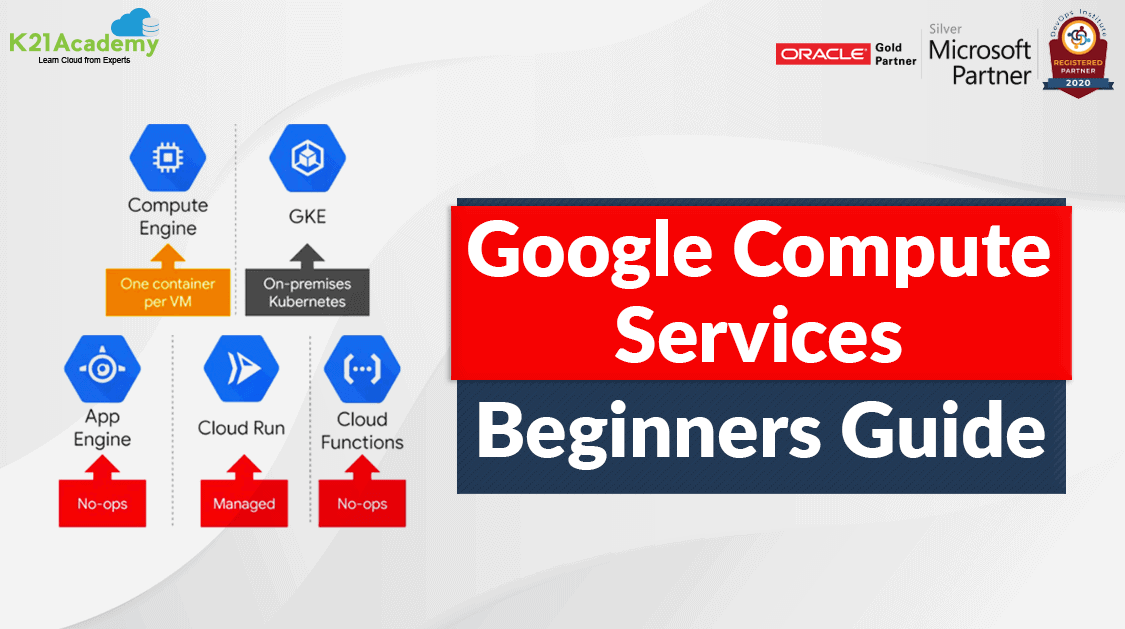



In this blog, we are going to talk about the various Compute Services offered by Google Cloud Platform and their use-cases.
Google Compute Services is one of Google’s core offerings for businesses looking to run their apps in the cloud. Under the compute umbrella we have a few different specific services and configuration options, and products available for use.
Google Compute Options
Google Cloud offers users the facility of computing and hosting where they can pick from the following options:
- Work in a serverless environment
- Use a managed application platform
- Build cloud-based infrastructure to facilitate maximum control and flexibility
- Leverage container technologies to achieve maximum flexibility
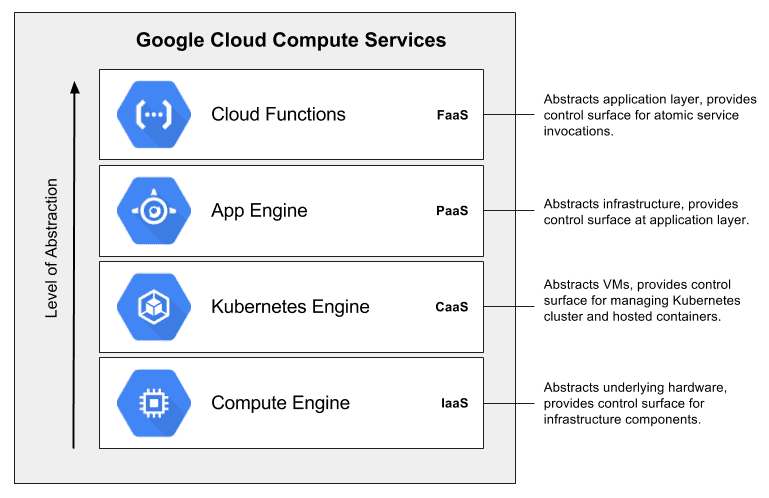
Compute Options are:
- Compute Engine
- App Engine
- Cloud Functions
- Kubernetes Engine
- Cloud Run
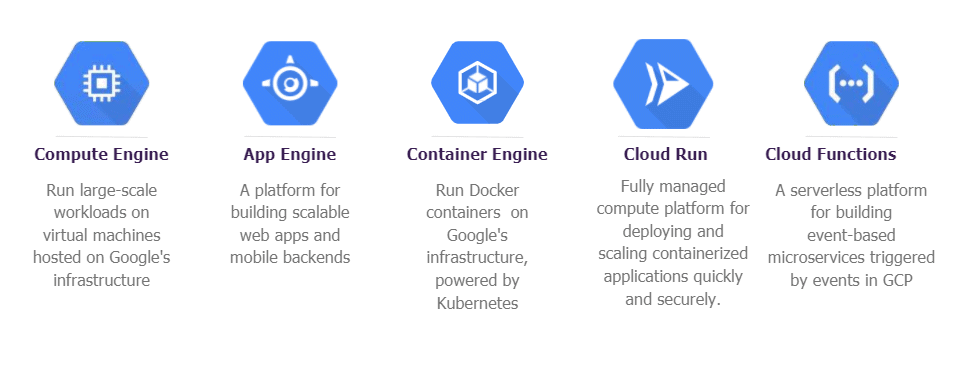
1.) Compute Engine
Compute engine is an unmanaged compute service offered by Google Cloud. It is an IaaS (Infrastructure As A Service) service that provides virtual machines hosted on Google’s infrastructure.
When & Where to Use Compute Engine?
- Need low-level access to or fine-grained control of the operating system, network, and other operational characteristics. E.g. custom compiled kernel
- Applications with extremely consistent utilization
- 1:1 container to VM mapping
- Migrating existing systems
To know more about Compute Engine, read our blog at Introduction to Compute Engine.
2.) Google App Engine
The App Engine is a PaaS (Platform As A Service) offering of Google Cloud used for building scalable web applications and IoT backends. It scales applications automatically based on the traffic received. It facilitates users with built-in services and APIs, for example, Datastores, NoSQL, user authentication API, etc.
When & Where to Use App Engine?
App Engine is a great fit for green-field applications where server-side processing and logic are required.
- Stateless applications
- Rapidly developing CRUD-heavy applications
- Applications composed of a few services
- Deploying complex APIs
When Not to Use App Engine
- Stateful applications requiring lots of in-memory states to meet the performance or functional requirements
- Applications built with large or opinionated frameworks or applications that have a slow start-up time
- Systems that require protocols other than HTTP
To know more about App Engine, read our blog at Overview of App Engine.
3.) Google Kubernetes Engine
Google Kubernetes Engine is an easy-to-use cloud-based Kubernetes service used for running containerized applications. It helps users implement a successful Kubernetes strategy for their applications in the cloud.
Kubernetes is an open-source framework for container management and automation based on Google’s actual internal container software.
When & Where to Use Kubernetes Engine?
Use GKE when you want to provide developers architectural flexibility or minimize operational costs. While GKE is the best-managed offering, you’ll need in-house resources to manage your Kubernetes clusters.
- Applications that can be easily containerized or are already containerized
- Hybrid or multi-cloud environments
- Systems leveraging stateful and stateless services
- Strong CI/CD Pipelines
When Not to Use GKE
- When the burden of managing underlying infrastructure lies on the team
- Applications that require very low-level access to the underlying hardware like custom kernel, networking, etc.
Read more about Google Kubernetes Engine in our blog.
4.) Cloud Functions
Cloud Functions is a lightweight compute solution for developers for creating single-purpose, stand-alone functions responding to cloud events without the hassle of managing the server or runtime environment.
IT works well for applications with bursty or variable traffic patterns as it is highly elastic and has minimal operational overhead because it is a serverless platform.
Read more about Cloud Functions in our blog.
When & Where to Use Cloud Functions?
It is an excellent choice for dynamic, event-driven plumbing (connecting) such as moving data between services or reacting to log events.
- Event-driven applications and functions
- Deploying simple APIs
- Quick Data transformations (ETL)
Check Out: Our blog post on Google Cloud Platform Services. Click here
5.) Google Cloud Run

Cloud Run is a managed compute platform enabling users to run stateless containers that can be invoked via web requests or Pub/Sub events. Since it is serverless, it abstracts away all infrastructure management allowing users to focus on building great applications. It is built from Knative.
It provides many benefits of App Engine with the power of GKE. It can also be run on your own GKE cluster if you want control over the runtime environment.
When & Where to Use Cloud Run?
- Stateless services that are easily containerized
- Event-driven applications and systems
- Applications that require custom system and language dependencies
When Not to Use Google Cloud Run
- Highly stateful systems
- Systems that require protocols other than HTTP
- Compliance requirements that demand strict controls over the low-level environment and infrastructure (might be okay with the Knative GKE mode)
Check Out: Our blog post Gcloud Create GKE Cluster. Click here
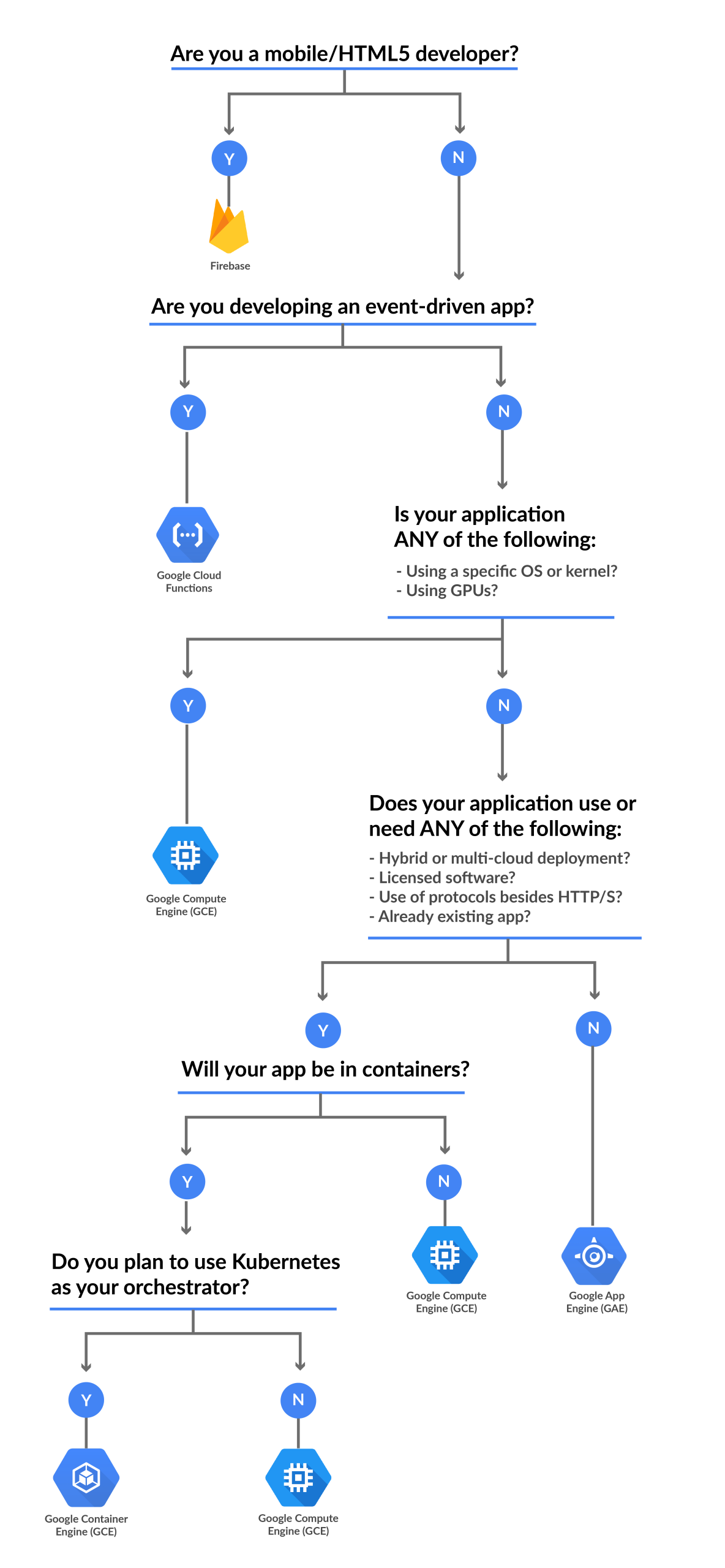
Google Cloud Compute Service Flowchart
Here is a simple flowchart for you to understand and choose the correct compute service for your application.
Also Check: Cosmos dB vs Spanner, Know their major differences!
Conclusion
This was a high-level overview of Compute Services offered by Google Cloud that summarized some of the key considerations when helping companies decide which compute platform is the most suitable for their needs. There are many options where the decision depends largely on the current skill sets and preferences.
FAQ’s
What are compute services in cloud computing?
Compute services in cloud computing refer to the infrastructure and resources provided by cloud service providers to run applications and process data. These services typically include virtual machines, containers, serverless functions, and other compute resources.
What is a virtual machine (VM)?
You can run operating systems and programmes on a virtual machine, which is software that emulates a physical computer. It offers a private setting with exclusive resources like networking, memory, storage, and CPU.
What is serverless computing?
Serverless computing, also known as Function as a Service (FaaS), is a cloud computing model where the cloud provider manages the underlying infrastructure and automatically provisions, scales, and manages the execution of individual functions in response to events or triggers. With serverless, you only pay for the actual compute time used by your functions.
Can compute services be used for different types of workloads?
Yes, a variety of workloads, including web applications, databases, batch processing, machine learning, data analytics, and more, can be employed with compute services. Different compute services are created to give the appropriate resources and scalability for particular workload requirements.
Related References
- GCP Professional Cloud Architect: Everything You Need To Know
- Introduction To Google Cloud Platform
- Google Cloud Services & Tools
- Introduction To Google Compute Engine
- Overview of Google App Engine
Next Task For You
If you are also interested and want to know more about the Google Professional Cloud Architect certification then register for our Free Class.


![Microsoft Agentic AI Business Solutions Architect [AB-100] | K21 Academy](https://test.k21academy.com/wp-content/uploads/2025/11/Microsoft-Agentic-AI-Business-Solutions-Architect-AB-100-Exam-Overview1.png)


