





In this post, we’ll cover everything you need to master Google AI/ML, secure a high-paying job, and get certified in this dynamic and rapidly growing field. Whether you’re starting from the basics or looking to deepen your expertise, this bootcamp is designed to guide you through the essentials of Google Cloud AI and ML, step by step.
We’ll dive into the fundamentals of Google Professional Machine Learning Engineer, and explore advanced topics through detailed hands-on labs and project work. These practical experiences are specifically designed to help you achieve mastery in deploying and optimizing AI/ML models on Google Cloud. Our step-by-step activity guides and real-world projects will provide you with the practical skills and deep knowledge needed to excel in interviews and progress in your career.
Prepare to immerse yourself in hands-on learning experiences that will pave the way for your success in the Google Cloud AI/ML domain. From foundational concepts to advanced techniques, this bootcamp will equip you with everything you need to thrive in this cutting-edge field.
Let’s get started on this transformative journey together to unlock your potential in AI/ML with Google Cloud!
Table of Contents:
1. Hands-On Labs For Google AI/ML
1.1 AI/ML & GenAI for Beginner on Google Cloud
- Lab 1: Register for a FREE Google Cloud Trial Account & Access Google Cloud Console
- Lab 2: Create a Project, Set Billing Budgets & Alerts
- Lab 3: Create a Jupyter Notebook Instance with Google Cloud Vertex AI Workbench
1.2 Data Management and Preprocessing
- Lab 4: Visualizing and Analyzing Data with Data Studio and BigQuery
- Lab 5: Create and Manage Buckets & Objects
- Lab 6: Querying and Transforming Data with BigQuery SQL
- Lab 7: Managing Relational Data with Cloud SQL
- Lab 8: Managing datasets and features with Vertex AI
- Lab 9: Feature Engineering and Dataset Management Using Vertex AI Feature Store
1.3 Introduction to AI and ML in BigQuery
- Lab 10: Feature engineering and model prediction with BigQuery ML
- Lab 11: Leveraging GCP’s Document AI and Retail API for Industry-Specific Data Processing and Management
1.4 AutoML On Vertex AI
- Lab 12: Train an AutoML image classification model
- Lab 13: Train an AutoML tabular classification model
- Lab 14: Train an AutoML text classification model
- Lab 15: Train an AutoML video classification model
1.5 Model Development and Experimentation On Vertex AI
- Lab 16: Developing models in Vertex AI Workbench by using sklearn
- Lab 17: Developing ML experiments and evaluating solutions using Vertex AI Experiments
- Lab 18: Model Management with Vertex AI Model Registry
1.6 Scaling and Training ML Models
- Lab 19: Parallel jobs in vertex ai component
1.7 Model Serving and Deployment
- Lab 20: Batch and Online Inference with Vertex AI and BigQuery ML
- Lab 21: Model Management and A/B Testing with Vertex AI Model Registry
- Lab 22: Scaling and Tuning Model Serving for Production Performance
1.8 Automation and MLOps
- Lab 23: End-to-End ML Pipeline Development with Vertex AI Pipelines
- Lab 24: Track artifacts and metrics across Vertex AI Pipelines runs using Vertex ML Metadata
- Lab 25: Automating Model Retraining and Deployment with CI/CD Using Cloud Build, Cloud Functions, and Cloud Scheduler
1.9 Monitoring and Maintaining AI Solutions
- Lab 26: Monitoring and evaluating AI solutions using Vertex AI Model Monitoring and Explainable AI
1.10 Advanced labs on Vertex AI
- Lab 27: Create Custom Containers for training jobs
- Lab 28: Create Custom Containers for prediction jobs
- Lab 29: Developing models in Vertex AI Workbench using tensorflow & Tracing experiments on tensorboard
- Lab 30: Developing models in Vertex AI Workbench by using PyTorch framework
- Lab 31: Developing models in Vertex AI Workbench by using Spark framework
- Lab 32: Developing models in Vertex AI Workbench by using Jax framework
1.11 Generative AI
- Lab 33: Create, optimize Gemini prompts & Create Video Summary from An YouTube Video Using Vertex AI Studio in Freeform Mode
- Lab 34: Text Summarization Methods using Vertex AI PaLM API
- Lab 35: Text and Vector Embedding
- Lab 36: Image generation using Imagen on Vertex AI
- Lab 37: Build an AI Image Recognition app using Gemini on Vertex AI
- Lab 38: Implementing RAG Applications and Chat Solutions with Vertex AI Agent Builder
- Lab 39: Fine-Tuning and Evaluating Generative Models for Business Applications
- Project 1: Build AI Apps using Google AI Studio & Gemini AI
- Project 2: Build beautiful, AI-powered apps for mobile and web
- Project 3: Building, Customizing, and Deploying Generative AI Solutions with Foundation Models
- Google Cloud Professional Machine Learning Engineer Certification
1. Hands-On Labs For Google AI/ML
1.1 AI/ML & GenAI for Beginner on Google Cloud
Lab 1: Register for Google Cloud free trial account
In this lab, you’ll learn how to sign up for a free trial account on Google Cloud, which gives you access to several cloud services. You’ll register for a Google account, provide payment details (there are no costs for the trial period), and get access to the Google Cloud Console for testing and education.
Lab 2: Create a Project, Set Billing Budgets & Alerts on Google Cloud Console
Objective: Learn to create a project in Google Cloud, and set up billing budgets and alerts to monitor costs effectively.
In this lab, you’ll go through the steps of creating a new project in Google Cloud Console, followed by configuring billing budgets and alerts to keep track of expenditures. You’ll learn how to establish spending thresholds, set up automated alerts, and manage budgets to optimize cloud resource costs. By the end, you’ll be equipped with tools to monitor and control cloud expenses effectively.
Lab 3: Create a Jupyter Notebook Instance with Google Cloud Vertex AI Workbench
Objective: Learn how to create and configure a Jupyter Notebook instance in Google Cloud Vertex AI Workbench.
In this lab, you’ll explore the process of setting up a Jupyter Notebook environment within Vertex AI Workbench. You’ll learn how to configure resources, choose machine types, and customize the environment to support your data science and machine learning workflows. By the end, you’ll have a fully functional Jupyter Notebook instance, ready for ML experimentation and development.
1.2 Data Management and Preprocessing
Lab 4: Create and Manage Buckets & Objects
Objective: Learn how to create and manage storage buckets and objects effectively.
This hands-on lab provides guidance on setting up and managing buckets in the cloud. You’ll explore the process of creating buckets, uploading objects, and managing permissions to ensure secure and organized storage. By the end, you’ll have a solid understanding of cloud storage fundamentals and practical experience in managing buckets and objects.
Lab 5: Visualizing and Analyzing Data with Data Studio and BigQuery
Objective: Discover how to use Data Studio and BigQuery for data visualization and analysis.
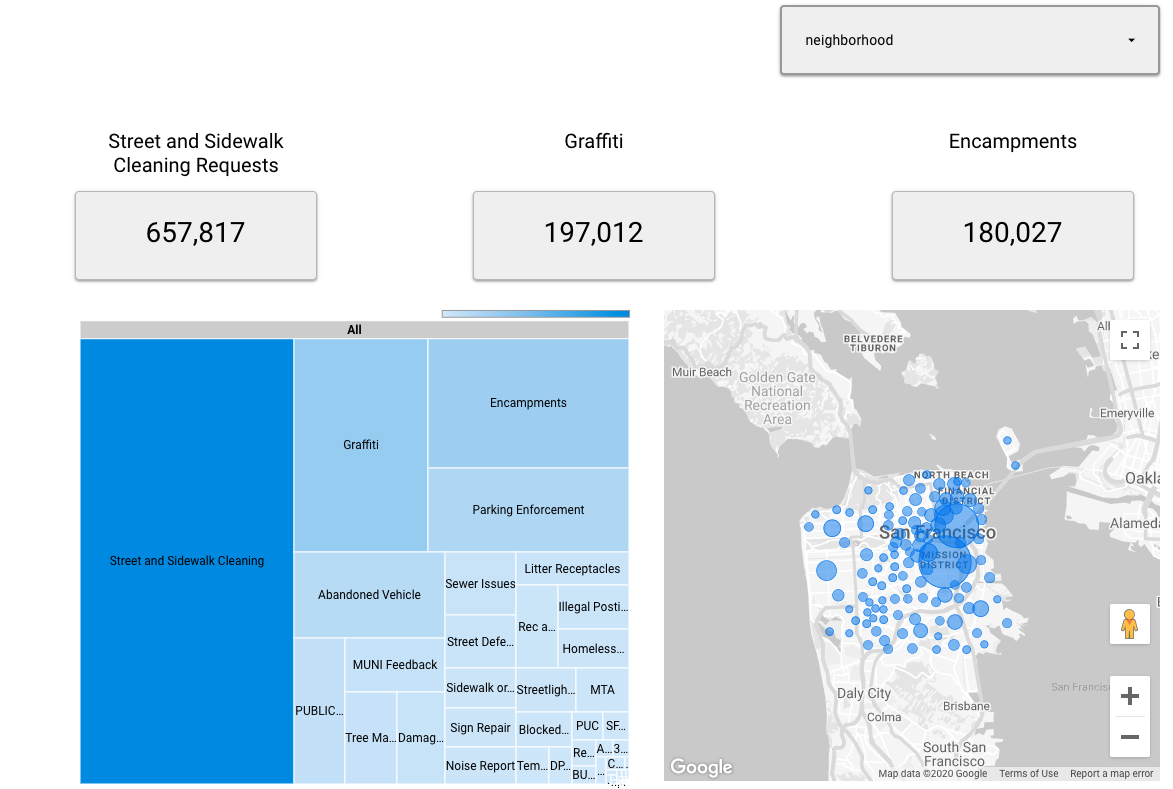
In this lab, you’ll dive into data visualization techniques using Data Studio, while leveraging BigQuery for data analysis. You’ll work on connecting data sources, creating interactive reports, and deriving insights from data. By the end, you’ll have created a data visualization that highlights key findings using Data Studio’s features.
Lab 6: Querying and Transforming Data with BigQuery SQL
Objective: Develop skills in querying and transforming data using SQL within BigQuery.
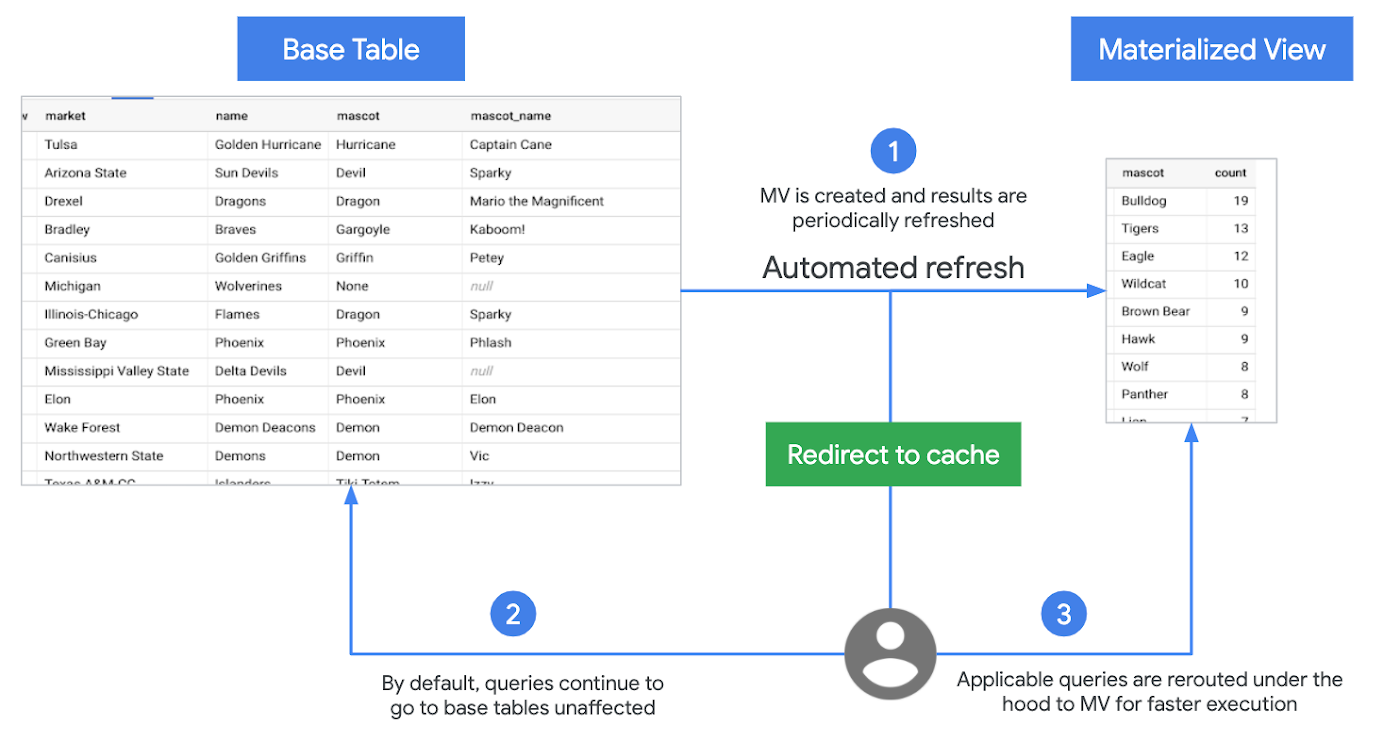
This lab focuses on utilizing BigQuery’s SQL capabilities to query and manipulate data. You’ll learn how to perform complex data transformations, write efficient SQL queries, and extract meaningful insights. By the end, you’ll have hands-on experience in data querying and transformation, ready to apply these skills to real-world datasets.
Lab 7: Managing Relational Data with Cloud SQL
Objective: Gain proficiency in managing relational data using Cloud SQL.
In this lab, you’ll explore the fundamentals of relational database management within Cloud SQL. You’ll set up databases, manage tables, and execute SQL commands for data manipulation. By the end, you’ll have practical experience in managing relational databases in a cloud environment, essential for modern data handling.

Lab 8: Managing Datasets and Features with Vertex AI
Objective: Learn to manage datasets and features effectively using Vertex AI.
This hands-on lab introduces you to Vertex AI for dataset and feature management. You’ll learn how to organize data, prepare features, and set up environments for AI model training. By the end, you’ll understand how to streamline data management and feature handling within Vertex AI.
Lab 9: Feature Engineering and Dataset Management Using Vertex AI Feature Store
Objective: Master feature engineering and dataset management with Vertex AI Feature Store.
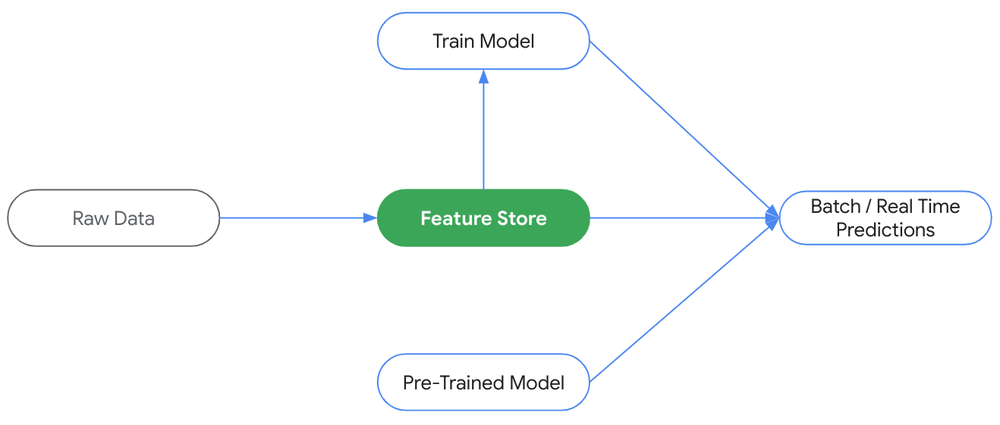
In this lab, you’ll focus on advanced feature engineering techniques using Vertex AI’s Feature Store. You’ll manage datasets, create and store features, and prepare them for machine learning models. By the end, you’ll have an in-depth understanding of feature engineering and dataset management, which are crucial for effective model development.
1.3 Introduction to AI and ML in BigQuery
Lab 10: Feature Engineering and Model Prediction with BigQuery ML
Objective: Learn how to perform feature engineering and make predictions using BigQuery ML.
In this lab, you’ll explore feature engineering techniques and predictive modeling within BigQuery ML. You’ll prepare and enhance datasets for machine learning, build a model, and generate predictions directly in BigQuery. By the end, you’ll understand how to streamline feature engineering and use BigQuery ML for efficient model prediction.
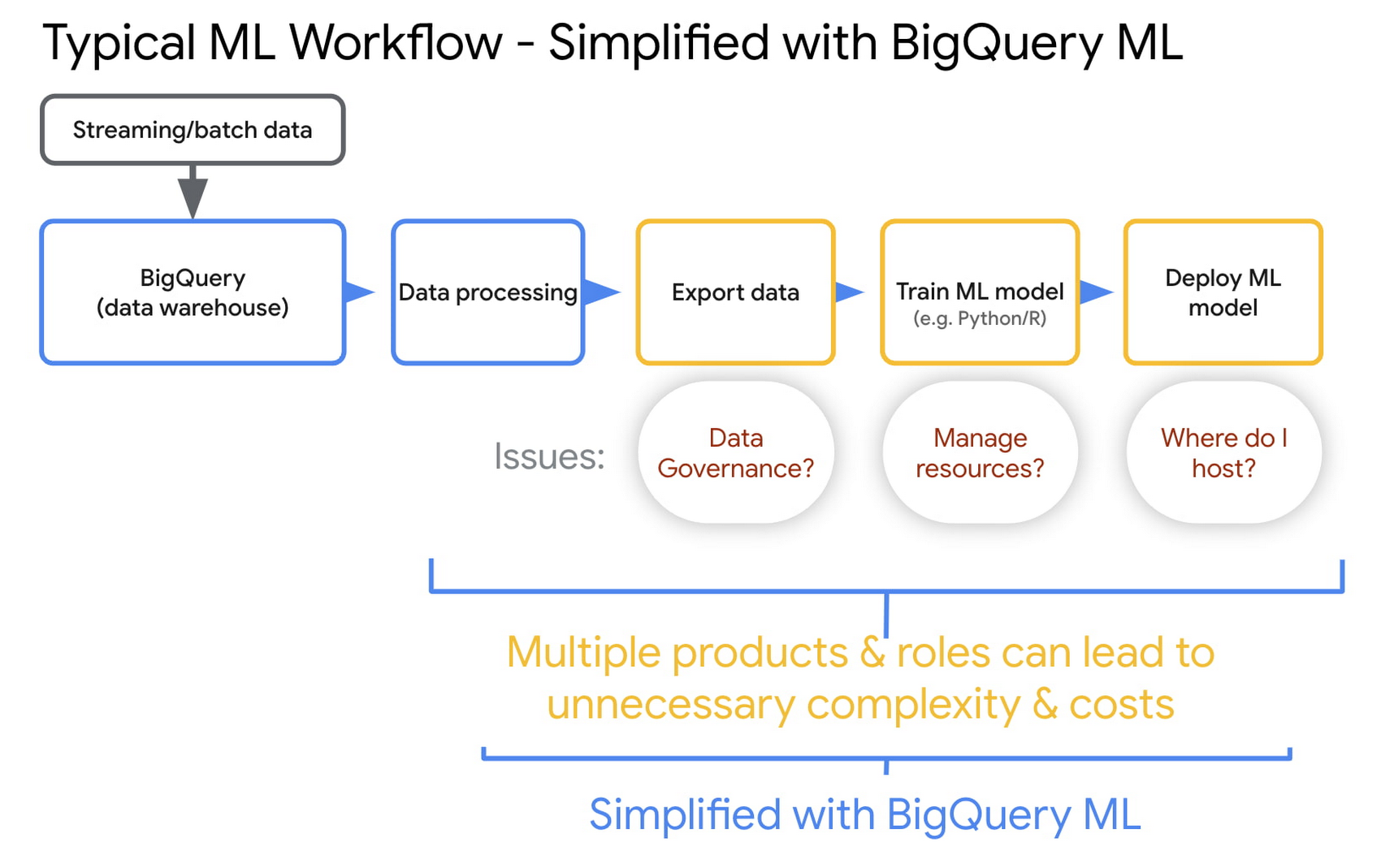
Lab 11: Leveraging GCP’s Document AI and Retail API for Industry-Specific Data Processing and Management
Objective: Understand how to use GCP’s Document AI and Retail API for processing and managing industry-specific data.
This hands-on lab introduces you to GCP’s Document AI and Retail API, focusing on real-world applications for data processing and management in specific industries. You’ll work on document parsing, data extraction, and retail-specific API usage, learning how to automate and manage industry-related data effectively. By the end, you’ll have experience applying these tools to industry-focused data scenarios.
1.4 AutoML On Vertex AI

Lab 12: Train an AutoML Image Classification Model
Objective: Learn to train an image classification model using AutoML.
In this lab, you’ll explore the process of training an image classification model with AutoML. You’ll work on uploading and preparing image datasets, configuring AutoML settings, and training the model to classify images based on patterns in the data. By the end, you’ll have built a functional image classifier with minimal coding.
Lab 12: Train an AutoML Tabular Classification Model
Objective: Develop skills in training a tabular data classification model using AutoML.
This lab focuses on training a classification model using structured tabular data. You’ll learn how to prepare and upload tabular datasets, configure AutoML for optimal model performance, and evaluate classification results. By the end, you’ll understand the process of building accurate classifiers using tabular data in AutoML.
Lab 13: Train an AutoML Text Classification Model
Objective: Gain experience in training a text classification model with AutoML.
In this lab, you’ll train a text classification model by processing and labeling text data in AutoML. You’ll go through steps to prepare text data, define categories, and train the model to classify text into predefined labels. By the end, you’ll have a trained model capable of classifying text based on learned patterns.
Lab 14: Train an AutoML Video Classification Model
Objective: Master the basics of video classification using AutoML.
This hands-on lab introduces you to training a video classification model. You’ll prepare video data, configure settings in AutoML, and train the model to recognize and classify actions or scenes in videos. By the end, you’ll have experience building a video classification model that can identify patterns within video sequences.
1.5 Model Development and Experimentation On Vertex AI
Lab 15: Developing Models in Vertex AI Workbench Using sklearn
Objective: Learn how to develop machine learning models in Vertex AI Workbench using sklearn.
In this lab, you’ll explore model development within Vertex AI Workbench, focusing on the sklearn library for building and training models. You’ll go through data preparation, model training, and performance evaluation, leveraging Vertex AI’s integration with sklearn. By the end, you’ll understand how to utilize Vertex AI Workbench to streamline model development and testing using sklearn.
Lab 16: Developing ML Experiments and Evaluating Solutions Using Vertex AI Experiments
Objective: Gain experience in managing and evaluating ML experiments with Vertex AI Experiments.
This lab introduces you to Vertex AI Experiments, where you’ll learn to set up and track machine learning experiments. You’ll focus on designing experiments, running trials, and evaluating model performance across different configurations. By the end, you’ll know how to use Vertex AI Experiments to optimize and document model-building processes effectively.
Lab 17: Model Management with Vertex AI Model Registry
Objective: Master model management using Vertex AI Model Registry.
In this lab, you’ll explore the Vertex AI Model Registry, focusing on managing and tracking different model versions. You’ll learn how to register models, organize model metadata, and maintain version control to streamline deployment processes. By the end, you’ll have hands-on experience in managing models efficiently within Vertex AI’s Model Registry.
1.6 Scaling and Training ML Models
Lab 18: Parallel Jobs in Vertex AI Component
Objective: Learn how to execute and manage parallel jobs using Vertex AI components.
This hands-on lab focuses on setting up and running parallel jobs in Vertex AI, allowing you to optimize resource usage and reduce execution time for complex tasks. You’ll explore how to configure parallel processing in Vertex AI, manage dependencies, and monitor job performance. By the end, you’ll understand how to leverage Vertex AI’s parallel job capabilities to enhance the efficiency of your workflows.
1.7 Model Serving and Deployment
Lab 19: Batch and Online Inference with Vertex AI and BigQuery ML
Objective: Understand how to perform both batch and online inference using Vertex AI and BigQuery ML.
In this lab, you’ll explore the processes for setting up and executing batch and online inference. You’ll work on configuring inference jobs in Vertex AI, integrating BigQuery ML for model predictions, and managing data flow for real-time and scheduled predictions. By the end, you’ll gain practical experience in implementing inference strategies for various use cases.
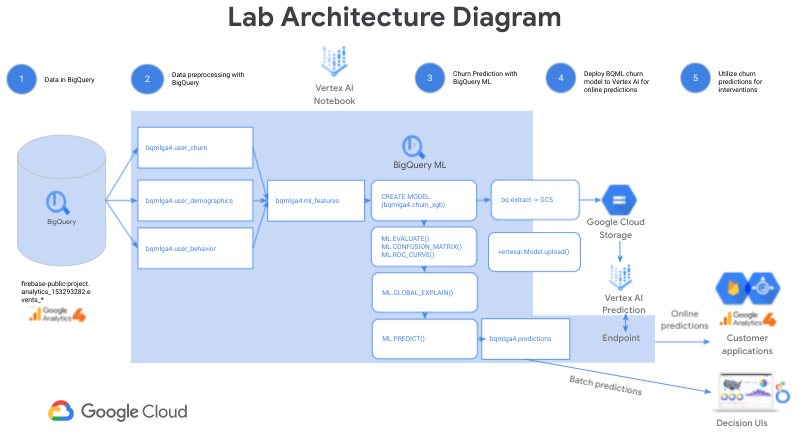
Lab 20: Model Management and A/B Testing with Vertex AI Model Registry
Objective: Learn to manage models and conduct A/B testing using Vertex AI Model Registry.
This lab focuses on using the Vertex AI Model Registry to manage multiple model versions and conduct A/B testing. You’ll explore how to register and organize models, set up A/B testing environments, and evaluate model performance. By the end, you’ll have hands-on experience in model management and performance comparison for deployment strategies.
Lab 21: Scaling and Tuning Model Serving for Production Performance
Objective: Gain insights into scaling and tuning model serving for optimal performance in production.
In this lab, you’ll learn about techniques for scaling and optimizing model serving within Vertex AI. You’ll work on configuring resources, tuning model settings, and managing deployment to ensure reliable, high-performance predictions in a production environment. By the end, you’ll understand how to prepare and optimize model serving for large-scale applications.
1.8 Automation and MLOps on GCP
Lab 22: End-to-End ML Pipeline Development with Vertex AI Pipelines
Objective: Learn to develop an end-to-end machine learning pipeline using Vertex AI Pipelines.
In this lab, you’ll explore the steps involved in building a complete ML pipeline within Vertex AI, from data ingestion to model deployment. You’ll set up pipeline components, configure dependencies, and automate workflows to streamline the ML lifecycle. By the end, you’ll have experience building and executing a functional end-to-end ML pipeline using Vertex AI Pipelines.
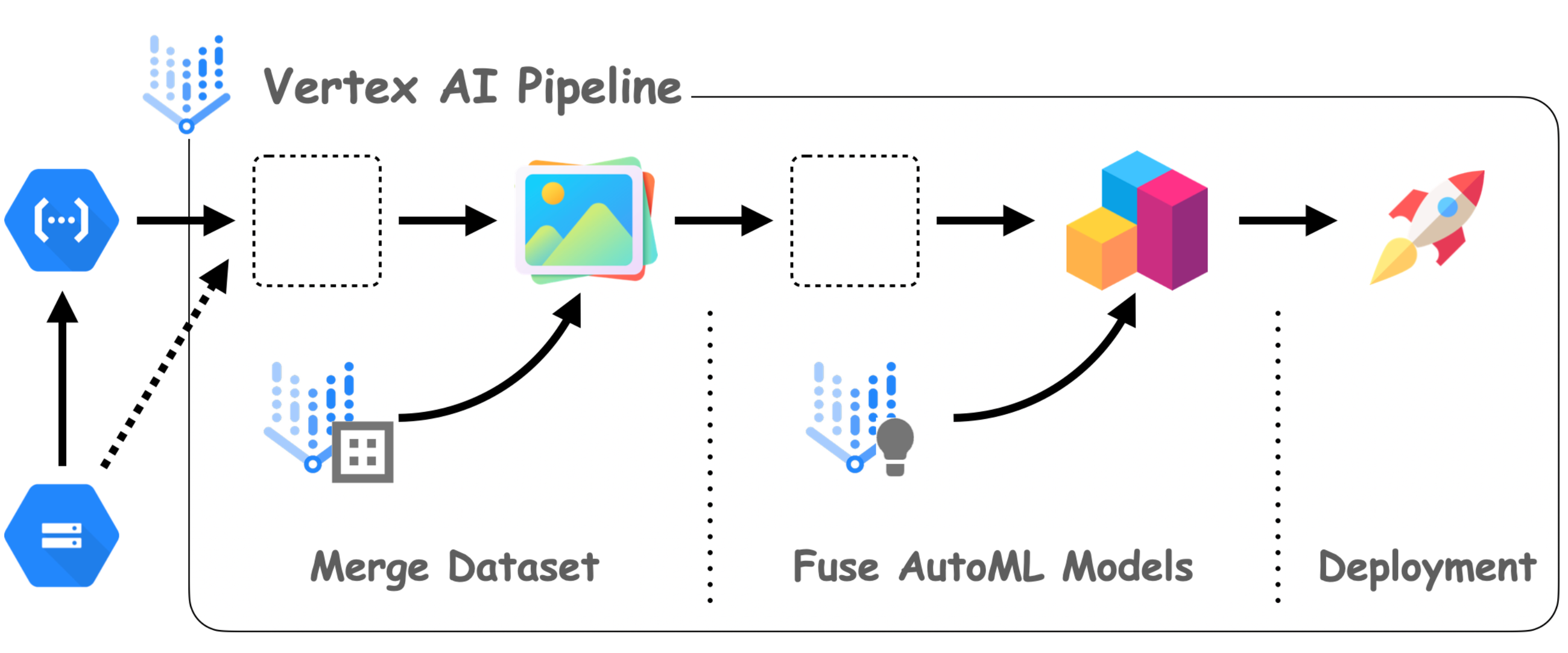
Lab 23: Track Artifacts and Metrics Across Vertex AI Pipeline Runs Using Vertex ML Metadata
Objective: Gain experience in tracking artifacts and metrics across pipeline runs with Vertex ML Metadata.
This lab focuses on using Vertex ML Metadata to monitor and record details of your ML pipeline runs. You’ll learn how to track model artifacts, evaluation metrics, and other metadata for organized and reproducible ML experiments. By the end, you’ll understand how to effectively manage and analyze pipeline run data to improve model performance and debugging.
Lab 24: Automating Model Retraining and Deployment with CI/CD Using Cloud Build, Cloud Functions, and Cloud Scheduler
Objective: Automate the retraining and deployment of models using a CI/CD pipeline with Cloud Build, Cloud Functions, and Cloud Scheduler.
In this lab, you’ll set up a CI/CD workflow to automate model retraining and deployment. You’ll configure Cloud Build to trigger retraining jobs, use Cloud Functions for custom logic, and Cloud Scheduler for periodic tasks, ensuring continuous integration and delivery of model updates. By the end, you’ll be able to automate the retraining and deployment cycle, keeping models up-to-date in production environments.
1.9 Monitoring and Maintaining AI Solutions
Lab 25: Monitoring and Evaluating AI Solutions Using Vertex AI Model Monitoring and Explainable AI
Objective: Learn how to monitor and evaluate AI models using Vertex AI’s Model Monitoring and Explainable AI features.
In this lab, you’ll explore techniques for tracking model performance over time and ensuring model reliability. You’ll set up Vertex AI Model Monitoring to detect anomalies, monitor data drift, and maintain model accuracy in production. Additionally, you’ll leverage Explainable AI to interpret model predictions and gain insights into feature importance. By the end, you’ll have a comprehensive understanding of how to evaluate and maintain AI models using Vertex AI’s monitoring and explainability tools.

1.10 Advanced labs on Vertex AI
Lab 26: Create Custom Containers for Training Jobs
Objective: Learn how to create custom containers for training machine learning models.
In this lab, you’ll explore the process of building custom containers tailored for training jobs. You’ll learn how to package dependencies, configure environments, and deploy these containers to Vertex AI for scalable model training. By the end, you’ll understand how to set up and use custom containers for efficient and flexible training workflows.
Lab 27: Create Custom Containers for Prediction Jobs
Objective: Understand how to create custom containers for serving prediction jobs.
This lab guides you through creating custom containers specifically designed for model inference and prediction. You’ll configure prediction-serving environments, integrate necessary libraries, and deploy these containers to Vertex AI for scalable predictions. By the end, you’ll be able to create and deploy custom containers that enhance the flexibility and performance of your model predictions.
Lab 28: Developing Models in Vertex AI Workbench Using TensorFlow & Tracing Experiments on TensorBoard
Objective: Develop machine learning models using TensorFlow and trace experiments with TensorBoard.
In this lab, you’ll build models within Vertex AI Workbench using the TensorFlow framework. You’ll also leverage TensorBoard to trace experiment metrics, visualize training progress, and optimize model parameters. By the end, you’ll have hands-on experience with TensorFlow for model development and TensorBoard for monitoring experiment performance.
Lab 29: Developing Models in Vertex AI Workbench Using PyTorch Framework
Objective: Learn how to develop models using the PyTorch framework in Vertex AI Workbench.
This lab focuses on building machine learning models with PyTorch in Vertex AI Workbench. You’ll go through data preparation, model training, and evaluation steps while using PyTorch’s capabilities. By the end, you’ll understand how to utilize PyTorch within Vertex AI Workbench for model development and testing.
Lab 30: Developing Models in Vertex AI Workbench Using Spark Framework
Objective: Gain experience in developing models with the Spark framework within Vertex AI Workbench.
In this lab, you’ll explore using the Spark framework for distributed data processing and model development in Vertex AI Workbench. You’ll work with Spark’s tools for handling large datasets, preparing data, and building scalable machine learning models. By the end, you’ll have experience in combining Spark’s data processing power with Vertex AI’s model development environment.
Lab 31: Developing Models in Vertex AI Workbench Using JAX Framework
Objective: Learn to develop models using the JAX framework within Vertex AI Workbench.
This lab introduces you to building models with the JAX framework, known for its high-performance numerical computing capabilities. You’ll leverage JAX for gradient-based machine learning, model training, and experimentation in Vertex AI Workbench. By the end, you’ll have foundational skills in using JAX for efficient and optimized model development.
1.1 Generative AI on GCP
Lab 32: Create and Optimize Gemini Prompts & Create Video Summaries from a YouTube Video Using Vertex AI Studio in Freeform Mode
Objective: Learn to create and optimize prompts for Gemini and generate video summaries from YouTube content in Vertex AI Studio’s Freeform Mode.
In this lab, you’ll explore how to design effective prompts for Gemini and use Vertex AI Studio to summarize video content from YouTube. You’ll experiment with prompt structuring, optimization techniques, and leverage Freeform Mode for enhanced control. By the end, you’ll be able to generate accurate summaries and craft optimized prompts for various applications.
Lab 33: Text Summarization Methods using Gemini Models
Objective: Understand and implement different text summarization techniques using Gemini Models.
This lab introduces you to Gemini Models, where you’ll explore various methods for summarizing text data. You’ll experiment with different summarization techniques and configure Gemini Models for optimal results. By the end, you’ll have hands-on experience with text summarization for applications such as document summarization and information extraction.
Lab 34: Text and Vector Embedding
Objective: Learn about text and vector embedding techniques for natural language processing and similarity matching.
In this lab, you’ll work on generating and analyzing text and vector embeddings using Vertex AI. You’ll explore how embeddings are used for tasks like semantic similarity, recommendation systems, and search relevance. By the end, you’ll understand how to create and apply embeddings for various AI-driven applications.
Lab 35: Image Generation Using Imagen on Vertex AI
Objective: Discover how to create images using the Imagen model in Vertex AI.
This hands-on lab focuses on image generation with the Imagen model available in Vertex AI. You’ll learn to configure image generation parameters, experiment with different prompts, and generate high-quality images based on text inputs. By the end, you’ll be able to use Imagen for creative and business applications in image generation.
Lab 36: Build an AI Image Recognition App Using Gemini on Vertex AI
Objective: Learn to develop an AI-powered image recognition application using Gemini in Vertex AI.
In this lab, you’ll build a functional image recognition app using Gemini on Vertex AI. You’ll explore steps like setting up the recognition model, training it on sample data, and deploying the app for real-time image recognition. By the end, you’ll have created a complete AI image recognition application using Gemini’s capabilities.
Lab 37: Implementing RAG Applications and Chat Solutions with Vertex AI Agent Builder
Objective: Understand how to create Retrieval-Augmented Generation (RAG) applications and chat solutions using Vertex AI Agent Builder.
This lab introduces you to the Vertex AI Agent Builder for implementing RAG applications and interactive chat solutions. You’ll learn how to configure retrieval mechanisms, design conversational flows, and deploy RAG-based chatbots for various use cases. By the end, you’ll know how to build RAG applications and chatbots to enhance user interaction and information retrieval.
Lab 38: Fine-Tuning and Evaluating Generative Models for Business Applications
Objective: Master the process of fine-tuning and evaluating generative models for specific business needs.
In this lab, you’ll focus on fine-tuning generative models for tailored business applications. You’ll work on configuring model parameters, training on domain-specific data, and evaluating model outputs to ensure accuracy and relevance. By the end, you’ll understand how to fine-tune and assess generative models to meet targeted business objectives.
2 Real-Time Projects
Project 1: Building a fraud detection model with AutoML Using Vertex AI
In this lab, you will leverage Google Vertex AI to build a fraud detection model using AutoML. The lab covers data management, model training, evaluation, deployment, and prediction steps to create an end-to-end machine learning solution for detecting fraudulent transactions.
Key Points:
- BigQuery Integration: Import data from a public BigQuery table for real-world data training.
- Data Management: Create a managed dataset in Vertex AI and configure it for training.
- Model Training with AutoML: Use AutoML to train a classification model, optimize it for precision-recall, and handle imbalanced datasets.
- Model Evaluation: Explore evaluation metrics such as the confusion matrix and feature importance to assess model performance.
- Model Deployment: Deploy the trained model to an endpoint in Vertex AI for online predictions.
- Predictions and Testing: Test your deployed model using both the Vertex AI UI and Vertex AI API to obtain predictions and validate model accuracy.
Project 2: Build AI Apps using Google AI Studio & Gemini AI:
In this project, we will learn how to use Google AI Studio to prototype prompts and build AI applications using the Gemini AI model. The focus will be on exploring different types of prompts for effective prompt engineering and integrating these capabilities into applications through the Google Generative AI API.
Key Points:
- Google AI Studio: Understanding its interface and functionalities to create and test AI prompts efficiently.
- Gemini AI Model: Utilizing the advanced Gemini AI for generating high-quality outputs and prototyping.
- Prompt Engineering: Learning about various types of prompts and techniques to refine them for optimal AI performance.
- Building AI Apps: Using the Google Generative AI API to develop and deploy applications that leverage AI capabilities.
- Hands-On Practice: Gaining practical experience by building prototypes and integrating them into real-world applications.
Project 3: Build beautiful, AI-powered apps for mobile and web
In this project, we will learn to use Flutter and Firebase Genkit, combined with Gemini APIs, to build multi-platform applications for mobile and web. These apps will have seamless AI integration to enhance user experiences and functionality.
Key Points:
- Flutter: Leveraging Flutter’s framework to create visually appealing, cross-platform applications.
- Firebase Genkit: Utilizing Firebase’s backend services to add robust and scalable support for app development.
- Gemini APIs: Integrating Gemini AI capabilities into the apps for enhanced AI-driven interactions and features.
- Multi-Platform Development: Ensuring that apps work seamlessly on both mobile and web platforms.
- AI-Powered Features: Implementing AI functionalities such as natural language processing, image recognition, and data-driven insights for richer user experiences.
Project 4: Building, Customizing, and Deploying Generative AI Solutions with Foundation Models
In this project, we will learn how to use pre-trained foundation models for generative AI tasks, customize these models to align with specific business requirements, and deploy them using Vertex AI for seamless integration into applications.
Key Points:
- Pre-Trained Foundation Models: Understanding and utilizing pre-existing models for efficient generative AI development.
- Customization: Tailoring models to meet unique project needs and domain-specific applications.
- Vertex AI Deployment: Deploying customized models on Vertex AI to ensure smooth integration and real-world application.
- Generative AI Tasks: Applying these models to tasks like content creation, summarization, and more.
- Scalability and Efficiency: Ensuring models are scalable and optimized for production-level performance.
Project 5: Real-Time Language Translation with Translation API and Vertex AI
In this project, we will build a real-time language translation tool that supports seamless cross-language communication. We will use Google’s Translation API and fine-tune models on Vertex AI to incorporate domain-specific vocabulary and improve translation accuracy.
Key Points:
- Translation API: Leveraging Google’s Translation API for multi-language support and real-time translation.
- Vertex AI Integration: Using Vertex AI to customize and fine-tune models for enhanced accuracy with domain-specific terms.
- Real-Time Communication: Developing a tool that can process and deliver translations instantly for practical use cases.
- Custom Model Enhancements: Tailoring translation capabilities to fit specific industries or technical fields.
3. Certification
Google Cloud Professional Machine Learning Engineer Certification
The Google Cloud Professional Machine Learning Engineer Certification validates your ability to build, deploy, and manage machine learning (ML) models on the Google Cloud Platform (GCP). It focuses on key areas such as data engineering, model development, training, deployment, and MLOps for managing models in production environments.
This certification is ideal for ML Engineers, Data Scientists, and AI Specialists who design and implement scalable ML solutions using GCP tools. It equips you with the skills to create efficient ML systems aligned with Google Cloud’s best practices.
The exam features multiple-choice questions that test your ability to solve real-world ML challenges using GCP’s capabilities. Managed by Google Cloud, the certification remains aligned with industry trends, making it a valuable benchmark for cloud-based ML expertise.
Achieving this certification demonstrates proficiency in working with data, training models, and using tools like Vertex AI, TensorFlow, and BigQuery to build effective ML solutions, enhancing your appeal to potential employers.
👉🏻 Learn More about Google Cloud Professional Machine Learning Engineer Certification
Frequently Asked Questions (FAQs)
What is the Google Cloud Professional Machine Learning Engineer Certification?
This certification demonstrates your ability to design, build, and manage ML models using Google Cloud’s machine learning services. It validates your expertise in applying machine learning techniques to solve real-world problems while following Google Cloud best practices.
Who should take this certification?
he certification is designed for professionals who work in roles like Machine Learning Engineers, Data Scientists, AI Engineers, or anyone who designs and builds ML models on Google Cloud. It is also suited for individuals looking to enhance their cloud-based machine learning skills.
What is the format of the exam?
The exam consists of multiple-choice and multiple-select questions. You will have 2 hours to complete the exam, which can be taken online (proctored) or at an authorized test center.
How long should I prepare before taking the exam?
Preparation time varies depending on your experience with Google Cloud and ML concepts. Generally, candidates spend 2–3 months preparing by studying the exam topics, working through hands-on labs, and reviewing practice questions.
What happens if I don’t pass the exam?
If you don’t pass the exam on your first attempt, you can retake it after 14 days. If you fail a second time, the waiting period extends to 60 days. After the third attempt, you must wait 365 days before retaking the exam.
Do I need to pay the exam fee again if I fail?
Yes, if you fail the exam, you will need to pay the full exam fee of $200 USD (plus applicable taxes) each time you retake the exam.
What score do I need to pass the exam?
Google Cloud does not publicly disclose the passing score, but most candidates aim for a score of at least 70-75% based on available study guides and practice exams.
Related References
- Join Our Generative AI Whatsapp Community
- Google Cloud Professional Machine Learning Engineer Certification: Everything You Need to Know
- Introduction to Generative AI and Its Mechanisms
- Mastering Generative Adversarial Networks (GANs)
- Generative AI (GenAI) vs Traditional AI vs Machine Learning (ML) vs Deep Learning (DL)
Next Task For You
Don’t miss our EXCLUSIVE Free Training on Mastering GooGle AI/ML & GenAI. Master cutting-edge AI and Machine Learning technologies with Google tools. Join a growing community of learners ready to elevate their careers.
Click the image below to secure your spot!


![Microsoft Agentic AI Business Solutions Architect [AB-100] | K21 Academy](https://test.k21academy.com/wp-content/uploads/2025/11/Microsoft-Agentic-AI-Business-Solutions-Architect-AB-100-Exam-Overview1.png)


