



In this blog, I have covered the Step-By-Step Activity Guides with 30+ Hands-on Labs of OpenShift Certified Specialist training program that you must perform to learn this course.
Topic’s we will cover:
- What is OpenShift?
- List of the Hands-on Labs
- 8-week Learning Path for OpenShift
What is OpenShift?
OpenShift is a platform from RedHat/IBM to run containerised applications. Under the hood, OpenShift is powered by an open-source Kubernetes engine.
Also, you can think of OpenShift as “Kubernetes” branded by Red Hat with some extra bells and whistles. PaaS (Platform as a Service) built on top of Docker and Kubernetes allows to build, test, deploy, manage, and run container-based applications on the cloud.
If you are a beginner, then check our blog on OpenShift- What, Why, and How?
Hands-on Labs
Here is the list of the activity guides which you need to perform in order to learn OpenShift
Install, Configure & Access Cluster (Single & High Availability)
- Lab 01: Create Cloud Account @ RedHat/IBM
- Lab 02: Install & configure (Origin Community Distribution (OKD) on Single Node)
- Lab 03: Install & configure OKD on a single node
- Lab 04: Navigation through OpenShift Web Console (GUI) and CLI
- Lab 05: Installation of multi-node OpenShift cluster
Deploying Application and Databases
- Lab 06: Deploying web and database applications using local templates
- Lab 07: Deploying web and database instances using Docker file
- Lab 08: Create & launch a web Instance using container images from various registries
- Lab 09: Deploying multi-container application on OpenShift
- Lab 10: Scaling Application
Networking & Connectivity
- Lab 11: Expose application to access externally using routes
- Lab 12: Troubleshooting OpenShift Software-defined Networking
- Lab 13: Configuring Network Policies on applications
Storage & Persistent Volumes
- Lab 14: Implementing persistent database storage — through GUI
- Lab 15: Deploying Dynamically Provisioned Storage — through CLI
- Lab 16: Deleting Persistent Volume Claims
Working with Containerized Application
- Lab 17: Creating Applications with Source-to-Image using OpenShift console (GitHub to OpenShift)
- Lab 18: Building an Application with S2I using OpenShift CLI
- Lab 19: Working on Image Streams – listing, creating, deleting
- Lab 20: Working with OpenShift objects such as Build, BuildConfig, DeploymentConfig Vs K8s components
- Lab 21: Scaling Applications
- Lab 22: Use the OpenShift command-line client OC to:
- Create, change, and delete projects.
- Create application resources inside a project.
- Delete, inspect, edit, and export resources inside a project.
- Check logs from application pods, deployments, and build operations
Security
- Lab 23: Create & Manage users, RBAC in OpenShift environment
- Lab 24: Managing Identity Providers
- Lab 25: Configuring Application with Security Context Constraints
- Lab 26: Deploying Database application using Secrets; Protecting Database Passwords
Management, Troubleshooting & Upgrade
- Lab 27: Controlling pod schedular
- Lab 28: Limiting resources & applying quotas
- Lab 29: Operator installation
- Lab 30: Cluster update and upgradation
- Lab 31: Scaling up cluster — manually and dynamically
- Lab 32: Troubleshooting OpenShift cluster & applications
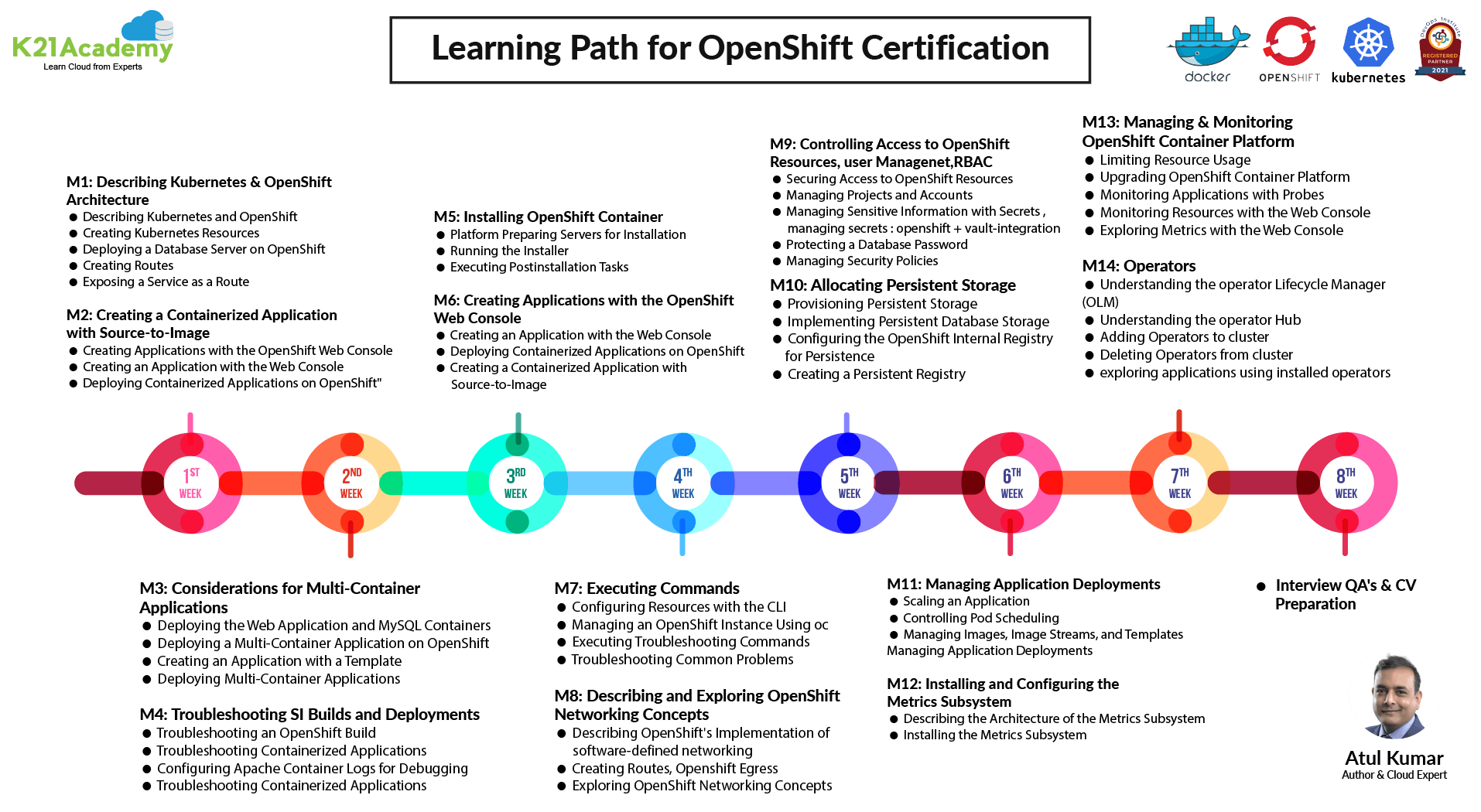
8-week Learning Path for OpenShift
Related/References
- Kubernetes for Beginners
- Kubernetes Architecture | An Introduction to Kubernetes Components
- Docker & Certified Kubernetes Administrator (CKA) Training
- (CKA) Certification: Step By Step Activity Guides/Hands-On Lab Exercise
Next Task for You:
Begin your journey towards becoming a Red Hat Certified Specialist in OpenShift Administrator and earning a lot more in 2021 by joining our Free Class


![Microsoft Agentic AI Business Solutions Architect [AB-100] | K21 Academy](https://test.k21academy.com/wp-content/uploads/2025/11/Microsoft-Agentic-AI-Business-Solutions-Architect-AB-100-Exam-Overview1.png)


