


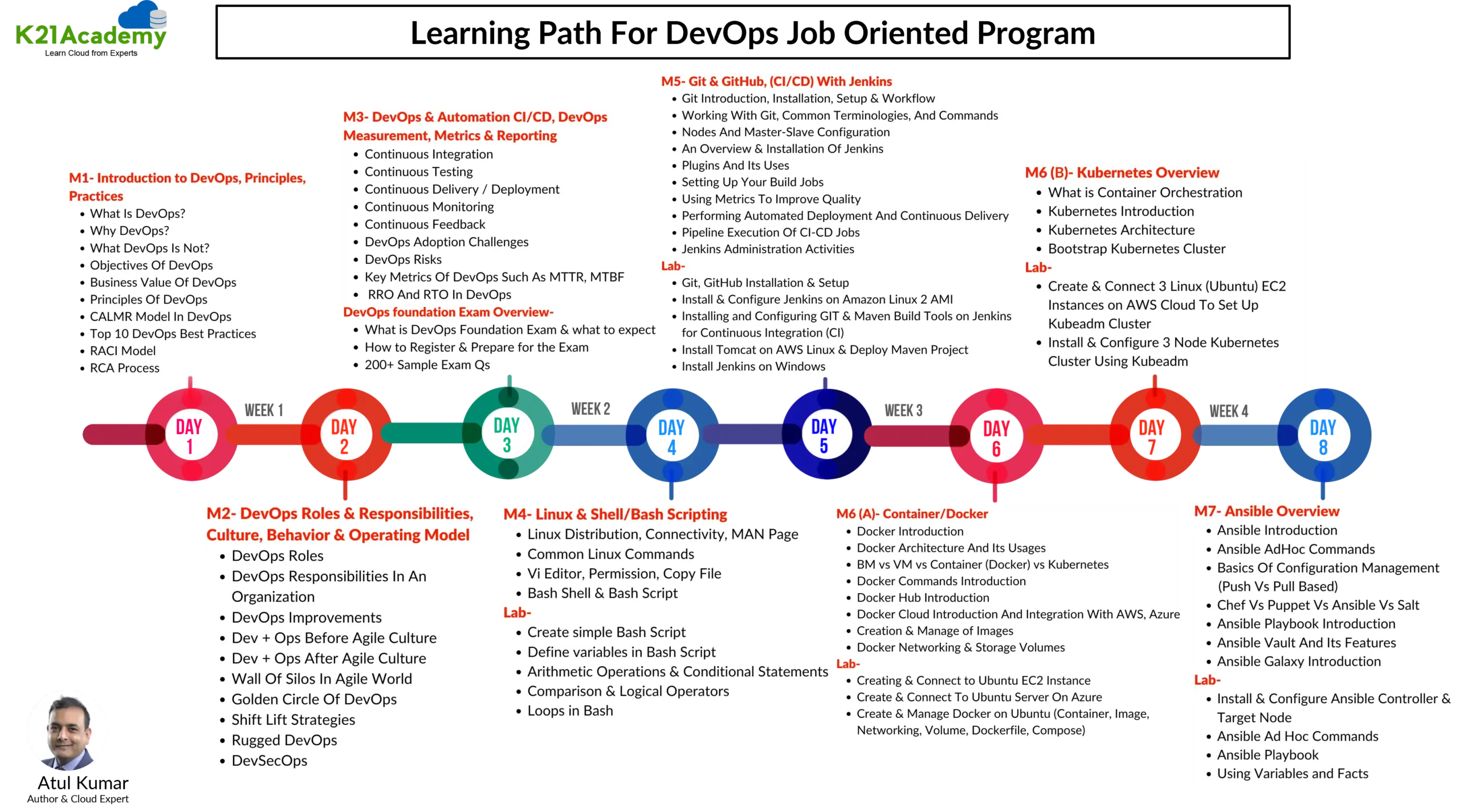
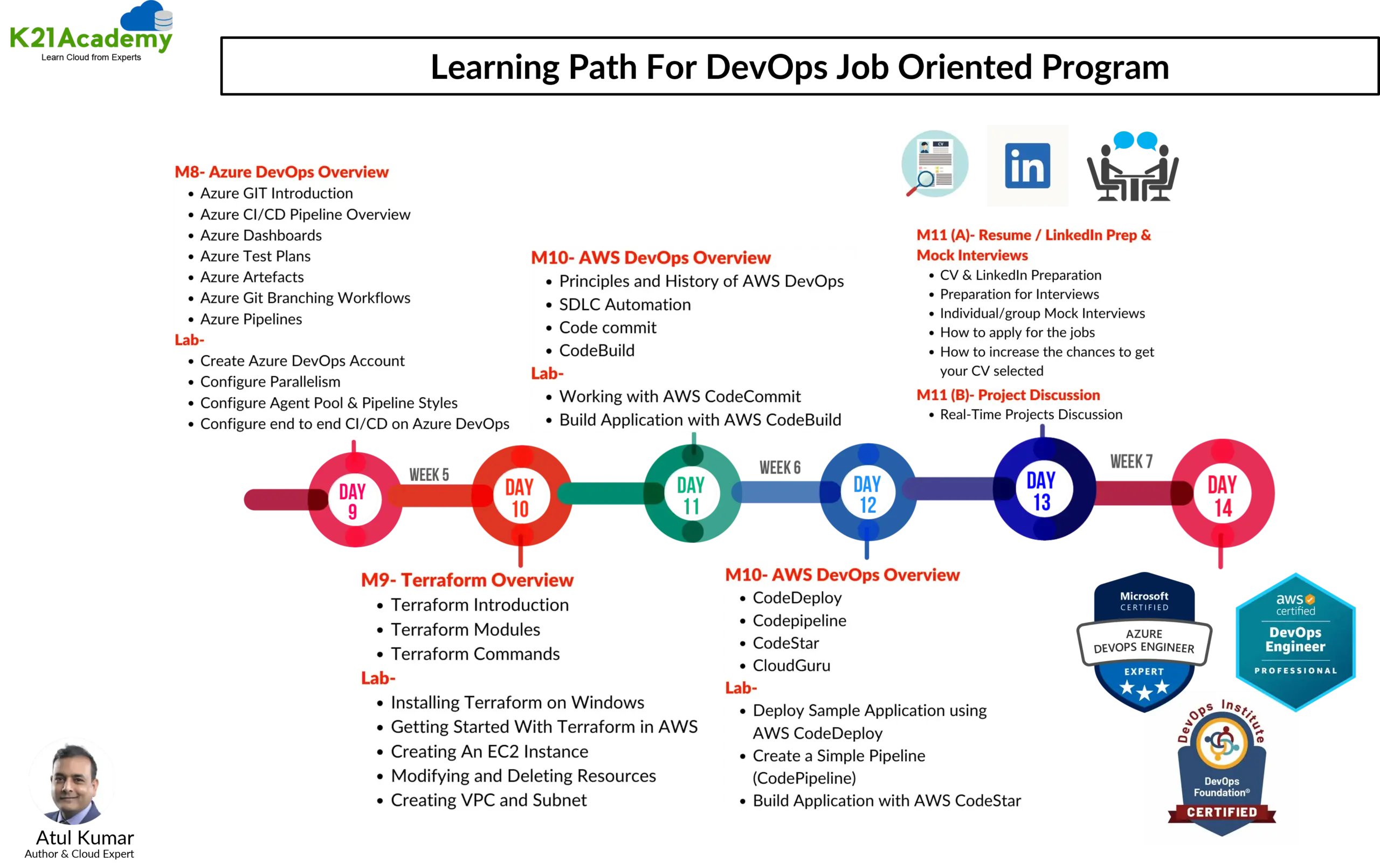
This blog post is your pathway to unlocking a rewarding career in the field of DevOps. Explore our comprehensive Step-By-Step Activity Guides within the Job-Oriented training program, meticulously designed to not only elevate your CV but also position you for success in landing your dream job. These resources are crafted to equip you with the sought-after skills by employers, empowering you to create an impressive CV and confidently excel in job interviews.
In this blog we will check out:
Hands-on Labs
Cloud Basics:
- Lab 01: Create an AWS Free trial account.
- Lab 02 Create Azure Free trial account.
- Lab 03: Create & Connect to Ubuntu VM on Azure.
- Lab 04: Create & Connect to Ubuntu EC2 Instance on AWS.
Linux & Shell/Bash Scripting:
- Lab 05: Create simple Bash Script
- Lab 06: Define variables in Bash Script
- Lab 07: Arithmetic Operations & Conditional Statements
- Lab 08: Comparison & Logical Operators
- Lab 09: Loops in Bash
Git & GitHub, (CI/CD) With Jenkins:
- Lab 10: Git Installation & Setup
- Lab 11: GitHub Setup
- Lab 12: Install & Configure Jenkins on Amazon Linux 2 AMI
- Lab 13: Installing and Configuring GIT & Maven Build Tools on Jenkins for Continuous Integration (CI)
- Lab 14: Install Tomcat on AWS Linux & Deploy Maven Project
- Lab 15: Install Jenkins on Windows
Docker:
- Lab 16: Install & Configure Docker on Ubuntu Server
- Lab 17: Working with Container
- Lab 18: Working with Docker Images
- Lab 19: Docker Registry
- Lab 20: Docker Storage & Volume
- Lab 21: Docker Networking
- Lab 22: Working with Docker Compose
- Lab 23: Working with Dockerfile
Kubernetes:
- Lab 24: Create & Connect 3 Linux VM (Ubuntu) Machine on AWS & Azure Cloud To Set Up Kubernetes Cluster
- Lab 25: Install & Configure 3 Node Kubernetes Cluster Using Kubeadm
- Lab 26: Deploy Application & Test Application on Kubernetes Cluster
Ansible:
- Lab 27: Install & Configure Ansible Controller & Target Node
- Lab 28: Ansible Ad Hoc Commands
- Lab 29: Ansible Playbook
- Lab 30: Using Variables and Facts
Terraform:
- Lab 31: Installing Terraform Client on Windows
- Lab 32: User Terraform with AWS & Azure Cloud
- Lab 33: Creating An EC2 Instance on AWS & VM on Azure using Terraform
- Lab 34: Modifying and Deleting Resources
- Lab 35: Creating Networks (VPC & Vnet) on AWS & Azure using Terraform
Azure DevOps:
- Lab 36: Create Azure DevOps FREE account
- Lab 37: Create Azure CI/CD Pipeline
- Lab 38: Deploy Application & Infra from Azure DevOps dashboard
- Lab 39: Azure Test Plans integration in CI/CD Pipeline
- Lab 40: Create & Manage Azure Artefacts on DevOps Portal
AWS DevOps:
- Lab 41: Working with AWS CodeCommit
- Lab 42: Create a Simple Pipeline (CodePipeline)
- Lab 43: Working with AWS CodeCommit
- Lab 44: Build Application with AWS CodeBuild
- Lab 45: Deploy Sample Application using AWS CodeDeploy
- Lab 46: Create a Simple Code Pipeline
- Lab 47: Build Application with AWS CodeStar
Observability: Monitoring & Logging:
- Lab 48: Install & Configure Prometheus
- Lab 49: Install & Configure Grafana
- Lab 50: Integrate Prometheus & Grafana with Kubernetes Cluster
- Lab 51: Configure ELK Stack
Projects
- ArgoCD (GitOps CD) to Deploy App to K8s Cluster
- Azure DevOps Automate Infra Deployment on Azure Cloud with Terraform & Azure Pipeline (CI_CD)
- Create a Containerized Application Using Azure Kubernetes Service (AKS)
- Deploy App on AKS Cluster using Jenkins (CI/CD)
- Automating Azure Infrastructure(Virtual Network, Subnet, and Load Balancer) Setup with Terraform
- Automating E2E AWS Cloud Infrastructure(VPC Network, Subnet, and Load Balancer) Setup with Terraform
- Deploy & Manage Amazon like Shopping Website using DevOps Tools (Terraform, Jenkins (CI-CD), Sonar Qube, Docker & Trivy on AWS Cloud)
- Deployment of Super Mario on Kubernetes using Terraform
Cloud Basics:
Lab 01: Create AWS Free Trial Account
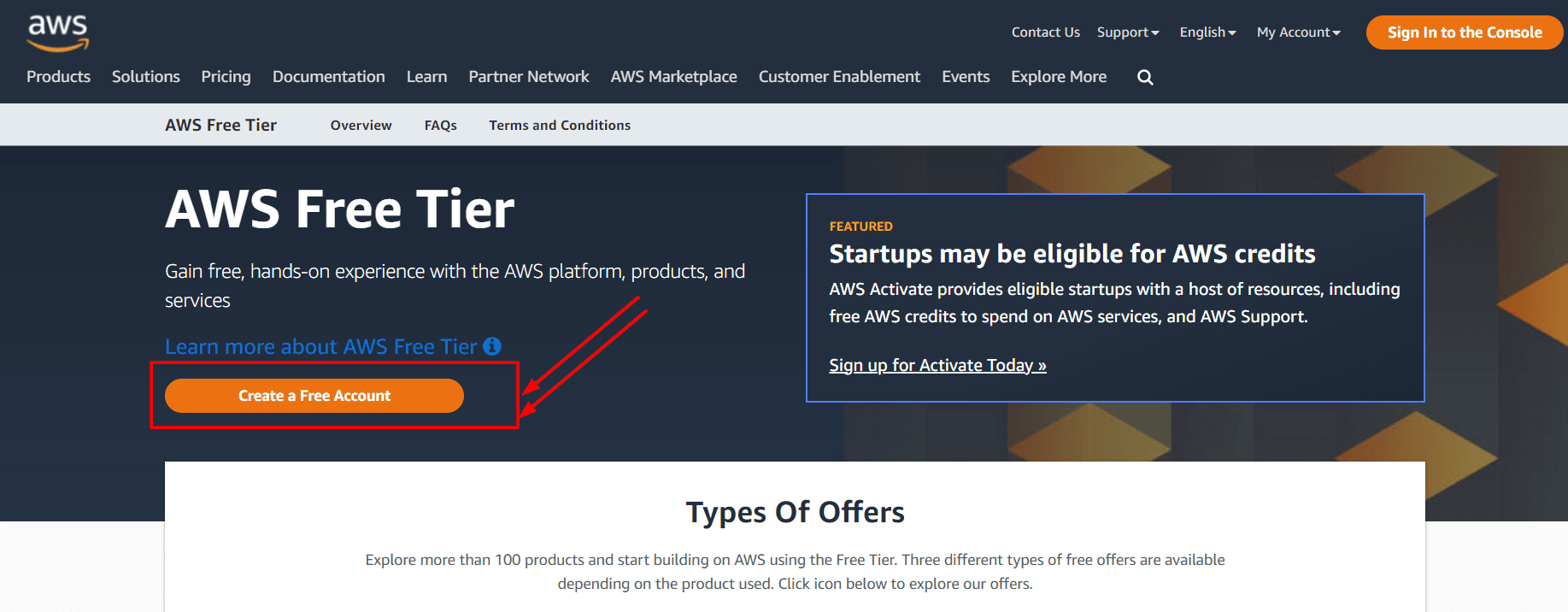
Amazon Web Services (AWS) is offering prospective members a free 12-month trial account to obtain hands-on experience with all of the services offered by AWS. Amazon provides a number of various services that we can utilise with certain constraints to gain hands-on experience and gain a better understanding of AWS Cloud services as well as routine business use.
With the AWS Free Tier account, we have a limited amount of time to access the services without being charged. In this section, we will look at how to sign up for an AWS FREE Tier Account.
Check out our step-by-step blog How To Create AWS Free Tier Account to learn how to create a free AWS account.
Lab 02: Create Azure Free Trial Account
The first thing you must do is to get a Trial Account for Microsoft Azure. (You get 200 USD FREE Credit from Microsoft to practice)
Microsoft Azure is one of the top choices for any organization due to its freedom to build, manage, and deploy applications. Here, we will look at how to register for the Microsoft Azure FREE Trial Account, click here.
Check out our blog to know how to create a Free Azure account.

Lab 03: Create & Connect to Ubuntu VM on Azure
In this lab, you will create a virtual machine (VM) running Ubuntu on Azure. The instructions cover the creation process, configuration settings, and methods to connect to the VM using SSH.
Lab 04: Create & Connect to Ubuntu EC2 Instance on AWS
This lab provides detailed steps to launch an Ubuntu EC2 instance on AWS. You will learn how to configure instance settings, security groups, and connect to your instance via SSH.
Linux & Shell/Bash Scripting:
Lab 05: Create Simple Bash Script
This lab introduces you to Bash scripting by teaching you how to write and execute a simple script. You will learn the basic syntax and how to run scripts in a Linux environment.
Lab 06: Define Variables in Bash Script
In this lab, you will explore variable definitions in Bash. The guide will show you how to declare, assign, and use variables within your scripts.
Lab 07: Arithmetic Operations & Conditional Statements
This lab focuses on performing arithmetic operations and using conditional statements in Bash scripts. You will practice writing scripts that include addition, subtraction, and logical comparisons.
Lab 08: Comparison & Logical Operators
Here, you will learn about comparison and logical operators in Bash. The lab provides examples and exercises to help you understand how to use these operators effectively in your scripts.
Lab 09: Loops in Bash
This lab covers the use of loops in Bash scripting. You will learn to create and use different types of loops, such as for, while, and until loops, to automate repetitive tasks.

Git & GitHub, (CI/CD) With Jenkins:
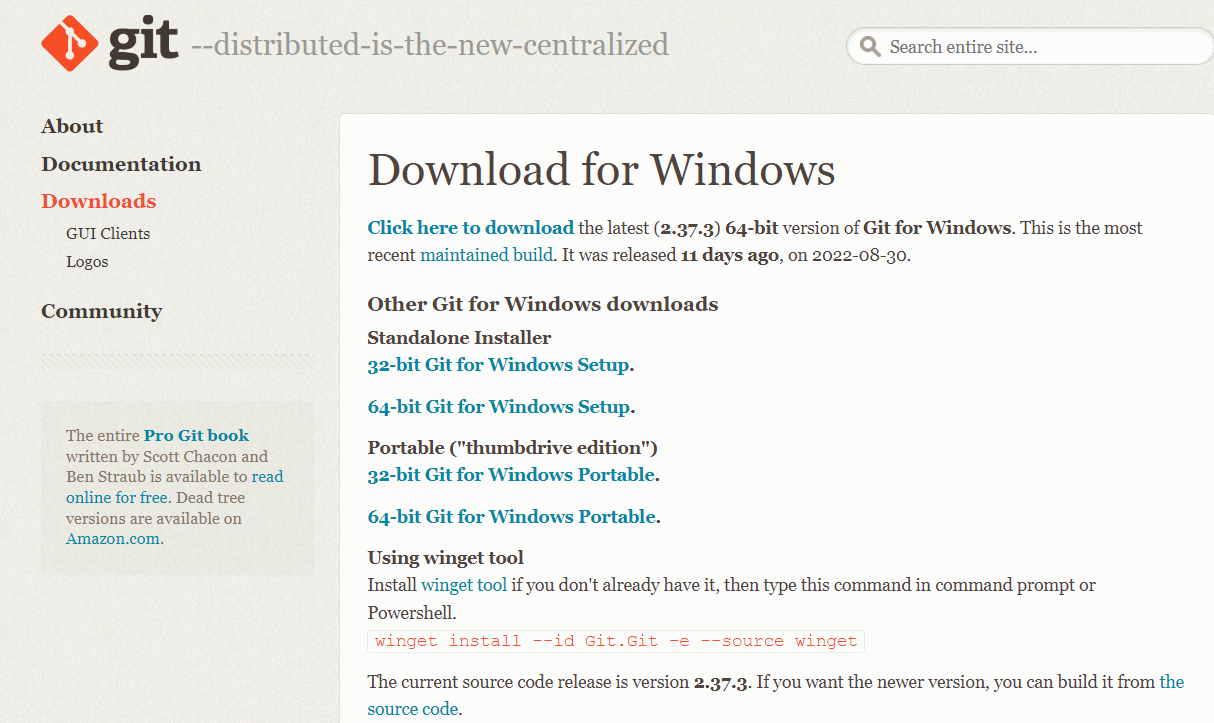
Lab 10: Git Installation & Setup
In this lab, you will install and set up Git on your system. You will configure essential settings and learn basic Git commands to manage your code repositories.
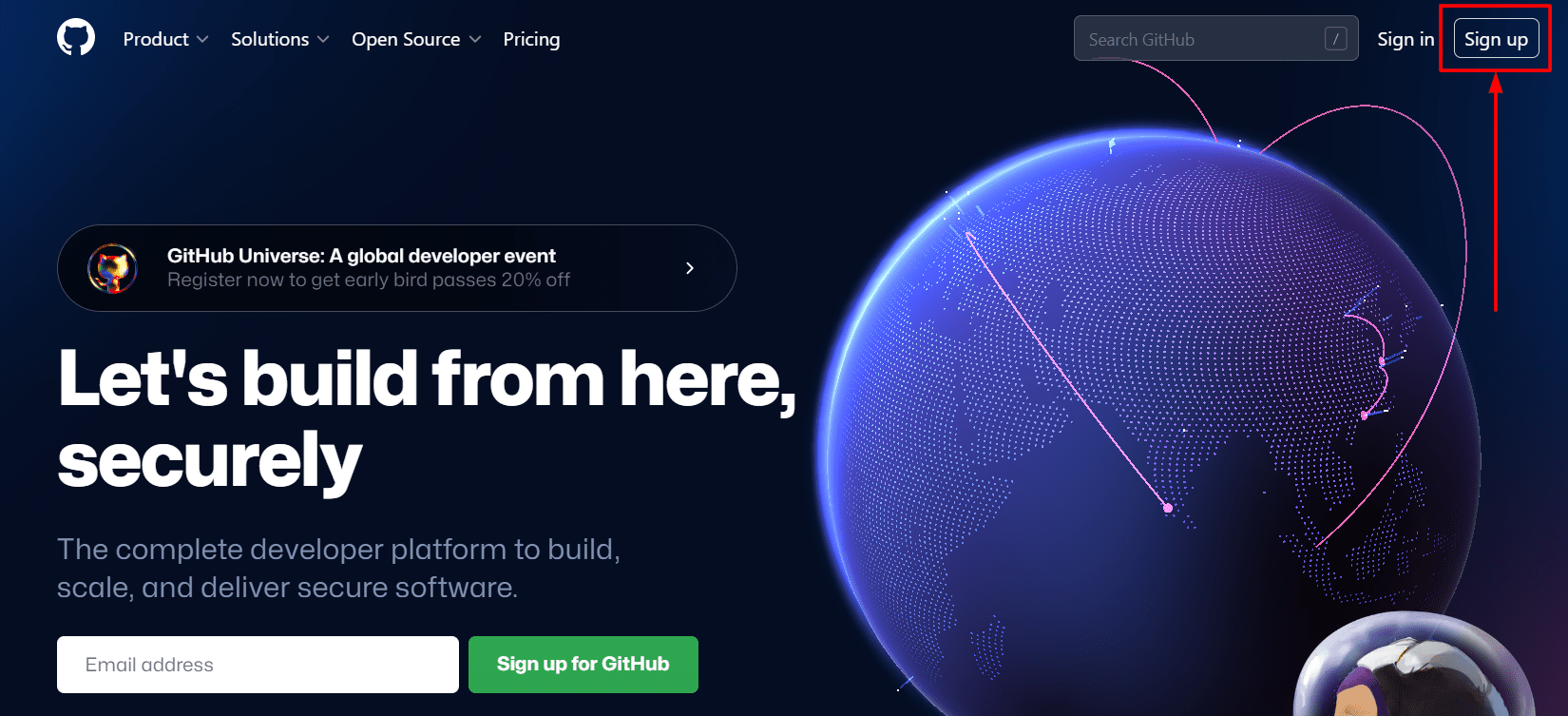
Lab 11: GitHub Setup
This lab guides you through creating a GitHub account and setting up repositories. You will learn to push and pull code, manage branches, and collaborate with others using GitHub.
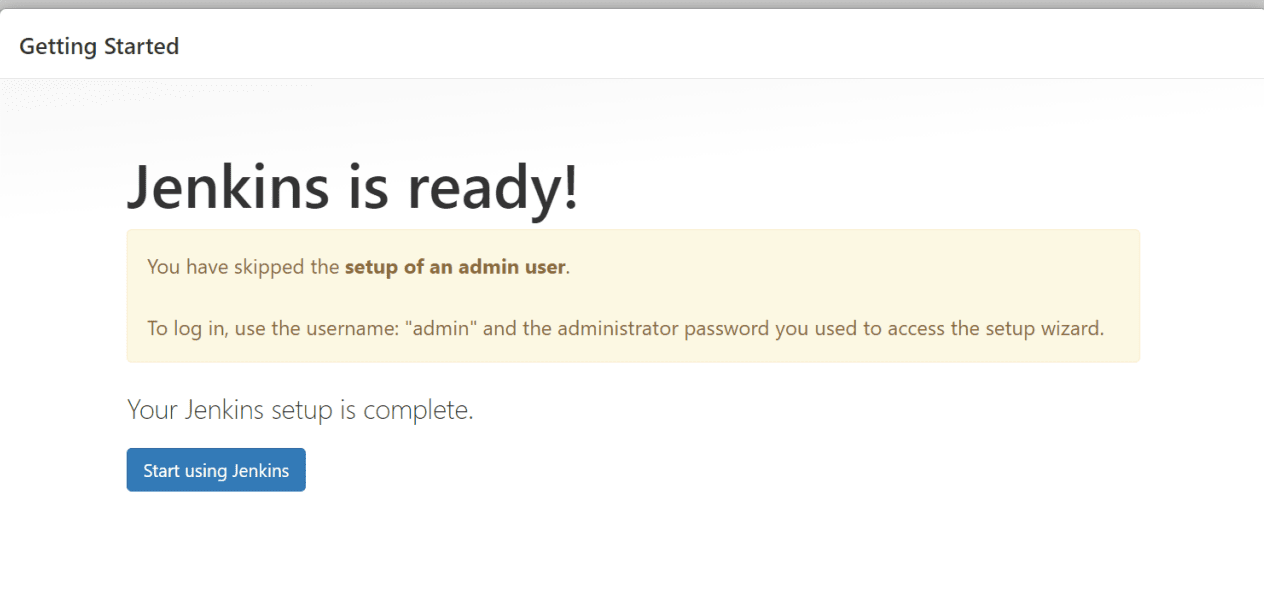
Lab 12: Install & Configure Jenkins on Amazon Linux 2 AMI
Learn how to install and configure Jenkins on an Amazon Linux 2 AMI in this lab. You will set up Jenkins for continuous integration and continuous delivery (CI/CD) workflows.
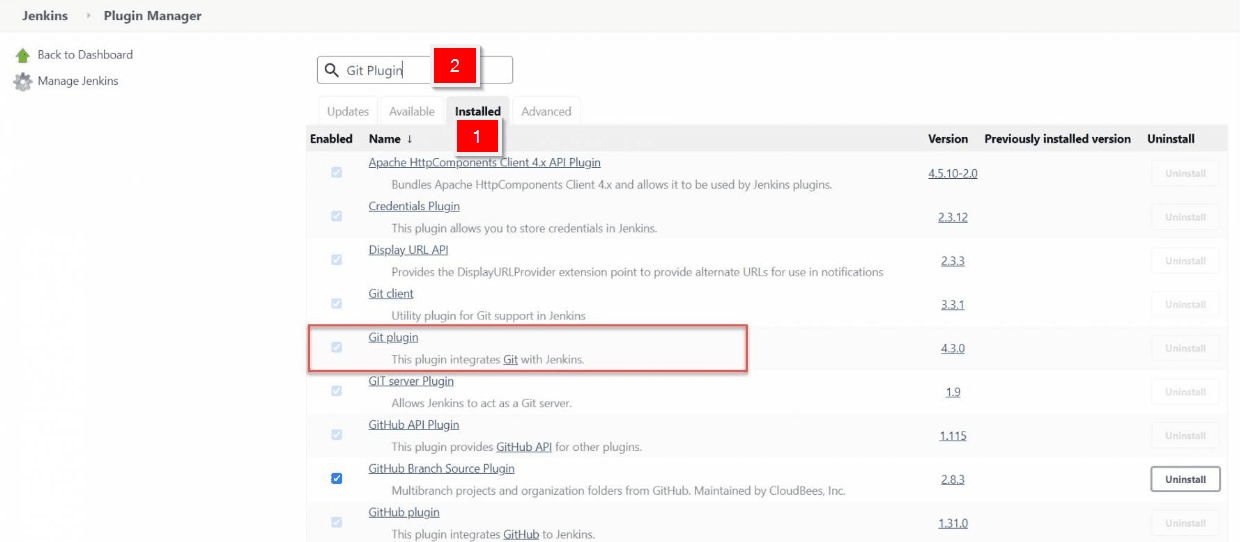
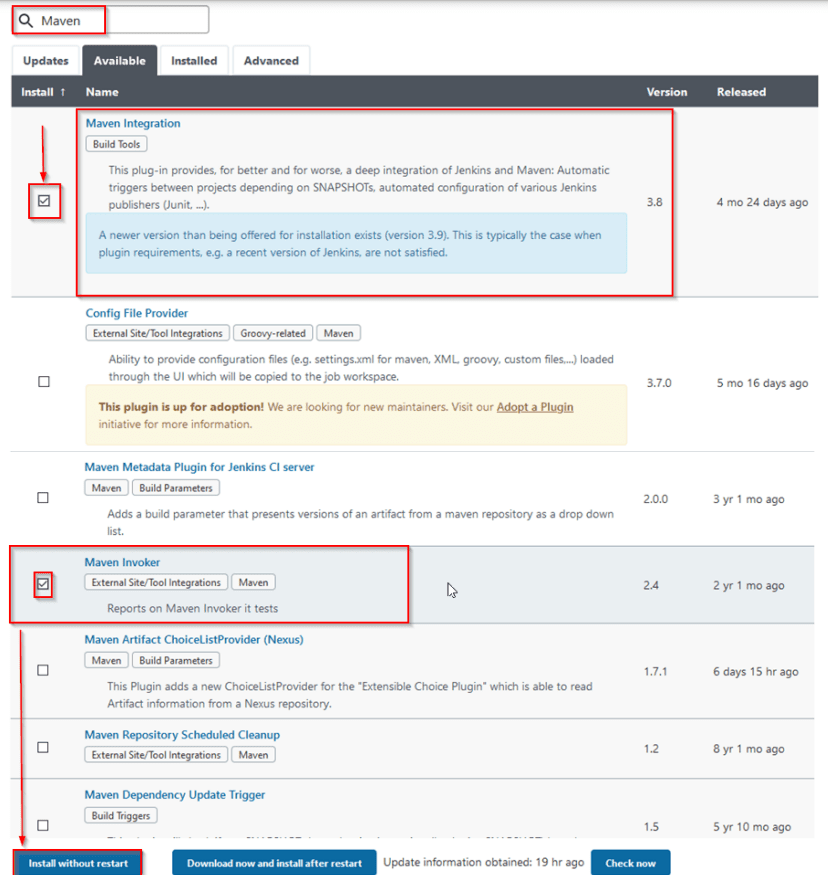
Lab 13: Installing and Configuring GIT & Maven Build Tools on Jenkins for Continuous Integration (CI)
This lab focuses on integrating Git and Maven with Jenkins. You will configure Jenkins to pull code from a Git repository and build it using Maven.
Lab 14: Install Tomcat on AWS Linux & Deploy Maven Project
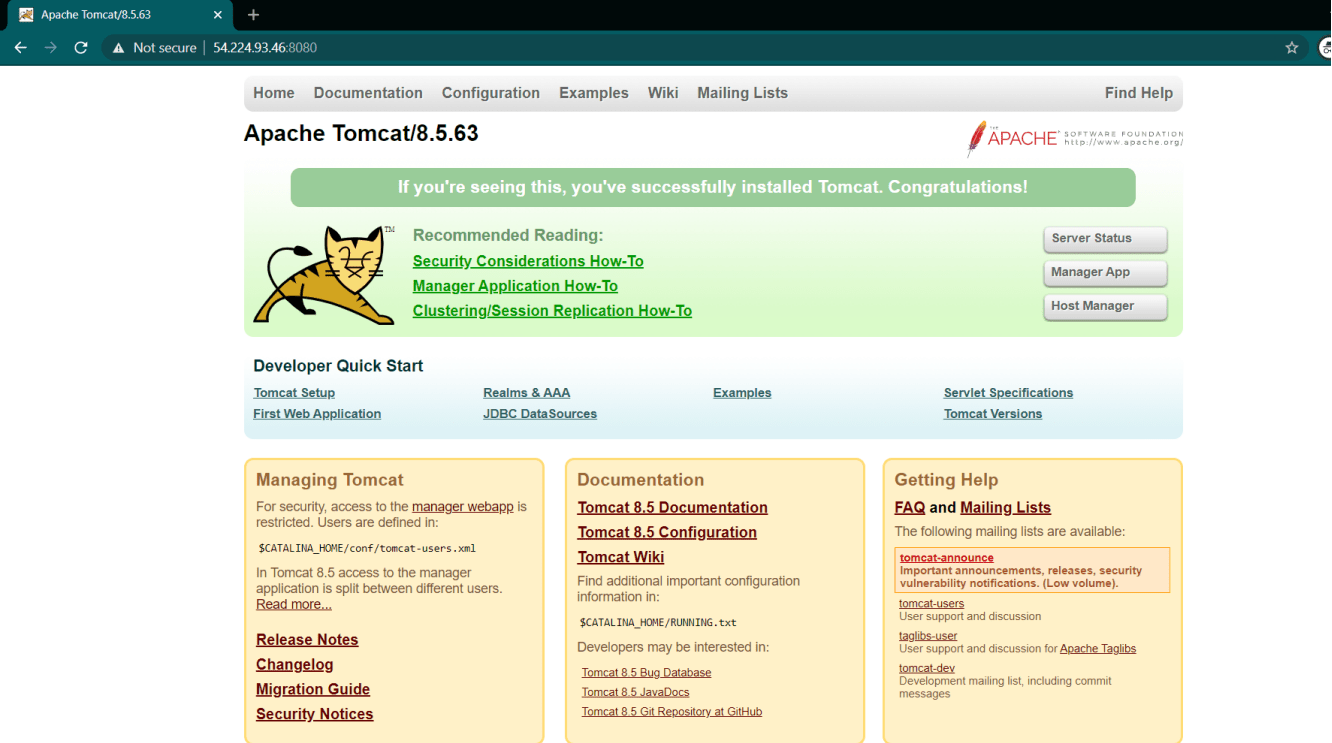
In this lab, you will install the Apache Tomcat server on an AWS Linux instance and deploy a Maven project to it. The guide includes steps for configuration and deployment.
Lab 15: Install Jenkins on Windows
Learn how to install Jenkins on a Windows operating system in this lab. You will configure Jenkins for basic use and set up initial projects.
Docker:
Lab 16: Install & Configure Docker on Ubuntu Server
Docker is an open platform for app development, shipping, and running. Docker allows you to decouple your apps from your infrastructure, allowing you to release software more quickly. Docker allows you to manage your infrastructure in the same manner that you control your applications. You may drastically minimize the time between writing code and executing it in production by utilizing Docker’s methodology for fast shipping, testing, and deploying code.
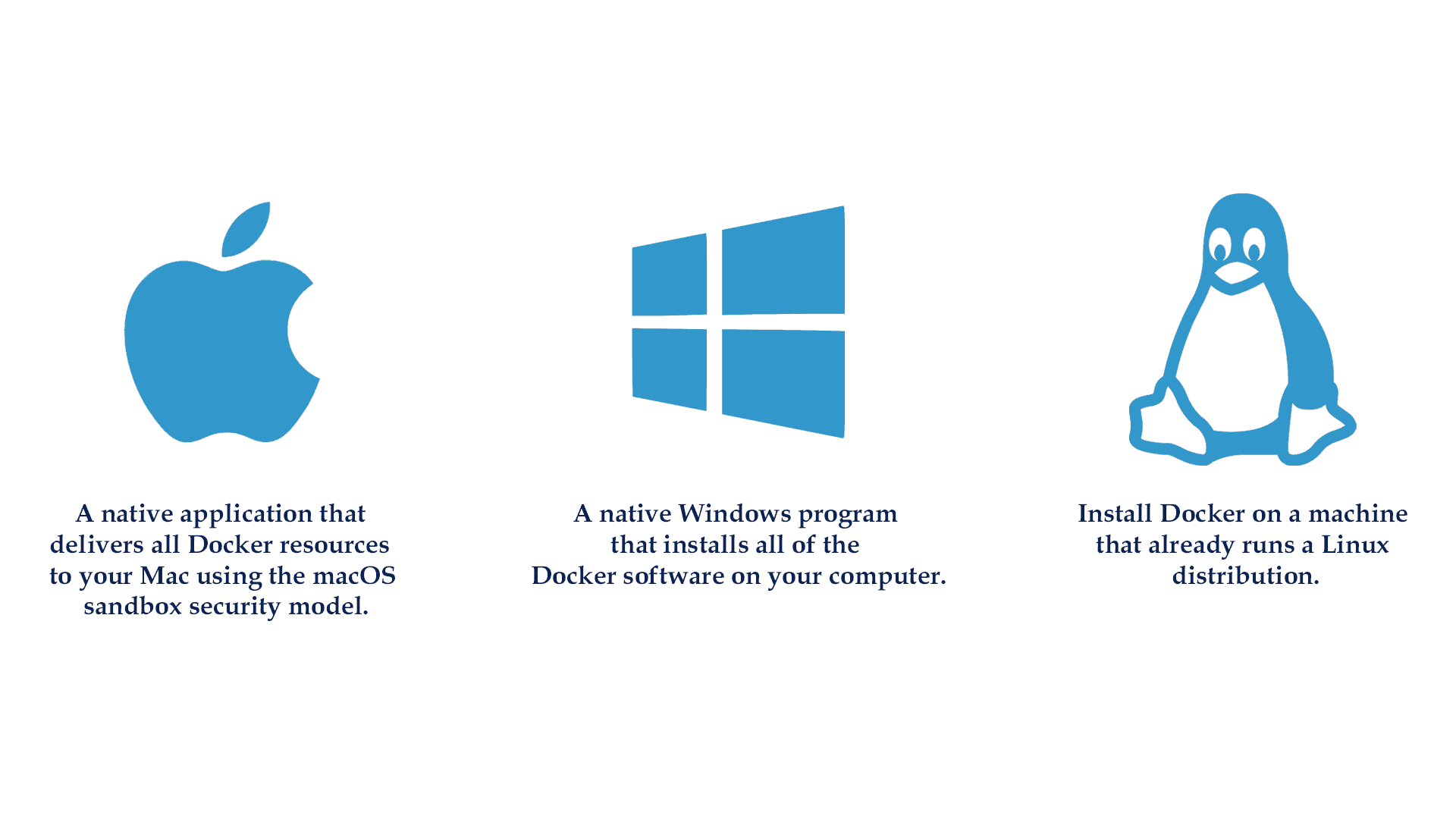
Docker is available for download and installation on Windows Os, Linux, and macOS.
To know how to install docker on your machine read our blog on Docker Installation.
This lab teaches you to install and configure Docker on an Ubuntu server. You will learn the basics of Docker and how to manage Docker services.
Lab 17: Working with Containers
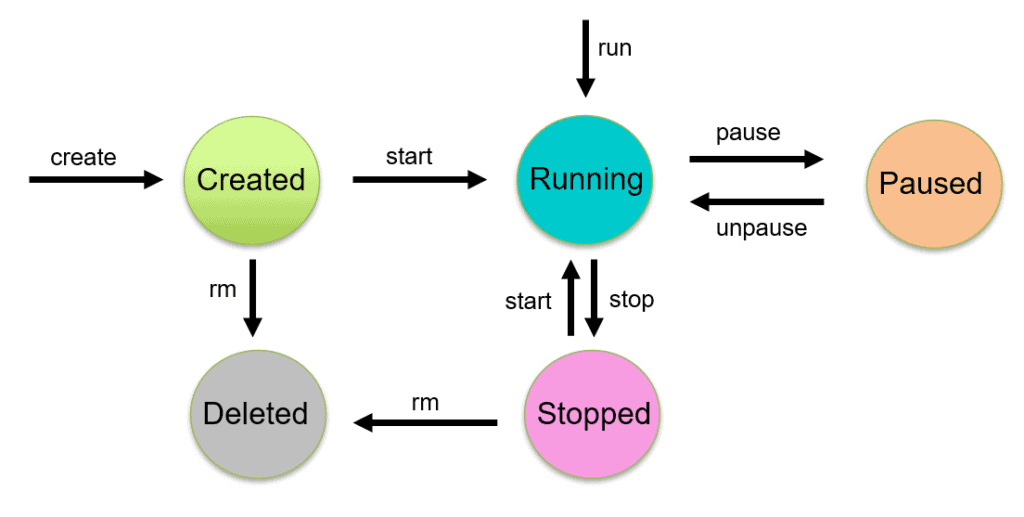
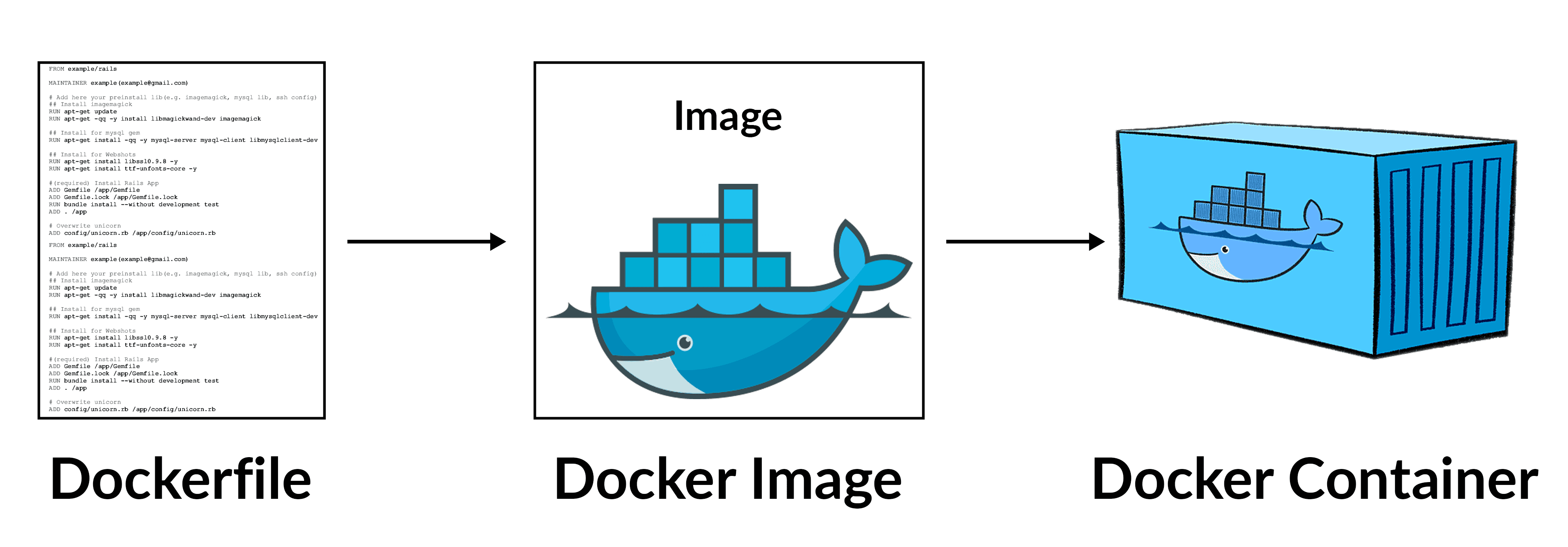
A Docker container is a runnable version of an image. Containers can be built, started, stopped, paused, and removed using the Docker API and CLI. You can attach storage to a container, connect it to one or more networks, and even create a new image based on its existing state.
This Activity guide covers how to create/delete a container, the container’s lifecycle, inspecting container details, listing containers, and executing inside a container.
Read our blog to get an idea of the Docker container.
Know more: about Container Orchestration and Management Options
Lab 18: Working with Docker Images
Docker images serve as a template for creating a Docker container. Images are read-only templates that provide Docker container creation instructions. A Docker image is a multi-layered file that is used to execute code in a Docker container.
In this Activity guide, we cover how to Create/Push an Image, how to Tag images, Inspect Image details, Listing out Images, Delete Images from Local repo.
Read our blog to get an idea of Docker Image
Lab 19: Docker Registry
This lab covers setting up and using Docker registries. You will learn to configure a private Docker registry and manage images within it.
Lab 20: Docker Storage & Volume
In this lab, you will explore Docker storage options and volumes. You will learn to manage data persistence for Docker containers using volumes and bind mounts.
Lab 21: Docker Networking
This lab introduces Docker networking concepts. You will learn to configure and manage container networking, including bridge networks, overlay networks, and more.
Lab 22: Working with Docker Compose
Learn to use Docker Compose in this lab. You will define and run multi-container Docker applications using Docker Compose files.
Lab 23: Working with Dockerfile
This lab teaches you to create Dockerfiles for building custom Docker images. You will learn the syntax and best practices for writing Dockerfiles.
Kubernetes:
Lab 24: Create & Connect 3 Linux VM (Ubuntu) Machines on AWS & Azure Cloud to Set Up Kubernetes Cluster
In this lab, you will create and connect three Ubuntu virtual machines on AWS and Azure. These VMs will be used to set up a Kubernetes cluster.
Lab 25: Install & Configure 3 Node Kubernetes Cluster Using Kubeadm
This lab guides you through the installation and configuration of a three-node Kubernetes cluster using kubeadm. You will set up master and worker nodes and configure networking.
Lab 26: Deploy Application & Test Application on Kubernetes Cluster
Learn how to deploy and test applications on a Kubernetes cluster in this lab. You will use kubectl commands to manage deployments and services.
Ansible:
Lab 27: Install & Configure Ansible Controller & Target Node
Ansible is a software program that provides cross-platform computer assistance through simple yet effective automation. It is primarily aimed at IT professionals, who use it for application deployment, workstation and server updates, cloud provisioning, configuration management, intra-service orchestration, and practically anything else that a systems administrator does on a weekly or daily basis. Ansible does not rely on agent software and does not require any additional security infrastructure, making it simple to set up.
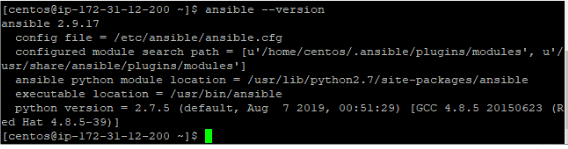
In this Lab, you will learn how to install Ansible on AWS EC2 Linux Instance (VM) and check the Ansible version. You can create and configure the Ansible locally on your own Linux VM or your Linux Machine.
AWS is in demand with Ansible in the Industry, and for this reason, we are working on AWS Cloud for configuring Ansible.
Lab 28: Ansible Ad Hoc Commands
Ansible ad hoc commands are one-liners composed to perform a particular task, like performing a quick task over various machines.
In this Lab, we will learn how to use Ad-hoc commands in Ansible Playbook.

Lab 29: Ansible Playbook
Playbooks register and perform Ansible’s configuration, deployment, and orchestration functions. They can specify a policy you want your remote systems to implement or a set of actions in a standard IT process.
Modules are script-like programs written to specify the desired state of the system. A code editor is used to write Modules. Modules are written by the developer and executed via SSH. Modules are part of a more extensive program called Playbook. Ansible module is a standalone script that is used inside an Ansible Playbook.
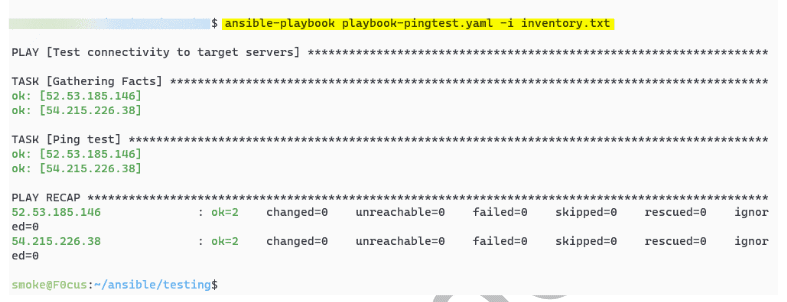
Here, you’ll learn how to create an Ansible Playbook from Scratch and test the same playbook.
Lab 30: How to setup the inventory of Ansible
Ansible runs on many systems in your infrastructure simultaneously. It does it by picking portions of Ansible’s inventory file systems, which defaults to being stored in the location /etc/ansible/hosts. You can define a different inventory file using the -i <path>option on the command line.
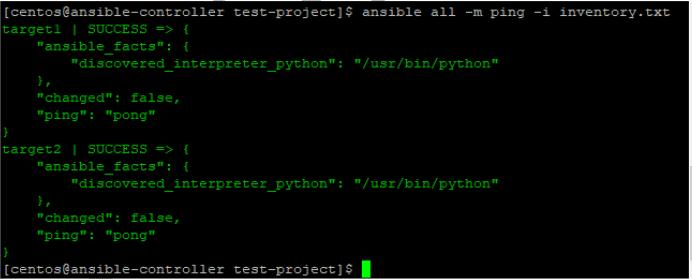
In this activity guide, we will set up an Ansible controller that communicates with 2 target machines.
We will also configure inventory files and run commands to test if our configuration is working.
Terraform:
Lab 31: Installing Terraform Client on Windows
This lab teaches you to install Terraform on a Windows machine. You will configure the environment and verify the installation.
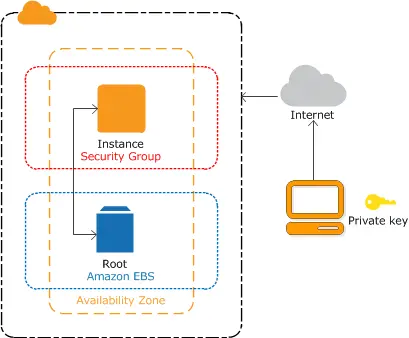
Lab 32: Use Terraform with AWS & Azure Cloud
In this lab, you will learn to use Terraform to manage resources on AWS and Azure. You will write Terraform configurations to create and manage cloud infrastructure.
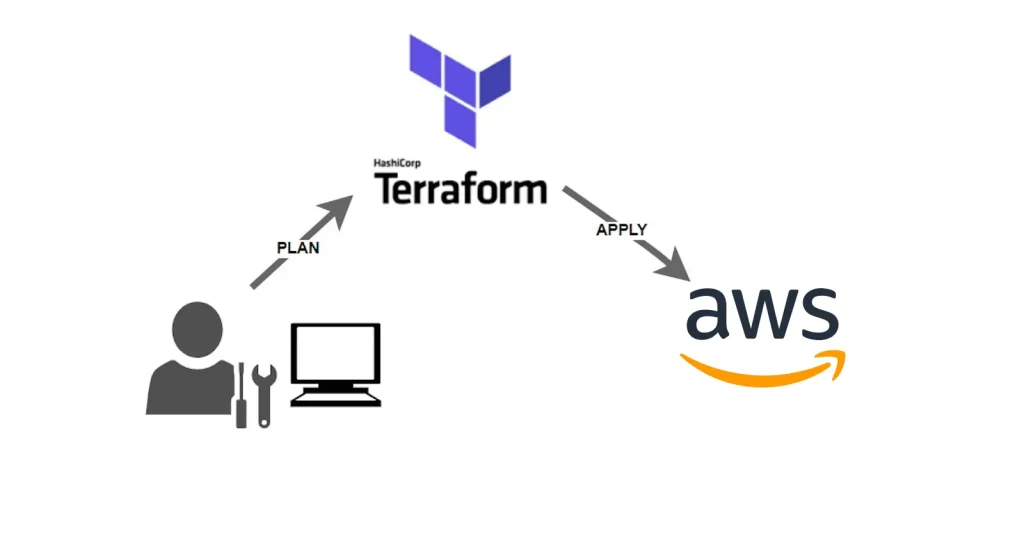
Lab 33: Creating An EC2 Instance on AWS & VM on Azure using Terraform
This Activity guide provides a concise overview of essential aspects when using Terraform to create an EC2 instance on AWS. It introduces the syntax involved in defining an EC2 instance within a Terraform configuration. It also guides you through fundamental Terraform commands, including terraform init for initialization, terraform plan for infrastructure preview, and terraform apply for actual resource provisioning
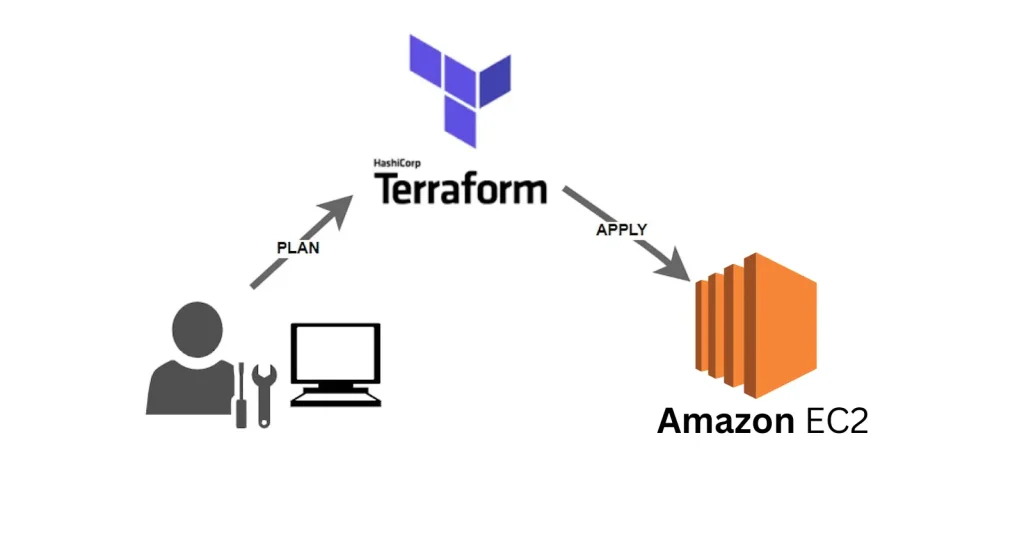
Lab 34: Modifying and Deleting Resources
This Activity guide concisely overviews essential tasks when using Terraform to manage AWS EC2 instances. It encompasses modifying a resource, which allows you to adapt to changing infrastructure needs and removing specific resources to streamline your environment. Additionally, it explains the procedure for destroying all resources, a vital step when resources are no longer required, enabling you to manage your AWS infrastructure with Terraform efficiently.
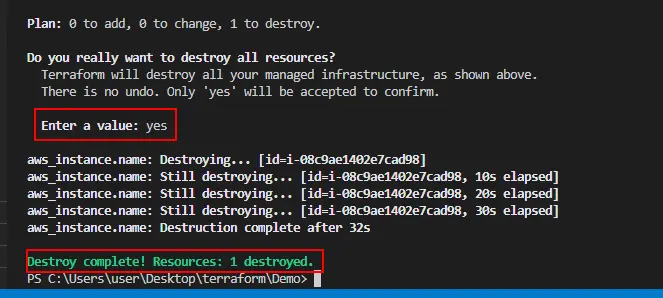
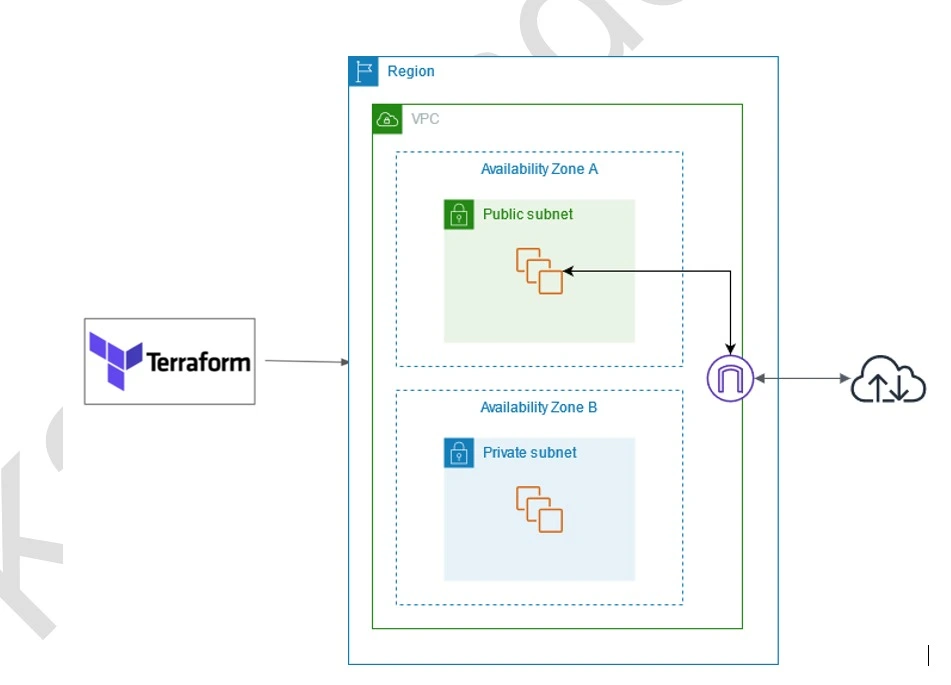
Lab 35: Creating Networks (VPC & VNet) on AWS & Azure using Terraform
This Activity guide provides a concise overview of fundamental tasks when utilizing Terraform to establish an AWS Virtual Private Cloud (VPC) and its associated subnets. It outlines the process of creating the VPC, which serves as a secure network environment and creating subnets within it. These subnets are essential for segmenting your network resources, achieving isolation, and aligning with specific architectural requirements, making it a crucial starting point for building robust cloud infrastructure using Terraform.
Azure DevOps:
Lab 36: Create Azure DevOps FREE Account
The first thing you must do is to get a Trial Account for Microsoft Azure. (You get 200 USD FREE Credit from Microsoft to practice)
Microsoft Azure is one of the top choices for any organization due to its freedom to build, manage, and deploy applications. Here, we will look at how to register for the Microsoft Azure FREE Trial Account, click here.
Check out our blog to know how to create a Free Azure account.
Lab 37: Create Azure CI/CD Pipeline
In this lab, you will create a CI/CD pipeline using Azure DevOps. You will configure build and release pipelines to automate the deployment of applications.
Lab 38: Deploy Application & Infra from Azure DevOps Dashboard
Learn to deploy applications and infrastructure directly from the Azure DevOps dashboard. This lab covers configuring and managing deployments using pipelines.
Checkout the blog to learn more about Azure DevOps
Lab 39: Azure Test Plans Integration in CI/CD Pipeline
This lab focuses on integrating Azure Test Plans into your CI/CD pipeline. You will learn to automate testing as part of your build and release processes.
Lab 40 Create & Manage Azure Artifacts on DevOps Portal
In this lab, you will create and manage Azure Artifacts. You will publish, consume, and version control your packages within Azure DevOps.

Checkout the blog to learn more about Azure DevOps
AWS DevOps:
Lab 41: Working with AWS CodeCommit
This lab introduces AWS CodeCommit for source control. You will create repositories, commit code, and manage branches using CodeCommit.
Lab 42: Create a Simple Pipeline (CodePipeline)
Learn to create a simple CI/CD pipeline using AWS CodePipeline. You will configure stages to build, test, and deploy your application.
Lab 43: Working with AWS CodeCommit
This lab further explores AWS CodeCommit, focusing on advanced features and best practices for managing code repositories.
Lab 44: Build Application with AWS CodeBuild
In this lab, you will use AWS CodeBuild to compile and test your application. You will set up build projects and manage build environments.
Lab 45: Deploy Sample Application using AWS CodeDeploy
Learn to deploy applications using AWS CodeDeploy in this lab. You will configure deployment groups and strategies for automated deployments.
Lab 46: Create a Simple Code Pipeline
This lab guides you through creating a more complex AWS CodePipeline. You will integrate various AWS services to build, test, and deploy your applications.
Lab 47: Build Application with AWS CodeStar
In this lab, you will use AWS CodeStar to build and manage your application development projects. You will configure CodeStar to integrate with other AWS DevOps tools.
Observability: Monitoring & Logging:
Lab 48: Install & Configure Prometheus
This lab guides you through the installation and configuration of Prometheus for monitoring. You will set up Prometheus to collect and query metrics.
Lab 49: Install & Configure Grafana
Learn to install and configure Grafana for data visualization in this lab. You will create dashboards and integrate Grafana with various data sources.
Lab 50: Integrate Prometheus & Grafana with Kubernetes Cluster
In this lab, you will integrate Prometheus and Grafana with a Kubernetes cluster. You will set up monitoring and visualization for your Kubernetes environment.
Lab 51: Configure ELK Stack
This lab covers the installation and configuration of the ELK (Elasticsearch, Logstash, Kibana) stack. You will set up centralized logging and visualization for your applications.
Real-Time Projects: These consist of various projects
In this segment, we’ll delve into hands-on, real-world projects that not only enhance your skill set but also serve as impactful additions to your CV, significantly bolstering your candidacy when applying for jobs
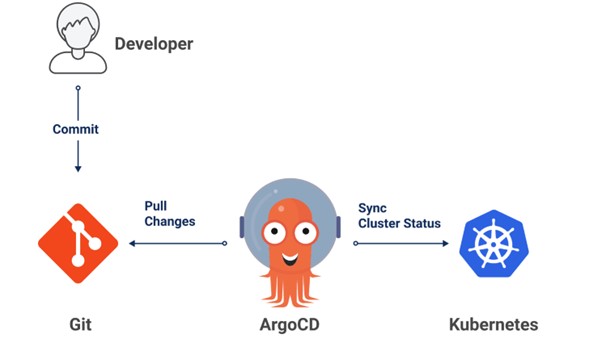
1. ArgoCD (GitOps CD) to Deploy App to K8s Cluster
In this project, we will employ ArgoCD, a GitOps continuous delivery tool, to automatically synchronize and deploy applications to Kubernetes clusters. This ensures consistency and traceability through version-controlled manifests.
2. Azure DevOps Automate Infra Deployment on Azure Cloud with Terraform & Azure Pipeline (CI_CD)
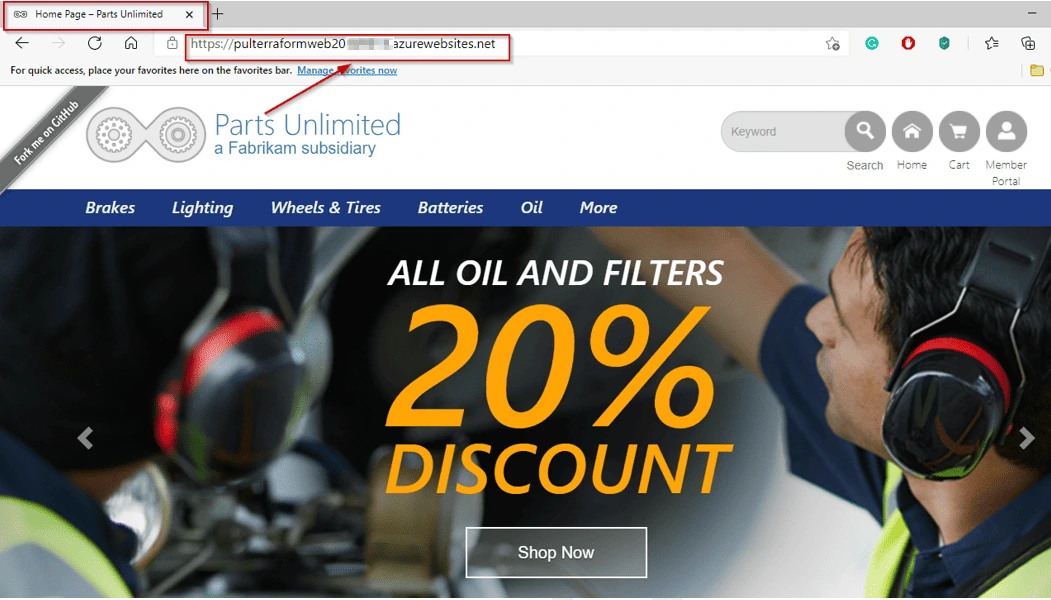
In this project, you will learn how to incorporate Terraform into Azure Pipelines (CI/CD) for implementing Infrastructure as Code (IaC) to create Azure WebApp and deployment of .Net Application (same logic can be used to deploy Java or Python or any other application) on Azure WebApp
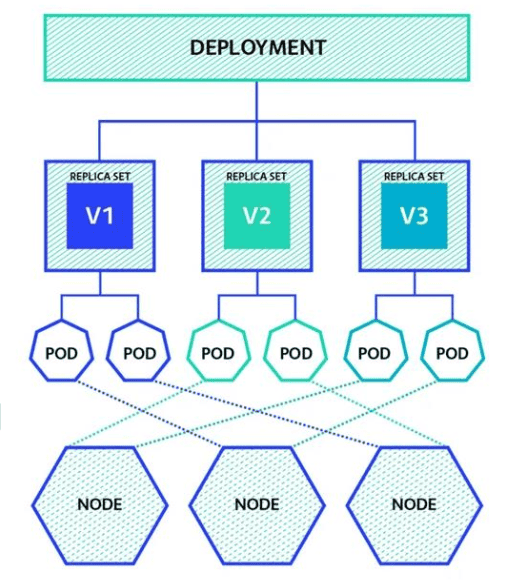
3. Create a Containerized Application Using Azure Kubernetes Service (AKS)
This project involves the creation of an Azure Kubernetes Service (AKS) cluster and the deployment of a containerized application onto the AKS cluster using Docker images. Kubernetes is a powerful container orchestration platform that simplifies the management, scaling, and deployment of containerized applications in a cloud-native environment.
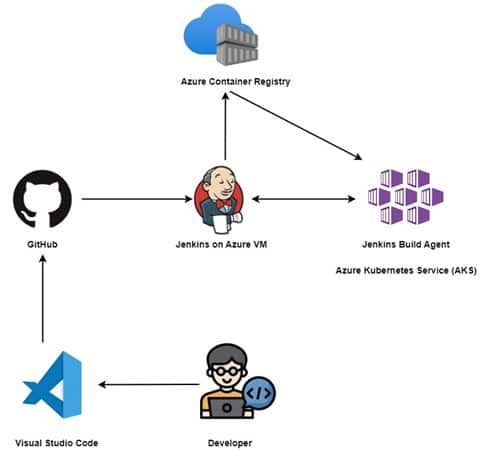
4. Deploy App on AKS Cluster using Jenkins (CI/CD)
In this project, we will leverage Jenkins as a CI/CD tool to automate the build and deployment of applications on an AKS cluster. This approach enhances the efficiency and reliability of the software delivery lifecycle.
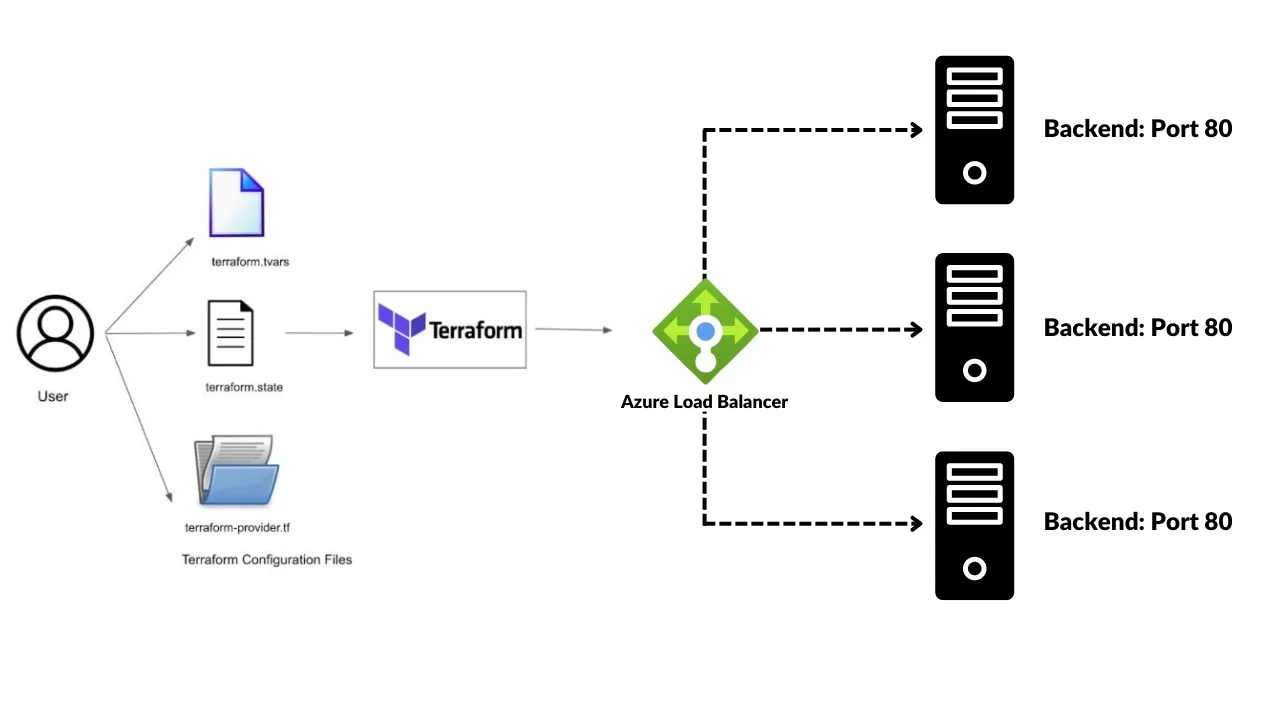
5. Automating Azure Infrastructure(Virtual Network, Subnet, and Load Balancer) Setup with Terraform
In this project, we will be utilizing Terraform, an infrastructure-as-code tool, to create an Application Load Balancer (ALB) in Azure. The ALB plays a crucial role in distributing incoming network traffic across multiple backend resources to enhance the availability and scalability of applications.
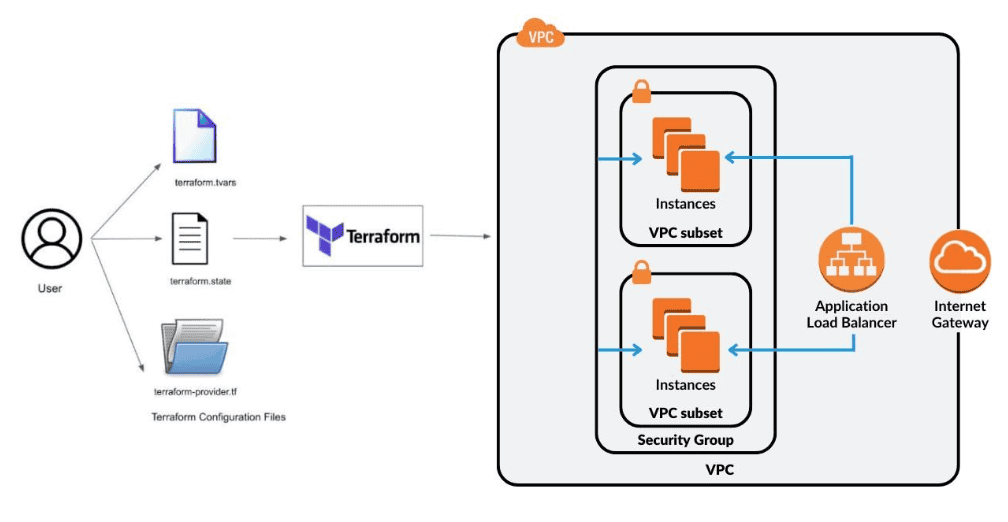
6. Automating E2E AWS Cloud Infrastructure(VPC Network, Subnet, and Load Balancer) Setup with Terraform
In this guide, we will be using Terraform to build a Virtual Private Cloud (VPC) in AWS. The VPC will include 2 subnets, route tables, internet gateways, and security groups. The code will be flexible enough to accommodate opening ports in an easy way.
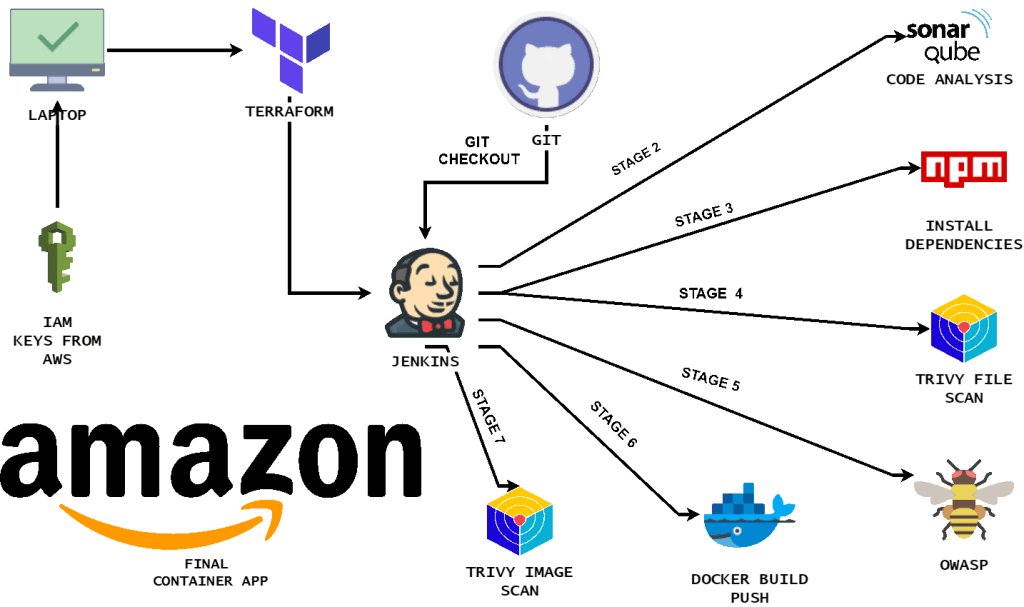
7. Deploy & Manage Amazon like Shopping Website using DevOps Tools (Terraform, Jenkins (CI-CD), Sonar Qube, Docker & Trivy on AWS Cloud)
This project involves creating an Amazon clone app named ShopifyLite. Using Terraform for infrastructure management and Jenkins for CI/CD, the team automates testing and deployment processes. Developers push code changes, Jenkins tests them, and Terraform deploys updates to Shopping Website hosted on AWS Cloud. This ensures a fast and reliable app launch, allowing users to browse and shop seamlessly.
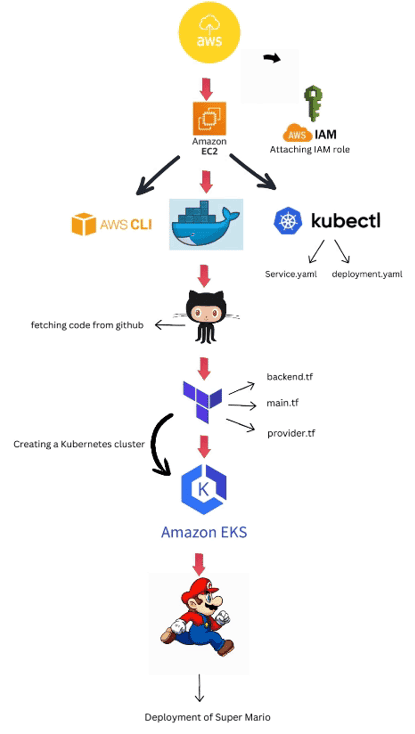
8. Deployment of Super Mario on Kubernetes using Terraform
This project involves deploying the Super Mario game onto a Kubernetes cluster using Terraform for infrastructure provisioning. Terraform is used to define and create the necessary infrastructure components such as Kubernetes clusters, networking resources, and storage. Once the infrastructure is set up, Kubernetes manages the deployment, scaling, and orchestration of the Super Mario game application within the cluster. This deployment approach ensures scalability, reliability, and efficient management of the game application infrastructure.
Certifications
DevOps Foundations Certified
This Certification requires professionals who are capable of combining processes, people, and technologies for continuously delivering services and products that meet business objectives and user needs and have completed at least 16 contact hours (instruction and labs) as part of a formal, approved training course delivered by an accredited Education Partner of DevOps Institute.
Know more about DevOps Foundations Certified
[AZ-400] Microsoft Azure DevOps Certification Exam
This exam requires DevOps professionals who are capable of combining processes, people, and technologies for continuously delivering services and products that meet business objectives and user needs. These professionals must be proficient with Agile practices in software development.
![AZ-400] Microsoft Azure DevOps Engineer | K21 Academy](https://k21academy.com/wp-content/uploads/2020/04/DEV_ENG-19.png)
Know more about [AZ-400] Microsoft Azure DevOps Certification Exam
AWS Certified DevOps Engineer Professional
AWS DevOps training is implementing the DevOps philosophy using a Cloud platform with dedicated tools and services. AWS provides a set of services designed to enable companies to more rapidly and reliably build and deliver products using AWS and DevOps practices. These services simplify Provisioning and Managing Infrastructure, Deploying Application Code, Automating Software release Processes, and Monitoring your Application and Infrastructure Performance.
[CKA] Certified Kubernetes Administrator
The Certified Kubernetes Administrator (CKA) exam is designed for professionals who possess the skills and knowledge necessary to administer Kubernetes clusters. This certification assesses the ability to deploy, maintain, and troubleshoot applications within Kubernetes environments, ensuring the effective orchestration of containerized applications.
Know more about [CKA] Certified Kubernetes Administrator exam
Related/References
- What Is DevOps | DevOps Principles | Advantages Of DevOps | Why DevOps?
- Agile Methodology and DevOps | DevOps and Agile Relationship
- DevOps Best Practices
- What Is DevOps? AWS DevOps For Beginners
- [AZ-400] Microsoft Azure DevOps Certification Exam: Everything You Need To Know
- Certified Kubernetes Administrator (CKA) Certification Exam: Everything You Must Know
Next Task For You
Begin your journey towards becoming a DevOps Expert and earn a lot more by landing a high-paying job.
Join FREE CLASS to learn more about the DevOps Roles and Responsibilities, Job opportunities related to DevOps in the market, and what to study Including Hands-On labs and projects you must perform to get your Dream job.
Click on the below image to Register for Our FREE Class on Mastering DevOps on Cloud: How to Build In-Demand Skills and Land High-Paying Jobs


![Microsoft Agentic AI Business Solutions Architect [AB-100] | K21 Academy](https://test.k21academy.com/wp-content/uploads/2025/11/Microsoft-Agentic-AI-Business-Solutions-Architect-AB-100-Exam-Overview1.png)