



In this blog post, I will share How to Deploy an Application on OpenShift? Various methods of OpenShift Application Deployment and the most Frequently Asked Questions about it.
Let’s go through the topics of discussion first:
- What is OpenShift?
- Methods to Deploy Applications on OpenShift
- How to Deploy an Application on OpenShift?
- FAQs
- Conclusion
What is OpenShift?

OpenShift is a fully managed Platform as a Service offering from RedHat/IBM specially designed for open hybrid cloud strategy. It is used to run containerized applications. It is built on top of Docker and Kubernetes that lets users build, test, deploy, manage, and run container-based applications on cloud platforms.
Check out: OpenShift Overview
Methods to Deploy Applications on OpenShift
There are two easy ways to deploy an OpenShift Application.
- Using Console: You can directly deploy the website using the Graphical User Interface of OpenShift with just a few clicks.
- Using CLI: OpenShift also provides a Command Line Interface where with few commands, you can deploy an Application.
How to Deploy an Application on OpenShift?
In this demo, I am using RedHat OpenShift Service, accessing from the AWS cloud computing platform. I have performed this demo in two parts using both the Console and Command Line Interface. So let’s get into OpenShift Application Deployment.
Check out: Create AWS Free Tier Account
Step 1) Make sure you have already created the OKD cluster using the AWS console.
Step 2) You need to Open All Ports in the EC2 instance as shown in the following steps:
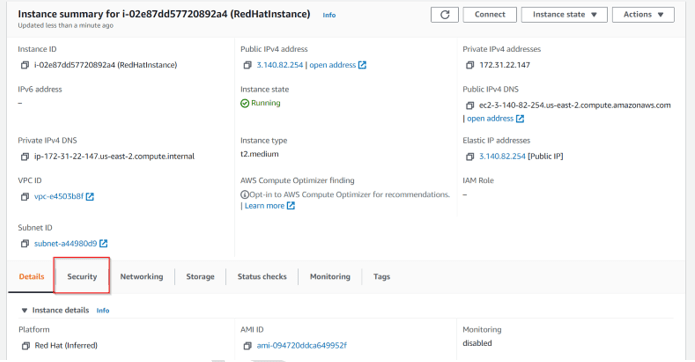
a) Access the instance and click on Security.
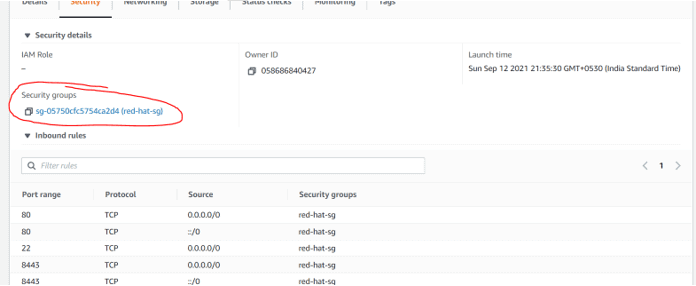
b) Select the Security Group.
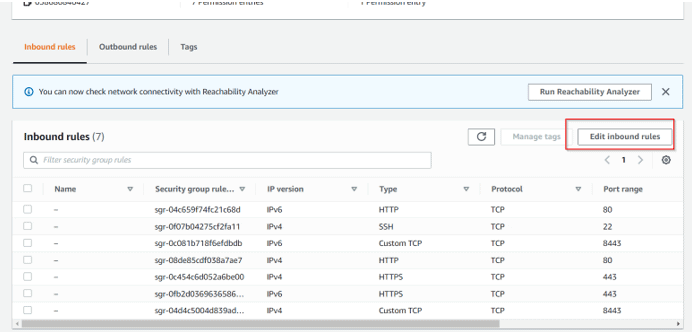
c) Go to Inbound rules and select the Edit Inbound Rule.
d) Now, click on Add Rule.
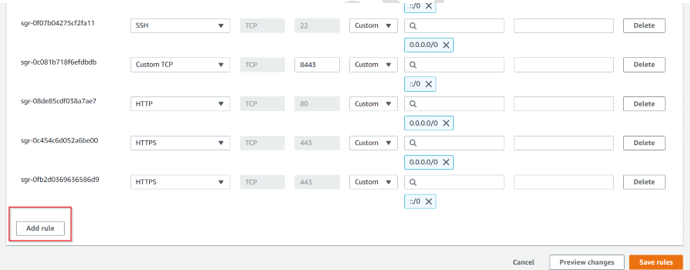
e) Go to In Type, and Select All TCP. In CIDR, Select 0.0.0/0 and then click on the Save rule.
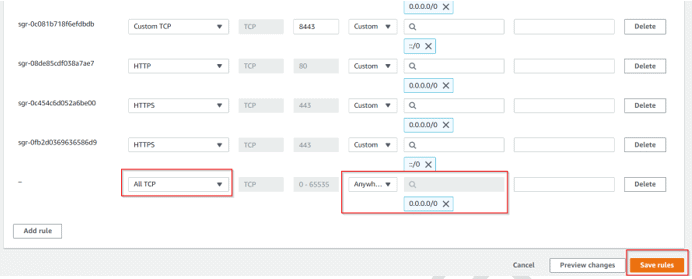
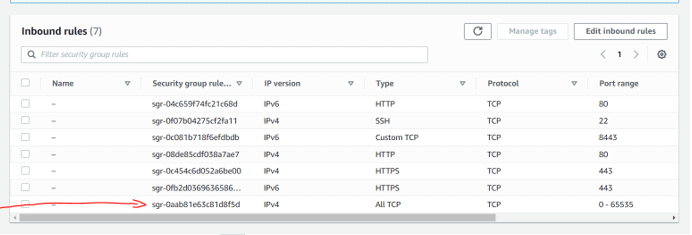
Step 3) Let’s deploy the Application using Console first.
a) You need to login into the OKD console.
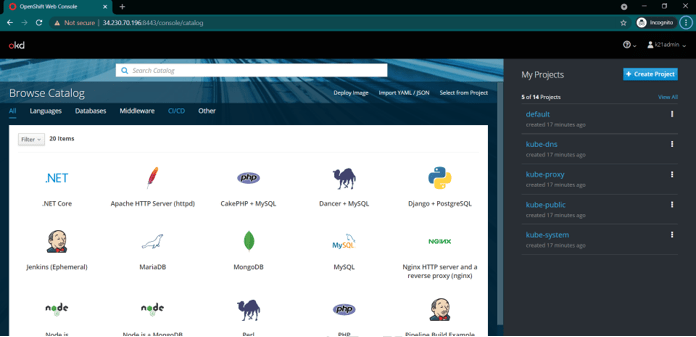
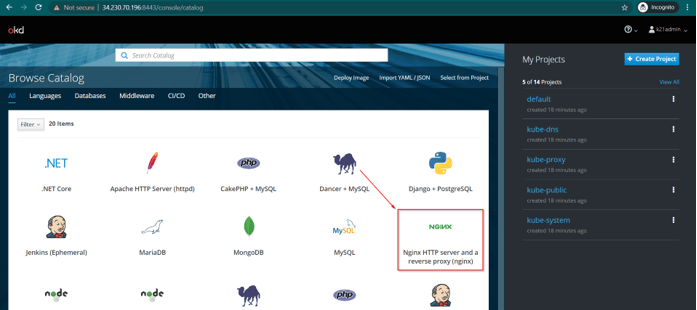
b) Go to Catalog and select NGINX to deploy the application.
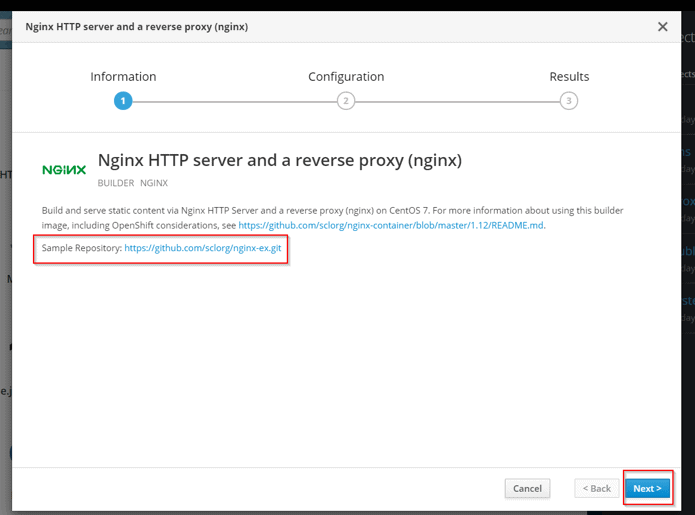
C) We will make use of the Sample Repository in this demo further. Make sure to take a note of it and click on next.
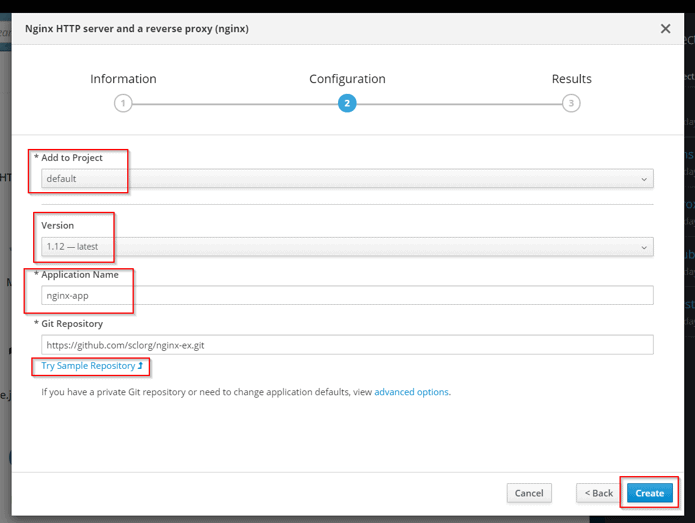
d) A new window will pop up. So under Project Details, Select Default Project.
Now Select the Latest Version.
Application Name: nginx-app
Under the Git Repository path, there is a link present for Try Sample Repository. You need to click on that link to populate the Git Repository textbox.
Note: The meaning of Project in Openshift is like namespace in Kubernetes.
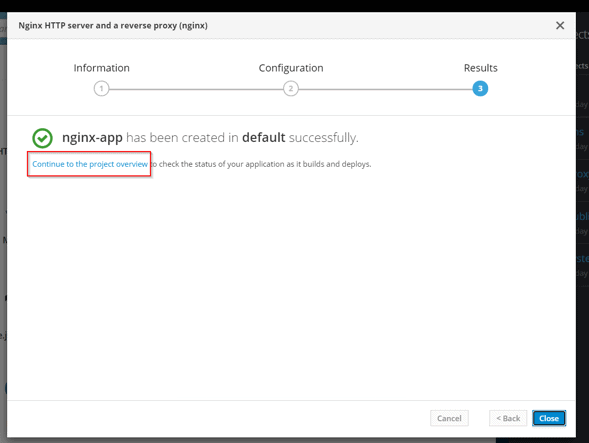
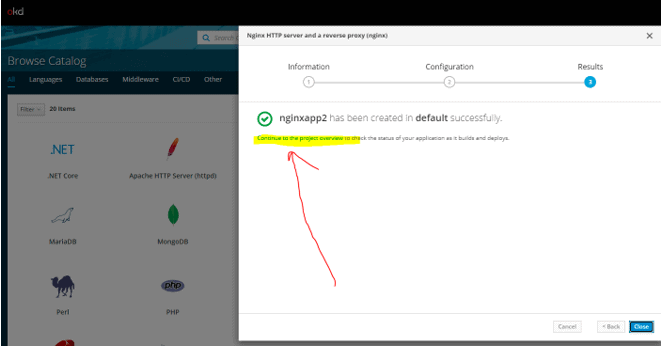
e) After this, click on the Project Overview link on the screen.
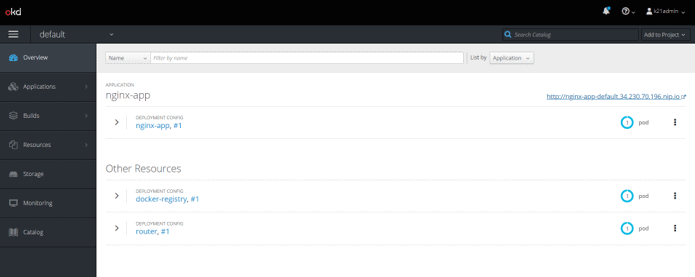
Step 4) Now, I will show you how to Access Nginx Application.
a) Go to Home Screen, and select the default project.
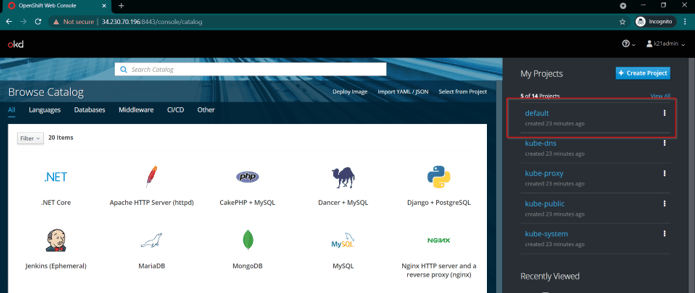
b) When you click on overview, it will show the nginx application that we just deployed. Now click on the arrow button to expand it.
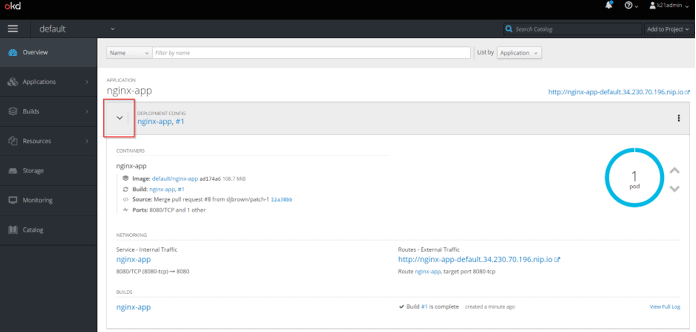
c) You can access this application externally by using the link highlighted in the image.
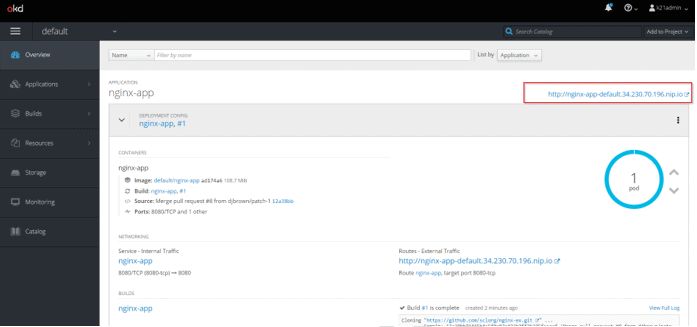
d) Now application can be easily accessed by using this link.
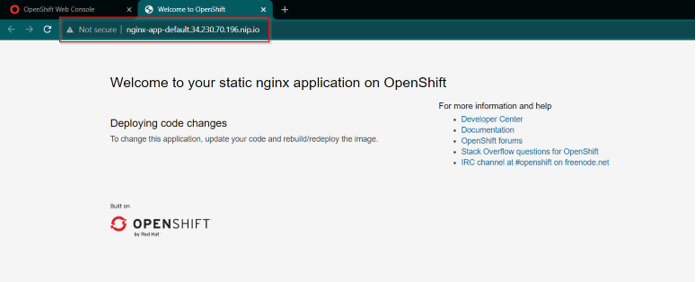
Check Out: Our blog post on Openshift Use Cases.
Deploy the Application using CLI
Step 1) Go to Cluster CLI.
Step 2) Here, we will create a new Project First (which is similar to the namespace in Kubernetes)
# oc new-project k21application
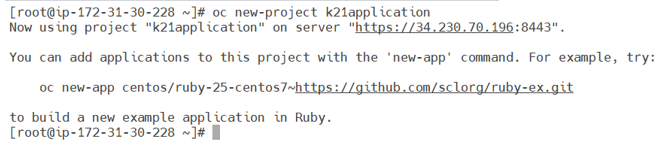
Step 3) The third step is to enable Dockerhub images that Require Root.
# oc adm policy add-scc-to-user anyuid -z default

Step 4) Now, let’s deploy the httpd Application on the oc cluster.
# oc new-app --name web2 docker.io/httpd
Note: Ignore the Warning that states git is not available on the system.
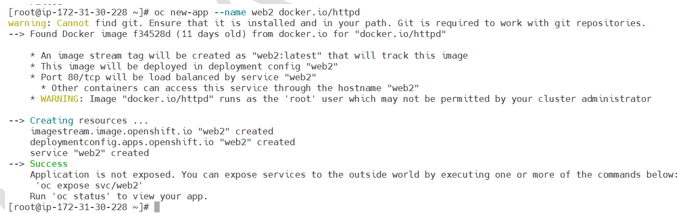
Step 5) Now, you need to check the pod status on the machine.
# oc get pods

Step 6) Next step is to expose this service so that we can access this externally.
# oc expose svc/web2

Step 7) Now, we will access the service that is recently exposed.
# oc status
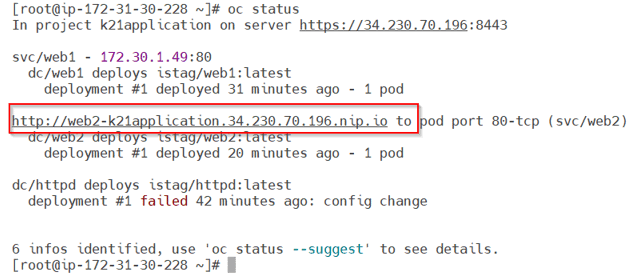
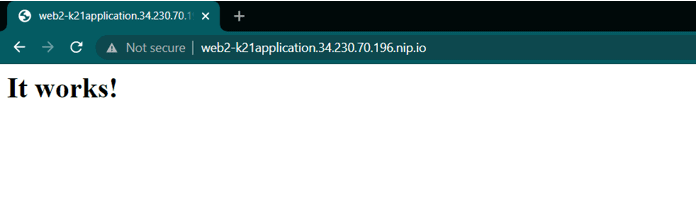
Step 8) The last step is to delete the deployment and service.
# oc delete deploymentconfig web2
# oc delete svc web2
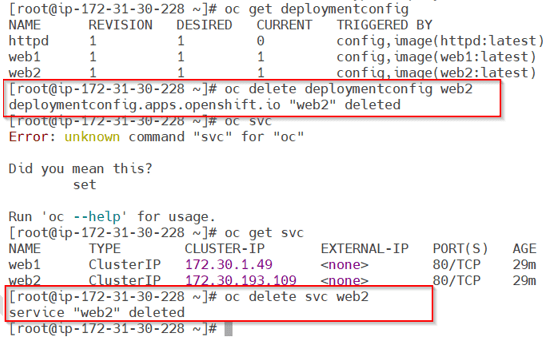
Check out: OpenShift vs Kubernetes
FAQs
Q1) What is a deployment in OpenShift?
Ans: A deployment is a replication controller in OpenShift. It is based upon a user-defined template which is called a deployment configuration. Generally, deployments are created either manually or for responses to triggered events.
Q2) How to list all pods in OpenShift?
Ans: Let’s look at the pods in OpenShift.
a) You can list all or selected pods on one or more nodes using the following command:
$ oc describe node <node1> <node2> $ oc describe node ip-10-0-128-218.ec2.internal.
b) If you want to list all or selected pods on selected nodes, follow the command:
$ oc describe --selector=<node_selector> $ oc describe -l=<pod_selector>
Q3) What is a template in OpenShift?
Ans: A template is a set of objects. These objects can be easily processed and parameterized.
Check out: OpenShift Hands-on Labs
Conclusion
There are many ways to deploy an application on OpenShift. In this post, I discussed and showed some of the easiest methods on how to deploy an application on OpenShift? If you already have all those tools that build and store images, then you can deploy applications using container images. Hence, OpenShift is a great tool for container-based applications over the cloud. We can build, test, deploy and maintain applications using it very easily.
Related/References
- Kubernetes for Beginners
- Kubernetes Architecture | An Introduction to Kubernetes Components
- Docker & Certified Kubernetes Administrator (CKA) Training
- (CKA) Certification: Step By Step Activity Guides/Hands-On Lab Exercise
- Docker Architecture | Docker Engine Components | Container Lifecycle
- OpenShift Official Documentation
Next Task for You:
Begin your journey towards becoming a Red Hat Certified Specialist in OpenShift Administrator and earning a lot more in 2021 by joining our Free Class.


![Microsoft Agentic AI Business Solutions Architect [AB-100] | K21 Academy](https://test.k21academy.com/wp-content/uploads/2025/11/Microsoft-Agentic-AI-Business-Solutions-Architect-AB-100-Exam-Overview1.png)


