This blog post covers some quick tips, including Q/A and useful links from Day 2Live Interactive training on Ansible for Beginners. covering Ansible Playbook, Modules & Privilege Escalation, Ansible Variables
We kicked off day 2 with interactive Hands-On labs, We have coveredLab6, Lab7 from 9 Hands-On Labs
In Day 1 session, the previous week, we got an overview of Introduction to ansible, Ad-hoc commands.
There are 7 modules covering 30+ lessons& 9 extensive step-by-step Hands-onlabs which are vital to becoming an Automation with Ansible certified.
We have already seen the basics of Playbook in Day1 now we continue to learn more on Playbook.
Playbook
Playbooks in Ansible are written in YAML format. It is a human-readable data serialization language. It is commonly used for configuration files. It can also be used in many applications where data is being stored.
Ansible Playbooks are the way of sending commands to remote systems through scripts.
YAML Syntax
Start with — (3 consecutive hyphens) end with …(optional)
A list – begin with a dash followed by space
attribute definition(key-value)
Comments are preceded by #
Warning: Do NOT use TAB! (unless you configured tab expand)
Ansible uses existing privilege escalation systems to execute tasks with root privileges. Because this feature allows you to ‘become’ another user, different from the user that logged into the machine (remote user), we call it to become. The become keyword leverages existing privilege escalation tools like sudo, su, pfexec, doas, pbrun, runas, machinectl, and others.
become: set to yes to activate privilege escalation.
become_user: set to the user with desired privileges the user you become, NOT the user you log in as. Does NOT imply become: yes, to allow it to be set at the host level. The default value is root.
For example- to manage a system service (which requires root privileges) when connected as a non-root user (this takes advantage of the fact that the default value of become_user is root):
- name: Ensure the httpd service is running
  service:
    name: httpd
    state: started
  become: yes
Q5. What is become: yes?
Ans. These ad hoc commands allow us to run a command with Sudo privileges.
Modules
A module is a reusable, standalone script that Ansible runs on your behalf, either locally or remotely. Modules interact with your local machine, an API, or a remote system to perform specific tasks like changing a database password or spinning up a cloud instance
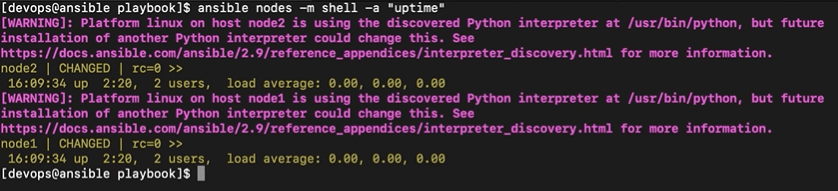
Command: ansible nodes -m shell -a “uptime”
Here, after -m we are specifying the name of a module. In this case, we are using a shell module.
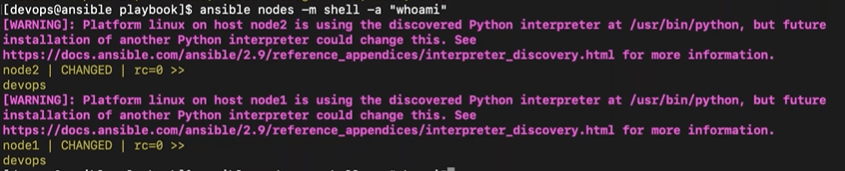
ansible nodes -m shell -a “whoami”
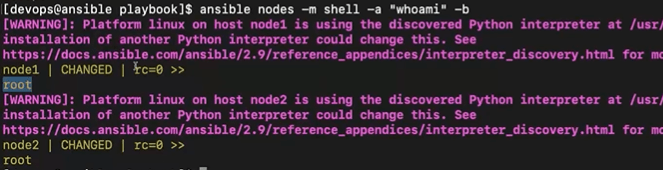
ansible nodes -m shell -a “whoami” -b
-a is used to pass ad-hoc commands.
–b is used to run this command with sudo privilege
Command Module: Default ansible module that is used to run/execute system commands over the target nodes.
Q6. How do you see all available ansible modules?
Ans. We use command ansible-doc -l
Q7. What is different between Shell and Command?
Ans.
With the Command module, the command will be executed without being proceeded through a shell. As a consequence, some variables like $HOME are not available. And also stream operations like <, >, | and & will not work.
The Shell module runs a command through a shell, by default /bin/sh. This can be changed with the option executable. Piping and redirection are therefore available.
The command module is more secure because it will not be affected by the user’s environment.
Variables
Playbook variables are quite easy, straightforward. To define a variable in a playbook, simply use the keyword vars before writing your variables with indentation.
Types of variables in Ansible:
host vars: A dictionary whose keys are Ansible hostnames and values are dictionaries that map variable names to values
inventory_hostname: Name of the current host as known by Ansible
group_names: A list of all groups that the current host is a member of
groups: A dictionary whose keys are Ansible group names and values are a list of hostnames that are members of the group. Includes all and ungrouped groups: {“all”: […], “web”: […], “ungrouped”: […]}
play_hosts: A list of inventory hostnames that are active in the current play
ansible_version: A dictionary with Ansible version info: {‘string’: ‘2.9.13’, ‘full’: ‘2.9.13’, ‘major’: 2, ‘minor’: 9, ‘revision’: 13}
Variable names should be letters, numbers, and underscores. Variables should always start with a letter.
Valid Variable Name Examples:
demo
demo_book
demo1
demo_book1
Non-valid Variable Name Examples:
demo book
1
demo-book
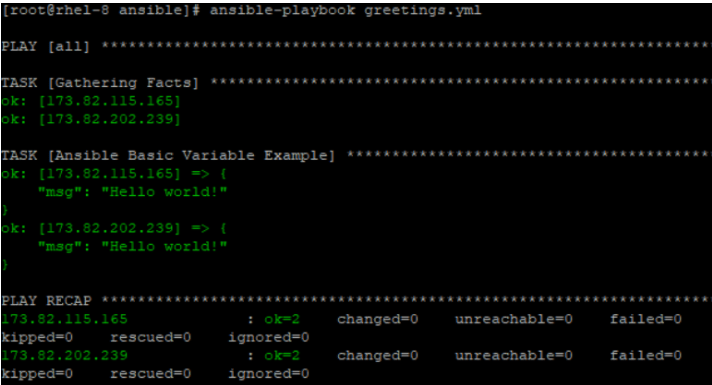
Here’s a simple playbook example:
- hosts: all
  vars:
    greeting: Hello world!

  tasks:
  - name: Ansible Basic Variable Example
    debug:
       msg: "{{ greeting }}"
In the above playbook, the greeting variable is substituted by the value Hello world! when the playbook is run. The playbook simply prints the message Hello world! when executed.
Ansible Facts
When running playbooks, the first task that Ansible does is the execution of the setup task. I’m pretty sure that you must have come across the output:
TASK: [Gathering facts] *********
Ansible facts are nothing but system properties of information about remote nodes that you have connected to. This information includes the System architecture, the OS version, BIOS information, system time and date, system uptime, IP address, and hardware information, etc.
To get the facts about any system simply use the setup module as shown in the command below:
# ansible -m setup hostname
For example:
# ansible -m setup database_server
Q8. What is the Scope of variables in Ansible?
Ans. You can define variables at different levels in the Ansible project and in a simple view, we must learn the below scopes.
Global Scope – when you set variables in Ansible configuration or via command line.
Play Scope – set in the play
Host Scope – when you set variables for hosts or groups inside the inventory, fact-gathering, or registered tasks.
Quiz Questions!
Check out these questions and see if you can answer them
Question1: Which command will you use to run a playbook called install.yml with Ansible?
A. ansible-playbook install.yml
B. ansible install.yml
C. ansible –playbook install.yml
D. ansible -p install.yml
Question2: What are the things Ansible can do?
A. Task automation
B.Configuration management
C.Deployment of application
D.All of the above
Question3: Which argument will you use to specify a variable for your Ansible playbook?
A. -c
B.-d
C.-e
D.None of them
Comment your answer in the comment box.
The right answer will be revealed in my next week’s blog.
Here is the answer to the question shared last week.
Question: What is the default format is used to write Ansible Playbooks?
a. JSON format
b. YAML format
c. XML format
d. HTML format
Answer: B
Explanation: The default format to write Ansible Playbooks in YAML format
If you are considering in-depth learning about Ansible in the coming days, then do join our WAITLIST and don’t miss an opportunity to attend a free class and gain a plethora of insights on the basics of Ansible.
I started my IT career in 2000 as an Oracle DBA/Apps DBA. The first few years were tough (<$100/month), with very little growth.
In 2004, I moved to the UK. After working really hard, I landed a job that paid me £2700 per month.
In February 2005, I saw a job that was £450 per day, which was nearly 4 times of my then salary.






![Microsoft Agentic AI Business Solutions Architect [AB-100] | K21 Academy](https://test.k21academy.com/wp-content/uploads/2025/11/Microsoft-Agentic-AI-Business-Solutions-Architect-AB-100-Exam-Overview1.png)


