




In today’s fast-paced software development world, continuous integration (CI) and continuous deployment (CD) have become crucial practices for ensuring code quality and accelerating the development process. Among the various tools available, CircleCI stands out as one of the most popular CI/CD platforms. It helps developers automate their build, test, and deployment pipelines seamlessly. In this beginner’s guide, we’ll explore the essentials of CI/CD, delve into how CircleCI works, and guide you through getting started with this powerful tool.
In this blog we will cover,
- Understanding CI/CD in Software Development
- Introduction to CircleCI
- Why CircleCI is a Great Choice for CI/CD
- Understanding the config.yml File in CircleCI
- Setting Up Your CircleCI Account
- Conclusion
Understanding CI/CD in Software Development
Continuous Integration (CI) and Continuous Deployment (CD) are practices that aim to make software development more efficient and reliable by automating the integration, testing, and deployment of code.
Continuous Integration (CI)
CI means that developers regularly merge their code changes into a shared repository, often several times a day. This helps keep everyone’s work in sync and ensures that changes from different developers fit together smoothly. Whenever a developer adds new code, automated systems quickly build and test it. This way, any bugs can be found and fixed early.
Continuous Deployment (CD)
CD is the next step after CI. It automatically deploys the application to the live environment once it passes all the tests. This process ensures that new features, bug fixes, and updates reach users as quickly as possible. In some setups, Continuous Delivery (also abbreviated as CD) refers to automatically moving changes to a staging area for further testing. However, pushing these changes to the live environment might still need manual approval.
Together, CI and CD form a CI/CD pipeline, which is a key part of modern DevOps practices. This pipeline helps teams deliver high-quality software faster and more reliably.

Note: Learn more about CI/CD here.
Introduction to CircleCI
CircleCI is a cloud-based platform that automates the process of CI/CD, enabling developers to continuously integrate and deploy their code. It supports various programming languages, frameworks, and cloud providers, making it versatile and easy to integrate into existing workflows.
With CircleCI, developers can automate repetitive tasks, such as running tests, building applications, and deploying them to production, which helps in catching issues early and ensuring consistent code quality.

Why CircleCI is a Great Choice for CI/CD
CircleCI is a tool that automates code testing and deployment, speeding up development and increasing reliability. Here’s why it’s a great choice:
- Easy Setup: Quickly connect your GitHub, Bitbucket, or GitLab repository and start building and testing with a few clicks.
- Wide Ecosystem Integration: Seamlessly integrate with tools like Slack, Jira, and Docker to streamline workflows and improve team collaboration.
- Flexible Configurations: Customize your pipeline for various languages and frameworks using a YAML file to add tests, linters, or deployment steps as needed.
Understanding the config.yml File in CircleCI
The config.yml file in CircleCI is a YAML configuration that outlines the steps for building and testing your software. Think of it as a detailed set of instructions for CircleCI, specifying tasks like code compilation, running tests, and deploying software. Customizing this file lets developers adapt the CI/CD pipeline to their project’s needs, ensuring efficient and accurate delivery.
Setting Up Your CircleCI Account
Before you can use CircleCI to automate your workflow, you’ll need to sign up for an account. To get started, follow these steps:
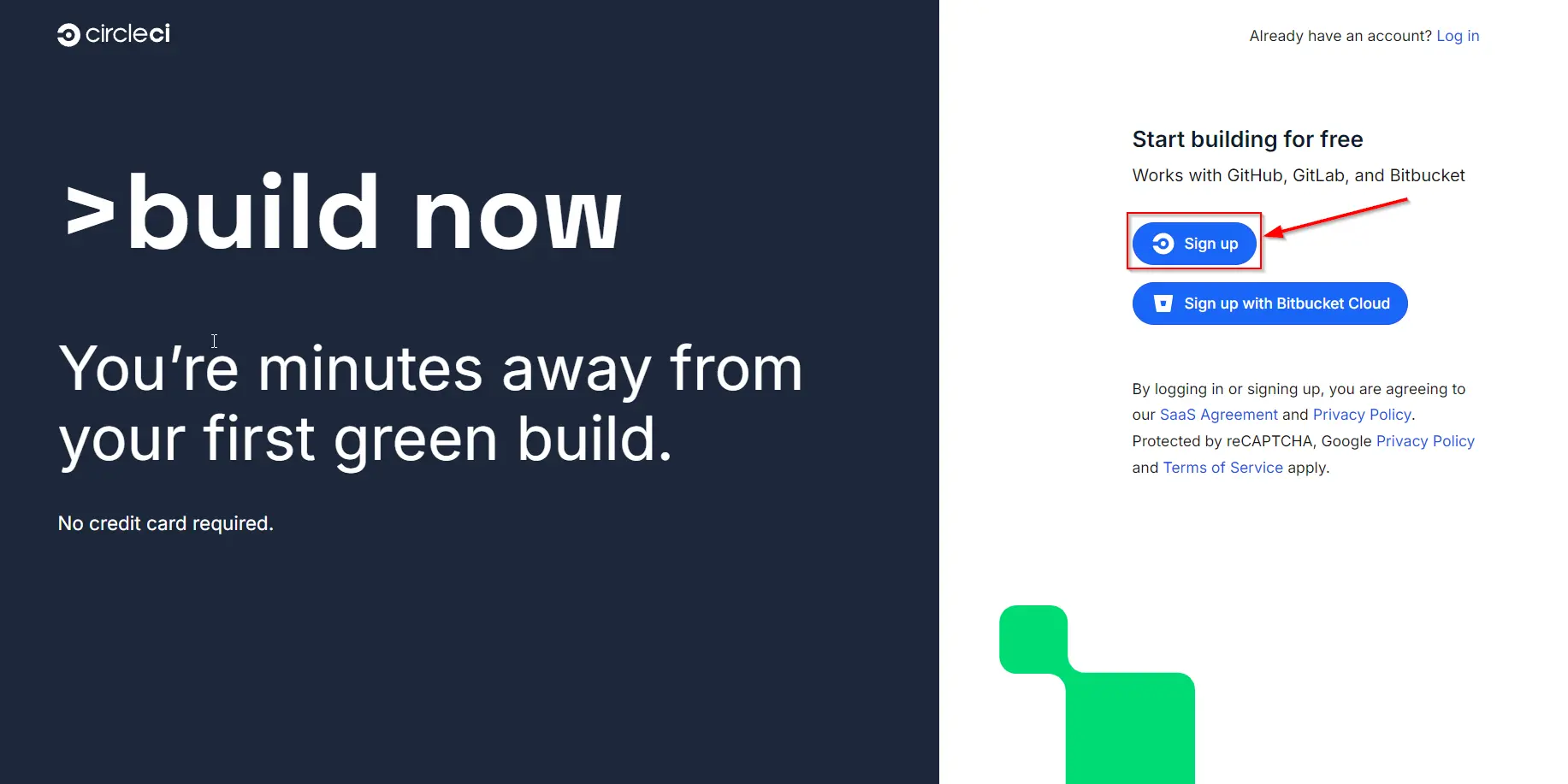
- Visit https://circleci.com/signup/ and click the Sign up button.
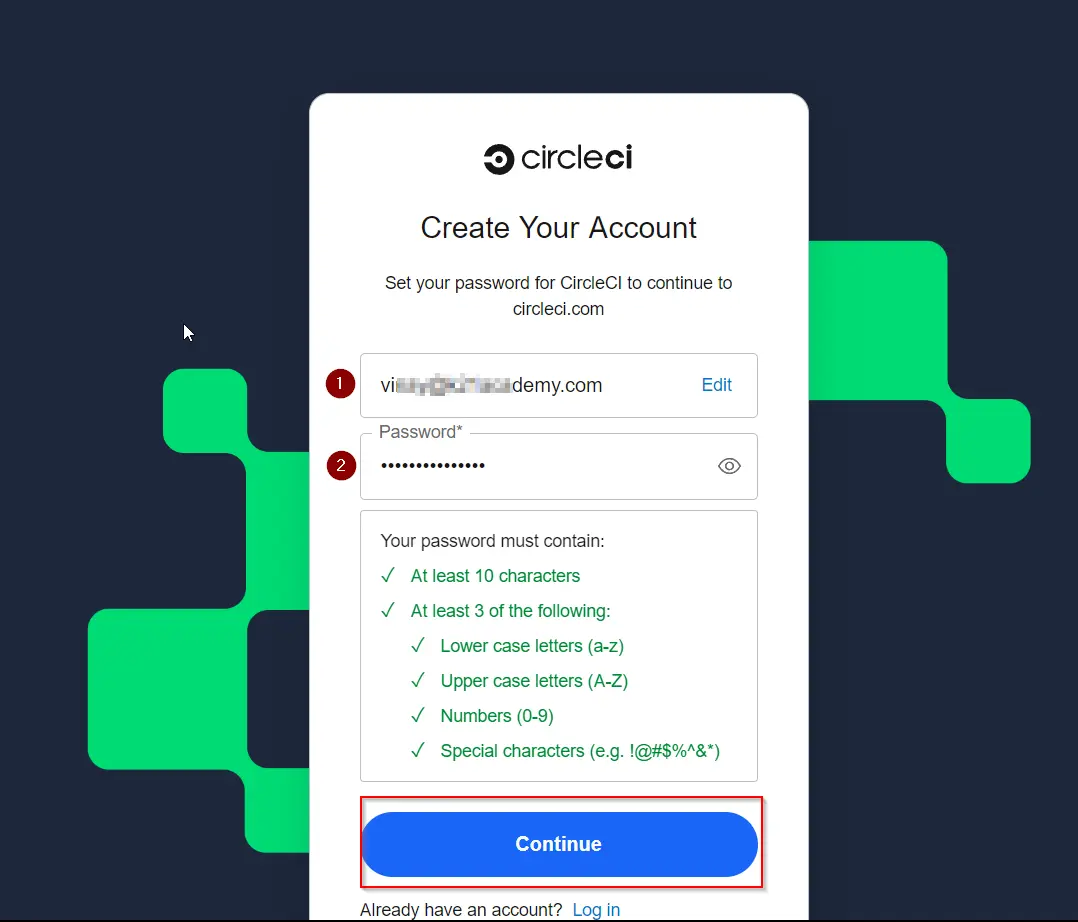
- After clicking Sign up, you’ll be directed to a new page. Enter your email address. Create a password that meets the listed requirements. Once done, click Continue.
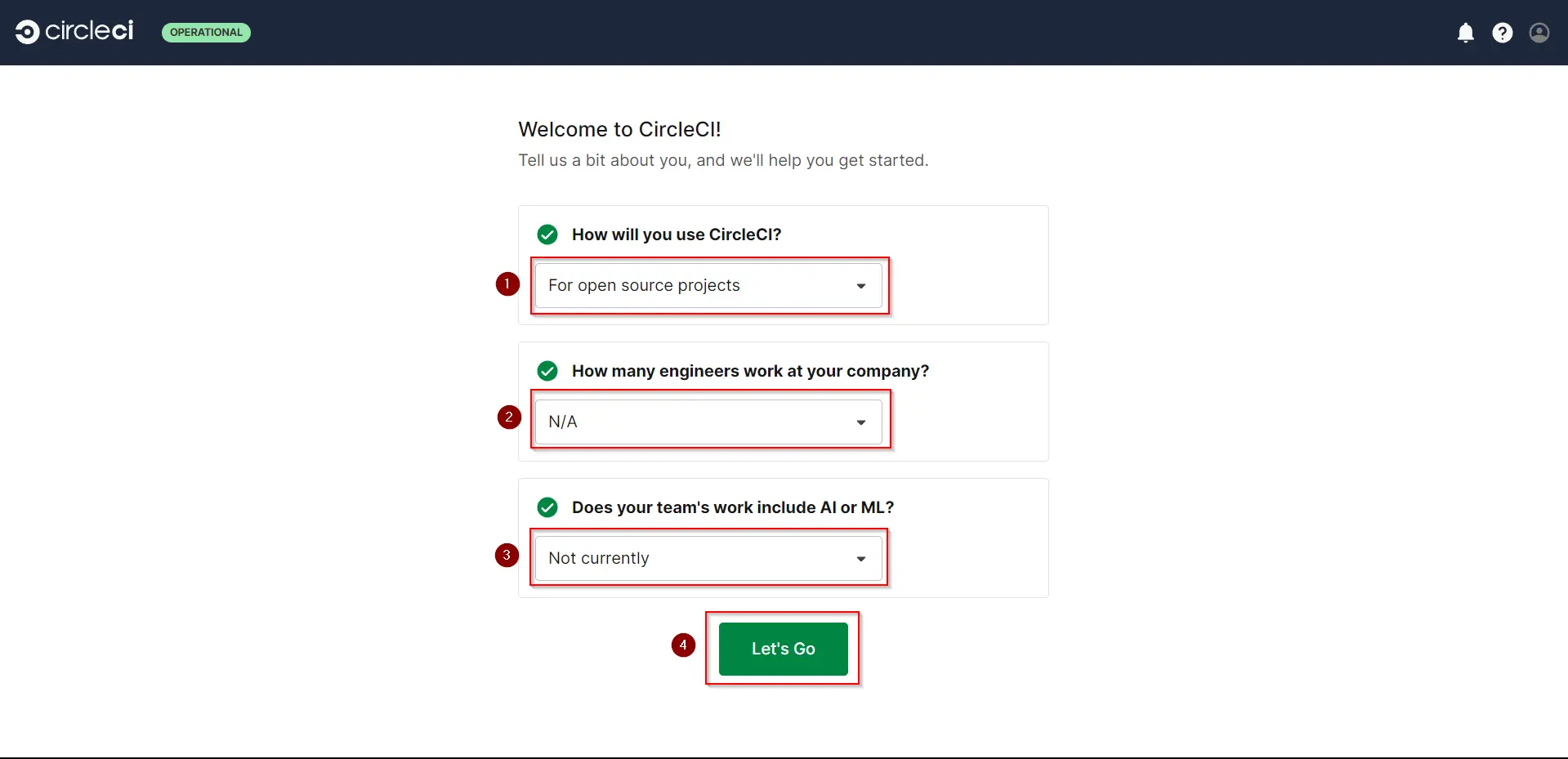
- Enter the required information as shown in the example provided, then click Let’s Go.
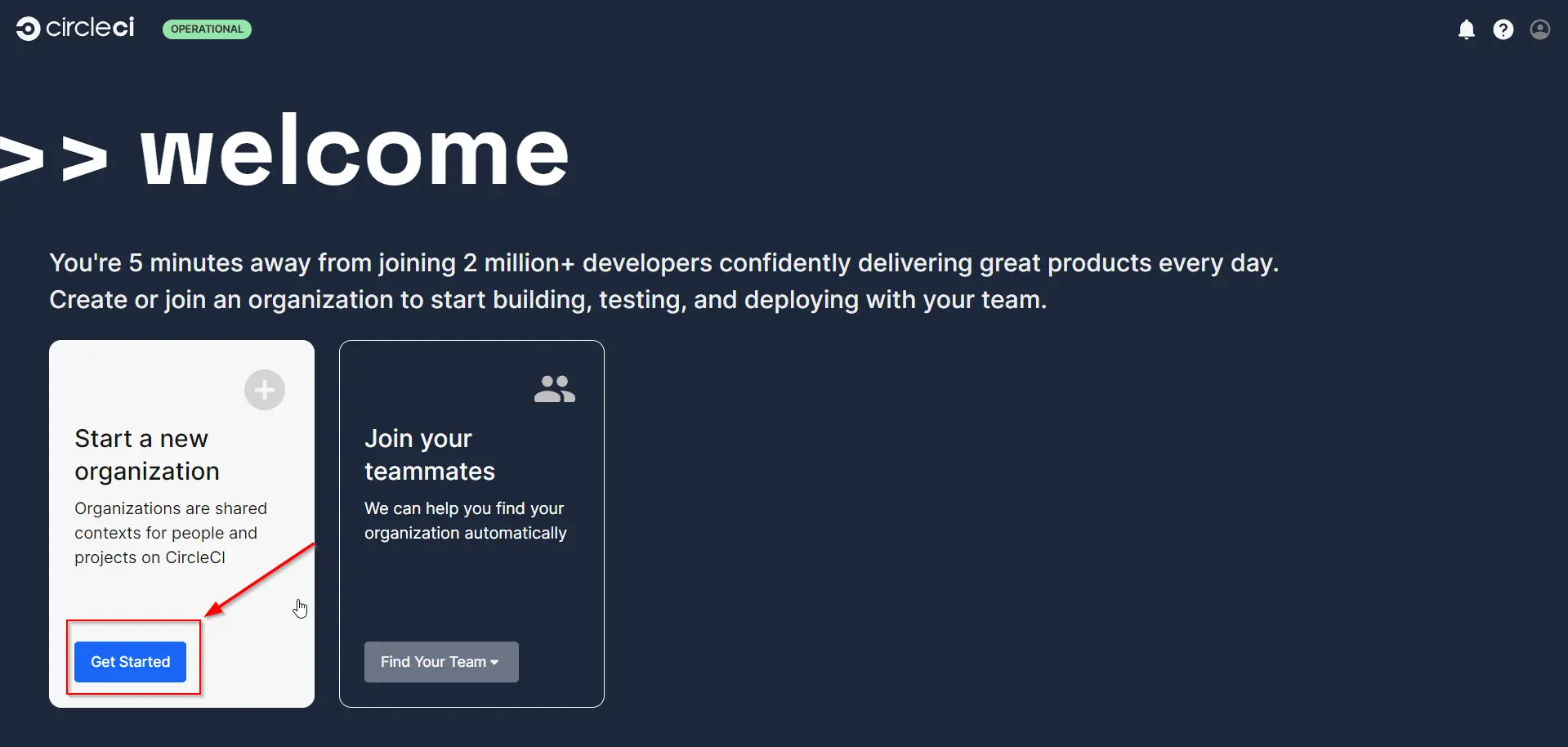
- On this page, click Get Started to proceed to the next page.
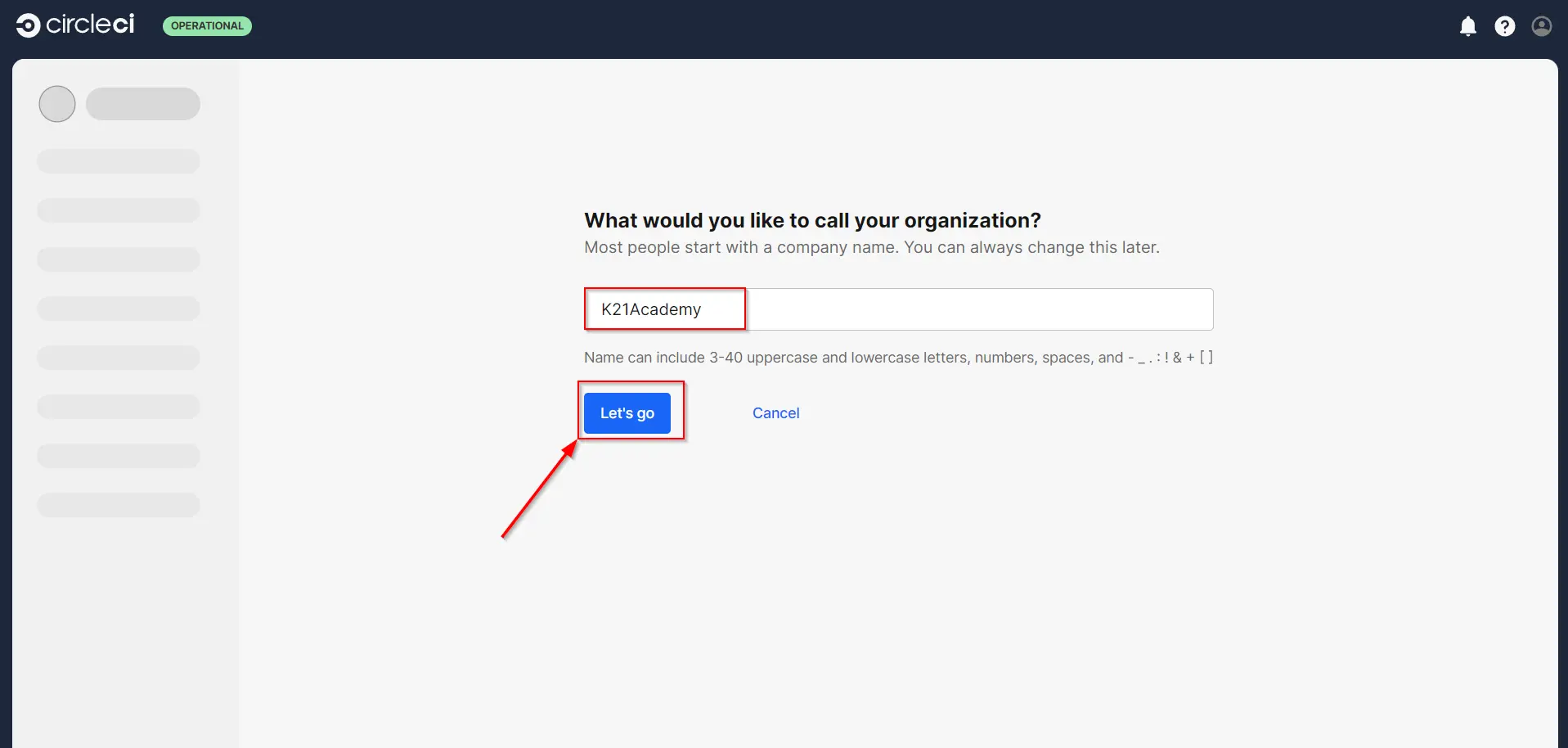
- Enter a name of your choice and click Let’s Go. Your dashboard will then open.
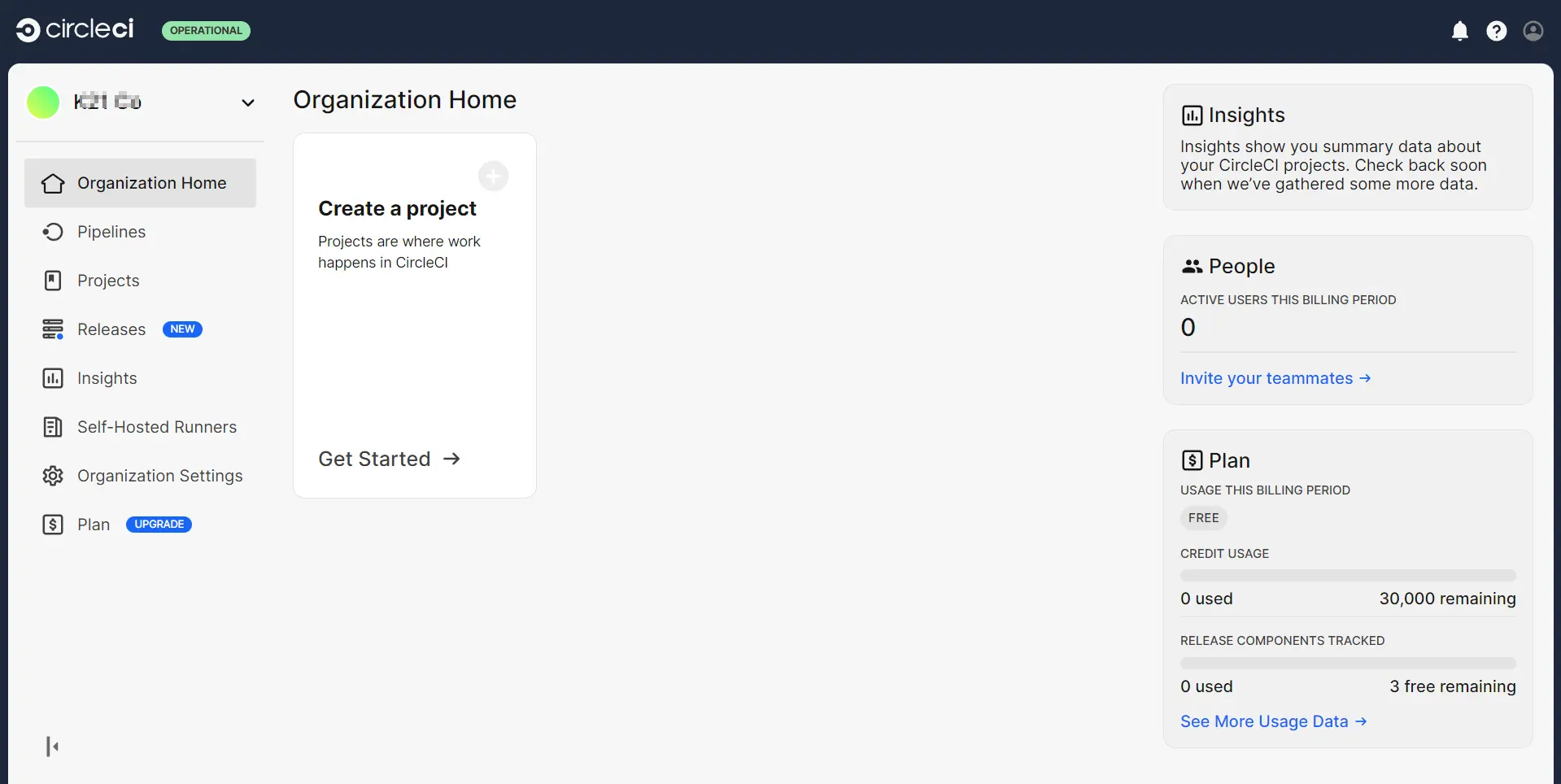
- The image above shows your dashboard, indicating that your CircleCI account has been successfully created.
Also Read: Our blog post on What is Jenkins?
Conclusion
In conclusion, CircleCI is a powerful tool that makes Continuous Integration (CI) and Continuous Deployment (CD) easier and more efficient. It helps developers automate the steps of building, testing, and deploying software, so they can focus on writing code. By using CircleCI, you can quickly set up a pipeline that fits your project’s needs, ensuring that your software is reliable and delivered faster. With its easy setup and seamless integration, It handles the automation, letting you concentrate on coding.
Frequently asked questions
Is CircleCI free to use?
CircleCI offers a free plan with limited resources, suitable for smaller projects or personal use. Paid plans with more resources and features are available for larger teams and projects.
Can I use CircleCI with GitHub and Bitbucket?
Yes, CircleCI integrates seamlessly with both GitHub and Bitbucket. You can connect your repositories from either platform and start building your CI/CD pipeline.
Can CircleCI deploy my application automatically?
Yes, CircleCI can automatically deploy your application if the build and tests pass. You can configure deployment steps in your config.yml file to deploy to various environments like staging or production.
What happens if a build fails on CircleCI?
If a build fails, CircleCI provides detailed logs that help you identify and fix the issue. You can rerun the build after making necessary changes.
Can CircleCI be used for mobile app development?
Yes, CircleCI supports mobile app development, including Android and iOS. You can configure your workflow to build, test, and deploy mobile apps as part of your CI/CD pipeline.
Can I run multiple builds in parallel on CircleCI?
Yes, CircleCI supports parallelism, allowing you to run multiple builds or tests simultaneously. This can significantly reduce the time it takes to complete your CI/CD pipeline.
Related/References
- Terraform Beginner’s Guide: Everything You Should Know
- Ansible for Beginners’: Step By Step Activity Guides/Hands-On Lab Exercise
- How to create CI CD Pipeline Jenkins Step by Step Guide
- Azure Pipelines | Uses | It’s Advantages
- Azure Pipelines vs Jenkins
Next Task For You
Begin your journey towards becoming a DevOps Expert and earn a lot more by landing a high-paying job.
Join FREE CLASS to learn more about the DevOps Roles and Responsibilities, Job opportunities related to DevOps in the market, and what to study Including Hands-On labs and projects you must perform to get your Dream job.
Click on the below image to Register for Our FREE Class on Mastering DevOps on Cloud: How to Build In-Demand Skills and Land High-Paying Jobs


![Microsoft Agentic AI Business Solutions Architect [AB-100] | K21 Academy](https://test.k21academy.com/wp-content/uploads/2025/11/Microsoft-Agentic-AI-Business-Solutions-Architect-AB-100-Exam-Overview1.png)