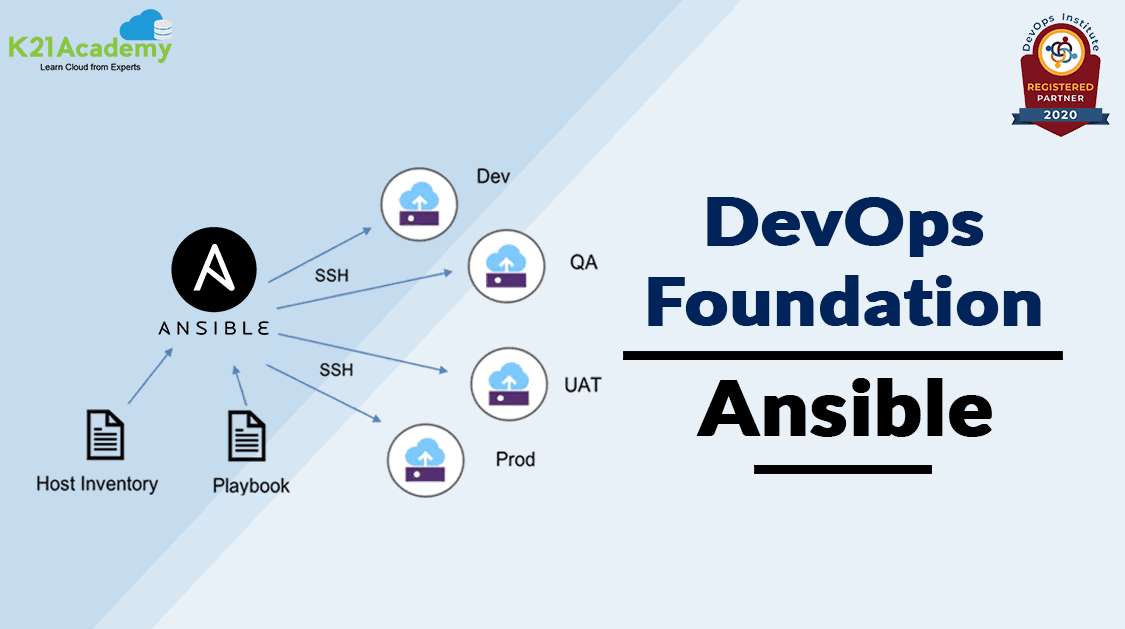



Ansible is the most widely used tool for Configuration Management in the industry since it is very simple to use yet powerful enough to automate complex multi-tier IT application environments. You will get the complete overview of Ansible Configuration Management Tool.
In this blog, we are going to cover what is Configuration Management, its tools such as Chef, Puppet, Ansible, Salt, and Ansible playbook, Ansible Galaxy, and Ansible Tower.
If you want to know more about DevOps certification please go through our previous blog on [DOFD] DevOps Foundation Certification Exam and everything you need to know about it.
Table of Conetnts:
- Configuration Management
- Configuration Management Tools
- Ansible Overview
- Ansible Playbook
- Ansible Galaxy
- Ansible Tower
Configuration Management
Configuration management is a form of IT Service Management(ITSM) that helps model IT infrastructure like managing production systems, server provisioning, and configuring various IT resources.
By using automation, it ensures faster software delivery, and hence Configuration management helps lay the foundation of DevOps and, it is popularly known as IT Automation.
Configuration Management Tools
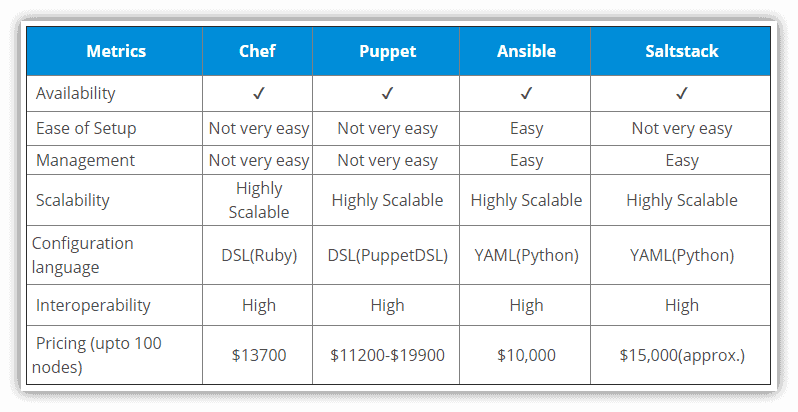
There are various configuration management tools but we will discuss a few industry-wide used tools such as Chef, Puppet, Ansible, and SaltStack. These tools are designed to deploy, configure, and manage servers and other resources.
The below table shows the comparison of these tools based on some metrics.
In this blog, we will discuss Ansible and its various concepts.
Ansible Overview
Ansible is an open-source IT Configuration tool, deployment, and orchestration tool. It mainly aims at a variety of automation challenges. This tool is very simple to use yet powerful enough to automate complex multi-tier IT application environments.
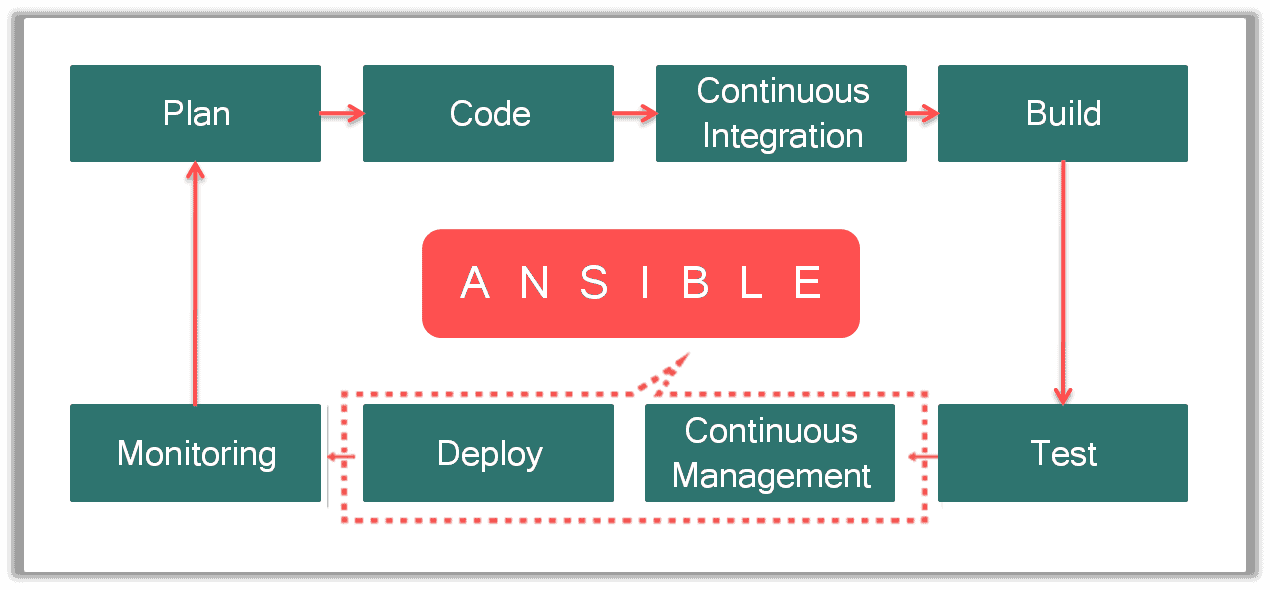
There are various other things that Ansible can do other than configuration management such as,
- Provisioning of infrastructure
- Configuration Management
- Application Deployment
- Security and Compliance
- Orchestration
Ansible Playbook
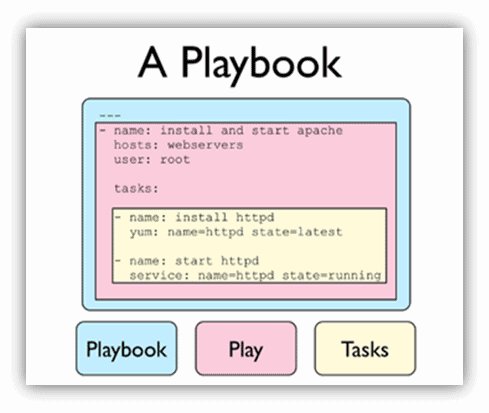
A Play is a list of tasks and roles that should be run. A playbook may consist of a single play or multiple plays. In simple terms, a playbook is a collection of commands, and executing a single command is called a Play.
Playbooks are written in YAML format. Playbooks are one of the core features of Ansible and they can launch tasks synchronously or asynchronously.
Ansible Galaxy
Galaxy is used for sharing Ansible content. Galaxy is a collection of roles and roles are nothing but a particular work that is to be done. For example, a developer has to do a developer role and an administrator has to do an admin role.
Roles can be added into Ansible PlayBook and immediately put to work. You’ll find roles for provisioning infrastructure, deploying applications, and all of the tasks you do every day.
Check Out: DevOps vs CloudOps, Know their major differences!
What is Ansible Tower
Ansible Tower (formerly AWX) is a web-based solution that makes Ansible even easier to use for IT teams. It is a hub for all of your automation tasks.
One of the top items in Ansible users’ wishlists was an easy-to-use GUI for managing quick deployments and monitoring one’s configurations. Hence, Ansible Tower came into the picture to fix this.
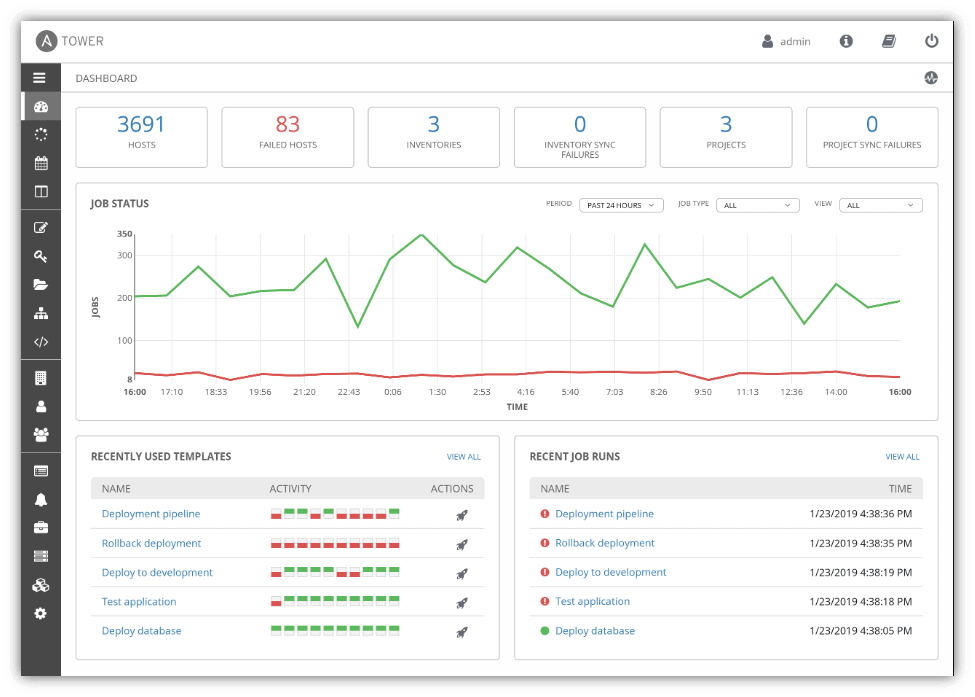
The various features of the Ansible Tower are specified below:
-
Role-based access control: You can set up teams and users in various roles. These can integrate with your existing LDAP or AD environment.
-
Job scheduling: Schedule your jobs and set repetition options.
-
Portal mode: This is a simplified view of automation jobs for newbies and less experienced Ansible users. This is an excellent feature as it lowers the entry barriers to starting to use Ansible.
-
Fully documented REST API: This allows you to integrate Ansible into your existing toolset and environment.
-
Tower Dashboard: Use this to quickly view a summary of your entire environment. Simplifies things for sysadmins while sipping their coffee.
-
Cloud integration: Tower is compatible with the major cloud environments: Amazon EC2, Rackspace, and Azure.
FAQs
What is Ansible?
Ansible is an open-source automation tool used for configuration management, application deployment, and orchestration.
How does Ansible differ from other configuration management tools?
Ansible is agentless, which means it doesn’t require any software to be installed on the managed nodes. It uses SSH for communication, making it simpler and more secure.
Can Ansible be used for network automation?
Yes, Ansible has modules specifically designed for network automation, allowing you to manage network devices using the same tool you use for servers.
What is the learning curve for Ansible?
Ansible is known for its simplicity. Even beginners can start writing playbooks quickly, thanks to its human-readable YAML syntax.
Is Ansible suitable for small businesses?
Absolutely. Ansible’s simplicity and ease of use make it an excellent choice for small businesses that need to automate their IT tasks without investing in complex infrastructure.
Related/References
- What Is DevOps | DevOps Principles | Advantages Of DevOps | Why DevOps?
- [DOFD] DevOps Foundation Certification Exam: Everything You Need To Know
- Git | Version Control System | Git Workflow | Advantages
- CI/CD Pipeline | Continuous Integration | Continuous Deployment
- [AZ-400] Microsoft Azure DevOps Certification Exam: Everything You Need To Know
- Certified Kubernetes Administrator (CKA) Certification Exam: Everything You Must Know
Next Task For You
Begin your journey towards becoming a DevOps Expert and earn a lot more by landing a high-paying job.
Join FREE CLASS to learn more about the DevOps Roles and Responsibilities, Job opportunities related to DevOps in the market, and what to study Including Hands-On labs and projects you must perform to get your Dream job.
Click on the below image to Register for Our FREE Class on Mastering DevOps on Cloud: How to Build In-Demand Skills and Land High-Paying Jobs


![Microsoft Agentic AI Business Solutions Architect [AB-100] | K21 Academy](https://test.k21academy.com/wp-content/uploads/2025/11/Microsoft-Agentic-AI-Business-Solutions-Architect-AB-100-Exam-Overview1.png)