





In this blog, we will look at what steps are taken into consideration while data preparation with Azure Databricks for machine learning.
Azure Databricks
Azure Databricks is a data analytics platform optimized for the Microsoft Azure cloud services platform. Azure Databricks offers three environments for developing data-intensive applications: Databricks SQL, Databricks Data Science & Engineering, and Databricks Machine Learning.
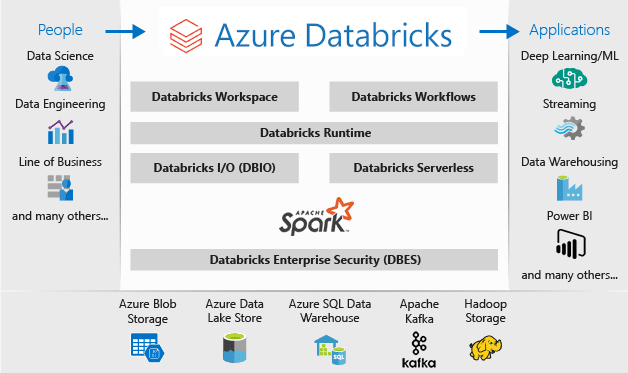
Databricks Machine Learning is an integrated end-to-end machine learning environment incorporating managed services for experiment tracking, model training, feature development and management, and feature and model serving.
Machine Learning
Machine learning is a data science technique used to extract patterns from data allowing computers to identify related data, forecast future outcomes, behaviors, and trends.
The result of training a machine learning algorithm is that the algorithm has learned the rules to map the input data to answers.
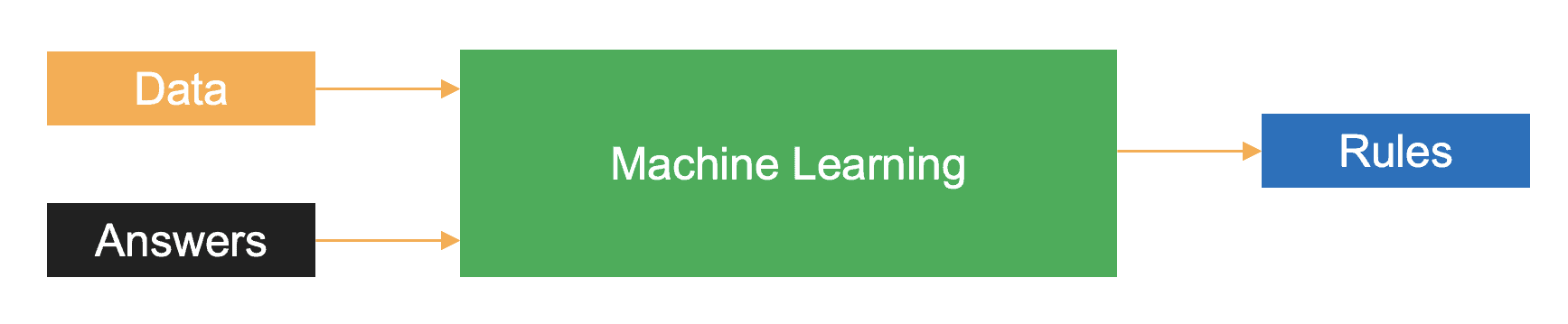
In machine learning, you train the algorithm with data and answers, also known as labels, and the algorithm learns the rules to map the data to their respective labels.
Databricks Environment Setup
Before we get into the four prominent data preparation with Azure Databricks steps for machine learning, let’s set up our data bricks environment.
Step 1: Create your Azure Free Trial Account if you do not have one or log in with your existing credentials.
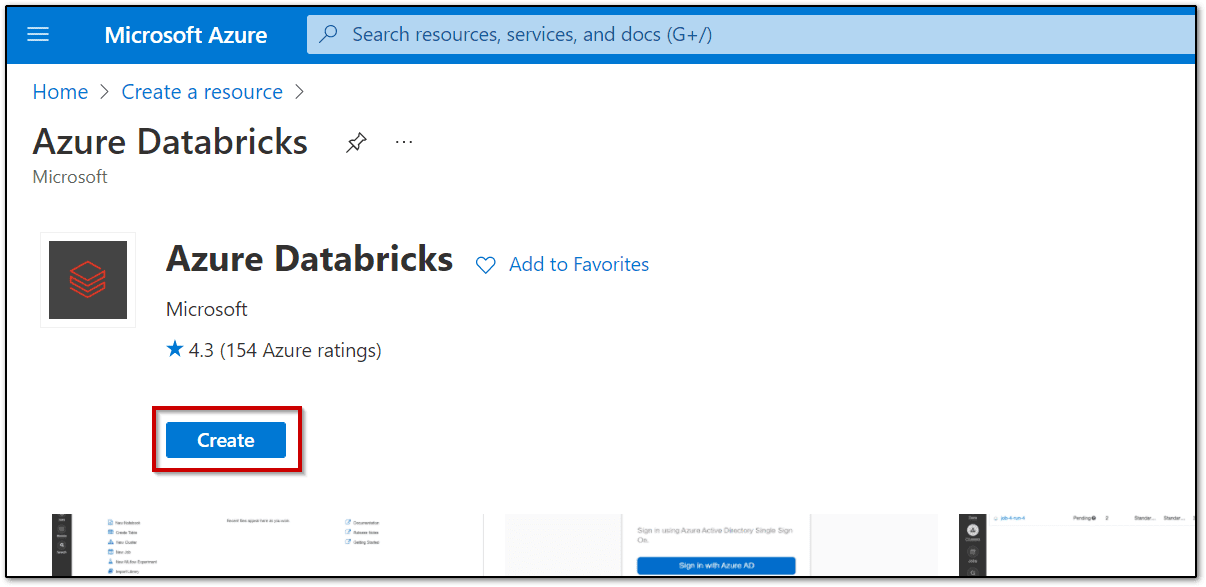
Step 2: In the Azure portal, create a new Azure Databricks resource, specifying the following settings as shown in the image. Validate the details and create the workspace.

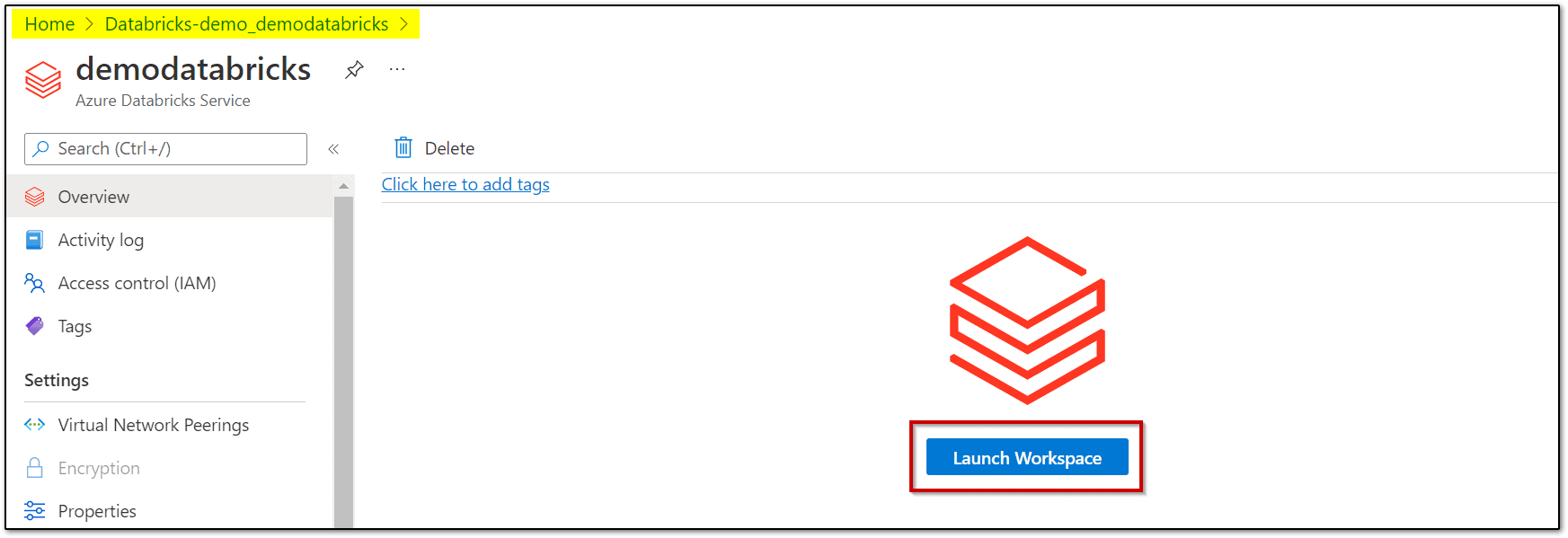
Step 3: Once the resource workspace is created, launch the Databricks workspace.
Step 4: In the left-hand menu of your Databricks workspace, select Compute, and then select + Create Cluster to add a new cluster.

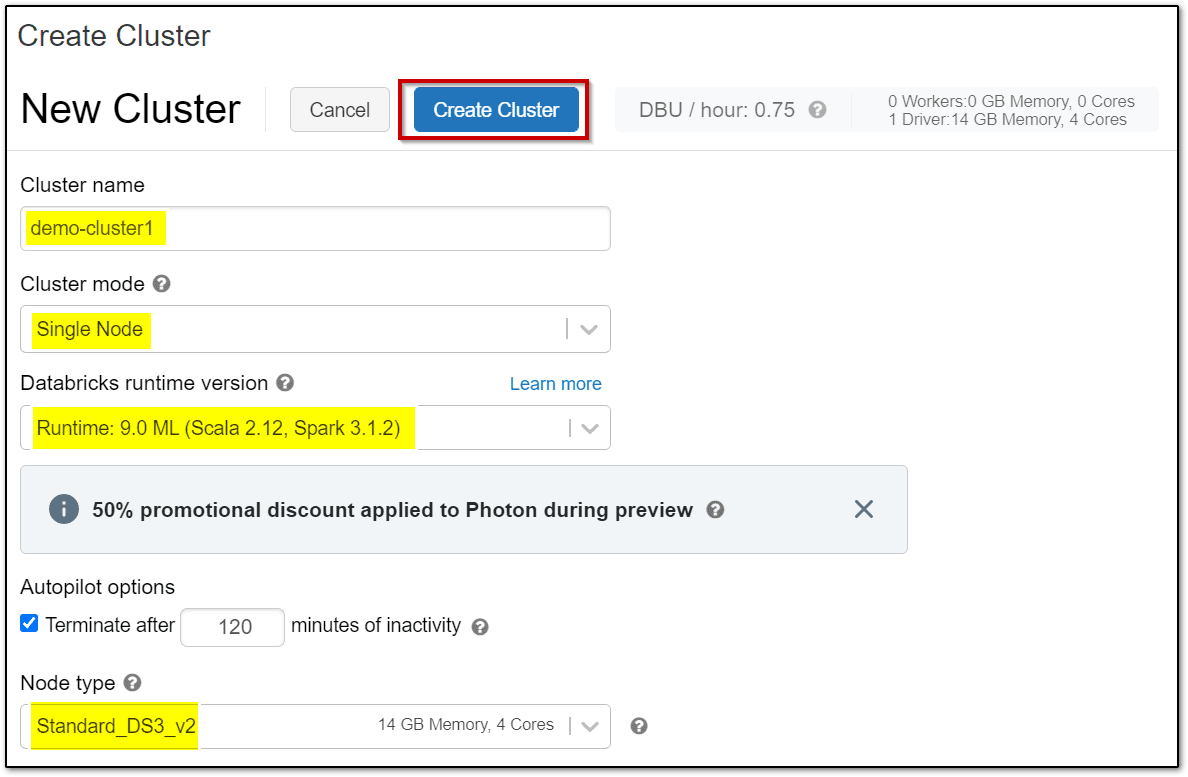
Step 5: Confirm that the cluster is created and running.
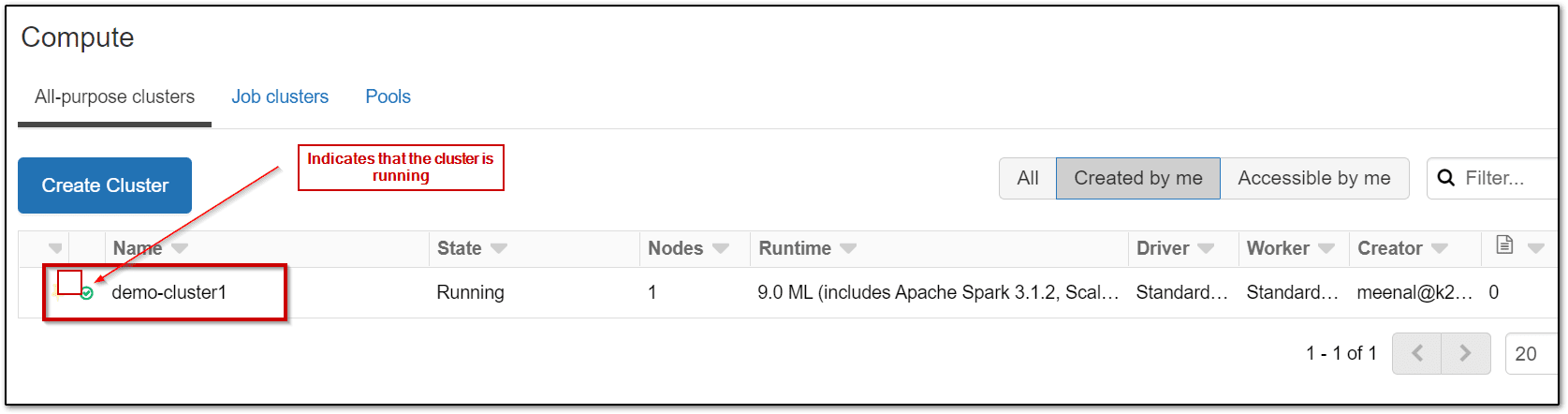
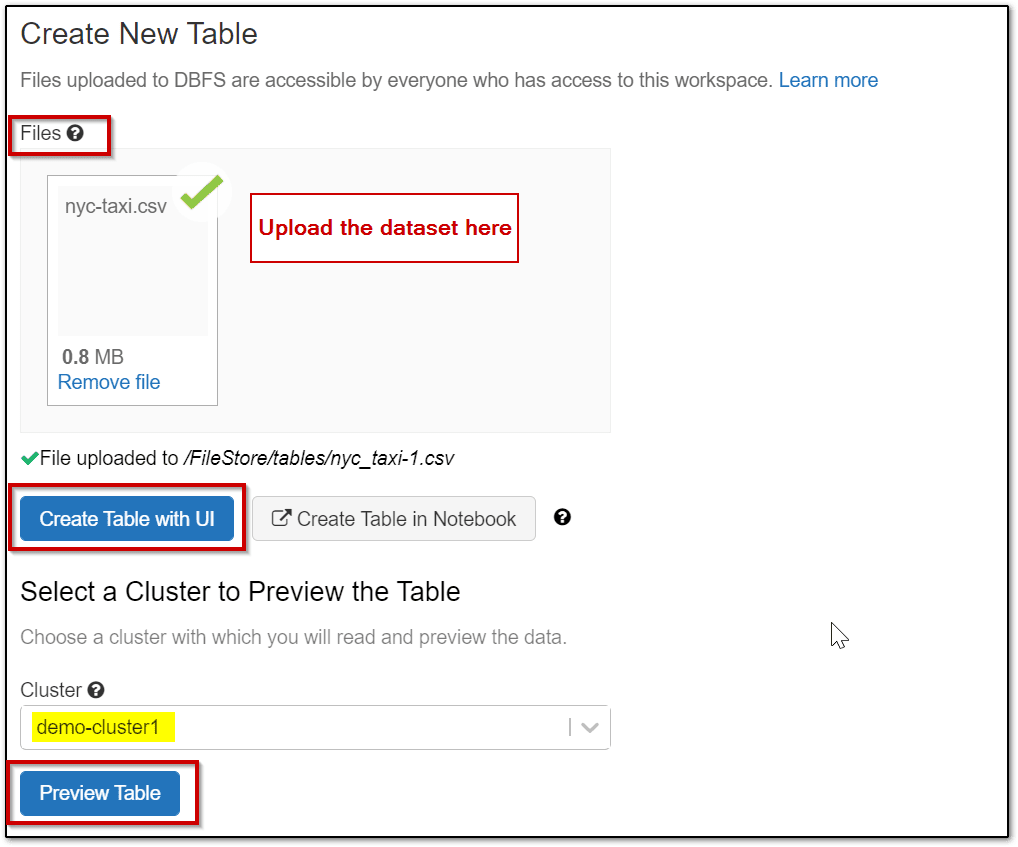
Step 6: Load the dataset which is to be used for the experiment in the Azure Databricks workspace for machine learning. Here we are using nyc-train dataset. Download the dataset on your laptop.
- On the Data page in the Databricks Workspace, select the option to Create Table.
- In the Files area, select browse and then browse to the nyc-taxi.csv file you downloaded.
- After the file is uploaded to the workspace, select Create Table with UI. Then select your cluster and select Preview Table.
Step 7: Check & verify the attribute fields and click on create a table.

Step 8: In the Azure Databricks Workspace, using the command bar on the left, select Workspace -> select Users -> ☗ your_user_name. In the blade that appears, select the downwards pointing chevron (v) next to your name, and select Import.
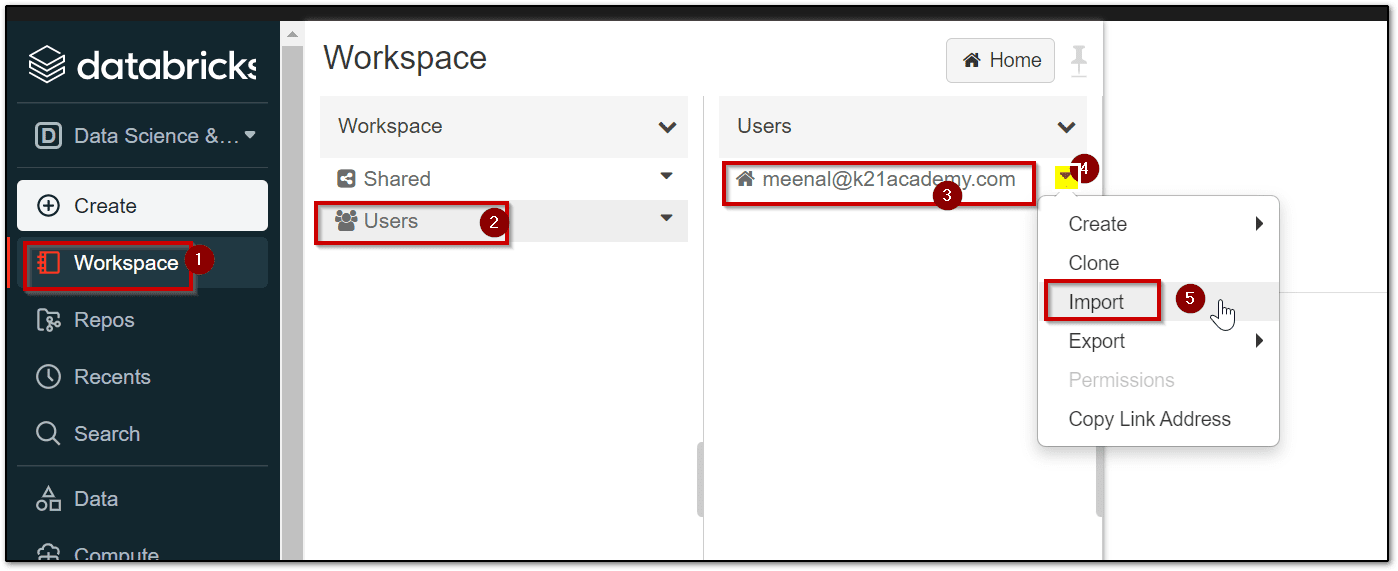
Step 9: On the Import Notebooks dialog, import the notebook archive.
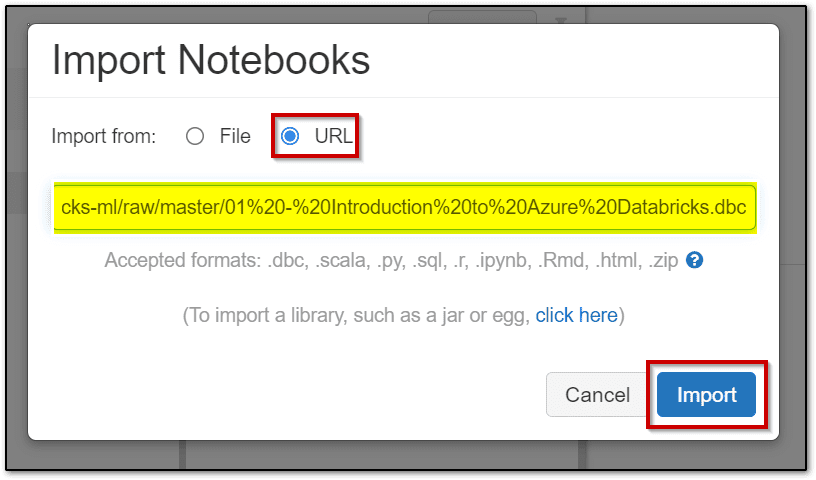
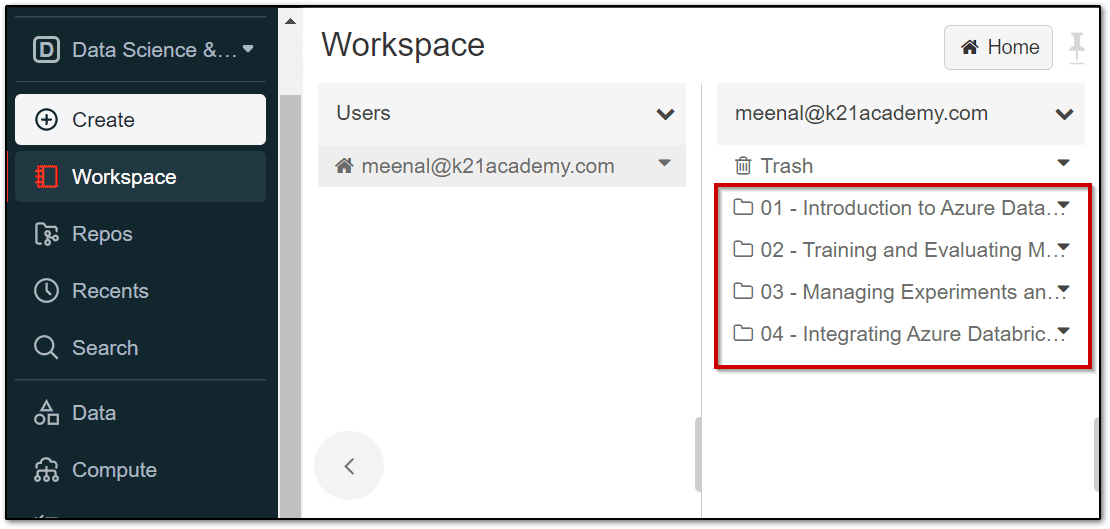
Step 10: Once the notebooks are imported, open the 2nd Notebook and attach your compute cluster.

Now you are all set to perform the data preparation with Azure Databricks steps in the notebook
Data Preparation with Azure Databricks Steps
Big Data has become part of the lexicon of organizations worldwide, as more and more organizations look to leverage data to drive more informed business decisions. With this evolution in business decision-making, the amount of raw data collected, along with the number and diversity of data sources, is growing at an astounding rate.
Now let’s look at the four main data preparation steps:
- Data Cleaning
- Feature Engineering
- Data Scaling
- Data Encoding
1.) Perform Data Cleaning
Raw data is often noisy and unreliable and may contain missing values and outliers. Using such data for Machine Learning can produce misleading results. Thus, data cleaning of the raw data is one of the most important steps in preparing data for Machine Learning. As a Machine Learning algorithm learns the rules from data, having clean and consistent data is an important factor in influencing the predictive abilities of the underlying algorithms.
Data cleaning deals with issues in the data quality such as errors, missing values, and outliers and there are several techniques in dealing with data quality issues. Common data cleaning strategies include:
- Imputation of null values
- converting data types
- Duplicate Records
- Outliers
A very common option to work with missing data is to impute the missing values with the best guess for their value.

2.) Perform Feature Engineering
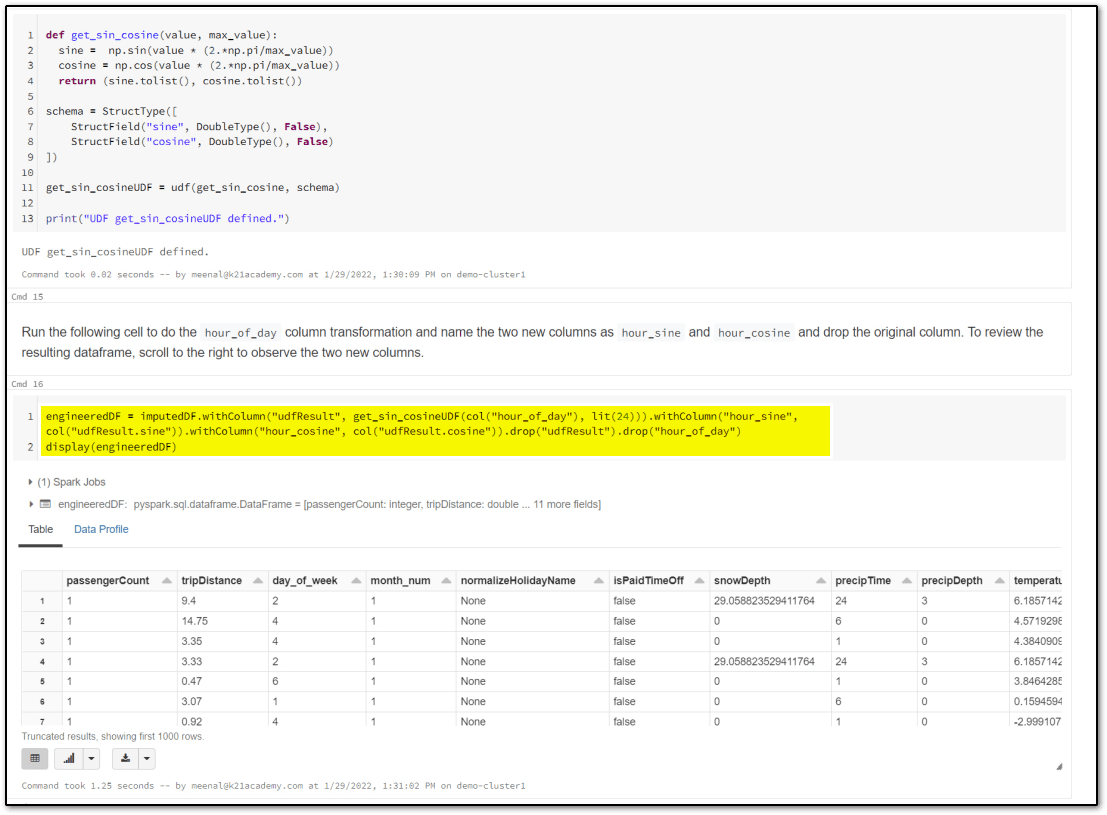
Machine learning models are as strong as the data they are trained on. Often it is important to derive features from existing raw data that better represent the nature of the data and thus help improve the predictive power of the machine learning algorithms. This process of generating new predictive features from existing raw data is commonly referred to as feature engineering.
3.) Perform Data Scaling
Scaling numerical features is an important part of preprocessing data for machine learning. Typically the range of values each input feature takes varies greatly between features. There are many machine learning algorithms that are sensitive to the magnitude of the input features and thus without feature scaling, higher weights might get assigned to features with higher magnitudes irrespective of the importance of the feature on the predicted output.
There are two common approaches to scaling numerical features:
- Normalization: mathematically rescales the data into the range [0, 1].
- Standardization: rescales the data to have mean = 0 and standard deviation = 1.
4.) Perform Data Encoding
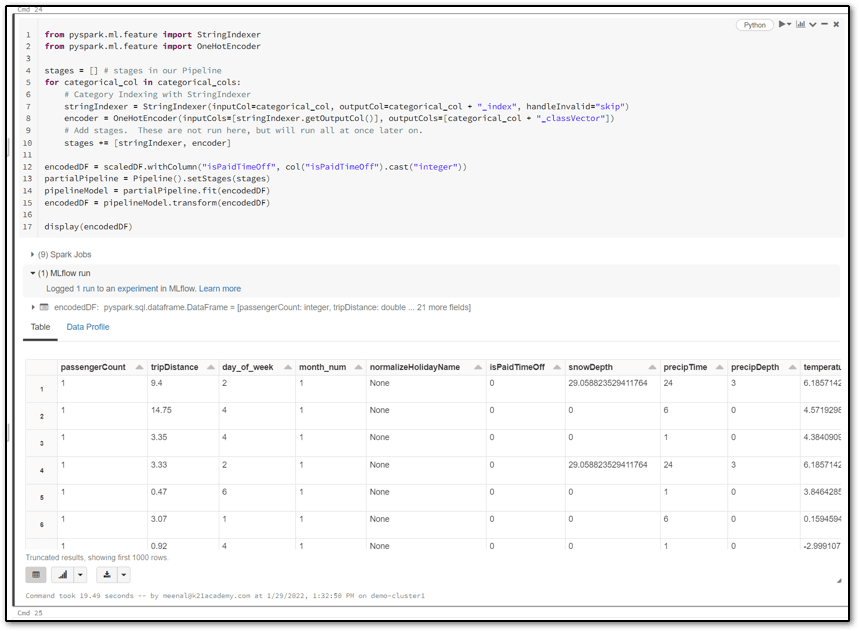
A common type of data that is prevalent in machine learning is called categorical data. Categorical data implies discrete or a limited set of values. Two common approaches for encoding categorical data are:
- Ordinal encoding: converts categorical data into integer codes ranging from 0 to (number of categories – 1)
- One-hot encoding: often the recommended approach, and it involves transforming each categorical value into n (= number of categories) binary values, with one of the 1, and all others 0.
One-hot encoding is often preferred over ordinal encoding because it encodes each category item with equal weight.
Hope this blog helps you in understanding the concepts & steps of data preparation with Azure Databricks for Machine Learning.
Azure Databricks for beginners
Azure Databricks is a powerful data analytics and machine learning platform built on Apache Spark, specifically optimized for Microsoft Azure. For beginners, it’s an accessible way to process large datasets and develop machine learning models without needing deep infrastructure knowledge. It provides a collaborative environment that allows data scientists, data engineers, and business analysts to work together in a unified workspace. With features like auto-scaling clusters, seamless integration with Azure storage solutions, and support for multiple programming languages (including Python, SQL, Scala, and R), Azure Databricks makes it easy to analyze, visualize, and transform data. Beginners will find its user-friendly notebooks particularly helpful for experimenting with code, and its compatibility with Azure Machine Learning enables a smooth workflow from data preparation to model deployment.
Azure Databricks documentation
Azure Databricks is a collaborative, cloud-based platform designed to streamline big data and machine learning workflows. Built on Apache Spark, it integrates seamlessly with Azure’s ecosystem, making it ideal for businesses looking to analyze and transform data at scale. Databricks allows data engineers and data scientists to work together in a unified workspace, facilitating faster and more efficient data processing and model building.
With Azure Databricks, users benefit from a fully managed Spark environment, which reduces setup time and automates cluster management. This makes it easy to experiment with and deploy machine learning models. The platform also supports popular programming languages like Python, R, Scala, and SQL, making it accessible for a wide range of users. Additionally, it integrates with other Azure services, such as Azure Machine Learning and Azure Data Lake, creating a comprehensive data and AI solution.
Overall, Azure Databricks offers a robust environment for processing vast amounts of data, supporting both ETL and advanced analytics tasks, and is a powerful tool for any data-driven organization looking to harness the full potential of their data.
Azure Databricks Machine Learning Tutorial
Azure Databricks is a collaborative, Apache Spark-based analytics platform optimized for Microsoft Azure. It offers a unified workspace that integrates with Azure Machine Learning, enabling data engineers, data scientists, and analysts to work together efficiently. For beginners, Azure Databricks provides an accessible entry into big data processing and machine learning with its seamless support for Python, R, Scala, and SQL, along with an intuitive notebook environment.
In this tutorial, you’ll learn the essentials of building machine learning models on Azure Databricks, from data ingestion and cleaning to model training and evaluation. Starting with data preparation, you can use Spark’s distributed computing capabilities to handle large datasets, transforming raw data into a format suitable for machine learning. Databricks also simplifies model training, as it offers a managed environment with MLflow integration, allowing for streamlined tracking of model parameters and performance metrics. Once the model is trained, you can easily deploy it on Azure for real-time or batch inference, leveraging the scalability and security of the Azure cloud.
This hands-on approach will provide a clear understanding of machine learning workflows in a cloud-based environment, setting a foundation for more advanced analytics and data science projects.
FAQs
Why is data splitting crucial in machine learning, and how is it typically done?
Data splitting is crucial in machine learning to assess a model's ability to generalize to new, unseen data, thereby preventing overfitting. Typically, datasets are divided into training and testing sets, enabling the model to learn patterns and then be evaluated objectively.
How does proper data splitting improve model generalization and reliability?
Proper data splitting enhances model generalization and reliability by ensuring the model learns patterns rather than memorizing data. Splitting into training, validation, and test sets allows unbiased performance evaluation, reducing overfitting and improving real-world prediction accuracy.
What is dimensionality reduction, and how is it applied in data preparation?
Proper data splitting enhances model generalization and reliability by ensuring the model learns patterns rather than memorizing data. Splitting into training, validation, and test sets allows unbiased performance evaluation, reducing overfitting and improving real-world prediction accuracy.
Why is data preparation not a one-time task?
Data preparation is not a one-time task because data continually evolves, requiring regular cleaning, transformation, and validation. Frequent updates ensure models remain accurate, relevant, and capable of handling new patterns or changes in data.
Why is data transformation important in machine learning?
Data transformation is crucial in machine learning as it prepares raw data for modeling, improving data consistency, scale, and structure. Proper transformation enhances model accuracy, reduces bias, and ensures robust performance across diverse data scenarios.
What are common misconceptions about data preparation for machine learning?
A common misconception about data preparation in machine learning is that it’s a quick, straightforward process. In reality, data preparation is often the most time-intensive step, involving data cleaning, transformation, and careful handling to ensure model accuracy.
What are the drawbacks of relying solely on manual data preparation?
Relying solely on manual data preparation can be time-consuming, prone to human error, and inconsistent. It often lacks scalability, limiting adaptability to large datasets and complex transformations, which impacts the accuracy and efficiency of machine learning models.
Conclusion
To effectively prepare data for machine learning, Azure Databricks provides a robust environment with a range of tools for data ingestion, cleaning, transformation, and exploration. Through its integration with Azure services, Databricks allows seamless access to various data sources, enabling data engineers and scientists to quickly process large datasets. Key features like Apache Spark support, collaborative notebooks, and scalable compute resources make Azure Databricks an ideal platform for building high-quality datasets. By automating data preprocessing steps, users can ensure that data is well-structured and ready for machine learning models, ultimately leading to more accurate and reliable predictions.
- Join Our Generative AI Whatsapp Community
- Azure AI/ML Certifications: Everything You Need to Know
- Azure GenAI/ML : Step-by-Step Activity Guide (Hands-on Lab) & Project Work
- Azure Machine Learning Studio
- [DP-100] Microsoft Certified Azure Data Scientist Associate: Everything you must know
- Microsoft Azure Data Scientist DP-100 FAQ
- MLOps on Azure
- Machine Learning Service Workflow
- Azure ML Model in Production
- Datasets & Datastores in Azure
Next Task: Enhance Your Azure AI/ML Skills


![Microsoft Agentic AI Business Solutions Architect [AB-100] | K21 Academy](https://test.k21academy.com/wp-content/uploads/2025/11/Microsoft-Agentic-AI-Business-Solutions-Architect-AB-100-Exam-Overview1.png)



