





Databricks Machine Learning is an integrated end-to-end machine learning environment incorporating managed services for experiment tracking, model training, feature development and management, and feature and model serving. The diagram shows how the capabilities of Databricks map to the steps of the model development and deployment process.
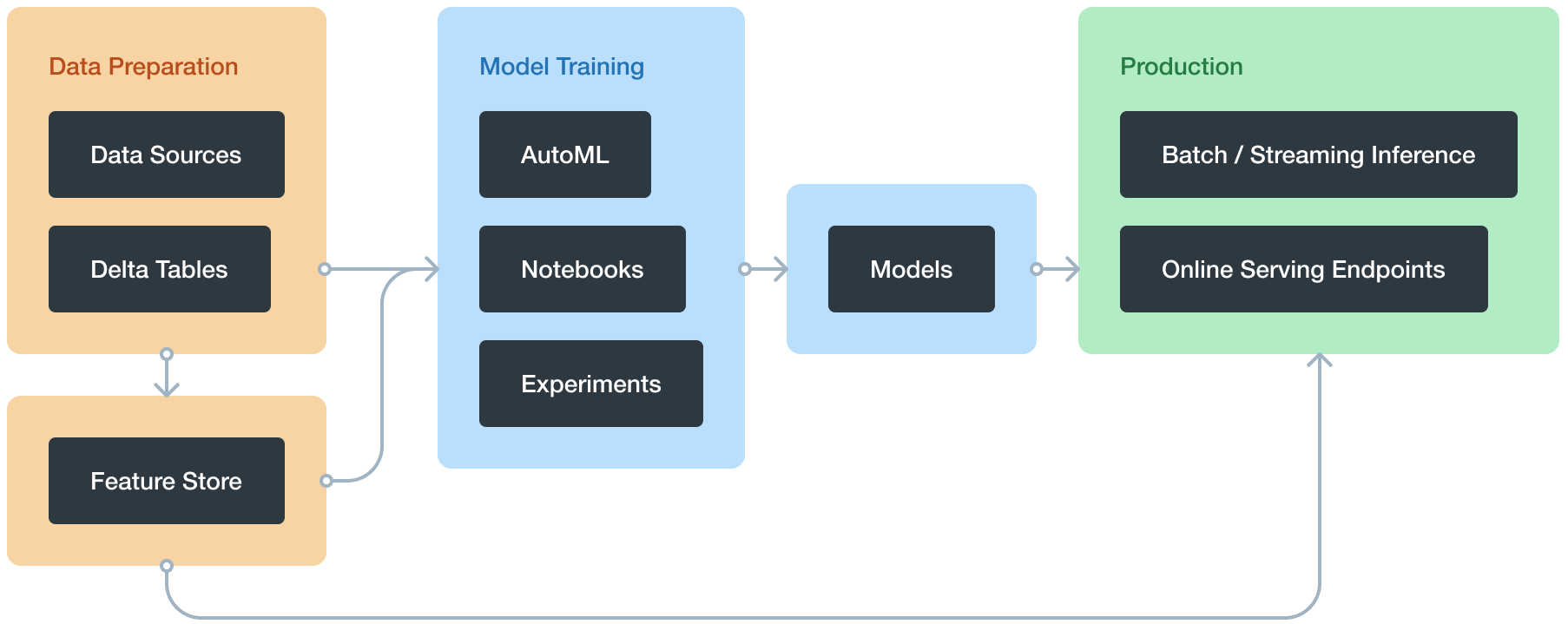
Databricks Machine Learning overview
With Databricks Machine Learning, you can:
- Train models either manually or with AutoML
- Track training parameters and models using experiments with MLflow tracking
- Create feature tables and access them for model training and inference
- Share, manage, and serve models using Model Registry
You also have access to all of the capabilities of the Databricks workspace, such as notebooks, clusters, jobs, data, Delta tables, security and admin controls, and so on.
Train Model Manually
This section covers how to train machine learning and deep learning models on Databricks, and includes examples using many popular libraries. You can also use Databricks AutoML, which automatically prepares a dataset for model training, performs a set of trials using open-source libraries such as scikit-learn and XGBoost, and creates a Python notebook with the source code for each trial run so you can review, reproduce, and modify the code.
- Machine Learning
- scikit-learn
- MLlib
- XGBoost
- Deep Learning
- Best practices for deep learning on Databricks
- Get started with TensorFlow Keras in Databricks
- TensorFlow
- PyTorch
- Distributed training
- Deep Learning Pipelines
- Hyperparameter tuning
- Hyperparameter tuning with Hyperopt
- Automated MLflow tracking
Databricks AutoML
Databricks AutoML helps you automatically apply machine learning to a dataset. It prepares the dataset for model training and then performs and records a set of trials, creating, tuning, and evaluating multiple models. It displays the results and provides a Python notebook with the source code for each trial run so you can review, reproduce, and modify the code. AutoML also calculates summary statistics on your dataset and saves this information in a notebook that you can review later.
AutoML automatically distributes hyperparameter tuning trials across the worker nodes of a cluster.
Requirements
- Databricks Runtime 8.3 ML or above. For the general availability (GA) version, Databricks Runtime 10.4 LTS ML or above.
- For time series forecasting, Databricks Runtime 10.0 ML or above.
- No additional libraries other than those provided with the Databricks Runtime ML runtime can be installed on the cluster.
- On a high concurrency cluster, AutoML is not compatible with table access control or credential passthrough.
- To use Unity Catalog with AutoML, the cluster security mode must be Single User, and you must be the designated single user of the cluster.
AutoML algorithms
Databricks AutoML creates and evaluates models based on these algorithms:
- Classification models
- scikit-learn models
- Decision trees
- Random forests
- Logistic regression
- XGBoost
- LightGBM
- scikit-learn models
- Regression models
- Forecasting
- Prophet
- Auto-ARIMA (Available in Databricks Runtime 10.3 ML and above.)
Track machine learning training runs
The MLflow tracking component lets you log source properties, parameters, metrics, tags, and artifacts related to training a machine learning model
MLflow tracking is based on two concepts, experiments and runs:
- An MLflow experiment is the primary unit of organization and access control for MLflow runs; all MLflow runs belong to an experiment. Experiments let you visualize, search for, and compare runs, as well as download run artifacts and metadata for analysis in other tools.
- An MLflow run corresponds to a single execution of model code. Each run records the following information:
- Source: Name of the notebook that launched the run or the project name and entry point for the run.
- Version: Notebook revision if run from a notebook or Git commit hash if run from an MLflow Project.
- Start & end time: Start and end time of the run.
- Parameters: Model parameters saved as key-value pairs. Both keys and values are strings.
- Metrics: Model evaluation metrics saved as key-value pairs. The value is numeric. Each metric can be updated throughout the course of the run (for example, to track how your model’s loss function is converging), and MLflow records and lets you visualize the metric’s history.
- Tags: Run metadata saved as key-value pairs. You can update tags during and after a run completes. Both keys and values are strings.
- Artifacts: Output files in any format. For example, you can record images, models (for example, a pickled scikit-learn model), and data files (for example, a Parquet file) as an artifact.
The MLflow Tracking API logs parameters, metrics, tags, and artifacts from a model run. The Tracking API communicates with an MLflow tracking server. When you use Databricks, a Databricks-hosted tracking server logs the data. The hosted MLflow tracking server has Python, Java, and R APIs.
Databricks Feature Store
Databricks Feature Store is a centralized repository of features. It enables feature sharing and discovery across your organization and also ensures that the same feature computation code is used for model training and inference.
The Databricks Feature Store library is available only on Databricks Runtime for Machine Learning and is accessible through notebooks and jobs.
Requirements
Databricks Runtime 8.3 ML or above.
MLflow Model Registry on Databricks
MLflow Model Registry is a centralized model repository and a UI and set of APIs that enable you to manage the full lifecycle of MLflow Models. Model Registry provides:
- Chronological model lineage (which MLflow experiment and run produced the model at a given time).
- Model serving.
- Model versioning.
- Stage transitions (for example, from staging to production or archived).
- Webhooks so you can automatically trigger actions based on registry events.
- Email notifications of model events.
You can also create and view model descriptions and leave comments.
You can work with the model registry using either the Model Registry UI or the Model Registry API.
Machine learning Model Example
A practical example of a machine learning model is a spam detection system used in email services. This model is trained to classify emails as “spam” or “not spam” based on specific characteristics in the email content. Using supervised learning, the model is initially fed with a labeled dataset of emails, where each email is tagged as either spam or not. Through this training, the model learns to recognize common patterns associated with spam emails, such as certain keywords, phrases, or formatting. Once trained, the model can analyze new, incoming emails, assigning them a probability score to determine whether they are spam or genuine. This type of classification model is widely implemented across various platforms, and it continuously improves over time as it encounters new data, making it a dynamic and highly effective application of machine learning.
Machine Learning Model for Prediction
In machine learning, predictive models analyze historical data to forecast future outcomes or identify patterns within new data. These models can range from simple linear regression, which predicts outcomes by finding relationships between variables, to more complex neural networks, which process data through layers of interconnected nodes, simulating human neural activity. Predictive models often leverage algorithms like decision trees, random forests, and support vector machines, each suited to different types of data and prediction needs. For example, linear models are often used for straightforward, continuous predictions, while complex data might require neural networks or ensemble methods, which combine multiple models to enhance accuracy. Machine learning models for prediction are widely used in fields like finance, healthcare, and marketing, where data-driven insights support informed decision-making and tailored responses.
Model Registry concepts
- Model: An MLflow Model logged from an experiment or run that is logged with one of the model flavor’s
mlflow.<model-flavor>.log_modelmethods. Once logged, you can register the model with the Model Registry. - Registered model: An MLflow Model that has been registered with the Model Registry. The registered model has a unique name, versions, model lineage, and other metadata.
- Model version: A version of a registered model. When a new model is added to the Model Registry, it is added as Version 1. Each model registered to the same model name increments the version number.
- Model stage: A model version can be assigned one or more stages. MLflow provides predefined stages for the common use-cases None, Staging, Production, and Archived. With the appropriate permission, you can transition a model version between stages or you can request a model stage transition.
- Description: You can annotate a model’s intent, including description and any relevant information useful for the team such as algorithm description, dataset employed, or methodology.
- Activities: Each registered model’s activities—such as a request for stage transition—is recorded. The trace of activities provides lineage and auditability of the model’s evolution, from experimentation to staged versions to production.
Also Read: Download Our blog post on DP 100 Exam questions and Answers. Click here.
FAQS
How does one deploy models using specific tools and methods in batch, pipeline, and real-time scenarios?
For deploying models, batch deployments use tools like Apache Spark for large dataset processing on schedules. Pipelines employ orchestrators like Airflow or Azure Data Factory for automated, sequential steps. Real-time deployments leverage APIs or streaming platforms, such as Kafka, for instant, on-demand predictions.
What are the key components of data preparation for machine learning, including data imputation, encoding, and standardization?
Data preparation for machine learning involves handling missing values through imputation, transforming categorical data using encoding, and ensuring uniformity with techniques like standardization. These steps enhance data quality, enabling accurate model training and reliable predictions.
What are the components of a course on machine learning in production, including managing ML lifecycle, deployment paradigms, and post-production concerns?
A course on machine learning in production covers the ML lifecycle management, including data preprocessing, model training, and evaluation. It explores deployment paradigms like batch, real-time, and serverless, and addresses post-production concerns such as monitoring, scalability, and model drift handling.
What are the different registration options available for machine learning courses, including self-paced, instructor-led, and blended learning?
Machine learning courses offer various registration options: self-paced, allowing learners to progress at their own speed; instructor-led, providing real-time guidance from experts; and blended learning, which combines self-paced and live instruction for a flexible yet structured approach.
How can data be prepared for generative Al solutions and connected with building a RAG architecture?
To prepare data for Generative AI and integrate it into a Retrieval-Augmented Generation (RAG) architecture, structure, clean, and label relevant data, then index it in a knowledge base. This enables retrieval of context-specific information, enriching generative responses with accurate, contextually relevant details.
What is MLOps, and how is it defined in a modern context?
MLOps (Machine Learning Operations) is a practice that integrates machine learning models into software development and deployment pipelines. It focuses on automating and scaling model lifecycle management, improving collaboration between data science and IT teams for efficient, reliable AI solutions in production.
How can generative Al applications be developed using multi-stage reasoning chains and agents?
Generative AI applications can be enhanced using multi-stage reasoning chains and agents by breaking down complex tasks into sequential steps, allowing agents to tackle specific functions. This structured approach improves task accuracy and depth of AI responses.
Conclusion
In conclusion, deploying machine learning models in Databricks offers a powerful and streamlined solution for end-to-end data science workflows. With its collaborative environment, Databricks enables teams to efficiently build, train, and deploy machine learning models while leveraging the scalability of Apache Spark. By integrating various machine learning libraries and tools, Databricks simplifies the process of data preprocessing, model selection, and hyperparameter tuning, making it easier for data scientists and engineers to experiment and optimize models. Furthermore, with Databricks’ support for MLflow, model tracking, versioning, and deployment become more organized and reproducible, which is crucial for maintaining robust machine learning systems in production. This platform empowers businesses to harness their data and transform insights into actionable outcomes, making Databricks a valuable tool for modern machine learning and AI applications.
Related/References:
- Azure AI/ML Certifications: Everything You Need to Know
- Azure GenAI/ML : Step-by-Step Activity Guide (Hands-on Lab) & Project Work
- Azure Machine Learning Studio
- Datastores And Datasets In Azure
- Prepare Data for Machine Learning with Azure Databricks
- Microsoft Azure Data Scientist DP-100 FAQ
Next Task: Enhance Your Azure AI/ML Skills


![Microsoft Agentic AI Business Solutions Architect [AB-100] | K21 Academy](https://test.k21academy.com/wp-content/uploads/2025/11/Microsoft-Agentic-AI-Business-Solutions-Architect-AB-100-Exam-Overview1.png)



