




The process of analysis of business strategies and tools to make sense of your business data is called Business Intelligence.
In this blog, we are going to cover everything about Enterprise Business Intelligence Architecture, Automated Enterprise BI Architecture, and create Azure SQL Data Warehouse instance.
Design an Enterprise Business Intelligence Architecture
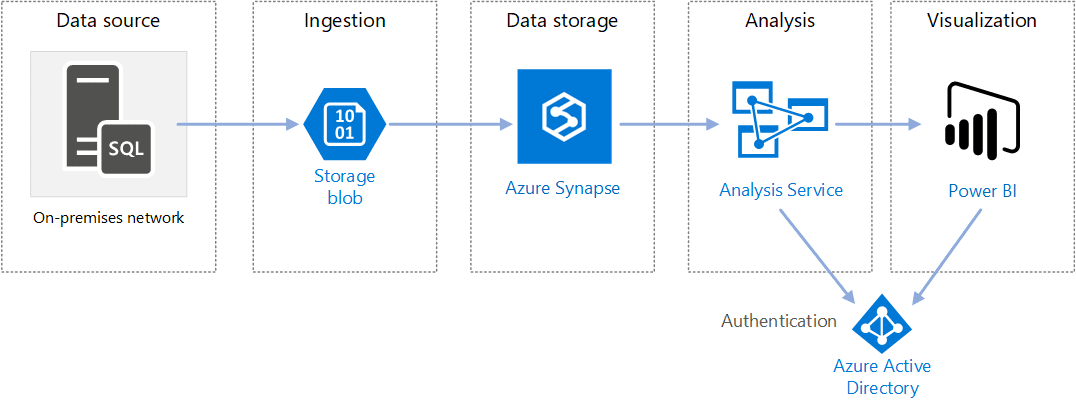
- The below architecture executes an extract, load, and transform (ELT) Pipeline.
- This pipeline moves data into Azure Synapse from an on-premises SQL Server database and transforms the data for analysis.
- This architecture is made for one-time or on-demand jobs.
- If your requirement is to move data on a continuing basis, then use Azure Data Factory to define an automated workflow.
Read this: Azure Event Hubs streamline your data pipelines for you.
The Main Components of Enterprise Business Intelligence Architecture:
1) Data Source
- The source data is an on-premises SQL Server database.
- To replicate the on-premises environment, the deployment scripts for this architecture create a VM in Azure with an already installed SQL Server.
2) Data Ingestion and Data Storage
- Before loading the data into Azure Synapse, we use the Blob storage as a staging area to copy the data.
- To perform analytics on large data, we use the Azure Synapse because it supports massive parallel processing.
3) Reporting And Analysis
- Azure Analysis Services comes with data modelling capabilities. Generally, the azure analysis used to create a semantic model that users can query easily.
- To process the semantic model, Analysis Services reads data from the data warehouse, and efficiently serves dashboard queries.
- Currently, it supports tabular models but not multidimensional models.
- In this architecture, Power BI is used to analyze data for business insights.
4) Authentication
- Azure Active Directory (Azure AD) is used to authenticates users who connect to the Azure Analysis Services server through Power BI.
Also read: Azure SQL Database is evergreen, meaning it does not need to be patched or upgraded, and it has a solid track record of innovation and reliability for mission-critical workloads.
Automated Enterprise BI with Azure Synapse Analytics and Azure Data Factory
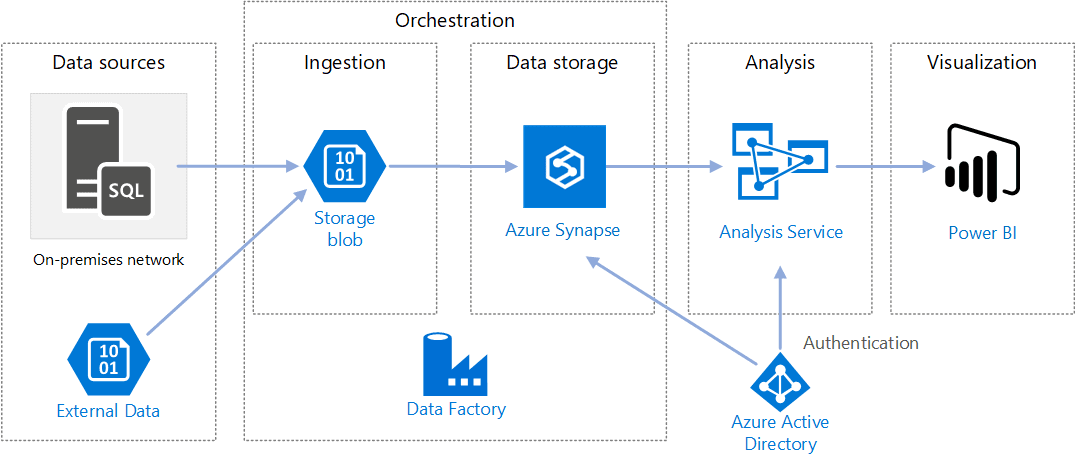
- The below architecture executes an extract, load, and transform (ELT) Pipeline, automates the ELT pipeline by Azure Data Factory.
- The pipeline step-by-step moves the latest Online Transaction Processing (OLTP) data from an on-premises SQL Server database into Azure Synapse.
- Then the transactional data is to change into a tabular model for analysis purposes.
Also read: Azure Stream Analytics is the perfect solution when you require a fully managed service with no infrastructure setup hassle.
The Main Components of Automated Enterprise Business Intelligence Architecture:
1) Data sources
- The data source is an on-premises SQL Server database.
- To replicate the on-premises environment, the deployment scripts for this architecture create a VM in Azure with an already installed SQL Server.
- This architecture loads an external data set that holds city populations by year and joins it with the data from the OLTP database.
2) Data Ingestion and data storage
- Before loading the data into Azure Synapse, we use the Blob storage as a staging area to copy the data.
- To perform analytics on large data, we use the Azure Synapse because it is a distributed system and supports massive parallel processing. it suitable for running high-performance analytics use cases.
- Azure Data Factory orchestrates and automates data movement and data transformation, it regulates the different stages of the ELT process.
3) Reporting AND Analysis
- Use Azure Analysis Services for semantic model and Power BI for business insights.
4) Authentication
- By using a Managed Service Identity (MSI) or a service principal, Data Factory use Azure AD to authenticate to Azure Synapse.
Read about: What is the difference in Data Science vs Data Analytics vs Data Engineer.
Create A Data Warehouse in Azure Synapse Analytics
Enterprise Business Intelligence solution required Azure SQL Data Warehouse instance. These steps provisions SQL Data Warehouse instance for Enterprise Business Intelligence.
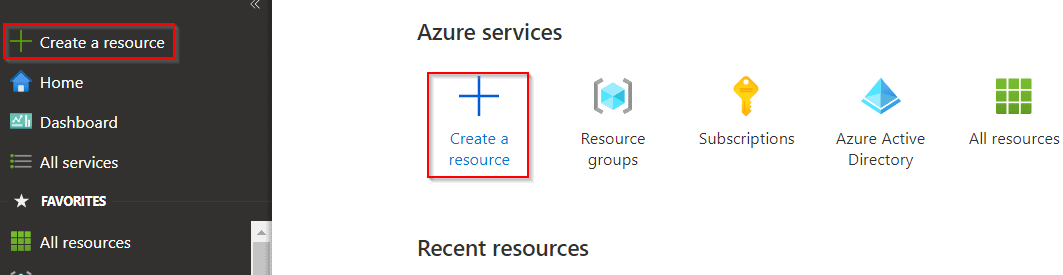
1) Sign in on the Azure portal, select + Create a resource.
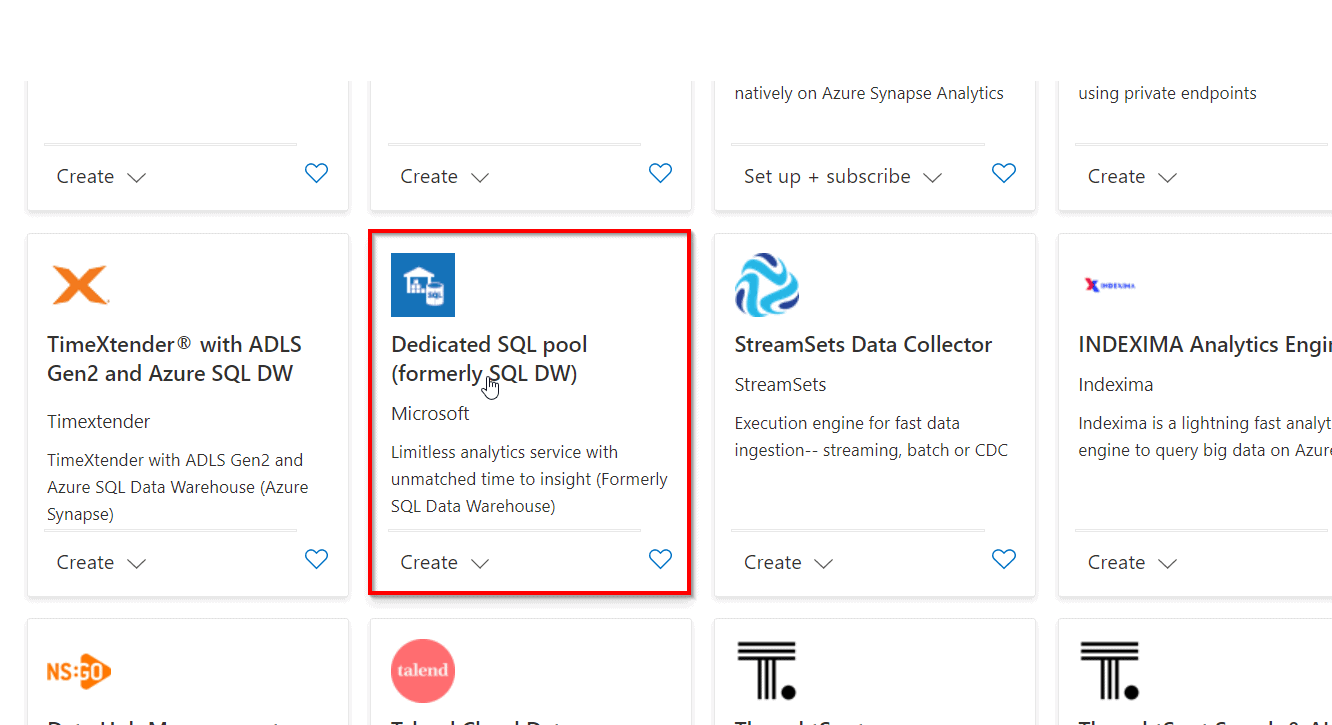
2) Navigate to the Search the Marketplace text box, and type the word Dedicated. Click Dedicated SQL pool (formerly SQL DW) in the list that appears.
To Know More About batch processing vs stream processing click here
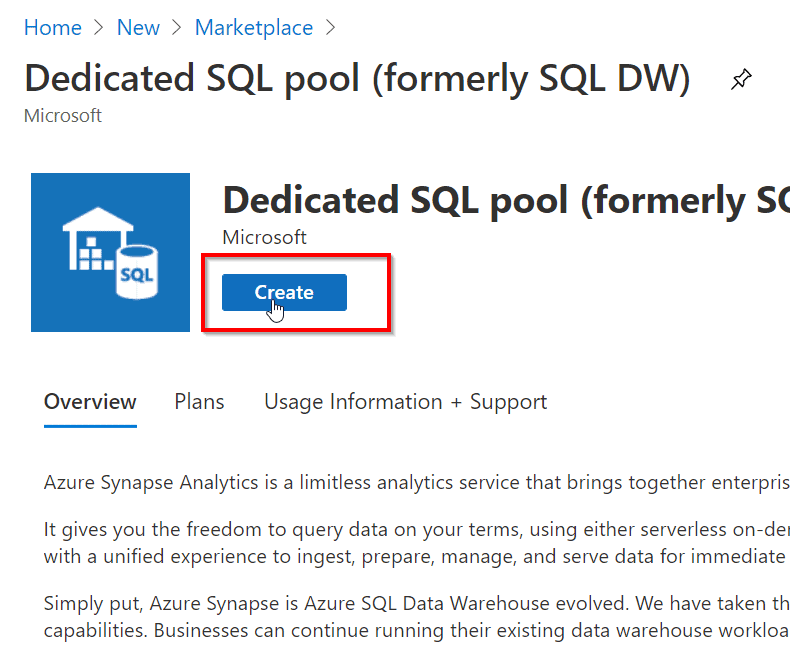
3) On the Dedicated SQL pool (formerly SQL DW) blade, click Create.
Also Check : Our Previous Blog On azure synapse analytics
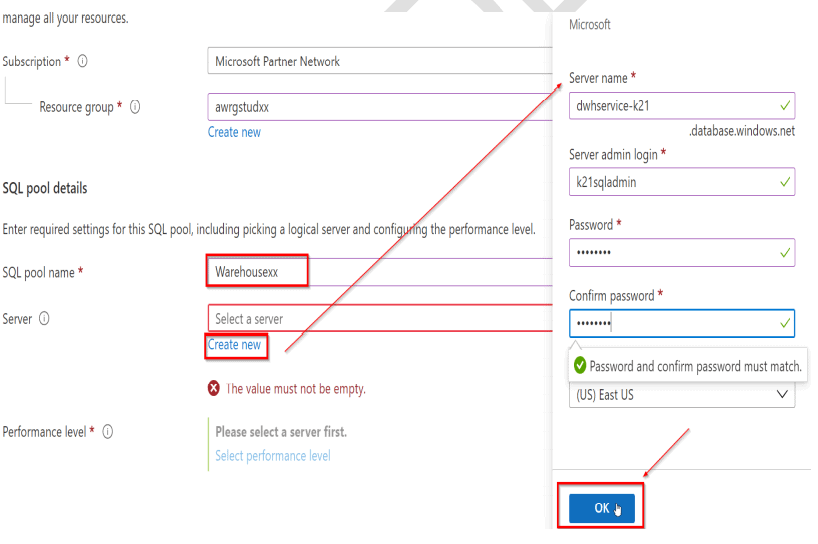
4) create a Dedicated SQL pool with the following settings, and then click on Review + create.
Read More : About Azure Data Lake click here
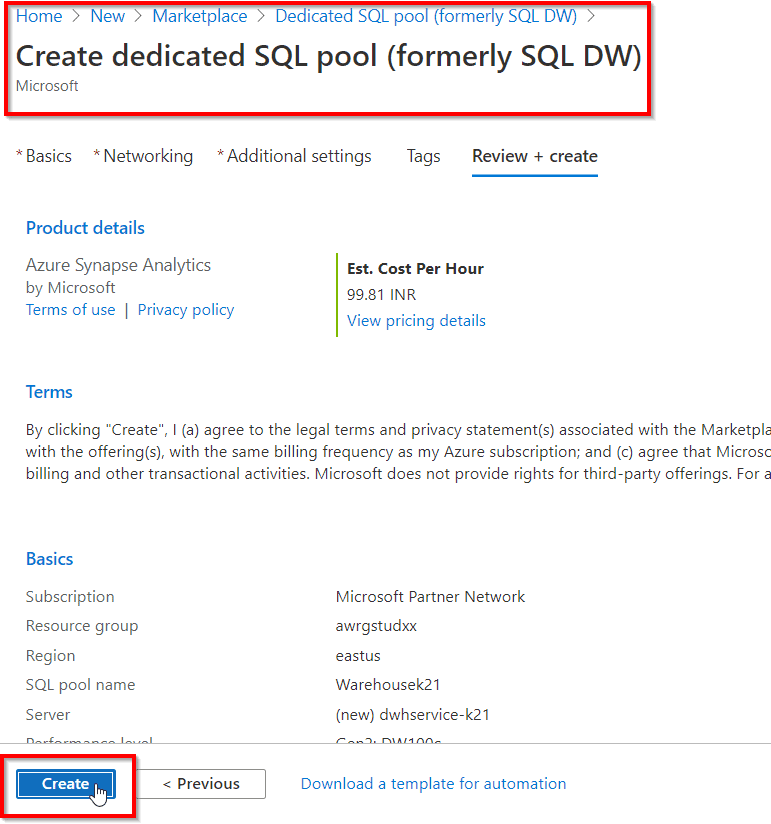
5) In the Dedicated SQL pool blade, click Create
Read more: Basics of the Convolutional Neural Network (CNN) and how we train our CNN’s model on Azure ML service without knowing to code.
Related/References
- Microsoft Azure Data Engineer Associate [DP-200 & DP-201]: Everything You Need To Know
- Implementing an Azure Data Solution | DP-200 | Step By Step Activity Guides [Hands-On Labs]
- Designing an Azure Data Solution | DP-201 | Step By Step Activity Guides [Hands-On Labs]
- Microsoft Azure Data Fundamentals [DP-900]: All You Need To Know
- Microsoft Azure Data Fundamentals [DP-900]: Step By Step Activity Guides (Hands-On Labs)
- Introduction to Big Data and Big Data Architectures
- Designing And Automate An Enterprise BI solution In Azure
- Azure Data Science And Data Engineering Certifications: DP-900 vs DP-100 vs DP-200/DP-201
- Azure Databricks For Beginners
- Azure Synapse Analytics (Azure SQL Data Warehouse)
- Microsoft Azure Data Engineer [DP-200 & DP-201] Hands-On Labs
- AZ-500 Microsoft Azure Security Technologies: Step By Step Activity Guides (Hands-On Labs)
- AZ-500 Exam – Microsoft Azure Security Technologies Certification
Next Task For You
In our Azure Data Engineer training program, we will cover 28 Hands-On Labs. If you want to begin your journey towards becoming a Microsoft Certified: Azure Data Engineer Associate by checking out our FREE CLASS.


![Microsoft Agentic AI Business Solutions Architect [AB-100] | K21 Academy](https://test.k21academy.com/wp-content/uploads/2025/11/Microsoft-Agentic-AI-Business-Solutions-Architect-AB-100-Exam-Overview1.png)


