





Azure SQL Database is evergreen, meaning it does not need to be patched or upgraded, and it has a solid track record of innovation and reliability for mission-critical workloads. Companies are choosing Azure for their SQL workloads.
In this blog, we are going to cover Azure SQL Services, Azure SQL Database, Deployment option, and how to work on it.
What is Azure SQL Service?
It allows hosting our Microsoft SQL Server workloads on the Azure cloud. We have three major ways of hosting the SQL database on the Azure Cloud.
1) Azure SQL Database: It is a fully managed database service in Azure. It is always running on the current version of the SQL Server database engine and patched OS with 99.99% availability.
2) Azure SQL Managed Instance: It is a fully managed service. It’s for those companies who want to migrate their existing SQL workloads to the cloud.
3) SQL Server on Azure VMs: It is when we want to have more control over the SQL server environment.
Also read: our blog on Azure Data Lake Overview for Beginners
What Is The Azure SQL Database?
It is a fully-managed platform as a service. Here the platform manages aspects such as the database software upgrades, the patching, the
backups, the monitoring.
Using this, we can provide a highly available and performant storage layer for our applications.
Types Of Deployment Options For The Database:
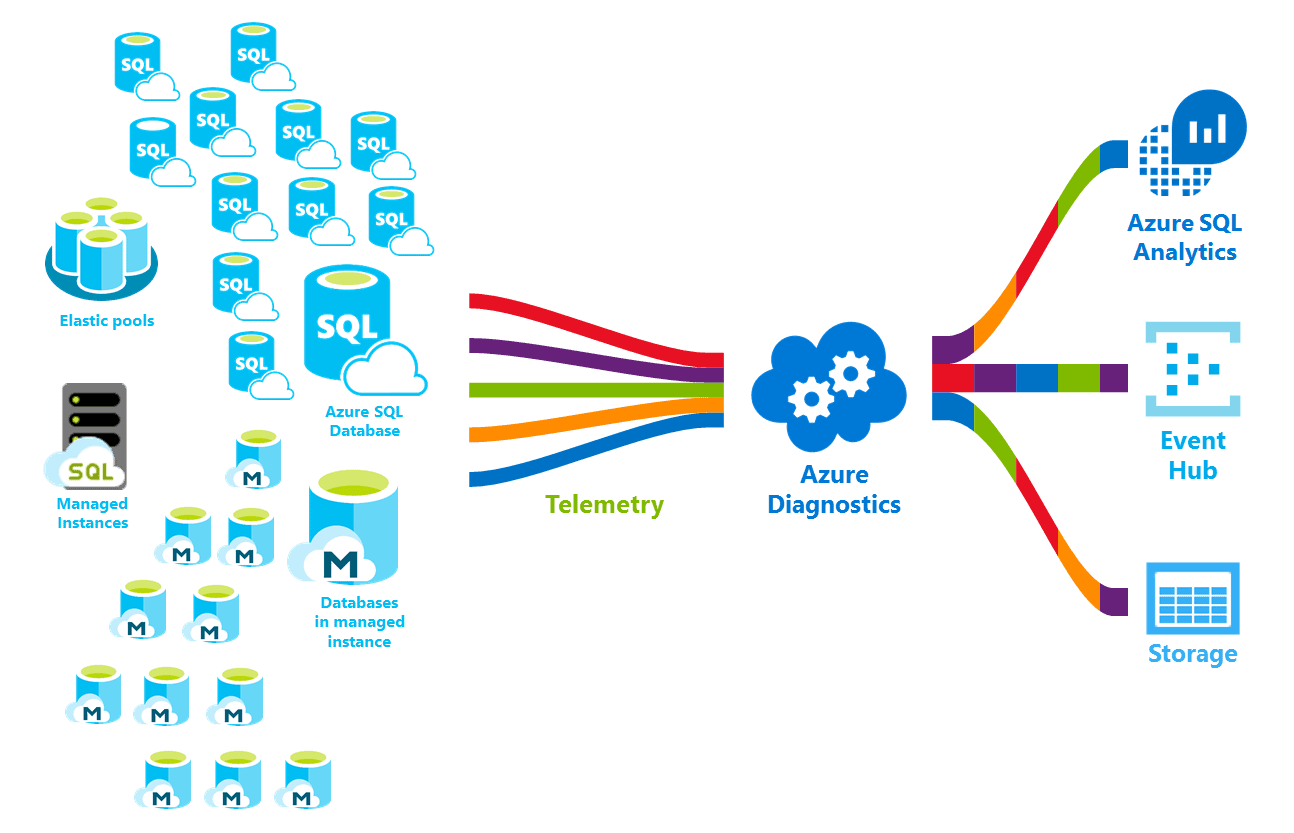
1) Single Database: Single database represents a managed isolated database. We create a database in Azure SQL with its own set of resources and it is managed by sever.
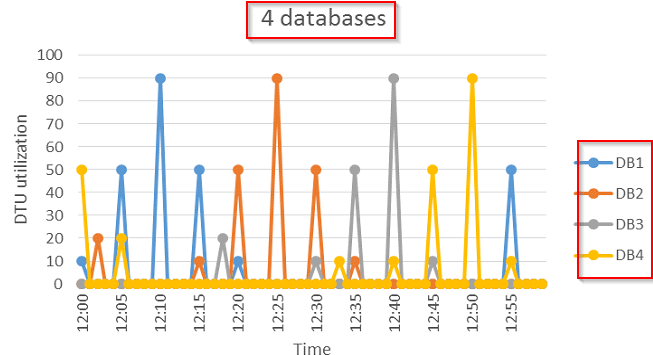
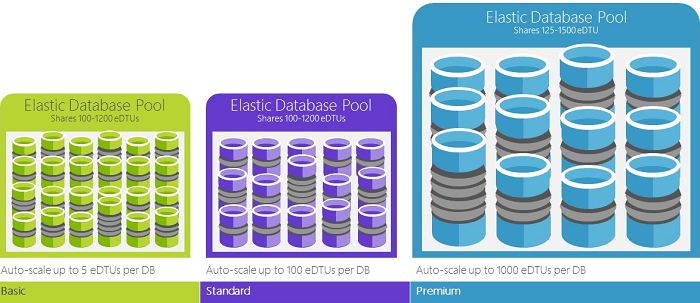
2) Elastics Pool: An Azure SQL Elastics pool allows us to allocate a shared set of computing resources to the collection of Azure SQL Database. Elastics Pools are well fit for a large number of databases with particular utilization patterns.
3) Managed Instance: The managed instance is a deployment option of Azure SQL providing near 100% compatibility with the latest SQL server on-premises.
Also check: All you need to know about DP 100 Exam
The Different Service Tiers And Purchasing Models
1) DTU Model
It is known as the Database Transaction Unit purchasing model. This model is based on a bundled measure of computing, storage, and I/O resources in 3 service tiers, to support light to heavy database workloads.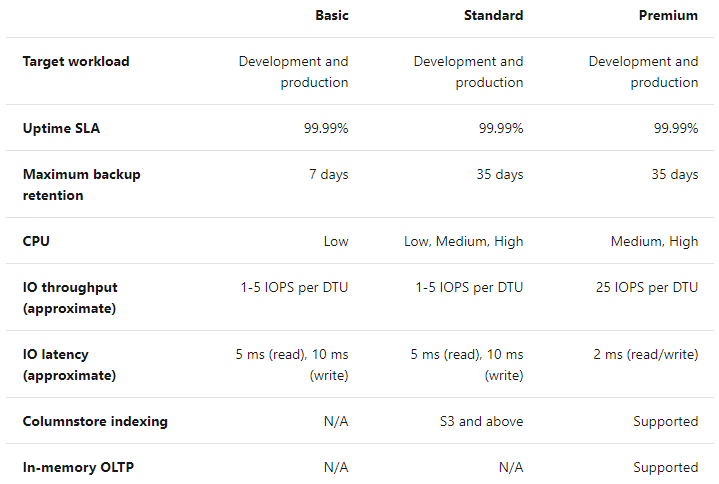
2) Vcore Model
It is known as the Virtual core model. It provides a choice between a provisioned compute tier and a serverless compute tier.
Here we can choose the exact amount of computing resources for our database server. With the compute tier, we can also automatically pause and resume the database based on workload activity.
Also read: How Azure Event Hub & Event Grid Works?
3) Serverless Model
The Serverless model automatically scales compute according to workload demands. It automatically pauses databases at a time of inactive periods and automatically proceeds databases when activity returns.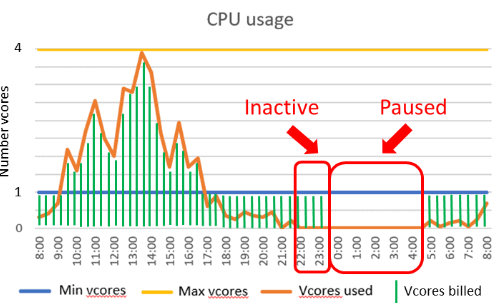
Azure SQL Database Offers Three Service Tiers:
1) General Purpose or Standard: This service designed for common workloads. It offers budget-oriented balanced computing and storage choice.
2) Business Purpose or Premium: This service designed for OLTP applications with lowest-latency I/O and high transaction rates. It offers resistance to failures by using several isolated replicas.
3) Hyperscale: This service designed for a very large OLTP database and the ability to autoscale compute fluidly and storage.
Also Read: all you need to know about Azure Databricks
How To Work With The Azure SQL Database Service?
1) Log in to Azure, click on the Go to the Portal link, and navigate to the Azure Management Portal.
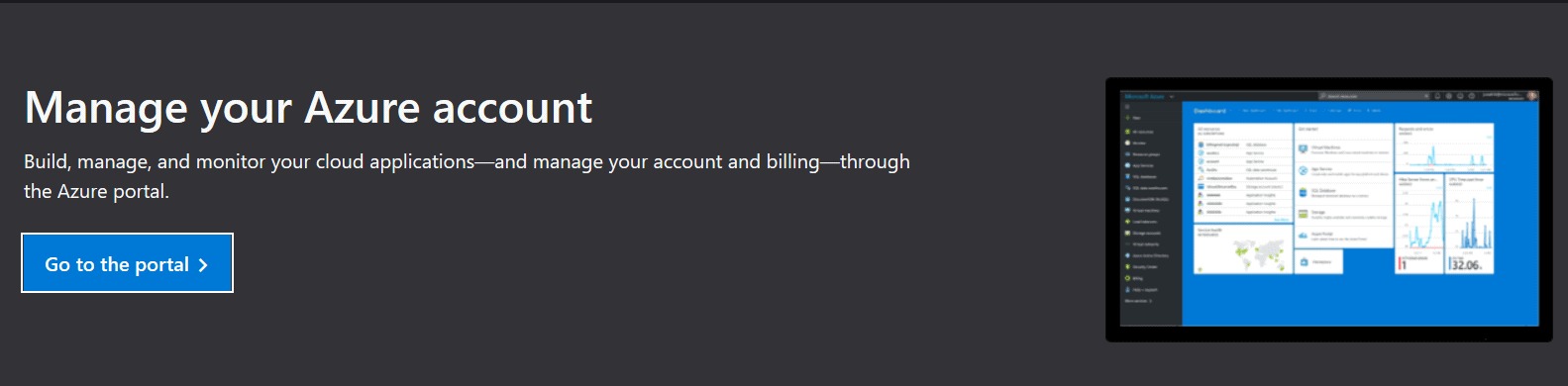
2) Go to the Dashboard and click on all resources and then write the SQL keyword inside the search textbox and then select the SQL database option.

3) Click on the Create SQL database link on the SQL database page.

4) Under the DATABASE DETAILS heading, enter the Database name and Server.
5) To create a new server, click on Create new under the Server textbox.


6) In Compute + storage, click Configure database and then ch0se Standard.

7) Click Review + create to continue.
8) Read the terms and conditions and the configuration settings. Click Create to provision the SQL database.
Read More : How Does Azure Stream Analytics Work?
Advantages Of The Azure SQL Database
1) Fully Managed: Database automates provisioning, updates, and backups so we can target on application development.
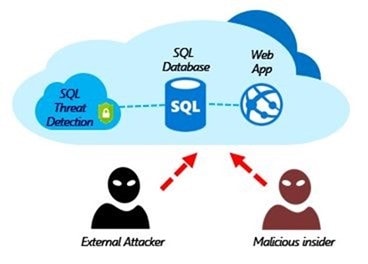
2) Security: Azure provides Layers of protection, built-in controls, and smart threat detection to keep our data secure.
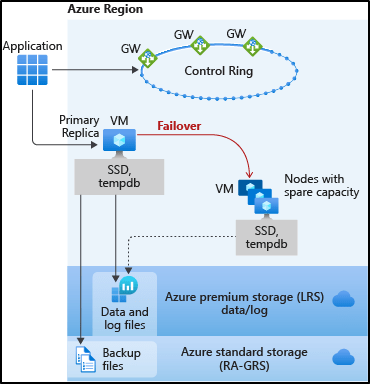
3) Availability: Azure provides Built-in AI features and built-in high availability maintain peak performance and persistence with an SLA of up to 99.995 percent.
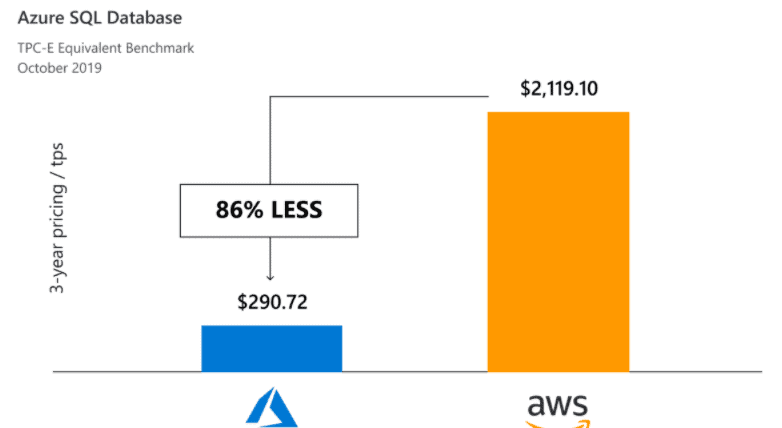
4) Low Price: It provides better price-performance than other cloud providers.
Differences Between Azure SQL Database And SQL Server
1) Backup and Restore
- Conventional database backup and restore statements aren’t supported.
- In Azure, SQL Backups are automatically scheduled and start within a few minutes.
- In Azure, There is no additional cost for backup storage until it goes beyond 200% of the provisioned database storage.
2) Recovery Model
- The default recovery model of an Azure SQL database is FULL and it can’t be modified to any other recovery model as in on-premises recovery models.
3) SQL Server Agent
- Azure SQL Server doesn’t have SQL Server Agent, which is used to schedule jobs and send success/failure notifications.
4) Mirroring
- We can’t implement mirroring between two Azure SQL databases but we can configure it as a mirror server.
- We can also set up a readable secondary for an Azure SQL database, which is better than mirroring.
5) Table Partitioning
- Table partitioning using a partition program and partition function is allowed in Azure SQL Database. Because of the PaaS nature of the SQL database, all partitions should be created on a primary filegroup.
6) Replication
- Conventional replication techniques, such as snapshot, transactional, and merge replication, can’t be done between two Azure SQL databases. However, it can be a subscriber to an on-premise or Azure VM SQL Server.
Frequently Asked Questions(FAQs)
Q: How does Azure SQL Database ensure data security?
A: Azure SQL Database provides several security features, such as built-in threat detection, data encryption at rest and in transit, firewall rules, virtual network service endpoints, and integration with Azure Active Directory for authentication and access control.
Q: Can I migrate my on-premises databases to Azure SQL Database?
A: Yes, Azure SQL Database supports migration from on-premises SQL Server databases. Microsoft provides several tools and services, such as Azure Database Migration Service and Data Migration Assistant, to simplify the migration process.
Q: Is there a way to monitor and optimize Azure SQL Database performance?
A: Yes, Azure SQL Database offers various monitoring and optimization capabilities. You can use features like Azure Monitor and Query Performance Insight to monitor performance metrics, identify bottlenecks, and optimize query execution. Additionally, you can configure automatic tuning to improve query performance.
Q: Does Azure SQL Database support high availability and disaster recovery?
A: Yes, Azure SQL Database provides built-in high availability with automatic failover to ensure continuous database availability. You can also configure geo-replication to replicate your database to a different region for disaster recovery purposes.
Related/References
- Microsoft Azure Data on Cloud Job Oriented Step By Step Activity Guides (Hands-On Labs) & Projects
- Azure Data Lake For Beginners: All you Need To Know
- Batch Processing Vs Stream Processing: All you Need To Know
- Azure Data Engineer vs Data Scientist vs Database Administrator vs Data Analyst
- A Beginner’s Guide to SQL Commands: DDL, DML, DCL, & TCL
- Introduction to Big Data and Big Data Architectures
Next Task For You
In our Azure Data Engineer training program, we will cover 50+ Hands-On Labs. If you want to begin your journey towards becoming a Microsoft Certified: Master in Azure Data Engineering by checking out our FREE CLASS.


![Microsoft Agentic AI Business Solutions Architect [AB-100] | K21 Academy](https://test.k21academy.com/wp-content/uploads/2025/11/Microsoft-Agentic-AI-Business-Solutions-Architect-AB-100-Exam-Overview1.png)



