
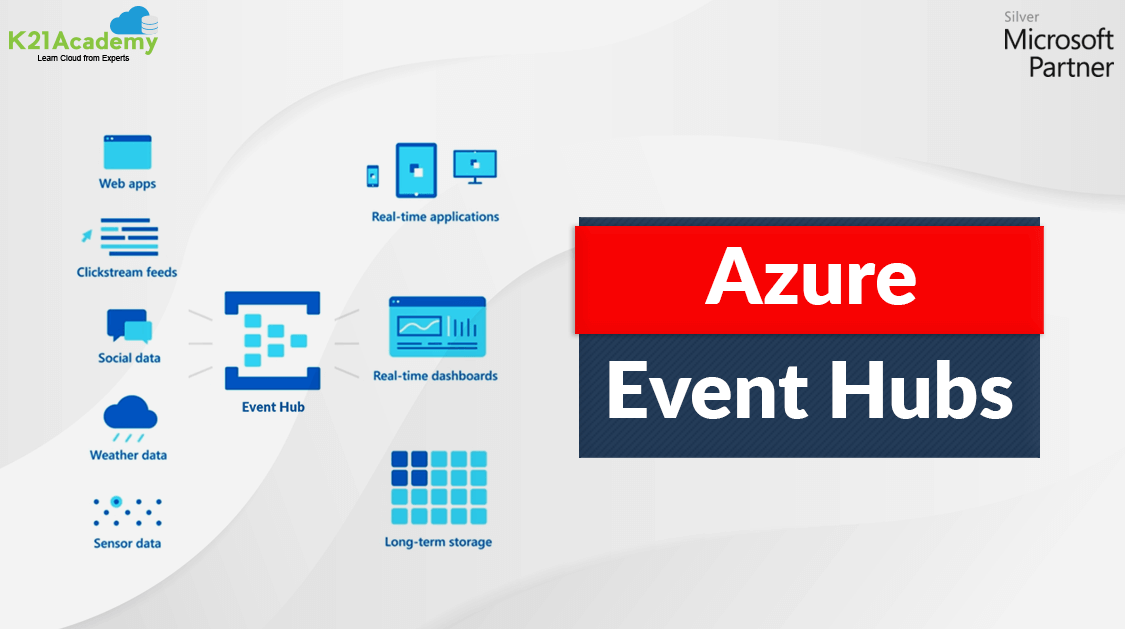





Big data has revolutionized the way we do business. Analyzing information in real-time to capture actionable insights can be the difference between maintaining your edge and lagging behind. But, building the right infrastructure to manage your constant flow of data becomes complex. Azure Event Hubs streamlines your data pipelines for you. So, the journey from input to insights is seamless.
In this blog post, we are going to cover Event Hubs, event hub architecture, Event grid, components of event grid, and Data ingestion with Event hub.
Azure Event Hubs
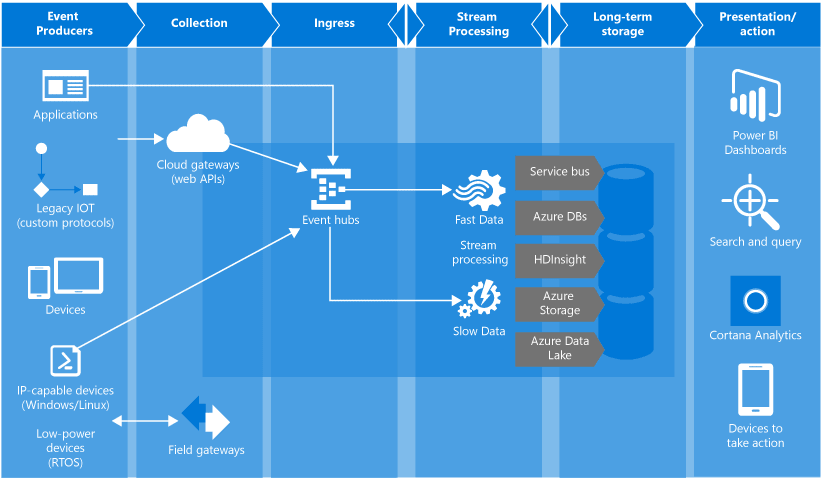
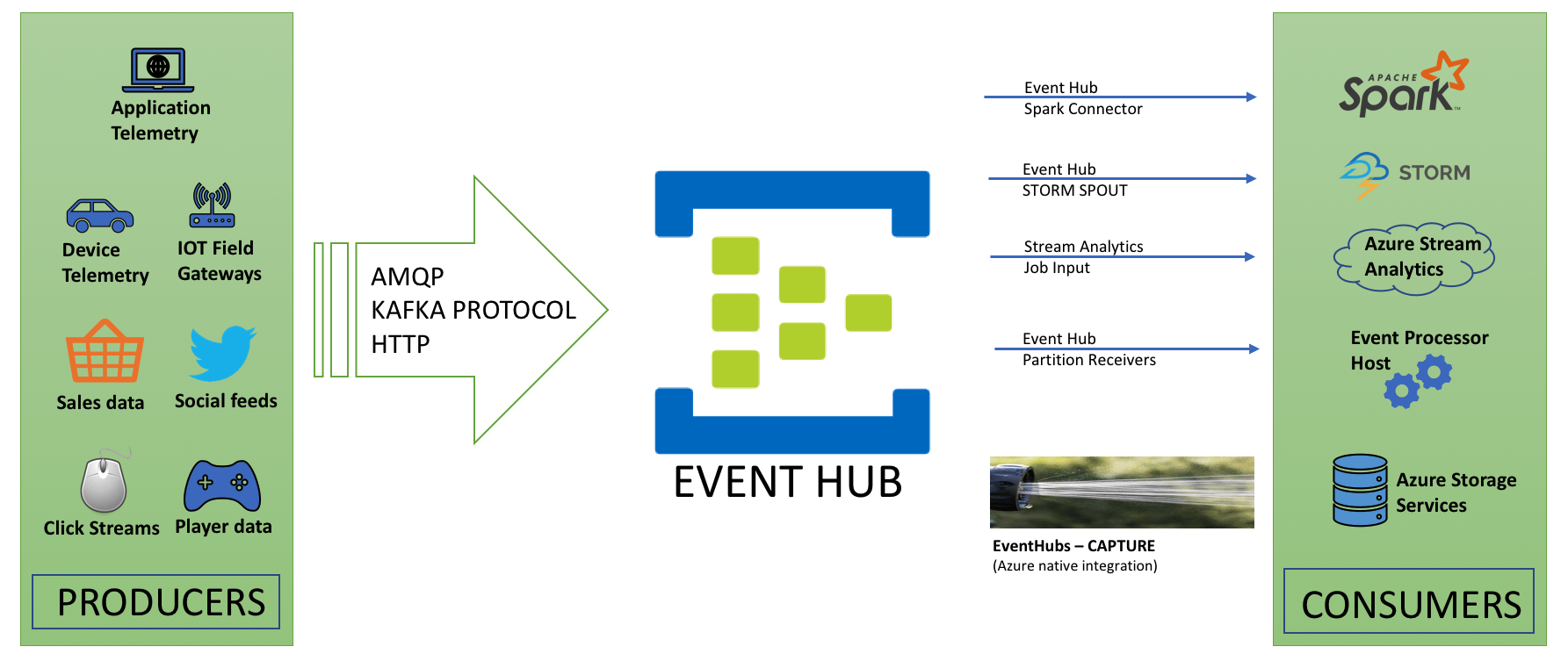
- Azure Event Hubs are designed for big data ingestion from a different variety of sources such as social data, web apps, sensor data, weather data, IoT devices, etc.
- It is sure that we can receive events from a variety of sources, fast, and in order, and store events reliably and durably.
- It also supports multiple consumers and consumer groups for quick and concurrent data processing.
- We can choose to capture all incoming data in Azure Storage, or we can also decide to trigger Azure Functions in response to new events.
- We can process data streams using Spark, or we can write our own systems for data processing and receiving events from Azure Event Hubs.
What Is The Need For Azure Event Hubs?
Big Data is advantageous only when there is a simple way to process and get timely insights from data sources. Event Hubs offers a distributed stream processing platform service with low latency and smooth integration, with data and analytics services inside and outside Azure to construct your entire big data pipeline.
1) Completely managed Platform-as-a-Service (PaaS)
- Event Hubs is a completely managed Platform-as-a-Service (PaaS) with minor configuration or management above, so you concentrate on your business solutions.
- Event Hubs for the Apache Kafka system provide us with the PaaS Kafka experience without having to configure, manage, or start your clusters.
2) Support for batch and real-time processing
- Ingest, store, buffer, and process your stream in real-time to get useful insights.
- Event Hubs split our model, enabling multiple applications to process the stream simultaneously and letting you manage the speed of processing.
Also, read about DP 100 Exam – Microsoft Certified Azure Data Scientist Associate and why people in the IT Industry are thinking that it’s a great time to be a data scientist these days.
3) Scalable
- With Azure Event Hubs, we can easily run with big data streams in megabytes and grow to gigabytes or terabytes.
Check out this blog in which we discuss the basics of PowerShell and how it plays a key role in the Microsoft Azure Certification Exam.
4) Robust Ecosystem
- With a robust ecosystem available in various languages Java, JavaScript, .NET, and Python, we can simply start processing our streams analytics jobs from Azure Event Hubs.
- We don’t need to configure, set up, and manage your own Kafka clusters.
Check out: Our blog on Azure Databricks for Beginners
Azure Event Hub Architecture
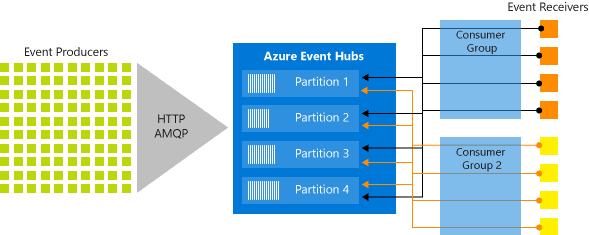
The main components of Azure Event Hubs are as follows:
1) Event producers: Any object that sends an event to an event hub.
2) Partitions: we can only read a particular subset, or segment, of the message stream.
3) Consumer groups: The data can be used by different consumers according to their own requirements. Some consumers want to use it carefully only once, some consumers used historical data again and again.
4) Throughput units: Throughput units are the foundation of how you can scale the traffic coming in and going out of Azure Event Hubs.
Think of throughput units like water pipes, if you required more water to flow through, you required more water pipes.
5) Event receivers: Any object (applications) that read event data from an Azure Event Hub is a receiver.
Also check: Overview of Azure Stream Analytics
Azure Event Grid
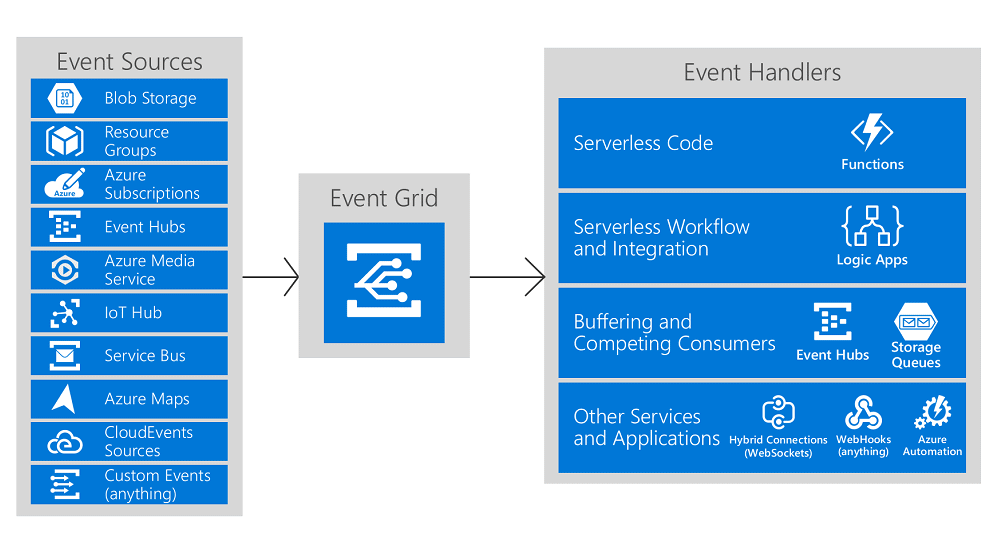
- Azure Event Grid is used to build applications very simply and rapidly with event-based architectures.
- Event Grid has an inbuilt support structure for events coming from the different Azure services, like blobs storage and resource groups.
- We will use filters to route particular events to different endpoints, multicast to many endpoints, and make sure your events are surely delivered.
- Event sources – where the event took place.
- Event Handlers – the service or app reacting to the event.
Also read: Azure SQL Database is evergreen, meaning it does not need to be patched or upgraded, and it has a solid track record of innovation and reliability for mission-critical workloads.
Features of Azure Event Grid
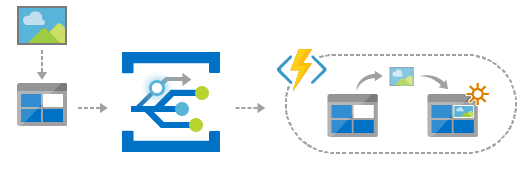
1) Serverless application architectures: Azure Event Grid connects event handlers and data sources. Use it to trigger a serverless function that examines images when inserted into a blob storage container.
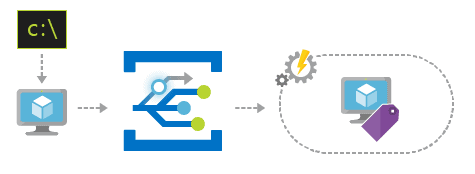
2) Ops Automation: Event Grid enables us to speed automation and clarify policy enforcement. Use the events to check automatically that service configurations are compliant, tag virtual machines put metadata into operations tools, or file work items.
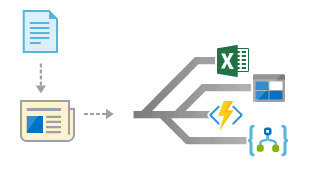
3) Application integration: Azure Event Grid connects our application with other Azure services. For example, when we create a custom topic to send our application’s event data to Event Grid and take advantage of its reliable delivery, and direct combination with Azure.
Read More: About Azure Data Engineer Associate.
Data Ingestion
- Azure Event Hubs is a highly scalable publish-subscribe service that can ingest millions of events per second and stream them into many different applications.
- To ingest data with Event Hubs we require to create an Event Hubs namespace and an event hub.
Note: To create an Event hub, make sure that you have an Azure subscription. If you don’t have one, create a free account before you begin.
Step 1: Creating and configuring an Event Hub Namespace
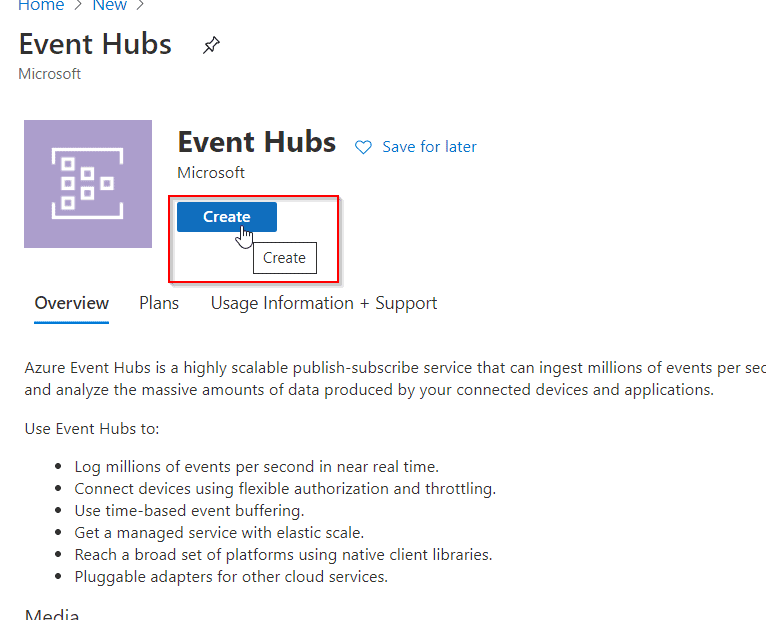
1) In the Azure portal, select + Create a resource icon, type Event Hubs in the search box, and then select Event Hubs from the resulting search. Then click on Create.
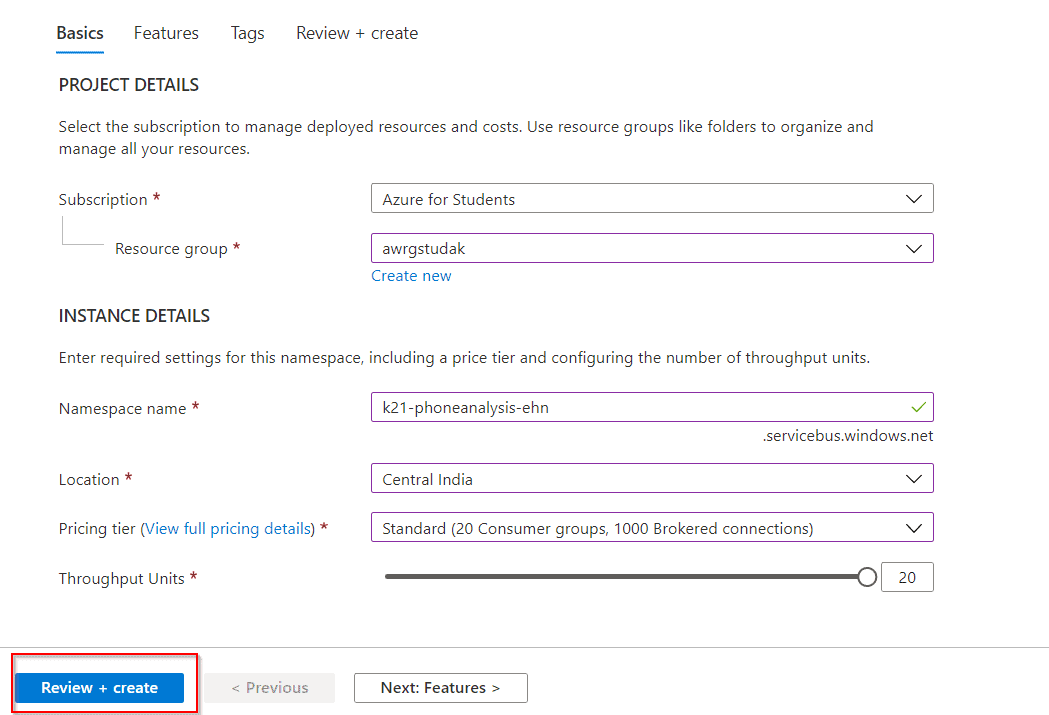
2) Give a name for the event hub, and then create a resource group. Specify k21-phoneanalysis-ehn and awrgstudxx respectively, XX- represents your initials to ensure the uniqueness of the Event Hub name and Resource Group name. Then click on Review + Create.
Step 2: Creating and configuring an Event Hub
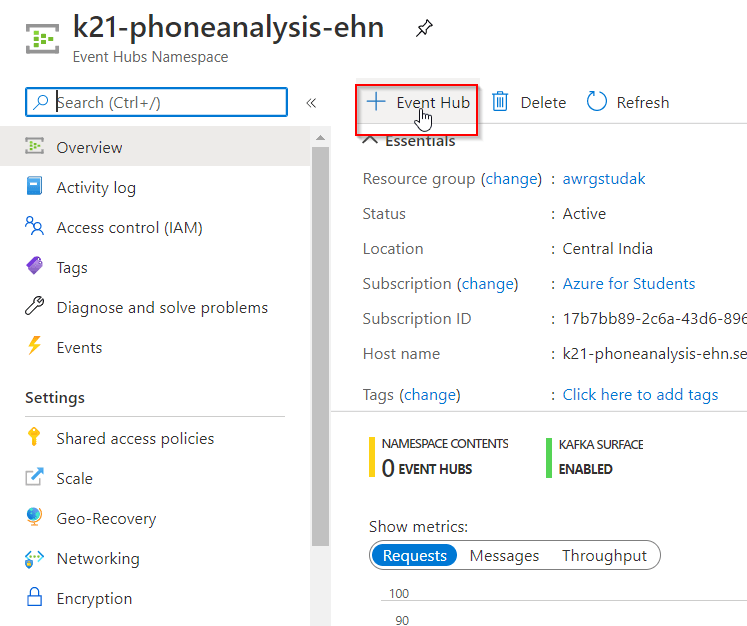
1) After the deployment is complete, click the k21-phoneanalysis-ehn event hub on the dashboard. click on + Event Hubs.
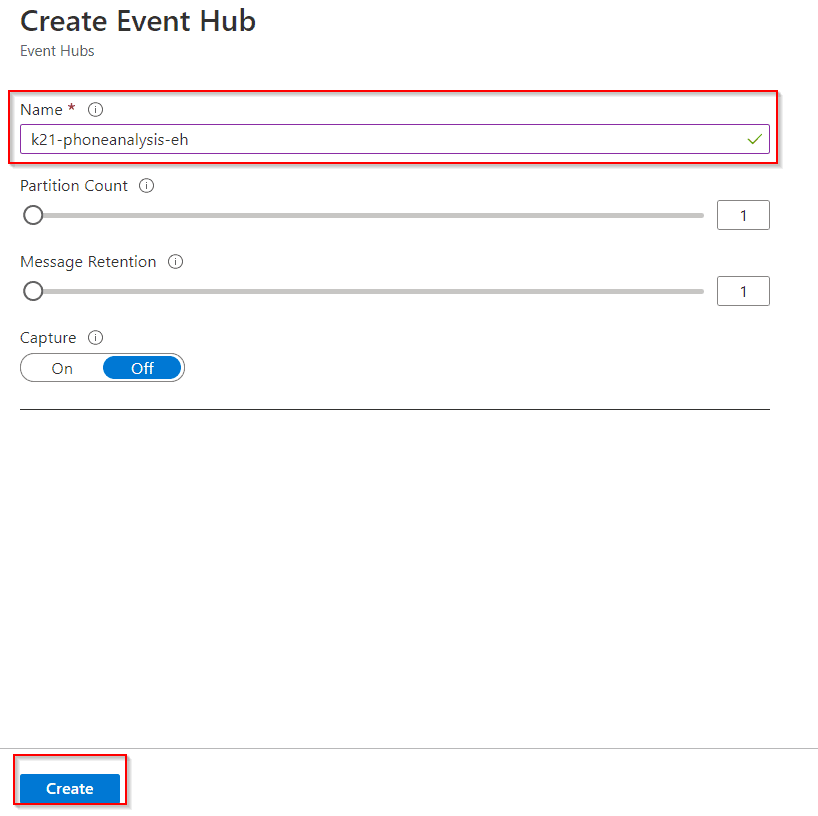
2) Provide a name k21-phoneanalysis-eh, leave the other settings to their default values, and then select Create.
Check Out: Our blog post on DP-203.
Step 3: Configuring Event Hub security
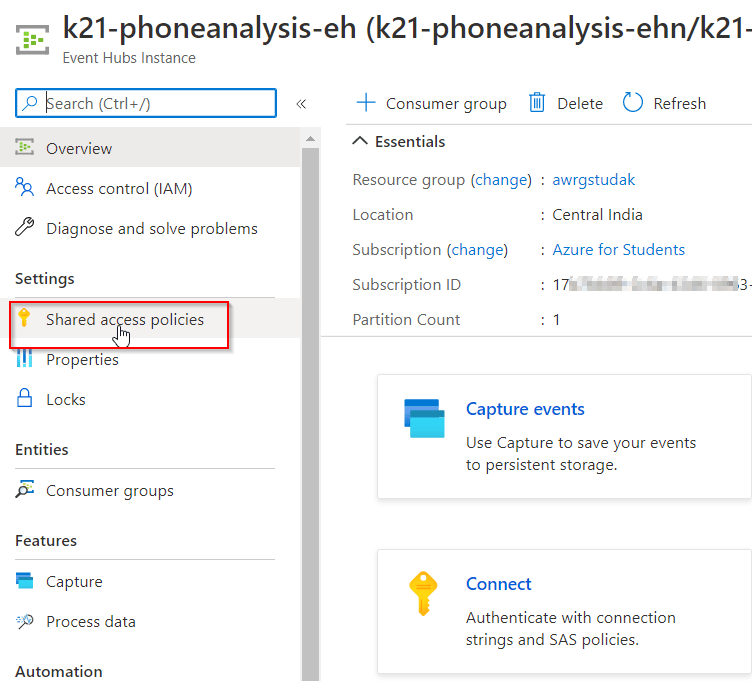
1) To grant access to the event hub, we need to create a shared access policy. Select the k21-phoneanalysis-eh event hub when it appears, and then, under Settings, select Shared access policies.
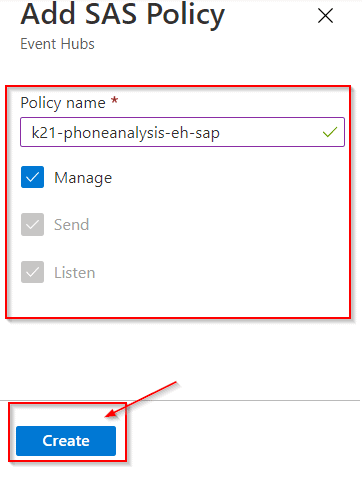
2) Under Shared access policies, create a policy with MANAGE permissions by selecting + Add. Give the policy the name of k21-phoneanalysis-eh-sap, check MANAGE, and then select Create.
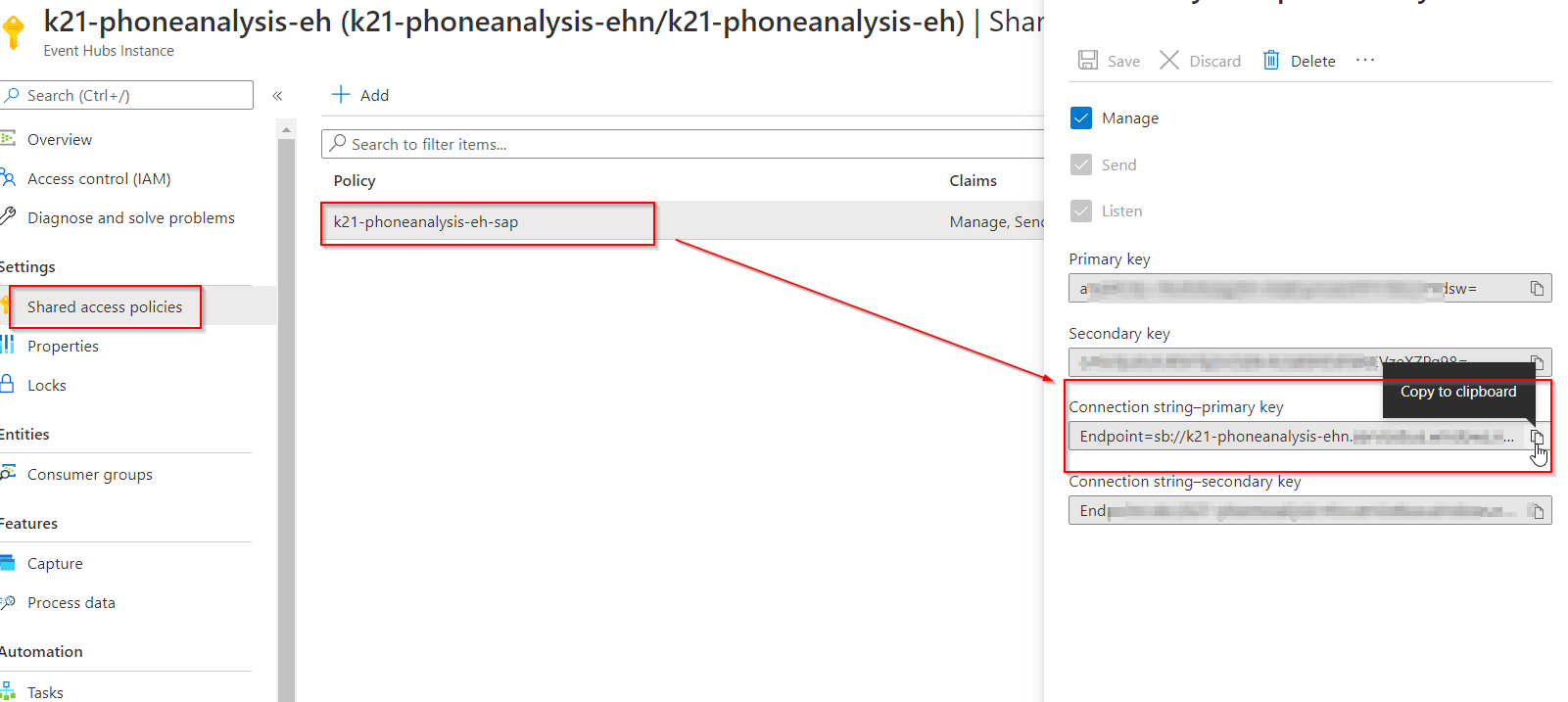
3) Select your new policy after it has been created, and then select the copy button for the CONNECTION STRING – PRIMARY KEY entity. Paste the CONNECTION STRING – PRIMARY KEY entity into Notepad. This is needed later when Processing Data with Stream Analytics Jobs.
Frequently Asked Questions (FAQs)
Q: Can Azure Event Hubs handle real-time event processing?
A: Yes, Azure Event Hubs is designed for real-time event processing. It can handle high-volume, high-velocity event streams in real time and support scenarios such as real-time analytics, anomaly detection, and real-time dashboards.
Q: How does Azure Event Hubs ensure data durability and reliability?
A: Azure Event Hubs provides data durability and reliability through features like event data retention, multiple replicas of data across different availability zones, and automatic load balancing of event processing across partitions.
Q: Can Azure Event Hubs guarantee message ordering within a partition?
A: Yes, Azure Event Hubs guarantees message ordering within a partition. Events within a partition are stored and processed in the order they are received, ensuring sequential processing of events.
Q: How can I integrate Azure Event Hubs with other Azure services?
A: Azure Event Hubs offers seamless integration with other Azure services. You can use Azure Stream Analytics to perform real-time analytics on event data, Azure Functions for event-driven serverless computing, and Azure Logic Apps for event-based workflows and automation.
Q: What security features are available in Azure Event Hubs?
A: Azure Event Hubs provides robust security features, including encryption of data at rest and in transit, access control through shared access policies and tokens, integration with Azure Active Directory for authentication and authorization, and network isolation through virtual network service endpoints.
Related/References
- Exam DP-203: Data Engineering on Microsoft Azure
- Microsoft Certified Azure Data Engineer Associate | DP 203 | Step By Step Activity Guides (Hands-On Labs)
- Microsoft Azure Data Fundamentals [DP-900]: All You Need To Know
- Microsoft Azure Data Fundamentals [DP-900]: Step By Step Activity Guides (Hands-On Labs)
- Azure Data Lake For Beginners: All You Need To Know
- Batch Processing Vs Stream Processing: All You Need To Know
- Azure Databricks For Beginners
- Azure Synapse Analytics (Azure SQL Data Warehouse)
Next Task For You
In our Azure Data Engineer training program, we will cover 28 Hands-On Labs. If you want to begin your journey towards becoming a Microsoft Certified: Azure Data Engineer Associate by checking out our FREE CLASS.


![Microsoft Agentic AI Business Solutions Architect [AB-100] | K21 Academy](https://test.k21academy.com/wp-content/uploads/2025/11/Microsoft-Agentic-AI-Business-Solutions-Architect-AB-100-Exam-Overview1.png)



