





This blog post will go through some quick tips including Q/A and related blog posts on the topics that we covered in the Azure Data Engineer Day 2 Live Session which will help you gain a better understanding and make it easier for you to
On our Day 2 Live Session of the Training Program, we covered the concepts of Azure Synapse serverless SQL pools Build data analytics solutions using Azure Synapse serverless SQL pools, along with Data engineering considerations for source files.
>Azure Synapse Serverless SQL Pools
Azure Synapse SQL offers both serverless and dedicated resource models, offering consumption and billing options to fit your needs
Every Azure Synapse Analytics workspace comes with a built-in serverless SQL pool that you can use to query data in the lake.
A serverless SQL pool is a distributed data processing system, built for large-scale data, and computational functions. It enables you to analyze your Big Data in seconds to minutes, depending on the workload.
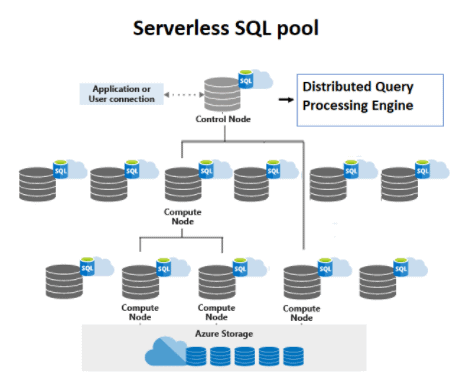 Source: Microsoft
Ques 1: When to use Azure Synapse serverless SQL pools?
A: Synapse SQL serverless resource model is great if you need to know the exact cost for each query executed to monitor and attribute costs.
Ques 2: Are serverless pools are just in memory?
A: Serverless pool has nothing to do with memory it’s just the infrastructure is not taken care of by us it’s completely taken care by azure.
Ques 3: What is the concept of a Dedicated SQL pool?
A: Dedicated SQL pool is available as a standalone service, and it is also available within Synapse. Now it belongs to the family of SQL Server, so if you have worked with SQL Server, things will look very familiar to you. But remember, it is based on MPP or massively parallel processing architecture, so its working is very different from SQL Server. And here is the first difference: compute and storage are decoupled here, and that’s why storage can be scaled separately and compute can be scaled separately. Note that it’s a costly service so if you are not using it, you can pause it and resume it when required. This can help you save costs. Now let’s understand the MPP architecture of the dedicated SQL pool. There are four important components: distributions, Control node, Compute nodes, and Data Movement Service, or DMS.
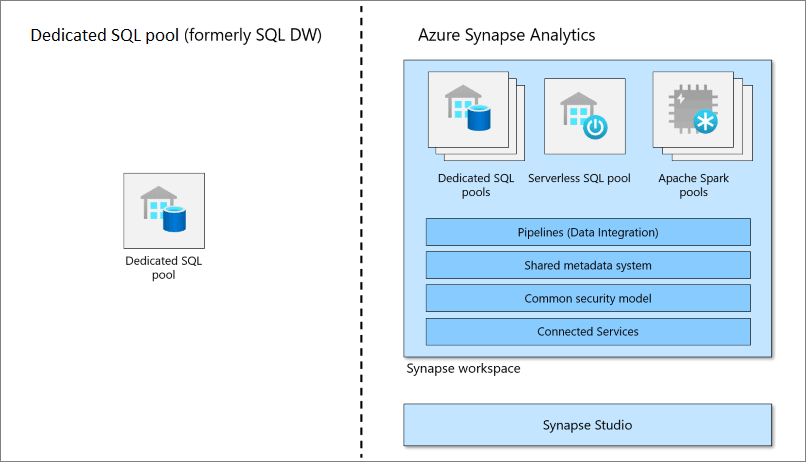 Source: Microsoft Azure
Ques 4: Which is cost-effective. dedicated pool or serverless when we have OLTP databases most of the time?
A: Every Synapse workspace includes a built-in serverless SQL pool designed to enable quick exploration of data stored in the data lake based on pay-per-query pricing. You can also provide one or more dedicated SQL pools to your workspace that lets you run high-performance analytics against data stored in tables with columnar storage.
Ques 5: Can we start/stop serverless SQL Pool automatically?
A: No, you cannot pause serverless because there is no charge for resources reserved, you are only being charged for the data processed by queries you run; hence this model is a true pay-per-use model.
Ques 6: What does it mean to vacuum a database?
A: Databases that use MVCC to isolate transactions from each other need to periodically scan the tables to delete outdated copies of rows. In MVCC, when a row is updated or deleted, it cannot be immediately recycled because there might be active transactions that can still see the old version of the row. Instead of checking if that is the case, which could be quite costly, old rows are assumed to stay relevant. The process of reclaiming the space is deferred until the table is vacuumed which, depending on the database, can be initiated automatically or explicitly.
Ques 7: what is the vacuum index?
A: If you want to permanently delete the index then you use the vacuum index. It will permanently be purged from hyperspace.
Ques 8: What is parquet file?
A: Parquet is an open-source file format available to any project in the Hadoop ecosystem. Apache Parquet is designed for efficiency as well as the performant flat columnar storage format of data compared to row-based files like CSV or TSV files.
Also Check: Our blog post on Azure Synapse.
>Build data analytics solutions using Azure Synapse serverless SQL pools
Ques 1: What is Azure Synapse serverless SQL pool?
A: Azure Synapse serverless SQL pool is a serverless query service provided by Azure Synapse Analytics. It allows you to query and analyze data stored in various formats in a data lake without requiring any infrastructure management.
Ques 2: How does Azure Synapse serverless SQL pool differ from traditional SQL databases?
A: Unlike traditional SQL databases, Azure Synapse serverless SQL pool does not require provisioning or managing dedicated infrastructure. It provides on-demand scalability and cost-efficient pricing based on the amount of data processed.
Ques 3: What are the benefits of using Azure Synapse serverless SQL pool for data analytics solutions?
A: Some benefits include:
- Flexibility: Azure Synapse serverless SQL pool supports querying and analyzing data in various formats, such as Parquet, CSV, JSON, and more.
- Cost-effectiveness: You only pay for the queries executed and the data processed, without the need for upfront infrastructure costs.
- Scalability: The service automatically scales up or down based on the query workload, allowing for efficient handling of large datasets.
- Integration: It seamlessly integrates with other Azure services, such as Azure Data Lake Storage, Azure Data Factory, and Power BI, enabling end-to-end data analytics solutions.
Ques 4: What are the key features and capabilities of Azure Synapse serverless SQL pool?
A: Some key features include:
- Serverless architecture: No infrastructure management is required, and resources are automatically provisioned.
- Querying structured and unstructured data: Azure Synapse serverless SQL pool can handle data stored in various formats.
- Advanced analytics: It supports complex SQL queries, aggregations, and joins, as well as machine learning with built-in functions and algorithms.
- Data integration: You can easily ingest and process data from multiple sources using Azure Synapse serverless SQL pool.
- Data security: The service provides robust security features to protect your data, including encryption, authentication, and authorization mechanisms.
Ques 5: What programming languages can be used to interact with Azure Synapse serverless SQL pool?
A: You can interact with Azure Synapse serverless SQL pool using T-SQL (Transact-SQL), which is a standard SQL language extension used in Microsoft SQL Server.
Use Azure Synapse serverless SQL pool to query files in a data lake:
Ques 1: What is a data lake and how does it relate to Azure Synapse serverless SQL pool?
A: A data lake is a centralized repository that allows you to store structured and unstructured data at any scale. Azure Synapse serverless SQL pool can directly query files stored in a data lake, providing a unified interface for analyzing and processing data.
Ques 2: How can I query files in a data lake using Azure Synapse serverless SQL pool?
A: You can use the OPENROWSET function in T-SQL to specify the file format, location, and schema of the files you want to query. By writing SQL queries, you can access and retrieve data from the files in the data lake.
Ques 3: What file formats are supported for querying in Azure Synapse serverless SQL pool?
A: Azure Synapse serverless SQL pool supports various file formats, including Parquet, CSV, JSON, ORC, and Avro. You can specify the file format while querying the data.
Ques 4: Can I perform complex queries and aggregations on files in a data lake with Azure Synapse serverless SQL pool?
A: Yes, Azure Synapse serverless SQL pool supports complex queries, aggregations, and joins on files in a data lake. You can leverage the power of T-SQL to perform advanced analytics and transformations on the data in the data lake directly from the serverless SQL pool.
Ques 5: Are there any limitations or considerations when querying files in a data lake using Azure Synapse serverless SQL pool?
A: While Azure Synapse serverless SQL pool provides powerful querying capabilities, there are a few considerations to keep in mind. It is important to optimize your queries to minimize data scanning and improve performance. Additionally, the performance can be impacted by factors such as the size and complexity of the data, the file format, and the query patterns used.
Use Azure Synapse serverless SQL pools to transform data in a data lake:
Ques 1: What does it mean to transform data in a data lake?
A: Data transformation in a data lake refers to the process of applying various operations, such as filtering, aggregating, joining, and formatting, to the raw data stored in the data lake. The goal is to convert the data into a more structured and usable format for analysis and reporting purposes.
Ques 2: How can I transform data in a data lake using Azure Synapse serverless SQL pools?
A: Azure Synapse serverless SQL pools provide a range of capabilities for data transformation. You can use T-SQL statements and functions to perform operations like SELECT, WHERE, GROUP BY, JOIN, and more. By crafting SQL queries, you can transform and manipulate the data directly within the serverless SQL pool.
Ques 3: What are some common data transformation operations that can be performed using Azure Synapse serverless SQL pool?
A: Some common data transformation operations include filtering rows based on certain criteria, aggregating data to calculate summary statistics, joining multiple datasets based on common fields, applying mathematical and string functions to manipulate data values, and converting data types to match the desired format.
Ques 4: Can I schedule and automate data transformations in Azure Synapse serverless SQL pool?
A: Currently, Azure Synapse serverless SQL pool does not provide native scheduling and automation capabilities. However, you can use Azure Data Factory, Azure Logic Apps, or other workflow orchestration tools to schedule and automate data transformation pipelines. These tools can trigger the execution of your data transformation workflows that utilize Azure Synapse serverless SQL pool for processing and querying the data.
Ques 5: Are there any performance considerations when performing data transformations in Azure Synapse serverless SQL pools?
A: Yes, there are several performance considerations to keep in mind when performing data transformations in Azure Synapse serverless SQL pools. Some best practices include:
- Optimize query design: Ensure that your queries are well-optimized, including proper indexing, efficient joins, and appropriate use of filtering conditions.
- Partitioning and clustering: Consider partitioning and clustering your data to optimize query performance and minimize data movement.
- Data skew: Avoid data skew, which occurs when data distribution is uneven across partitions. It can impact query performance, so evenly distribute data to avoid hotspots.
- File formats: Choose efficient file formats like Parquet or ORC, which provide columnar storage and compression, reducing I/O and improving query performance.
- Data skipping and predicate pushdown: Leverage data skipping and predicate pushdown optimizations offered by Azure Synapse serverless SQL pool to minimize data scanned during query execution.
- Monitor and optimize resource utilization: Keep track of resource utilization metrics and adjust the resources allocated to the serverless SQL pool to ensure optimal performance.
Create a lake database in Azure Synapse Analytics:
Ques 1: What is a lake database in Azure Synapse Analytics?
A: A lake database in Azure Synapse Analytics is a logical container within the Azure Synapse Analytics service that provides a namespace for organizing and managing data lakes. It allows you to define and manage database objects like tables, views, and stored procedures for structured and unstructured data stored in data lakes.
Ques 2: How can I create a lake database using Azure Synapse Analytics?
A: To create a lake database in Azure Synapse Analytics, you can use the Azure portal, Azure PowerShell, Azure CLI, or Azure Synapse Studio. These tools provide options for creating a new lake database and configuring its properties.
Ques 3: What are the steps involved in setting up a lake database in Azure Synapse Analytics?
A: The steps for setting up a lake database in Azure Synapse Analytics include:
- Navigate to the Azure portal and open your Azure Synapse Analytics workspace.
- Go to the “Data” section and select “Lake Databases.”
- Click on “New” or “Add” to create a new lake database.
- Provide a name, configure the settings, and choose the storage account and file system for the database.
- Save the settings, and the lake database will be created.
Ques 4: Can I connect multiple data lakes to a single lake database in Azure Synapse Analytics?
A: Yes, you can connect multiple data lakes to a single lake database in Azure Synapse Analytics. The lake database acts as a logical container that can span across multiple data lakes, providing a unified view of the data and allowing you to query and analyze data from different data lakes in a single database context.
Ques 5: What are some best practices for organizing and managing a lake database in Azure Synapse Analytics?
A: Some best practices for organizing and managing a lake database in Azure Synapse Analytics include:
- Use descriptive and meaningful names for your lake databases to facilitate easy identification and management.
- Define an appropriate folder structure within the data lakes to organize data based on domains, projects, or data sources.
- Leverage partitioning and metadata management techniques to improve query
Ques 6: How can I query the parquet file directly?
A: You can also execute a query using a serverless SQL pool that will read Parquet files. The OPENROWSET function enables you to read the content of a parquet file by providing the URL to your file.
Ques 7: Can I explicitly specify a schema?
A: OPENROWSET enables you to explicitly specify what columns you want to read from the file using the WITH clause.
Ques 8: Can I Query multiple files and folders using Azure Synapse serverless SQL pools?
A: Serverless SQL pools support reading multiple files or folders by using wildcards, which are similar to wildcards used in Windows OS. However, greater flexibility is present since multiple wildcards are allowed.
Ques 9: Can you please explain reading specific folders again?
A: You can read all the files during a folder using the file level wildcard as shown in read all files within the folder. however, there’s the simplest way to question a folder and consume all files among that folder.
If the trail provided within the OPENROWSET points to a folder, all files in this folder are going to be used as a supply for your source.
Ques 10: What function is used to read the data in files stored in a data lake?
A: The OPENROWSET is used to read the data in files stored in a data lake.
Ques 11: When do we create an external table when we can query directly the parquet files?
A: When an application needs to query data like from a relational table, they can just use the views created on the external table. External tables are one of the mechanisms to have data available quickly for consumption from files that are stored in the data lake. If this feature is not available, you will be building a typical ETL /data pipeline to consume. Just to avoid that cycle, this is one of the quick ways to consume the data. Also, this gives the flexibility to explore, identify which data is needed to be stored in the SQL table for better performance.
Also Check: Our blog post on Azure Databricks.
> Secure Data and Manage Users in Azure Synapse Serverless SQL Pools
Serverless SQL pool authentication refers to how users prove their identity when connecting to the endpoint. Two types of authentications are supported:
- SQL Authentication: This authentication methodology uses a username and password.
- Azure Active Directory Authentication: This authentication methodology uses identities managed by Azure Active Directory. For Azure AD users, multi-factor authentication is often enabled. Use Active Directory authentication (integrated security) whenever potential
Ques 12: What is a Shared access signature (SAS)?
A: With SAS, you can grant clients access to resources in a storage account, without sharing account keys.
Ques 13: What is ACL here?
A: You can associate a security principle with an access level for files and directories. These associations are captured in an access control list.
There are two kinds of access control lists:
- Access ACLs: Controls access to an object. Files and directories both have access to ACLs.
- Default ACLs: Are templates of ACLs associated with a directory that determine the access ACLs for any child items that are created under that directory. Files do not have default ACLs
>Azure Data Factory

Source: Microsoft
Check Out: Our blog post on ADF Interview Questions.
Hands-on Labs
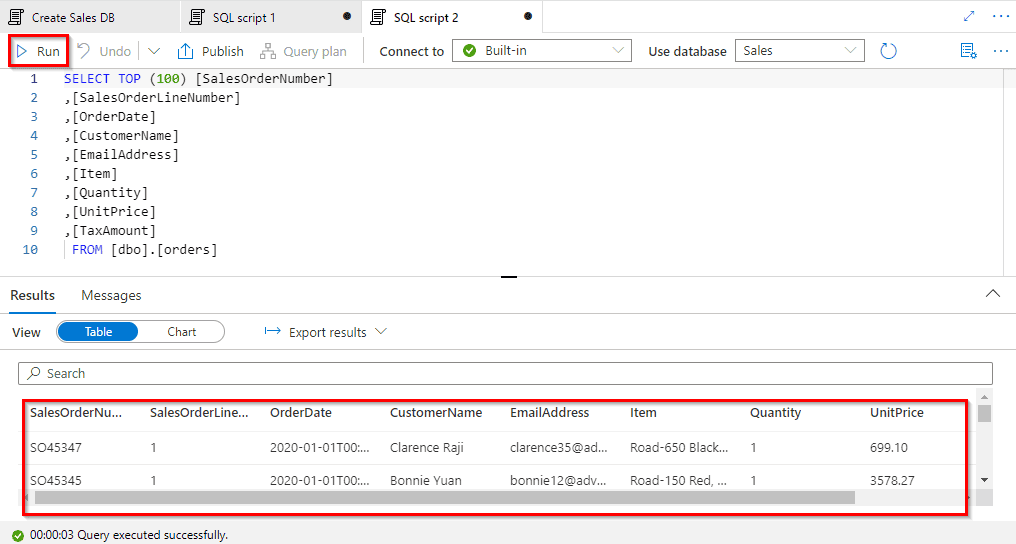
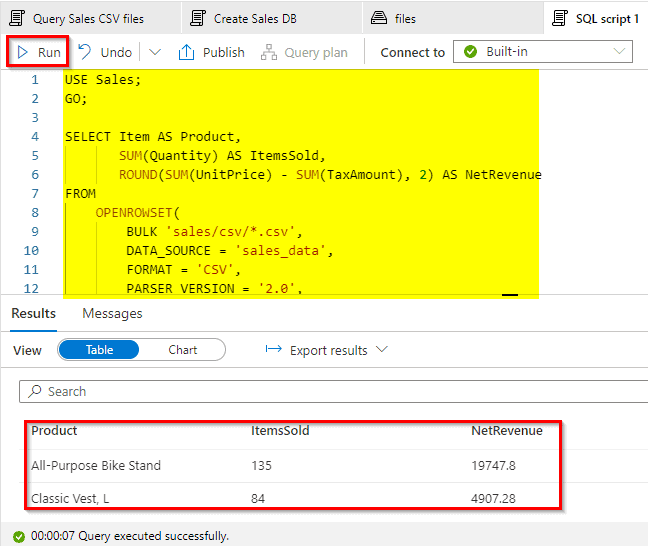
Query Files using a Serverless SQL Pool
You can use the built-in serverless SQL pool to query files in the data lake
In this lab, we have covered the steps:
- Query data in files
- View files in the data lake
- Use SQL to query files
- Access external data in a database
- Visualize query results
Transform files using a serverless SQL pool
In this lab, we have successfully:
- Query data in files
- Transform data using CREATE EXTERAL TABLE AS SELECT (CETAS) statements
- Encapsulate data transformation in a stored procedure
Analyze data in a lake database
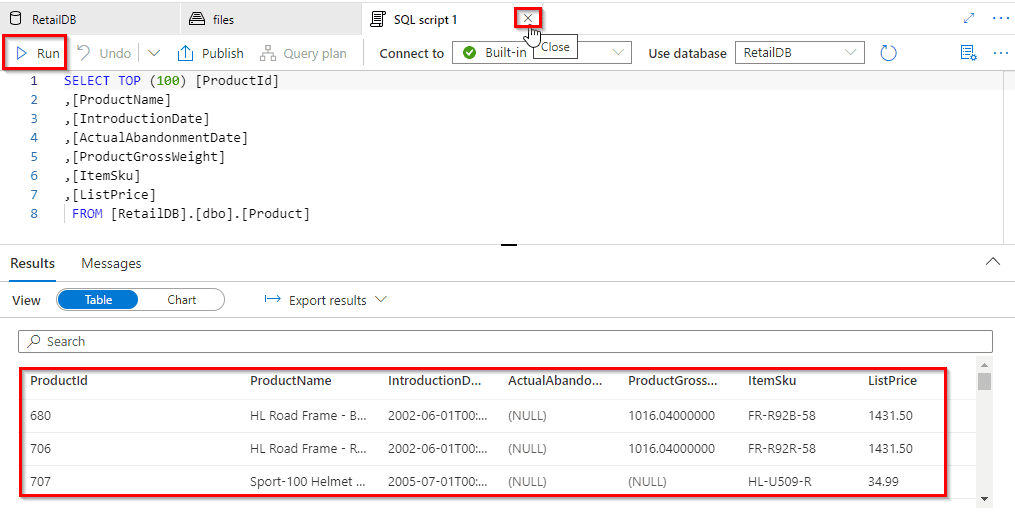
In this lab, we have successfully covered the steps::
- Created a lake database
- Created a table
- Created a table from a database template
- Created a table from existing data
- Worked with lake database tables
Q 1.
Q 2. What are the types of dimensions?
Q 3. Which is the most optimized model?
Q 4. If Azure data factory and synapse pipelines have the same functionality then which one to choose and why to choose?
Q 5. Is it possible to make data models on Azure Data studio?
Q 6. What is star schema?
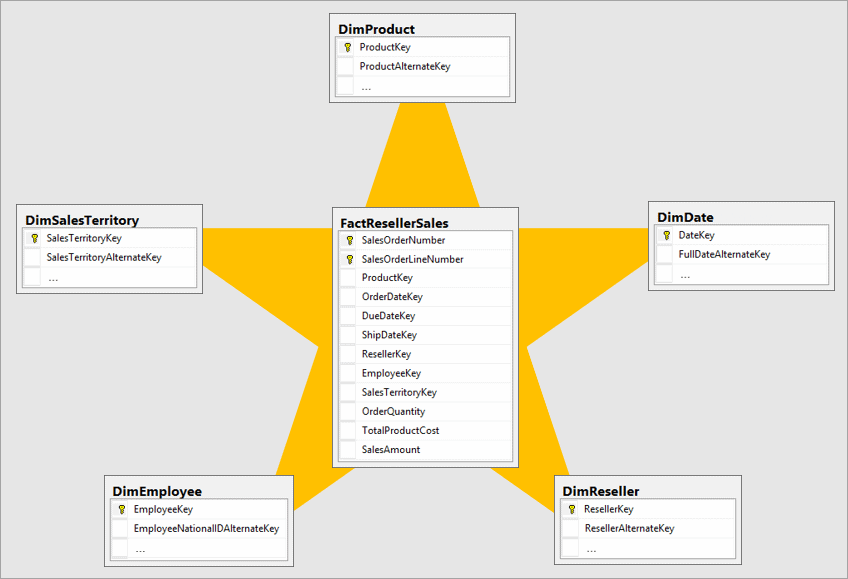
Q 7. What is Snowflake Schema?
Q 8. Can we use Azure Data Studio on the local system instead of Azure VM?
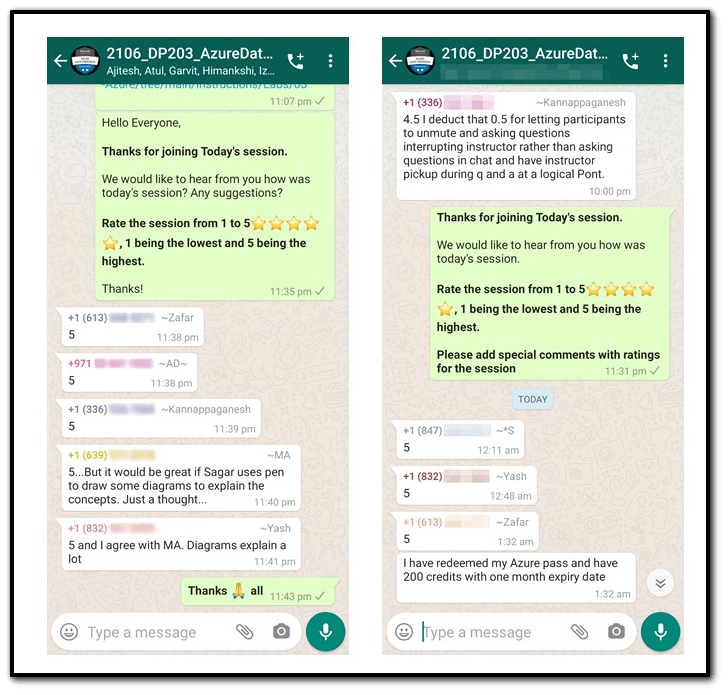
Feedback Received…
Here is some positive feedback from our trainees who attended the session:
Quiz Time (Sample Exam Questions)!
Q. Which SCD type would you use to keep a history of changes in dimension members by adding a new row to the table for each change?
A. Type 1 SCD.
B. Type 2 SCD.
C. Type 3 SCD.
Comment with your answer & we will tell you if you are correct or not!
References
- Microsoft Certified Azure Data Engineer Associate | DP 203 | Step By Step Activity Guides (Hands-On Labs)
- Azure Data Engineer [DP-203] Q/A | Day 1 Live Session Review
- Azure Data Engineer, Data Science & Data Analyst Certifications: DP-900 vs DP-100 vs DP-203 vs DA-100A
Next Task For You
In our Azure Data Engineer training program, we will cover 28 Hands-On Labs. If you want to begin your journey towards becoming a Microsoft Certified: Azure Data Engineer Associate by checking out our FREE CLASS.


![Microsoft Agentic AI Business Solutions Architect [AB-100] | K21 Academy](https://test.k21academy.com/wp-content/uploads/2025/11/Microsoft-Agentic-AI-Business-Solutions-Architect-AB-100-Exam-Overview1.png)



