





Unlock the potential of Azure Compute offerings with our detailed blog exploration.
Azure Compute
Azure Compute is a set of cloud computing services provided by Microsoft Azure that offer scalable and flexible solutions for running applications and workloads in the cloud. It provides services such as virtual machines, containers, serverless computing, and batch processing to meet a wide range of computing demands. Azure Compute enables users to quickly provision, deploy, and manage virtualized instances, resulting in better resource utilization and cost optimizations.
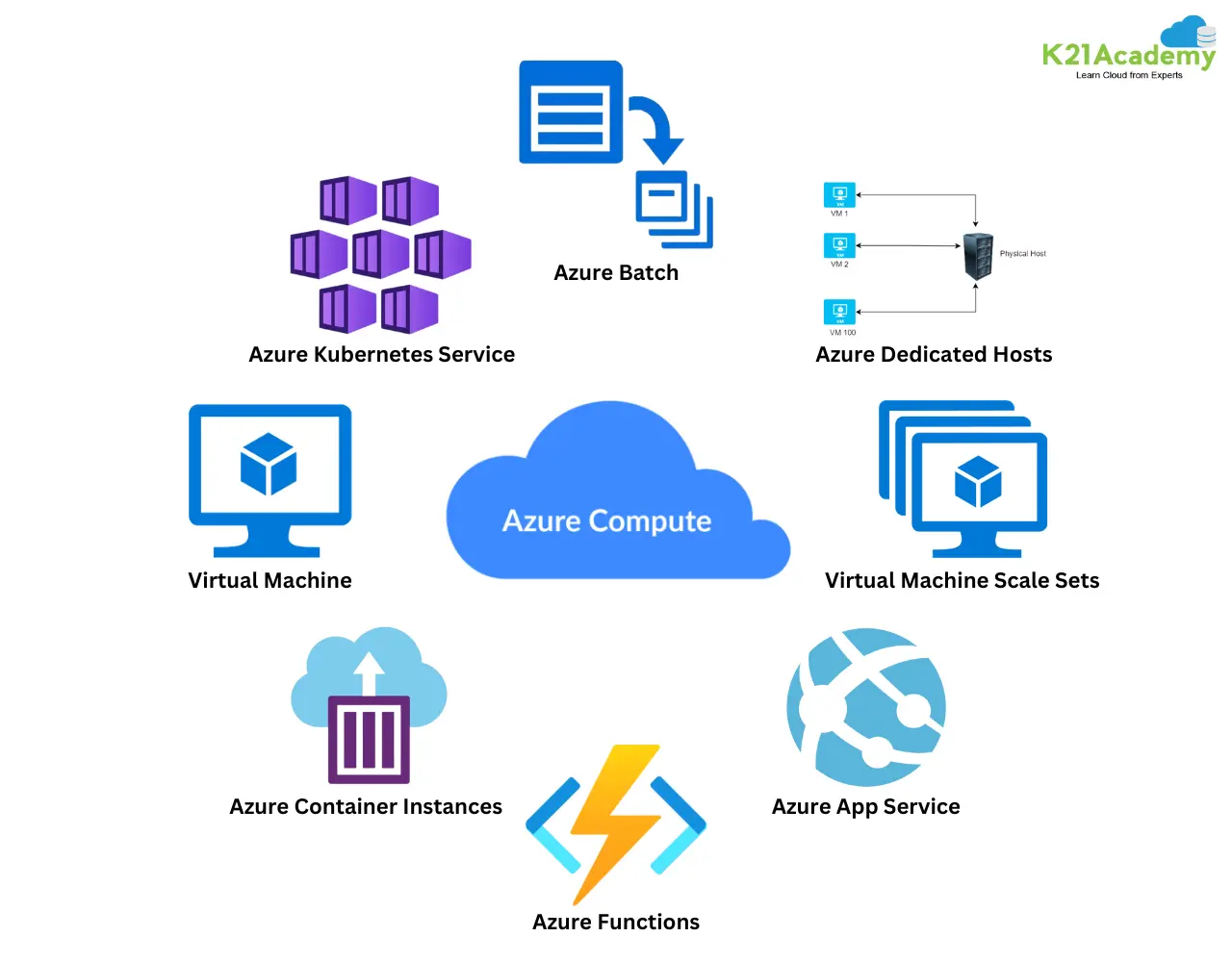 It offers high application availability and performance through built-in capabilities such as auto-scaling, load balancing, and monitoring. It supports a variety of operating systems, programming languages, and development frameworks, allowing for easy application migration and development. Azure Compute enables organizations to innovate and scale their IT infrastructure, speeding up digital transformation and commercial growth in the cloud.
List of services in Azure Compute
- Virtual Machine
- Virtual Machine Scale Sets
- Azure App Service
- Azure Functions
- Azure Container Instances
- Azure Kubernetes Service
- Azure Batch
- Azure Dedicated Hosts
Virtual Machine
Azure VM is a scalable and adaptable computational solution provided by Microsoft Azure. It enables users to create and manage virtualized instances of the Windows or Linux operating systems in the cloud. They are available in a variety of sizes and configurations to fulfil a wide range of workload requirements, including computation, memory, and storage.
Users may simply provision, scale, and customize virtual machines (VMs) based on their application requirements, assuring optimal performance and cost effectiveness. Azure VMs enable organizations to quickly install and execute applications, extend on-premises infrastructure, and achieve seamless hybrid cloud integration.
Virtual Machine Scale Sets
Azure Virtual Machine Scale Sets let you automatically scale your applications based on demand. It’s perfect for achieving high availability and dispersing workloads across numerous virtual machines. You can create scaling rules that automatically alter the number of VM instances based on CPU consumption or other parameters.
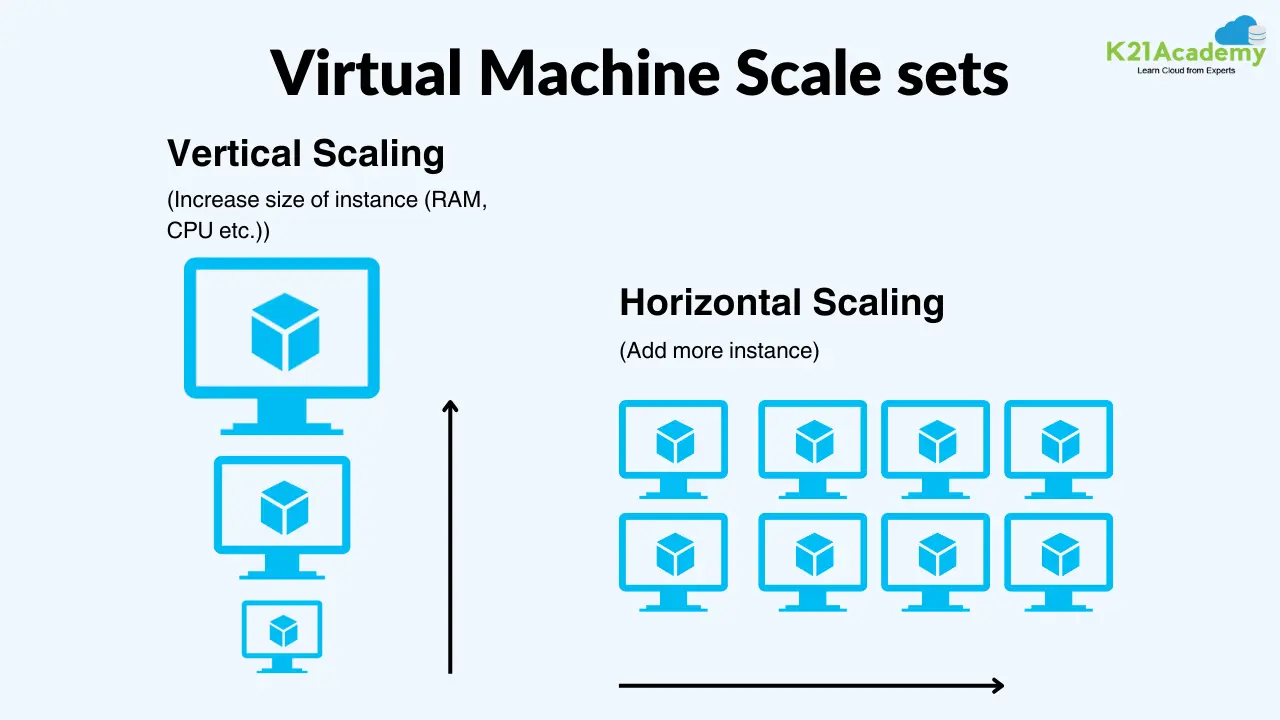 Scale sets provide the simple management and deployment of identical VMs, providing constant performance and dependability. Scale sets, which include load balancing and health monitoring, help to optimize resource utilization and improve application availability.
Azure App service
Azure App Service is a platform-as-a-service (PaaS) offering for hosting web apps and APIs. It streamlines the process of deploying, managing, and scaling applications by eliminating the need to manage the infrastructure. Azure App Service supports a variety of programming languages and frameworks, including.NET, Java, Node.js, and PHP, to meet a wide range of application development needs.
 It includes automatic scalability, continuous deployment, built-in monitoring, and connectivity with Azure DevOps to simplify application lifecycle management. Azure App Service is highly available and secure, delivering consistent performance and compliance with industry requirements. It allows developers to focus on code while Azure manages the underlying infrastructure, making it an excellent choice for creating and delivering modern web apps in the cloud.
Azure Functions
Azure Functions is a serverless compute solution that enables developers to execute code in response to events without having to manage infrastructure. It allows you to create event-driven apps and execute code snippets or functions in a variety of programming languages, including C#, Java, JavaScript, Python, and more. Azure Functions allows developers to create scalable and cost-effective solutions by only paying for the resources required during execution.
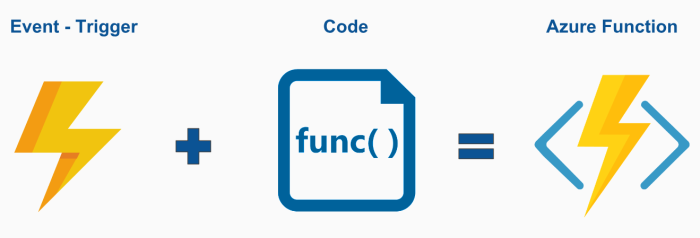
It supports a diverse set of triggers, including HTTP requests, timers, queues, and event grid events, allowing for smooth connection with other Azure services and external systems. Azure Functions enable rapid creation and deployment of microservices, data processing activities, and automation processes, allowing developers to focus on creating creative solutions rather than worrying about server management.
Azure Container Instances
Azure Container Instances (ACI) is a serverless container service which enables users to run containers without managing the underlying infrastructure. It offers a quick and flexible approach to deploy containerized applications, allowing developers to focus on writing and releasing code rather than server management. ACI enables users to start containers with a single command and scale them up or down based on demand.
 It supports both Linux and Windows containers, making it suited for a diverse set of application workloads. ACI works easily with other Azure services and includes capabilities like automatic scaling, networking, and access control, making it easier to create and maintain containerized applications in the cloud.
Azure Kubernetes service
Azure Kubernetes Service (AKS) is a managed Kubernetes service that allows you to install, manage, and scale Kubernetes-based containerized applications. It streamlines the process of constructing and managing Kubernetes clusters by abstracting away the complexities of infrastructure management. AKS enables customers to effortlessly deploy and manage containerized apps without having to provision or maintain Kubernetes control plane components.
AKS provides capabilities like autonomous scaling, self-healing, and integrated monitoring to improve reliability and efficiency. It connects smoothly with other Azure services, allowing for the deployment of microservices architectures and the modernization of existing applications. AKS enables organizations to expedite their transition to cloud-native application development and deployment while promoting agility, scalability, and creativity.
Azure Batch
Azure Batch is a cloud-based service designed to conduct large-scale parallel and high-performance computing (HPC) applications. It allows customers to efficiently provide and manage computing resources on demand, scalable to meet the needs of batch processing activities. It can handle a variety of workloads, including data processing, graphics, and simulations, in both Windows and Linux platforms.
 Users may use Azure Batch to run compute-intensive processes without having to manage infrastructure, which optimizes resource utilization and lowers costs. Azure Batch works seamlessly with other Azure services, providing for simple data transport, storage, and management. It enables organizations to expedite time-to-results and gain faster insights by leveraging distributed computing capabilities.
Azure Dedicated Hosts
Azure Dedicated Hosts allows organizations to run virtual machines on dedicated physical servers. It isolates and controls the underlying hardware, allowing for compliance with regulatory or special licensing. Dedicated Hosts allow customers to deploy virtual machines in single-tenant environments, ensuring predictable performance and security.
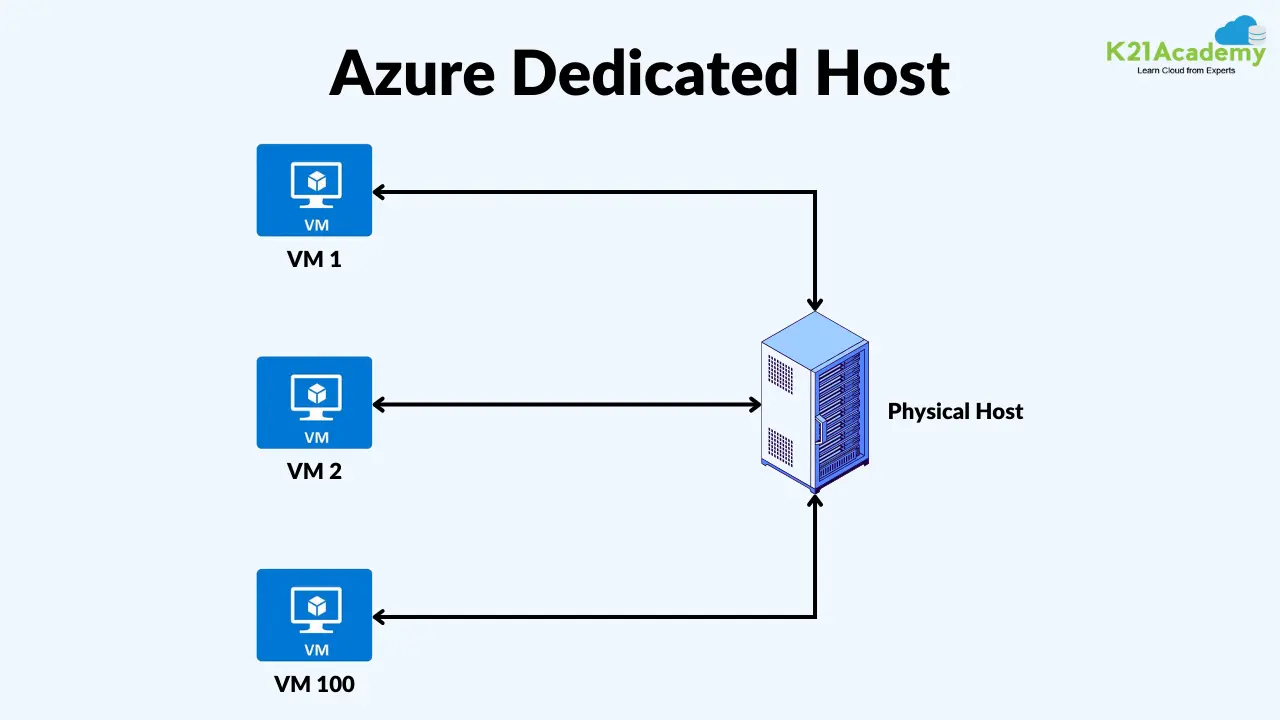 It can run a variety of operating systems and workloads, including Windows and Linux, database servers, and enterprise applications. Dedicated Hosts provide flexibility in instance kinds, sizes, and configurations, allowing organisations to tailor their environments to unique needs. Overall, Azure Dedicated Hosts offer a dependable and flexible alternative for hosting virtualized workloads in the cloud.
Frequently Asked Questions
Q1) How can I scale VMs automatically based on demand?
VM Scale Sets enable automatic scaling of identical VMs based on load or schedule.
Q2) How quickly can I deploy containers using Azure Container Instances?
ACI allows for rapid deployment of containers in seconds, without the need to provision or manage VMs.
Q3) Can Azure Batch handle large-scale computing workloads efficiently?
Yes, Azure Batch is designed for running compute-intensive tasks at scale, with features like job scheduling, resource provisioning, and task parallelism.
Q4) Can I deploy Azure Functions in multiple programming languages?
Yes! Azure Functions supports several programming languages, including C#, Python, JavaScript, Java, and PowerShell. This allows you to select the language that best fits your project and expertise, all within the same serverless environment.
Q5) How can I ensure compliance and regulatory requirements with Azure Dedicated Hosts?
Dedicated Hosts offer various compliance features, including physical isolation to meet data residency and security requirements, license transfer to use existing on-premises license, and additional control to configure according to your compliance policies.
Q6) Can I run Windows and Linux VMs on Azure?
Yes, Azure supports both Windows and Linux VMs, offering a wide range of operating system choices.
Q7) Can I use Azure Virtual Machines for testing and development purposes?
Yes, Azure VMs are suitable for testing and development, offering flexibility in terms of configuration and scalability.
Q8) Can I deploy multi-container applications with Azure Kubernetes Service?
Yes, Azure Kubernetes Service supports the deployment of complex, multi-container applications using Kubernetes pods and services.
Q9) Can I integrate Azure Batch with other Azure services for data processing?
Yes, Azure Batch integrates seamlessly with Azure Storage, Azure Data Lake, and Azure Databricks for efficient data processing workflows.
Q10) What are the pricing considerations for Azure Dedicated Hosts?
Azure Dedicated Hosts are billed based on the type and size of the host, you can also checkout the Azure Dedicated Host pricing page for exact details.
Q11) What options are available for managing and monitoring Azure Functions?
Azure Functions can be monitored using Azure Monitor and integrated with Azure Application Insights for performance monitoring and troubleshooting.
Related/References
- Activity Guides/Hands-on Lab & Projects
- Cloud Services Model
- Cloud Computing – Overview & Benefits
- Azure Region and Availablity Zone
- How to create a free tier account on Azure
- Microsoft Azure Core Services For Beginners
Next Task For You
Begin your journey toward Mastering Azure Cloud and landing high-paying jobs. Just click on the register now button on the below image to register for a Free Class on Mastering Azure Cloud: How to Build In-Demand Skills and Land High-Paying Jobs. This class will help you understand better, so you can choose the right career path and get a higher paying job.


![Microsoft Agentic AI Business Solutions Architect [AB-100] | K21 Academy](https://test.k21academy.com/wp-content/uploads/2025/11/Microsoft-Agentic-AI-Business-Solutions-Architect-AB-100-Exam-Overview1.png)



