



This blog post will go through some quick tips including Q/A and related blog posts on the topics that we covered in the Azure Administration Day 3 Live Session which will help you gain a better understanding and make it easier for you to
In this blog, I am going to share some quick tips including Q & As and useful links from Day 3 of Azure Admin covering Module 3: Intersite Connectivity and Module 4: Network Traffic Management where we have covered topics like VNet-to-VNet, Virtual Network Peering, Point-to-Site, Site-to-Site, ExpressRoute.
We also covered hands-on, Lab 6, Lab 7, and Lab 8 out of our 35+ extensive labs.
The previous week, In Day 2 session we got an overview of concepts of Azure virtual networking, Network Security Group(NSG), Basics of NSG, Route Table, Azure Security Groups(ASG), Azure Private DNS, Azure Firewall, Jump-Box, and Azure Bastion Host.
A week before, In Day 1 session we got an overview of Cloud Concepts, Cloud Service Models, Cloud Deployment Models, Azure Overview, Azure Region, IP Addressing, basics of Networking, RBAC Overview.
So, here are some of the Q/A from the live class.
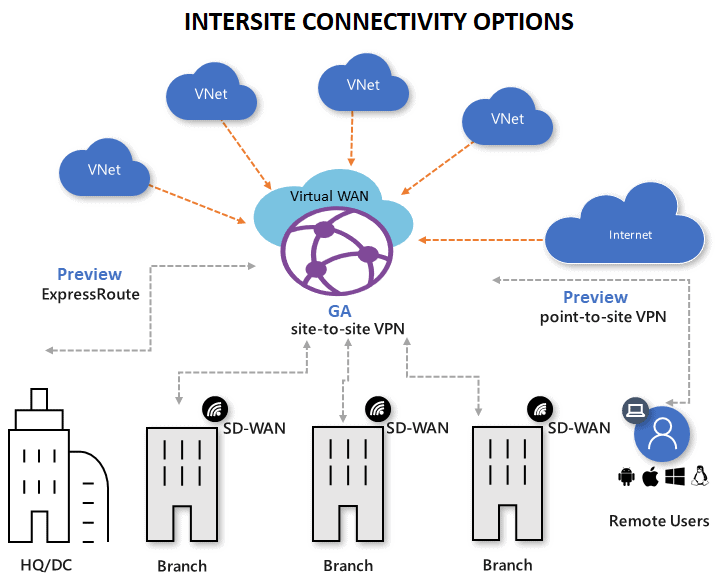
Azure Inter-site Connectivity
Also Read: Our blog post on Microsoft Azure Administrator Learning Path. Click here
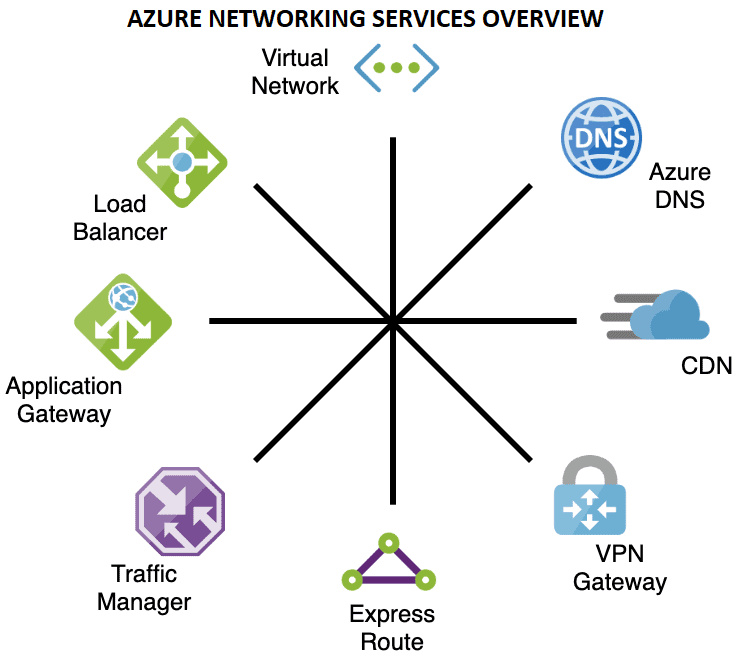
Azure Networking Services Overview
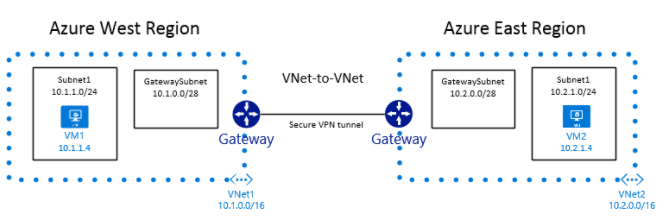
VNet-TO-VNet Connection
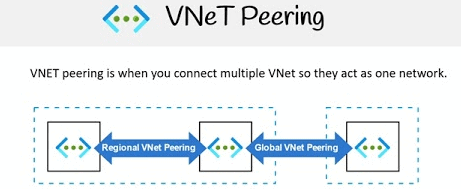
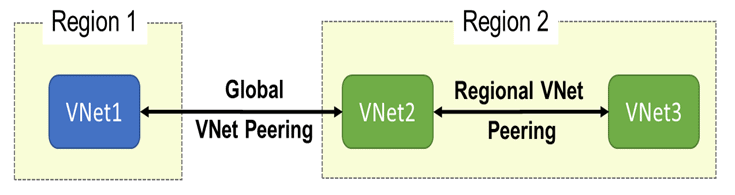
VNet Peering
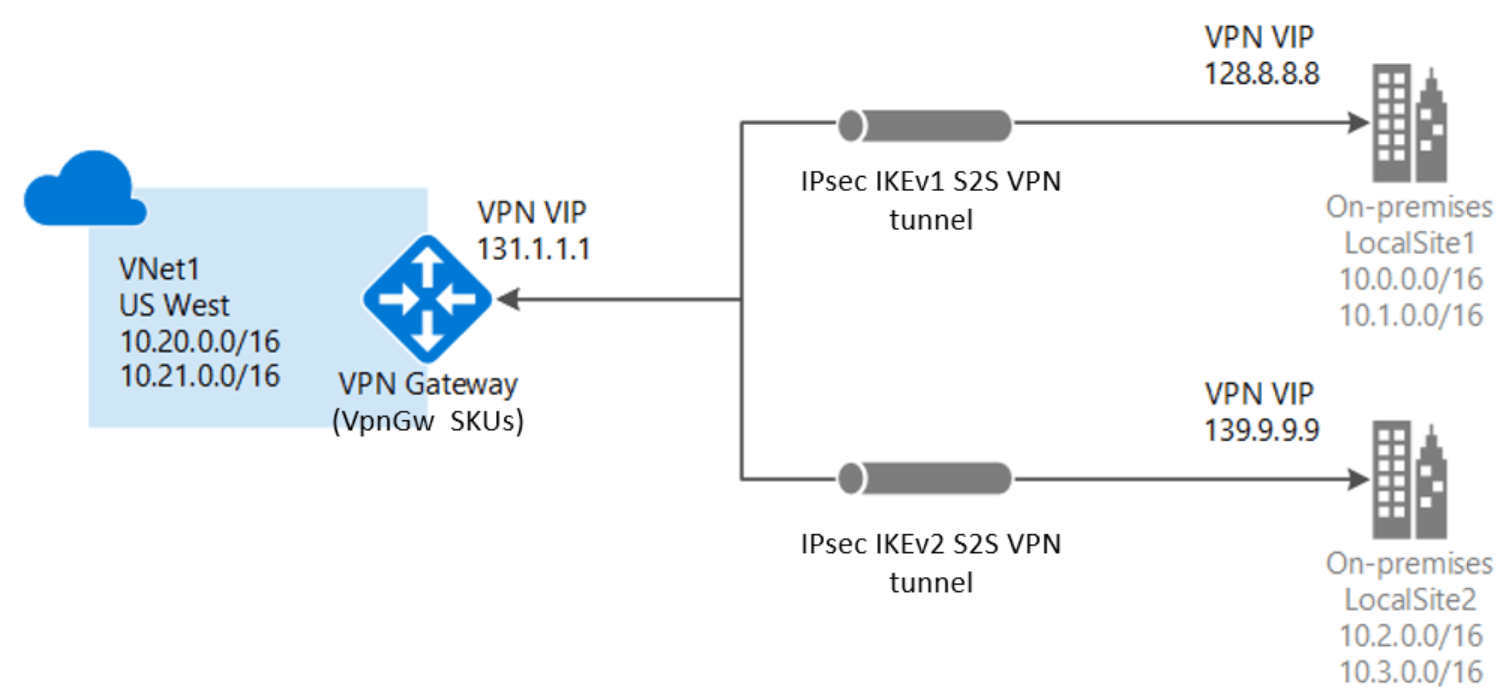
Azure Network Gateways
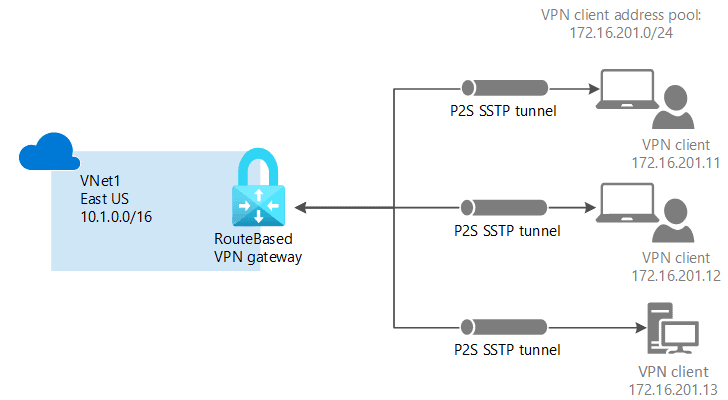
Point-to-Site Connection
A Point-to-Site (P2S) VPN gateway connection lets you create a secure connection to your virtual network from an individual client computer. A P2S connection is established by starting it from the client’s computer.
Check more on Point-to-Site Connection
Site-to-Site Connection
If we have an on-premises virtual network, and we may have other virtual networks existing in other cloud providers. To connect to our virtual network in Azure with the network that is an on-premises data center, we can use a Site-to-site VPN.
A Site-to-Site VPN gateway connection is used to connect your on-premises network to an Azure virtual network over an IPsec/IKE (IKEv1 or IKEv2) VPN tunnel. This type of connection requires a VPN device located on-premises that has an externally facing public IP address assigned to it.
Check more on Site-to-Site Connection
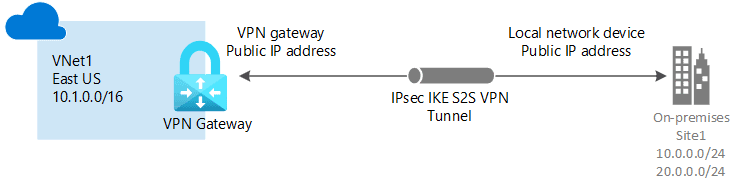
Q7: Does site to site is mostly on-premise to Azure?
Ans. Yes, a Site-to-Site VPN gateway connection is used to connect your on-premises network to an Azure virtual network. This type of connection requires a VPN device located on-premises that has an externally facing public IP address assigned to it.
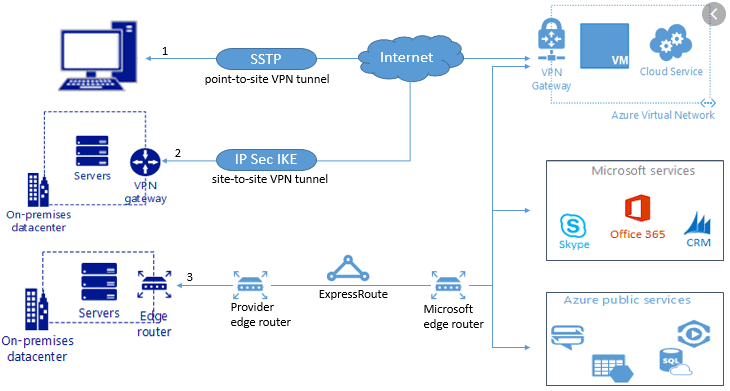
Q8: What is the difference between point-to-site and site-to-site?
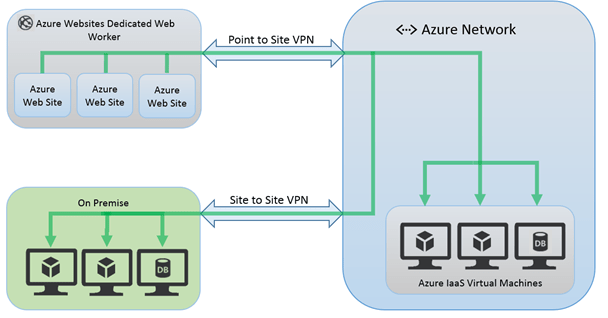
Ans. In point-to-site, you have to connect to the network you want to access manually. Usually, if you log off or restart the workstation it loses connection, and you have to reconnect every time. It’s common to use this type of VPN when we are working remotely, and we need to access our company assets. The channel is bi-directional, but it’s 1-to-many.
Site-to-site is used when you want to connect two networks and keep the communication up all the time. It’s also bi-directional, but it’s many-to-many and stays up no matter if your server/workstation is running or not because the connection is established through a network gateway and not from the computer operating system.
ExpressRoute
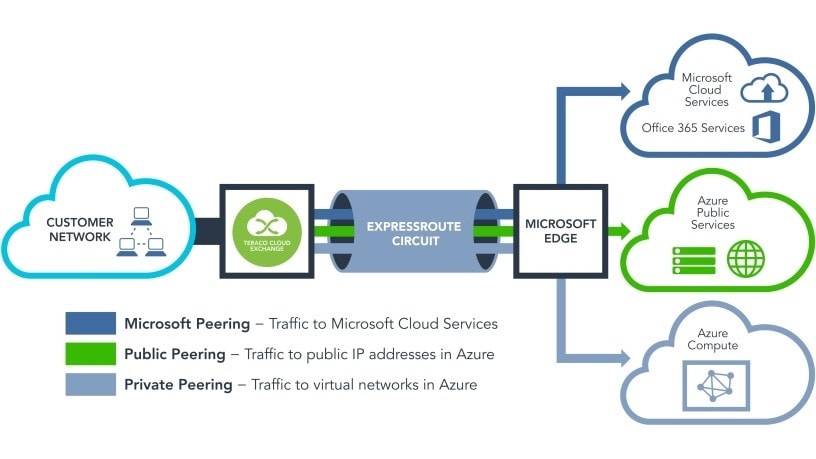
ExpressRoute is an Azure service that lets you create private connections between Microsoft datacenters and infrastructure that’s on your premises or in a colocation facility.
ExpressRoute lets you extend your on-premises networks into the Microsoft cloud over a private connection with the help of a connectivity provider. With ExpressRoute, you can establish connections to Microsoft cloud services, such as Microsoft Azure and Microsoft 365.
Check more on Azure ExpressRoute
There are similar services with different terms as Azure ExpressRoutes provided by other Cloud providers:
Amazon Web Services – AWS Direct Connect is a cloud service solution that makes it easy to establish a dedicated network connection from your premise to AWS.
Check more on AWS Direct Connect
Google Cloud Platform – GCP Dedicated Interconnect provides direct physical connections between your on-premises network and Google’s network.
Check more on GCP Dedicated Interconnect
Oracle Cloud Infrastructure – Oracle Cloud Infrastructure FastConnect provides an easy way to create a dedicated, private connection between your data center and Oracle Cloud Infrastructure. FastConnect provides higher-bandwidth options, and a more reliable and consistent networking experience compared to internet-based connections.
Check more on FastConnect Overview
Interconnect Microsoft Azure ExpressRoute With Oracle Cloud FastConnect
In June 2019, Microsoft announced a cloud interoperability collaboration with Oracle that will enable its customers to migrate and run enterprise workloads across Microsoft Azure and Oracle Cloud.
Check our blog on Oracle and Microsoft: Interconnect Overview
Check our blog on Interconnect Microsoft Azure ExpressRoute With Oracle Cloud FastConnect
Q9: What are the benefits of using ExpressRoute and private network connections?
Ans. ExpressRoute connections don’t go over the public Internet. They offer higher security, reliability, and speeds, with lower and consistent latencies than typical connections over the Internet. In some cases, using ExpressRoute connections to transfer data between on-premises devices and Azure can yield significant cost benefits.
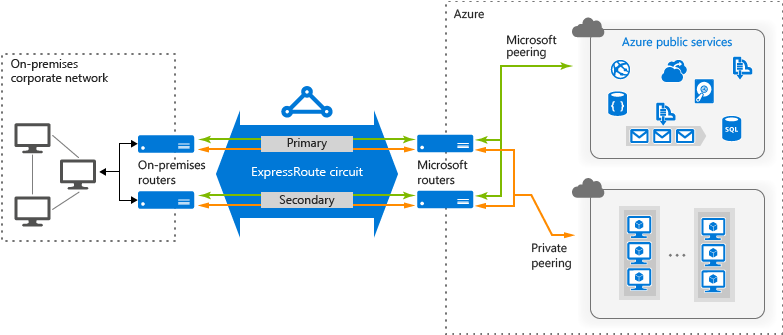
Q10: Will we lose connectivity if one of our ExpressRoute links fails?
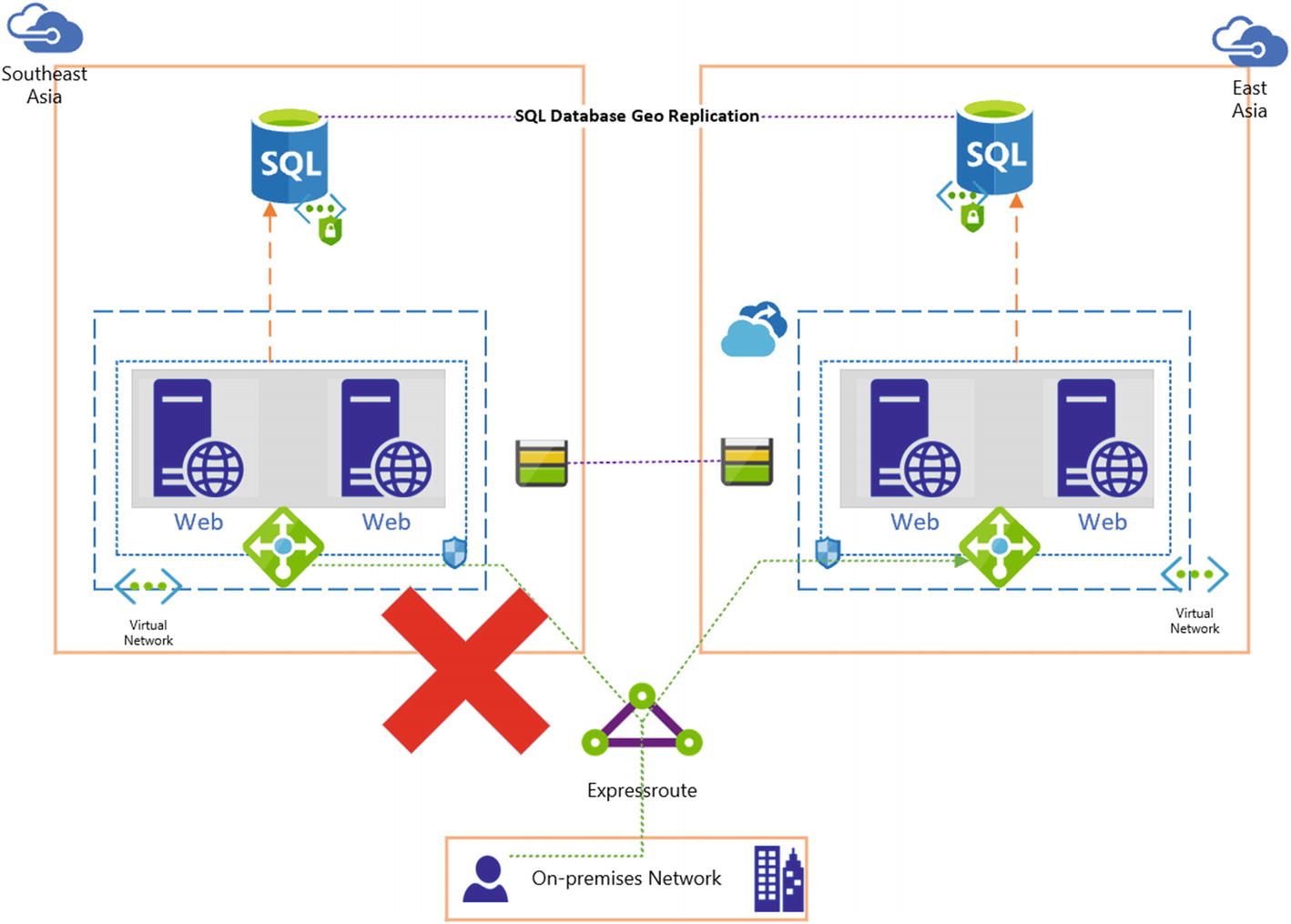
Ans. You will not lose connectivity if one of the cross-connections fails. A redundant connection is available to support the load of your network and provide high availability of your ExpressRoute circuit. You can additionally create a circuit in a different peering location to achieve circuit-level resilience.
Availability Set
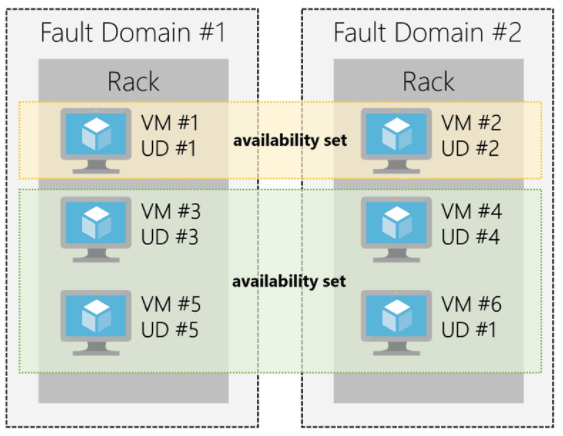
Availability Set is a logical grouping capability for isolating VM resources from each other when they’re deployed. By deploying your VMs across multiple hardware nodes Azure ensures that if hardware or software failure happens within Azure, only a sub-set of your virtual machines is impacted and your overall solution is safe and in working condition.
It provides redundancy for your virtual machines. An Availability set spreads your virtual machines across multiple fault domains and update domains.
Fault Domain
- Azure Fault domains define the group of virtual machines that share a common power source and network switch.
- Each and every fault domain contains some racks and each rack contains a virtual machine.
- All the resources in the fault domain become unavailable when there is a failure in the fault domain.
Update Domain
- Virtual machines get update domains automatically once they are put inside the availability set.
- All virtual machines within that update domain will reboot together.
- They are used for the patching of virtual machines.
- Only one update domain can be updated at a time.
Check more on Azure Availability Set.
Q11: What is the main advantage of an availability set?
Ans. Availability set provides redundancy for your virtual machines. Availability set spreads your virtual machines across multiple fault domains and update domains. If you want to leverage Microsoft’s 99.95% SLA from Microsoft you must place your VMs inside the availability set except your VMs are having premium storage.
Q12: What is the maximum number of virtual machines we can have in an Azure Availability Set?
Ans. The max is 200 virtual machines per availability set, which is the same number of virtual machines that can be in a single cloud service. However, note that all virtual machines must reside in the same cloud service and therefore the same Azure scale unit (cluster).
Check more on the Microsoft Azure Virtual Machine Limits page
Quiz Time (Sample Exam Questions)!
With our Microsoft Azure Administrator training program, we cover 150+ sample exam questions to help you prepare for the certification AZ-104.
Check out one of the questions and see if you can crack this…
Ques: Is it possible to add an existing VM to an availability set?
A. Yes, VM can be added
B. No, VM cannot be added
C. Not Sure
The right answer will be revealed in my next week’s email.
Here is the answer to the question shared last week (Scroll down at the end of this post for the question).
Ques: Your company plans to migrate all its network resources to Azure. You need to start the planning process by exploring Azure. What should you create first?
A. Subscription
B. Resource group
C. Virtual network
D. Management group
Answer: A
Related/References
- VNet Peering in Azure
- Azure Network Gateways
- Azure traffic manager overview
- Azure Load Balancer Overview
- Azure ExpressRoute
- Oracle and Microsoft: Interconnect Overview
- [Recap] Day 1: Azure Administration & Governance and Compliance [Azure Administrator] [AZ-104]
- [Recap] Day 2: Azure Virtual Networking [Azure Administrator] [AZ-104]
- Interconnect Microsoft Azure ExpressRoute With Oracle Cloud FastConnect
Next Task For You
Begin your journey toward Mastering Azure Cloud and landing high-paying jobs. Just click on the register now button on the below image to register for a Free Class on Mastering Azure Cloud: How to Build In-Demand Skills and Land High-Paying Jobs. This class will help you understand better, so you can choose the right career path and get a higher paying job.


![Microsoft Agentic AI Business Solutions Architect [AB-100] | K21 Academy](https://test.k21academy.com/wp-content/uploads/2025/11/Microsoft-Agentic-AI-Business-Solutions-Architect-AB-100-Exam-Overview1.png)


