



This blog post covers a brief overview of the topics covered and some common questions asked on Day 1 Live Interactive training on Azure Administrator Certification [AZ-104].
This post will help you to learn Administration and Azure Virtual Networking and prepare you for the certification and get a better-paid job in the field of Azure administrator.
On our Day 1 Live Session, we have covered Cloud Concepts, Cloud Service Models, Azure Overview, Azure Region, Azure Governance and Compliance, Subscriptions and Accounts Overview, Azure Resource Manager, Azure Policy, Azure RBAC, Resource Tags, Azure Resource Lock, and also performed hands-on, where we have created Resource Groups and configured Virtual Networks, Virtual Machines, Azure Policy and many more.
1. Azure Administration
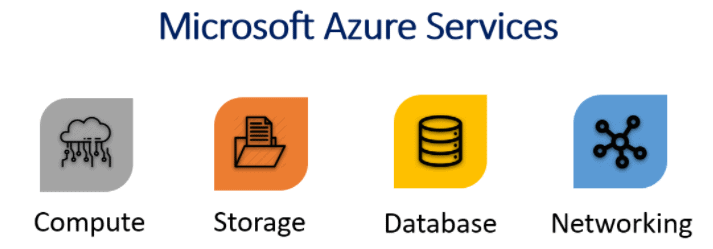
An Azure Administrator is responsible for implementing, monitoring, and maintaining Microsoft Azure solutions, including major services related to Compute (Virtual machine, Containers), Storage (Blob Storage, Azure Files), Networking (Load Balancer, DNS, etc.), Database and Security .
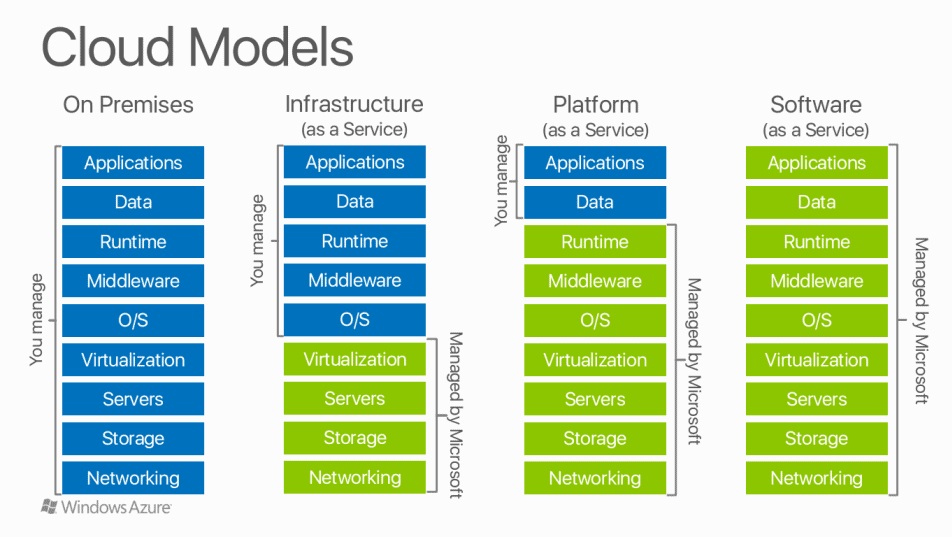
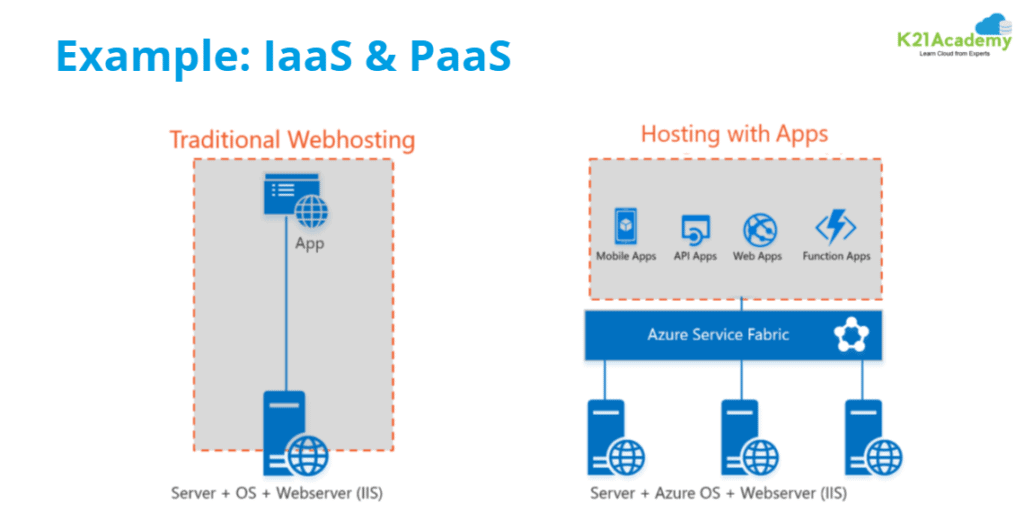
Cloud Services Model
Also, Read Our blog post on Azure Front Door. Click here
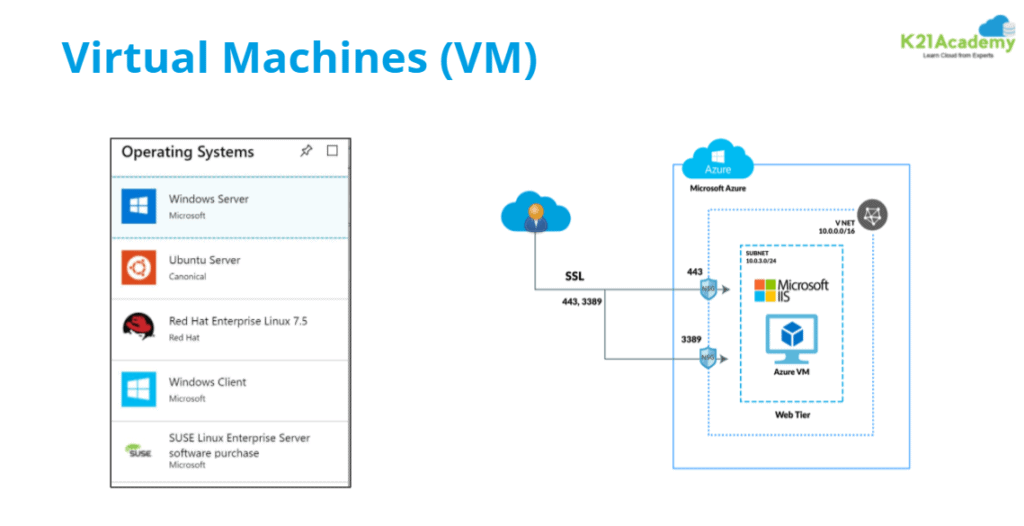
Virtual Machines
FAQs asked in the session are:
Also, Check Our blog post on Azure Administrator Learning Path. Click here
Cloud Deployment Models
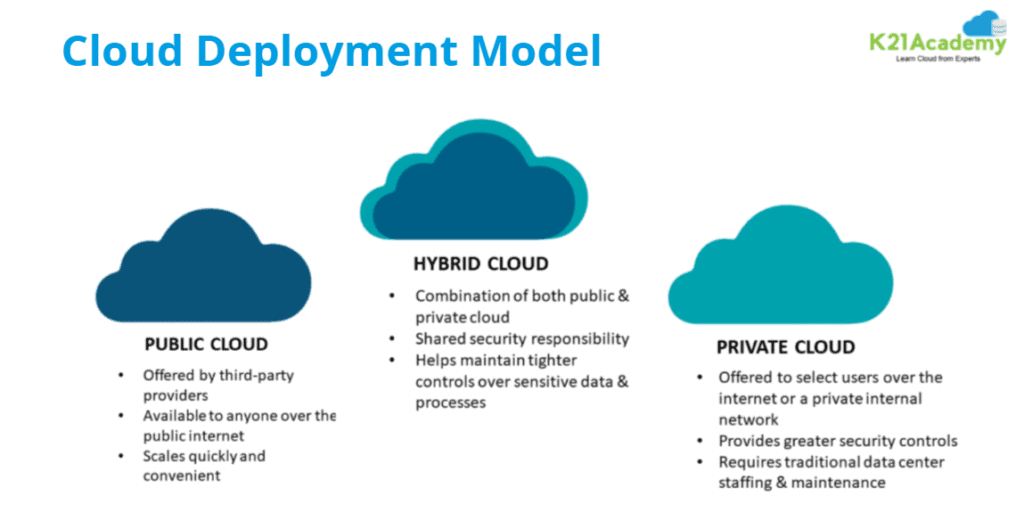
Public Cloud
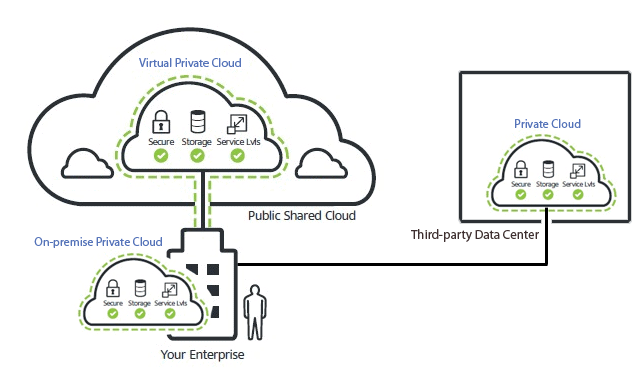
Private Cloud
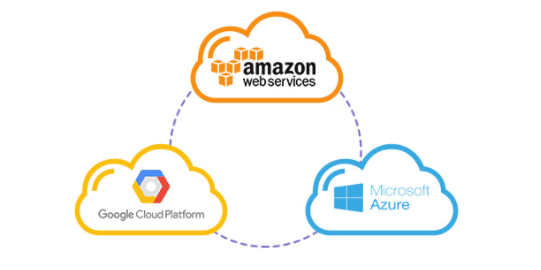
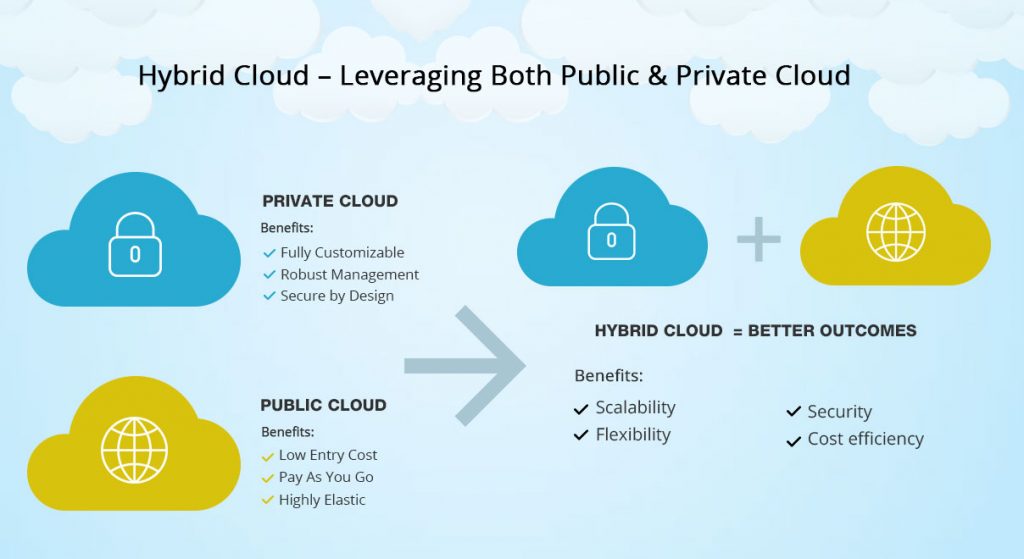
Hybrid Cloud
Regions in Azure
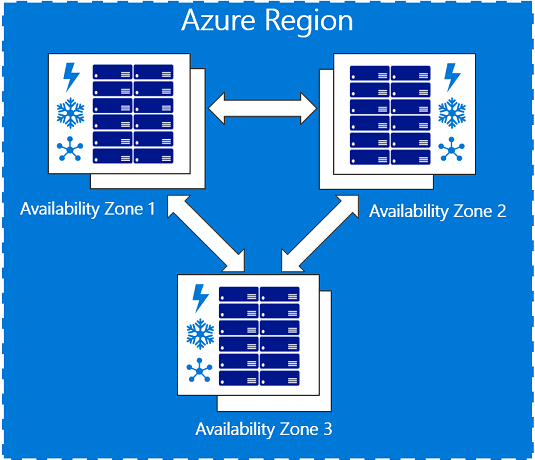

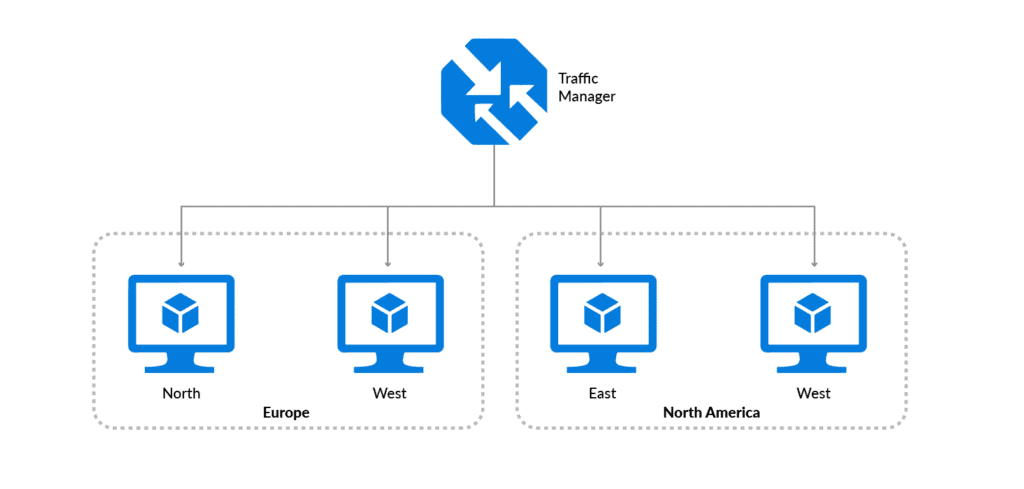
>Governance and Compliance
The first step is the migration strategy, which lays down how you plan to migrate your applications to the Cloud. Logically, the next step is to determine how to integrate the new environment into your organization. That’s where Cloud Governance comes in.
>Governance
“Governance” is the framework that determines how your organization conducts business activities, based on objectives and responsibilities.
And also, Governance refers to the ongoing process of managing, monitoring, and auditing the use of Azure resources.
You lay down the rules – also known as the “guard rails” – for these disciplines early on in the development process.
On a similar note in an Azure cloud, Azure Governance can be described simply as mechanisms and processes to maintain control over your applications and resources in Azure.
➝Read more about Azure Governance
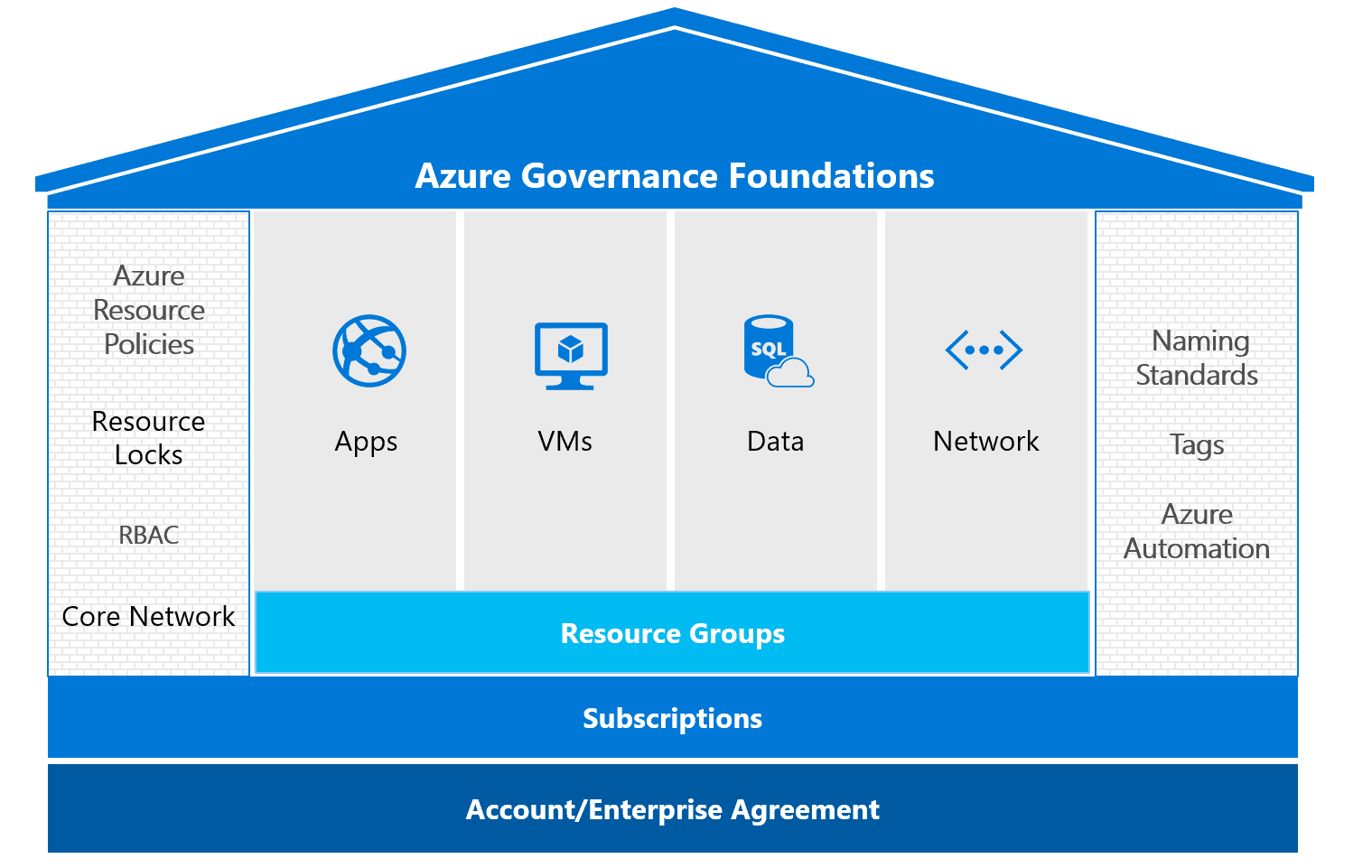
Compliance strategy helps customers address business objectives and industry standards & regulations, including ongoing evaluation and adoption of emerging standards and practices.
The Microsoft compliance framework for online services maps controls to multiple regulatory standards, which helps drive the design and building of services that meet today’s high level of security and privacy needs.

>Subscriptions and Accounts Overview
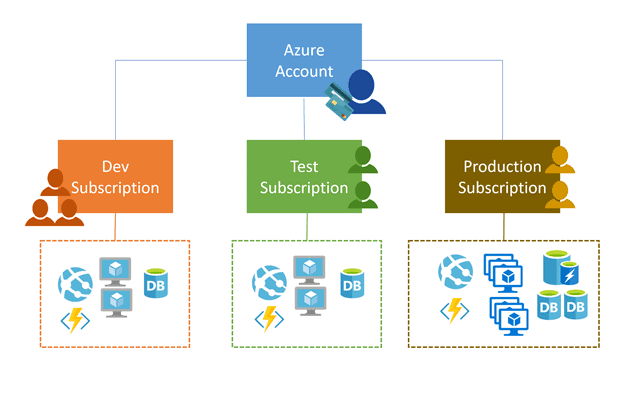
Azure Subscriptions are a logical unit of Azure services that are linked to an Azure account. In order to take advantage of Azure’s cloud-based services, you must have a subscription as it serves as a single billing unit for Azure resources used in that account.
➝Read more about Subscription
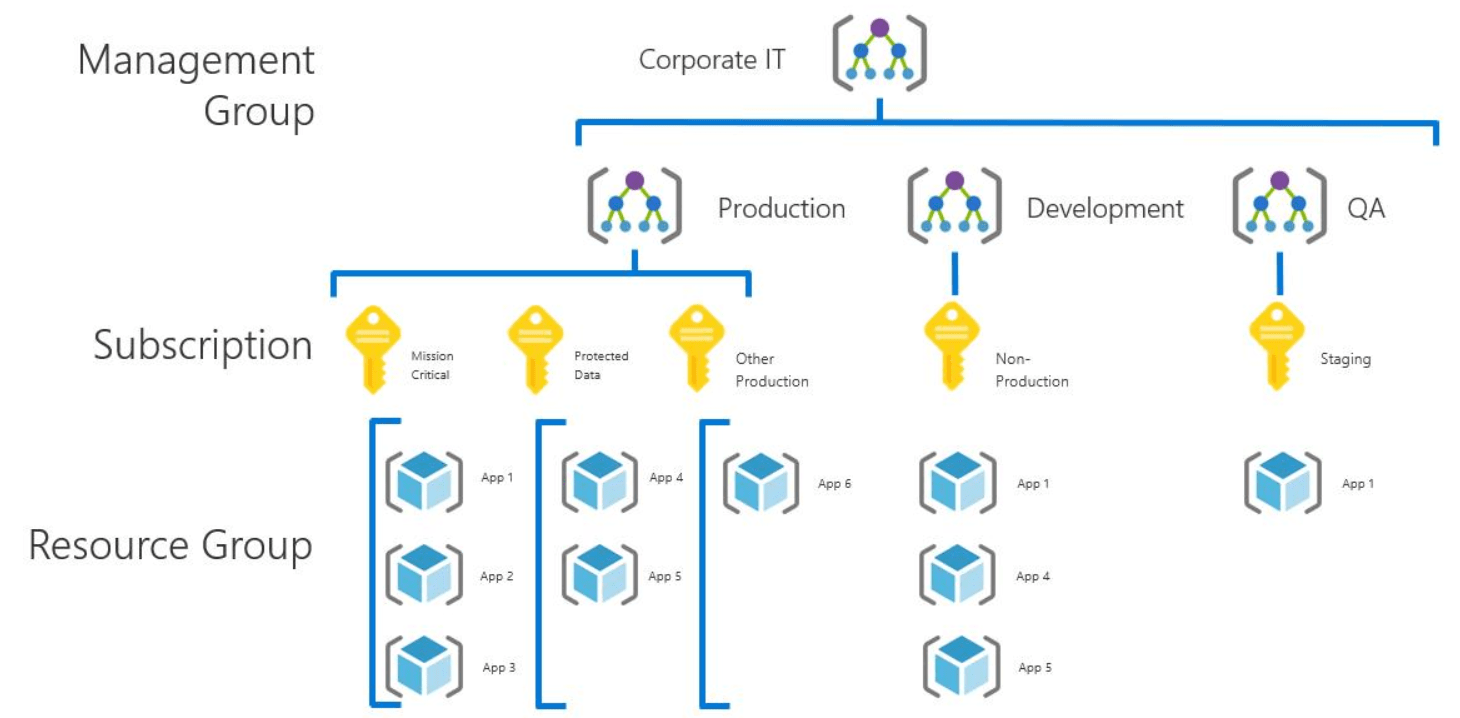
>Azure Account
An Azure account is a globally unique entity that gets you to access to Azure and your Azure subscriptions. You can create multiple subscriptions in your Azure account to create separation. For example – for billing and management purposes.
To use the azure, we would be creating the azure account. An account in azure is tied to
- Name, email & contact details
- Billing information
>Azure Subscription
An Azure subscription is a logical container used to provision resources in Microsoft Azure. It holds the details of all your resources like virtual machines, databases, etc.
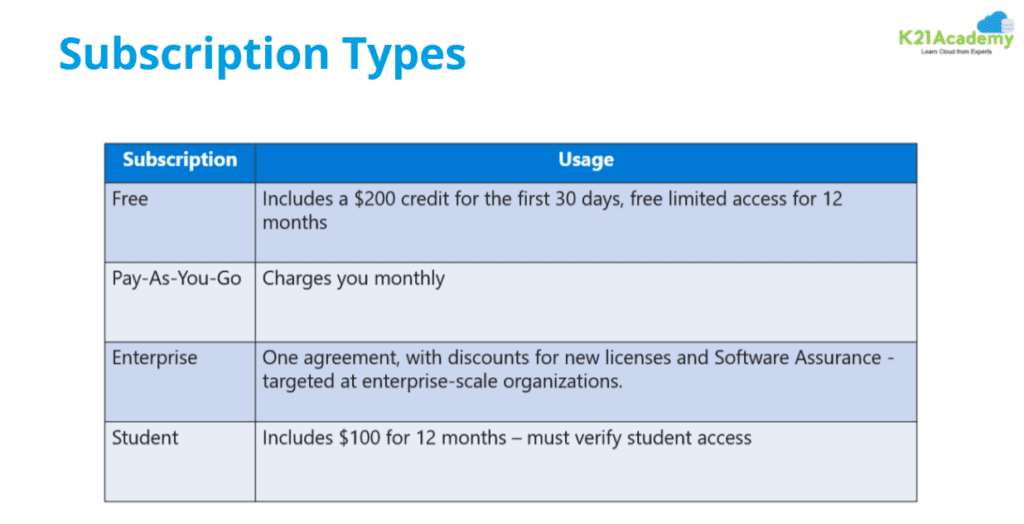
For each account, you can have multiple subscriptions. Azure supports the following subscriptions
- Free
- Pay-As-You-Go
- Enterprise Agreement Support
One can also create multiple subscriptions in Azure!
Q5. Can we delete a free subscription?
Ans. If you have a free trial subscription, you don’t have to wait 30 days for the subscription to automatically delete. You can delete your subscription three days after you cancel it. The Delete subscription option will not be available after three days you cancel your subscription.
>Azure Resource Manager
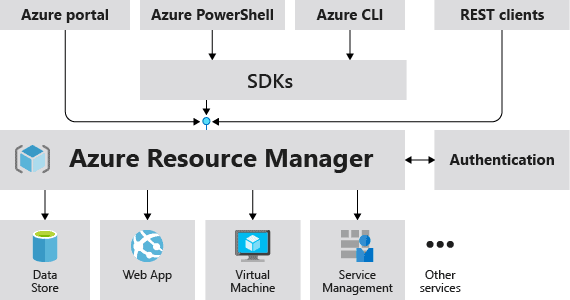
Azure Resource Manager is the deployment and management service for Azure. It provides a management layer that enables you to create, update, and delete resources in your Azure account. You use management features, like access control, locks, and tags, to secure and organize your resources after deployment.
➝Read more about Azure Resource Manager
Q6: What is the difference between ASM and ARM templates?
- ASM is an old portal that provides Cloud service for IaaS Workload and a few specific PaaS Workload and ARM is a new portal that provides service for all Workload of IaaS and PaaS
- Removal or Deletion is not easy as Azure Resource Manager in ASM and Removal of resource is easier by deleting their source group (RSG) which will help to delete all the resources present in the RSG
Q7. Why should you ARM templates?
Ans. Templates help you implement an infrastructure-as-code solution for Azure. Your organization can repeatedly and reliably deploy the required infrastructure to different environments.
>Resource Groups
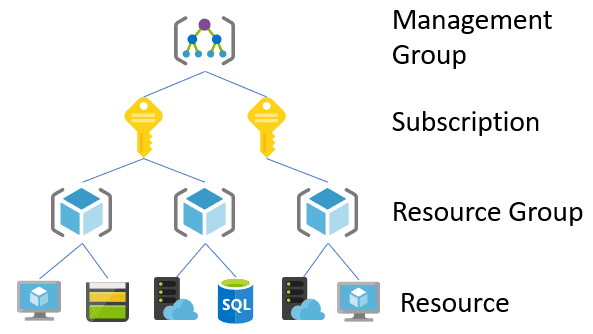
A resource group is a logical container that holds related resources for an Azure solution. It helps in managing all the resources in a group. It helps us to allocate resources to a resource group and generally, add resources that share the same lifecycle to the same resources group so you can easily deploy, update, and delete them as a group.
➝Read more about Resource Groups.
Q8. Who has the right to delete the resource groups or virtual machines, the owner or the administrators?
Ans. An administrator has login access to the platform and as an administrator can add and delete resource groups and virtual machines. An administrator can only delete A particular resource group and virtual machine based on their user role. And the owner cannot delete the resource group and virtual machines due to the particular role assigned to the various administrators and the administrators can only handle their role.
Q9. What is the best practice to Audit or Govern the Root Permission?
Ans. The best practice for Governance is that there should be a minimum of 2 Owners and the rest can be given according to their job roles in the organization. For Audit, you can enable RBAC Policy. Also, this topic will be covered in Module 10 Manage identities and governance of this training.
>Azure Policy
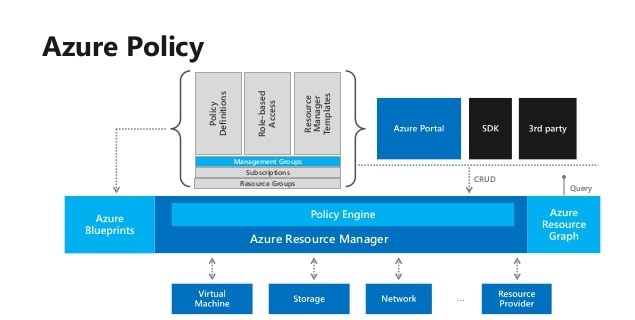
Policies are sets of rules that specify what can and cannot be created in either a single resource group or a full subscription. These can be used to ensure users are able to create and work with approved resources without creating over-provisioned machines racking up major costs on your Azure bill.
Azure Policy is a service in Azure that you use to create, assign, and manage policies. These policies enforce different rules and effects over your resources, so those resources stay compliant with your corporate standards and service level agreements.
➝Read more about Azure Policy
Q10. What is the main function of policies in Azure?
Ans. Azure Policy helps you manage and prevent IT issues with policy definitions that enforce rules and effects for your resources.
Q11. What are azure policy effects?
Ans. Append, Audit, AuditIfNotExists, Deny, DeployIfNotExists, Disabled, Modify are Azure policy effects.
Q12: Is Azure policy free?
Answer: Azure Policy is a free service, therefore, it does not have a financially backed SLA.
>Azure RBAC (Role-Based Access Control)
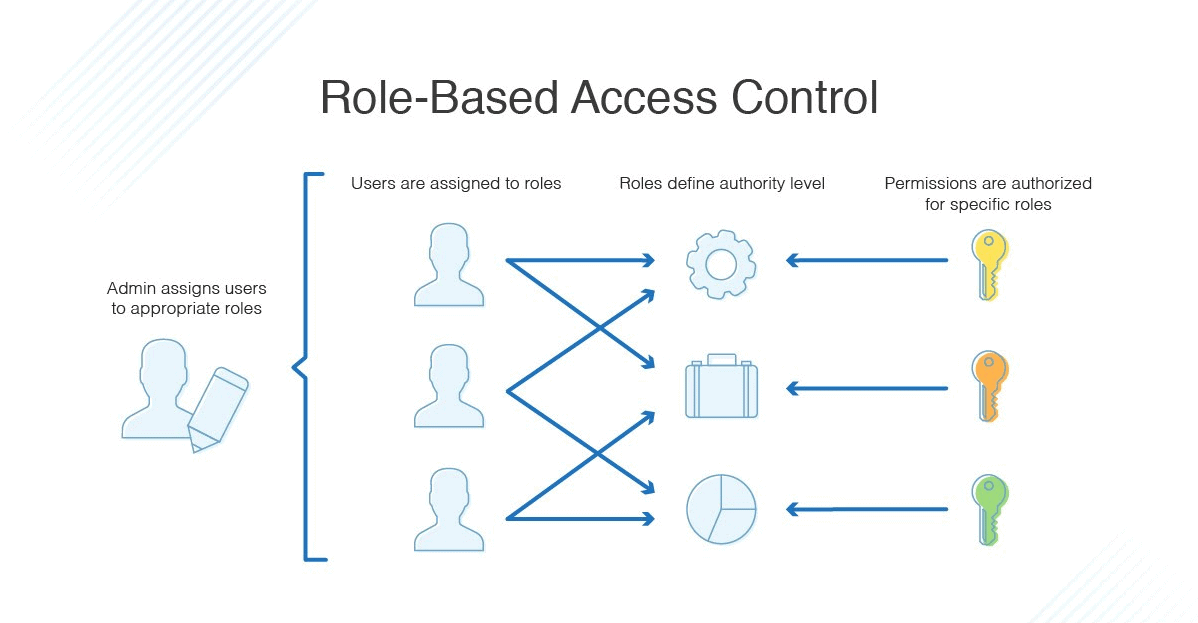
Role-based access control (RBAC) is a method of restricting network access based on the roles of individual users within an enterprise. RBAC lets employees have access rights only to the information they need to do their jobs and prevents them from accessing information that doesn’t pertain to them.
➝Read more about Azure RBAC
Q13. What is the definition of the role in Azure?
Ans. A role definition is a collection of permissions that can be performed, such as read, write, and delete. It’s typically just called a role. Azure role-based access control (Azure RBAC) has over 120 built-in roles or you can create your own custom roles.
>Resource Tags
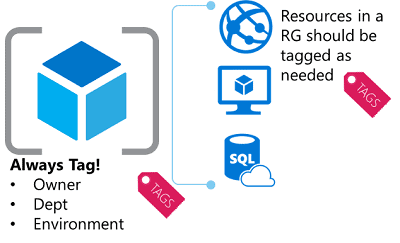
Azure Resource tags logically organize resources. Tags are a crucial part of organizing your Azure resources into a taxonomy.
Azure tags are name-value pairs that are used to organize resources in Azure Portal. You can apply tags for individual resources or tag the resource group that they are part of.
Features of Tags
Implementing a proper tagging strategy can help organizations gain much better control over and visibility of the resources that are hosted in their Azure subscriptions.
For example, you can apply the name “Environment” and the value “Production” to all the resources in production.
After you apply tags, you can retrieve all the resources in your subscription with that tag name and value. Tags enable you to retrieve related resources from different resource groups. This approach is helpful when you need to organize resources for billing or management.
➝Read more about Resource Tags
>Azure Resource Lock
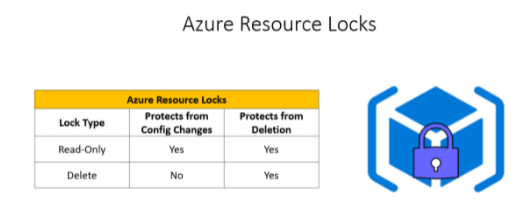
The Resource Lock in Azure is a Super powerful Resource Manager that provides Azure Admins a way to lock down required Azure Resources and prevent them from accidental deletions and modifying of the resources.
➝Read more about Azure Resource Lock
Q14. How many locks can an Azure resource have?
Ans. Azure has basically two kinds of locks known as read-only and deletes locks. A read-only lock is something similar to assigning a reader role for your users. The authorized users will not be able to modify the resource, but they can only read from the resource.
Q15. What is the use of tags in Azure?
Ans. You apply tags to your Azure resources, resource groups, and subscriptions to logically organize them into a taxonomy. Each tag consists of a name and a value pair.
For example, you can apply the name Environment and the value Production to all the resources in production.
Related/References
- [AZ-104] Microsoft Azure Administrator Exam: Everything You Need To Know
- Activity Guides/Hands-on Lab Exercise
- Cloud Services Model
- Cloud Computing – Overview & Benefits
- Azure Region and Availablity Zone
- How to create a free tier account on Azure
Next Task For You
Begin your journey toward Mastering Azure Cloud and landing high-paying jobs. Just click on the register now button on the below image to register for a Free Class on Mastering Azure Cloud: How to Build In-Demand Skills and Land High-Paying Jobs. This class will help you understand better, so you can choose the right career path and get a higher paying job.


![Microsoft Agentic AI Business Solutions Architect [AB-100] | K21 Academy](https://test.k21academy.com/wp-content/uploads/2025/11/Microsoft-Agentic-AI-Business-Solutions-Architect-AB-100-Exam-Overview1.png)


