





In this blog, I will share some quick tips including Q&A’s and useful links from Day 12 of our recently launched new batch of Microsoft Azure Solutions Architect
On Day 12, we covered Azure Virtual Network (VNet), VNet Peering, Network Security Groups (NSG), Azure Firewall, Bastion host, Load Balancer, VPN Gateway, Front Door.
We also covered hands-on Lab 6, Lab 7, Lab 8, Lab 9 out of our 15 Extensive labs(AZ-304).
The Previous week on Day 11 we covered Containers, Azure Container Instances, Azure Kubernetes Service, Azure Service Fabric, Function as a Service (FaaS), Choosing a Compute Solution.
So, here are some of the Q&A asked during the Live session from Module: Design a Network Solution.
Azure Virtual Network(VNet)
Azure Virtual Network is the fundamental building block for your private network in Azure. It enables many types of Azure resources, such as Azure Virtual Machines to Securely communicate with each other, the internet, and on-premises networks.
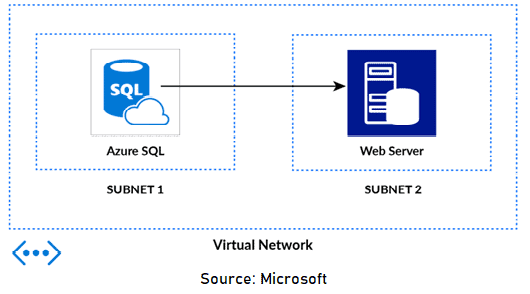
Planning for Azure Virtual Networks
Address space: When creating a VNet, custom private IP address space is specified using public and private addresses.
Subnets: Subnets enable segmenting a virtual network into one or more sub-networks and allocating a portion of the virtual network’s address space to each subnet.
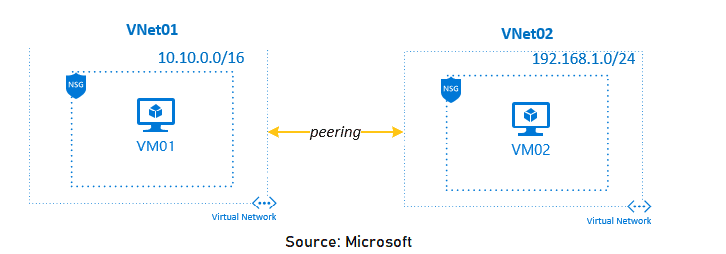
Regions: VNet is scoped to a single region/location. Multiple virtual networks from different regions can be connected using Virtual Network Peering.
Subscription: VNet is scoped to a subscription. Implement multiple virtual networks within each Azure subscription and Azure region.
Q1. What protocols can I use within VNets?
Ans. You can use TCP, UDP, and ICMP TCP/IP protocols within VNets. Unicast is supported within VNets, with the exception of Dynamic Host Configuration Protocol (DHCP) via Unicast (source port UDP/68 / destination port UDP/67) and UDP source port 65330 which is reserved for the host.
Virtual Network Peering
VNet Peering in Azure allows the traffic of one virtual network to communicate to another virtual network. This is basically used for database failover, disaster recovery, or cross-region data replication.VPN gateways are used in an encrypted connection in the region but VNet Peering provides connection sharing in different regions.
Q2. Is VNet peering traffic encrypted?
Ans. When Azure traffic moves between datacenters (outside physical boundaries not controlled by Microsoft or on behalf of Microsoft), MACsec data-link layer encryption is utilized on the underlying network hardware. This is also applicable to VNet peering traffic.
Network Security
- Filter network traffic between resources in a virtual network using a network security group, an NVA that filters network traffic, or both.
- Use NVA to create custom routes to route traffic from subnets to the NVA. A network security group contains several default security rules that allow or deny traffic to or from resources.
- If different VMs within a subnet need different security rules applied to them, you can associate a network interface in the VM to one or more application security groups.
- Azure creates several default routes for outbound traffic from a subnet. You can override Azure’s default routing by creating a route table and associating it to a subnet.
Check Out: Our blog post on Azure Virtual Desktop.
Azure Network Security Groups (NSG)
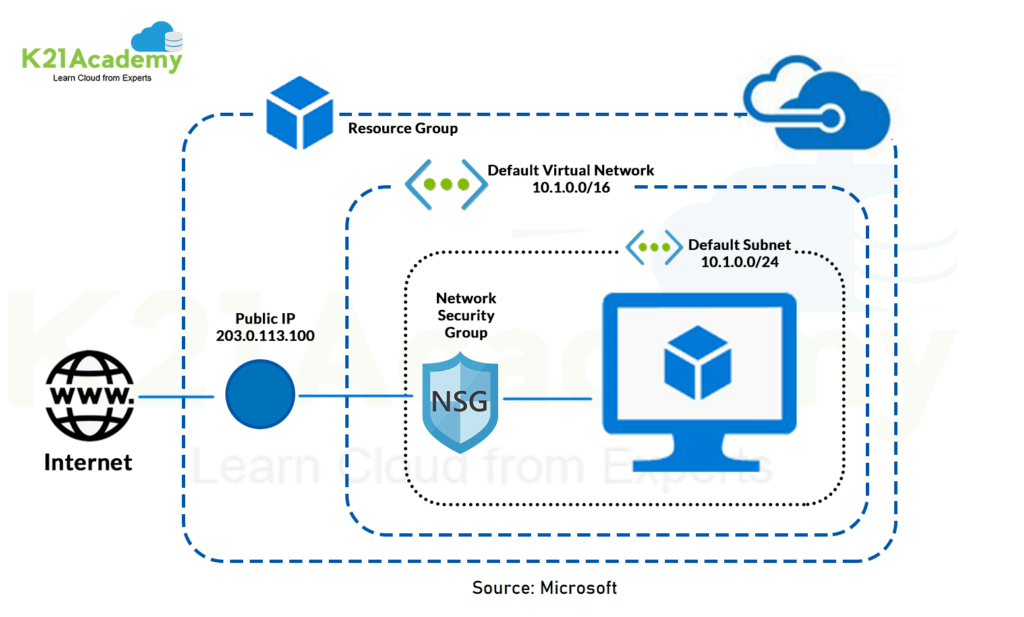
Azure Network Security Groups is a fully managed offering from Microsoft that helps refine traffic from and to Azure VNet. The Azure NSG consists of certain security rules that users can allow or deny at their convenience. Evaluation of these rules is done through a 5-tuple hash.
Q3. What information is required to create a Network Security Group Rule?
Ans. Rules can deny or allow access to the network based on the source/target port, source/target address specification, direction (inbound/outbound) and protocol.
Azure Firewall
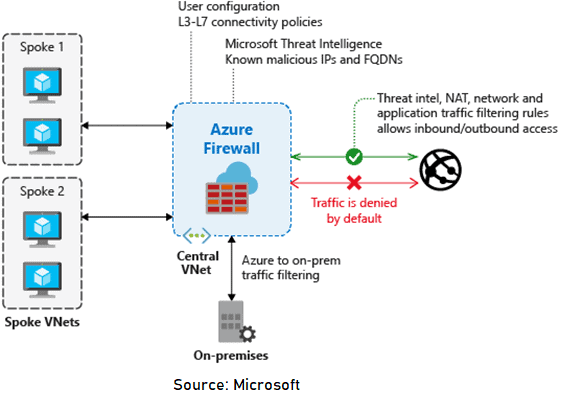
Azure Firewall is a managed, cloud-based network security service that protects your Azure Virtual Network Resources. It’s a fully stateful firewall as a service with built-in high availability and unrestricted cloud availability.
Q4. Does Azure Firewall support inbound traffic filtering?
Ans. Azure Firewall supports inbound and outbound filtering. Inbound protection is typically used for non-HTTP/S protocols. For example RDP, SSH, and FTP protocols.
Q5. What is the difference between Network Security Groups (NSGs) and Azure Firewall?
Ans. NSGs provide distributed network layer traffic filtering to limit traffic to resources within virtual networks in each subscription. Azure Firewall is a fully stateful, centralized network firewall as-a-service, which provides network- and application-level protection across different subscriptions and virtual networks.
Azure Bastion Host
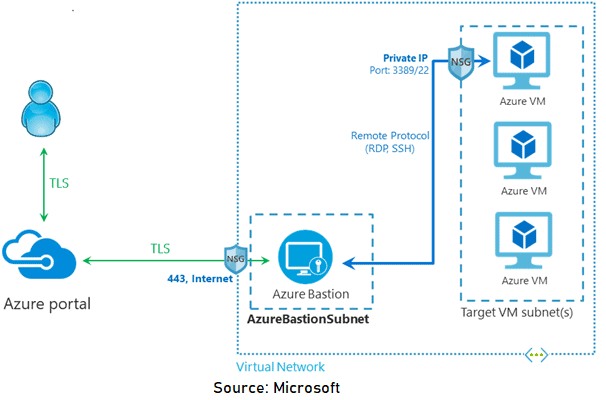
Azure Bastion is a fully platform-managed PaaS service that provides RDP/SSH over TLS i.e. port 443 to all the VMs in the network. Think of this as a managed Jump Box or Jump Server service provided by Microsoft.
➝Read more about Azure Bastion Host.
Q6. Can I deploy any Azure resources in my Azure Bastion subnet?
Ans. No, The Azure Bastion subnet (AzureBastionSubnet) is reserved only for the deployment of your Azure Bastion resource.
Hub and Spoke Architecture
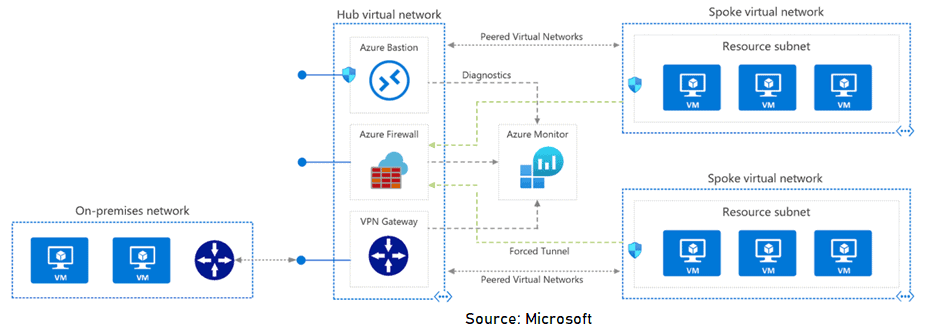
The hub virtual network acts as a central point of connectivity to many spoke virtual networks. The spoke virtual networks peer with the hub and can be used to isolate workloads. The benefits of using a hub and spoke configuration include cost savings, overcoming subscription limits, and workload isolation.
➝Read more about Hub-spoke network topology with Azure Virtual WAN.
Azure Load Balancer
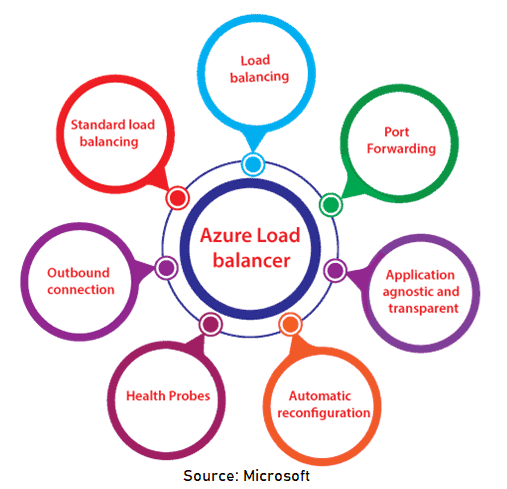
Azure load balancer allows you to distribute traffic to your backend virtual machines. An Azure load balancer provides high availability for your application. The Azure load balancer is a fully managed service itself. With Standard Load Balancer, you can scale your applications and create highly available services. Load balancer supports both inbound and outbound scenarios.
Q7. Can we configure Load Balancer with an Azure Firewall?
Ans. You can integrate an Azure Firewall into a virtual network with an Azure Standard Load Balancer (either public or internal).
Q8. Does Azure Load Balancer support TLS/SSL termination?
Ans. No, Azure Load Balancer doesn’t currently support termination as it is a pass-through of the network load balancer.
VPN Gateway
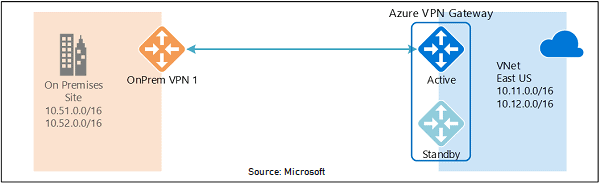
A VPN gateway is a specific type of virtual network gateway that is used to send encrypted traffic between an Azure virtual network and an on-premises location over the public Internet. You can also use a VPN gateway to send encrypted traffic between Azure virtual networks over the Microsoft network.
Q9. How long does it take to create a gateway in Azure?
Ans. A gateway can take 35-45 minutes or more to fully create and deploy. You can see the deployment status on the Overview page for your gateway.
Azure Front Door
Microsoft Azure Front Door (AFD) is a service that offers a single global entry point for customers accessing web apps, APIs, content, and cloud services. It offers services over Web applications, VM, APIs’, Cloud services, Data. Also, it provides a global infrastructure for building, managing, and provides security. It’s a kind of a global load balancer.
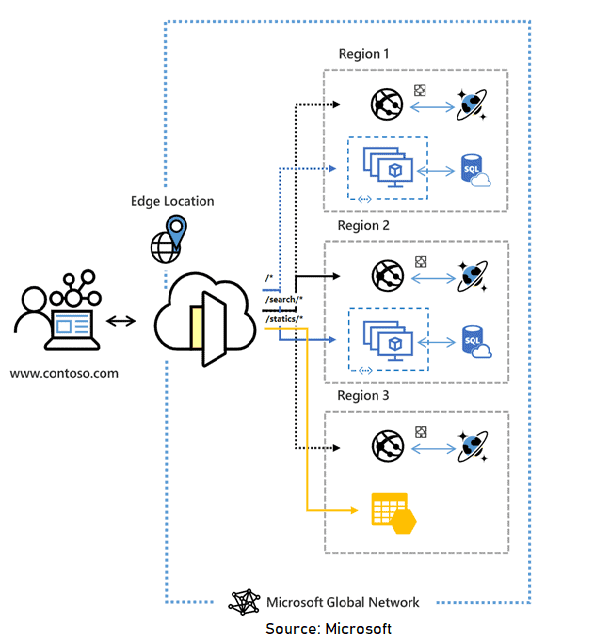
Q10. How does Azure Front Door support HTTP/2?
Ans. HTTP/2 protocol support is available to clients connecting to Azure Front Door only. The communication to backends in the backend pool is over HTTP/1.1.
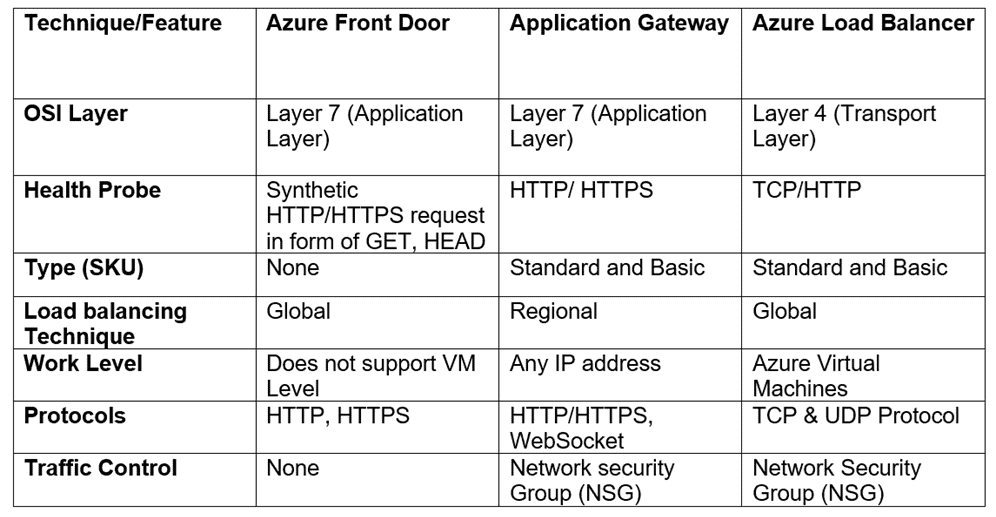
Comparison Between AFD, AG & ALB
Below is a detailed comparison between Azure Front Door, Application Gateway, Azure Load Balancer.
Quiz Time (Sample Exam Questions)!
With our Microsoft Azure Solutions Architect training program, we cover 220+ [AZ-303] & 200+[AZ-304] sample exam questions to help you prepare for the certification AZ-303 & AZ-304.
Note: Download the 25 Sample Exam-Questions of Microsoft Azure Solutions Architect.
Check out one of the questions and see if you can crack this…
Ques: You use a virtual network to extend an on-premises IT environment into the cloud. The virtual network has two virtual machines that store sensitive data.
The data must only be available using internal communication channels. Internet access to those VMs is not permitted.
You need to ensure that the VMs cannot access the Internet. What should you recommend?
A. Azure ExpressRoute
B. Azure Load Balancer
C. Network Security Groups (NSG)
D. None of the Above
The right answer will be revealed in my next week’s Blog.
Here is the answer to the question shared last week.
Ques: You are designing a container solution in Azure that will include two containers. One container will host a web API that will be available to the public. The other container will perform health monitoring of the web API and will remain private. The two containers will be deployed together as a group. You need to recommend a compute service for the containers. The solution much minimizes costs and maintenance overhead.
What should you include in your recommendation?
A. Azure Kubernetes Service (AKS)
B. Azure Container Instances
C. Azure Container registries
D. Azure Service Fabric
Answer: B. Azure Container Instances
Explanation: Azure Container Instances (ACI) supports individual containers and multi-container groups as well as sidecars and health monitoring.
Feedback
We always work on improving and being the best version of ourselves from the previous session hence constantly ask feedback from our attendees.
Here’s the feedback that we received from our trainees who had attended the session…
Here 2106 is in YYMM format, represents the trainees from the batch of June 2021.

Related/References
- AZ 303/304: Microsoft Azure Solutions Architect: Step By Step Activity Guides (Hands-On Labs)
- [Recap] Day 11: Design a Compute Solution [Azure Solutions Architect] [AZ-303/304]
- [Recap] Day 10: Cloud Infrastructure Monitoring [Azure Solutions Architect] [AZ-303/304]
- Top 10 Best Practices for Azure Security in 2021
- Tips To Prepare Exam AZ-304: Microsoft Azure Architect Design
- Exam AZ-305: Azure Solutions Architect Expert Certification
Next Task For You
Begin your journey toward Mastering Azure Cloud and landing high-paying jobs. Just click on the register now button on the below image to register for a Free Class on Mastering Azure Cloud: How to Build In-Demand Skills and Land High-Paying Jobs. This class will help you understand better, so you can choose the right career path and get a higher paying job.


![Microsoft Agentic AI Business Solutions Architect [AB-100] | K21 Academy](https://test.k21academy.com/wp-content/uploads/2025/11/Microsoft-Agentic-AI-Business-Solutions-Architect-AB-100-Exam-Overview1.png)



