





In this post, I am going to share some quick tips, including Q/A’s and useful links from Azure Solutions Architect Day 3 Training of our recently launched new batch of Microsoft Azure Solutions Architect(AZ-305), in which we have 25+ hands-on labs of AZ-305 in the course.
Day 2 live session, we covered Hybrid Identity, Password hash synchronization (PHS), Pass-through authentication (PTA), AD FS, Azure AD Health, Azure Networking for Beginners, IP Addressing, Azure Virtual Network, VNet Peering.
And in this week’s Day 3 Live Session, we have covered the Azure Virtual Machines, Availability Zones ,Application Security Groups ,Azure Firewall ,Azure Load Balancer ,Azure Load Balancer is to be had in distinctive SKUs ,Azure Reserved Virtual Machine Instances ,Azure Availability Set ,Azure Fault Domain ,Azure Update Domain ,Azure Dedicated Host ,Virtual Machine Scale Set in Azure ,Azure Disk Encryption. We also covered hands-on Lab 1, Lab 4, Lab 7 out of our 25+ extensive labs(AZ-305).
So, here are some of the Q/A asked during the Live session from Module 4: Implement VMs for Windows and Linux.
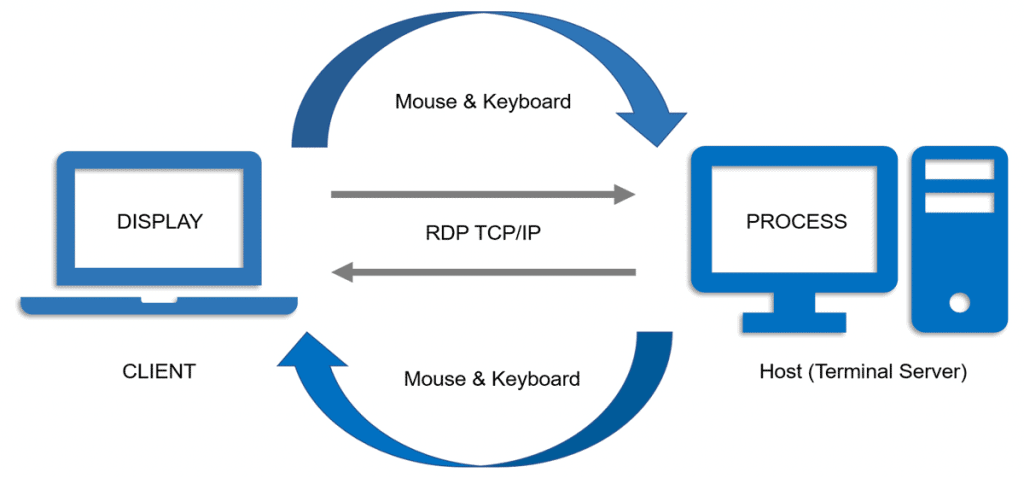
Azure Virtual Machine
A Virtual Machine (VM) is a computing service that performs most functions of a physical computer, behaving like a separate computer system. A virtual machine, usually known as a guest, is created within another computing environment (i.e., Physical Datacenters) referred to as a “host.”
An Azure Virtual Machines gives you the flexibility of virtualization without buying and maintaining the physical hardware that runs it. However, you still need to maintain the Virtual Machin by performing tasks, such as configuring, patching, and installing the software that runs on it.

➝Read more about the
Application Security Groups
Application Security Groups in Azure provide a way to configure network security based on the structure of an application, allowing you to group virtual machines and define network security policies based on those groups. ASGs enable you to define fine-grained network security policies for your virtual networks without the need to manually manage explicit IP addresses. This allows for easier management and scalability of network security policies.
With ASGs, you can create groups of network interfaces (NICs) based on application or workload requirements. Each NIC can be a member of multiple ASGs, up to the limits imposed by Azure. By associating ASGs with network security groups (NSGs), you can apply network security policies to the groups of VMs instead of individual IP addresses. This simplifies the management of security rules and provides better visibility and control over network traffic
Azure Firewall
Azure Firewall is a cloud-local and wise community firewall protection provider supplied through Microsoft Azure. It offers threat protection for cloud workloads running in Azure and is a fully stateful firewall-as-a-service with built-in high availability and unrestricted cloud scalability. Azure Firewall provides both east-west and north-south traffic inspection, allowing you to create, enforce, and log application and network connectivity policies across subscriptions and virtual networks .
There are three SKUs available for Azure Firewall: Standard, Premium, and Basic.
Azure Firewall Standard: This SKU provides L3-L7 filtering and includes threat intelligence feeds directly from Microsoft Cyber Security. It allows for alerting and denying traffic to/from known malicious IP addresses and domains in real-time, providing protection against new and emerging attacks .
Azure Firewall Premium: In addition to the features offered by Azure Firewall Standard, the Premium SKU provides advanced capabilities such as signature-based Intrusion Detection and Prevention System (IDPS). It enables rapid detection of attacks by looking for specific patterns in network traffic and includes a large number of signatures across various exploit categories. This allows for enhanced protection against malware, phishing, coin mining, Trojan attacks, and more.
Azure Firewall Basic: The Basic SKU is designed for small and medium-sized customers (SMBs) and offers essential protection for Azure cloud environments at an affordable price point. It supports threat intelligence alert mode only and has a fixed scale unit with two virtual machine backend instances. It is recommended for environments with an estimated throughput of 250 Mbps.
Azure Load Balancer
Azure Load Balancer is a service provided by Microsoft Azure that enables the distribution of network traffic across multiple backend resources or servers. It operates at layer 4 of the Open Systems Interconnection (OSI) model, acting as a single point of contact for clients and distributing inbound flows to backend pool instances based on configured load-balancing rules and health probes .
There are different types of Azure Load Balancer:
Public Load Balancer: It provides outbound connections for Azure virtual machines (VMs) by translating their private IP addresses to public IP addresses.Public Load Balancers are used to load stability net site visitors to VMs .
Internal Load Balancer: It is used in scenarios where private IPs are needed at the frontend only.Internal Load Balancers are used to load stability site visitors inner a digital network. They can also be accessed from an on-premises network in a hybrid scenario.
Azure Load Balancer is to be had in distinctive SKUs:
Standard Load Balancer: It provides load balancing for network layer traffic and offers high performance and low latency. Standard Load Balancer can route traffic within and across regions and provide high resiliency by distributing resources across availability zones.
Gateway Load Balancer: It is designed for deploying and scaling virtual appliances, enabling service chaining for scenarios such as analytics, DDoS protection, firewall, and more.
Basic Load Balancer: It supports small-scale applications that do not require high availability or redundancy.
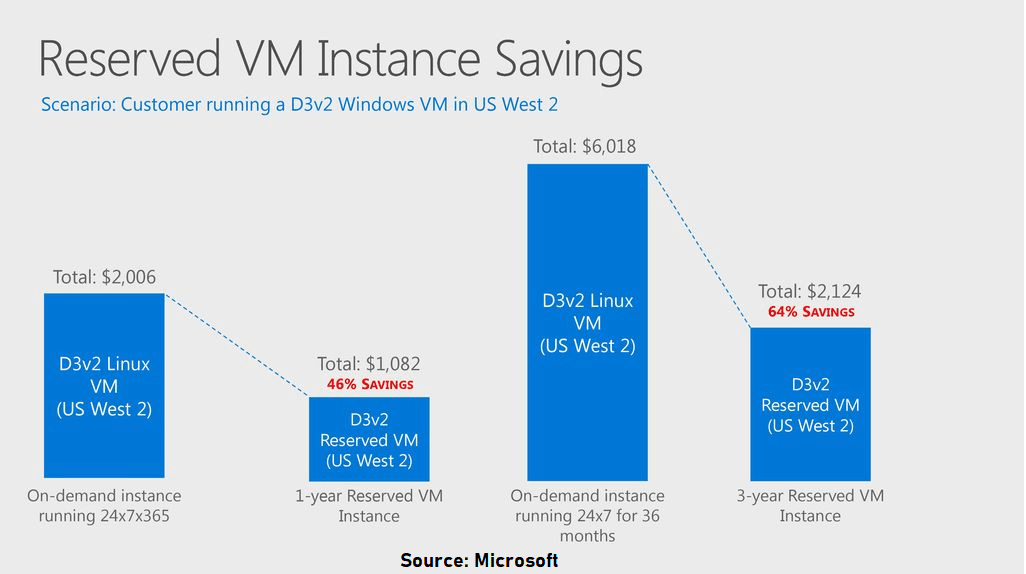
Azure Reserved Virtual Machine Instances
Also Check: Our blog post on Azure Networking.
Q2: What happens if we do not use VM after taking a 3 years reservation? Still, will we be charged?
Q3: Is there something like Spot instances in Azure similar to AWS EC2 instances?
Ans: Yes, In Azure we have Spot Virtual Machines. Using Azure Spot Virtual Machines allows you to take advantage of unused capacity at significant cost savings. At any point in time when Azure needs the capacity back, the Azure infrastructure will evict Azure Spot Virtual Machines.

Also Check: Our blog post on ARM Template.
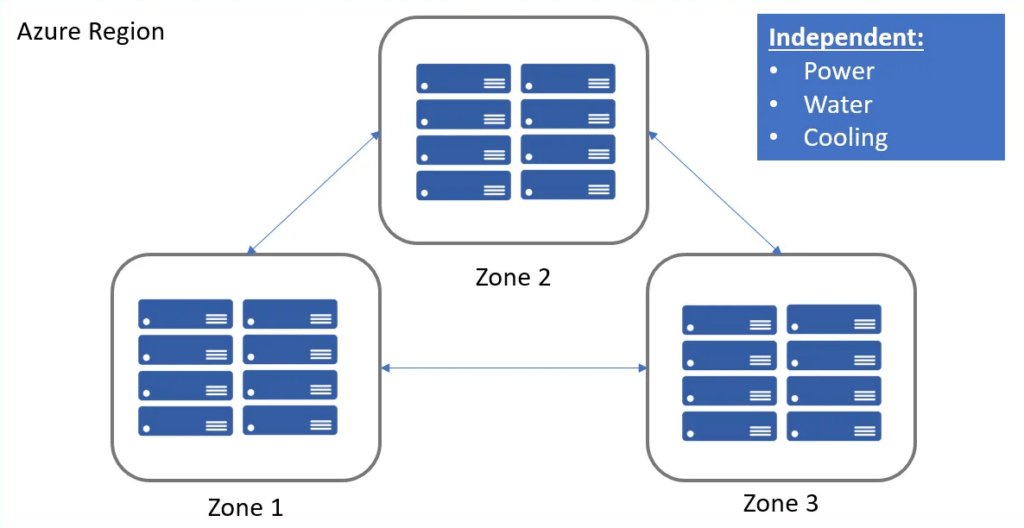
Azure Availability Zone
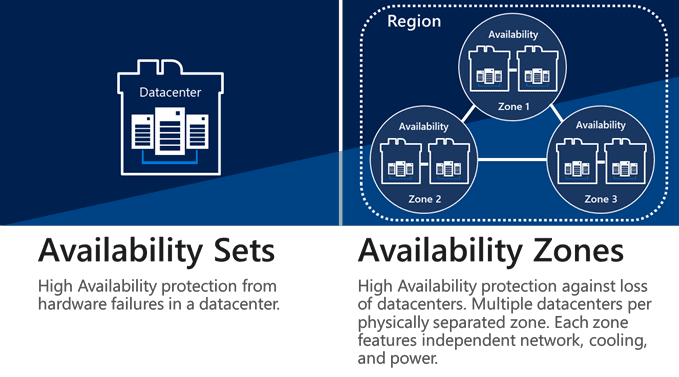
Azure Availability Zones is a high-availability offering that protects your applications and data from data-center failures.These are unique physical locations within an Azure region. Each zone is made up of one or more data centers equipped with independent power, cooling, and networking.The physical separation of Availability Zones within a region protects applications and data from data-center failures.
Also Check: Our blog post on Azure Service Bus.
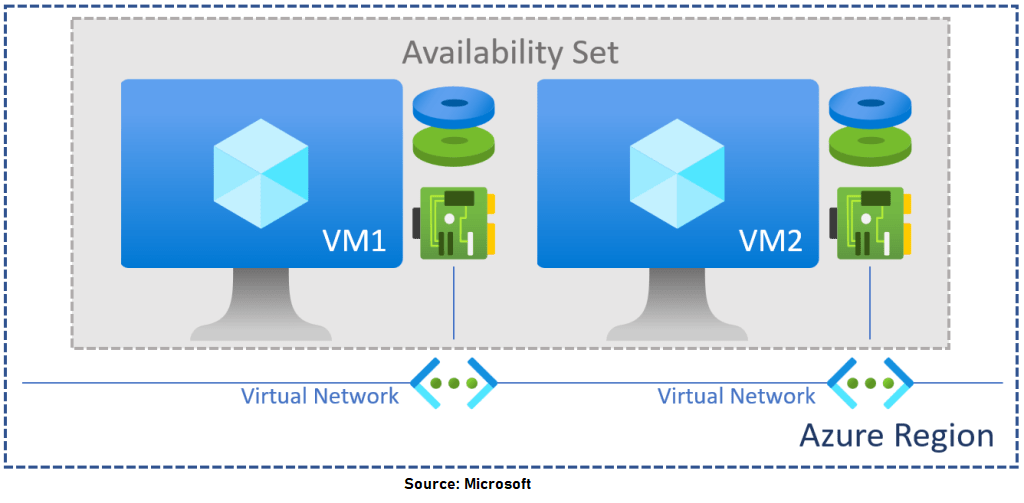
Azure Availability Set
Availability Set is a logical grouping capability for isolating VM resources from each other when they’re deployed. By deploying your VMs across multiple hardware nodes, Azure ensures that if hardware or software failure happens within Azure, only a sub-set of your virtual machines is impacted, and your overall solution is safe and in working condition.
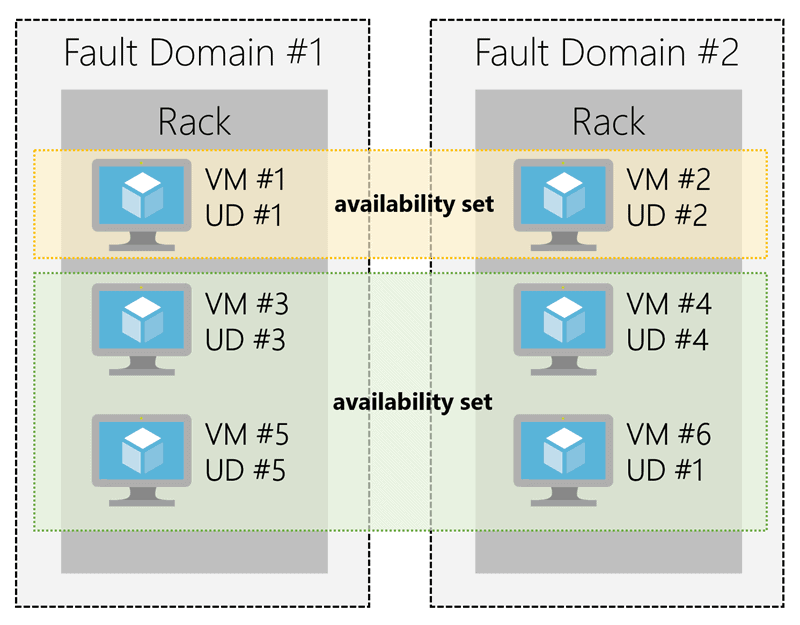
It provides redundancy for your virtual machines. An Availability set spreads your virtual machines across multiple fault domains and update domains.
Also Read: Our blog post on Azure Traffic Manager.
Q4: What is the difference between Availability Sets and Availability Zones?
Check Out: Our blog post on Azure Bastion.
Azure Fault Domain
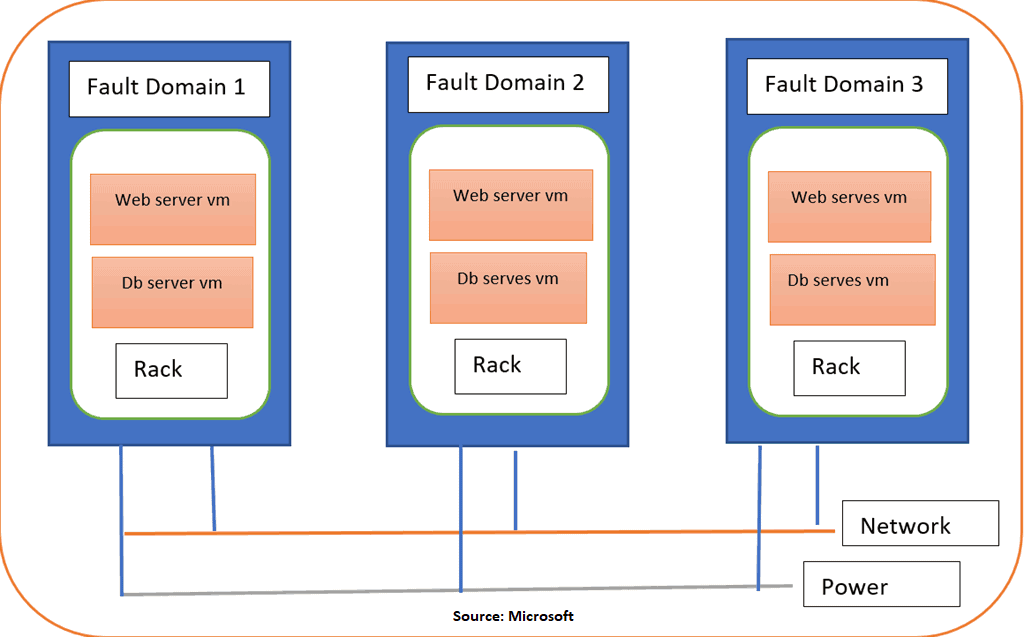
Azure Fault domains define the group of virtual machines that share a common power source and network switch.
- Each fault domain contains some racks, and each rack contains a virtual machine.
- Each of these Azure Fault domain shares a power supply and a network switch.
- All the resources in the fault domain become unavailable when there is a failure in the fault domain.
Also Read: Our blog post on Azure Load Balancer.
Update Domain
An update domain is a logical group of the underlying hardware that can undergo maintenance or be rebooted simultaneously. As you create VMs within an availability set, the Azure platform automatically distributes your VMs across these update domains. This approach ensures that at least one instance of your application always remains running as the Azure platform undergoes periodic maintenance.
Q5: How many Fault Domains and Update Domains can we have?
Ans: By default, Azure will assign three fault domains and five update domains which can be increased to a maximum of 20) to the Availability Set.
Check Out: Our blog post on Microsoft Azure Serverless Computing.
Dedicated Host
Virtual Machine Scale Set in Azure
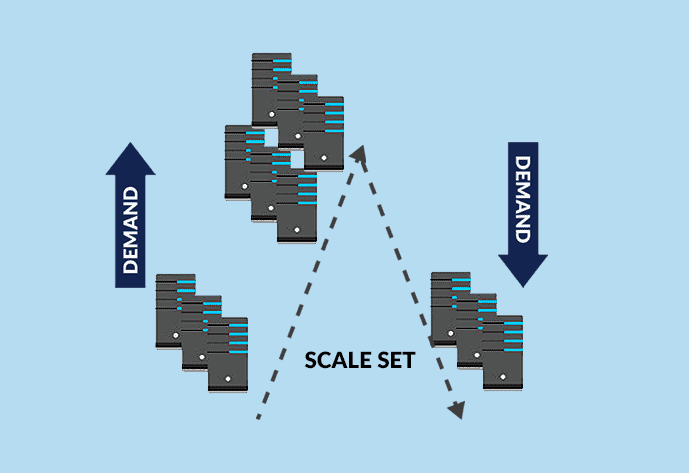
Virtual Machine Scale Set, an interesting service offered by Microsoft Azure, helps to create and manage a set of identical, auto-scaling Virtual Machines (VMs). The number of VM instances can automatically increase or decrease based on scheduled conditions.
➝Read more about the Azure VM Scale Set.
Q6: How many Virtual Machines can I have in a scale set?
Ans: Scale sets support up to 1,000 VM instances for standard marketplace images. If you create a scale set using a custom image, the limit is 600 VM instances.
Q7: Do scale sets work with Azure availability zones?
Ans: Yes, When you deploy a virtual machine scale set, you can choose to use a single Availability Zone in a region or multiple zones.
Disk Encryption
Azure Disk Encryption helps protect and safeguard your data to meet your organizational security and compliance commitments. ADE provides volume encryption for the OS and data disks of Azure virtual machines (VMs) through the use of the feature of Linux or the BitLocker feature of Windows. ADE is integrated with Azure Key Vault to help you control and manage the disk encryption keys and secrets.
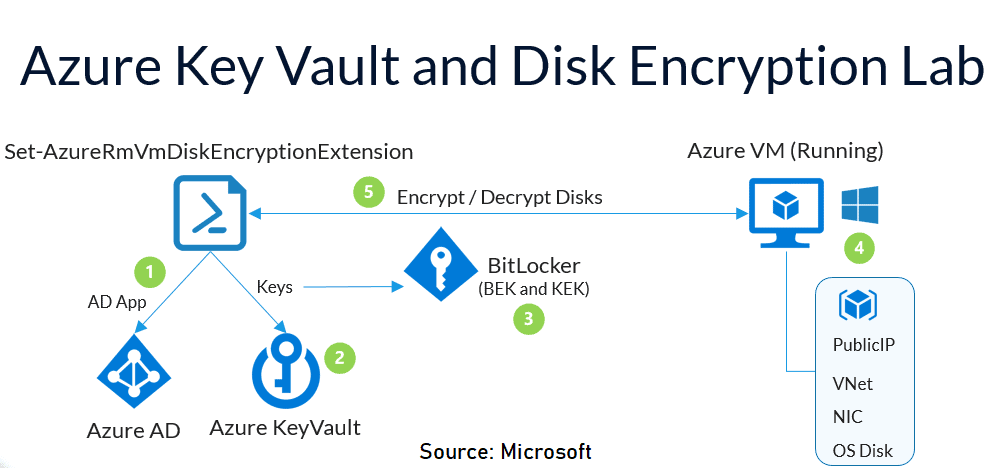
Q8: How much does Azure Disk Encryption cost?
Ans: There’s no charge for encrypting VM disks with Azure Disk Encryption, but there are charges associated with the use of Azure Key Vault, Because our Disk Encryption keys are stored in Key Vault.
Snapshots
An Azure Snapshot is a read-only copy of the existing disk in the Microsoft Azure Cloud. We can create a snapshot of the OS or Data disk. This snapshot can be used as a backup. The snapshot can also be used to create a Virtual Machine. To create a Virtual Machine using a snapshot, it is better to shut down the VM before taking its snapshot.
➝Read more about the Snapshots.
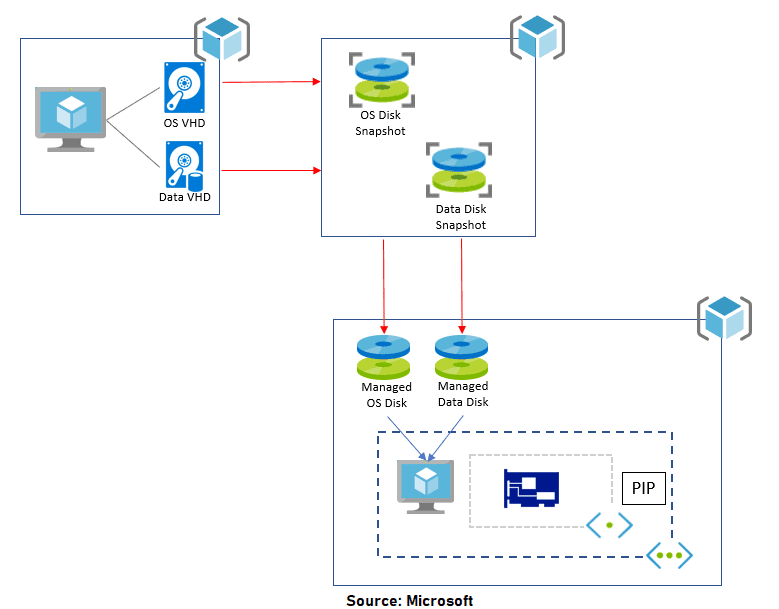
Q9: Can we create a snapshot from a corrupted VM?
Ans: Yes, we can create a snapshot from a corrupted VM. Because we are creating a snapshot of the disk of the VM. We can always take a snapshot of a disk irrespective of its condition.
Q10: Can we create a snapshot of an encrypted disk?
Yes, we can create a snapshot of an encrypted disk. Firstly, we have to decrypt the disk using keys. You can use the Microsoft keys or custom keys to decrypt, It depends on the encryption method used.
Q11: Which is better azure backup or snapshots?
Quiz Time (Sample Exam Questions)!
With our Microsoft Azure Solutions Architect training program, we cover 220+ [AZ-305]sample exam questions to help you prepare for the certification AZ-305.
Note: Download the 25 Sample Questions of Microsoft Azure Solutions Architect from here.
Check out one of the questions and see if you can crack this…
Ques: You have a set of virtual machines that are hosting mission-critical applications. You have to ensure the experience of virtual machines experiences as little downtime as possible.
Which of the following can you use to maintain application performance across an identical set of Virtual Machines?
A. Scale Sets
B. Availability Sets
C. Availability Zone
D. Azure Functions
The right answer will be revealed in the next week’s blog.
Here is the answer to the question shared last week.
Ques. There is a requirement to ensure that virtual machines hosted in Virtual Networks can communicate across both virtual networks using their private IP address. Which of the following can be used to fulfill this requirement?
A. Virtual Network Peering
B. VPN Gateway
C. Local Gateway
D. ExpressRoute
Answer: A
Explanation: Virtual Network Peering facilitates communication between resources of 2 VNet’s using Azure infrastructure.
Feedback
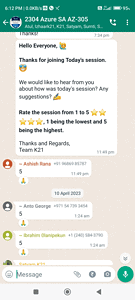
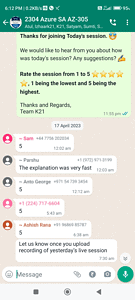
We always improve and be the best version of ourselves from the previous session, constantly asking for feedback from our attendees.
Here’s the feedback that we received from our trainees who had attended the session…
Related/References
- Exam AZ-305: Azure Solutions Architect Expert Certification
- [Recap] Day 1: Azure Active Directory [Azure Solutions Architect]
- [Recap] Day 2: Implement and Manage Hybrid Identities & Virtual Networking: [Azure Solutions Architect]
- Azure Networking | A Brief Introduction for Beginners
- Introduction to ARM Templates: Learn, Create and Deploy in Azure
- Tips To Prepare Exam AZ-304: Microsoft Azure Architect Design
Next Task For You
Begin your journey toward Mastering Azure Cloud and landing high-paying jobs. Just click on the register now button on the below image to register for a Free Class on Mastering Azure Cloud: How to Build In-Demand Skills and Land High-Paying Jobs. This class will help you understand better, so you can choose the right career path and get a higher paying job.


![Microsoft Agentic AI Business Solutions Architect [AB-100] | K21 Academy](https://test.k21academy.com/wp-content/uploads/2025/11/Microsoft-Agentic-AI-Business-Solutions-Architect-AB-100-Exam-Overview1.png)



