




In this blog, I have covered everything you must know about VNet Peering in Azure which is an important topic for the [AZ 104] Microsoft Azure Administrator Certification exam. VNet Peering connects two virtual networks for resource sharing in one region or across regions in Microsoft Azure. This helps to share virtual machine resources, backups and maintaining disaster recovery.
The following section covered in this blog:
- What is Azure VNet Peering
- Importance of VNet Peering
- Types of Vnet peering
- Pre-checks of VNet Peering
- Benefits of VNet Peering
- Practical Guide
What Is Azure VNet Peering?
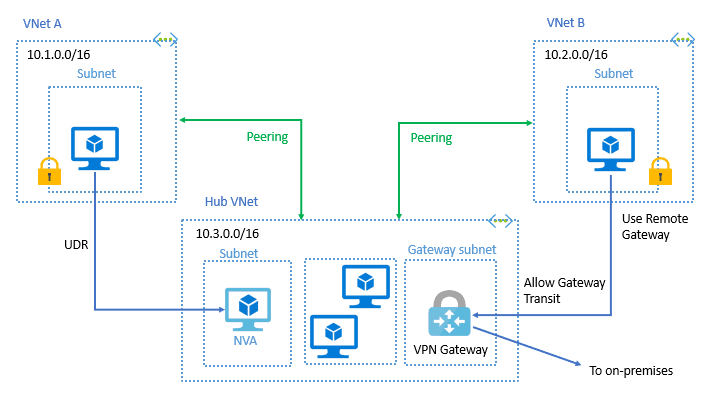
Azure Virtual Network is used for the Virtual Network Peering empowers users to flawlessly communicate with virtual networks in Azure. VNet Peering in Azure allows the traffic of one virtual network to communicate to another virtual network. This is basically used for database failover, disaster recovery, or cross-region data replication.VPN gateways are used in an encrypted connection in the region but VNet Peering provides connection sharing in different regions.
Read about: What is Azure Virtual Network?
Importance Of VNet Peering
Managing separate virtual networks in Azure can be easier with VNet peering. This clever feature creates secure, direct connections between your VNets, allowing resources to chat freely. No more public internet interference! VNet peering brings several benefits:
-
Enhanced security: Keeps data on Microsoft’s private network, away from prying eyes on the public internet.
-
Boosted performance: Leverages Microsoft’s high-speed network for swift communication between resources in peered VNets.
-
Scalability for the future: Grows as your Azure environment does, automatically handling increased traffic.
- Reducing Cost: Usage of global vnet peering removed usage of VPN Gateway which was costly resource.
VNet peering unlocks a world of possibilities for building robust and secure network architectures in Azure.
Types Of VNet Peering
- VNet Peering: It empowers the connectivity between various VNets within the same Azure region.
- Global VNet Peering: It allows Virtual networks to connect across different Azure regions. It provides private peering with low latency and high bandwidth in Azure backbone infrastructure.
Read more: Want to know about Region, Availability Zone, Availability Sets and Fault Domain, Update Domain In Microsoft Azure
Pre-checks Of VNet Peering
- VNet Peering only establishes between Two virtual networks, it’s not transitive. for example, VNet P and VNet Q having VNet peering, VNet Q and VNet R having peering than VNet P and VNet R are not having VNet peering.
- Before Peering at virtual networks check for the non-overlapping IP addresses.
- The virtual network’s resource cannot set connections with the front-end IP address’s basic load balancer in Global VNet Peering in Azure.
- Once a virtual network peered with another virtual network then adding or deleting the address range is auto-disabled.
Also Read: Our blog post on Microsoft Azure Kubernetes Service AKS. Click here
Benefits
- Network traffic of peered Virtual networks become private.
- Virtual network peering in Azure allows transferring data across Azure deployment models, subscriptions, and other regions.
- No downtime issues in global Azure virtual network peering.
- It configures the connection with high bandwidth Low latency in the VNet region.
- Global VNet peering has erased the need for VNet to VNet peering Azure configuration. It disabled the use of VPN encryption, public internet, or any gateways.
- This is a very cost-effective and Time-saving process that controlling the backup, traffic, sharing from different regions
Check Out: What is Traffic manager?
Step-by-Step Configuration
- Log in to the Azure portal at https://portal.azure.com.
- Create two Virtual networks in the same or Different regions like Vnet1, Vnet2, etc.
- Now go to any one of the two Virtual Networks and select Peerings, under Settings, and then select Add.
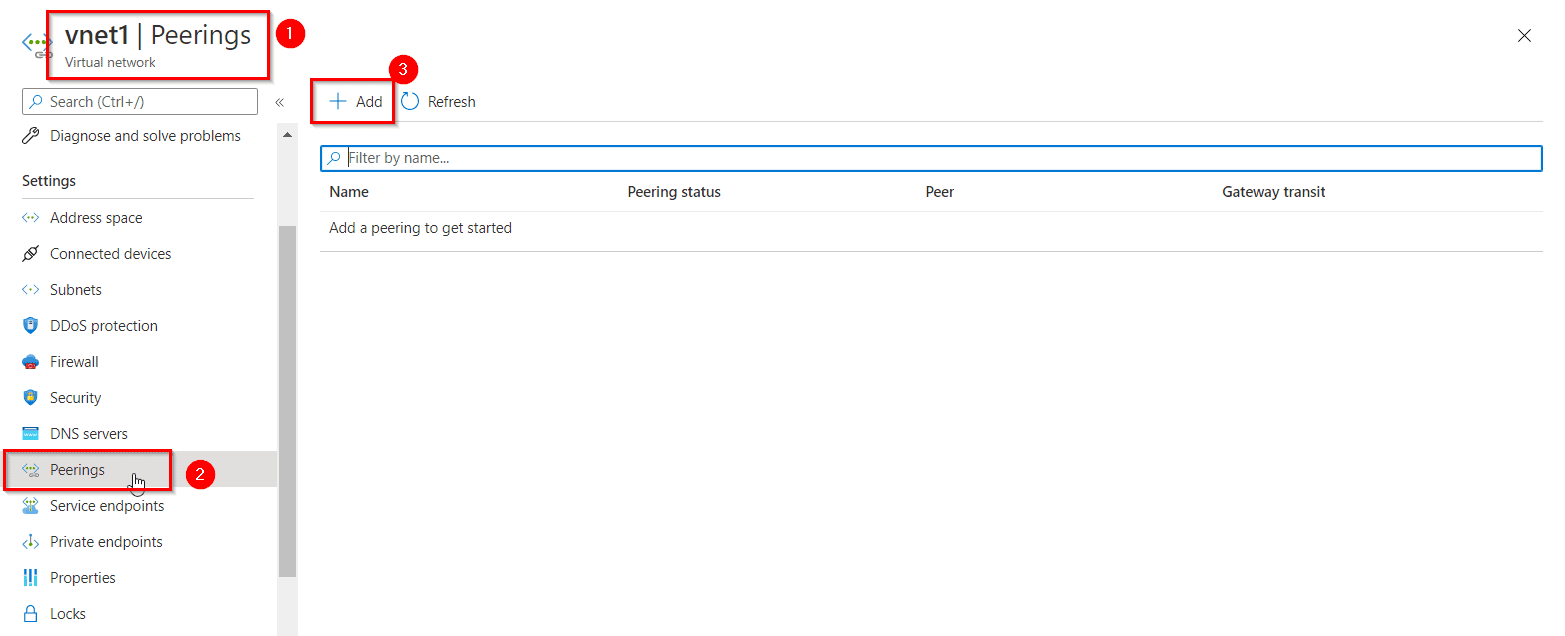
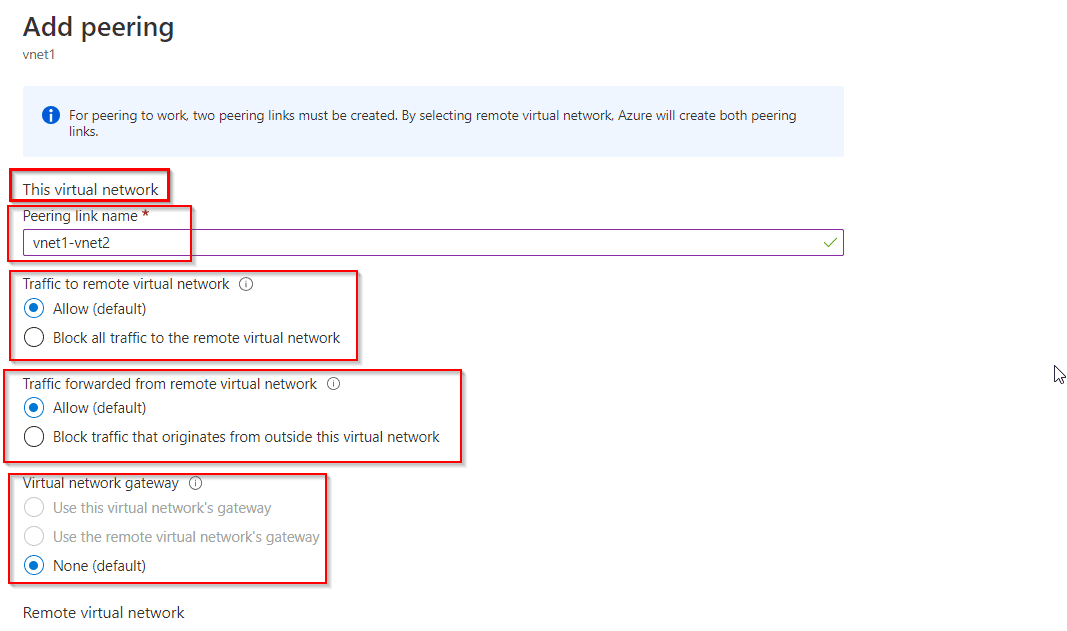
- Configuring the peering for the two virtual networks and select, Add.
This virtual network: means the vnet 1
Remote virtual network: means the vnet (here vnet2) which you want to peer the vnet1 with.
- The PEERING STATUS is Connected, as shown in the following picture:
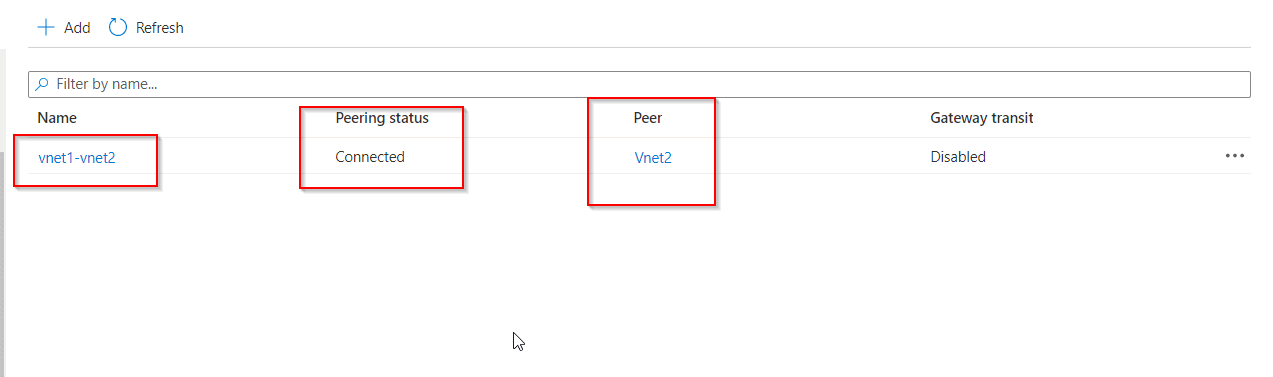 If you don’t see the status, refresh your browser.
Note: Configuring peering on anyone VNet will configure the peering automatically on the other VNet as well. - Now connect anyone of your VM and then try to ping the Public IP of the second Virtual Machine to test the peering.
Note: If you are using a Windows Server VM, the ping will fail, because ping uses the Internet Control Message Protocol (ICMP). By default, ICMP isn’t allowed through the Windows firewall. - To allow VM1 to ping VM2 in a later step, enter this command in the VM2 Powershell.
New-NetFirewallRule –DisplayName “Allow ICMPv4-In” –Protocol ICMPv4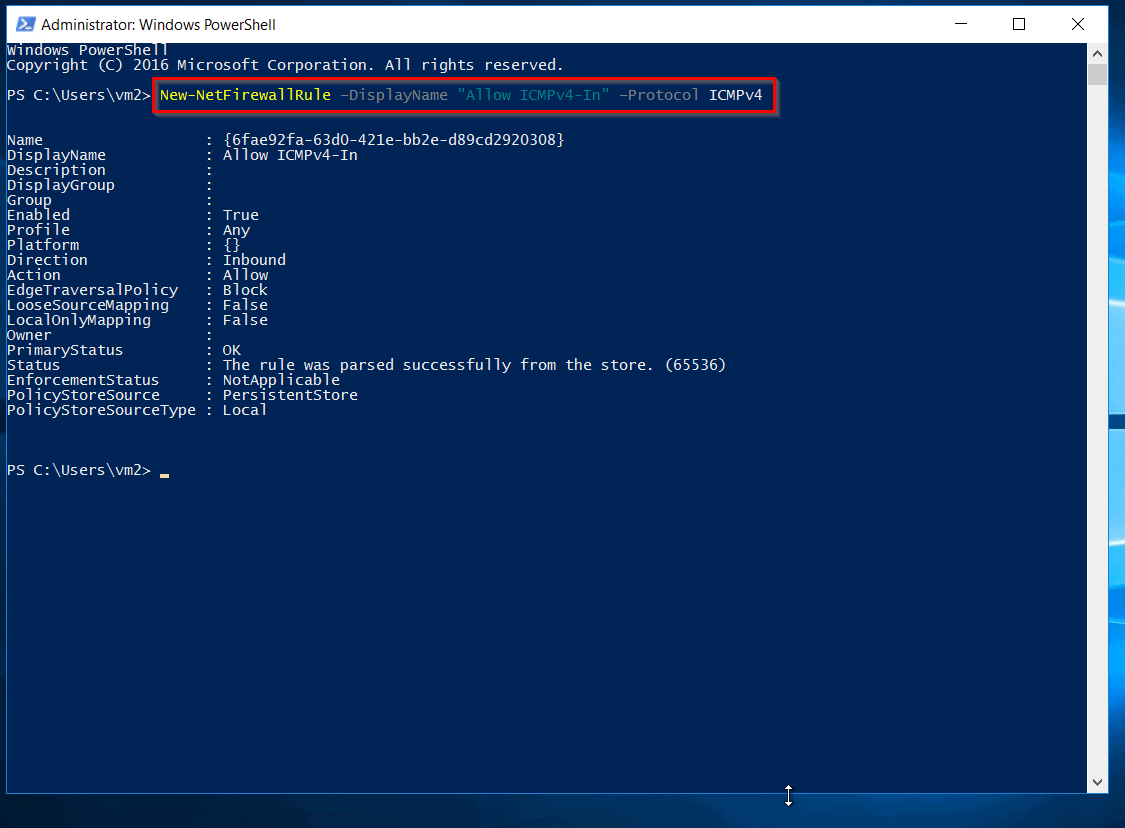
NOTE: You have to enter this command on the other VM. (Here VM2).
- Now, close the remote desktop connection to VM2 and connect to the VM1, then again ping the Public IP of the second VM.
Also Check: Azure VPN Gateway vs ExpressRoute, to know the major differences between them
Now you will see that your Virtual Machines is connected as it has 100% packages received on pinging to VM2.
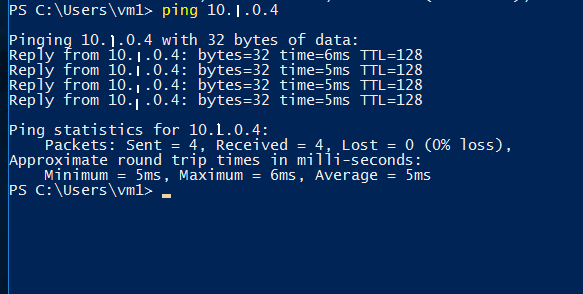
You have successfully configured and tested the VNet Peering, I hope now you have a better understanding of VNet Peering in Azure. The virtual network establishes the connection with VPN gateways and VNet Peering but it depends on the condition and requirement of the scenario.
Read More: About Availability Zones Azure. Click here
Happy learning! Please follow the below links for more information on the virtual network in Microsoft Azure.
Next Task For You
Begin your journey toward Mastering Azure Cloud and landing high-paying jobs. Just click on the register now button on the below image to register for a Free Class on Mastering Azure Cloud: How to Build In-Demand Skills and Land High-Paying Jobs. This class will help you understand better, so you can choose the right career path and get a higher paying job.


![Microsoft Agentic AI Business Solutions Architect [AB-100] | K21 Academy](https://test.k21academy.com/wp-content/uploads/2025/11/Microsoft-Agentic-AI-Business-Solutions-Architect-AB-100-Exam-Overview1.png)


