



In this blog, we are going to cover Azure SQL Serverless Database. Serverless is a compute tier for single databases in Azure SQL Database that consequently scales process dependent on responsibility interest and bills for the amount of computing utilized each second. The serverless process tier additionally automatically stops databases during inert periods when just storage is charged and consequently continues databases when activity returns.
Topics we’ll cover:
- Serverless Compute Tier
- Scenarios
- Comparison of Serverless Compute with the Provisioned compute tier
- Purchasing Model And Service Tier
- Create a new database in the serverless compute tier
- Move a database from the provisioned compute tier into the serverless compute tier
Serverless Compute Tier
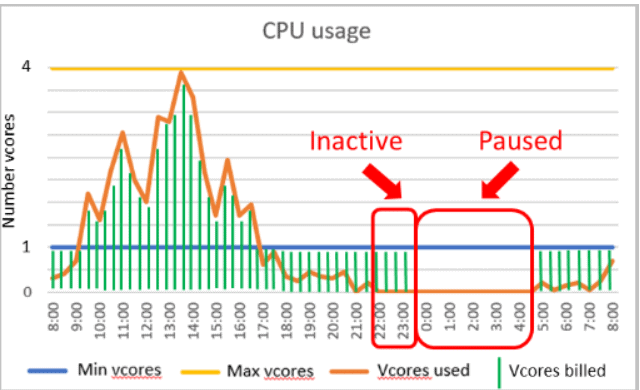
The serverless compute tier for single databases in Azure SQL DB is parameterized by a compute autoscaling range and an auto-pause delay. The configuration of these parameters shapes the database performance experience and compute charges.
Performance Configuration
- The minimum vCores and maximum vCores are configurable parameters that define the range of computing capacity available for the database. Memory and IO limits are proportional to the vCore range specified.
- The auto-pause configuration parameters define the period of time the database must be inactive before automatically stopped. Whenever the other activity occurs the database is automatically resumed. Alternatively, automatic pausing can be disabled.
Cost
- The Cost of the serverless database is derived by the summation of storage cost and compute cost.
- The compute cost is based on the memory used and vCore that is based on usages is between the min and max limit configured.
- Whenever the compute cost is below the min limit configured then the compute cost is based on the min vCores and memory configured.
- Compute costs are zero and only storage costs are incurred whenever the database is paused.
- The storage cost is determined in the same way as in the provisioned compute tier.
Scenarios
Serverless is price-performance optimized for single databases with intermittent, capricious use patterns that can bear the cost of some deferral in computing warm-up after inactive use periods. Interestingly, the provisioned compute tier is price-performance optimized value for single databases or multiple databases in elastic pools with higher normal use that can’t bear the cost of any postponement in computing warm-up.
1.) Scenarios Well Suited For Serverless Computing
- Single databases with intermittent, unpredictable usage patterns interspersed with periods of inactivity and lower average compute utilization over time.
- Single databases in the provisioned compute tier that is frequently rescaled and customers who prefer to delegate compute rescaling to the service.
- New single databases without usage history where compute sizing is difficult or not possible to estimate prior to deployment in SQL Database.
2.) Scenarios Well Suited For Provisioned Compute
- Single databases with more predictable usage patterns, regular, and higher average compute utilization over time.
- Databases that cannot tolerate performance trade-offs resulting from delays in resuming from a paused state or more frequent memory trimming.
- Multiple databases with intermittent, unpredictable usage patterns can be consolidated into elastic pools for better price-performance optimization.
Comparison Of Serverless Database Compute With The Provisioned Compute Tier
The Following below table shows some comparisons.
Purchasing Model And Service Tier
SQL Database serverless is currently only supported in the General Purpose tier on Generation 5 hardware in the vCore purchasing model.
1.) Autoscaling
i.) Scaling Responsiveness
As a rule, serverless databases are run on a machine with adequate ability to fulfill resources without interference for any measure of computing mentioned inside limits set by the maximum vCores esteem. At times, load balancing automatically happens if the machine can’t fulfill resources inside a couple of moments. For instance, if the resource request is 4 vCores, however just 2 vCores are accessible, then, at that point, it might take up to a couple of moments to stack balance before 4 vCores are given. The database stays online during load balancing except for a brief period at the end of the operation when connections are dropped.
ii.) Memory Management
Memory for serverless databases is reclaimed more frequently than for provisioned compute databases. This behavior is important to control costs in serverless and can impact performance.
a.) Cache Reclamation
- Active cache utilization is considered low when the total size of the most recently used cache entries falls below a threshold for a period of time.
- When cache reclamation is triggered, the target cache size is reduced incrementally to a fraction of its previous size, and reclaiming only continues if usage remains low.
- When cache reclamation occurs, the policy for selecting cache entries to evict is the same selection policy as for provisioned compute databases when memory pressure is high.
- The cache size is never reduced below the min memory limit as defined by min vCores, which can be configured.
b.) Cache Hydration
The SQL cache develops as data is brought from a disk similarly and with a similar speed concerning provisioned databases. At the point when the database is occupied, the cache is permitted to become unconstrained up as far as possible memory limit.
2.) Auto-Pausing And Auto-Resuming
i.) Auto-Pausing
If the auto-Pause is a delay when the duration is true then at that time auto-pausing is triggered.
Number of sessions = 0
CPU = 0 for user workload running in the user resource pool
ii.) Auto-Resuming
The auto-Resuming is true when the following condition is true at any time. some of them are: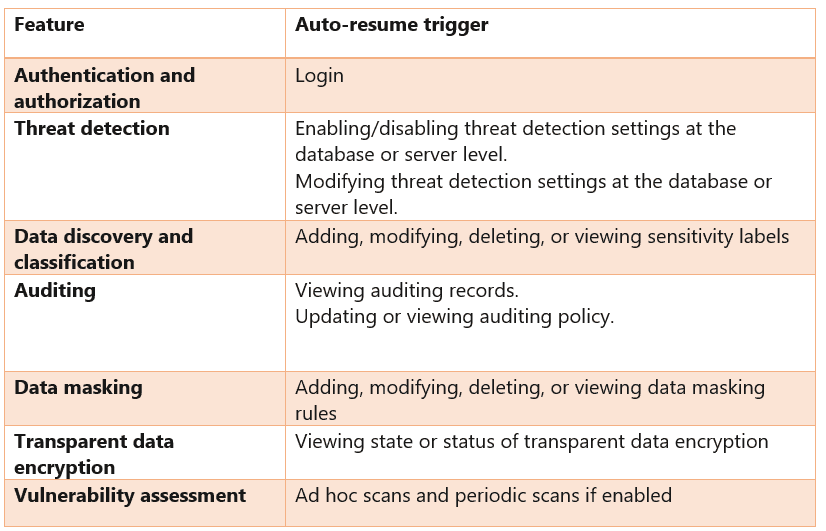
Create A New Database In The Serverless Compute Tier
1.) Use PowerShell
New-AzSqlDatabase -ResourceGroupName $resourceGroupName -ServerName $serverName -DatabaseName $databaseName `
  -ComputeModel Serverless -Edition GeneralPurpose -ComputeGeneration Gen5 `
  -MinVcore 0.5 -MaxVcore 2 -AutoPauseDelayInMinutes 720
2.) Use Azure CLI
az sql db create -g $resourceGroupName -s $serverName -n $databaseName `
  -e GeneralPurpose -f Gen5 --min-capacity 0.5 -c 2 --compute-model Serverless --auto-pause-delay 720
Move A Database From The Provisioned Compute Tier Into The Serverless Compute Tier
1.) Use Powershell
Set-AzSqlDatabase -ResourceGroupName $resourceGroupName -ServerName $serverName -DatabaseName $databaseName `
  -Edition GeneralPurpose -ComputeModel Serverless -ComputeGeneration Gen5 `
  -MinVcore 1 -MaxVcore 4 -AutoPauseDelayInMinutes 1440
2.) Use Azure CLI
az sql db update -g $resourceGroupName -s $serverName -n $databaseName `
  --edition GeneralPurpose --min-capacity 1 --capacity 4 --family Gen5 --compute-model Serverless --auto-pause-delay 1440
Related/References
- Exam DP-300: Microsoft Azure Database Administrator Associate
- Microsoft Certified Azure Database Administrator Associate(Hands-On Labs)
- Azure SQL Deployment Options | SQL Managed Instance | SQL Database| SQL On VM
- Migrate SQL Server To Azure SQL Database
- Implement A High Availability And Disaster Recovery Environment
- Use External Table On Azure SQL Managed Instance To Read Data From Azure SQL Database
- Optimize Query Performance In SQL Server
- Create alerts for Azure SQL Managed Instance
Next Task For You
We will cover all the exam objectives related to how to perform migrations, Hands-On Labs, and practice tests in our Azure Database Administrator training program. If you want to begin your journey towards becoming a Microsoft Certified: Azure Database Administrator Associate by checking our FREE CLASS.

![Microsoft Agentic AI Business Solutions Architect [AB-100] | K21 Academy](https://test.k21academy.com/wp-content/uploads/2025/11/Microsoft-Agentic-AI-Business-Solutions-Architect-AB-100-Exam-Overview1.png)


