



In their latest announcements, Microsoft has made Azure proximity placement groups available for general use. A new capability to achieve co-location of your Azure Infrastructure as a Service (IaaS) resources and have low network latency among them.
This blog-post will cover everything you need to know about Microsoft Azure proximity placement groups, a new deployment method in the Azure cloud, and the following topics:
- When To Use Proximity Placement Groups?
- What To Expect When Using Proximity Placement Groups
- Availability
The performance of your applications is fundamental to the success of your IT organization or business. Application performance can directly influence your capability to increase customer satisfaction and the growth of your business.
Out of the many factors that can impact the performance of your applications. One of those is network latency which is affected, among other things, by the physical distance between the virtual machines deployed.
If you place your Microsoft Azure Virtual Machines in a single Azure region:
- The physical distance between the VM’s is reduced.
- You can deploy your virtual machines closer together by placing them in a single availability zone.
However, as the physical size of the Azure cloud grows, a single availability zone may expand to cover multiple physical datacenters which could result in network latency yet again affecting the overall performance of your application.
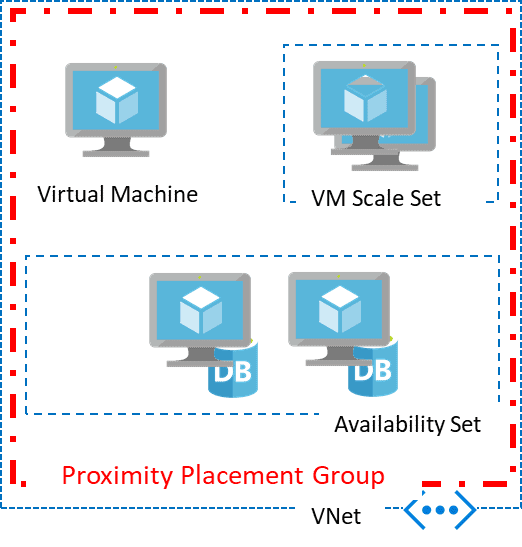
Azure proximity placement groups exhibit a new logical grouping capability for your Azure Virtual Machines, which can be used as a deployment constraint when selecting the location for your Azure Virtual Machines.
Also Check: Our blog post on Microsoft az 104: Everything you need to know before giving this exam.
When To Use Proximity Placement Groups?
Proximity placement groups increase the overall application performance by reducing the network latency between virtual machines and you should consider using them for multi-tiered, IaaS-based deployments.
The following scenarios are eligible for Proximity Placement Groups:
- Low latency between stand-alone VMs.
- Low Latency between VMs in a single availability set or a virtual machine scale set.
- Low latency between stand-alone VMs, VMs in multiple Availability Sets, or multiple scale sets. You can have multiple compute resources in a single placement group to bring together a multi-tiered application.
- Low latency between multiple application tiers using different hardware types.
Check Out: What is Azure Ad Powershell & how it works?
What To Expect When Using Proximity Placement Groups
Proximity placement groups provide co-location within the same data center. However, because they represent an additional constraint of deployment, allocation failures can occur.
- The data center is automatically selected when you ask for the first virtual machine in the proximity placement group.
- In some situations, a request for a second different virtual machine SKU may fail as it may not be already available in the data center available.
- In that case, an OverconstrainedAllocationRequest error will be returned.
- In situations where elastic deployment is used, which scale-out, having a proximity placement group constraints can also result in a failure to satisfy the request. It is recommended that you ask for all the virtual machines at the same time.
Also Check: Why is Azure Administrator Certification beneficial? Click here
Availability
Proximity placement groups are currently available and are offered free of charge in all Azure cloud regions except India Central.
Related/References
- [AZ-900] Microsoft Azure Fundamentals Certification Exam: Everything You Must Know
- [AZ-104] Microsoft Azure Administrator Certification Exam: Everything You Need To Know
- [AZ-400] Microsoft Azure DevOps Certification Exam: Everything You Need To Know
- [AZ-500] Microsoft Azure Security Technologies Certification Exam: Everything You Need To Know
- [DOFD] DevOps Foundation Certification Exam: Everything You Need To Know
- Microsoft Azure Cloud Cost-Saving Tips And Tricks
- Step-By-Step Deploy Azure VMs In Availability Set
- Official Microsoft documentation on Azure proximity placement groups can be found here.
Next Task For You
Begin your journey toward Mastering Azure Cloud and landing high-paying jobs. Just click on the register now button on the below image to register for a Free Class on Mastering Azure Cloud: How to Build In-Demand Skills and Land High-Paying Jobs. This class will help you understand better, so you can choose the right career path and get a higher paying job.


![Microsoft Agentic AI Business Solutions Architect [AB-100] | K21 Academy](https://test.k21academy.com/wp-content/uploads/2025/11/Microsoft-Agentic-AI-Business-Solutions-Architect-AB-100-Exam-Overview1.png)


