
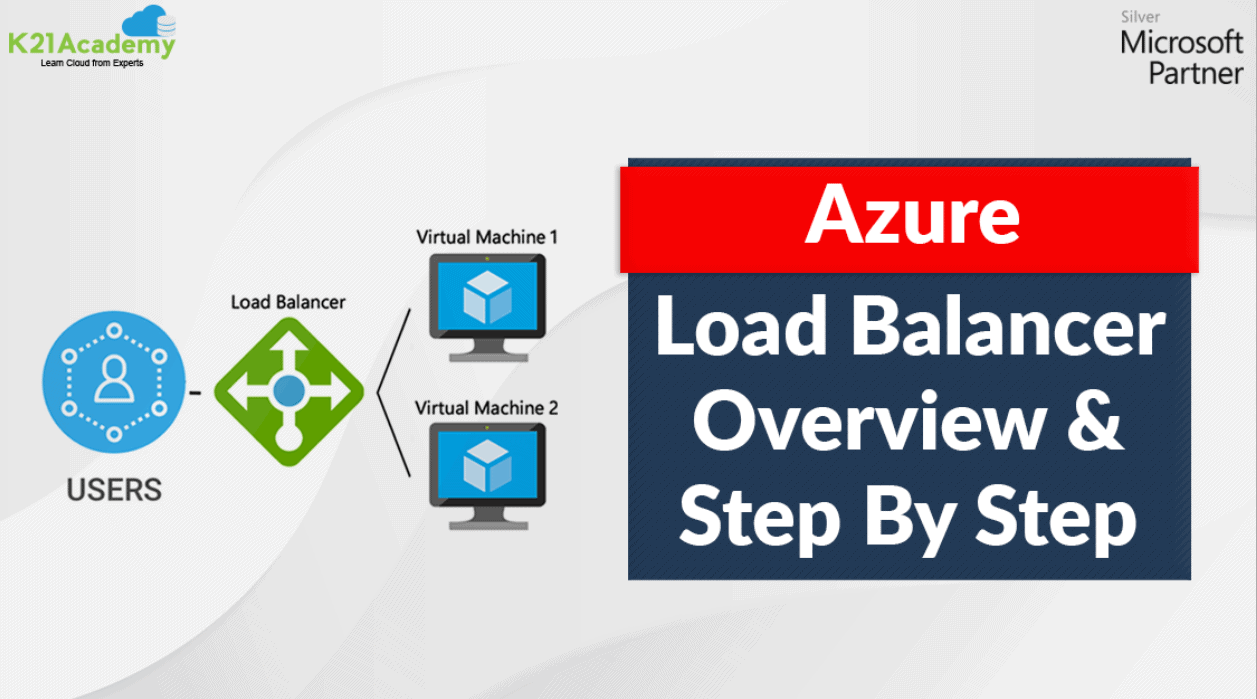



In this post, I will be covering an overview and various major aspects of Azure load balancer. I have discussed features, components, Azure load balancing rules, types and selection of load balancer in detail. I also have covered steps to create an Azure load balancer
Azure load balancing is used to distribute traffic loads to backend virtual machines, By defining your own load balancing rules you can use a load balancer in a more flexible way.
The areas covered in this blog are given below:
- What is Azure Load Balancer?
- Why Choose Azure Load Balancer?
- Load Balancer Types
- Features Of Azure Load Balancer
- Azure Load Balancing Rules
- Azure Load Balancer Components
- Select a Load Balancer Solution
- Steps to create an Azure Load Balancer

What Is Azure Load Balancer?
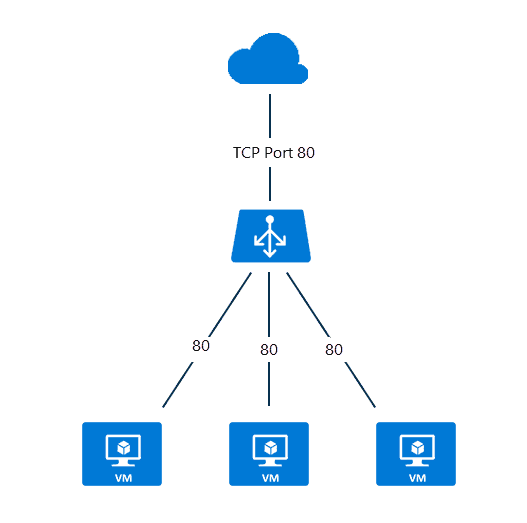
Azure load balancer allows you to distribute traffic to your backend virtual machines. An Azure load balancer provides high availability for your application. The Azure load balancer is fully managed service itself.
Why Choose Azure Load Balancer?
Some of the key scenarios that you can accomplish using Standard Load Balancer include:
- Load balance internal and external traffic to Azure virtual machines.
- Increase availability by distributing resources within and across zones.
- Use health probes to monitor load-balanced resources.
- Employ port forwarding to access virtual machines in a virtual network by public IP address and port.
- Standard Load Balancer provides multi-dimensional metrics through Azure Monitor. These metrics can be filtered, grouped, and broken out for a given dimension. They provide current and historic insights into the performance and health of your service. Resource Health is also supported.
- Load balance services on multiple ports, multiple IP addresses, or both.
Load Balancer Types
In Azure, you can create two types of the load balancer
- Public load balancer
- Internal/ private load balancer
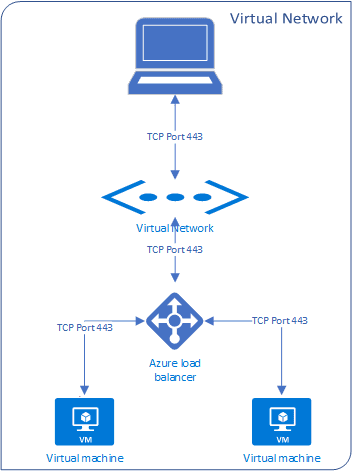
Public Load Balancer: A public load balancer can be used to load balance internet traffic to virtual machines. It can provide outbound connections for virtual machines (VMs) inside your virtual network.

Internal/ Private Load Balancer: An internal (or private) load balancer is used to balance traffic from within a virtual network.
Along with load balancer, there are two pricing tiers available Basic and Standard
Basic: Basic tier load balancer provides basic features and restricted to some limits like for backend pool size it is restricted to only 300 instances, it’s restricted to a single availability set and the Basic tier only supports multiple frontends for inbound traffic.
Standard: Standard tier load balancer is generally available and offers higher-scale and new features. The Standard tier load balancer is a paid-for feature using a complex set of consumption-based charges and the Basic tier continues to be free. The standard tier can scale out to 1000 instances and the Standard tier can span any virtual machine in a single virtual network, including blends of scale sets, availability sets, and machines.
To know more features of Basic and Standard tier check the below table

Related Readings: Click Here
Features Of Azure Load Balancer
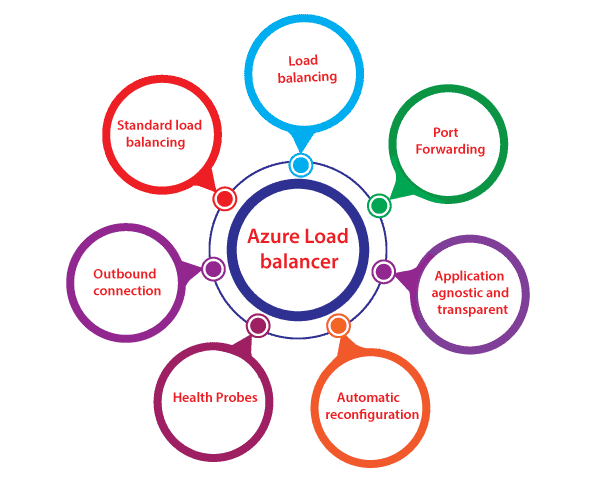
- Load Balancing: Azure load balancer uses a 5-tuple hash which contains source IP, source port, destination IP, destination port, and protocol.
- Outbound connection: All the outbound flows from a private IP address inside our virtual network to public IP addresses on the Internet can be translated to a frontend IP of the load balancer.
- Automatic reconfiguration: Load balancer is able to reconfigure itself when it scales up or down instances on the basis of conditions. So, if more virtual machines are added into the backend pool, automatically load balancer will reconfigure.
- Application agnostic and transparent: It doesn’t directly interact with TCP or UDP protocols. We can route the traffic based on URL or multi-site hosting
- Health probes: When any failed virtual machines in a load balancer are recognized by health probe in the backend pool then it stop routing the traffic to that particular failed virtual machine. It can configure a health probe to determine the health of the instances in the backend pool.
- Port forwarding: The load balancer supports port forwarding ability if we have a pool of web servers, and we don’t want to attach public IP address for the every web server in that pool.
Azure Load Balancing Rules
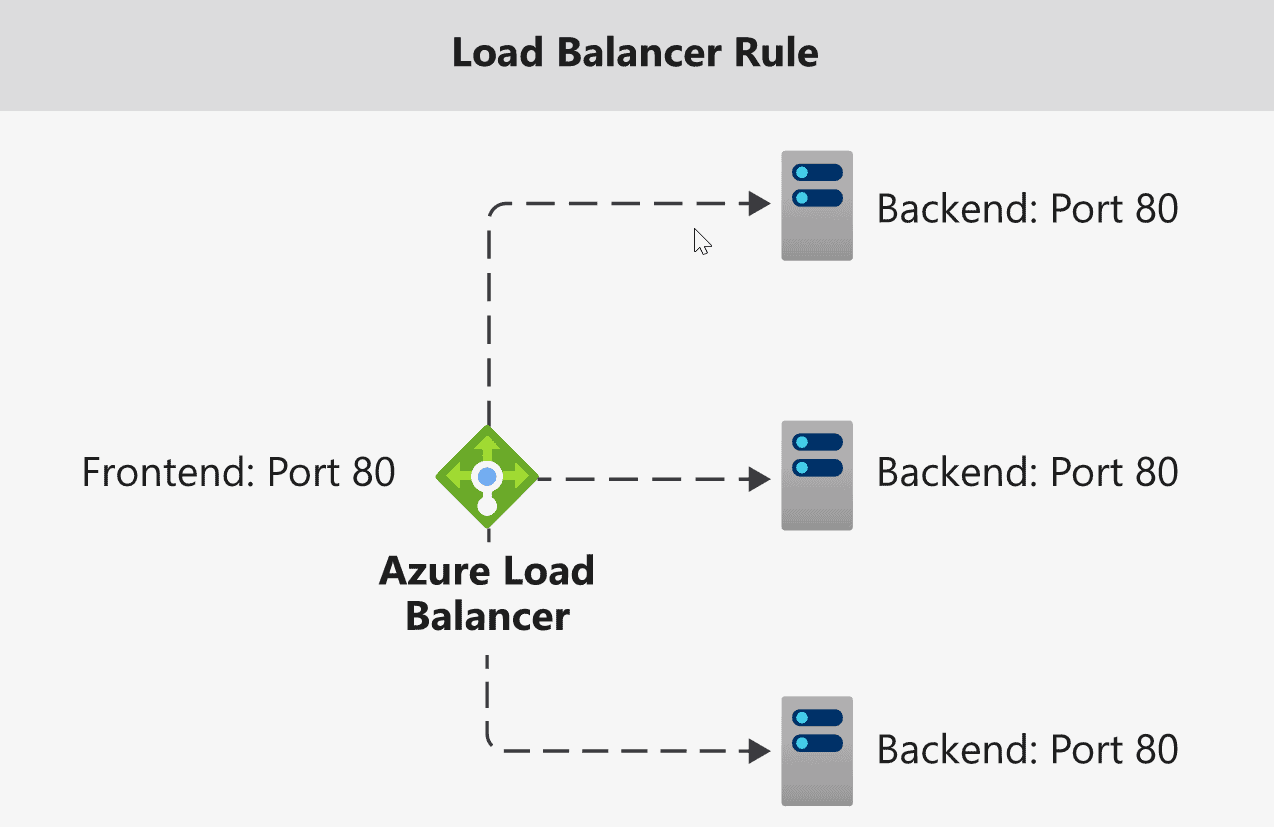
- Load balancing rules define how to route traffic when it arrives on the load balancer
- These rules can use to redirect traffic into the backend pool
- You can also enable session persistence- Here’s client IP’s can be directed to the same backend virtual machines
Azure Load Balancer Components
1) Front-end IP configuration: This is the IP address of your Azure load balancer. It is the point of contact for clients. These IP addresses can be:-
- Public IP Address
- Private IP Address
The nature of the IP address explains the sort of load balancer created. Selection of Private IP address gives an internal load balancer. whereas, selection of Public IP address provides public load balancer.
2) Back-end address pool: These are the pool of virtual machines to which the traffic will generally pass. By adding more instances to backend pool it is easy to achieve scale-cost and satisfy high volumes of incoming traffic.
3) Health Probes: A health probe is used to check the health of the backend virtual machine is good or not
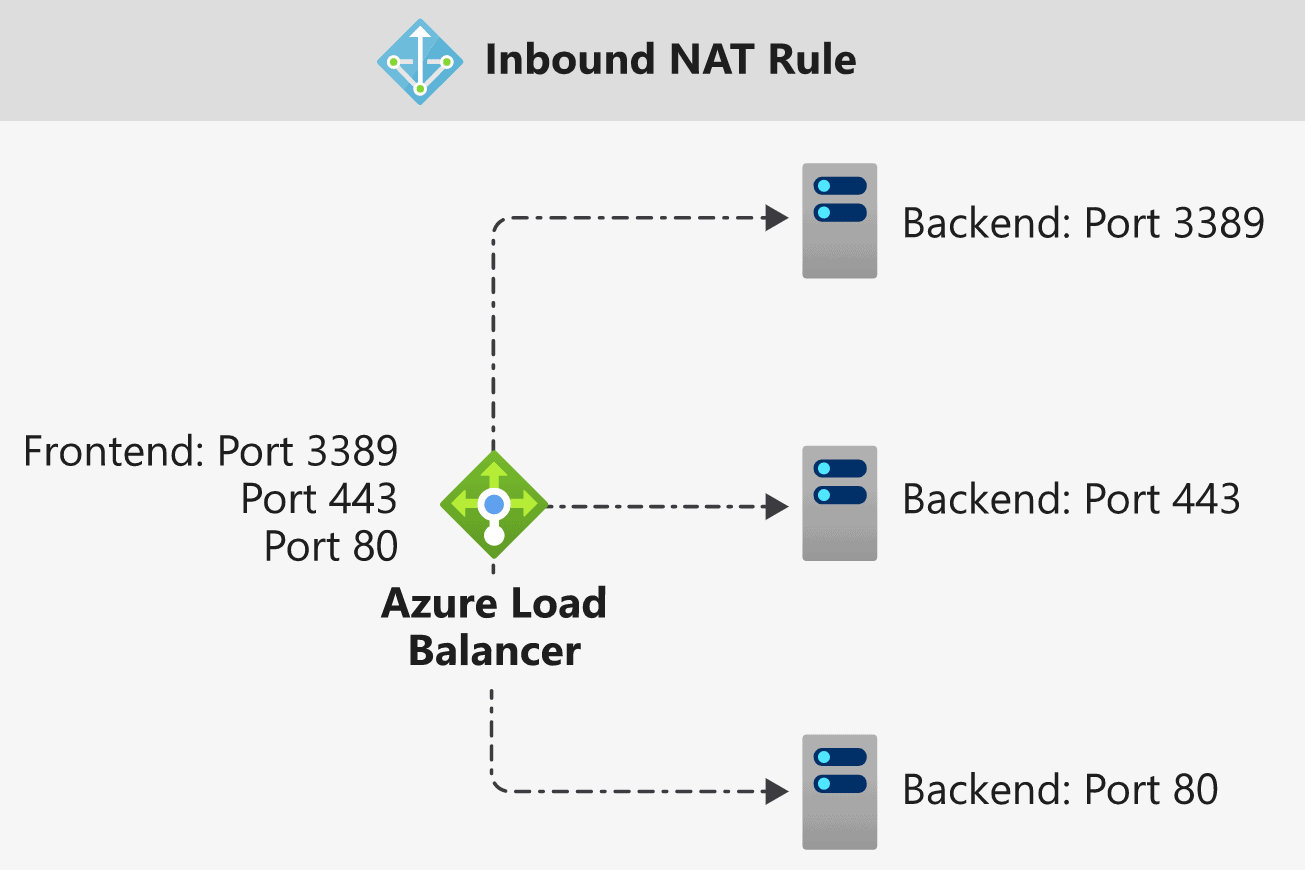
 4) Inbound & Outbound NAT rules: By flowing through the front end IP and distributes to the backend IP, NAT rules define the inbound traffic. Outbound rules will transmit VM private IP to load balancer public IP
5) High Availability Ports: The load-balancing decision is made per flow. This action is based on the following five-tuple connection:
-
- source IP address
- source port
- destination IP address
- destination port
- protocol
The HA ports load-balancing rules assist you with critical scenarios, like high availability and scale for network virtual appliances (NVAs) inside virtual networks.

Select a Load Balancer Solution
Basic Load Balancers allow:
- Port Forwarding
- Automatic Reconfiguration
- Health Probes
- Outbound Connections through source network address translation (SNAT)
- Diagnostics through Azure Log Analytics for public-facing load balancers.
- It can be used in availability sets, not availability zones.

Standard Load Balancers allow:
- HTTPS health probes
- Diagnostics through Azure Monitor, for multidimensional metrics
- High availability (HA) ports
- Outbound rules
- A guaranteed SLA (99.99% for two or more Virtual Machines in different zones)
- It can be used in availability zones

Steps To Create An Azure Load Balancer
Step 1) Log in to Azure Portal (Please make sure you have a subscription before doing all this. If you created a free account for the first time, you’ll already have a FREE TRIAL subscription for 1 month).
Note: If you don’t know how to get free Azure account then click on Azure Free Trial Account to know more
If you don’t know how to create an instance or virtual machine then click on Create a Virtual Machine to know more
Step 2) On top use search bar and search for Load Balancer and then choose Load Balancer

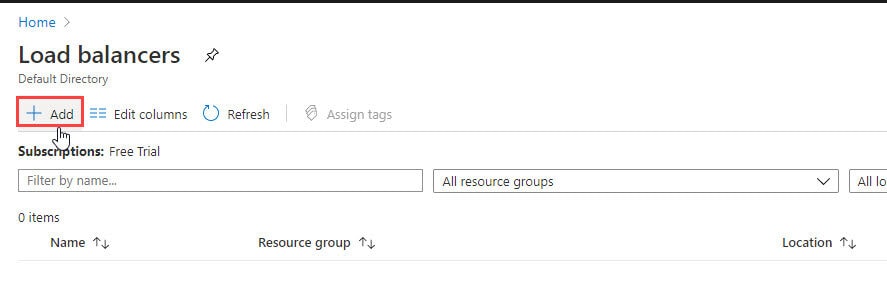
Step 3) On the top left-hand side of the screen, click Add
Step 3) In the Basics tab of the Create load balancer page, enter or select the following information, accept the defaults for the remaining settings, and then select Review + create.
- Name – Any name
- Region – Any region according to a resource group
- Type – Public
- SKU – Basic
- Public IP Address – Create new

Step 4) Now Click On Create and check your Load Balancer Is Created

Conclusion: Azure load balancer is used to distribute networking traffic load to backend virtual machines, its scaling feature provide great value during higher and lower loads. The flexibility is the major benefit during defining load balancing rules in your own way. The above discussed practical Hands-on helps you to understand concepts in more detail.
Note: So in this blog, we have seen a basic overview and quick practical demonstration of the creation of Azure Load Balancer. In our next blog, I will discuss load balancer in more depth and we will see hands-on on load balancer where we will cover load balancing rules, health probe and testing of the public load balancer. So stay tuned with us we will back with the next part of this blog.
Next Task For You
Begin your journey toward Mastering Azure Cloud and landing high-paying jobs. Just click on the register now button on the below image to register for a Free Class on Mastering Azure Cloud: How to Build In-Demand Skills and Land High-Paying Jobs. This class will help you understand better, so you can choose the right career path and get a higher paying job.

![Microsoft Agentic AI Business Solutions Architect [AB-100] | K21 Academy](https://test.k21academy.com/wp-content/uploads/2025/11/Microsoft-Agentic-AI-Business-Solutions-Architect-AB-100-Exam-Overview1.png)


