



This blog post covers Hands-On Labs that will help you understand topics covered in Microsoft Azure AI Fundamental (AI-900) Certification.
This post helps you with your self-paced learning as well as with your team learning. There are 15 Hands-On Labs in this course.
- Explore Automated Machine Learning in Azure Machine Learning
- Explore Azure AI Services
- Analyze images in Vision Studio
- Detect faces in Vision Studio
- Read the text in Vision Studio
- Analyze text with Language Studio
- Use Question Answering with Language Studio
- Use Conversational Language Understanding with Language Studio
- Explore Speech Studio
- Extract form data in Document Intelligence Studio
- Explore an Azure AI Search index (UI)
- Explore Copilot in Microsoft Edge
- Explore Copilot for Microsoft 365
- Explore Azure OpenAI Service
- Explore content filters in Azure OpenAI
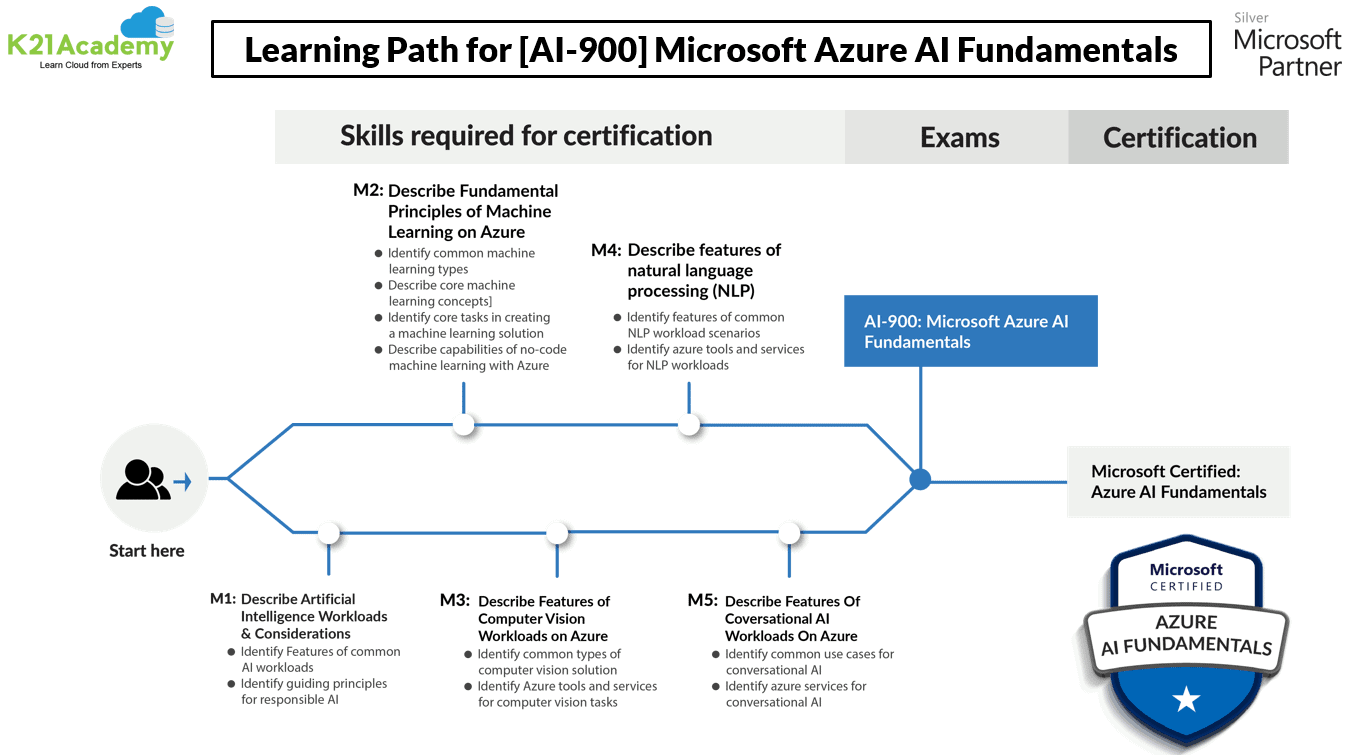
Here’s a quick sneak-peak of how to start learning Artificial Intelligence and Machine Learning on Azure & to clear Microsoft Azure AI Fundamentals (AI-900)
Lab 1. Explore Automated Machine Learning in Azure Machine Learning
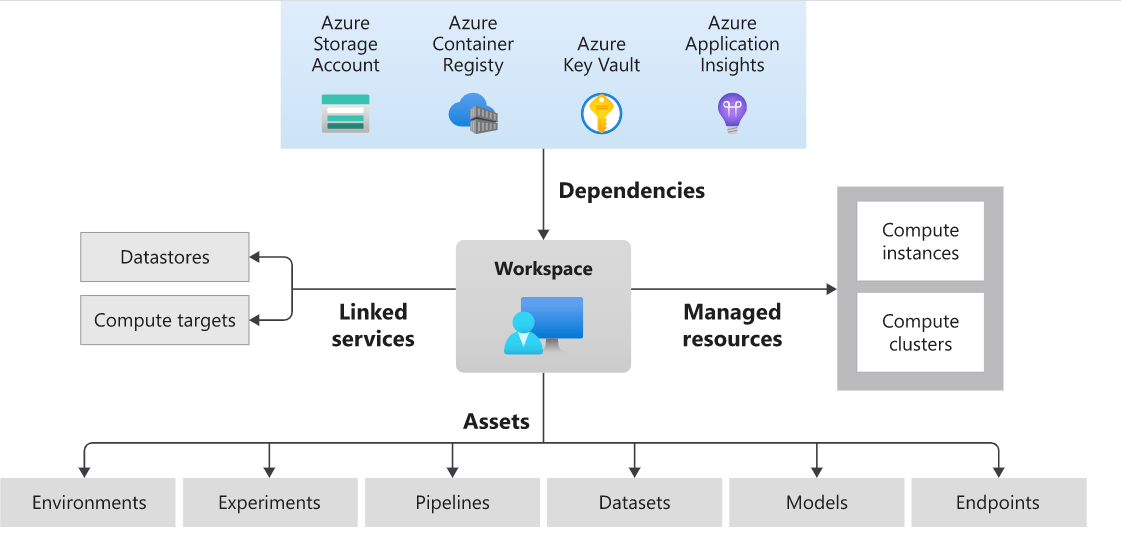
Automated Machine Learning in Azure allows you to train, evaluate, and deploy models efficiently. You’ll start by creating an Azure ML workspace, and then use it to train a model using historical bicycle rental data. The model predicts the number of rentals based on various features. Finally, you’ll deploy and test the model as a real-time endpoint.
Key Concepts
- Automated Machine Learning: Automates the process of selecting and tuning models.
- Azure ML Workspace: The main interface for creating and managing machine learning experiments.
- Model Training: Process of teaching a model to make predictions using historical data.
- Model Evaluation: Assessing the model’s performance on test data.
- Real-Time Endpoint: A service that provides predictions based on new input data.
In this lab, you will explore Automated Machine Learning in Azure. You will create an Azure ML workspace, train a model using historical data, evaluate its performance, and deploy it for real-time predictions.
Explore More About Microsoft Certified Azure AI Fundamental (AI-900) Certification
Lab 2. Explore Azure AI Services
Azure AI Services offer pre-built and customizable APIs and models for creating various AI applications. Content Safety Studio is a tool within Azure AI Services that helps you moderate text and image content by running tests and analyzing severity scores to ensure the content adheres to safety and compliance standards.
Key Concepts
- Content Safety Studio: Interface for managing content moderation tasks.
- Text Moderation: Identifies inappropriate or harmful language in text.
- Image Moderation: Detects and classifies unsafe elements in images.
- Severity Scores: Quantitative assessment of content safety.

In this lab, you will learn to explore Azure AI Content Safety Studio. You will create a resource, test text and image content for safety, and analyze severity scores to understand how Azure AI services are provisioned and utilized for content moderation.
Learn more about Azure Machine Learning Studio, a Machine Learning service that helps to build and deploy models faster.
Lab 3. Analyze images in Vision Studio
Azure AI Vision provides tools for analyzing images through features like captioning, tagging, and object detection. These capabilities can be used for various applications, such as enhancing a smart store scenario by automatically understanding and classifying visual content.
Key Concepts
- Captioning: Describes the content of an image.
- Tagging: Assigns labels to image content and indicates the likelihood of each label being accurate.
- Object Detection: Identifies and locates objects in images, allowing for manipulation of detection parameters like confidence thresholds.
 In this lab, you will learn to analyze images using Azure AI Vision’s features for a smart store scenario. You will explore captioning, tagging, and object detection to understand how these tools can be applied in real-world applications.
Lab 4. Detect faces in Vision Studio
In this lab, you use the Azure AI Face service in Vision Studio to detect faces in images and retrieve bounding box coordinates. You’ll set up an Azure AI services resource, connect it to Vision Studio, and test face detection with sample images.
Key Concepts
- Face Detection: Finds and locates faces in images.
- Bounding Box: A rectangle around detected faces with coordinates.
- Vision Studio: A tool for managing and testing AI Vision features.
- Face Service: Azure tool for detecting and analyzing facial features.
 In this lab, you will explore the Azure AI Face service in Vision Studio. You will set up the Face Service, connect it to Vision Studio, and test face detection with sample images to retrieve bounding box coordinates.
Lab 5. Read the text in Vision Studio
Optical Character Recognition (OCR) is a feature in Azure AI Vision that extracts text from images. Vision Studio provides a no-code environment for testing and experimenting with OCR capabilities.
Key Concepts
- OCR: Technology for recognizing and extracting text from images.
- Text Extraction: Process of identifying and analyzing text in images.
- Vision Studio: Platform for accessing and testing AI Vision features without coding.
 In this lab, you will explore the OCR capabilities of Azure AI Vision using Vision Studio. You will set up an OCR resource, connect it to Vision Studio, and experiment with extracting and interpreting text from images.
Join K21 Academy’s free AI-900 session and get step-by-step hands-on lab guidance.
Lab 6. Analyze text with Language Studio
Azure AI-Language helps you analyze and understand the text through various Natural Language Processing (NLP) techniques. In this lab, you’ll use Language Studio to perform sentiment analysis on hotel reviews, determining whether the reviews are positive, negative, or neutral.
Key Concepts
- NLP: Technology for understanding and analyzing human language.
- Sentiment Analysis: Process of categorizing the sentiment behind the text.
- Text Analysis: Techniques for extracting and evaluating text data.
 In this lab, you will explore sentiment analysis with Azure AI-Language. You will set up a Language resource, connect it to Language Studio, and use it to analyze hotel reviews for sentiment and key phrases.
Lab 7. Use Question Answering with Language Studio
Azure AI Language’s Question Answering capabilities enable you to create a system that can answer customer questions using a knowledge base. In this lab, you’ll set up a question-answering system for a customer service bot using an FAQ document.
Key Concepts:
- Question Answering Model: Uses NLP to understand and answer questions.
- Knowledge Base: A collection of Q&A pairs used for answering questions.
- Bot Integration: Connects the knowledge base to a bot for user interaction.
In this lab, you will create a question-answering system using Azure AI Language. You will set up a Language resource, build and test a knowledge base from an FAQ document, and deploy a bot to answer customer queries.
Lab 8. Use Conversational Language Understanding with Language Studio
Conversational AI aims to make computers understand and respond to human language naturally. By setting up a Conversational Language Understanding project, you configure an AI model to recognize user intents (actions) and entities (objects) from commands, enabling automation of tasks like controlling home devices through voice or text.
Key Concepts:
- Intents: What the user wants (e.g., “turn on”).
- Entities: Specific elements in the request (e.g., “light”).
- Utterances: Examples of commands (e.g., “switch on the fan”).
 The lab involves configuring these elements, training the model, and deploying it for real-world use.
Lab 9. Explore Speech Studio
Azure AI Speech Service offers tools for working with spoken language, including converting speech to text and text to speech. In this lab, you’ll explore the Speech-to-Text and Text-to-Speech capabilities of Speech Studio.
Key Concepts
- Speech-to-Text: Transcribes spoken words into written text.
- Text-to-Speech: Converts written text into spoken audio.
- Real-Time Processing: Transcribes or generates speech as it happens for live applications.
 In this lab, you will explore the Speech-to-Text and Text-to-Speech capabilities of Azure AI Speech. You will set up a Speech resource, experiment with real-time speech-to-text conversion, and review text transcriptions from an audio file.
Lab 10. Extract form data in Document Intelligence Studio
Azure AI Document Intelligence helps analyze documents to extract structured data. It uses advanced OCR techniques to go beyond simple text extraction by interpreting document structure and identifying key data fields.
Key Concepts
- Document Intelligence: Advanced OCR for interpreting text and identifying data fields in documents.
- Prebuilt Models: Ready-to-use models for common document types like receipts.
 In this lab, you will explore the Document Intelligence capabilities of Azure AI. You will set up a Document Intelligence resource, analyze a receipt using a prebuilt model, and review the structured data extracted from the document.
Lab 11. Explore an Azure AI Search index (UI)
Azure AI Search helps you build powerful search solutions by indexing data and performing searches. This lab focuses on creating a search index for customer reviews, enriching data with AI capabilities, and exploring insights from the knowledge store.
Key Concepts
- Azure AI Search: Manages the process of indexing data and searching through documents.
- AI Skills: Enhances data with additional insights such as sentiment analysis and keyphrase extraction.
- Knowledge Store: Stores and organizes enriched data for further analysis and insights.
 In this lab, you will explore Azure AI Search by creating a search index for customer reviews, enriching the data with AI skills, and analyzing the results from the knowledge store.
Lab 12. Explore Microsoft Copilot in Microsoft Edge
Microsoft Copilot in Microsoft Edge uses generative AI to assist with content creation and research tasks. In this lab, you will learn how Copilot helps with:
- Business Planning: Developing a business plan including market analysis and financial projections.
- Presentation Creation: Designing a presentation for investor pitches.
- Email Composition: Drafting a funding request email for your business idea
Key Concepts
- Generative AI: Technology for creating and refining content.
- Business Plan: Document outlining a business’s goals, market analysis, and financial strategies.
- Presentation: Visual tool for communicating business ideas and proposals.
- Email: Professional communication tool for requests and correspondence.
 In this exercise, you will explore Microsoft Copilot in Microsoft Edge by using generative AI to develop a business plan, create a presentation, and compose a funding request email, showcasing how Copilot can enhance productivity and creativity in content creation and research.
Lab 13. Explore Copilot for Microsoft 365
Copilot for Microsoft 365 is a generative AI tool integrated across Word, Excel, and PowerPoint to assist with content creation and business planning. In this exercise, you will explore how Copilot helps with:
- Business Planning: Developing a business plan for a cleaning business, including financial projections.
- Presentation Creation: Preparing a slide deck for investors.
- Email Drafting: Creating a funding request email.
Key Concepts
- Generative AI: Technology that assists in creating and refining content and visualizations.
- Business Plan: Document outlining business goals, market analysis, and financial projections.
- Financial Projections: Estimates of a business’s future financial performance.
- Email: Formal communication for funding requests or other business correspondence.
- Presentation: Slide deck for business proposals and pitches.
 In this exercise, you will explore Copilot for Microsoft 365 by using generative AI to develop a business plan, create a presentation, and draft a funding request email. This showcases how Copilot enhances content creation, business planning, and data visualization within the Microsoft 365 suite.
Lab 14. Explore Azure OpenAI
Azure OpenAI Service integrates OpenAI models into the Azure cloud for text and image generation. This lab introduces the Azure OpenAI Service, where you will explore:
- Generative AI Models: Use GPT-35-Turbo for text generation and DALL-E 2 for image creation.
- Chat Playground: Interface for interacting with text models.
- DALL-E Playground: Interface for creating and editing images.
 Key Concepts
- Generative AI: Technology for creating text or images from prompts.
- GPT-35-Turbo: Model for generating text responses.
- DALL-E 2: Model for generating and editing images.
- Chat Playground: Tool for text model interactions.
- DALL-E Playground: Tool for image creation and editing.
In this lab, you will explore Azure OpenAI Service, deploy GPT-35-Turbo for text generation, and DALL-E 2 for image creation. You’ll manage resources through the Azure Portal, interact with AI models via the Chat Playground and DALL-E Playground, and experiment with generative AI capabilities.
Lab 15. Explore content filters in Azure OpenAI
Content Filters in the Azure OpenAI Service are tools designed to manage AI outputs by ensuring that generated content is safe and responsible. This lab will guide you through the default content filters and the process of creating custom content filters to meet specific moderation needs.
 Key Concepts
- Content Filters: Tools to ensure AI responses are safe and responsible.
- Default Content Filters: Filters designed to prevent harmful or offensive outputs.
- Custom Content Filters: Allows you to define specific rules for content moderation.
- Filter Categories:
- Hate: Language expressing discrimination or derogatory statements.
- Sexual: Sexually explicit or abusive language.
- Violence: Language promoting or describing violence.
- Self-harm: Language encouraging self-harm.
In this lab, you will explore content filters in Azure OpenAI Service, learning how default filters work and how to create custom filters for specific content moderation needs. You will apply these filters and review their effectiveness in managing harmful content and ensuring responsible AI use.
Related or References.
- [DP-100] Microsoft Certified Azure Data Scientist Associate: Everything You Must Know
- [AI-900] Microsoft Certified Azure AI Fundamentals Course: Everything You Must Know
- Automated Machine Learning | Azure | Pros & Cons
- Object Detection and Tracking in Azure Machine Learning
- Azure Machine Learning Studio
- Azure Cognitive Services (Overview & Types)
- Azure Free Account: Steps to Register for Free Trial Account
Next Task: Enhance Your Azure AI/ML Skills


![Microsoft Agentic AI Business Solutions Architect [AB-100] | K21 Academy](https://test.k21academy.com/wp-content/uploads/2025/11/Microsoft-Agentic-AI-Business-Solutions-Architect-AB-100-Exam-Overview1.png)


