


Welcome to our Azure GenAI/ML Mastery Bootcamp! In this post, we’ll cover everything you need to master Azure GenAI/ML, secure a high-paying job, and get certified (AI-900, AI-102, DP-100, AZ-900) in this dynamic field. Whether starting with the basics or looking to deepen your expertise, we’ve got you covered with a comprehensive approach to Azure Generative AI and ML.
We’ll dive into the essentials of Azure AI (AI-900) and explore advanced topics through detailed hands-on labs and project work designed for Azure AI Engineer (AI-102) and Data Scientist (DP-100) certifications. Our step-by-step activity guides and real-world projects will provide you with the practical skills and knowledge needed to excel in interviews and advance your career.
Prepare to immerse yourself in hands-on learning experiences that will pave the way for your success in the Azure AI/ML domain. This boot camp will equip you with everything you need to thrive in this ever-evolving field, from foundational concepts to advanced techniques. Let’s get started on this transformative journey together!
Table of Contents:
1. Hands-On Labs For Azure AI/ML
- Lab 1: Register for the Azure Free trial account
- Lab 2 : Create Budget(Billing alert)
- Lab 3: Creating & connecting Windows VM
- Lab 4: Installing VS Code, Python & Git on VM
1.2 Introduction to AI and Machine Learning
- Lab 5: Explore Automated ML in Azure ML
- Lab 6: Explore Azure AI Services
- Lab 7: Work with Compute resources in Azure Machine Learning
- Lab 8: Work with environments in Azure Machine Learning
1.3 Generative AI & Large Language Models
- Lab 9: Generate images with AI
- Lab 10: Prepare for an AI development project
- Lab 11: AI Foundry: Deploy & Compare Lang. Models
1.4 Agentic AI & Multimodal Systems
- Lab 12: Explore AI Agent development
- Lab 13: Develop an AI agent.
- Lab 14: Use a custom function in an AI agent
- Lab 15: Azure AI agent with the Semantic Kernel SDK
- Lab 16: Develop a multi-agent solution
- Lab 17: Connect AI agents to tools using Model Context Protocol (MCP)
1.5 Natural Language Processing (NLP)
- Lab 18: Analyze Text with Azure AI Search
- Lab 19: Create a Question Answering Solution
- Lab 20: Create a Language Understanding Model
- Lab 21: Custom Text Classification using AI Language
- Lab 22: Extract Custom Entities
- Lab 23: Translate Text with the Azure AI Translator
- Lab 24: Create Speech-enabled App: Azure AI Speech
- Lab 25: Translate speech with Azure Speech Resource
- Lab 26: Develop an audio-enabled Chat App
- Lab 27: Explore the Voice Live API
- Lab 28: Analyze images with Azure AI Vision
- Lab 29: Classify images with an AI Vision custom model
- Lab 30: Detect Objects in Images with Custom Vision
- Lab 31: Detect and Analyze Faces
- Lab 32: Read text in images
- Lab 33: Analyze video with Video Indexer
- Lab 34: Classify Images with Azure AI Custom Vision
1.7 Document Intelligence & Knowledge Mining
- Lab 35: Extract information from multimodal content
- Lab 36: Develop a Content Understanding client app.
- Lab 37: Analyze forms with prebuilt Azure AI Document
- Lab 38: Analyze forms with custom Azure AI Document
- Lab 39: Create a knowledge mining solution
1.8 Deep Dive into Transformer Architectures
1.9 Azure AI Foundry Deep Dive
- Lab 42: Create a Gen AI Chat App
- Lab 43: Develop a multimodal generative AI app
- Lab 44: Manage Chat Conversation with Prompt Flow
- Lab 45: Use prompt flow for NER in AI Foundry portal
- Lab 46: Explore content filters in Azure AI Foundry
- Lab 47: Evaluate generative AI performance
- Lab 48: Create a generative AI app that uses your data
- Lab 49: Add your data for RAG with the Az OpenAI Service
1.11 Designing and Deploying Copilots using Microsoft Copilot Studio
- Lab 51: Run a Training Script as a Command Job in AZ-ML
- Lab 52: Tracking ML Training Jobs with MLflow
- Lab 53: Perform Hyperparameter Tuning with a SweepJob
- Lab 54: Run Pipelines in Azure Machine Learning
1.13 Model Deployment and Monitoring on Azure
- Lab 57: Model registration and versioning @ MLFlow
- Lab 58: Install & Use DVC with Azure Storage
- Lab 59: Model Deployment with Azure & Gradio
1.15 AI Governance & Compliance
- Project 1: Chatbot Using Azure AI Search and OpenAI With Our Own Data
- Project 2: Synthetic Data Generation with LLM
- Project 3: Building RAG Application With Langchain
- Project 4: AI-Enhanced advertisement generation
- Project 5: Multi-Tasking Agent with Azure OpenAI
- Project 6: Movie Recommender with Azure ML
- Project 7: Predicting Diabetes using Azure ML
- Project 8: Housing Price Prediction with Azure ML
- Project 9: University Admission Prediction Using Azure ML Studio
- Project 10: Credit Card Fraud Detection with Azure ML
- Project 11: Multimodal RAG Agents using Azure OpenAI
1. Hands-On Labs For Azure AI/ML
1.1 Azure for Beginners
Lab 1: Register for an Azure Free trial account
In this lab, you will learn how to sign up for an Azure Free Trial account. This trial provides you with a $200 credit to explore and use a wide range of Azure services for 30 days, allowing you to familiarize yourself with Azure’s cloud capabilities at no cost. By the end of this lab, you will have set up your own Azure account and be ready to start experimenting with various Azure tools and services.

Source: K21Academy
Lab 2 : Create Budget(Billing alert)
In this lab, you’ll learn how to create and configure a budget in Azure to monitor and manage your spending. Setting up a budget with billing alerts helps you keep track of your Azure costs and ensures that you stay within your budget limits by notifying you when spending approaches or exceeds predefined thresholds.

Source: K21Academy
Why Create Billing Alerts?
Creating billing alerts in Azure is beneficial because it helps you maintain control over your cloud spending, preventing unexpected costs. By setting up alerts, you receive notifications when your expenses approach or exceed your budget, allowing you to take immediate action to avoid overspending. This proactive management is crucial for optimizing resource usage, maintaining financial predictability, and ensuring that your Azure spending aligns with your organization’s financial goals.
Lab 3: Creating & connecting Windows VM
In this lab, you’ll learn how to create and connect to a Windows Virtual Machine (VM) in Azure. This involves provisioning a Windows VM, configuring its settings, and establishing a remote connection to manage it. This lab is essential for understanding how to deploy and interact with Windows-based cloud resources in Azure.

Source: K21Academy
Part 1: Connecting with Windows Laptop
In this part of the lab, you’ll learn how to create a Windows virtual machine (VM) in Azure and connect to it using a Windows laptop. You’ll use the Remote Desktop Protocol (RDP) to establish a secure connection to your VM. This setup allows you to access and manage the VM as if it were a physical machine, providing a seamless development or testing environment within Azure.
Part 2: Connecting with a Mac Laptop
In this section, you’ll create a Windows VM in Azure and connect to it from a Mac laptop. You’ll use the Microsoft Remote Desktop application for macOS to establish an RDP connection. This enables you to access the Windows environment on your VM from your Mac, offering cross-platform flexibility for managing and interacting with your Azure resources.
Lab 4: Installing VS Code, Python & Git on VM
In this lab, you’ll set up a development environment on a virtual machine (VM) by installing Visual Studio Code (VS Code), Python, and Git. These tools are essential for coding, debugging, and version control. VS Code is a lightweight, versatile code editor, Python is a powerful programming language, and Git is a system for tracking code changes. By the end of the lab, your VM will be ready for software development, enabling efficient project management and collaboration.

Source: K21Academy
1.2 Introduction to AI & ML
Lab 5: Explore Automated ML in Azure ML
In this lab, you’ll delve into Automated Machine Learning (AutoML) in Azure Machine Learning. AutoML simplifies the process of building and deploying machine learning models by automating various stages of the machine learning workflow, from data preparation to model selection and tuning.

Source: K21Academy
Lab 6: Explore Azure AI Services
In this lab, you’ll explore the various AI services available on Azure. Azure provides a suite of AI services and tools that can be integrated into applications to add intelligence and automation. These services cover areas such as natural language processing, computer vision, conversational AI, and more.
 Source: K21Academy
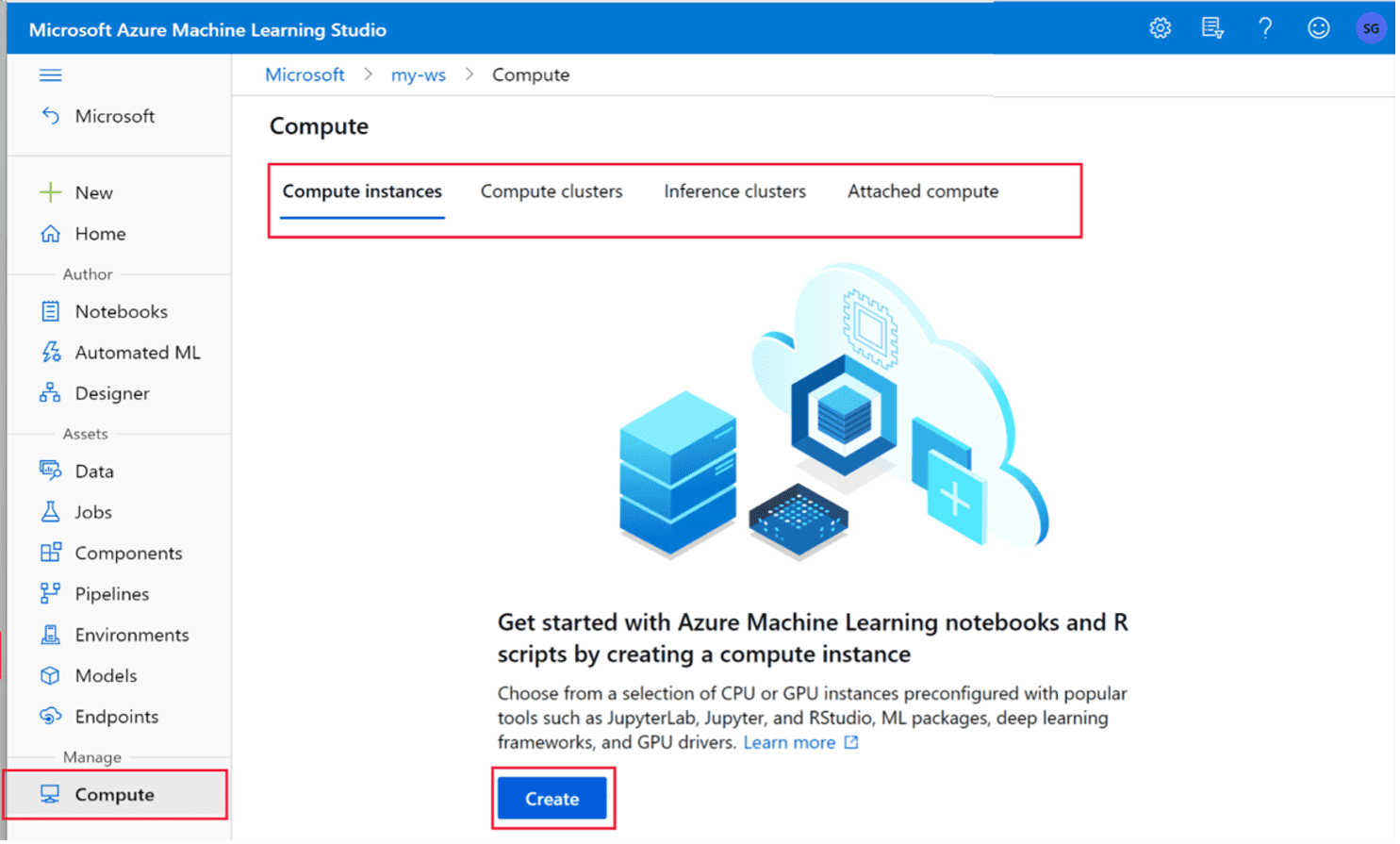
Lab 7: Work with Compute resources in Azure Machine Learning
In this exercise, you’ll learn how to use cloud computing in Microsoft Azure Machine Learning to run experiments and production code at scale.
Source: K21Academy
Lab 8: Work with environments in Azure Machine Learning
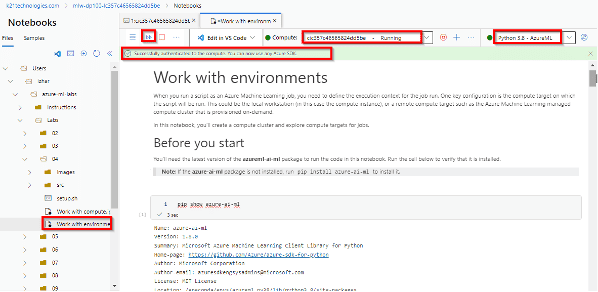
To run notebooks and scripts, you must ensure that the required packages are installed. Environments allow you to specify the runtimes and Python packages that your computer must use to run your code.
In this exercise, you will learn about environments and how to use them when training machine learning models with Azure Machine Learning compute.
Source: K21Academy
Read more: MLOps is based on DevOps principles and practices that increase the efficiency of workflows and improve the quality and consistency of machine learning solutions.
1.3 Generative AI & Large Language Models
Lab 9: Generate images with AI
In this lab, you will learn how to generate images using AI-driven models. You will explore the use of Generative Adversarial Networks (GANs) or other advanced AI tools to create images from text prompts, random noise, or specific inputs. The lab will guide you through the process of setting up the model, training it (if necessary), and using it to generate realistic or artistic images. You will also experiment with fine-tuning parameters to influence the style, quality, and content of the generated images.

Source: K21Academy
By the end of the lab, you will have hands-on experience in creating AI-generated images for various use cases, such as creative content creation, marketing, and design.
Lab 10: Prepare for an AI development project
In this lab, you will learn how to effectively prepare for an AI development project. You will explore the necessary steps to set up the project, including defining the objectives, selecting the appropriate tools, and identifying the data required for training AI models. The lab will guide you through project planning, from understanding the problem domain to structuring workflows, designing pipelines, and setting milestones. You will also gain insights into choosing the right algorithms and frameworks to ensure the success of the project.

Source: K21Academy
By the end of the lab, you will have a solid foundation in preparing for an AI development project, ensuring that you have all the necessary resources and planning in place for a smooth and efficient development process.
Lab 11: AI Foundry: Deploy & Compare Lang. Models
In this lab, you will learn how to deploy and compare different language models using AI Foundry. You will explore how to integrate various pre-trained language models (such as GPT) into your applications and evaluate their performance on specific tasks like text generation, classification, or translation. The lab will guide you through the process of setting up deployment pipelines, fine-tuning models if necessary, and assessing key performance metrics such as accuracy, speed, and resource consumption.
By the end of the lab, you will have the skills to deploy multiple language models, compare their effectiveness, and choose the best one for your use case.
1.4 Agentic AI & Multimodal Systems
Lab 12: Explore AI Agent development
In this lab, you will explore the process of developing AI agents capable of performing autonomous tasks. You will learn how to design and implement agents using techniques such as reinforcement learning, natural language processing (NLP), and decision-making algorithms. The lab will guide you through building the foundational components of an AI agent, including perception, reasoning, and action-taking modules. You will also learn how to configure the agent’s environment, set goals, and enable it to make decisions based on the data it processes.

Source: K21Academy
By the end of the lab, you will have a solid understanding of AI agent development, allowing you to build agents that can autonomously interact with their environment and solve real-world problems.
Lab 13: Develop an AI agent
In this lab, you will learn how to develop a fully functional AI agent capable of interacting with its environment and making decisions autonomously. You will explore the key components of AI agent development, including perception, decision-making, and action execution.
The lab will guide you through building the agent, defining its goals, and implementing learning algorithms such as reinforcement learning or rule-based systems. Additionally, you will test the agent’s performance and optimize its behavior based on feedback.

Source: K21Academy
By the end of the lab, you will have hands-on experience in creating and deploying an intelligent agent that can carry out tasks with minimal human intervention.
Lab 14: Use a custom function in an AI agent
In this lab, you will learn how to enhance the capabilities of an AI agent by integrating custom functions. You will explore how to define and implement functions tailored to specific tasks or decision-making processes within the agent’s operation.
The lab will guide you through writing custom code that allows the agent to interact with its environment more effectively and perform specialized actions. Additionally, you’ll test the integration of these functions within the agent’s workflow and evaluate their impact on performance.
By the end of the lab, you will have the skills to customize AI agents with functions that extend their functionality for a wide range of applications.
Lab 15: Azure AI agent with the Semantic Kernel SDK
In this lab, you will explore how to build and deploy an AI agent using the Semantic Kernel SDK in Azure. You will learn how to leverage Azure’s powerful AI tools, including the Semantic Kernel, to develop a sophisticated agent capable of processing and understanding complex data.
The lab will guide you through integrating the Semantic Kernel SDK with your agent, setting up workflows, and enhancing decision-making capabilities.

Source: K21Academy
By the end of the lab, you will have hands-on experience in creating AI agents that can process semantic data and perform advanced tasks using Azure’s AI infrastructure.
Lab 16: Develop a multi-agent solution
In this lab, you will learn how to develop a multi-agent system where multiple AI agents work collaboratively or independently to solve complex tasks. You will explore how to design and implement agents that can communicate, share data, and coordinate efforts to achieve common or individual goals.
The lab will guide you through setting up communication protocols, handling synchronization between agents, and managing their interactions effectively.
By the end of the lab, you will have the skills to build a multi-agent solution that can solve more complex problems by leveraging the power of collaboration between autonomous agents.
Lab 17: Connect AI agents to tools using MCP
In this lab, you will learn how to connect AI agents to external tools and services using the Multi-Channel Platform (MCP). You will explore how to extend the capabilities of your AI agents by integrating them with various tools and APIs, enabling them to perform more advanced tasks.
The lab will guide you through setting up MCP, defining communication channels, and configuring agents to interact with tools such as databases, APIs, or external software systems.

Source: K21Academy
By the end of the lab, you will have hands-on experience in enhancing AI agents with external tool integrations, allowing them to perform a broader range of functions in real-world applications.
1.5 Natural Language Processing (NLP)
Lab 18: Analyze Text with Azure AI Search
In this lab, you will learn how to leverage Azure AI Search to analyze and extract valuable insights from text data. You will explore how to integrate Azure AI Search with your datasets, perform text indexing, and implement advanced search capabilities to analyze large volumes of unstructured text.
The lab will guide you through configuring custom analyzers, defining search queries, and using natural language processing (NLP) techniques to enhance search results.

Source: K21Academy
By the end of the lab, you will have the skills to use Azure AI Search to efficiently process and analyze text data for improved search accuracy and actionable insights.
Lab 19: Create a Question Answering Solution
In this lab, you will learn how to build a question-answering (QA) system using AI technologies. You will explore how to design and implement a solution that can automatically answer user queries based on a given dataset or knowledge base.
The lab will guide you through setting up a question-answering model, training it on your data, and integrating natural language processing (NLP) techniques to improve the accuracy and relevance of the answers.

Source: K21Academy
By the end of the lab, you will have hands-on experience in creating a QA solution that can understand and respond to user queries effectively in various real-world scenarios.
Lab 20: Create a Language Understanding Model
In this lab, you will learn how to create a language understanding model capable of interpreting and processing natural language. You will explore how to train the model to understand different language constructs, such as intents, entities, and context, using data-driven approaches.
The lab will guide you through setting up and fine-tuning a language model, building custom language understanding pipelines, and applying natural language processing (NLP) techniques for improved performance.

Source: K21Academy
By the end of the lab, you will have hands-on experience in developing a language understanding model that can effectively interpret and respond to complex user inputs in various applications.
Lab 21: Custom Text Classification using AI Language
In this lab, you will learn how to build a custom text classification model using AI language models. You will explore how to prepare your text data, define custom categories or labels, and train a model to classify the text into the appropriate categories.
The lab will guide you through using AI-powered tools to enhance the accuracy of classification, including data preprocessing, feature extraction, and model evaluation.

Source: K21Academy
By the end of the lab, you will have the skills to develop and deploy a custom text classification model that can be applied to real-world tasks such as sentiment analysis, spam detection, and topic categorization.
Lab 22: Extract Custom Entities
In this lab, you will learn how to extract custom entities from unstructured text data using AI-powered natural language processing (NLP) techniques. You will explore how to define and identify specific entities, such as names, dates, locations, or product types, based on the context of your dataset.
The lab will guide you through training a custom named entity recognition (NER) model, evaluating its performance, and fine-tuning it for greater accuracy.

Source: K21Academy
By the end of the lab, you will have the expertise to extract relevant entities from text data for use in applications such as information retrieval, knowledge extraction, and data organization.
Lab 23: Translate Text with the Azure AI Translator
In this lab, you will learn how to use the Azure AI Translator to translate text between multiple languages. You will explore how to integrate the Azure Translator API into your application, configure language detection, and implement real-time translation features.
The lab will guide you through using advanced capabilities such as batch translation, custom translation models, and language identification.

Source: K21Academy
By the end of the lab, you will have the skills to incorporate Azure AI Translator into your projects, enabling seamless multilingual communication and improving global reach.
Lab 24: Create Speech-enabled App: Azure AI Speech
In this lab, you will learn how to integrate speech recognition and synthesis into an application using Azure AI Speech services. You will explore how to convert spoken language into text (speech-to-text) and generate natural-sounding speech from text (text-to-speech).
The lab will guide you through setting up the Azure Speech SDK, handling different speech models, and implementing real-time speech features such as voice commands or interactive dialogues.

Source: K21Academy
By the end of the lab, you will be able to build a speech-enabled application that enhances user experience through voice interaction and accessibility.
Lab 25: Translate speech with Azure Speech Resource
In this lab, you will learn how to use the Azure Speech Resource to translate spoken language in real-time. You will explore how to configure speech-to-text and speech-to-speech translation capabilities, enabling seamless multilingual communication. The lab will guide you through setting up the Azure Speech SDK, handling different language models, and implementing live translation features for applications such as virtual assistants, real-time transcription, and multilingual support.

Source: K21Academy
By the end of the lab, you will have the skills to integrate speech translation into your applications, allowing for efficient and accurate voice communication across languages.
Lab 26: Develop an audio-enabled Chat App
In this lab, you will learn how to build an audio-enabled chat application using AI and speech technologies. You will integrate speech-to-text and text-to-speech capabilities into the chat app, allowing users to interact through both voice and text.
The lab will guide you through setting up real-time audio processing, converting spoken language into text for the chat interface, and using text-to-speech for generating voice responses.

Source: K21Academy
By the end of the lab, you will have created a fully functional chat app with seamless voice communication features, enhancing the user experience with hands-free interaction.
Lab 27: Explore the Voice Live API
In this lab, you will explore the Voice Live API to integrate real-time voice capabilities into your applications. You will learn how to set up the API for voice interactions, including features like live speech-to-text, text-to-speech, and voice recognition.
The lab will guide you through using the Voice Live API to build applications that support interactive voice commands, voice search, and real-time voice translation.

Source: K21Academy
By the end of the lab, you will have hands-on experience in utilizing the Voice Live API to enhance your applications with live voice interaction features.
1.6 Computer Vision
Lab 28: Analyze images with Azure AI Vision
In this lab, you will learn how to analyze and extract insights from images using Azure AI Vision services. You will explore how to use computer vision techniques for tasks like object detection, image classification, optical character recognition (OCR), and scene understanding.
The lab will guide you through setting up the Azure AI Vision API, processing images, and extracting valuable data such as text from images or identifying objects within a scene.

Source: K21Academy
By the end of the lab, you will have the skills to integrate Azure AI Vision into your applications for powerful image analysis capabilities.
Lab 29: Classify images with an AI Vision custom model
In this lab, you will learn how to use Azure AI Vision’s Custom Vision service to create and train custom image classification models. You will explore how to upload and label your own dataset of images, train the model to recognize specific objects or categories, and evaluate its performance.
The lab will guide you through setting up the Custom Vision SDK, deploying the trained model, and integrating it into your applications for real-time image classification.

Source: K21Academy
By the end of the lab, you will have the skills to build a custom image classification solution tailored to your specific needs, enabling more accurate and context-specific image analysis.
Lab 30: Detect Objects in Images with Custom Vision
In this lab, you will learn how to use Azure AI’s Custom Vision service to detect objects within images. You will explore how to train a custom object detection model by uploading and labeling images with specific objects.
The lab will guide you through the process of setting up the Custom Vision service, training the model to recognize multiple objects, and evaluating its performance. You will also learn how to deploy the model to detect objects in real-time images.
Source: K21Academy
By the end of the lab, you will have the skills to create custom object detection models tailored to your specific needs, enabling advanced image analysis in your applications.
Lab 31: Detect and Analyze Faces
In this lab, you will learn how to detect and analyze faces in images using Azure AI Vision services. You will explore how to utilize facial recognition technology to identify key features such as age, gender, emotions, and facial landmarks. The lab will guide you through setting up the Azure AI Vision SDK, processing images for face detection, and analyzing the attributes of the detected faces.

Source: K21Academy
By the end of the lab, you will be able to integrate face detection and analysis into your applications, enabling features like personalized user experiences, security, and emotion detection.
Lab 32: Read text in images
In this lab, you will learn how to use the Azure AI Vision SDK to read and extract text from images. You will explore how to integrate the SDK into your application to process images with embedded text, leveraging Optical Character Recognition (OCR) to convert the text into a machine-readable format.
The lab will guide you through setting up the Azure AI Vision SDK, handling different image formats, and optimizing OCR results for accuracy.

Source: K21Academy
By the end of the lab, you will have the skills to implement text extraction from images, enabling automated processing of scanned documents, receipts, and other image-based text data.
Lab 33: Analyze video with Video Indexer
In this lab, you will learn how to use Azure Video Indexer to analyze and extract valuable insights from videos. You will explore how to upload video files, automatically transcribe speech, identify faces, detect objects, and recognize emotions within the video content.
The lab will guide you through the process of setting up Video Indexer, configuring analysis settings, and interpreting the extracted metadata for further use in applications.

Source: K21Academy
By the end of the lab, you will have the skills to integrate video analysis capabilities into your solutions, enabling rich, data-driven insights from video content.
Lab 34: Classify Images with Azure AI Custom Vision
In this lab, you will learn how to use Azure AI’s Custom Vision service to build a custom image classification model. You will explore how to upload, label, and organize your image dataset, and then train a model to classify images into defined categories. The lab will guide you through setting up the Azure Custom Vision API, evaluating the model’s performance, and fine-tuning it to achieve better accuracy. You will also learn how to deploy the trained model for real-time image classification.
By the end of the lab, you will have the skills to create and deploy a custom image classification model tailored to your specific requirements using Azure AI Custom Vision.
1.7 Document Intelligence & Knowledge Mining
Lab 35: Extract information from multimodal content
In this lab, you will learn how to extract valuable information from multimodal content, such as combining text, images, audio, and video. You will explore how to use AI tools to process and analyze various forms of data simultaneously, extracting insights like text from images (OCR), speech from audio, and object recognition from videos.
The lab will guide you through integrating different AI services, such as Azure AI Vision and Speech APIs, to create a unified solution for processing multimodal content.

Source: K21Academy
By the end of the lab, you will have the skills to extract actionable information from a variety of media types, enabling more sophisticated and data-rich applications.
Lab 36: Develop a Content Understanding client app.
In this lab, you will learn how to develop a client application that leverages AI-driven content understanding capabilities. You will explore how to integrate natural language processing (NLP), image recognition, and other AI services to allow your app to comprehend and interpret various types of content, such as text, images, and videos.
The lab will guide you through building an intuitive interface, processing content, and utilizing AI models to derive meaningful insights.

Source: K21Academy
By the end of the lab, you will have a content understanding client app that can intelligently analyze and process diverse content, providing users with valuable insights and enhancing their experience.
Lab 37: Analyze forms with prebuilt Azure AI Document
In this lab, you will learn how to use Azure AI Document Services to analyze and extract data from forms automatically. You will explore how to integrate the prebuilt models for form recognition, which can identify key fields such as text, tables, and checkboxes within scanned or digital form images.
The lab will guide you through setting up the Azure AI Document API, processing different types of forms, and extracting structured data for further use in your applications.

Source: K21Academy
By the end of the lab, you will have the skills to efficiently process and extract information from forms, streamlining document management and data entry tasks.
Lab 38: Analyze forms with custom Azure AI Document
In this lab, you will learn how to create and deploy a custom form analysis solution using Azure AI Document services. You will explore how to train a custom model to recognize and extract data from forms that may not be supported by prebuilt models.
The lab will guide you through the process of labeling your data, training the custom model, and fine-tuning it for your specific use case. Additionally, you will learn how to integrate the custom model into your applications for automated form processing.

Source: K21Academy
By the end of the lab, you will have the skills to build a tailored form recognition solution that meets your unique data extraction requirements.
Lab 39: Create a knowledge mining solution
In this lab, you will learn how to build a knowledge mining solution using Azure AI services. You will explore how to ingest and process large volumes of unstructured data, such as documents, images, and other content types, and extract meaningful insights. The lab will guide you through using Azure Cognitive Search, AI-powered text analysis, and document processing to create a knowledge mining pipeline.
You will also learn how to enrich the data, index it, and implement powerful search and query capabilities.

Source: K21Academy
By the end of the lab, you will have the skills to develop a knowledge mining solution that enables you to discover hidden insights and make data-driven decisions across a wide range of content.
1.8 Deep Dive into Transformer Architectures
Lab 40: Fine-tune a Language Model
In this lab, you will learn how to fine-tune a pre-trained language model to perform specific tasks. You’ll begin by selecting an appropriate language model (such as GPT) and preparing a custom dataset to fine-tune it.
The lab will guide you through the process of training the model, adjusting hyperparameters, and evaluating its performance. You’ll also explore techniques for improving the model’s accuracy and generalization.

Source: K21Academy
By the end of the lab, you will have hands-on experience fine-tuning a language model, enabling it to generate more accurate and context-specific responses for your particular use case.
Lab 41: Using Advanced Prompts Techniques
In this lab, you will explore advanced techniques for creating and optimizing prompts to interact with language models effectively. You will learn how to craft complex, context-aware prompts that improve the accuracy and relevance of the model’s responses. The lab will guide you through strategies such as prompt engineering, few-shot and zero-shot learning, and dynamic prompt adjustments. You will also explore how to manage and structure prompts to handle ambiguous or multi-step tasks.
By the end of the lab, you will have the skills to design advanced prompts that can enhance model performance, making it more effective for a wide range of applications, from conversational AI to complex problem-solving.
1.9 Azure AI Foundry Deep Dive
Lab 42: Create a Gen AI Chat App
In this lab, you will build a Generative AI-powered chat application. The focus will be on integrating a language model, such as GPT, into a real-time chat interface.
You will learn how to set up the backend infrastructure, handle user inputs, and generate meaningful responses using the AI model. Additionally, you will explore techniques for optimizing the chat flow and ensuring a seamless user experience.

Source: K21Academy
By the end of the lab, you will have developed a fully functional chat app capable of generating intelligent and context-aware conversations.
Lab 43: Develop a multimodal generative AI app
In this lab, you will learn how to develop a multimodal generative AI application that can handle and generate different types of data, such as text, images, and audio. You will explore how to integrate multiple AI models to process various input modalities, enabling the app to generate diverse outputs (e.g., text-to-image, text-to-speech, or text-based responses). The lab will guide you through setting up the backend architecture, connecting AI services, and managing interactions between different data types.
By the end of the lab, you will have a fully functional multimodal generative AI app that can seamlessly handle and generate outputs across multiple modalities for a rich user experience.
Lab 44: Manage Chat Conversation with Prompt Flow
In this lab, you will learn how to manage and structure chat conversations using prompt flow techniques. You will explore how to design dynamic conversation flows that adapt to user inputs by leveraging prompt engineering and state management.
The lab will guide you through setting up conversational logic, managing context across multiple exchanges, and ensuring seamless interactions by using prompt flow to adjust responses.

Source: K21Academy
By the end of the lab, you will have the skills to create more interactive, context-aware chat applications that can maintain coherent dialogues and provide accurate responses throughout the conversation.
Lab 45: Use prompt flow for NER in the AI Foundry portal
In this lab, you will learn how to use Prompt Flow in the AI Foundry Portal to perform Named Entity Recognition (NER) on text data. You will explore how to set up and implement prompt flow techniques that enable the extraction of structured entities, such as names, locations, dates, and other key information from unstructured text. The lab will guide you through configuring prompts, defining entities, and utilizing AI Foundry’s workflow to automatically detect and categorize relevant information.
By the end of the lab, you will have the skills to design and deploy a prompt flow-based NER solution for automatically processing and extracting insights from text in real-world applications.
Lab 46: Explore content filters in Azure AI Foundry
In this lab, you will explore the use of content filters in Azure AI Foundry to manage and enhance the output of AI models. You will learn how to implement and customize content filtering techniques to ensure the generated content meets specific requirements, such as appropriateness, relevance, and accuracy.
The lab will guide you through setting up filters for text and images, adjusting their parameters, and applying them in various AI-powered applications.

Source: K21Academy
By the end of the lab, you will have a solid understanding of content filtering mechanisms, helping you create more controlled and reliable AI outputs in your projects.
Lab 47: Evaluate generative AI performance
In this lab, you will focus on evaluating the performance of generative AI models. You will learn how to assess the quality of outputs generated by AI models based on various metrics such as accuracy, relevance, coherence, and creativity.
The lab will guide you through setting up evaluation frameworks, applying performance benchmarks, and interpreting results. Additionally, you will explore methods for fine-tuning models to improve their performance.

Source: K21Academy
By the end of the lab, you will have the skills to effectively evaluate generative AI models and optimize them for better results in real-world applications.
1.10 RAG & Fine-Tuning
Lab 48: Create a generative AI app that uses your data
In this lab, you will learn how to create a generative AI application that utilizes your own custom dataset. You will explore how to prepare, clean, and structure your data for use in training a generative AI model, such as a text generator or an image creator. The lab will guide you through integrating your data with an AI model, fine-tuning the model to generate context-specific outputs, and deploying the application. You will also learn techniques to enhance the quality of the generated content based on your dataset.
By the end of the lab, you will have developed a functional generative AI app that produces meaningful results based on your specific data, ready for real-world applications.
Lab 49: Add your data for RAG with the Az OpenAI Service
In this lab, you will learn how to integrate your own data into a Retrieval-Augmented Generation (RAG) model using the Azure OpenAI Service. You will explore how to upload and structure your data so it can be used for retrieval-based tasks, enhancing the model’s ability to generate contextually relevant and accurate responses. The lab will guide you through setting up a RAG architecture, configuring the Azure OpenAI Service for data retrieval, and combining it with a generative model for improved results.
By the end of the lab, you will have the skills to add your custom data to an RAG pipeline, enabling more intelligent and data-driven content generation.
1.11 Designing and Deploying Copilots using MS Copilot
Lab 50: Explore Microsoft Copilot in Microsoft Edge
In this lab, you’ll explore Microsoft Copilot, an AI-powered assistant integrated into Microsoft Edge. You’ll learn how to use Copilot to enhance your browsing experience, from summarizing web pages and generating content to assisting with complex tasks.

Source: K21Academy
The lab will guide you through setting up and using various Copilot features, empowering you to perform tasks more efficiently and seamlessly while navigating the web.
1.12 Model Training & Tuning
Lab 51: Run a Training Script as a Command Job in AZ-ML
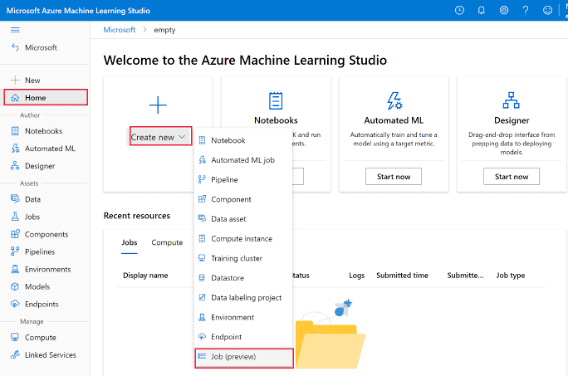
A notebook is ideal for experimentation and development. Once you’ve developed a machine learning model and it’s ready for production, you’ll want to train it with a script. You can run a script as a command job.
In this exercise, you’ll test a script and then run it as a command job.
Source: K21Academy
Read more about datastores and datasets in our blog, Working With Azure Datastores and Datasets.
Lab 52: Tracking ML Training Jobs with MLflow
In this lab, you’ll learn how to track and manage machine learning (ML) training jobs using MLflow. You’ll explore how MLflow helps in organizing and monitoring the entire lifecycle of ML models, from experiment tracking to model versioning. Through hands-on exercises, you’ll gain experience in logging parameters, metrics, and models, as well as visualizing the training progress.

Source: K21Academy
By the end of the lab, you’ll be able to efficiently track and compare multiple ML training runs, improving model development and reproducibility.
Lab 53: Perform Hyperparameter Tuning with a SweepJob
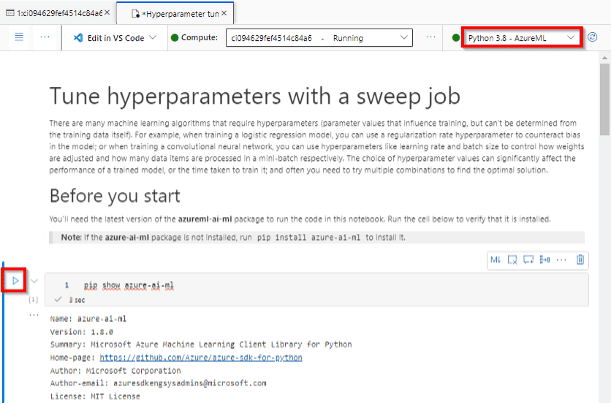
Hyperparameters are variables that affect how a model is trained, but which can’t be derived from the training data. Choosing the optimal hyperparameter values for model training can be difficult and usually involves a great deal of trial and error.
In this exercise, you’ll use Microsoft Azure Machine Learning to tune hyperparameters by performing multiple training trials in parallel.
Source: K21Academy
Lab 54: Run Pipelines in Azure Machine Learning
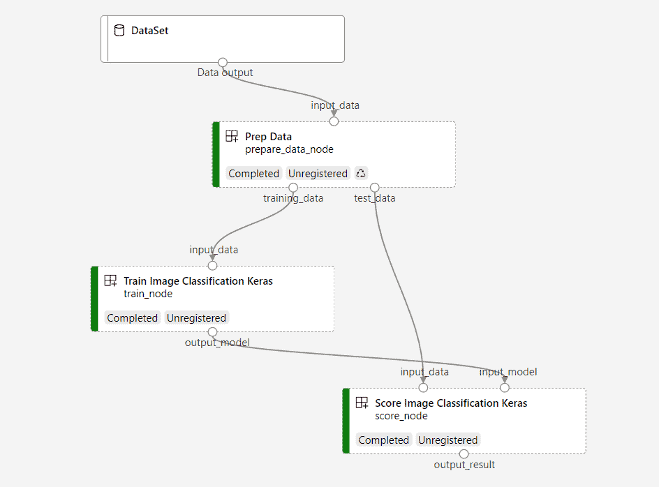
You can use the Python SDK to perform all of the tasks required to create and operate a machine-learning solution in Azure. Rather than perform these tasks individually, you can use pipelines to orchestrate the steps required to prepare data, run training scripts, and perform other tasks.
In this exercise, you’ll run multiple scripts as a pipeline job.
Source: K21Academy
1.13 Model Deployment and Monitoring on Azure
Lab 55: Deploy a Model to a Managed Online Endpoint
In this lab, you’ll learn how to deploy a machine learning model to a managed online endpoint. You’ll explore how to take a trained model and make it available for real-time predictions through an endpoint that can scale automatically based on demand. The lab will guide you through the process of setting up the deployment, configuring endpoint settings, and testing the model by sending prediction requests.

Source: K21Academy
By the end, you’ll have hands-on experience with deploying models for production-ready applications, enabling real-time inference in a seamless, scalable manner.
Lab 56: Deploy a Model to a Batch Endpoint
In this lab, you’ll learn how to deploy a machine learning model to a batch endpoint for processing large volumes of data. Unlike real-time endpoints, batch endpoints are ideal for handling jobs that can be processed asynchronously. You’ll explore how to set up a batch endpoint, upload input data, configure the batch job, and monitor the results.

Source: K21Academy
By the end of the lab, you’ll have hands-on experience deploying models for batch inference, making it easier to handle large-scale prediction tasks efficiently.
1.14 MLOps on Azure
Lab 57: Model registration and versioning @ MLFlow
In this lab, you’ll learn how to register and manage different versions of machine learning models using MLflow. You’ll explore how to store models in the MLflow Model Registry, ensuring they are easily accessible for future use, deployment, or collaboration. The lab will guide you through the process of versioning models, tracking changes, and maintaining a clear history of model iterations.
By the end of the lab, you’ll be proficient in managing model lifecycles, enhancing reproducibility, and collaboration in machine learning projects.
Lab 58: Lab: Install & Use DVC with Azure Storage
In this lab, you’ll learn how to integrate Data Version Control (DVC) with Azure Storage for efficient management of machine learning data and models. You’ll explore the installation and setup of DVC, connecting it to Azure Blob Storage to track and version control large datasets and model files. The lab will guide you through the process of pushing and pulling data to and from Azure Storage, as well as using DVC to maintain version history and share data across different environments.
By the end, you’ll be equipped to streamline your data workflows, improve collaboration, and enhance the reproducibility of your ML projects.
Lab 59: Model Deployment with Azure & Gradio
In this lab, you’ll learn how to deploy machine learning models using Azure and Gradio to create interactive web applications. You’ll explore how to integrate a trained model into a Gradio interface, allowing users to interact with the model through a simple, intuitive web interface. The lab will guide you through setting up Azure for model hosting and connecting the Gradio app for real-time inference.
By the end of the lab, you’ll have hands-on experience in deploying ML models with Azure and Gradio, enabling you to share interactive machine learning applications with users easily.
1.15 AI Governance & Compliance
Lab 60: Explore Content Filters in Azure OpenAI
In this lab, you’ll explore how to implement and configure content filters in Azure OpenAI to ensure that the generated content aligns with specific ethical and safety standards. You’ll learn how to set up filters to block or flag harmful, biased, or inappropriate content from AI-generated responses. The lab will guide you through different filter options, including text classification and moderation techniques, helping you fine-tune your AI model’s output for safe and responsible usage.

Source: K21Academy
By the end, you’ll be equipped to apply content filters effectively, enhancing the reliability and safety of your AI applications.
Level Up Your Career in Cloud & AI – Start with K21 Academy Labs
2. Real-Time Projects
Project 1: Chatbot Using Azure AI Search and OpenAI With Our Own Data
The “Chatbot Using Azure AI Search and OpenAI with Custom Data” project focuses on building an intelligent chatbot that combines the power of Azure AI Search and OpenAI to deliver precise, context-aware responses using tailored datasets. This project showcases how to integrate advanced AI capabilities with robust search functionalities to create scalable and efficient conversational solutions for diverse applications.

Source: K21Academy
Project 2: Synthetic Data Generation with LLM

Source: K21Academy
Project 3: Building RAG Application With Langchain
The “Building RAG Application with LangChain” project focuses on creating a Retrieval-Augmented Generation (RAG) application that combines LangChain’s capabilities with external data sources to provide accurate and context-aware AI-driven outputs. This project highlights the integration of advanced retrieval and generation techniques to enhance knowledge-based systems, making it ideal for applications like intelligent document search, chatbots, and AI-assisted research.

Source: K21Academy
Project 4: Crafting Smart Ads with AI
Create dynamic advertising content that resonates with your audience, using our personalized AI assistant using Azure Cosmos DB for MongoDB vCore project provides an innovative solution for creating dynamic, personalized advertisements at scale. Exploring Azure Cosmos DB for MongoDB vCore, this project integrates advanced AI algorithms to analyze user data and generate targeted ad content based on individual preferences, behaviors, and trends.

Source: K21Academy
Project 5: Multi-Tasking Agent with Azure OpenAI

Source: K21Academy
Project 6: Movie Recommender with Azure ML

Source: K21Academy
Project 7: Predicting Diabetes using Azure ML
The “Predicting Diabetes Using Azure ML” project involves developing a machine learning model to predict the likelihood of diabetes based on patient data. Using Azure Machine Learning, this project demonstrates how to preprocess data, train models, and deploy predictive solutions, showcasing the application of AI in healthcare to support early detection and improve patient outcomes.

Source: K21Academy
Project 8: Housing Price Prediction with Azure ML
The “Housing Price Prediction with Azure ML” project focuses on building a machine learning model to predict housing prices based on various features like location, size, and market trends. Using Azure Machine Learning, this project demonstrates how to preprocess data, train predictive models, and deploy them for real-world applications, showcasing the practical use of AI in real estate and decision-making processes.

Source: K21Academy
Project 9: University Admission Prediction Using Azure ML Studio

Source: K21Academy
Project 10: Credit Card Fraud Detection with Azure ML
The “Credit Card Fraud Detection with Azure ML” project focuses on building a machine learning model to identify and prevent fraudulent transactions in real time. Using Azure Machine Learning, this project demonstrates how to preprocess large datasets, train classification models, and deploy them for fraud detection, showcasing the use of AI in financial security to enhance fraud prevention systems.

Source: K21Academy
Project 11: Multimodal RAG Agents using Azure OpenAI
In this project, you will develop a Multimodal Retrieval-Augmented Generation (RAG) Agent using Azure AI services. The focus will be on building an intelligent agent that can process and understand multiple data types, such as text, images, and other media. You will leverage Azure Cognitive Search and Azure OpenAI to create an agent that can query data across different modalities (e.g., text-based documents, images, or videos) and generate contextually relevant responses.
The project will guide you through setting up the RAG architecture, integrating various data sources, and fine-tuning the agent’s capabilities to enhance its performance. By the end of the project, you will have created a multimodal AI agent capable of seamlessly handling complex queries and providing accurate, dynamic responses based on diverse input types.
3. Certifications Covered Within The Program
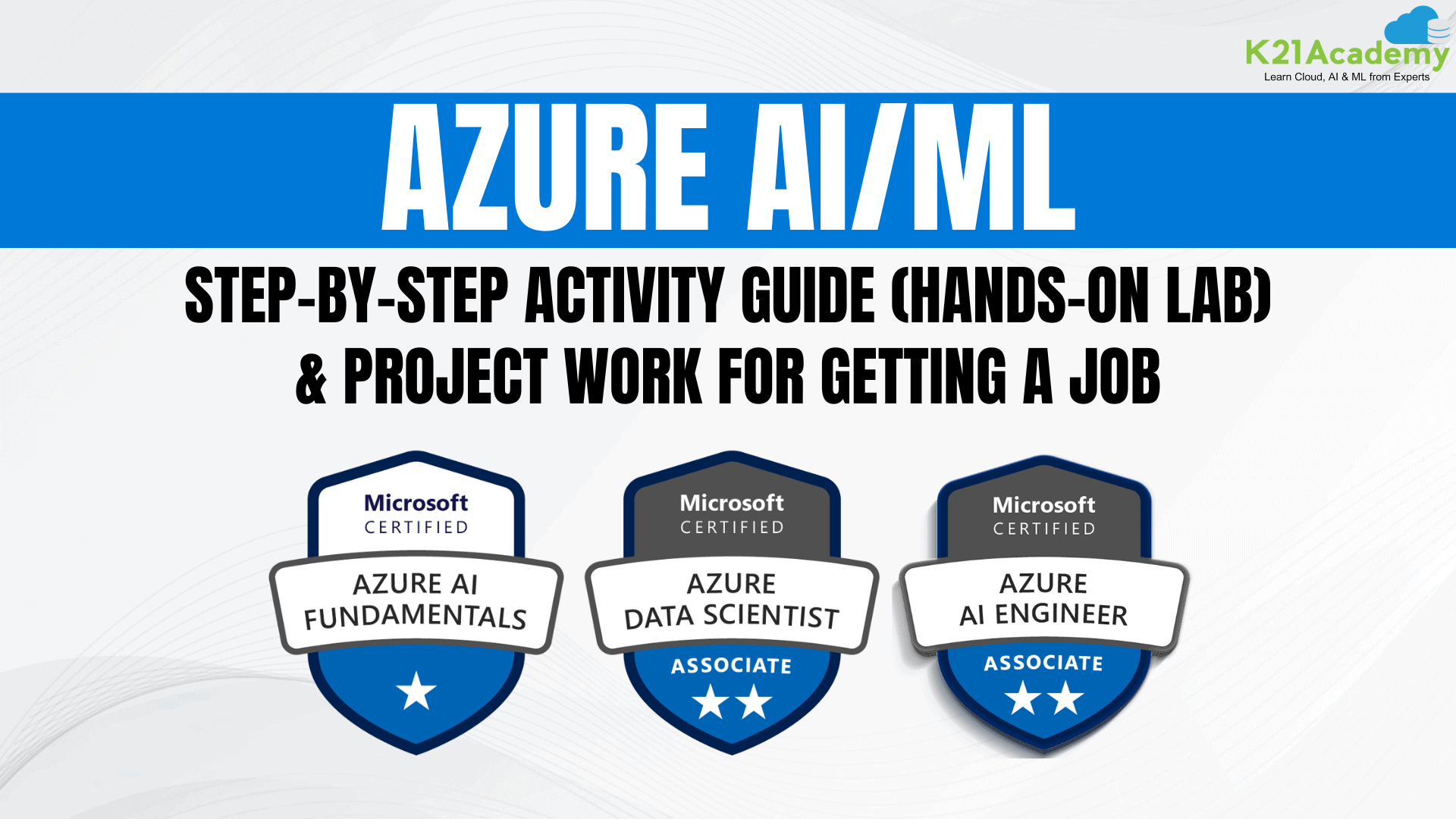
1. Azure Fundamentals (AZ-900)
This entry-level certification is designed for those who are new to Azure and cloud computing. It covers the core services, cloud concepts, Azure pricing, and governance principles. Ideal for beginners or those aiming to validate foundational knowledge in Azure services and cloud technologies before progressing to more specialized Azure certifications.

Related Readings: Exam AZ-900: Microsoft Azure Fundamentals Certification
2. Azure AI Fundamentals (AI-900)
This foundational certification validates your knowledge of Azure AI concepts, core services, and how to implement basic AI solutions. It’s designed for individuals who are new to AI and wish to demonstrate understanding in areas such as Azure Cognitive Services, machine learning, and AI workloads. Ideal for business professionals or those exploring AI applications on Azure.

Related Readings: Microsoft Azure AI Fundamentals – AI-900 Exam Detailed Overview
3. Azure AI Engineer Associate (AI-102)
This certification is for professionals who want to demonstrate their ability to plan, manage, and deploy Azure AI solutions. It covers designing AI apps, implementing computer vision solutions, NLP, conversational AI, and deploying machine learning models using Azure services such as Azure Machine Learning, Azure Cognitive Services, and Azure Bot Services. Ideal for developers or data engineers aiming to advance in AI engineering roles.

Related Readings: AI-102 Microsoft Azure AI Engineer: Exam Preparation Guide
4. Azure Data Scientist Associate (DP-100)
This certification focuses on using Azure to perform data science tasks, including preparing data, developing machine learning models, and deploying them in production environments. It covers advanced topics like data exploration, model training and evaluation, and optimizing models for deployment. This is ideal for data scientists looking to deepen their knowledge in working with Azure Machine Learning and related services.

Related Readings: DP-100 Exam | Azure Data Scientist Certification: Complete Overview
FAQs
What infrastructure is available for building or fine-tuning AI models?
To create and optimize AI models efficiently and quickly, it's essential to use the right infrastructure and tools. Dedicated hardware, such as powerful CPUs and GPUs from companies like AMD and NVIDIA, is designed to accelerate AI model training. Deep learning frameworks like TensorFlow and PyTorch simplify the development and training process, while optimization tools like DeepSpeed and ONNX Runtime enhance model performance by increasing speed and reducing power consumption. Additionally, cloud platforms such as AWS and Google Cloud offer scalable and flexible solutions for managing large datasets and complex computations. By selecting the right combination of these resources, you can ensure your AI models are developed on a robust and efficient foundation.
What are the costs associated with using generative ai tools in machine learning platforms?
While generative AI tools in machine learning platforms are often free to use, the resources required to support your work come with costs. The largest expense typically comes from compute resources, such as virtual machines or cloud instances, needed to run AI models. Storage services also incur charges based on the volume of data and the duration it is stored. Ensuring data security through tools like identity management and key vaults adds to the overall costs. If you deploy models using containers, you’ll face additional expenses for container tools and services. Furthermore, monitoring and analytics tools, essential for tracking performance and usage, contribute to the total cost.
What is the model catalog and which foundation models can be accessed through it?
The model catalog offers a variety of open-source foundation models that can be customized with your data to address specific challenges. It includes models for natural language processing, which are ideal for tasks like translation, text summarization, and sentiment analysis. Computer vision models are available for applications such as image recognition, object detection, and video analysis. Speech recognition models convert spoken language into text, enabling effective transcription and communication. Additionally, reinforcement learning models help AI learn decision-making for applications in robotics, gaming, and more. These adaptable and versatile models are valuable across a wide range of industries and use cases.
How can language models be deployed responsibly to ensure safety and trustworthiness?
Combining Prompt Flow with open-source frameworks allows for effective scaling of your experiments. Start by selecting frameworks like Semantic Kernel or LangChain to build data processes and machine learning models. Use their libraries and community support to develop and refine your workflows. Transition these workflows to Prompt Flow to prepare them for scaling. Leverage Prompt Flow’s automation tools to handle larger datasets and simplify repetitive tasks. Continuously monitor performance and use analytics to fine-tune processes for better outcomes. This integration combines the flexibility of open-source tools with Prompt Flow’s scalability, enabling efficient and effective experimentation.


![Microsoft Agentic AI Business Solutions Architect [AB-100] | K21 Academy](https://test.k21academy.com/wp-content/uploads/2025/11/Microsoft-Agentic-AI-Business-Solutions-Architect-AB-100-Exam-Overview1.png)