





This blog post gives a walkthrough of the Step-By-Step Activity Guides and Project works of the Cloud Security (AWS/Azure) training program that you must perform to learn this course. These projects are nearly real-time and will help you gain hands-on experience with multiple AWS/Azure services.
List of Labs that we include in our training:
- Azure Account Creation
- AWS account setting and root user security
- CloudFront with s3 bucket origin
- Automated deployment of IAM groups and roles
- Azure Policy
- Azure AD Privileged Identity Management
- Configure your tenant for Microsoft Entra Verified ID
- Automated deployment of VPC
- Automated deployment of ec2 web application
- VPC flow logs analysis
- Network Security Groups and Application Security Groups
- Azure Firewall
- EKS -Intro
- Deploy a sample application in the EKS environment
- View Kubernetes resources
- Adding Security into AWS DevOps
- SonarQube Hands on (SAST)
- OWASP Zap Scan (DAST)
- DFD Practice
- Configuring and Securing ACR and AKS
- Create a data bunker account
- AWS certificate manager requests a public certificate
- Autonomous monitoring of cryptographic activity with KMS
- Key Vault (Implementing Secure Data by setting up Always Encrypted)
- Securing Azure SQL Database
- Remote configuration, installation, and viewing of cloudwatch logs
- Enable security hub
- Incident response with AWS console and CLI
- Incident response playbook with jupyter – aws iam
- Azure Monitor
- Microsoft Defender for Cloud – MDC
- Microsoft Sentinel
Activity Guides:
Activity Guide 1: Create an Azure Account
Creating an Azure free account is one way to access Azure services. When you start using Azure with a free account, you get USD2001 credit to spend in the first 30 days after you sign up. In addition, you get free monthly amounts of two groups of services: popular services, which are free for 12 months, and more than 25 other services that are free always.

Activity Guide 2: Create an AWS Account
Amazon Web Services (AWS) is providing a free trial account for 12 months to new subscribers to get hands-on experience with all the services that AWS provides. Amazon provides a number of different services that we can use, with some limitations, to get hands-on practice and gain more knowledge on AWS Cloud services as well as regular business use.
With the AWS Free Tier account, all the services offered have limited usage limits on what we can use without being charged. Here, we will look at how to register for an AWS FREE Tier Account.
To learn how to create a free AWS account, check our Step-by-step blog, How To Create AWS Free Tier Account

Activity Guide 3: CloudFront with S3 Origin
CloudFront is a content delivery network (CDN) service by AWS. When configured with an S3 bucket as its origin, it caches and distributes content globally, improving load times and scalability for web applications, by serving data from edge locations closer to users. This setup enhances performance and reduces the load on the S3 origin server.
In this Activity Guide, we will Configure AWS CloudFront with an S3 bucket as the origin to efficiently deliver static web content globally while ensuring low latency and high availability for users.
 Activity Guide 4: Creation of AWS IAM Groups, Roles, and Users
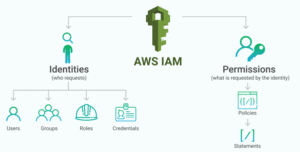
AWS Identity and Access Management is a service provided by AWS that helps you to securely control access to AWS resources. You can use the IAM service to control the user, who is authenticated (signed in) and authorized (has permissions) to use service/resources.
When you first create an AWS account you begin with a single sign-in identity that has complete access to all AWS services/resources in the account. This identity is called the AWS Root user and is accessed by signing in with the email and password that you used to create the account. Here we strongly recommend you do not use the root user for your daily tasks, even the administrative ones.
In this activity guide, You will learn how to create an IAM user, role, and Group and attach policies to it.
Activity Guide 5: Azure Policy
Azure Policy restricts resource creation to a specific location, and it can also be used in more depth.
Here, you need to create an Azure policy to restrict resource creation in specific regions and test your policy, too.

Activity Guide 6:Azure AD Privileged Identity Management
Azure AD Privileged Identity Management service allows Admins to manage and control user access to high-level resources of the organization.
In this Activity Guide, you’ll create resources in Azure and then implement access restrictions on users for accessing the resources.

Activity Guide 7: Configure your tenant for Microsoft Entra Verified ID
Microsoft Entra Verified ID is a tenant-level identity verification solution that enhances security by verifying the identity of users, making it a valuable tool for organizations looking to strengthen their authentication processes.
In this Activity Guide, you will do a manual setup to configure your Microsoft Entra tenant to use the verifiable credentials service.

Activity Guide 8: Creation of VPC
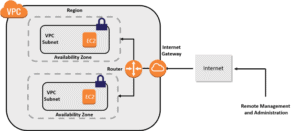
Amazon Virtual Private Cloud (Amazon VPC) is a service by AWS where you equip a logically outlying section of the AWS cloud where you can launch your AWS resources in a virtual network that you specify. You have complete control over your VPC environment, including a selection of your own IP address range, the creation of your own subnets, and the configuration of route tables and network gateways are all in your hand.
In this activity guide, you will learn about how to create a VPC, subnet, Internet gateway, and NAT gateway and what is the purpose of creating these resources.
Activity Guide 9: Create EC2 Web Application
This guide involves building a WordPress website using the AWS Console. WordPress is a popular content management system that powers millions of websites, and AWS provides a scalable and reliable platform for hosting WordPress sites.

Activity Guide 10: AWS VPC Flow Logs
VPC Flow Logs enable you to capture information about the IP traffic going to and from network interfaces in your VPC. The VPC Flow Logs Analysis Dashboard is an interactive, customizable, and accessible QuickSight dashboard to help customers gain insights into the traffic details of VPC in a graphical way.
 Activity Guide 11: Network Security Groups and Application Security Groups
Network Security Groups (NSGs) and Application Security Groups (ASGs) are essential components in Azure, with NSGs used to filter network traffic and define security rules for Azure Virtual Networks, while ASGs group virtual machines (VMs) based on security requirements to simplify security rule management for application deployments.
In this Activity Guide, you’ll have to configure the Network Security Group rule for a group of servers to perform RDP.

Activity Guide 12: Azure Firewall
Azure Firewall is a cloud-based network security service in Azure. Azure Firewall protects our Virtual Network Resources and this is a built-in service.
Here, you’ll be Configuring Azure Firewall to control inbound and outbound network access for your organization.

Activity Guide 13: Create EKS Cluster
EKS (Elastic Container Service for Kubernetes) is a managed Kubernetes service that allows you to run Kubernetes on AWS without the hassle of managing the Kubernetes control plane (Master Node).
The Kubernetes control plane plays a crucial role in a Kubernetes deployment as it is responsible for how Kubernetes communicates with your cluster — starting and stopping new containers, scheduling containers, performing health checks, and many more management tasks.
 Activity Guide 14: Deploy Sample Application in EKS Environment
A PHP Guestbook application with Redis is a web-based system that allows users to leave messages on a public forum. Redis is a popular open-source, in-memory data structure store that is used as a database, cache, and message broker.
In this type of application, users can create new messages, view existing ones, and delete their own messages. The application uses Redis to store and retrieve the messages. Redis is an efficient option for storing and retrieving data quickly, making it a great choice for a guestbook application where the data is constantly changing.
 Activity Guide 15: View Kubernetes Resources
Activity Guide 16: Adding Security into AWS DevOps
In this workshop, you will experience how tooling and automation can create a security-conscious culture throughout the development lifecycle while scaling to the demands of the business. We will see an example of how to stop code that erroneously contains stray AWS credentials (we revoked them first, of course) from being deployed.
 Activity Guide 17: SonarQube (SAST)
Activity Guide 18: OWASP Zap Scan (DAST)
Activity Guide 19: DFD Practice
Activity Guide 20: Configuring and Securing ACR and AKS
Azure Container Registry (ACR) is a managed, private Docker registry service based on the open-source Docker Registry 2.0. Create and maintain Azure container registries to store and manage your private Docker container images and related artifacts.
There are security benefits to working with ACR. Firstly, it provides signed container images, so your Kubernetes cluster can verify that the code it’s running is the code you pushed to your registry from your build system
You can log in to a registry using the Azure CLI or the standard docker login command. Azure Container Registry transfers container images over HTTPS and supports TLS to secure client connections.
Azure Kubernetes Service (AKS) is a fully managed service that allows you to run Kubernetes in Azure without having to manage your own Kubernetes clusters. Azure manages all the complex parts of running Kubernetes, and you can focus on your containers.
For improved security and management, AKS lets you integrate with Azure AD to use Kubernetes role-based access control (Kubernetes RBAC).

Activity Guide 21: Create a Data Bunker Account
In this lab, you will create a secure data bunker. A data bunker is a secure account that will hold important security data in a secure location. Ensure that only members of your security team have access to this account. In this lab, you will create a new security account, create a secure S3 bucket in that account, and then turn on CloudTrail for our organization to send these logs to the bucket in the secure data account. You may also want to also think about what other data you need there, such as secure backups.
 Activity Guide 22: AWS Certificate Manager
AWS Certificate Manager is a service that lets you easily provision, manage, and deploy public and private Secure Sockets Layer/Transport Layer Security (SSL/TLS) certificates for use with AWS services and your internal connected resources. SSL/TLS certificates are used to secure network communications and establish the identity of websites over the Internet as well as resources on private networks. AWS Certificate Manager removes the time-consuming manual process of purchasing, uploading, and renewing SSL/TLS certificates.
 Activity Guide 23: Autonomous Monitoring of Cryptographic Activity by KMS
Maintaining a strong security posture in your application requires traceability and automated responses to security events. AWS offers AWS CloudTrail to capture API activity and Amazon CloudWatch for contextualizing and alerting on key metrics, such as Key Management Service (KMS) activity. By monitoring KMS activity and setting predefined thresholds, you can proactively detect abnormal behavior and respond effectively to potential security threats.
 Activity Guide 24: Key Vault (Implementing Secure Data by setting up Always Encrypted)
Azure Key Vault, as the name suggests, is a service provided by Azure Cloud to store all the keys, passwords, and certificates.
Always Encrypted is a data encryption technology that ensures that sensitive data remains always encrypted and never shows as plaintext in a database, whether it’s at rest, moving between client and server, or in use.

Activity Guide 25: Securing Azure SQL Database
In this activity Guide, we will help you to Secure an Azure SQL Database by creating rules in Azure Firewall to prevent various attacks such as SQL Injection and Data Exfiltration.

Activity Guide 26: Remote configuration, installation, and viewing of Cloudwatch logs
Most applications require monitoring services that make up the workload to understand the workload state and performance. One way of collecting this data is through log files generated by the application and underlying services. Collecting and analyzing log files improves your security posture by creating a record of activity or audit trail in your workload, enabling you to detect and investigate potential threats.
 Activity Guide 27: Enable Security Hub
AWS Security Hub gives you a comprehensive view of your high-priority security alerts and compliance status across AWS accounts. There is a range of powerful security tools at your disposal, from firewalls and endpoint protection to vulnerability and compliance scanners. But oftentimes this leaves your team switching back and forth between these tools to deal with hundreds, and sometimes thousands, of security alerts every day.
 Activity Guide 28: Incident response with AWS console and CLI
This hands-on lab will guide you through a number of examples of how you could use the AWS Console and Command Line Interface (CLI) to respond to security incidents. It is a best practice to be prepared for an incident, and have appropriate detective controls enabled.
 Activity Guide 29: Incident response playbook with Jupyter – AWS IAM
This hands-on lab will guide you through running a basic incident response playbook using Jupyter. It is a best practice to be prepared for an incident and practice your investigation and response tools and processes.
 Activity Guide 30: Azure Monitor
Azure Monitor is a monitoring service provided by Azure. Using Azure Monitor helps to maximize the performance and availability of businesses. The Azure Monitor acts on the telemetry of the Cloud and On-Premises Environments and provides the optimum configurations for the resources.

Activity Guide 31: Microsoft Defender for Cloud – MDC
Microsoft Defender for Cloud is an infrastructure tool provided by Azure Cloud for security management and threat protection. This tool provides security to Cloud Resources and On-premises Resources as well.

Activity Guide 31: Microsoft Sentinel
Microsoft Sentinel is a very advanced service of Azure. It is a scalable, cloud-native, security information event management, and security orchestration automated response solution.
In this Activity Guide, you’ll have to collect data from the Azure Activity and Security Center. And also you have to add built-in and custom alerts.

Related Links/References:
- AWS Certified Security – Specialty (SCS-C02) Exam
- AZ500: Microsoft Azure Security Technologies
- AWS Certified Solutions Architect Associate SAA-C03
- AWS Free Tier Account
- Azure Free Account
Next Task For You
Begin your journey toward Cloud Security (AWS/Azure) including the DevSecOps Job Oriented Training Program, Here is the Link to Download the Brochure.

![Microsoft Agentic AI Business Solutions Architect [AB-100] | K21 Academy](https://test.k21academy.com/wp-content/uploads/2025/11/Microsoft-Agentic-AI-Business-Solutions-Architect-AB-100-Exam-Overview1.png)



