
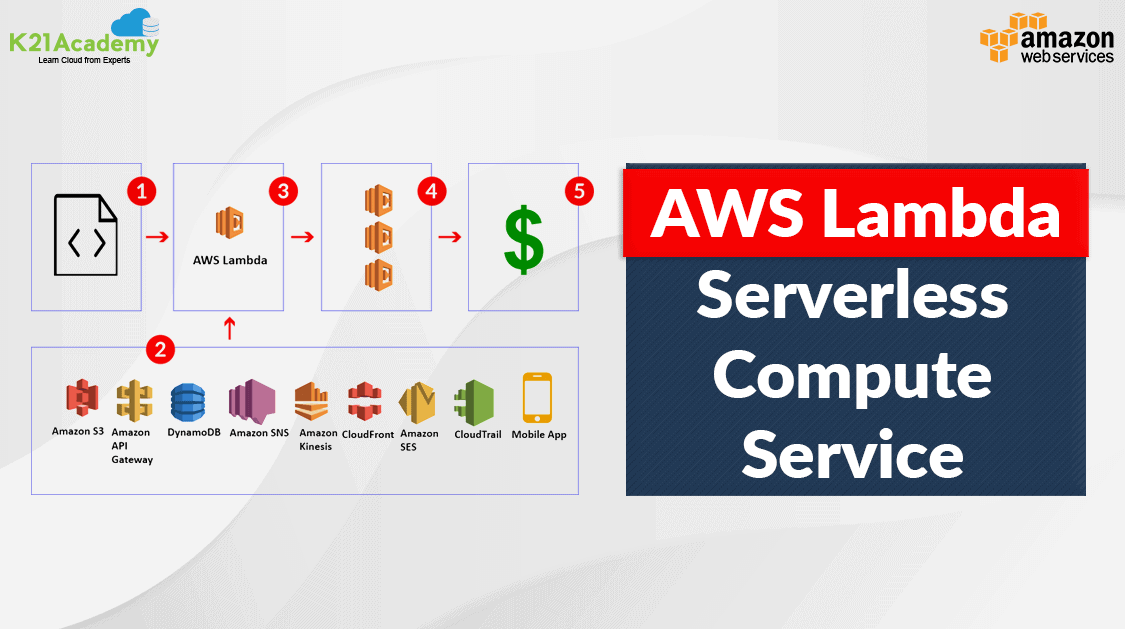





AWS Lambda is an Amazon Web Services (AWS) serverless computing service. AWS Lambda users construct functions, which are self-contained applications written in one of the supported languages and runtimes, and upload them to AWS Lambda, which then executes those functions in an efficient and flexible manner.
Lambda functions can do anything from providing web pages and processing data streams to using APIs and connecting with other AWS services.
Let’s get to know about AWS Lambda in detail. In this blog, we will cover the following topics
- AWS Lambda
- Features
- Components of a Lambda Application
- How Lambda Works
- Use Cases
- AWS Lambda Pricing
- Limitations of AWS Lambda
- Frequently Asked Questions
AWS Lambda
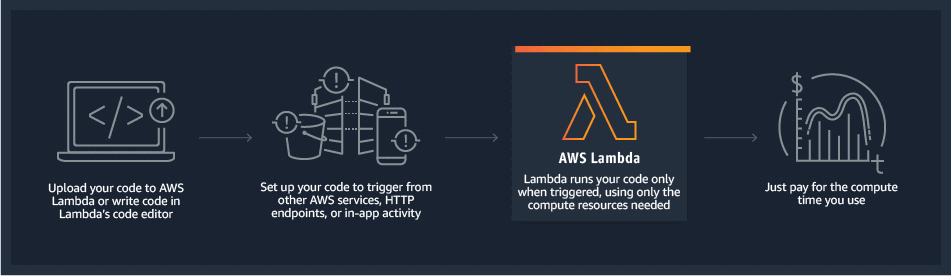
AWS Lambda is one of the services that fall under the compute domain of services that AWS provides. Lambda allows us to execute code or any type of obligation. With lambda, we can run code virtually for any type of obligation or back-end services. All we need to do is supply our code in one of the languages that AWS Lambda supports. The Lambda code called function is written in any language of your choice Node.js, Python, Go, Java, etc and you can also use serverless and container tools (e.g AWS SAM) for building, testing, and deploying functions.
Also Read: Our Blog post on AWS SNS
Features
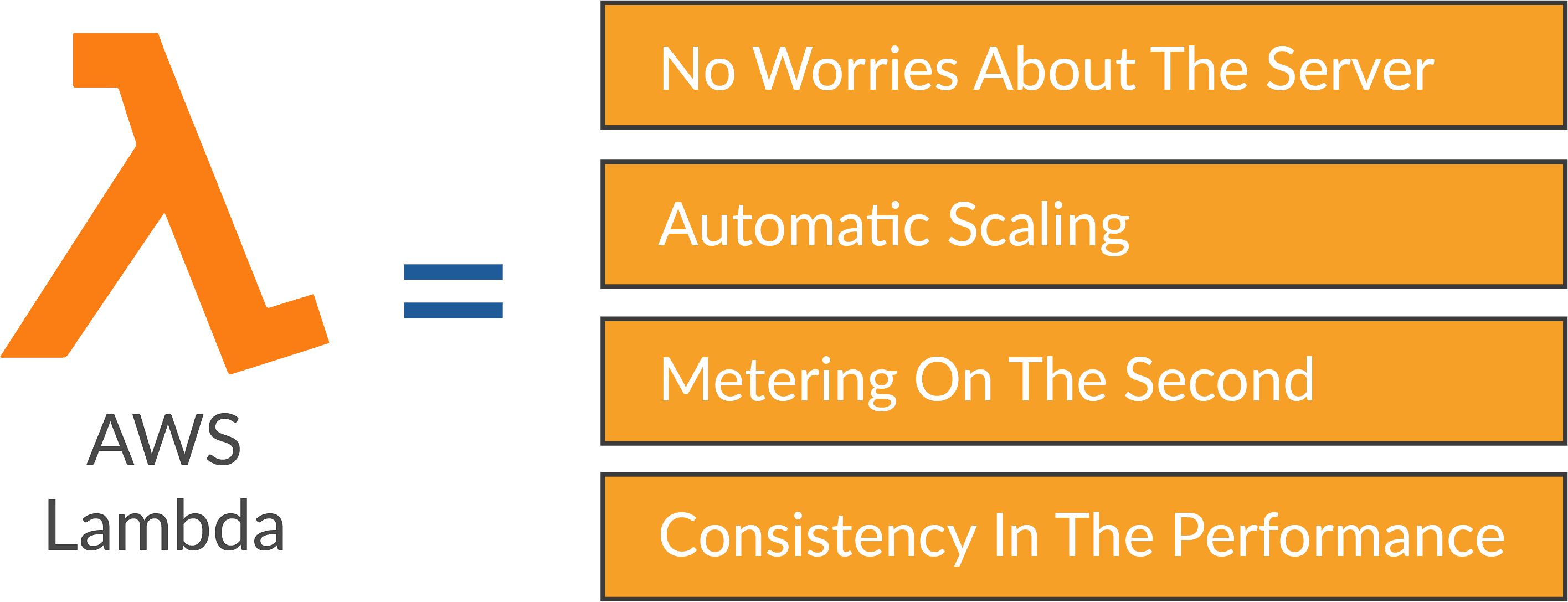
- No worries about the server: Lambda automatically runs our code without requiring us to provision or manage the servers. All you need to do is write the code or upload it to Lambda as a ZIP file or container image and Lambda will take care of the rest. So stop worrying about provisioning and managing servers. The only thing Lambda expects is a code that is working.
- Automatic Scaling: Scaling apps on AWS Lambda happens automatically in response to a trigger. Our algorithm operates in parallel and processes each trigger individually, with scaling based on workload size.
- Metering on the second: Lambda billing is done in milliseconds. We just pay for the time our code is executing, which means we are not paid for any of the servers. The only payment necessary is for the time it takes to compute the code. When the code is not running, you do not have to pay anything.
- Consistency in performance: With AWS Lambda the consistency in performance is not compromised at all as we can enhance the effectiveness of the code execution by selecting the right memory size for our function.
Know More: About Amazon Cloudtrail vs Cloudwatch.
Components of a Lambda Application
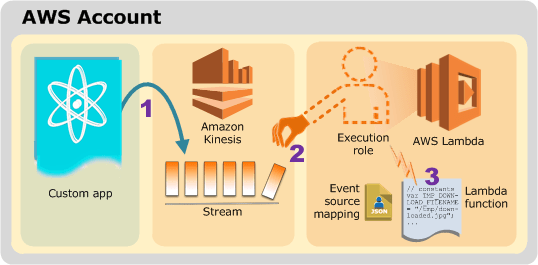
- Function: The piece of code you upload on Lamda is called a function.
- Runtimes: Runtimes basically allow the functions written in different languages to be executed in the same base environment
- Layers: Layers allow you to manage the in-development function code independently from the unchanging code and the resources that it uses.
- Event Source: An event is an AWS service or any custom service that triggers your function.
- Downstream Resources: Downstream Resource is an AWS service that is called by your Lambda function once it is triggered.
Also Check: Our Blog post on AWS Secrets Manager
How Lambda Works
Now let’s get to know how AWS Lambda works or in other words, let’s look at how complicated functions behind the scenes work in a simple and seamless way
Each Lambda function is executed within its own container. When a function is built, Lambda bundles it into a new container, which is subsequently executed on an AWS-managed multi-tenant cluster of servers. Each function’s container is assigned the requisite RAM and CPU capacity before the functions begin to operate. When the functions are finished, the RAM assigned at the start is multiplied by the amount of time the function ran. Customers are then charged based on the allotted memory and the length of time it takes the function to complete.
AWS manages the whole infrastructure layer of Lambda. Customers don’t have much insight into how the system works, but they also don’t have to worry about maintaining the underlying computers, avoiding network conflicts, and so on—AWS handles all of that for them. AWS Lambda can also save you time on operational activities because it is completely managed. When there is no infrastructure to maintain, you can devote more time to working on the application code, however, you lose the flexibility of running your own infrastructure.
To read More: About AWS Organizations Terminologies click here
Events that Trigger AWS Lambda
- Inserting, updating, and removing data from the Dynamo DB table
- To incorporate push alerts into SNS
- To search for log history in CloudTrail, enter the log history into an S3 object DynamoDB may trigger AWS Lambda whenever data is added, updated, or deleted from the table.
- Allows you to plan an event to complete a task at a regular time.
- Object modifications in S3 buckets
- Amazon SNS notifications were sent.
- CloudTrail logs can be processed using Lambda.
- API Gateway allows you to use GET/POST methods to trigger AWS Lambda.
Use Cases
There are a huge number of ways that Lambda is specifically used in the business world and some of them are listed below.
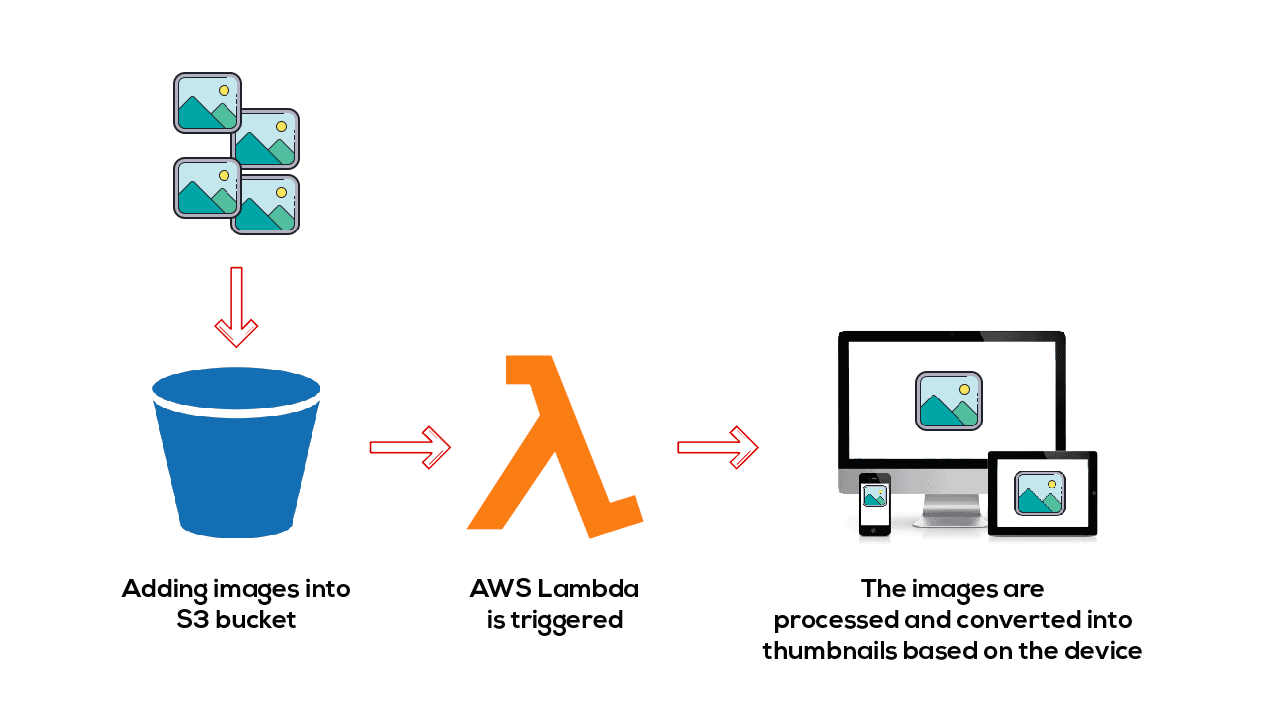
- AWS Lambda is used to process an image when it’s uploaded
Let’s say the object gets uploaded in the S3 bucket in a raw format or in the format which we don’t expect to get uploaded. Lambda is triggered anytime a new object is added to the bucket and the images are processed and converted into thumbnails based on the devices that would be reading the data. It can be a PC, mobile, tablet, etc. So based on the different device formats Lambda can get triggered and convert the video or image into different formats as per requirement.
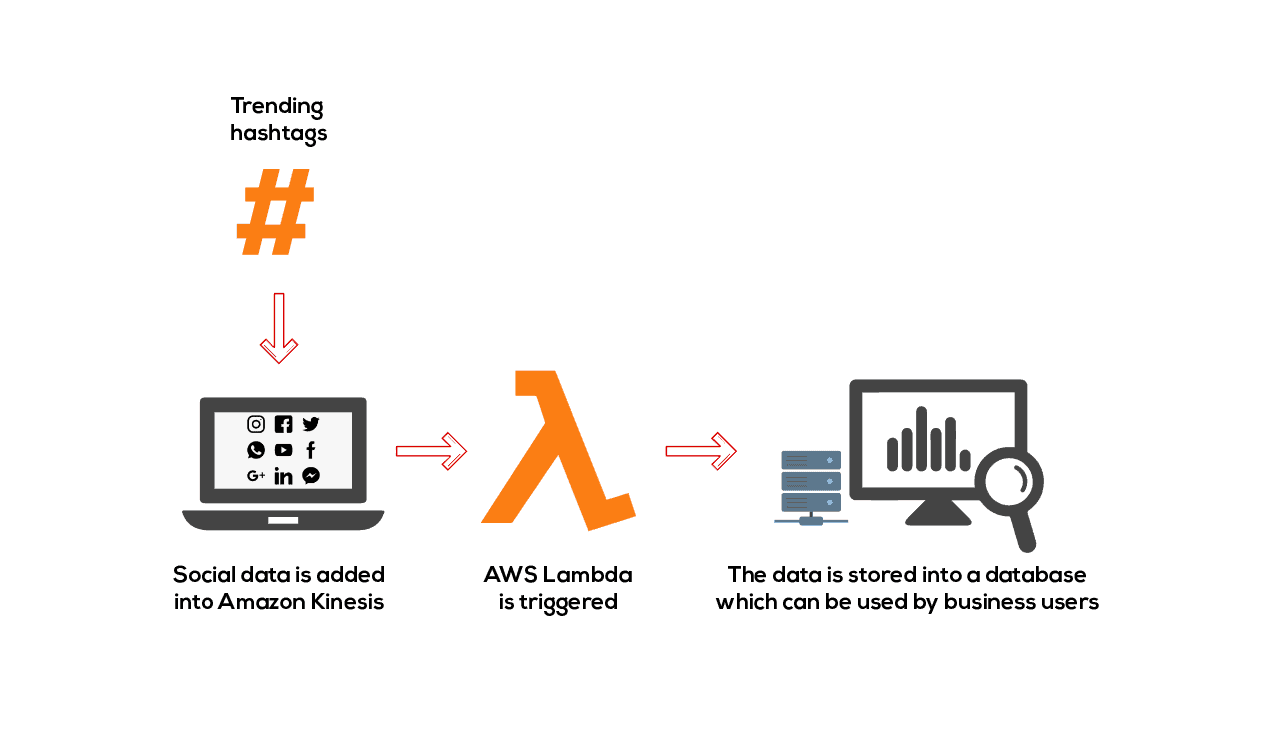
- AWS Lambda is used to analyze social media data say we are collecting the hashtag trending data and the data is received and is added to the Kinesis stream to feed into the Amazon environment and Lamda actions get triggered. It receives the data and the data is stored in the database which can be stored by businesses for later analysis.
- Backing Up Data
Consider a situation where you have to set up a temporary storage system to back up data as soon as it is uploaded as real-time manual backups are not possible and efficient too, looking at the size of the data and the random times it will be put in the bucket. AWS Lambda comes to the rescue. This is what can be done to achieve this.
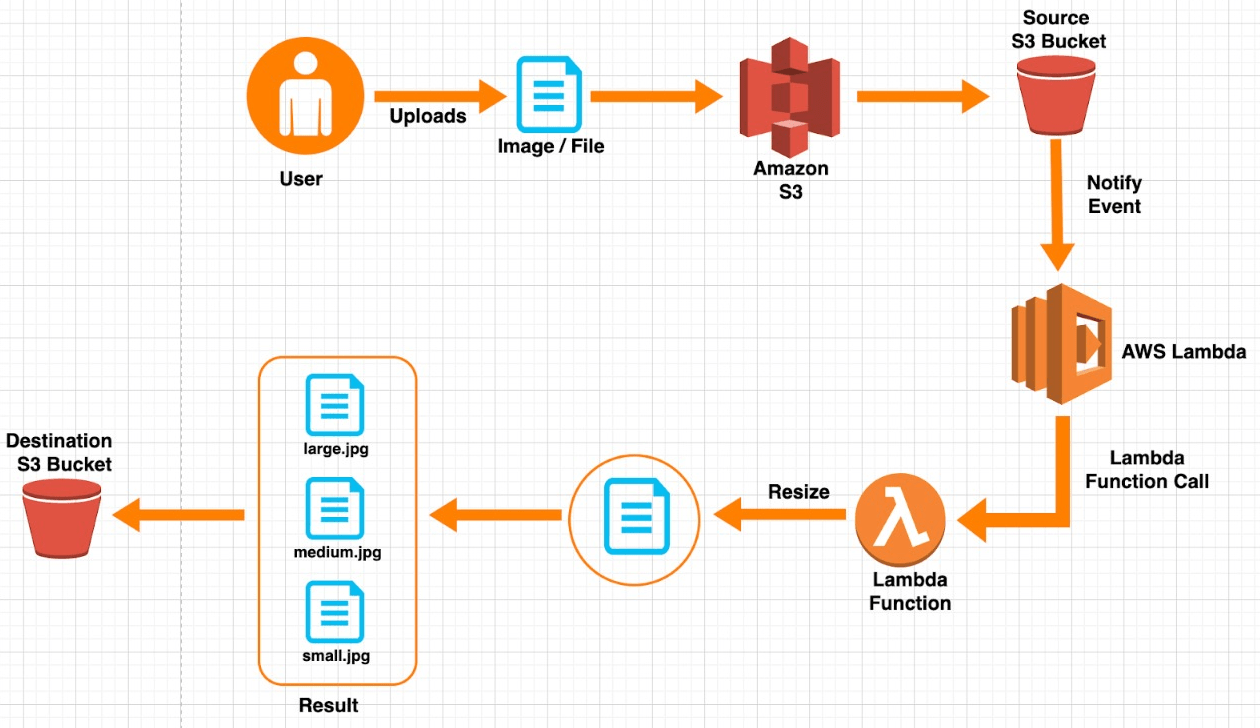
1) Create two buckets i.e. source and destination bucket. One for uploading and the other for backing up the data
2) Create IAM roles and policies
3) Create a Lambda function to copy files between buckets. The Lambda function is triggered every time there is an upload into the bucket. This data is then uploaded to the backup bucket.
4) Testing out
Go through this AWS Blog to get a clear understanding of aws kinesis
AWS Lambda Pricing
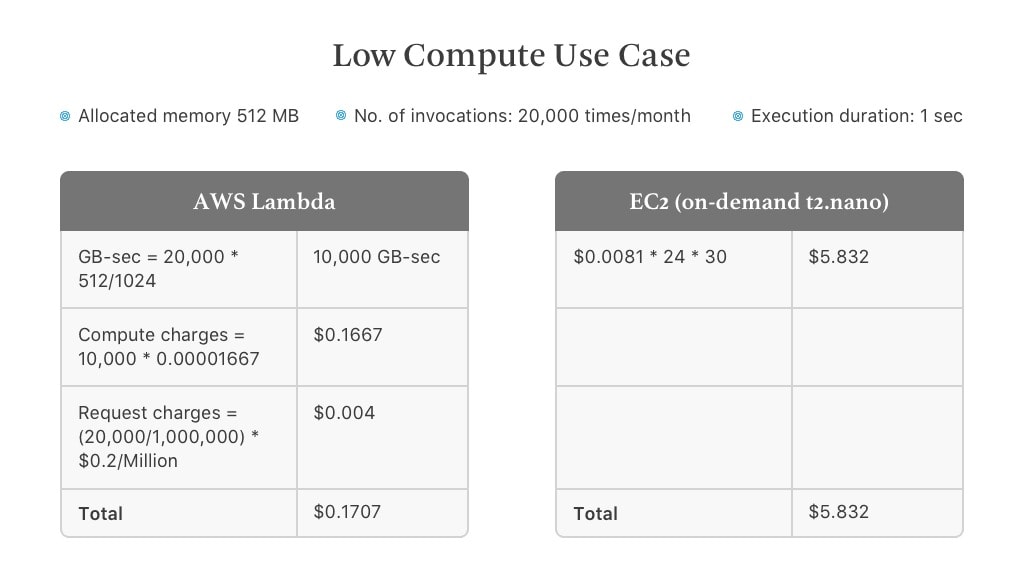
With AWS Lambda you only pay for what you use. You will be charged as per the number of requests for your functions and the amount of time for the execution of your code. The request is counted, each time the response to an event is executed by Lambda. Similarly, the amount of time taken is calculated from the time your code begins executing till it returns a response or gets terminated rounded up to the nearest 1ms, and also how much memory size you assign to your function. For the free usage tier, 1M free requests per month and 400,000 GB-seconds of compute time per month.
Check Out: Our Blog post on AWS Storage
Limitations of AWS Lambda
- You have a limited disk space of 512 MB
- By default, the deployment package size is 50 MB
- Memory ranges from 128 to 3008 MB
- The maximum execution time for a function is 15 minutes
- Body payload size for request and response is up to 6 MB
- The event request body can be up to 128 KB
Frequently Asked Questions
What is an AWS Lambda function?
The code you run on AWS Lambda is uploaded as a “Lambda function”. Each function has associated configuration information, such as its name, description, entry point, and resource requirements. The code must be written in a “stateless” style i.e. it should assume there is no affinity to the underlying compute infrastructure.
What is serverless computing?
Serverless computing allows you to build and run applications and services without thinking about servers. With serverless computing, your application still runs on servers, but all the server management is done by AWS. At the core of serverless computing is AWS Lambda, which lets you run your code without provisioning or managing servers.
What languages does AWS Lambda support?
AWS Lambda natively supports Java, Go, PowerShell, Node.js, C#, Python, and Ruby code, and provides a Runtime API that allows you to use any additional programming languages to author your functions. Please read our documentation on using Node.js, Python, Java, Ruby, C#, Go, and PowerShell.
Related Links/References
- Overview of Amazon Web Services & Concepts
- How to Create a free tier Account in AWS
- AWS Management Console Walkthrough
- AWS Solution Architect Certification [SAA-C03]
Next Task For You
Begin your journey towards an AWS Cloud by joining our FREE Informative Class on Amazon Cloud Free Class by clicking on the below image.


![Microsoft Agentic AI Business Solutions Architect [AB-100] | K21 Academy](https://test.k21academy.com/wp-content/uploads/2025/11/Microsoft-Agentic-AI-Business-Solutions-Architect-AB-100-Exam-Overview1.png)



