





AWS Glue is a fully managed ETL (extract, transform, and load) service that enables categorising your data, cleaning it, enriching it, and reliably moving it between various data stores and data streams simple and cost-effective.
- What is AWS Glue?
- Features
- AWS Glue Components
- AWS Glue Architecture
- Use cases
- Advantages
- Monitoring
- Pricing
What is AWS Glue?
AWS Glue is a serverless data integration service that makes finding, preparing, and combining data for analytics, machine learning, and application development simple. AWS Glue delivers all of the capabilities required for data integration, allowing you to begin analysing and putting your data to use in minutes rather than months.
Data integration is the procedure of preparing and merging data for analytics, machine learning, and application development. It entails a variety of tasks, including data discovery and extraction from a variety of sources, data enrichment, cleansing, normalisation, and merging, and data loading and organisation in databases, data warehouses, and data lakes. Different types of users and products are frequently used to complete these tasks.
AWS Glue offers both visual and code-based interfaces to help with data integration. Users can rapidly search and retrieve data using the AWS Glue Data Catalog. Data engineers and ETL (extract, transform, and load) developers may graphically create, run, and monitor ETL workflows with a few clicks in AWS Glue Studio.

Check Also: Free AWS Training and Certifications
Features of AWS Glue
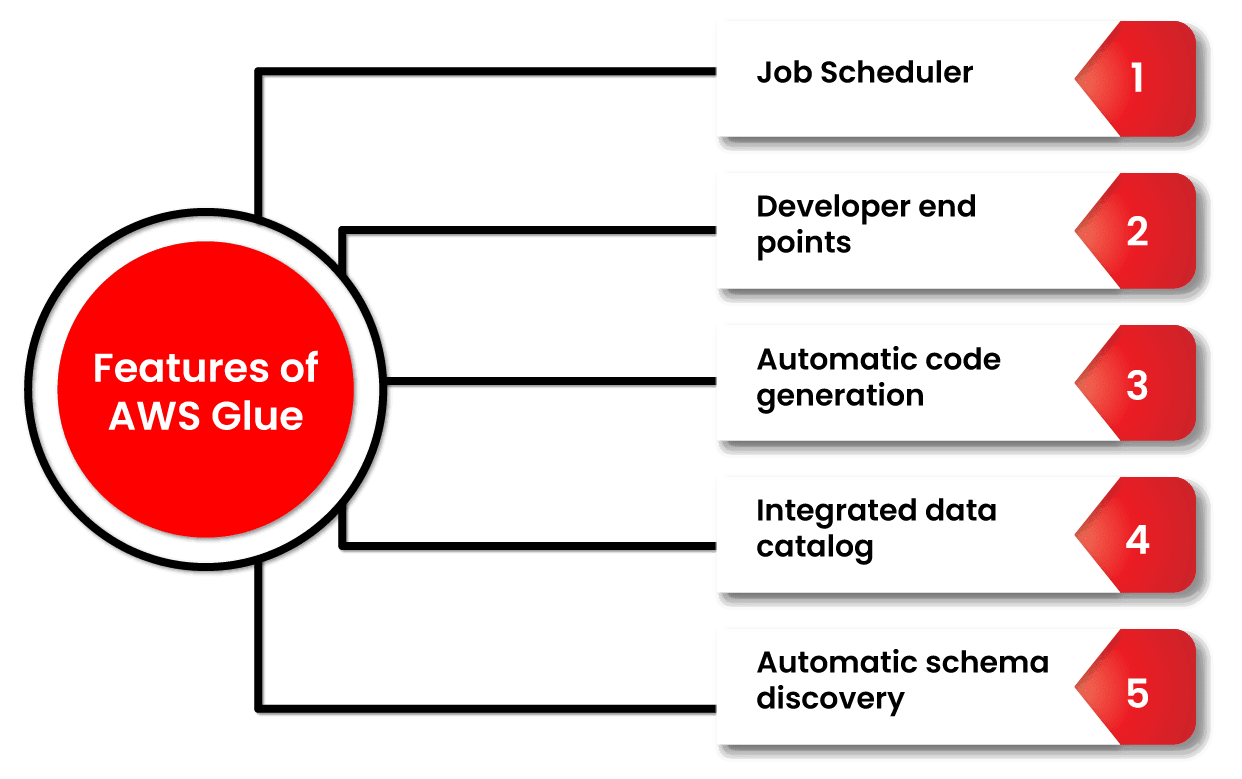
- Automatic schema discovery. Developers can use Glue to automate crawlers that collect schema-related data and store it in a data catalogue that can later be used to manage jobs.
- Job scheduler. Glue jobs can be scheduled and called on a flexible basis, using event-based triggers or on-demand. Several jobs can be initiated at the same time, and users can specify job dependencies.
- Developer endpoints. Developers can use them to debug Glue as well as develop custom readers, writers, and transformations, which can subsequently be imported into custom libraries.
- Automatic code generation. The ETL process automatically generates code, and all that is necessary is a location/path for the data to be saved. The code is written in Scala or Python.
- Integrated data catalog. Acts as a singular metadata store of data from a disparate source in the AWS pipeline. There is only one catalog in an AWS account.
AWS Glue Components
AWS Glue Data Catalog: The Glue Data Catalog is where persistent metadata is saved. It delivers table, task, and other control data to keep your Glue environment running well. For each account in each location, AWS provides a single Glue Data Catalog.
Classifier: A classifier is a programme that determines the schema of your data. AWS Glue has classifiers for CSV, JSON, AVRO, XML, and other common relational database management systems and file types.
Connection: The AWS Glue Connection object is a Data Catalog object that contains the properties required to connect to a certain data storage.
Crawler: It’s a feature that explores many data repositories in a single session. It uses a prioritised collection of classifiers to establish the schema for your data and then builds metadata tables in the Glue Data Catalog.
Database: A database is a structured collection of Data Catalog table definitions that are connected together.
Data Store: Data storage refers to a location where you can store your data for an extended period of time. Two examples are relational databases and Amazon S3 buckets.
Data Source: A data source is a set of data that is used as input to a transformation process.
Data Target: A data target is a storage location where the modified data is written by the task.
Transform: Transform is the logic in the code that is used to change the format of your data.
AWS Glue Architecture
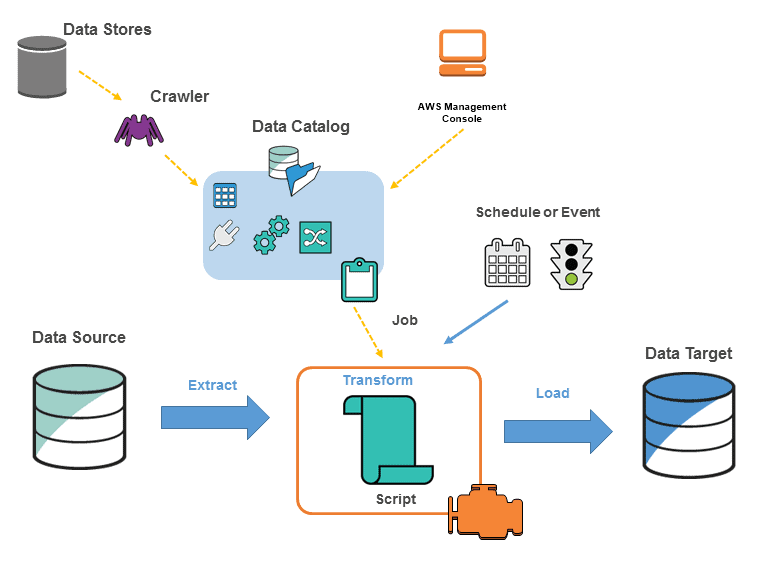
You define tasks in AWS Glue to perform the process of extracting, transforming, and loading (ETL) data from one data source to another. The actions you need to take are as follows:
- To begin, you must pick which data source you will use.
- If you’re utilising a data storage source, you’ll need to create a crawler to send metadata table definitions to the AWS Glue Data Catalog.
- When you point your crawler at a data store, it adds metadata to the Data Catalog.
- Alternatively, if you’re using streaming sources, you’ll need to explicitly establish Data Catalog tables and data stream characteristics.
- Once the Data Catalog has been categorised, the data is instantly searchable, queryable, and ready for ETL.
- The data is then converted using AWS Glue, which generates a script. You can also provide the script using the Glue console or API. (The script runs on an Apache Spark environment in AWS Glue.)
- You can perform the task on-demand or schedule it to start when a specific event occurs after you’ve created the script. The trigger can be a time-based schedule or an occurrence.
- While the task is running, the script will extract data from the data source, transform it, and load it to the data target, as seen in the above graphic. The ETL (Extract, Transform, Load) task in AWS Glue succeeds in this fashion.
Use Cases
- Use an Amazon S3 data lake to run queries: Without relocating your data, you may utilise AWS Glue to make it available for analytics.
- Analyze your data warehouse’s log data: To transform, flatten, and enrich data from source to target, write ETL scripts.
- Create an event-driven ETL pipeline: You can perform an ETL job as soon as new data is available in Amazon S3 by launching AWS Glue ETL jobs with an AWS Lambda function.
- A unique view of your data from many sources: You can instantly search and discover all of your datasets using AWS Glue Data Catalog, and save all essential metadata in one central repository.
Advantages of AWS Glue
- Glue is a serverless data integration solution that eliminates the requirement for infrastructure creation and management.
- It provides easy-to-use tools for creating and tracking job activities that are triggered by schedules and events, as well as on-demand.
-
It’s a budget friendly option. You only have to pay for the resources you use during the job execution process.
- The glue will develop ETL pipeline code in Scala or Python based on your data sources and destinations.
-
Multiple organisations within the corporation can utilise AWS Glue to collaborate on various data integration initiatives. The amount of time it takes to analyse the data is reduced as a result of this.
Monitoring
- Using AWS CloudTrail, record the actions of the user, role, and AWS service.
- When an event fits a rule, you may utilise Amazon CloudWatch Events and AWS Glue to automate the actions.
- You can monitor, store, and access log files from many sources with Amazon CloudWatch Logs.
- A tag can be assigned to a crawler, job, trigger, development endpoint, or machine learning transform.
- Using the Apache Spark web UI, you can monitor and troubleshoot ETL operations and Spark applications.
- If you enabled continuous logging, you could see real-time logs on the Amazon CloudWatch dashboard.
Pricing
- The amount of DPUs utilised to conduct your ETL operation determines how much you’ll be charged each hour
- The number of DPUs utilised to run your crawler determines how much you’ll be paid per hour.
- Data Catalog storage and requests:
- You will be charged per month if you store more than a million objects.
- You will be charged per month if you exceed a million requests in a month.
Related Links/References
- AWS Free Tier Limits
- AWS Free Tier Account Details
- How to create a free tier account in AWS
- AWS Certified Solutions Architect Associate SAA-CO3
- Amazon Elastic File System User guide
- AWS Certified Solution Architect Associate SAA-C03 Step By Step Activity Guides (Hands-On Labs)
- AWS Free Tier Account Services
- AWS Route 53 Introduction
Next Task For You
Begin your journey toward becoming an AWS Data Engineer by clicking on the below image and joining the waitlist.


![Microsoft Agentic AI Business Solutions Architect [AB-100] | K21 Academy](https://test.k21academy.com/wp-content/uploads/2025/11/Microsoft-Agentic-AI-Business-Solutions-Architect-AB-100-Exam-Overview1.png)



