





AWS Database Migration Service allows you to migrate databases to AWS effortlessly and reliably. During the migration, application downtime that is dependent on the source database is maintained to a minimum. The AWS Database Migration Service can move to and from the most common commercial and open-source databases.
Let’s talk one by one about the mentioned/below topics:
- Introduction of AWS Database Migration Service
- How does AWS Database Migration Service work?
- Data migration components with AWS DMS
- AWS Schema Conversion Tool
- Benefits & Limits of AWS DMS
- Use Cases of AWS DMS
- AWS Database Migration Type Options
- AWS DMS Pricing
- FAQ’S
Introduction of AWS Database Migration Service
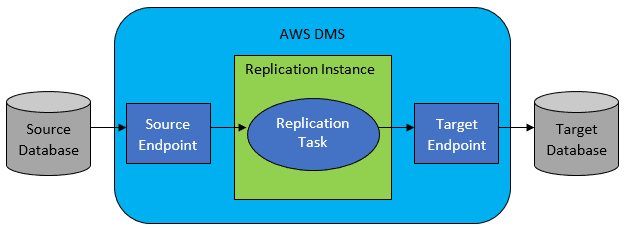
The Amazon Web Services Database Migration Service is a managed service provided by Amazon Web Services that works on the Amazon Web Services virtual cloud. The service is powered by a programmable Amazon Elastic Cloud compute instance. When you install the Database Migration Service on your virtual machine, it connects to a source database, reads the source data, formats it for use by a target database, and then loads the data into the target database.
You may also use AWS Database Migration Service to continuously replicate data from any supported source to any supported target with the least amount of latency. AWS DMS, a server in the AWS Cloud, runs replication software. To maintain sources and changes, you can make one-time migrations and duplicate ongoing changes.
How does AWS Database Migration Service work?
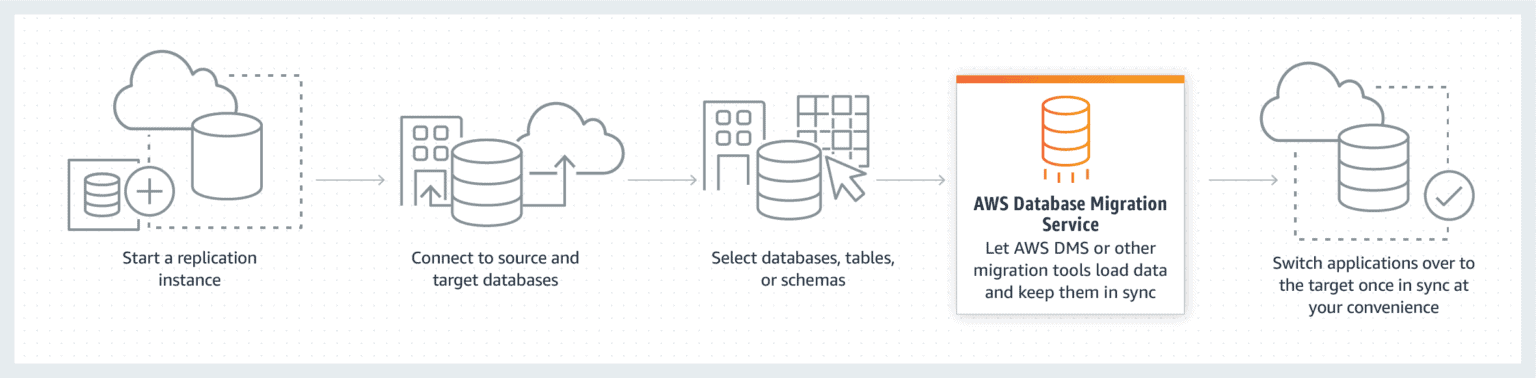
- Before using the AWS Database Migration Service, you must link your source database to it. After reading the data and formatting it to meet the needs of your target database, the service sends the data in accordance with the migration task you have specified.
- DMS begins keeping an eye on any changes to your database as soon as replication from source to destination begins. AWS DMS CDC, often referred to as Change Data Capture processes are used for this.
- The Database Migration Service goes through any cached objects and makes any necessary changes to the target, and until you transfer your workloads and shut down your source database, the service keeps checking for and caching changes.
Data Migration components with AWS DMS
Replication instance:
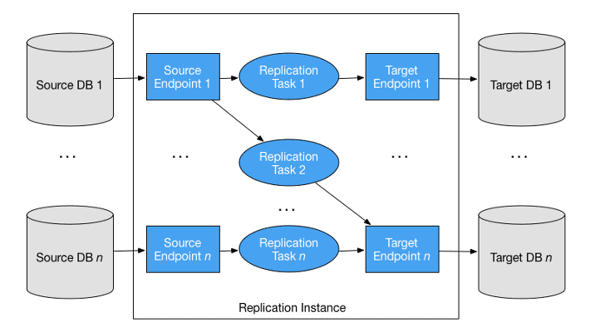
Replication instances are managed EC2 instances that are used to host replication jobs. There are different types of replication instances:
- T2/T3: These are used to set up, create, and test database migration processes. These instances can be used to do routine migration tasks.
- C4: These instances are performance-optimized and suitable for tasks that demand a lot of computing. In these circumstances, heterogeneous migrations are appropriate.
- R4/R5: These instances, which are optimized for memory, should be utilized for ongoing migrations and high-throughput transactions.
Endpoints:
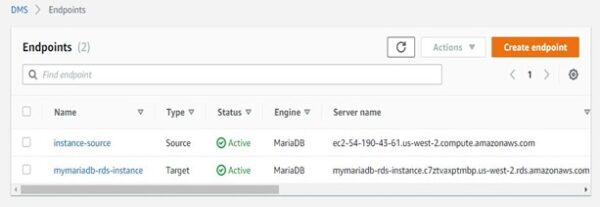
The AWS DMS connects the source and target databases and transfers data using an endpoint. Depending on the database type, the type of endpoint will vary, but all endpoints generally require the same information, including endpoint type, engine type, encryption methods, server name, port number, and credentials.
Here is an illustration of how to create an endpoint in AWS DMS:
Database replication tasks:
Replication jobs define how data is transferred between the source and the target. The source and target endpoints, replication instance, and migration type all need to be specified when creating a replication task.
Schema migration and conversion:
When doing a homogeneous migration, the Database Migration Service makes an effort to create a target schema. But sometimes it’s not possible to accomplish this. For example, when migrating an Oracle database, a target schema is not created to assure security. In certain cases, you might use Oracle SQL Developer, pgAdmin III, or MySQL Workbench.
AWS Schema Conversion Tool
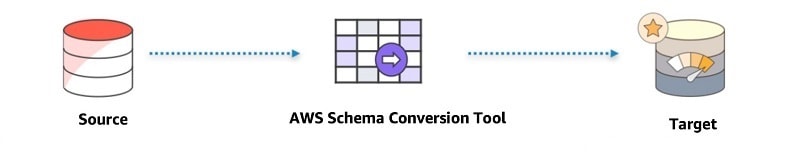
Heterogeneous database migrations are predicted and automated by the AWS Schema Conversion Tool (AWS SCT). SCT may search your application source code for embedded SQL statements as part of a database schema conversion effort and convert them. By replacing legacy Oracle and SQL Server functions with their AWS equivalents, SCT optimizes cloud-native code during this process. Once the schema conversion is finished, SCT may assist in transferring data to Amazon Redshift from a number of data warehouses using built-in data migration agents.
Benefits & Limits of AWS Database Migration Service
Benefits:
- Minimal downtime – During the migration process, DMS regularly sends changes to your data source while keeping it operational. As a result, you can switch databases at any moment without shutting down.
- Low cost—Data Migration Service is a no-cost migration option for DocumentDB, Redshift, Aurora, or DynamoDB. Other databases must be paid for based on the total amount of log storage and the computational load.
- Reliability—Database Migration Service is a self-care service that will restart itself immediately if it is interrupted. DMS allows you to set up Multi-AZ (availability zone) replicas for disaster recovery.
Limitations:
- Performance- By default, AWS DMS may load up to eight tables concurrently. Performance may be somewhat improved if utilizing a very big replication server.
- AWS DMS may slow down source systems with large database migrations- If you have a lot of data to transport, AWS DMS could be challenging to use.
- Coding requirements for incremental capture of data- AWS DMS necessitates a large amount of coding, which can be labor- and time-intensive, for Change Data Capture of incremental loads. To merge the adjustments, for instance, additional coding is needed for S3.
Use Cases of AWS Database Migration Service
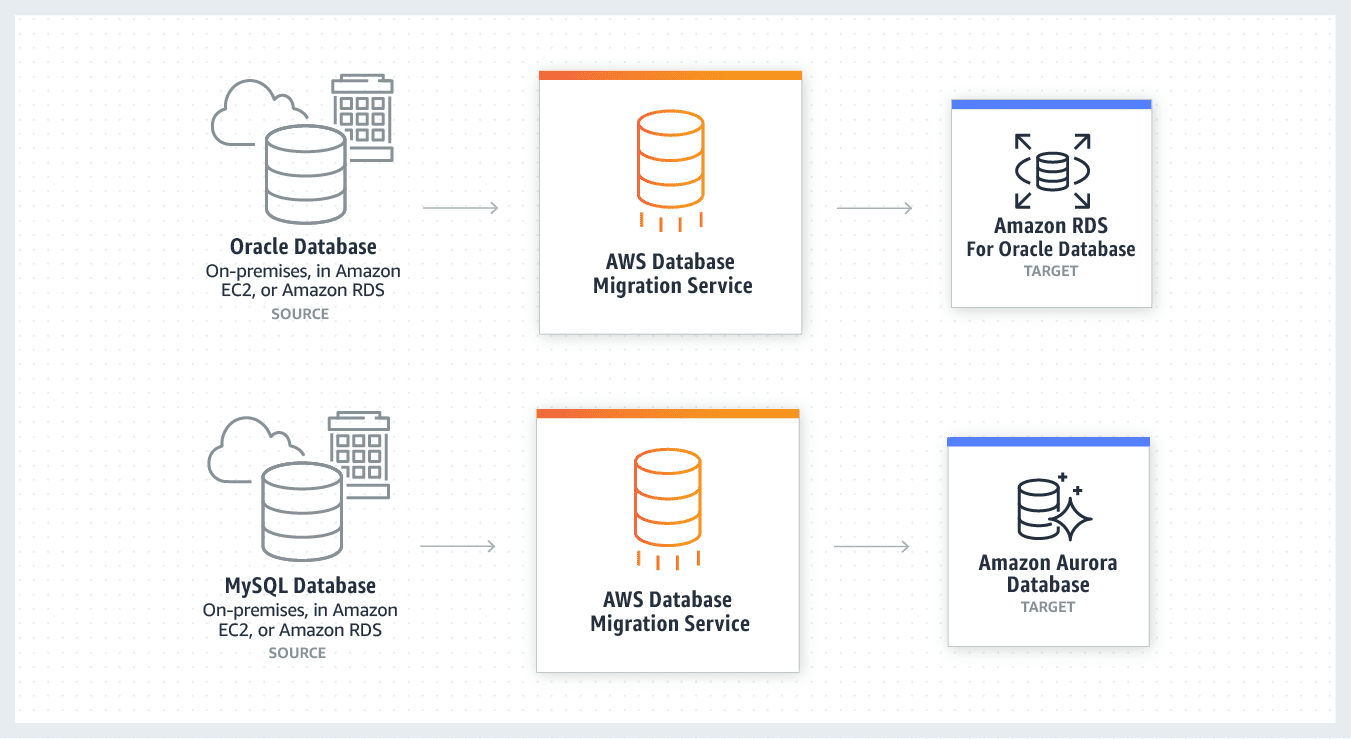
1. Heterogeneous Database Migrations
The source and target database engines are the same or compatible for converting a homogenous database, such as MySQL to Amazon RDS for MySQL, Oracle to Amazon Aurora, or Microsoft SQL Server to Amazon RDS for SQL Server. Because the source and target databases’ schema architecture, data types, and database codes are compatible, this form of conversion requires only one step.
2. Continuous Data Replication
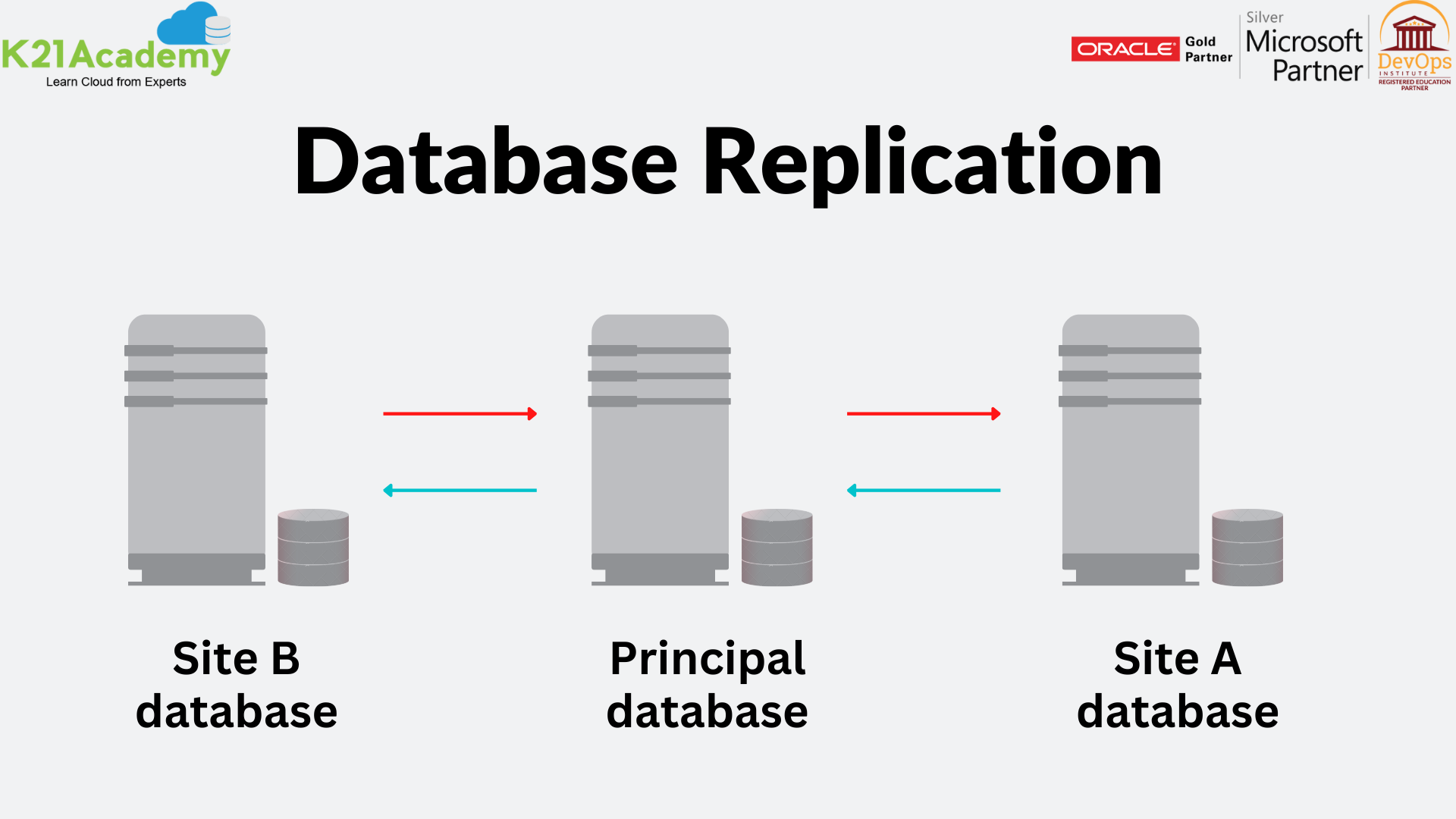
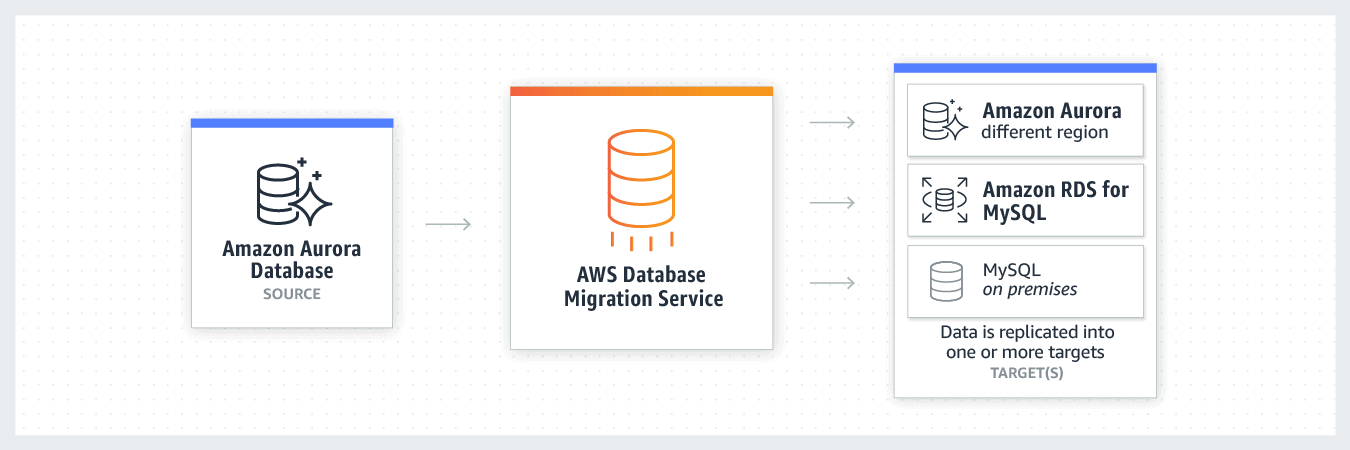
AWS Database Migration Service makes it feasible to replicate data continuously. Continuous data replication has several applications, including synchronizing Dev/Test environment locations, geographical database dispersion, and Disaster Recovery instance locations. You can use DMS for homogeneous and heterogeneous data replications for all supported database engines.
AWS Database Migration Type Options:
AWS DMS provides 3 migration type options:
- Full Load
Full Load with AWS DMS migrates all of the data in your database at once rather than replicating data updates. This is a great option if you only need to move data once and don’t need to keep track of ongoing changes.
- Full Load + CDC
Another AWS DMS option is full load + CDC, which will transfer all of your data initially and copy any changes made afterward at the source. Your database will be monitored while the task is being completed. This is very helpful if you have really large databases and don’t want to interrupt processes.
- CDC only
Not the initial entire load of data, but only changes made to the database will be replicated by CDC when utilizing AWS DMS. This solution is suitable if you need to keep up with ongoing changes at the source but are using another method to move your database.
Pricing of AWS Database Migration Service
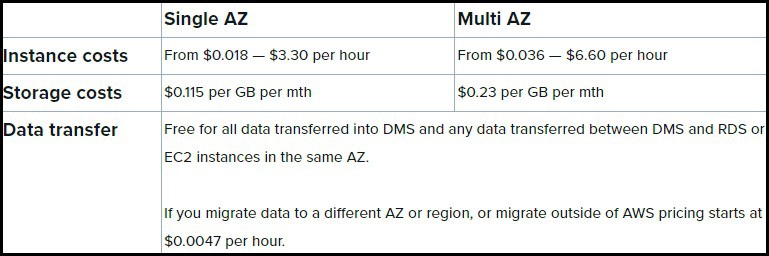
AWS Database Migration Service’s availability for free for some services is one of its advantages. It should be more than enough time for you to complete a typical migration over the first six months that you have access to this. When using DMS with a service that isn’t on the list, you’ll continue to be paid the same.
If you are past the six-month period or are using a different service pricing is as follows:
Frequently Asked Questions:
What are the 3 main DB migration strategies?
Fundamentally, there are three approaches to database migration, which this section discusses: Making use of a database migration system Using the replication functionality of a database management system Using custom database migration capabilities
What migration tools do you use AWS?
Here are just a few of the tools and services that AWS offers to help you get started on their platform fast. Amazon Web Services Application Discovery Service AWS Acceleration Program for Migration (MAP) Evaluator for AWS Migration Database Migration Service on AWS. AWS Prescriptive Advice CloudEndure. AWS Migration Service.
What is a database migration service in AWS?
You may easily and securely move databases to AWS with the help of AWS Database Migration Service (AWS DMS). Applications that rely on the source database experience the least amount of downtime during the migration because the source database is still fully functional.
How do you migrate the existing database to AWS?
1. In Amazon RDS, create a SQL Server database instance. 2. In AWS Database Migration Service, create a replication instance (AWS DMS) 3. For your database migration, create source and target endpoints. 4. In AWS DMS, create a replication task. 5. Complete the resource cleanup and migration.
What are the three phases of migration AWS?
The three phases of AWS's large-scale migration strategy are assessment, mobilization, and migration. Every stage builds on the one before it. The evaluation phase and the mobilization phase are both covered by this AWS Prescriptive Guidance method. During the migrations phase, these phases lay the groundwork for faster migration at scale.
Related Links/References
- AWS Free Tier Account
- 5 Steps for a Cost-efficient Migration to AWS Cloud
- Top 10 Must-Have AWS Cloud Migration Tools in 2023
- AWS Database Migration Service: Everything You Need To Know
- Application Migration to AWS & Its 6 Phases
- AWS Server Migration Service
- AWS Database Migration Service
- Top 100+ AWS Interview Questions for 2023
- Data Center Pre-Migration Assessment
Next Task For You
Begin your journey towards an AWS Cloud by joining our FREE Informative Class on Amazon Cloud Free Class by clicking on the below image.


![Microsoft Agentic AI Business Solutions Architect [AB-100] | K21 Academy](https://test.k21academy.com/wp-content/uploads/2025/11/Microsoft-Agentic-AI-Business-Solutions-Architect-AB-100-Exam-Overview1.png)



