






DevOps is a popular culture and AWS is a popular cloud provider and both are in demand. So how to implement DevOps on AWS?
AWS CodeCommit is a fully managed source control solution offered by Amazon Web solution. It is a version code service. It aids in the management and storage of assets such as codes, papers, and other file types such as binary files. It enables the team to collaborate in a secure and highly scalable environment. It does away with the requirement for third-party version control as well as your own source control system. By using the CodeCommit service, you can effortlessly work with your existing Git tools. You may easily save your source code and other files, as well as push, pull, and commit data.
Note: After careful consideration, AWS has decided to close new customer access to AWS CodeCommit on July 25, 2024. AWS CodeCommit’s existing customers can continue to utilize the service as usual. AWS continues to invest in security, availability, and performance enhancements for AWS CodeCommit, but we do not intend to provide new functionality.

In this post, we will discuss AWS CodeCommit in detail. We will discuss:
- Overview Of AWS CodeCommit
- Benefits Of AWS CodeCommit
- Working Of AWS CodeCommit
- Creating AWS CodeCommit Repository
- Branches
- Benefits Of Branches
- Pricing OF AWS CodeCommit
So let’s get started with AWS CodeCommit.
Overview Of AWS CodeCommit
AWS CodeCommit is a version control service hosted by Amazon Web Services (AWS) that you can use to privately store and manage assets such as documents, source code, and binary files. It is an in-house repository or infrastructure that lets you host or hold repositories. AWS CodeCommit basically gives you an environment where you can actually go ahead and commit your code, code pushes it or pull it.

AWS CodeCommit is a fully-managed source control service that hosts your secure Git-based repositories. It makes it easy for groups to collaborate on code in a secure and highly scalable ecosystem. CodeCommit eliminates the need to operate your source control system or worry about scaling its infrastructure. CodeCommit securely stores anything from source code to binaries, and it runs seamlessly with your existing Git tools.
Check out: AWS Storage overview and types of storage options offered and what are they intended for.
Benefits Of AWS CodeCommit
- Store any type of Code: AWS CodeCommit lets you store any type of code as there are very fewer restrictions on the type and the extensions of the code that you store.
- Fully Managed: AWS CodeCommit eliminates the need to host, maintain, back up, and scale your own source control servers. The service automatically scales to meet the growing needs of your project.
- Faster development lifecycle: AWS CodeCommit keeps your repositories close to your build, staging, and production environments in the AWS cloud. You can transfer incremental changes instead of the entire application. This allows you to increase the speed and frequency of your development lifecycle.
- Ensures Collaborative Work: AWS CodeCommit allows you to collaborate on code with teammates via pull requests, branching, and merging, and you can grant appropriate access to people who can access this piece of code, make changes to it, and this process becomes very engaging and collaborative under different IAM users and security groups.
- Highly Secure: Security is something that you don’t need to worry about with AWS Code Commit., like the code, you push or pull is encrypted. CodeCommit is integrated with AWS Identity and Access Management (IAM) allowing you to customize user-specific access to your repositories.
- Scale Easily: When you talk about cloud platforms and any service, it ensures scalability so does the amount of code you push on this particular service.
- Integrate with third-party tools:The best thing about AWS CodeCommit is that it places your code in areas where it is really easy to interact with third-party solutions. With CodeCommit, you may continue to use your preferred development environment plugins, continuous integration/continuous delivery systems, and graphical clients.
Note: Do Checkout Our Blog On AWS Solution Architect Training, To Get an Overview of Training.
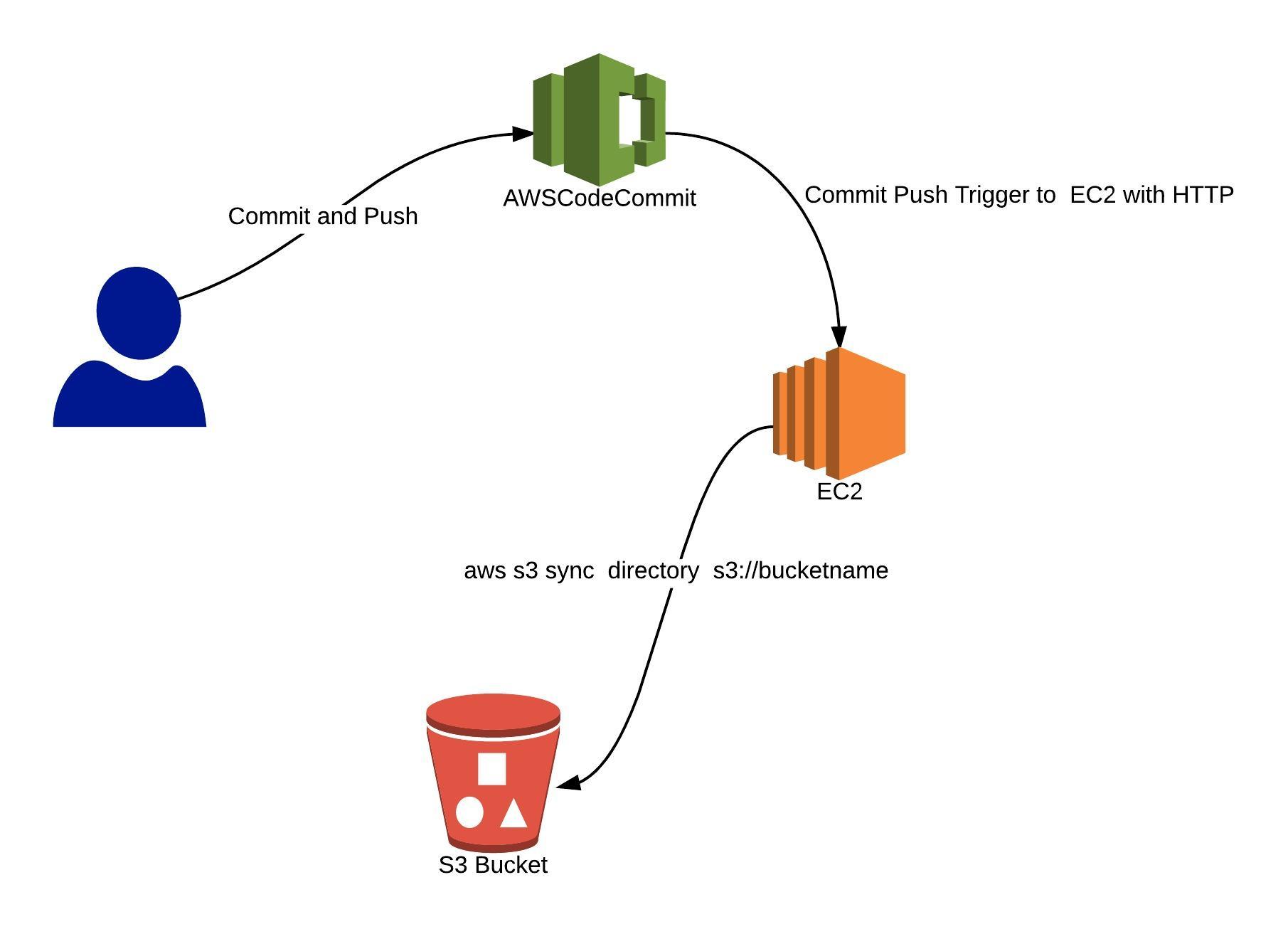
Before creating an AWS CodeCommit Repository let’s check its working first.
Check out: Amazon Elastic File System (EFS) what it is, its features, and how it can be helpful.
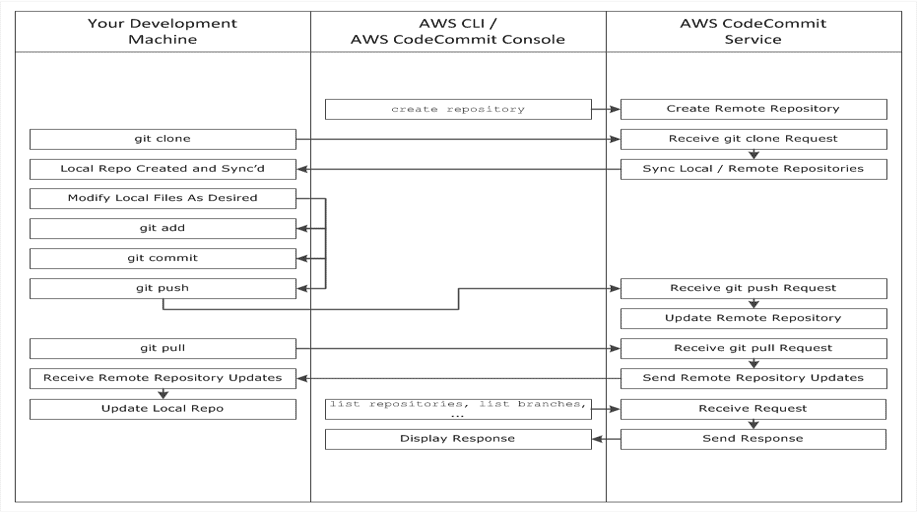
Working On AWS Code Commit
Creating AWS Code Commit Repository
1)Log in to your AWS account by clicking here
Note: If you have not created the free tier account yet, please check this blog. How to create a free tier account
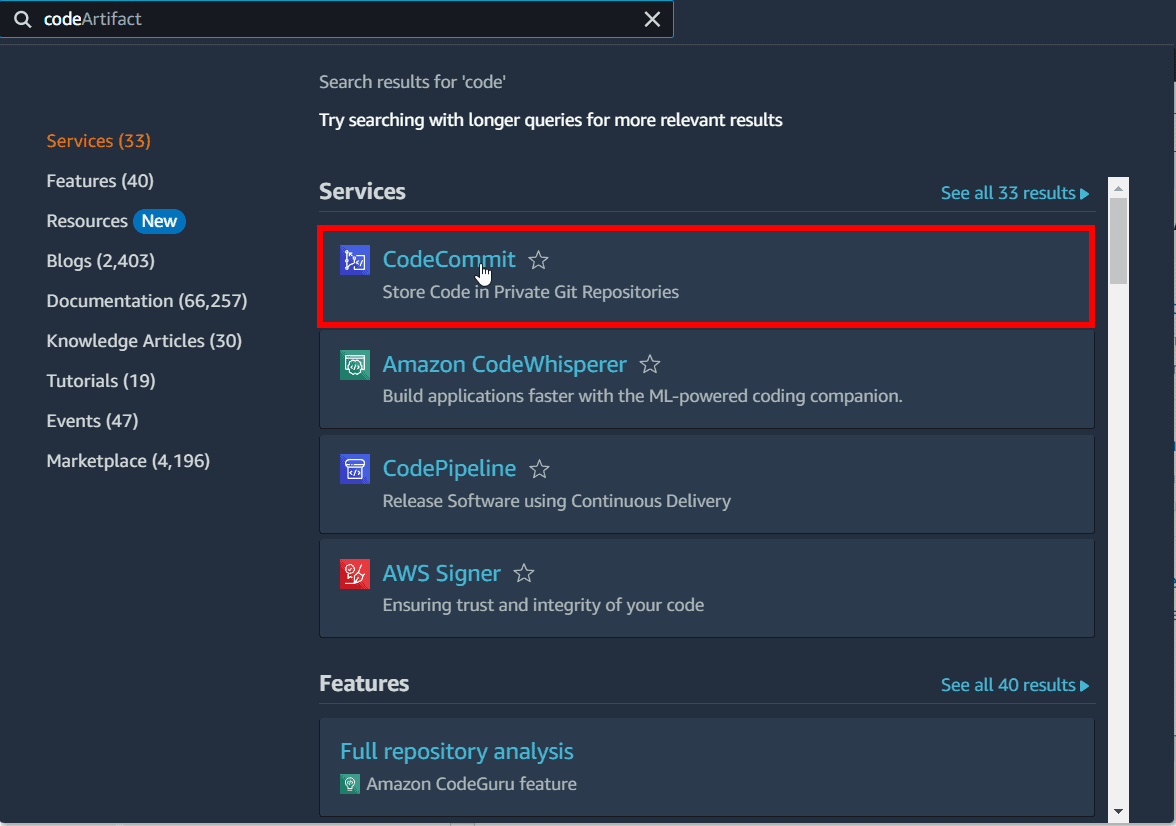
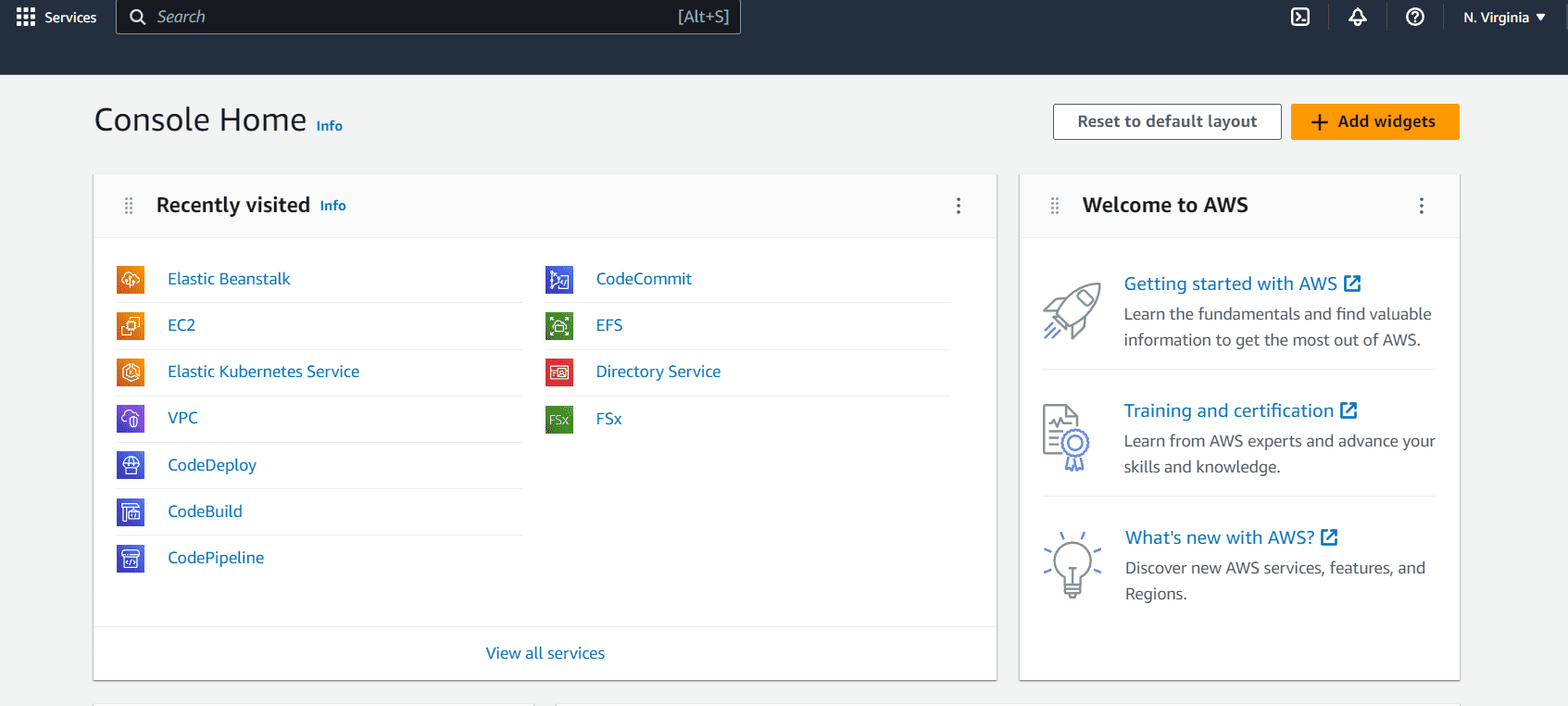 2) Search for CodeCommit and Open it.
3) In the region selector, choose the AWS Region where you want to create the repository.
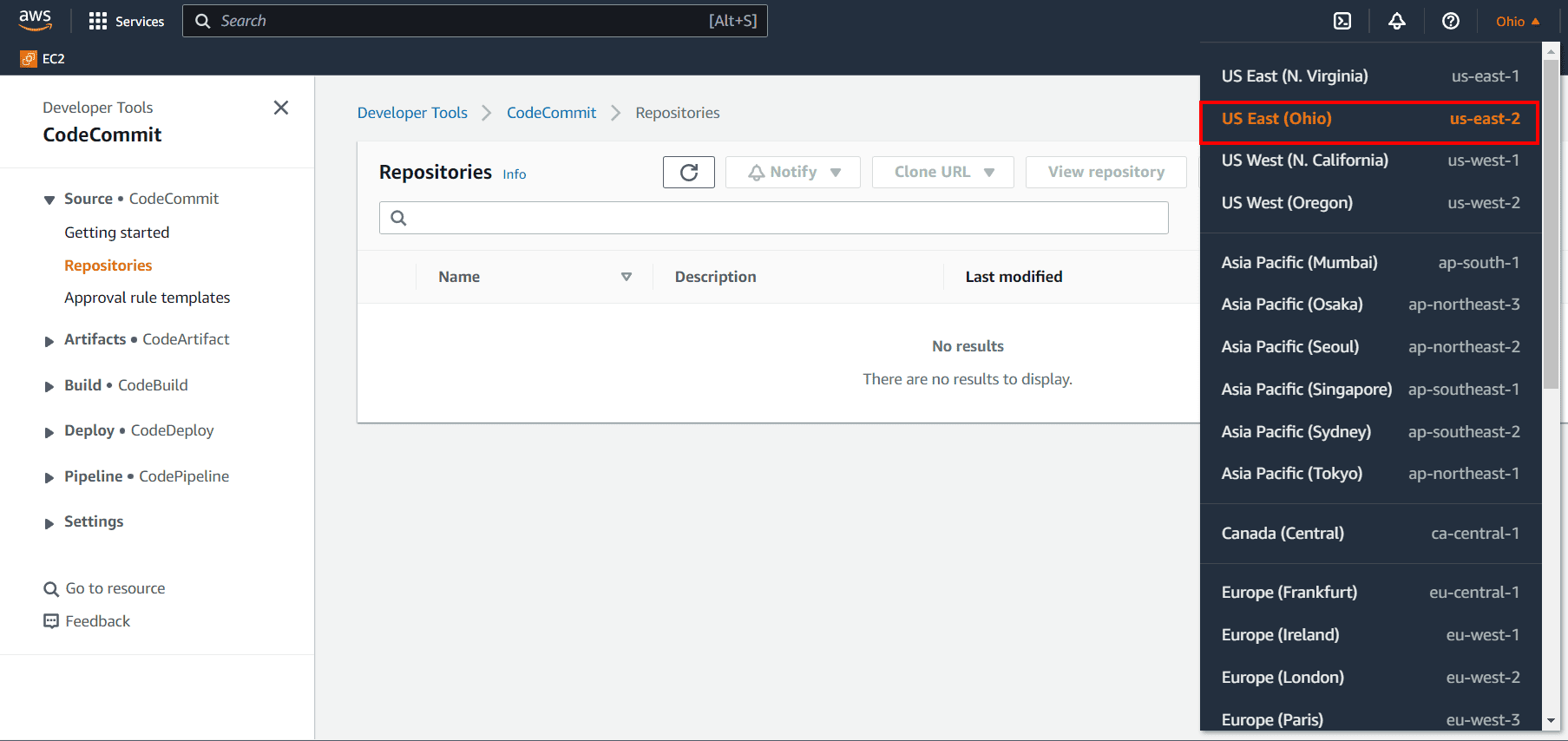
Note: You can create and use CodeCommit repositories in the following AWS Regions:
US East (Ohio), US East (N. Virginia), US West (N. California), US West (Oregon), Europe (Ireland), Europe (London), Europe (Paris), Europe (Frankfurt), Europe (Stockholm), Europe (Milan), Asia Pacific (Tokyo), Asia Pacific (Singapore) Asia Pacific (Sydney), Asia Pacific (Seoul), Asia Pacific (Mumbai), Asia Pacific (Hong Kong), South America (São Paulo), Middle East (Bahrain), Canada (Central), China (Beijing), China (Ningxia), AWS GovCloud (US-West), AWS GovCloud (US-East)
Know More : About What Are The Roles and Responsibilities Of An AWS Certified Solutions Architect.
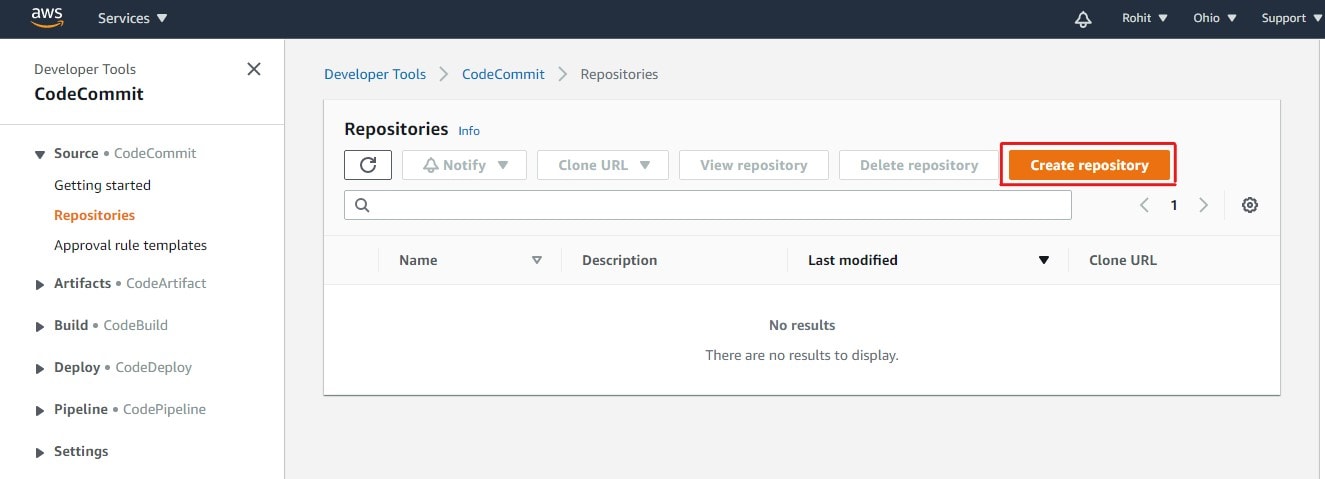
4) Click on Create Repository.
5) Give your repository a name and then click on Create
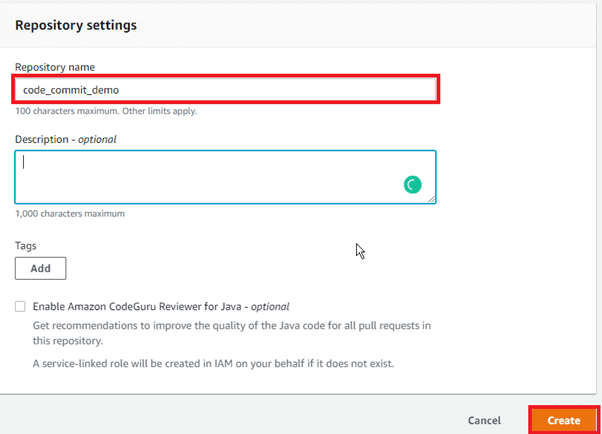
Note: In Description, enter a description for the repository. This can help you and other users identify the purpose of the repository and Choose to Add a tag to add one or more repository tags (a custom attribute label that helps you organize and manage your AWS resources) to your repository.
Select Enable Amazon CodeGuru Reviewer for Java if this repository contains Java code, and you want CodeGuru Reviewer to analyze it. CodeGuru Reviewer uses multiple machine learning models to find Java code defects and to suggest improvements and fixes in pull requests.
6) CodeCommit Repository will be created.
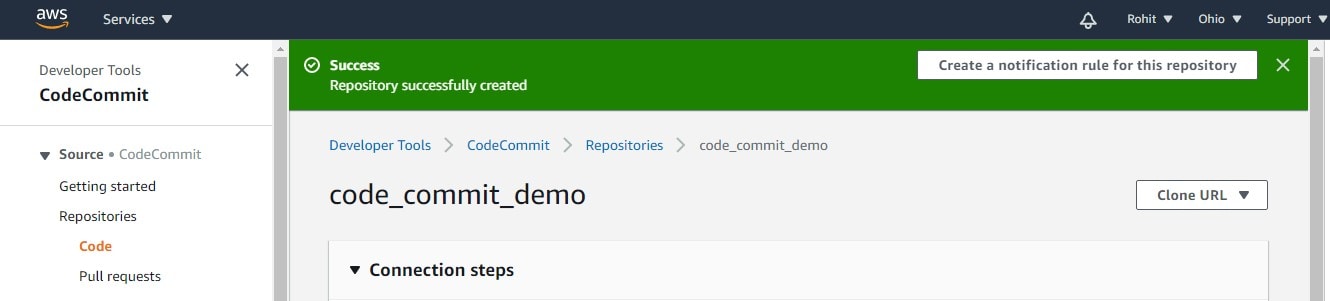
Note: You are signed in using a root account. You cannot configure SSH connections for a root account, and HTTPS connections for a root account are not recommended. Consider signing in as an IAM user and then setting up your connection.
Check out: Our blog on AWS Key Management Service
What are the Branches?
Branches are merely references or pointers to a commit. They are a convenient approach to organizing your work in development. You can use branches to keep work on a new or different version of a file separate from work in other branches. Branches can be used to develop new features, store a specific version of your project from a given commit, and more.
Benefits Of Branches
- A convenient way to organize your work by using branches to separate work impacting work in other branches
- Used for developing new features, storing a specific version of the project from a particular commit
- In CodeCommit, one can change the default branch for your repository.
- The default branch is the one used as the base or default branch in local repositories when users clone the repository.
- Creating, deleting, and viewing branch details is possible in Codecommit.
Pricing Of AWS CodeCommit
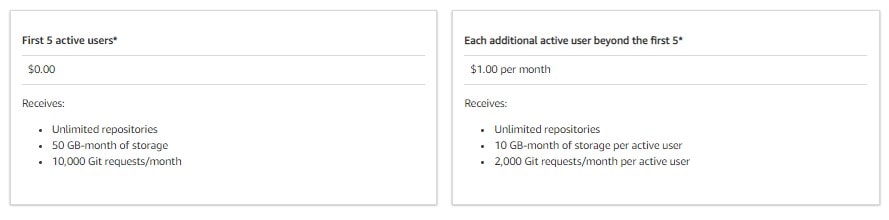
With an AWS account, anyone can get started with AWS CodeCommit for free. Your account gets 5 active users per month for free (within limits), after which you pay $1.00 per additional active user per month. There are no upfront fees or commitments.
This AWS free tier offer for AWS CodeCommit is available to both new and existing AWS customers indefinitely and does not expire at the end of the standard 12 months free tier term.
Related/References
- AWS Certified DevOps Engineer Professional DOP-C02
- Overview of Amazon Web Services & Concept
- AWS Management Console Walkthrough
- AWS CloudFormation
- AWS Elastic Beanstalk
- AWS Certified Machine Learning Specialty: All You Need To Know
Next Task For You
Begin your journey towards becoming an AWS Certified DevOps Engineer Professional by checking our FREE CLASS. Click on the below image to register for our FREE CLASS.


![Microsoft Agentic AI Business Solutions Architect [AB-100] | K21 Academy](https://test.k21academy.com/wp-content/uploads/2025/11/Microsoft-Agentic-AI-Business-Solutions-Architect-AB-100-Exam-Overview1.png)



