





This blog post gives a walkthrough of the Step-By-Step Activity Guides of the AWS Certified Cloud Practitioner (CLF-C02) training program that you must perform to learn this course.
The walkthrough of the Step-By-Step Activity Guides of AWS Certified Cloud Practitioner (CLF-C02) training program will prepare you thoroughly for the AWS CLF-C02 certification and apply for the exam click here.
List of Labs that we include in Our training AWS Certified Cloud Practitioner (CLF-C02)
- Create AWS Free Trial Account
- CloudWatch: Create billing alarm & service limits
- Create & Connect to Windows EC2 Machine
- Create & Connect to Linux EC2 Machine
- Creating S3 Bucket, Upload & AccessFiles, And Host Website
- S3 Lifecycle Management on S3 Bucket
- Working with AWS IAM
- Configure Amazon CloudWatch to Notify Change In EC2 CPU Utilization
- To Register For AWS Exam
Activity Guides:
Activity Guide I: Create AWS Free Trial Account
Amazon Web Services (AWS) is providing a free trial account for 12 months to new subscribers to get hands-on experience with all the services that AWS provided. Amazon is giving no. of various services that we will use with a number of the limitations to get hands-on practice and achieve more knowledge on AWS Cloud services also regular business use.
With the AWS Free Tier account, all the services are offered have limited usage on what we will use without being charged. Here, we’ll check out how to register for an AWS FREE Tier Account.
To know how to create a free AWS account, check our Step by steps blog How To Create AWS Free Tier Account
Activity Guide II: CloudWatch: Create billing & service limits
We can enable the AWS billing alerts through Amazon CloudWatch. CloudWatch is an AWS service dedicated to monitoring all of your activities across your AWS account. In addition, to billing alerts, CloudWatch also provides the infrastructure for monitoring applications, logs, metrics collections, and other service metadata, and detecting the activity in your AWS account usage.
The AWS CloudWatch provides a spread of metrics by which you’ll schedule your alarms. for instance, you’ll create an alarm to notify you when the CPU or memory Utilization of a running instance goes beyond 90% or when the billing amount goes over $100, In an AWS free tier account, we get 10 alarms and 1,000 email notifications per month.
In this activity guide, you will learn how to create a billing alarm and the service limits of the AWS services.
Activity Guide III: Create & Connect to Windows EC2 Machine
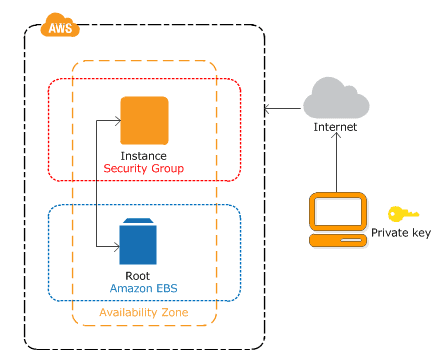
Amazon EC2 presents represents a real virtual computing environment, allowing you to use the console interfaces to launch instances with a spread of operating systems, load them together with your custom desired application environment, manage your network’s access permissions, and run the image using as many or few systems as you desire.
In this activity guide, you will learn how to create and connect to a Windows EC2 Machine.
Activity Guide IV: Create & Connect to Linux EC2 Machine
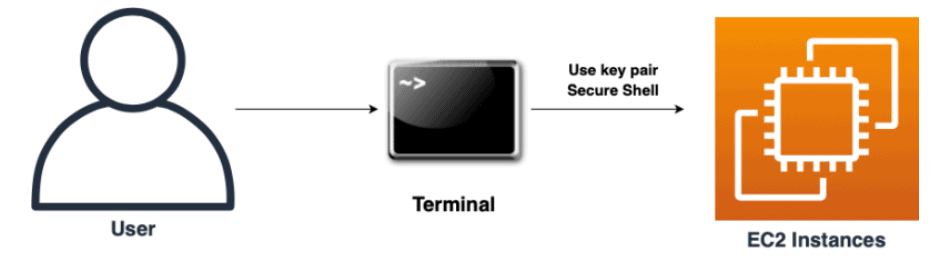
An Amazon EC2 instance is a virtual server in Amazon’s Elastic Compute Cloud (EC2) for running applications on the Amazon Web Services (AWS) infrastructure. Amazon provides various kinds of instances with different configurations of CPU, memory, storage and networking resources to suit user needs.
In this activity guide, you will learn how to create and connect to a Linux EC2 Machine.
Activity Guide V: Create S3 Bucket, Upload & Access a File, And Host Website
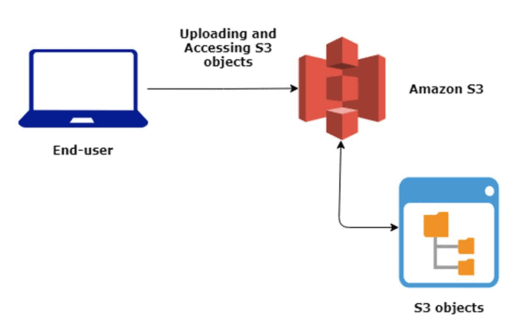
Amazon Simple Storage Service (S3) is an object storage service that gives scalability, durability, data availability, and performance to your data. This implies customers of all sizes and industries can use the S3 to store and protect any amount of knowledge for a variety of use cases, like mobile applications, backup & restore, website hosting, archive, enterprise applications, IoT devices, and large data analytics.
Amazon S3 is meant for 99.999999999% (11 9’s) of durability, and stores data for many applications for companies all around the world.
In this activity guide, You will learn how to create a bucket, upload and access your file and how to host your static website on Amazon S3.
Activity Guide VI: S3 Lifecycle Management on S3 Bucket
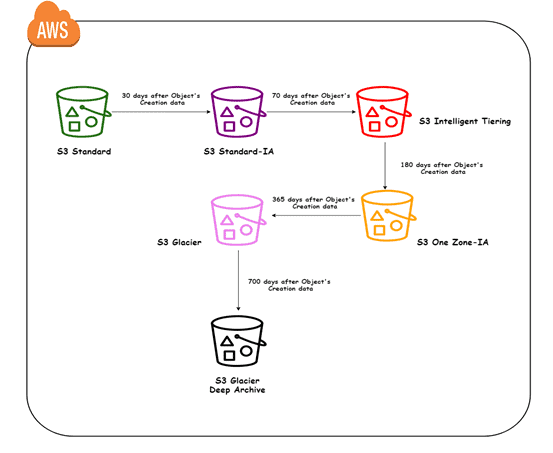
An S3 Lifecycle configuration is a set of rules and policies that outline actions that Amazon S3 applies to a bunch of objects. To manage your files in order that they will store in a cost-effective manner throughout their lifecycle, configure their Amazon S3 Lifecycle.
In this activity guide, You will learn how to set a lifecycle management policy on your data files so that they can store in a cost-effective manner.
Activity Guide VII: Working with AWS IAM
AWS Identity and Access Management is a service provided by AWS that helps you to securely control access to AWS resources. you’ll use the IAM service to regulate the user, who is authenticated (signed in) and authorized (has permissions) to use service/resources.
When you first create an AWS account you start with one sign-in identity that has complete access to all or any AWS services/resources within the account. This identity is named the AWS Root user and is accessed by signing in with the e-mail and password that you simply want to create the account. Here we strongly recommend you are doing not use the basic use for your daily tasks, even the executive ones.
In this activity guide, You will learn how to use create an IAM user, role, Group and attach policies to it.
Activity Guide VIII: Configure Amazon CloudWatch to Notify Change in EC2 CPU Utilization
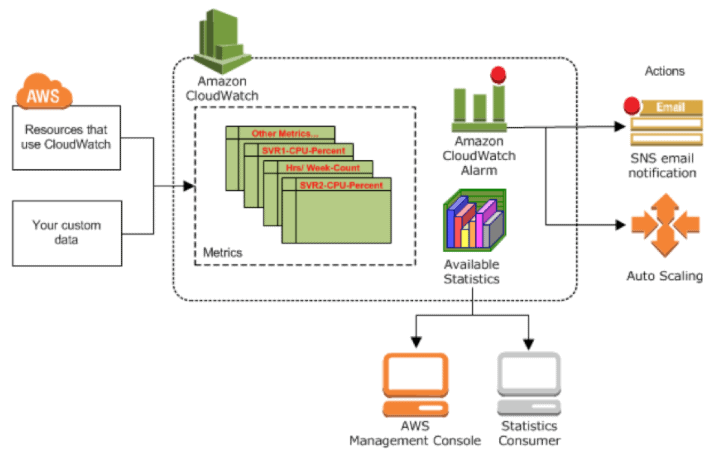
Amazon CloudWatch is a monitoring service built for DevOps engineers, IT engineers, and developers. CloudWatch provides you with data and actionable insights to watch your own applications and resources, answer system-wide performance changes, optimize resource utilization, and obtain a unified view of operational health.
With CloudWatch, you’ll access and collect all of your performance and operational data in sort of logs and metrics from one platform.
In this activity guide, you will learn how to configure a Cloudwatch when your EC2 Instance exceeds a certain CPU utilization.
Activity Guide XI: To Register For AWS Exam
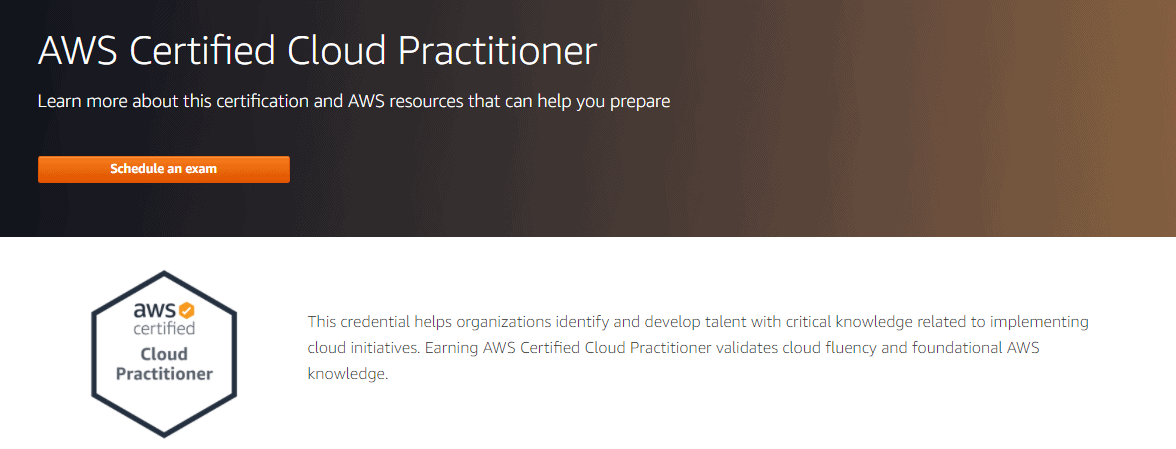
AWS Certification helps learners build credibility and confidence by validating their cloud expertise with an industry-recognized credential, and organizations identify skilled professionals to guide cloud initiatives using AWS. AWS Certifications validate AWS Cloud knowledge, skills, and expertise. Candidates take an exam to earn one among our Foundational, role-based, or Specialty certifications. to take care of our horizontal bar for earning an AWS Certification, our exams are taken during a proctored, timed environment.
This activity guide will teach you how to schedule your AWS Exam.
Related Links/References:
- Overview of Amazon Web Services & Concepts
- How to create a free tier account in AWS
- Amazon Elastic File System User guide
- AWS Management Console Walkthrough
- Amazon Elastic LoadBalancer
- Amazon RDS
Next Task For You
Begin your journey towards an AWS Cloud by joining our FREE Informative Class on Amazon Cloud Free Class by clicking on the below image.


![Microsoft Agentic AI Business Solutions Architect [AB-100] | K21 Academy](https://test.k21academy.com/wp-content/uploads/2025/11/Microsoft-Agentic-AI-Business-Solutions-Architect-AB-100-Exam-Overview1.png)



