
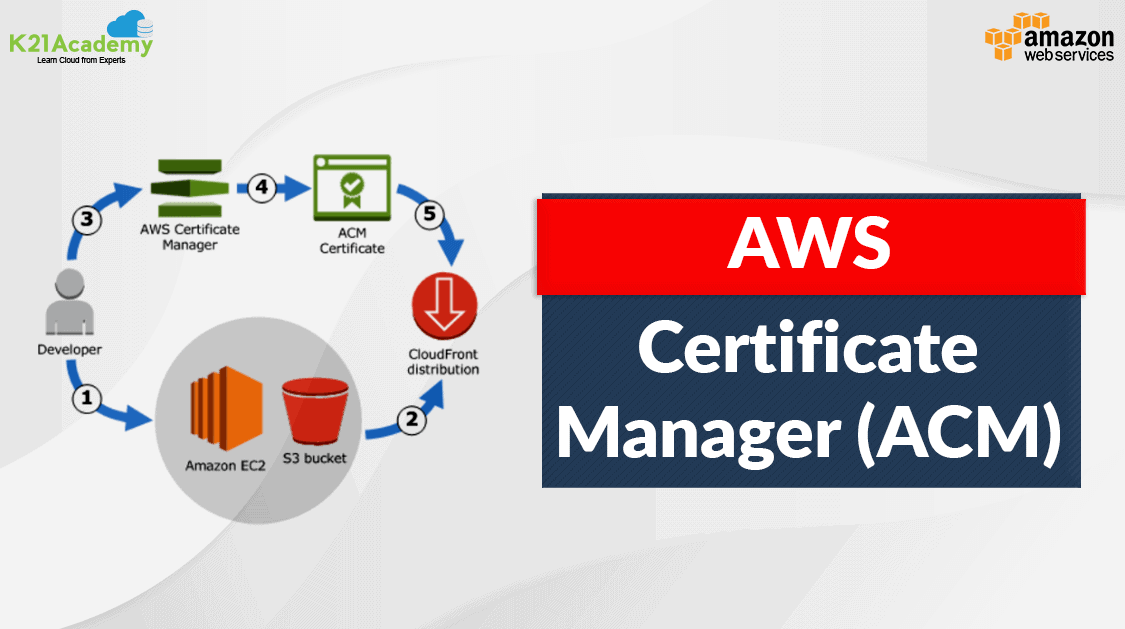





AWS Certificate Manager (ACM): Are you looking to secure your high-traffic website effortlessly? AWS has you covered with a range of integrated services like Elastic Load Balancing, Amazon CloudFront, and Amazon API Gateway, all of which support AWS Certificate Manager (ACM) for seamless security management. Using ACM, you can easily install certificates, ensure your public website is secure, handle high-traffic demands, and benefit from automated certificate renewals.
This blog will cover one of the most important AWS security services for data protection .ie. AWS Certificate Manager ACM, which provides free SSL/TLS Certificates.
Topics we will cover :
- Overview of SSL/TLS Certificates
- How SSL/TLS Works
- What is AWS Certificate Manager (ACM)?
- Why AWS Certificate Manager?
- Use Cases
- Demo: Requesting SSL/TLS Certificates Using AWS Certificate Manager
- Frequently Asked Questions
Before deploying a web application, we should understand the basic concept of Secure Socket Layers (SSL), what they are, and how to request them for free using Amazon Certificate Manager.
Overview of SSL/TLS Certificates
An SSL certificate is like an ID card or a badge that proves someone is who they say they are. SSL certificates are stored and displayed on the Web by a website’s or application’s server.
SSL (Secure Socket Layer) is the standard security technology for establishing an encrypted link between a web server and a browser. This link ensures that all data passed between the web server and browsers remains private and integral. Secure Sockets Layer/Transport Layer Security (SSL/TLS) is a must-have whenever sensitive data is moved to and from a website. For instance, sites that require compliance with requirements such as PCI-DSS, FedRAMP, and HIPAA make extensive use of SSL/TLS. Unfortunately, provisioning and managing SSL/TLS certificates can entail a lot of work that is usually manual and not easily automated.
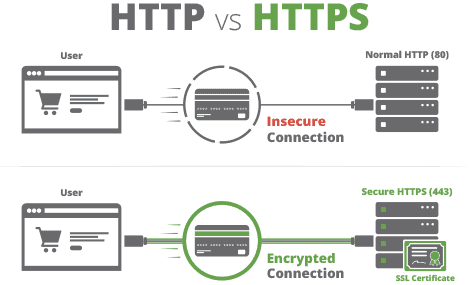
Are SSL and TLS identical?
Transport Layer Security (TLS) is the successor protocol to SSL. TLS is an improved version of SSL. It works in much the same way as SSL, using encryption to protect the transfer of data and information. The two terms are often used interchangeably in the industry, although SSL is still widely used.
Read about: Amazon Elastic Load Balancing (ELB). Its overview, features, and types.
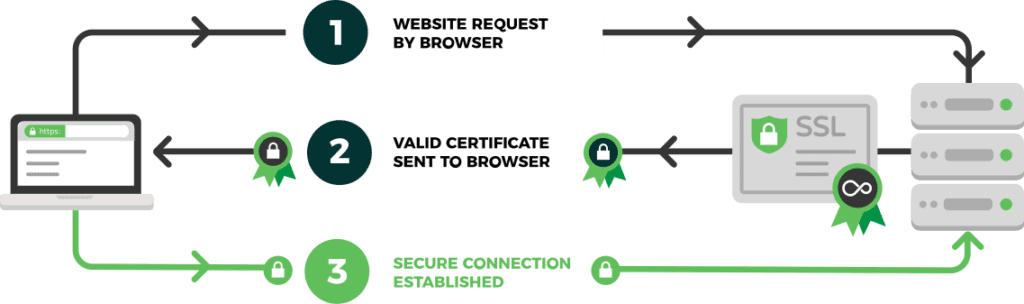
How SSL/TLS works
- A server attempts to connect to a website (i.e. a web server) secured with SSL. The server requests that the web server identify itself.
- The web server sends the server a copy of its SSL certificate.
- The server checks to see whether or not it trusts the SSL certificate. If so, it sends a message to the web server.
- The web server sends back a digitally signed acknowledgment to start an SSL-encrypted session.
Also Check : What is AWS Database Services.( Amazon RDS, Aurora, DynamoDB, ElastiCache )
What is AWS Certificate Manager (ACM)?
AWS Certificate Manager is a service that allows you to easily issue, manage, and deploy public and private Secure Sockets Layer/Transport Layer Security (SSL/TLS) certificates for usage with AWS services and internally connected resources. SSL/TLS certificates are used to protect network connections and establish the identity of websites on the Internet as well as resources on private networks. AWS Certificate Manager automates the time-consuming manual process of purchasing, uploading, and renewing SSL/TLS certificates.
Why AWS Certificate Manager (ACM)?
ACM simplifies the process of enabling SSL/TLS for a website or application on the AWS infrastructure. Many of the manual processes formerly connected with using and managing SSL/TLS certificates are eliminated by ACM. By managing renewals, ACM can also help you minimize downtime caused by misconfigured, revoked, or expired certificates. You receive SSL/TLS security and simple AWS certificate administration. Certificate private keys are safely safeguarded and maintained when you use ACM to handle certificates, thanks to strong encryption and key management best practices. ACM allows you to centrally manage all SSL/TLS ACM certificates in an AWS Region by using the AWS Management Console, AWS CLI, or AWS Certificate Manager APIs.
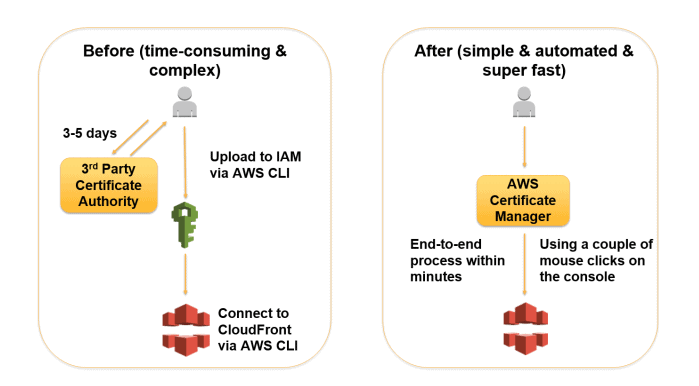
With AWS Certificate Manager, you will be able to quickly request a certificate, deploy it on ACM-integrated AWS resources, like Elastic Load Balancers, Amazon CloudFront distributions, and APIs on API Gateway, and let AWS Certificate Manager handle certificate renewals.
Use Cases of AWS Certificate Manager ACM
Scenario 1: Secure E-commerce Website
Situation: A business that conducts online sales must secure its website to safeguard client information. To guarantee encrypted communication, they need SSL/TLS certificates.
Solution:
- ACM Integration: The business supplies SSL/TLS certificates for its Elastic Load Balancer (ELB) through AWS Certificate Manager.
- Result: Sensitive consumer data is protected from hackers with a strong encryption system on the website. By automating certificate renewals, ACM guarantees ongoing security without requiring human participation.

Scenario 2: Content Delivery Network (CDN) Security
Situation: A media streaming service has to use its CDN to transmit encrypted data to safely distribute material to a global audience.
Solution:
- ACM Integration: To deploy SSL/TLS certificates, the service connects Amazon CloudFront with AWS Certificate Manager.
- Result: High transfer speeds and minimal latency are used to safely transport content. By managing certificates, ACM makes sure that every piece of data sent via CloudFront is encrypted.
Demo: Requesting SSL/TLS Certificates Using Certificate Manager in AWS
We will be performing 6 steps to request an SSL/TLS Certificate using AWS Certificate Manager.
Step 1: Provision Certificates
To get started, sign in to the AWS Management Console and navigate to the ACM console. Choose Request a certificate.
 Step 2: Request a Certificate
Now, choose Request a certificate to request a new certificate, and click on Next.
 Step 3: Provide Domain Names
Provide your domain name and don’t forget to add a wildcard before your domain name.
 Step 4: Select the Validation Method
With DNS validation, you add a CNAME record to your DNS configuration to establish control of your domain name. Choose DNS validation and click on Request.

 Step 5: Create a Record in Route53
Click on Create a record in Route53 (Make sure you have already created the Hosted Zone for the Domain name in Route53 )

Click on Create Records.

Step 6: Certificate Issued
Refresh, and once the validation is completed, the status of the certificate will be issued. (It generally takes 45 minutes to 1 hour to be issued.)
 Now, we have successfully issued an SSL/TLS Certificate that we can attach with ACM integrated services.
Conclusion
AWS Certificate Manager (ACM) simplifies the complexity of SSL/TLS certificate management, offering automation, enhanced security, and seamless integration with AWS services. Whether you’re running an e-commerce website or deploying APIs, ACM helps ensure your applications remain secure and compliant, all while saving time and reducing costs.
Frequently Asked Questions
Is AWS Certificate Manager free?
Public SSL/TLS certificates provisioned through AWS Certificate Manager are free. You pay only for the AWS resources you create to run your application.
What are private certificates?
Private certificates identify resources within an organization, such as applications, services, devices, and users. In establishing a secure encrypted communications channel, each endpoint uses a certificate and cryptographic techniques to prove its identity to the other endpoint.
What is a wildcard domain name?
A wildcard domain name matches any first level subdomain or hostname in a domain. A first-level subdomain is a single domain name label that does not contain a period (dot). For example, you can use the name *.example.com to protect www.example.com, images.example.com, and any other host name or first-level subdomain that ends with .example.com.
Related/References
- AWS Certified DevOps Engineer Professional DOP-C02
- AWS Certified Solutions Architect Associate SAA-C03 Exam
- Overview of Amazon Web Services & Concept
- AWS Management Console Walkthrough
- AWS Free Tier Account Services
- AWS Certificate Manager
Next Task for You
Attend our FREE CLASS to explore AWS Cloud, discover in-demand job opportunities, and gain insights into essential Hands-On labs and projects.
Register now for our FREE Class on Amazon Web Services: Build In-Demand Skills and Secure High-Paying Jobs by clicking the image below.


![Microsoft Agentic AI Business Solutions Architect [AB-100] | K21 Academy](https://test.k21academy.com/wp-content/uploads/2025/11/Microsoft-Agentic-AI-Business-Solutions-Architect-AB-100-Exam-Overview1.png)



