





Anyone who uses cloud-based applications is aware of the importance of security. When we discuss cloud security, we’re referring to the tools, regulations, and services that work to protect the infrastructure, applications, and data stored in the cloud from online attacks. Using an automated security assessment service called Amazon Inspector, apps are checked for exposure, vulnerabilities, and breaks from recommended practices. The security of apps running on Amazon Web Services is boosted by using it.
In this blog, we will discuss Amazon Inspector and cover topics like:
- What is Amazon Inspector
- Benefits of AWS Inspector
- How Amazon Inspector Works
- Getting Started With Amazon Inspector
- Case Study
What is Amazon Inspector?
Amazon Inspector is an automated security assessment service to test the network accessibility of EC2 instances. It helps you to identify vulnerabilities within your EC2 instances and applications. And allows you to make security testing more regular occurrence as part of the development and IT operations.
Amazon Inspector provides a clear list of security and compliance findings assigned a priority by the severity level. Moreover, these findings can be analyzed directly or as part of comprehensive assessment records available via the API or AWS Inspector console. AWS Inspector security assessments help you check for unintended network accessibility of EC2 instances and vulnerabilities on those EC2 instances.
Read: AWS Security And Compliance: Overview, Services & Benefits
Benefits of AWS Inspector
Amazon Inspector is a safe and reliable service we can use for security purposes in our services, deployed applications, etc. It’s an automated and managed service. Let’s see some key benefits of AWS Inspector.
- Automated Service: AWS Inspector is a beneficial service for the application’s security in the AWS cloud. It can fix automatically without the interaction of human resources.
- Regular Security Monitoring: Amazon Inspector helps to find security vulnerabilities in applications, as well as departures from security best practices, both before they’ve been deployed or running in production. This improves the overall security of your AWS-hosted applications.
- Leverage Aws Security Expertise: AWS Inspector includes a knowledge base of the number of rules charted to common security best practices and vulnerability definitions. It uses AWS’s Security Expertise, where AWS is constantly updating the security best practices and rules, so one gets the best of both worlds.
- Integrate Security Into DevOps: AWS Inspector is an API-bound service that analyzes network configurations in your AWS account. Moreover, it uses an optional agent for visibility into EC2 instances. The agent makes it easy to build Inspector assessments right into your existing DevOps process and empowers both development and operations teams to make security assessments an essential part of the deployment process.
- Network reachability price package regulations: Assessments performed by Amazon Inspector Classic that include network reachability rules are priced per instance per assessment (instance assessment) per month. One instance assessment is one that you perform against one instance. Ten instance assessments will result from doing one assessment against ten instances. With bulk reductions, pricing can be lowered to $0.04 per instance assessment per month from the starting price of $0.15 per instance assessment per month.
- Package prices for host assessment rules: The host assessment rules packages for Amazon Inspector Classic employ an agent that is deployed on the Amazon EC2 Instances running the apps you want to evaluate. Each month, host rules assessments (sometimes known as “agent assessments”) are charged per agent. A single-agent assessment is one that is performed against a single agent. Ten agent assessments will result from running one assessment against ten agents. With volume reductions, pricing can be lowered to as little as $0.05 per agent assessment per month from the starting price of $0.30 per agent assessment per month.
Read: AWS OpsWorks Overview, Features & Benefits
How Amazon Inspector Works?
Amazon Inspector performs an automatic assessment and generates a findings report containing steps to keep the environment safe. To use this service, you need to define the collection of AWS and all the resources that complete the application to proceed and tested. It is followed by adding and performing security practices. You can also set the duration of that assessment which can vary from 15 Min to 12 Hrs or last for one day.
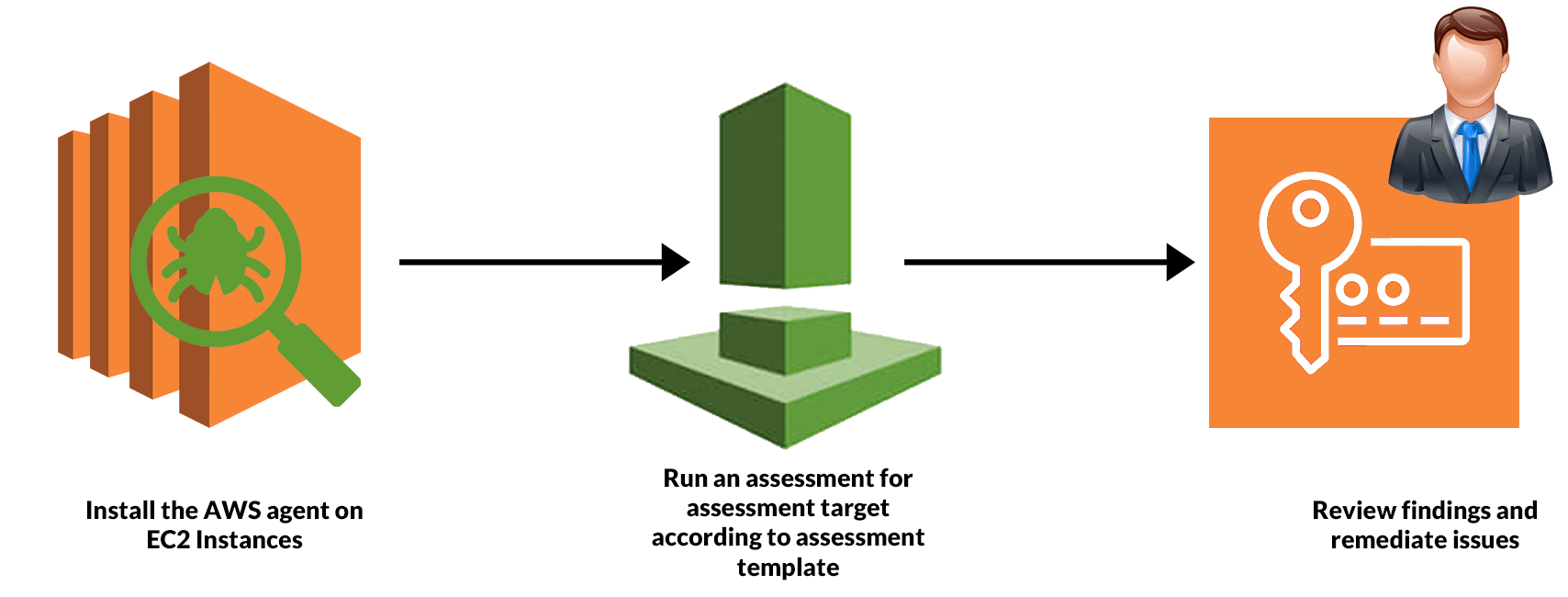
An Inspector Agent runs on the EC2 machines hosting the application that monitors the network, file system, and process activity. After collecting all the required data, it is compared with the built-in security rules to identify security or compliance issues.
Read SDLC Automation: Everything You Need To Know
Getting Started With Amazon Inspector
AWS Inspector is a security service that helps to monitor and improve the security and compliance of web applications running inside AWS. So in this guide, we have a production EC2 instance for which we need to perform a network accessibility check.
We will set up an EC2 instance to use with Amazon Inspector and induce a security thread, and we will open port 21 on EC2. Port 21 is generally not recommended to keep open on your instances. Follow the steps mentioned below.
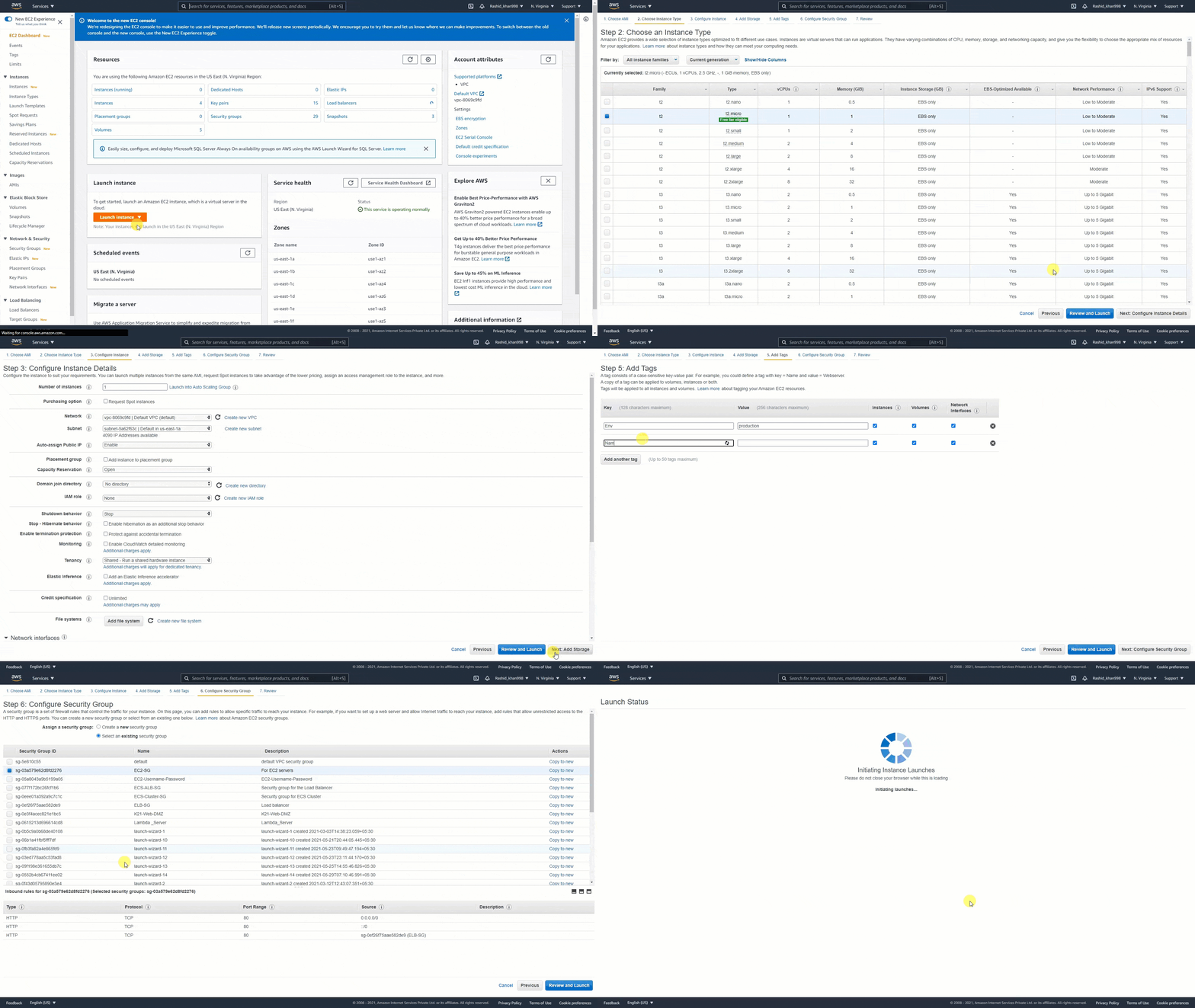
Step 1. Launch An EC2 Instance: Firstly, if you don’t have an AWS account, Register for AWS Free Tier Account. Secondly, we will launch a Linux EC2 instance.
- Click on Launch Instance.
- Select Amazon Linux AMI(HVM), SSD Volume Type.
- Select Subnet and Enable Auto-assign public IP
- Add a Tag to your EC2 instance.
- Configure Security Group and Select EC2-SG(existing security group)
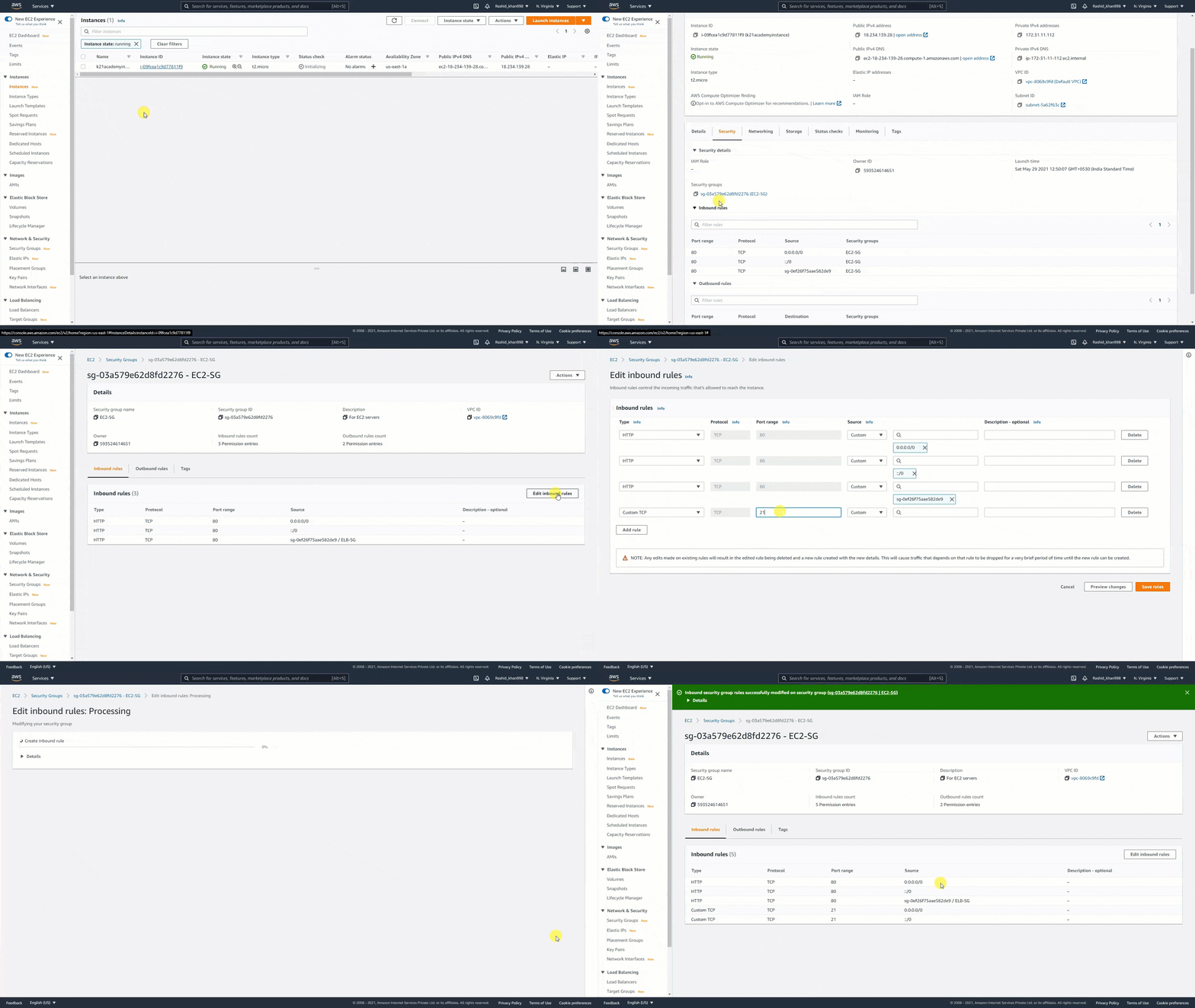
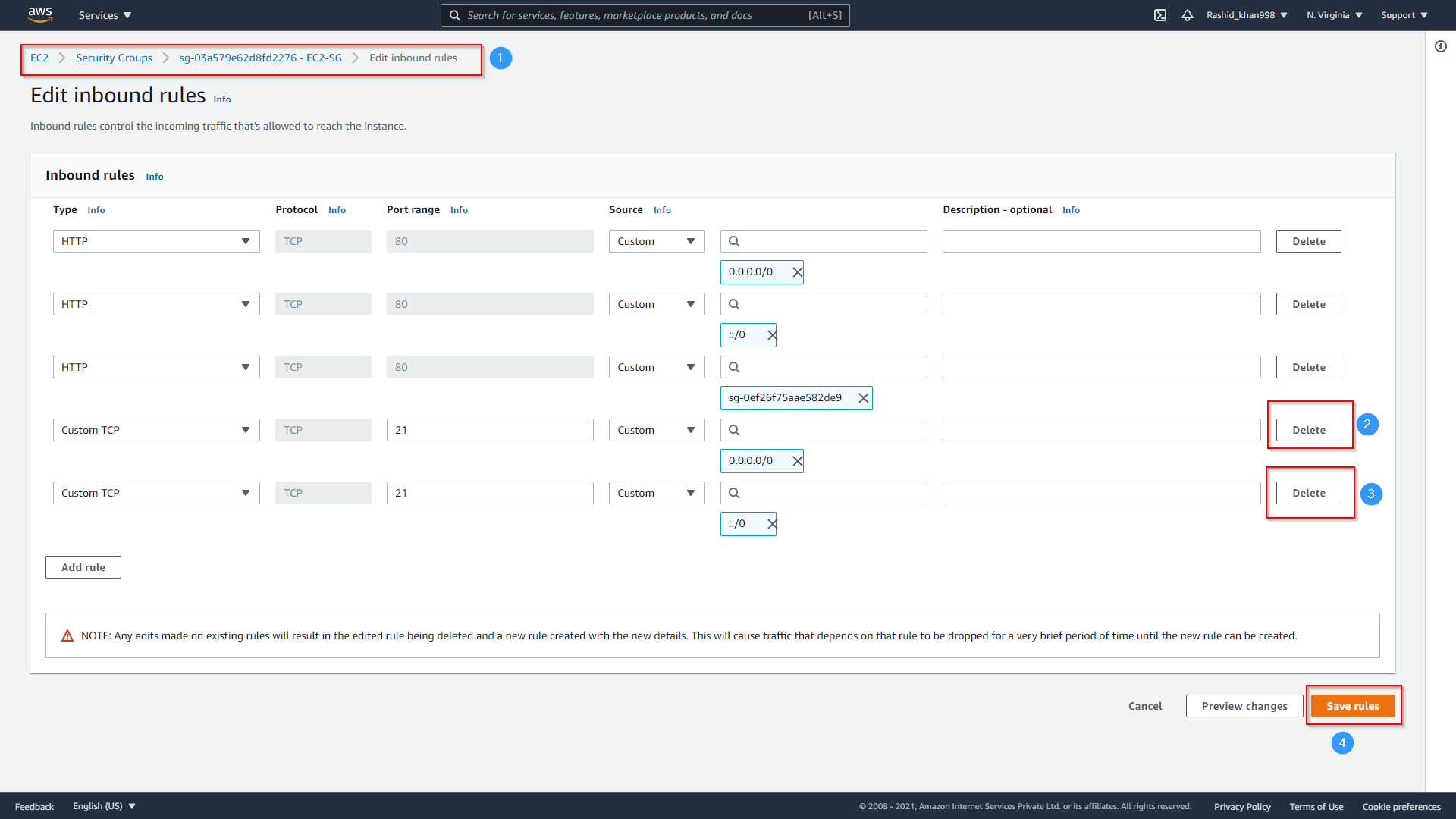
Step 2. Modify Security Group & Open Port 21: After launching the EC2 instance, we have to modify the security group inbound port 21 open.
Read: How To Deploy Web App on AWS
Step 3. Define An Assessment target: Now, select the EC2 instance as the assessment target
- Go to Services and choose Amazon Inspector, click on Get Started.
- Define an Assessment target and check Install Agent on EC2
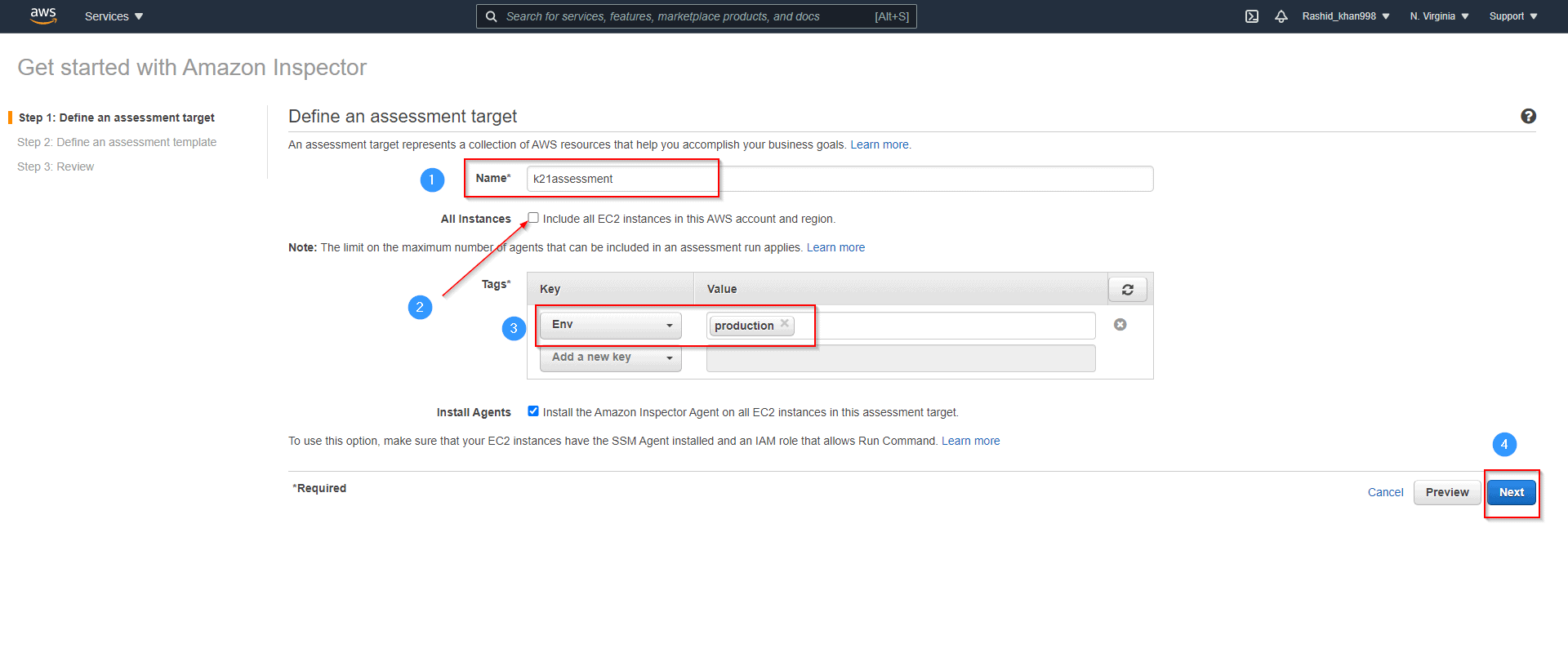
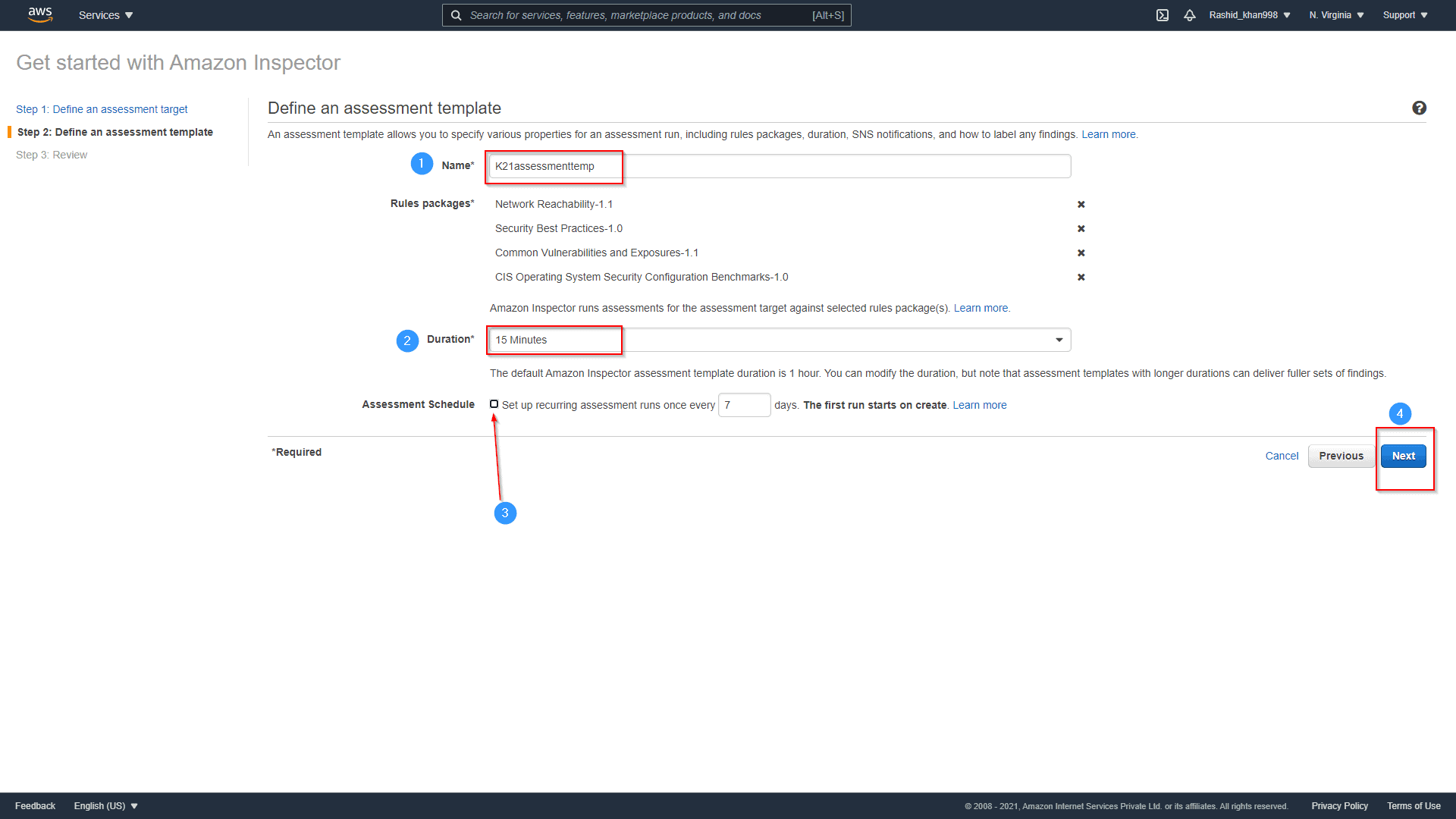
Step 3. Define An Assessment Template: After the assessment target, now define the assessment template.
- Please give it a name: K21assessmenttemp
- Set Duration to 15 Min ( as its demo)
- Uncheck Assessment Schedule and hit Next
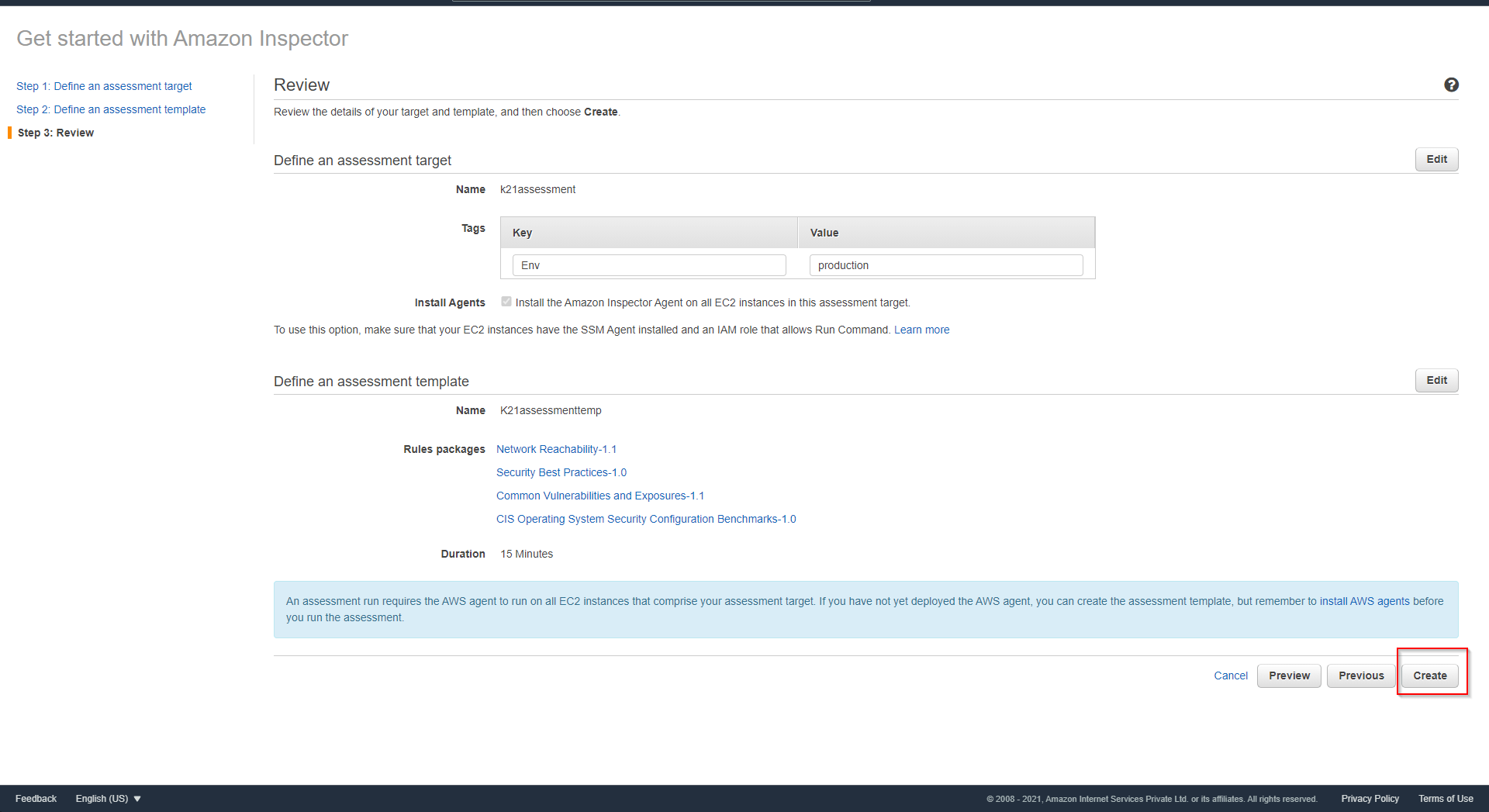
Now Review and click on Create
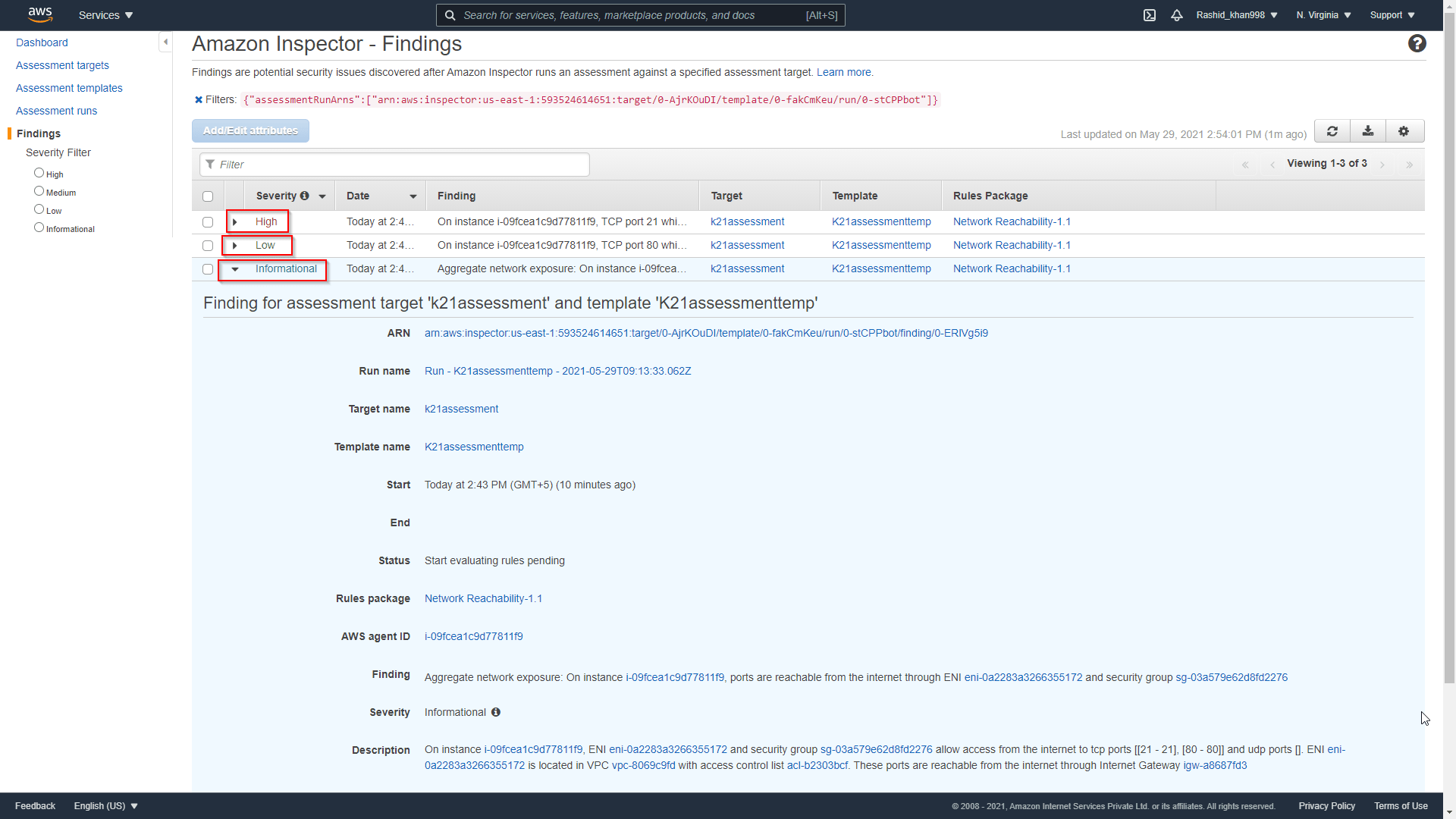
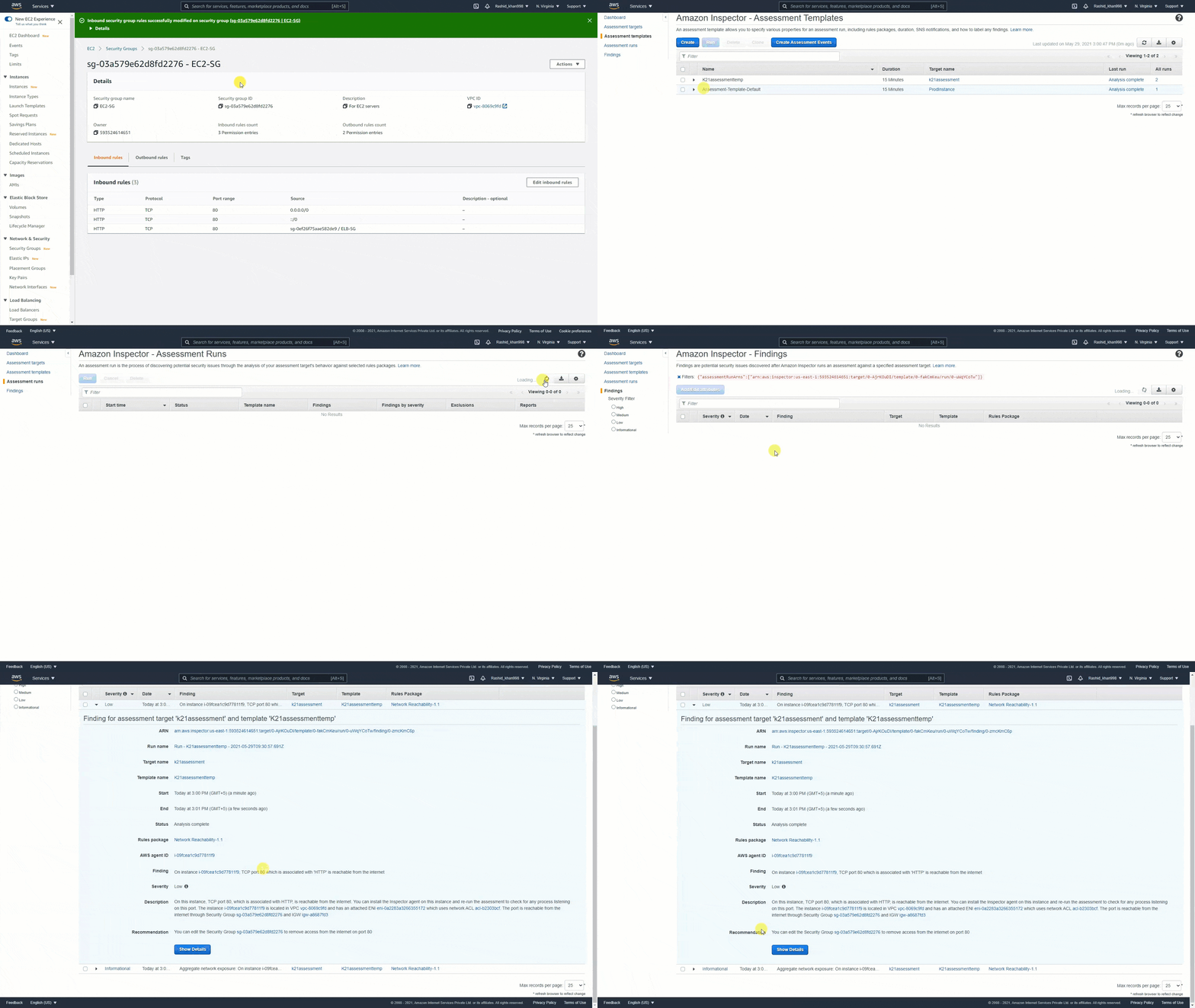
Step 4. Findings: Assessment Run will start automatically. Now, go to the findings and Review the risk.
Read: AWS Elastic Beanstalk: Everything You Need To Know
Step 5. Remove Open Port: Go back to EC2 and Delete open ports.
Step 6. Again Review Findings: After successfully deleting open ports, we will run the Assessment and review Finding; this time, there is no High-risk showing.
Read AWS Certified DevOps Engineer Professional.
Case Study
Almost every enterprise is moving towards the cloud and expanding its infrastructure footprint. There are Lots of companies reportedly consuming AWS services in their tech stacks. Some of the Amazon Inspector customers are mentioned below.
Check also: Free AWS Training

CapLinked: CapLinked is an online business transaction and project management application. CapLinked focused on stimulating sensitive financial transactions such as purchases, audits, and other complex transactions through a secure cloud-based platform. Aws Inspector helping in their way to secure the whole CapLinked ecosystem and pull the industries out of the security dark ages.
Related/References
- AWS Certified DevOps Engineer Professional DOP-C02
- AWS Certified Solutions Architect Associate SAA-Co3
- Overview of Amazon Web Services & Concept
- AWS IoT – Overview And Features For Beginners
- AWS Management Console Walkthrough
- What is AWS Command Line Interface (CLI) | How to Install and Configure
- AWS CloudFormation
- AWS Elastic Beanstalk
Next Task For You
Begin your journey towards an AWS Cloud by joining our FREE Informative Class on Amazon Cloud Free Class by clicking on the below image.


![Microsoft Agentic AI Business Solutions Architect [AB-100] | K21 Academy](https://test.k21academy.com/wp-content/uploads/2025/11/Microsoft-Agentic-AI-Business-Solutions-Architect-AB-100-Exam-Overview1.png)



