





Data is a fundamental element in any machine learning workload. Here, you will learn how to create and manage datastores and datasets in an Azure Machine Learning workspace, and how to use them in model training experiments.
This post will cover some quick tips including FAQs on the topics that we covered in the Day 2 live session which will help you to clear Certification [DP-100] & get a better-paid job.
The previous week, in Day 1 session we got an overview of Azure Machine Learning, and in this week’s Day 2 Live Session of the AI/ML & Azure Data Scientist Certification [DP-100] training program, we covered the concepts of Running Experiments, Training Models and Working with Data. We also covered hands-on Lab8, Lab 9 & Lab 10 out of our 15+ extensive labs.
So, here are some of the Q & As asked during the Live session from Module 3: Running Experiment and training models & Module 4: Working with Data of Microsoft Azure Data Scientist [DP-100]
>Azure ML SDK
Data scientists and AI developers use the Azure Machine Learning SDK for Python to build and run machine learning workflows with the Azure Machine Learning service where they can interact with the service in any Python environment, including Jupyter Notebooks, Visual Studio Code, or Python IDE.
Q1: What are the key areas of the Azure ML SDK?
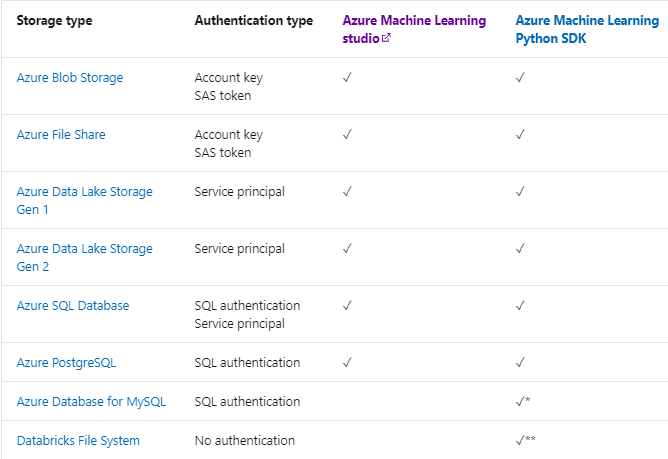
Ans: Key areas include-
- Explore, prepare and manage the lifecycle of datasets used in machine learning experiments.
- Manage cloud resources for monitoring, logging, and organizing the experiments.
- Train models either locally or by using cloud resources, including GPU-accelerated model training.
- Use AutoML, which accepts configuration parameters and training data. It automatically iterates through algorithms and hyperparameter settings to find the best model for running predictions.
- Deploy web services to convert your trained models into RESTful services that can be consumed in any application.
Q2: What are Stable & Experimental features in SDK?
Ans: The Azure ML SDK for Python provides both stable and experimental features in the same SDK.
Stable features are recommended for most use cases and production environments. They are updated less frequently then-experimental features.
Experimental features are newly developed capabilities & updates that may not be ready or fully tested for production usage. They are used to iron out SDK breaking bugs, and will only receive updates for the duration of the testing period.
Q3: What has preferred: Azure ML Studio or SDK?
Ans: The Azure Machine Learning SDK for Python provides both stable and experimental features in the same SDK. This is the payoff for your coding. But You can use Azure ML studio according to your requirements.
Source: Microsoft
Also Check: Our blog post on Data Science Interview Questions.
>Running Experiments
A run is a single execution of a training script. An experiment will typically contain multiple runs. Azure Machine Learning records all runs and stores the following information in the experiment:
- Metadata about the run (timestamp, duration, and so on)
- Metrics that are logged by your script
- Output files that are auto-collected by the experiment or explicitly uploaded by you
- A snapshot of the directory that contains your scripts, prior to the run.
Q4: What are trained models?
Ans: Trained model is the one that has been trained with some specific data parameters with different algorithms and predicted output. This trained model is further used to test the accuracy of the model by testing on the test data.
Q5: Do we have to train the model first and then register or register the model first and then train?
Ans: We have to train the model first and then register it. When you register a model, we upload the model to the cloud (in your workspace’s default storage account) and then mount it to the same compute where your web service is running.
Also Check: Our blog post on DevOps for Data Science.
>Working With Data
Data is the foundation on which machine learning models are built. Managing data centrally in the cloud, and making it accessible to teams of data scientists who are running experiments and training models on multiple workstations and compute targets is an important part of any professional data science solution.
Although it’s fairly common to work with data on their local file system, in an enterprise environment it can be more effective to store the data in a central location where multiple data scientists and machine learning engineers can access it.
>Datastores & Datasets In Azure
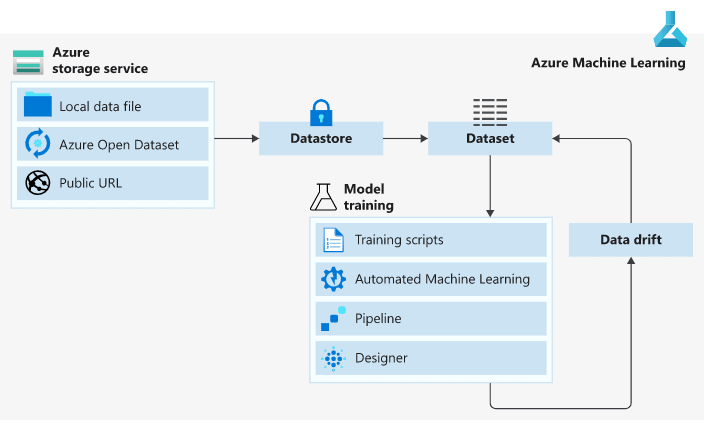
In Azure, we have two concepts namely Datastores and Datasets. Datastores are used for storing connection information to Azure storage services while Datasets are references to the data source locations
Source: Microsoft
>Azure Datastores
In Azure ML, Datastores are references to storage locations, such as Azure Storage blob containers. Every workspace has a default datastore – usually the Azure storage blob container that was created with the workspace. If you need to work with data that is stored in different locations, you can add custom datastores to your workspace and set any of them to be the default
There are two built-in datastores in every workspace namely an Azure Storage Blob Container and Azure Storage File Container which are used as system storage by Azure Machine Learning.
Datastores can be accessed directly in code by using the Azure Machine Learning SDK and further use it to download or upload data or mount a datastore in an experiment to read or write data.

Q6: When we create a default storage account, is it one of the data stores as Azure storage?
Ans: When you create a workspace, an Azure blob container and an Azure file share are automatically registered as datastores to the workspace. They’re named workspaceblobstore and workspacefilestore, respectively.The workspaceblobstore is used to store workspace artifacts and your machine learning experiment logs. It’s also set as the default datastore and can’t be deleted from the workspace.The workspacefilestore is used to store notebooks and R scripts authorized via compute instance.
Q7: What are the available Azure storage services that can be registered as datastores?
Ans: The following Azure Storage Services cab be registered as datastores:
- Azure Blob Container
- Azure File Share
- Azure Data Lake
- Azure Data Lake Gen2
- Azure SQL Database
- Azure Database for PostgreSQL
- Databricks File System
- Azure Database for MySQL
>Azure Datasets
A dataset is basically a schema or a versioned data object for experiments. Datasets can be dragged and dropped in the experiment or added with the URL.

Q8: What are the available datasets in Azure?
Ans: There are two types of datasets available in Azure:
- File Dataset: It is generally used when there are multiple files like images in the datastore or public URLs. File Datasets are usually recommended for machine learning workflows as the source files can be any format that gives a wide range of machine learning scenarios along with deep learning.
- Tabular Dataset: In a tabular dataset the data is represented in table format. This dataset format helps in materializing the dataset into Pandas or Spark DataFrame which allows the developer to work with familiar data preparation and training libraries without having to leave the notebook.
Q9: Can we say dataset as a subset of datastore?
Ans: No we cannot say that the dataset is a subset of Datastores because Datastores are used for storing connection information to Azure storage services while Datasets are references to the data source locations
Q10: What tasks can be performed with Azure Machine Learning datasets?
Ans: With Azure Machine Learning datasets, you can:
- Keep a single copy of data in your storage, referenced by datasets.
- Seamlessly access data during model training without worrying about connection strings or data paths.
- Share data and collaborate with other users.
Q11: Can your datastore and resource group be in different regions?
Ans: Yes they can be in different regions but it makes no sense to have them in different regions as it results in cross-region calling.
Q12: What are datasets with labels?
Ans: We refer to Azure Machine Learning datasets with labels as labelled datasets. These specific dataset types of labelled datasets are only created as an output of Azure Machine Learning data labelling projects. Create a data labelling project with these steps. Machine Learning supports data labelling projects for image classification, either multi-label or multi-class, and object identification together with bounding boxes.
Design and Implementing a Data Science Solution on Azure
Designing and implementing a data science solution on Azure involves leveraging its comprehensive suite of tools and services to streamline the process. Start by identifying the problem and preparing your data in Azure Data Lake or Blob Storage. Use Azure Machine Learning for model development, training, and deployment, integrating tools like Azure Databricks or Synapse Analytics for advanced data processing. Leverage Azure AI for cognitive services and integrate pipelines with Azure DevOps for automation. Monitor and optimize with Application Insights for robust, scalable, and efficient solutions tailored to business needs.
Designing and Implementing a Data Science Solution on Azure Course
FAQs
How can you manage datasets in Azure ML?
In Azure ML, datasets are managed efficiently by creating reusable, version-controlled data references. You can register datasets from various sources, explore them using tools like Data Wrangler, and enable seamless integration for training, validation, and deployment workflows.
How do you create an Azure ML Dataset?
To create an Azure ML Dataset, navigate to the Azure ML Studio, select Create Dataset, choose from file or database sources, define the schema, and validate the data. This simplifies data preparation for training machine learning models.
How do you create datasets from local files in Azure ML?
To create datasets from local files in Azure ML, upload the files to Azure Blob Storage or the Datastore linked to your workspace. Use Azure ML Studio or SDK to define a dataset, ensuring seamless access for machine learning experiments.
What are the supported data formats in Azure ML?
Azure ML supports various data formats, including CSV, TSV, Parquet, JSON, Avro, and Excel, along with image and text data. It enables seamless integration with structured, unstructured, and semi-structured data for efficient machine learning workflows.
How do you create a datastore in Azure ML?
To create a datastore in Azure ML, navigate to your Azure Machine Learning workspace. Select Datastores, click + Create, choose a data source (e.g., Azure Blob), provide credentials, and configure access settings.
How do you convert a Pandas data frame to an Azure ML dataset?
To convert a Pandas Data Frame into an Azure ML Dataset, use the azureml.data.TabularDatasetFactory to create a Tabular Dataset, enabling seamless integration with Azure ML workflows.
How can you lower the cost of a compute cluster in Azure Machine Learning?
Lower the cost of a compute cluster in Azure Machine Learning by using spot VMs, enabling auto-scaling, setting idle time for auto-shutdown, and selecting cost-effective VM types like Standard_NC4as_T4_v3.
How do you create a compute cluster in Azure ML?
To create a compute cluster in Azure ML, navigate to the Azure ML Studio, select Compute, then Clusters, click New, configure your cluster's settings, and deploy.
What options are available in a compute cluster?
In a compute cluster, options include scalable VM sizes, GPU or CPU-based nodes, auto-scaling for cost efficiency, low-priority nodes, and optimized configurations for AI/ML workloads.
What are the features of compute clusters in Azure Machine Learning?
Azure Machine Learning compute clusters provide scalable, managed compute resources for training and deploying machine learning models. They support auto-scaling, cost efficiency, multi-node processing, and integration with ML pipelines.
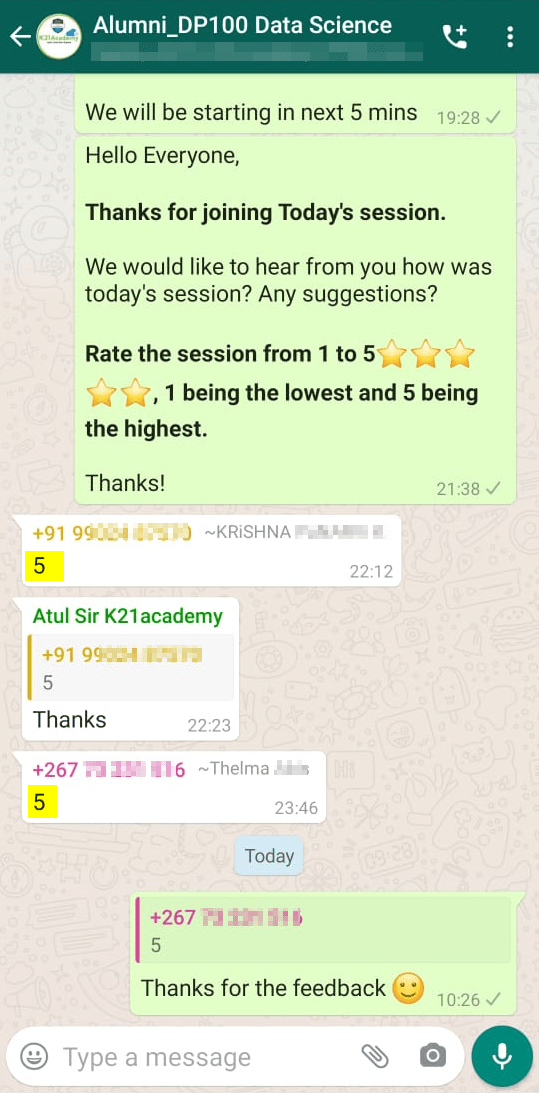
Feedback Received…
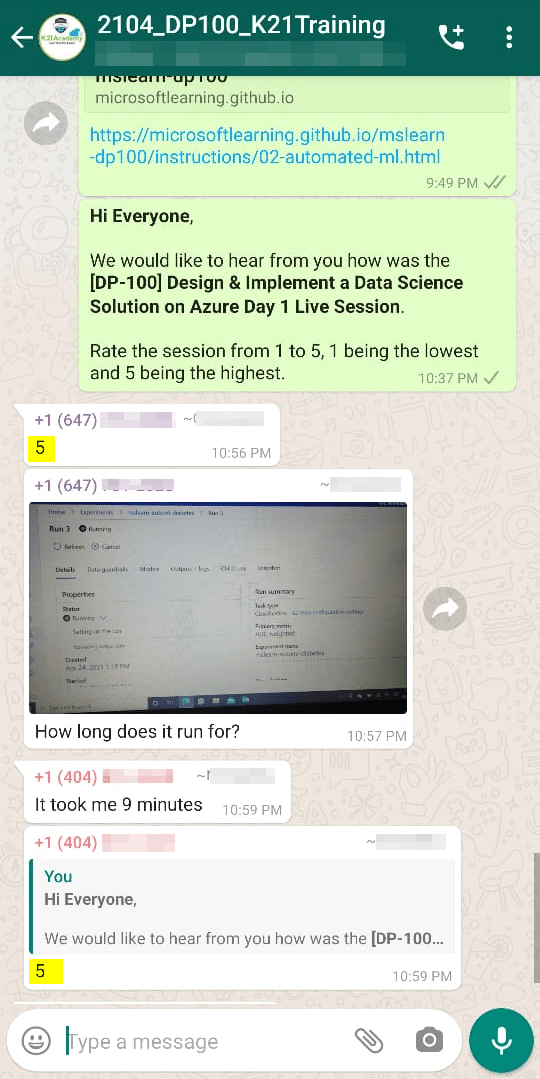
From our DP-100 day 2 session, we received some good feedback from our trainees who had attended the session, so here is a sneak peek of it.
To know more about DP-100 certification and whether it is the right certification for you, read our blog on [DP-100] Microsoft Certified Azure Data Scientist Associate: Everything you must know
Quiz Time (Sample Exam Questions)
With my AI/ML & Azure Data Science training program, we cover 150+ sample exam questions to help you prepare for the certification DP-100.
Check out one of the questions and see if you can crack this…
Ques: You have uploaded some data files to a folder in a blob container, and registered the blob container as a datastore in your Azure Machine Learning workspace. You want to run a script as an experiment that loads the data files and trains a model. What should you do?
A: Save the experiment script in the same blob folder as the data files.
B: Create a data reference for the datastore location and pass it to the script as a parameter.
C: Create global variables for the Azure Storage account name and key in the experiment script.
Comment with your answer & we will tell you if you are correct or not!!
Related/References
- Join Our Generative AI Whatsapp Community
- Azure AI/ML Certifications: Everything You Need to Know
- Azure GenAI/ML : Step-by-Step Activity Guide (Hands-on Lab) & Project Work
- [DP-100] Microsoft Certified Azure Data Scientist Associate: Everything you must know
- Microsoft Certified Azure Data Scientist Associate | DP 100 | Step By Step Activity Guides (Hands-On Labs)
- [AI-900] Microsoft Certified Azure AI Fundamentals Course: Everything you must know
- Azure Machine Learning Service Workflow: Overview for Beginners
- Azure ML Model
- Automated ML In Azure
- Azure Free Account: Steps to Register for Free Trial Account
Next Task: Enhance Your Azure AI/ML Skills


![Microsoft Agentic AI Business Solutions Architect [AB-100] | K21 Academy](https://test.k21academy.com/wp-content/uploads/2025/11/Microsoft-Agentic-AI-Business-Solutions-Architect-AB-100-Exam-Overview1.png)



