





An Azure Data Scientist applies their knowledge of Data Science and Machine Learning to implement and run ML workloads on Azure by using Azure ML Service.
The work role includes planning and creating an appropriate working environment for data science workloads on Azure, running data experiments and train predictive models, manage and optimizing models, and finally deploying them into production.
We have recently started our Azure Data Scientist [DP-100] Training Program.
In this post, we will be sharing the Day 1 live session review with the FAQs of Design & Implement a Data Science Solution Day 1 Training which will help help you in understanding some basic concepts.
First of all, there are 10 modules & 15+ hands-on labs which are important to learn to become an AI/ML & Azure Data Scientist.
- Module 1: Getting Started with Azure Machine Learning
- Module 2: Visual Tools for Machine Learning
- Module 3: Running Experiments and Training Models
- Module 4: Working with Data
- Module 5: Working with Compute
- Module 6: Orchestrating Operations with Pipelines
- Module 7: Deploying and Consuming Models
- Module 8: Training Optimal Models
- Module 9: Responsible Machine Learning
- Module 10: Monitoring Models
Out of which, in the first Live Session (Day 1) of the AI/ML & Azure Data Scientist Certification [DP-100] training program, where we covered the concepts of Machine Learning, Algorithms, Data Types, Azure Machine Learning Workflow, Training and Publishing Model with Designer.
We also covered hands-on Lab 2, Lab 3, Lab 4, Lab 5 and Lab 6 out of our 15+ extensive labs.
DP-100 FAQ’s: Getting Started With Azure Machine Learning
This is how Module 1 looks like on the learning portal
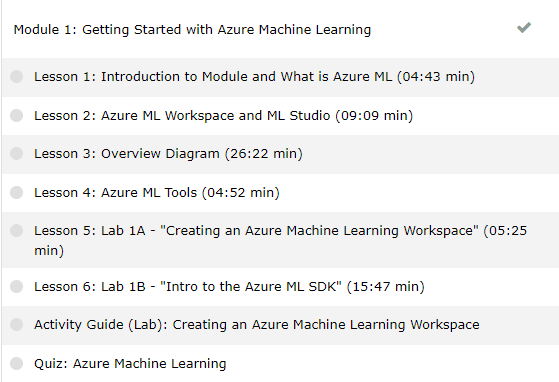
So, here are some of the DP-100 Data Science Questions Answers asked during the Live session from Module 1: Getting Started with Azure Machine Learning & Module 2: Visual Tools For Machine Learning
>Machine Learning
Machine Learning is the foundation for most artificial intelligence solutions, and the creation of an intelligent solution often begins with the use of machine learning to train a predictive model using historic data that you have collected.
>Machine Learning Algorithms
An “algorithm” in machine learning is a procedure that is run on data to create a machine learning “model.”
Machine learning algorithms perform “pattern recognition.” Algorithms “learn” from data, or are “fit” on a dataset.
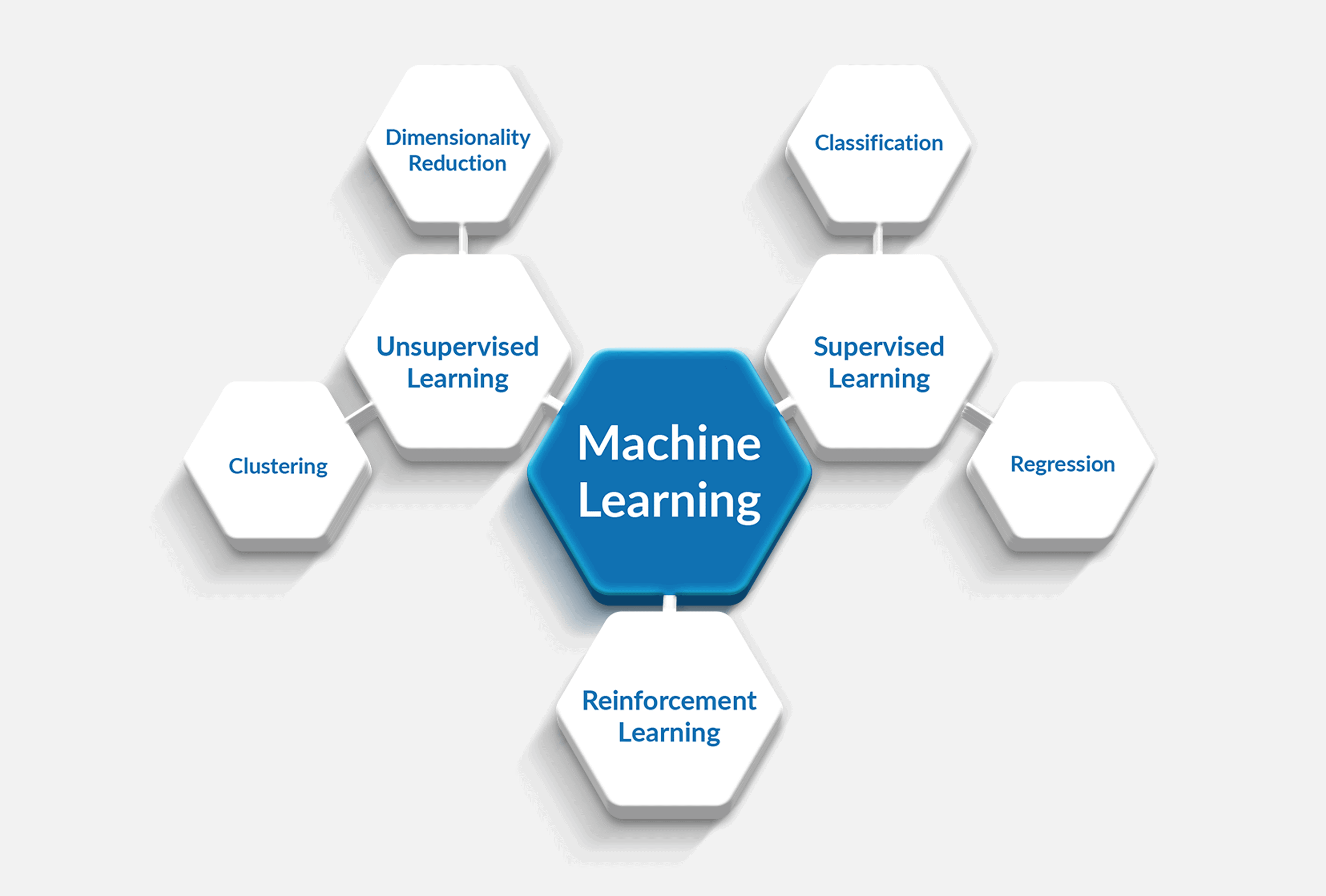
There are mainly 3 types of Machine Learning Algorithms.
1. Supervised: Supervised learning is similar to a child learning under the guidance of a supervisor or a teacher.
2. Unsupervised: Unsupervised learning is similar to a child trying to figuring out things all by itself, without any guidance or supervision.
3. Reinforcement: Imagine every time your kid exhibits good behavior, you reward or incentivize a kid to strengthen or reinforce that specific behavior. Reinforcement learning uses the same strategy and there is no label data.
Q1:Different types of predictions algorithms?
A: Here are Top 10 Machine Learning prediction Algorithms
- Linear Regression
- Logistic Regression
- Linear Discriminant Analysis
- Classification and Regression Trees
- Naïve Bayes
- K-Nearest Neighbors (KNN)
- Learning Vector Quantization (LVQ)
- Support Vector Machines (SVM)
- Random Forest
- Boosting
Q2: How can we deal with multi-class classification problems ?
A: Basically, there are three methods to solve a multi-label classification problem, namely:
- Problem Transformation
- Adapted Algorithm
- Ensemble approaches
Also Read: Our blog post on Data Science Interview Questions.
>Basic Data Terminologies
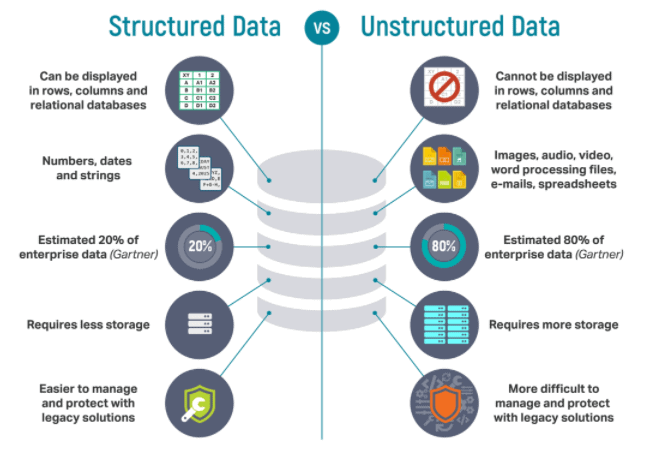
There are three broad types of data and Microsoft Azure provides many data platform technologies to meet the needs of the wide varieties of data.
- Structured data is data that adheres to a schema, so all of the data has the same fields or properties. Structured data can be stored in a database table with rows and columns.
- Semi-structured data doesn’t fit neatly into tables, rows, and columns. Instead, semi-structured data uses _tags_ or _keys_ that organize and provide a hierarchy for the data.
- Unstructured data encompasses data that has no designated structure to it. Known as No-SQL., there are four types of No-SQL databases: Key Value Store, Document Database, Graph Databases, Column Base.
Q3: How different is Data lake from Cosmos DB?
A: Azure Cosmos DB is that the globally distributed database service from Microsoft. Build applications with guaranteed high availability and low latency anywhere, at any scale, or migrate MongoDB, Cassandra, and other NoSQL workloads to the Cloud.
Because it’s a totally managed Microsoft Azure service, we won’t get to manage VM, deploy and configure software, or affect upgrades. Every database is protected automatically, secured from regional failures, and encrypted, so we’d like not to worry about those things and specialize in our app.
Azure Data Lake Storage may be a set of capabilities dedicated to big data analytics and is made on Azure Blob storage. It provides filing system semantics, file-level security, and scale. Because these capabilities are built on Blob storage, it provides low-cost, tiered storage, with high availability/disaster recovery capabilities.
Q4: Can we store structured data in the Data Lake?
A: It is recommended to store structured data/tabular data in other database options like Azure SQL Database.
Azure Data Lake Storage is a group of capabilities dedicated to big data analytics and is formed on Azure Blob storage. It provides file system semantics, file-level security, and scale. Because these capabilities are built on Blob storage, it provides low-cost, tiered storage, with high availability/disaster recovery capabilities.
It stores all kinds of data: structured, unstructured, or semi-structured. 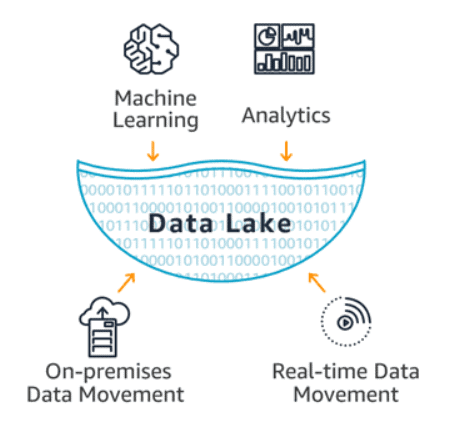
Also Read: Our blog post on DevOps for Data Science.
>Azure Machine Learning
Azure Machine Learning is an enterprise-level service for building and deploying machine learning models.
It allows us to create, test, manage, deploy, or monitor ML models in a scalable cloud-based environment. It supports numerous open-source packages available in Python such as TensorFlow, Matplotlib, and scikit-learn.
Q5: What are the features of Azure Machine Learning Service?
A: Features of Azure Machine Service include:
- It has the potential to auto-train and auto-tunes a model.
- The model can be trained on a local machine and then deployed on the cloud.
- It offers computing services like Azure Databricks, Azure Machine Learning Compute, etc.
- It manages the scripts and the run history of models, making it easy to compare model versions.
>Azure Machine Learning Workflow
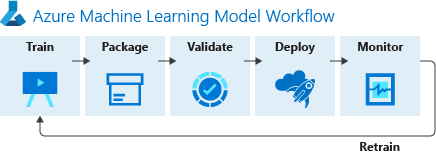
Azure machine learning service workflow is a three-step process that includes:
- Prepare Data: This is the first step in creating a machine learning model which includes collecting and processing the data from datastore and datasets
- Experiment (Build, Train & Test the model): After the data is registered and stored in the dataset, the next step is to build, train, and test the model.
- Deployment: Once the model is trained and tested, it is stored in the model registry and then deployed in web service or IoT modules.
Source: Microsoft
Q6: What is Azure Machine Learning Workspace?
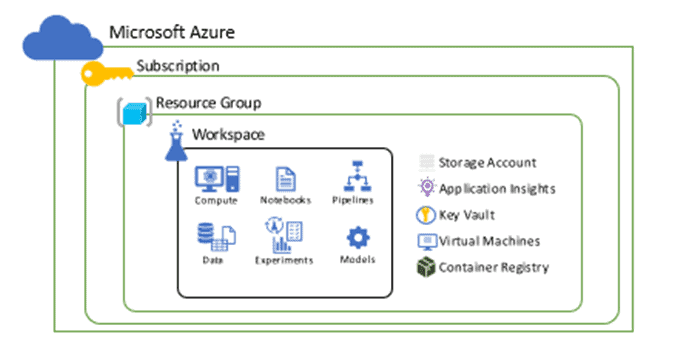
A: Before we start with collecting and processing our data we need a Workspace where we can perform all the operations. A Workspace represents the highest level of centralized resource of machine learning service.
It holds the list of all computes targets used for the training developed model. It stores the log of training execution, metrics, outputs, and snapshots. This data assists in choosing the best training model for the project. The model is registered through the workspace.
Q7: What are the components of Azure Machine Learning Workspace?
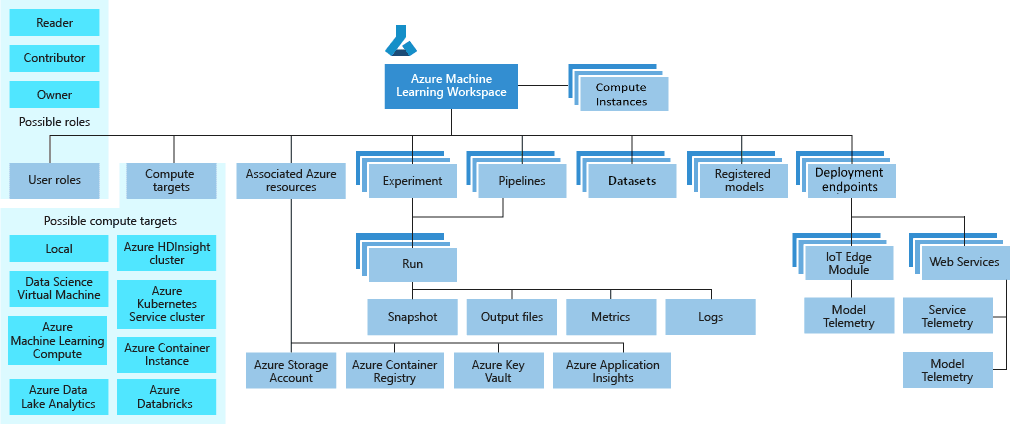
A: Workspace components include:
- ComputeTargets
- User Roles
- Models
- Experiments
- Endpoints
- Pipelines
- Datasets
- Azure Application Insights
- Azure Key Vault
Source: Microsoft
Q8: Please clarify on Compute instance and Compute cluster.
A: Compute instance is a VM that includes multiple tools and environments installed for machine learning. It is primarily used for your development workstation. Users can start running sample notebooks with no setup required. A compute instance can also be used as a compute target for training and inferencing jobs.
Compute clusters are a cluster of VMs with multi-node scaling capabilities. Compute clusters are better suited for computing targets for large jobs and production. The cluster scales up automatically when a job is submitted. Use as a training compute target or for dev/test deployment.
Q9: What are the tools available to interact with the Azure Machine Learning Workspace?
A: There are several ways to create the Azure ML workspace, which are as follows:
- Azure ML Studio
- In any Python environment with the Azure Machine Learning SDK for Python.
- On the command line using the Azure Machine Learning CLI extension
- Azure Machine Learning VS Code Extension
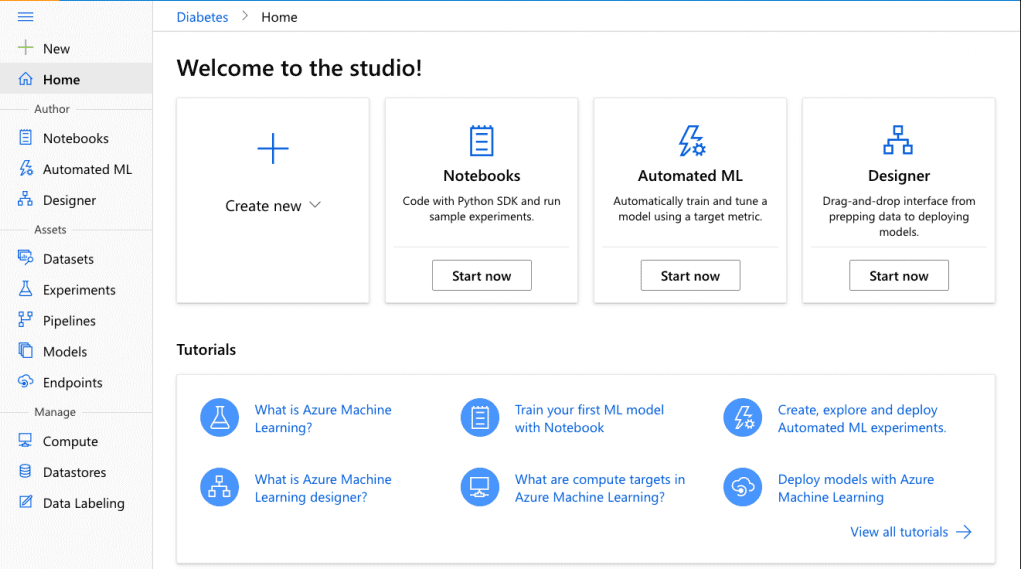
Q10: Difference between VS code and Jupyter or Jupyter notebook.
A: While setting up the Azure Machine Learning environment and perform labs, we will be using Jupyter notebooks to execute the python code.
- Jupyter Notebook is a web-based interactive computational environment for creating Jupyter notebook documents that supports several languages like Python, R, etc., and is largely used for data analysis, data visualization, and more.
- JupyterLab is the next-generation user interface including notebooks. It has a modular structure, where you can open several notebooks or files (e.g. HTML, Text, etc) as tabs in the same window. It offers more of an IDE-like experience.
- VScode or Visual Studio Code combines the ease of use of a classic lightweight text editor with more powerful IDE-type features with very minimal configuration. It comes with a lot of awesome extensions that make it a very powerful tool for regular usage.
> Azure Machine Learning Studio
Azure ML Studio is a workspace where you create, build, train the machine learning models. It is a drag and drop tool (Azure Machine Learning Designer) where you can drag the data sets and further process the analysis on that data. It offers both no-code and low-code options for projects.
Q11: How does ML Studio (Classic) differ from Azure ML Studio?
A: Released in 2015, ML Studio (classic) was the first drag and drop tool which was a standalone service that offered visual experience but however, it does not interoperate with Azure Machine learning. It does not support Code SDKs, ML pipeline, Automated model training and has a basic model for MLOPs and many other features were missing that is a part of Azure Machine Learning Studio now.
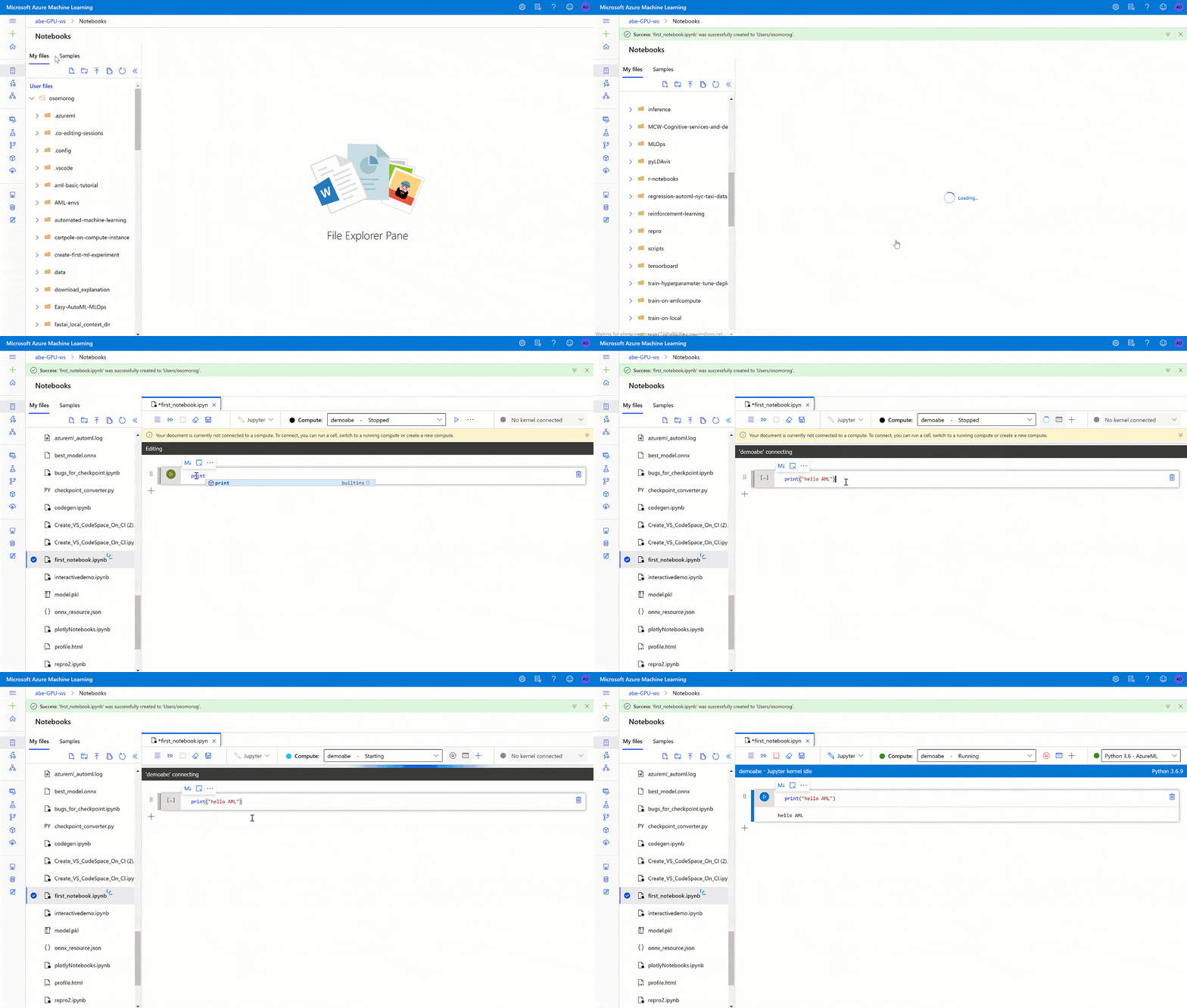
Q12: What are the authoring platforms offered By Azure ML Studio?
A: The studio offers multiple authoring experiences depending on the type project and the level of user experience.
- Notebooks: You can write and run your own code in managed Jupyter Notebook servers that are directly integrated in the studio.
- Azure Machine Learning Designer: It is a drag and drop tool where we can drop datasets and modules for creating ML pipelines.
- Automated Machine Learning UI: It is an easy to use interface used for training and tuning the model.
- Data Labeling: It is used to efficiently coordinate data labeling projects.
Source: Microsoft
>Visual Tools For Machine Learning
In Azure Automated Machine Learning and Designer visual tools, can be used to train, evaluate, and deploy machine learning models without writing any code.
>Automated ML
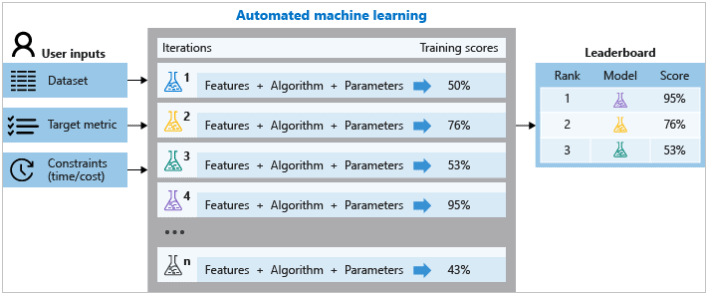
Automated machine learning, also called Automated ML or AutoML is the process of creating a Machine Learning model. It automates the time consuming and iterative tasks of creating a model.
Traditional machine learning model development requires a good knowledge of various machine learning algorithms and it takes time to build an efficient model for predictions. Using Azure Automated ML we can build an efficient model without spending much time.
Source: Microsoft
Q13: Is Automated ML used only for supervised learning?
A: The automated machine learning capability in Azure Machine Learning supports supervised machine learning models – in other words, models for which the training data includes known label values. You can use automated machine learning to train models for:
- Classification (predicting categories or classes)
- Regression (predicting numeric values)
- Time series forecasting (regression with a time-series element, enabling you to predict numeric values at a future point in time)
Q14: How Automated ML works in Azure?
A: During the training process, Azure Machine Learning creates a number of pipelines simultaneously to predict which ML algorithm is best to suit the underlying data. It also does the feature selection and all the pre-processing required.
Steps to design & run automated ml in the Azure workspace:
- Identify which algorithm best suits the underlying problem.
- Choose what you want to use for deploying a model between Python SDK & Azure ML studio.
- Specify the source and format of the training data (Numpy or pandas)
- Configure Compute Targets for model training such as local compute, azure ml computes, remote VMs, or azure databricks.
- Configure Auto ML parameters. It involves all the pre-processing, featurization, number of iterations over different models.
- Submit the trained model
- Review and analyze the score.

Source: Microsoft
> Azure Machine Learning Designer
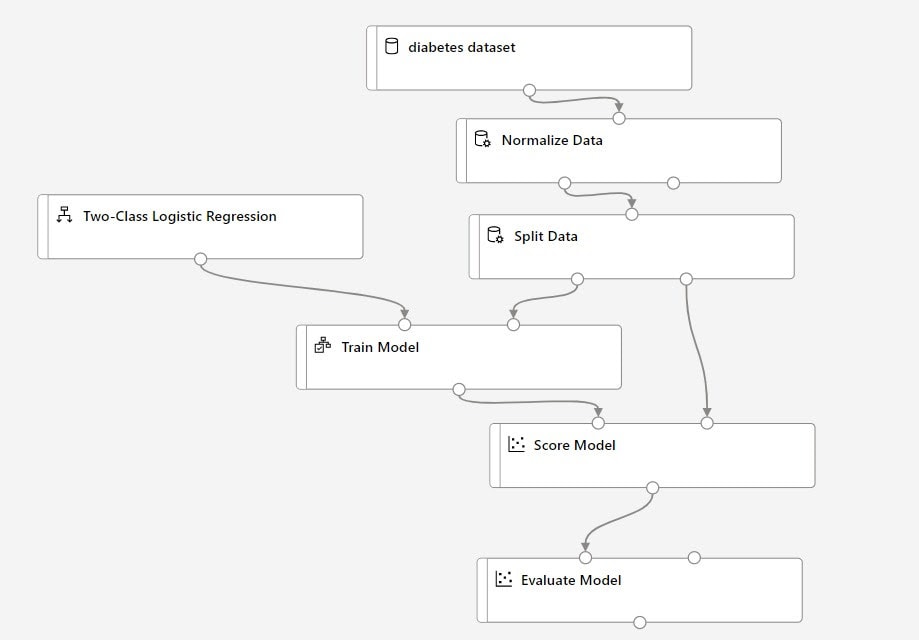
Azure Machine Learning designer is a drag-and-drop interface used to train and deploy models in Azure Machine Learning.
The designer uses your Azure Machine Learning workspace to organize shared resources such as:
- Pipelines
- Datasets
- Compute resources
- Registered models
- Published pipelines
- Real-time endpoints
Source: Microsoft
Q15: How does model deployment & training takes place with the help of designer in the Azure ML Studio?
A: Machine learning model deployment & training is executed in a specified manner in the designer.
- The Datasets & Modules are placed onto the canvas (since it is a drag-and-drop tool).
- The modules are connected to create a pipeline draft
- The pipeline is then run using the compute resources in your Azure Machine Learning workspace and after successful completion is converted to inference pipelines.
- Publish your pipelines to a REST pipeline endpoint to submit a new pipeline that runs with different parameters and datasets.
- Publish a training pipeline to reuse a single pipeline to train multiple models while changing parameters and datasets.
- Publish a batch inference pipeline to make predictions on new data by using a previously trained model.
- Finally the real-time inference pipeline is deployed to a real-time endpoint to make predictions on new data in real-time.
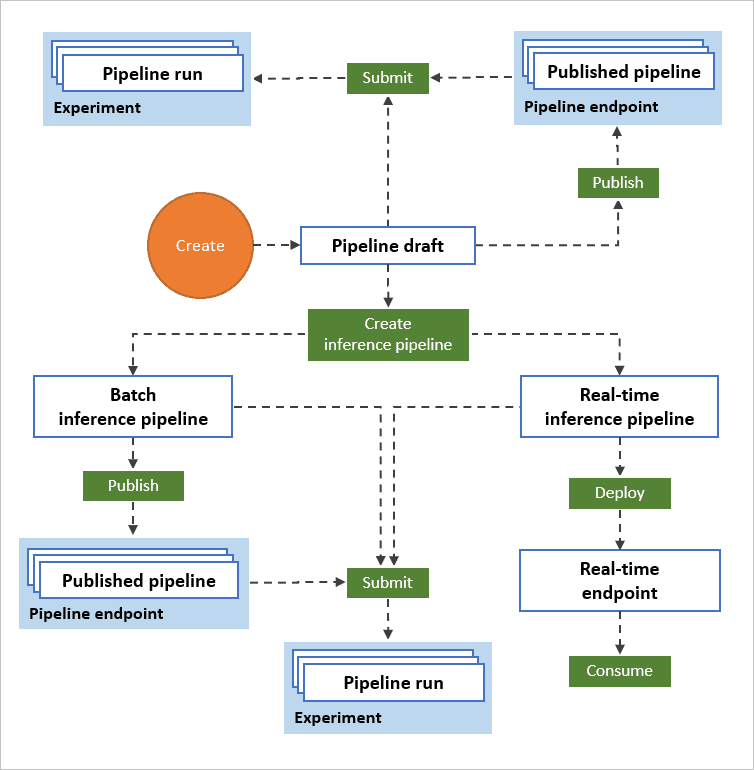
Source: Microsoft
Q16: What are the pipeline Parameters?
A: Pipeline parameters are typed pipeline variables that are declared in the parameters key at the top level of a configuration. Users can pass parameters into their pipelines when triggering a new run of a pipeline through the API.]
Q17: State the difference between a Validation Set and a Test Set.
A: A Validation set mostly considered as a part of the training set as it is used for parameter selection which helps you to avoid overfitting of the model being built.
While a Test Set is used for testing or evaluating the performance of a trained machine learning model.
Q18: What is Confusion Matrix?
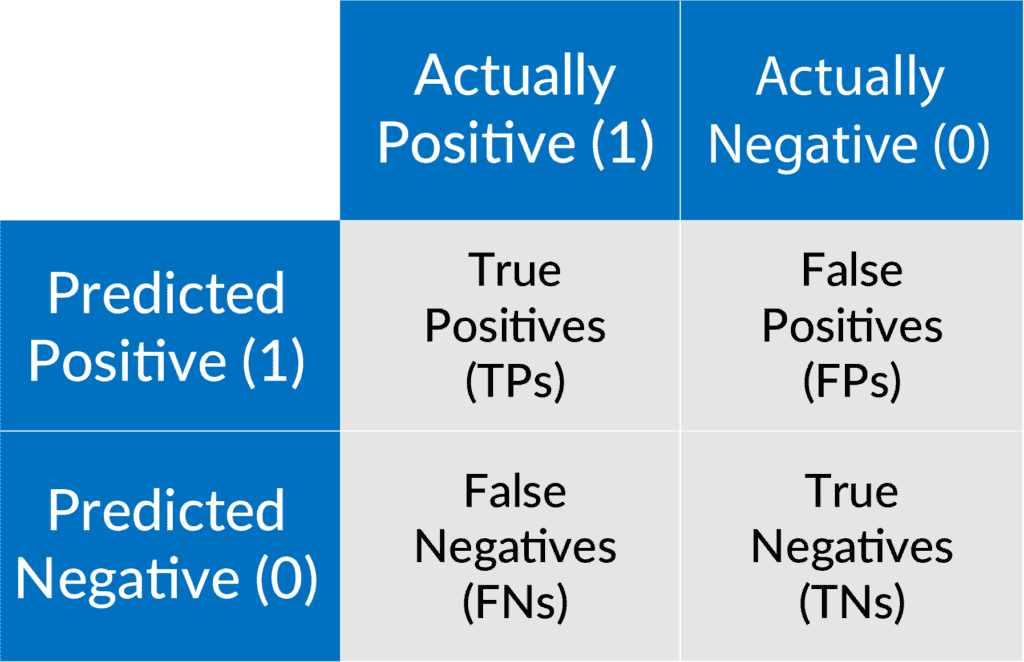
A: Confusion matrix is a N x N matrix used for evaluating the performance of a classification model, where N is the number of target classes. The matrix compares the actual target values with those predicted by the machine learning model.
Typical metrics for classification issues are Accuracy, Precision, Recall, False positive rate, F1-measure, and these are derived from Confusion Matrix. Every metric measure a special side of the predictive model.
Common terms:
- True positives (TP): Predicted positive and are actually positive.
- False positives (FP): Predicted positive and are actually negative.
- True negatives (TN): Predicted negative and are actually negative.
- False negatives (FN): Predicted negative and are actually positive.
 Feedback Received…
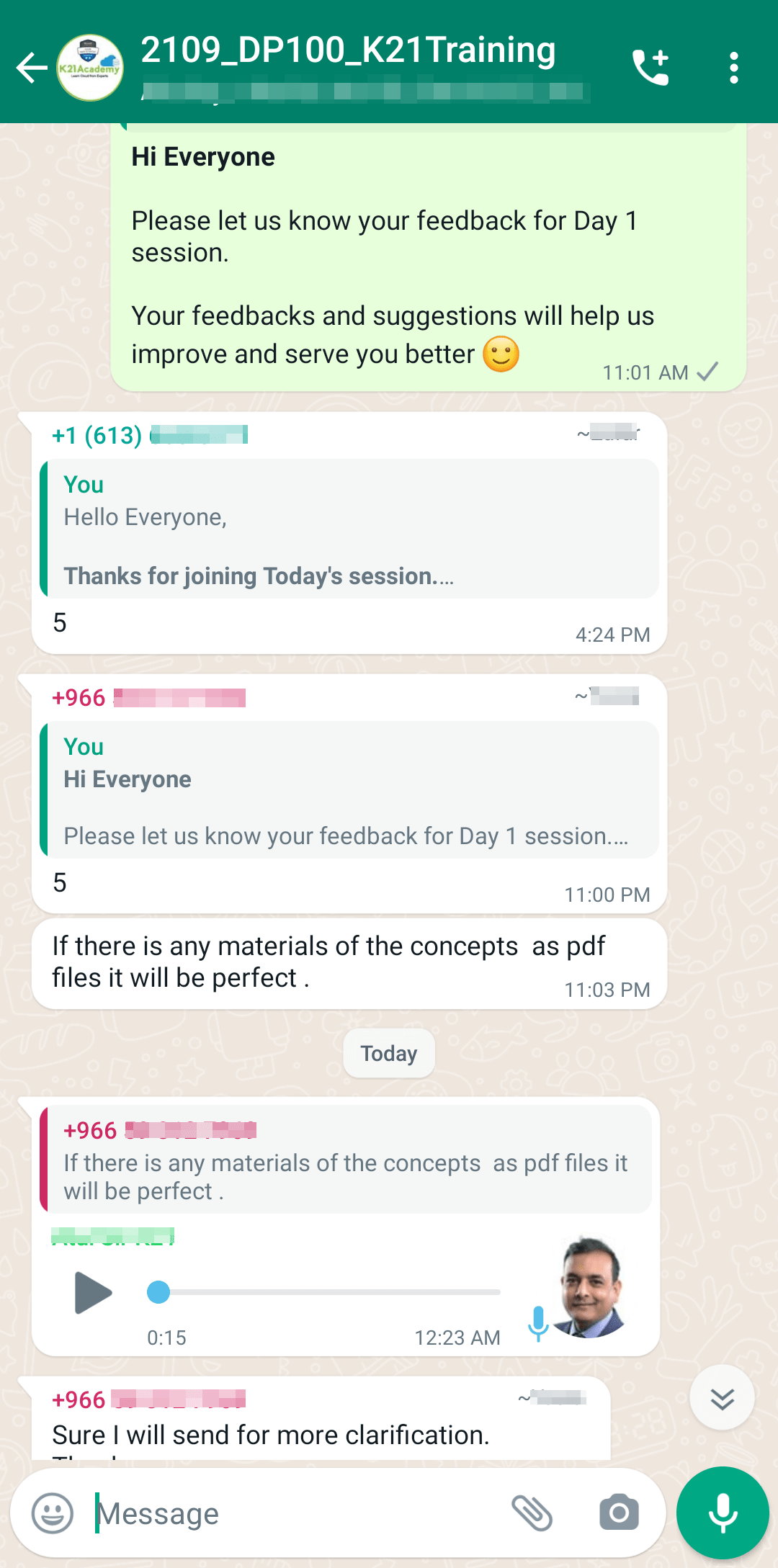
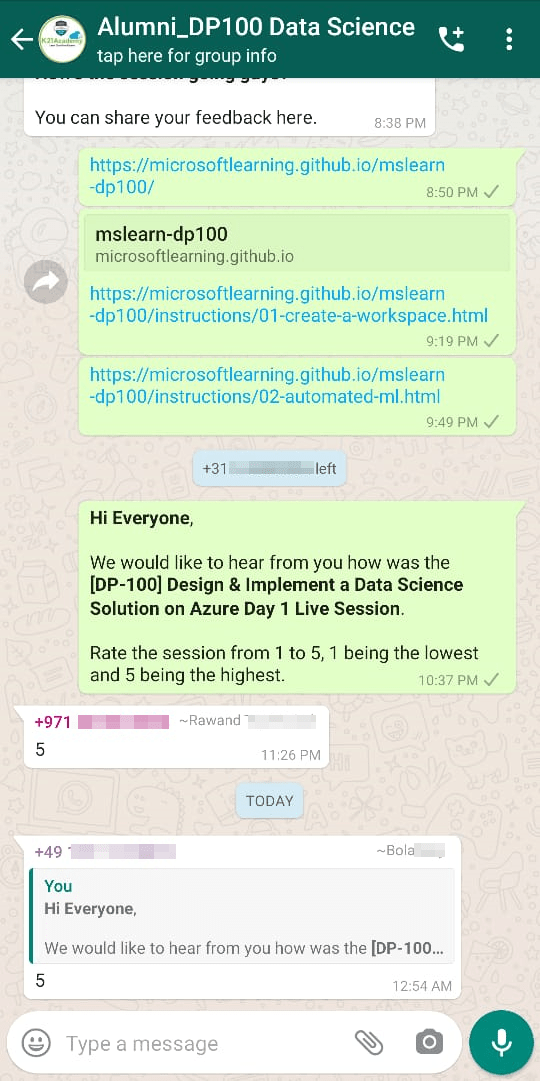
From our DP-100 day 1 session, we received some good feedback from our trainees who had attended the session, so here is a sneak peek of it.
To know more about DP-100 certification and whether it is the right certification for you, read our blog on [DP-100] Microsoft Certified Azure Data Scientist Associate: Everything you must know
Quiz Time (Sample Exam Questions)
With my AI/ML & Azure Data Science training program, we cover 150+ Sample Exam Questions to help you prepare for the certification DP-100.
Check out one of the questions and see if you can crack this…
Ques. You need a cloud-based development environment that you can use to run Jupyter notebooks that are stored in your workspace. The notebooks must remain in your workspace at all times. What should you do?
A) Install Visual Studio Code on your local computer.
B) Create a Compute Instance compute target in your workspace.
C) Create a Training Cluster compute target in your workspace.
Comment with your answer & we will tell you if you are correct or not !!
FAQs
What are the specific tasks measured by the DP-100 exam?
The DP-100 exam measures skills in designing and implementing data science solutions using Azure. Key tasks include preparing data, developing machine learning models, deploying and operationalizing solutions, and monitoring performance to ensure effective AI-driven results.
Who is the intended audience for the DP-100 Microsoft Azure Data Scientist course?
The DP-100 Microsoft Azure Data Scientist course is designed for data professionals, machine learning practitioners, and aspiring data scientists who aim to build, deploy, and maintain machine learning models on Azure, leveraging its advanced tools and services.
What is the DP-100 Microsoft Azure Data Scientist Complete Exam Prep course about?
The DP-100 Microsoft Azure Data Scientist Complete Exam Prep course prepares candidates to design, build, and deploy machine learning solutions using Azure. It covers data preparation, model training, evaluation, and deployment, aligning with real-world AI workflows.
What are the requirements to enroll in the DP-100 Microsoft Azure Data Scientist course?
To enroll in the DP-100 Microsoft Azure Data Scientist course, participants should have basic knowledge of Python programming, foundational statistics, and machine learning concepts. Familiarity with Azure services like Azure Machine Learning is also beneficial.
How does the course keep content updated with the latest platform changes?
The course stays updated with the latest platform changes by regularly reviewing official documentation, incorporating real-world updates, and aligning with industry trends. Expert instructors ensure content reflects current best practices, ensuring learners gain relevant and practical knowledge.
How many sections and lectures are included in the course?
The course includes multiple sections and lectures, carefully structured to cover key topics comprehensively. Each section focuses on specific concepts, ensuring a step-by-step learning journey tailored to practical application.
Is there a certificate of completion provided with the course?
Yes, most courses provide a certificate of completion upon successfully finishing the program. This certificate validates your acquired skills and can be used to enhance your resume or LinkedIn profile.
Related/References
- Join Our Generative AI Whatsapp Community
- Azure AI/ML Certifications: Everything You Need to Know
- Azure GenAI/ML : Step-by-Step Activity Guide (Hands-on Lab) & Project Work
- [DP-100] Microsoft Certified Azure Data Scientist Associate: Everything you must know
- Microsoft Certified Azure Data Scientist Associate | DP 100 | Step By Step Activity Guides (Hands-On Labs)
- [AI-900] Microsoft Certified Azure AI Fundamentals Course: Everything you must know
- Azure Machine Learning Service Workflow: Overview for Beginners
- Azure ML Model
- Automated ML In Azure
- Azure Free Account: Steps to Register for Free Trial Account
Next Task: Enhance Your Azure AI/ML Skills


![Microsoft Agentic AI Business Solutions Architect [AB-100] | K21 Academy](https://test.k21academy.com/wp-content/uploads/2025/11/Microsoft-Agentic-AI-Business-Solutions-Architect-AB-100-Exam-Overview1.png)



