



In this blog post we will discuss the following topics:
- Overview of Network Load Balancer
- Types of Network Load Balancer
- Network Load Balancer Concepts
- Network Load Balancer Limits
- Network Load Balancer Policies
- Steps to Create Network Load Balancer
Oracle Cloud Infrastructure recently has introduced the Flexible Network Load Balancer new feature on 24th March 2021.
Load Balancer provides automatic distribution of traffic from one point to multiple backend sets. In Load Balancer you can create your choice of a public or private IP address. The Load Balancer can reduce your maintenance window by draining traffic from an unhealthy application.
Overview of Network Load Balancer
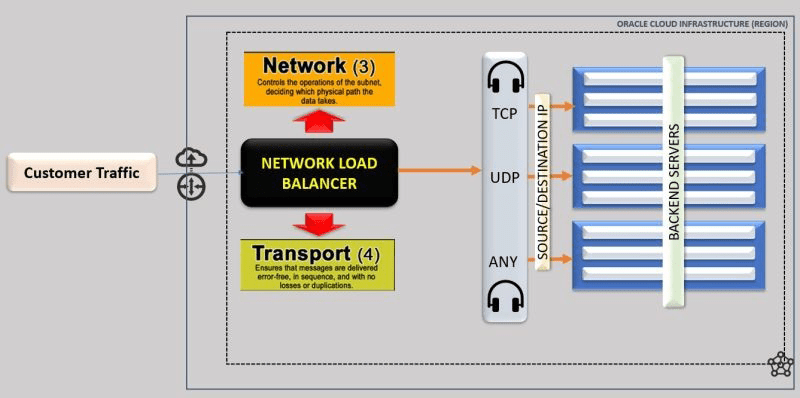
Network Load Balancer provides the benefits of flow high availability, source and destination IP addresses, and port preservation. It is designed to handle volatile traffic patterns and millions of flows, offering high throughput while maintaining ultra-low latency.
- It provides automatic traffic distribution.
- It operates at the connection level and load balances incoming client connections to healthy backend servers based on Layer 3/Layer 4 (IP protocol) data.
- Load balancer with your choice of a regional public or private IP address.
- Network Load Balancer provides the benefits of flow high availability.
- It is designed to handle volatile traffic patterns and millions of flows, offering high throughput while maintaining ultra-low latency.
- You can configure application-specific health checks to ensure that the load balancer directs traffic only to healthy backends.
Also Read: Our blog post on Private DNS.
Types of Network Load Balancer
Flexible Load Balancer enables the user to create a Public and Private network Load Balancer. The public load balancer has a public IP address and The private load balancer has an IP address that is visible within your VCN.
1. Public Network Load Balancer:
- To accept traffic from the internet you need to create a Public network load balancer.
- It is Regional in scope.
- It requires a Regional public load balancer.
- We cannot specify a private subnet for your public load balancer.
2. Private Network Load Balancer:
- To isolate your network load balancer from the internet and simplify your security posture, create a private network load balancer.
- Network load balancer assigns it a private IP address
- Network load balancer is accessible only from within the VCN that contains the host regional subnet
Also Read: Our blog post on Oracle VPN Connect.
Network Load Balancer Concepts
1. Backend Server: The application server responsible for generating content in reply to the incoming client traffic
2. Backend Set: A logical entity defined by a list of backend servers, a load balancing policy, and a health check policy.
3. Health Check: A health check is a test to confirm the availability of backend servers.
- You configure your health check policy when you create a backend set. You can configure TCP-level, UDP-level, or HTTP-level health checks for your backend servers.
- TCP-level health checks attempt to make a TCP connection with the backend servers and validate the response based on the connection status.
- UDP-level health checks attempt to make a UDP connection with the backend servers and validate the response based on the connection status.
- HTTP-level health checks send requests to the backend servers at a specific URL and validate the response based on the status code or entity data returned
4. Health Status: It indicates the Health of your Network Load Balancer and its Components.
5. Listener: A logical entity that checks for incoming traffic on the network load balancer’s IP address.
- Supported protocols are:
- TCP
- UDP
- ICMP
6. Network Load Balancing Policy: It tells the load balancer how to distribute the incoming traffic to the backend server.
- Load balancer policies include:
- 5-Tuple Hash
- 3-Tuple Hash
- 2-Tuple Hash
7. Regions and Availability Domains: The Network Load Balancer service manages application traffic across availability domains within a region.
Note: Check our Blog to know more about what Is Region, Availability Domain (AD)
8. Subnet: A subnet consists of a contiguous range of IP addresses that do not overlap with other subnets in the VCN.
Note: Check our Blog to know more about what Is Oracle Cloud: Create VCN, Subnet, Firewall
9. Virtual Cloud Network (VCN): A private network that you set up in the Oracle data centers, with firewall rules and specific types of communication gateways.
Note: Check our Blog to know more about what Is Networking In Oracle Cloud (OCI): VCN, Subnet, Gateways, Peering, Transit Routing
Network Load Balancer Limits:
Every Load balancer has the below configuration limits:
- One IP address
- 50 backend sets
- 512 backend servers per backend set
- 1024 backend servers total
- 50 listeners
Network Load Balancer Policies
You can apply Network Load Balancer resource policies to control traffic distribution to your backend servers.
Network Load Balancer service supports three primary network load balancer policy types:
- 5-Tuple Hash: Routs incoming traffic based on 5-Tuple (source IP and port, destination IP and port, protocol) Hash. This is the default network load balancer policy.
- 3-Tuple Hash: Routs incoming traffic based on 3-Tuple (source IP, destination IP, protocol) Hash.
- 2-Tuple Hash: Routs incoming traffic based on 2-Tuple (source IP Destination, destination IP) Hash.
Also Read: Our blog post on Oracle Storage.
Steps to Create Network Load Balancer
1. Register For FREE Oracle Cloud Trial Account
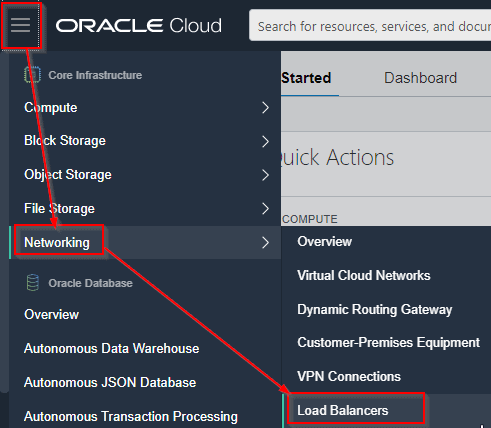
2. Open the navigation menu. Under Core Infrastructure, go to Networking and click Load Balancers.
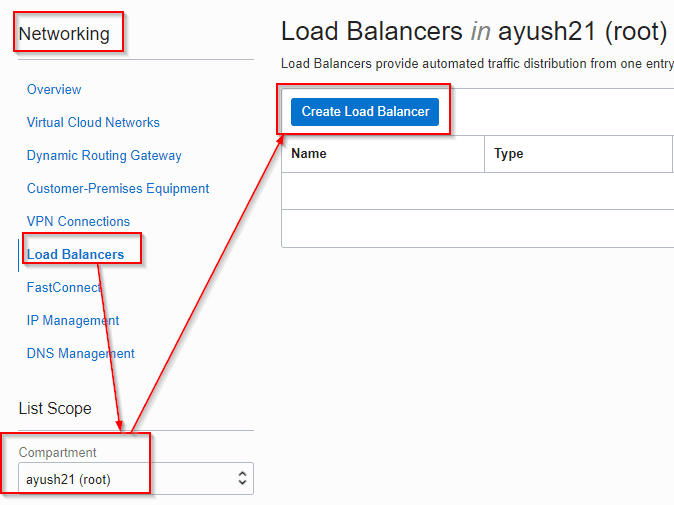
3. Now select the Compartment in which you want to create Network Load Balancer and then click on Create Load Balancer.
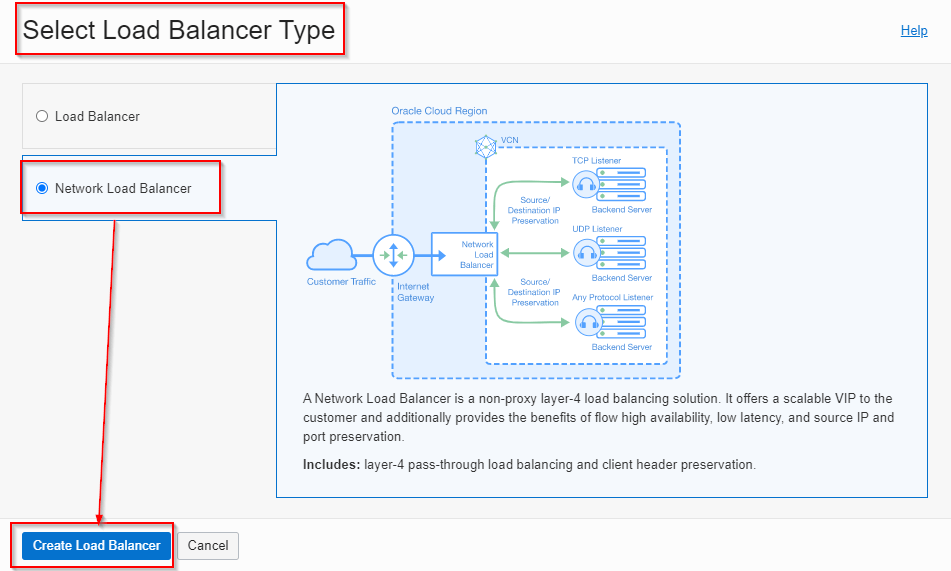
4. Now select the Network Load Balancer
5. Now fill all the details and click on Create Network Load Balancer
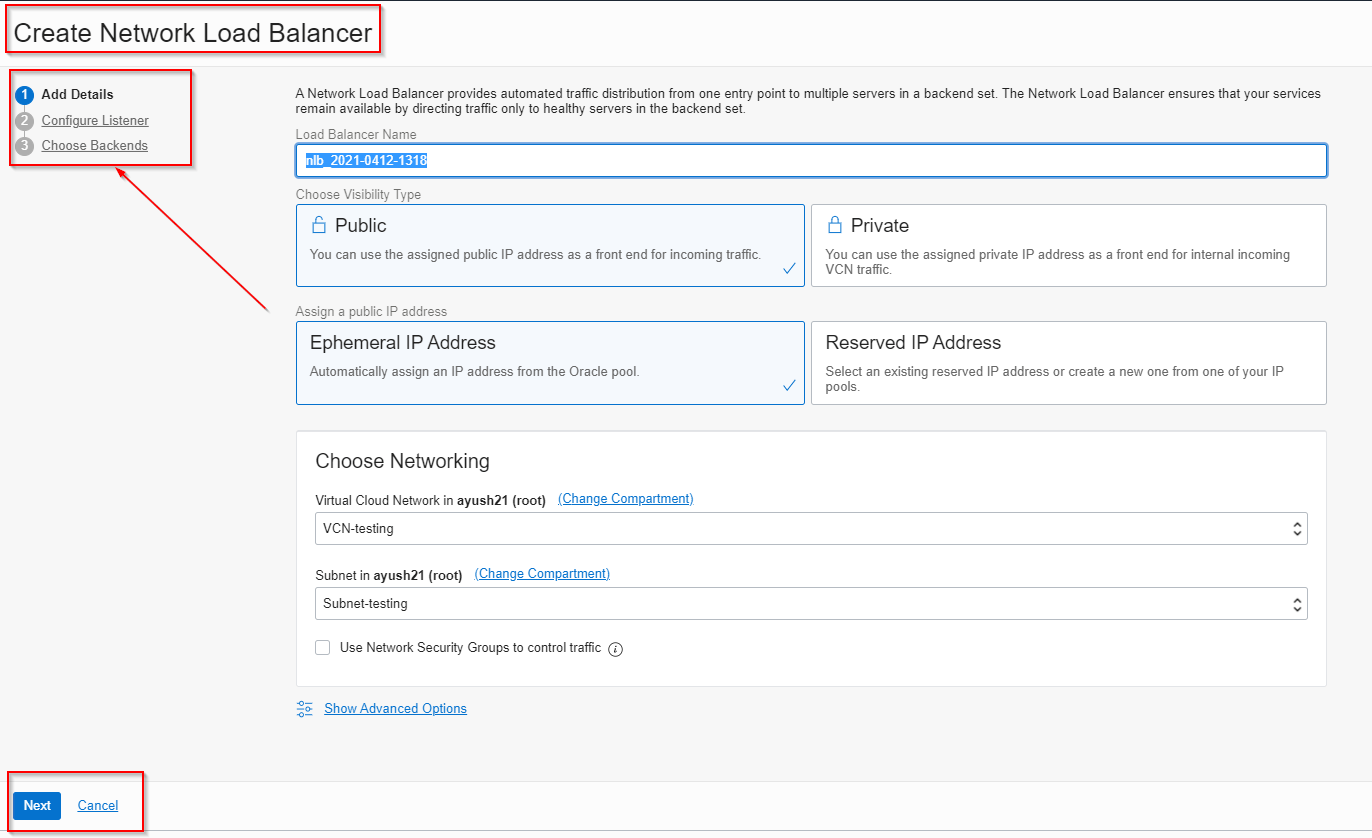
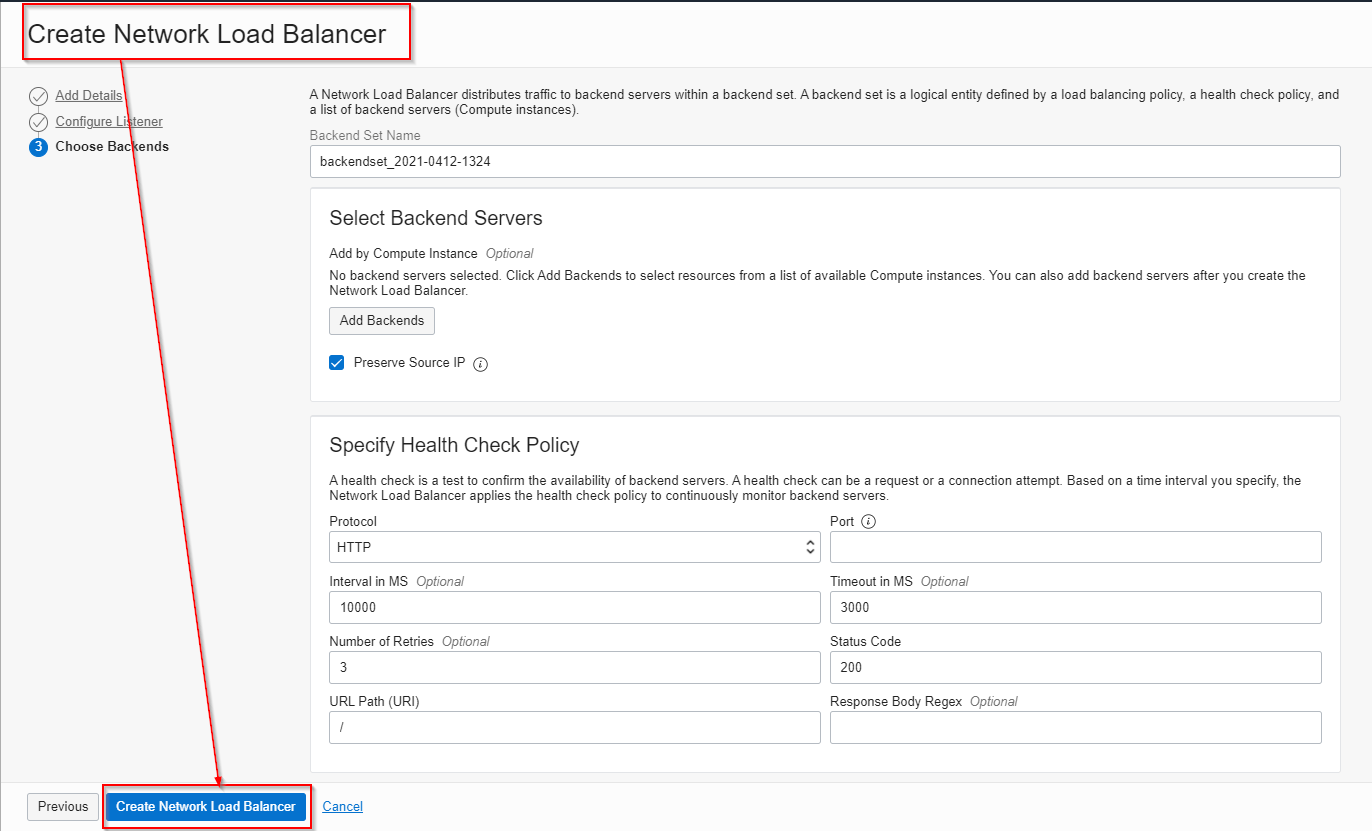
6. Now you can check in Load Balancer and you will see your Network Load Balancer.
Conclusion:
I hope you find this blog useful in understanding the new release of Network Load Balancer and how to create Network Load Balancer. If you have any doubts, please post them in the comments section.
Related/References
- 1Z0-1072-20 | Oracle Cloud Infrastructure 2020 Architect Associate
- What Is Load Balancer In Oracle Cloud (OCI)?
- Networking In Oracle Cloud (OCI): VCN, Subnet, Gateways, Peering, Transit Routing
- Gateways In OCI: Internet Gateway, NAT Gateway, Service Gateway, Dynamic Routing Gateway
- Oracle Cloud (OCI): How To Recover SSH Keys In Compute Instance
- Databases In Oracle Cloud (OCI) – VMDB | BMDB | ExadataC
Begin Your Cloud Journey
Begin your journey towards becoming a Certified Oracle Cloud Infrastructure Architect and earning a lot more in 2022 by joining our FREE CLASS. You will also know more about the Roles and Responsibilities, Job opportunities for OCI Architects in the market, and what to study Including Hands-On labs you must perform to clear the Oracle Cloud Architect Associate Certification (OCI) certification exam by registering for our FREE Masterclass.
Click on the below image to Register Our FREE Class on Master Oracle Cloud (OCI) and Get a Higher Paying Job!


![Microsoft Agentic AI Business Solutions Architect [AB-100] | K21 Academy](https://test.k21academy.com/wp-content/uploads/2025/11/Microsoft-Agentic-AI-Business-Solutions-Architect-AB-100-Exam-Overview1.png)


