





In this blog, we are going to discuss a Comparison of Microsoft Azure’s provided Load Balancing Techniques.
- What is an Azure Load balancer?
- Feature of Azure Load balancer
- What is the Azure Front door?
- Feature of Azure Front door
- Azure Front Door: Pros & Cons
- What is Azure Application Gateway?
- Features of Azure Application Gateway
- Azure Application Gateway: Pros & Cons
- Azure Front Door vs Azure Application Gateway
- Comparison of Azure Front door, Azure application Gateway, and Azure Load balancer.
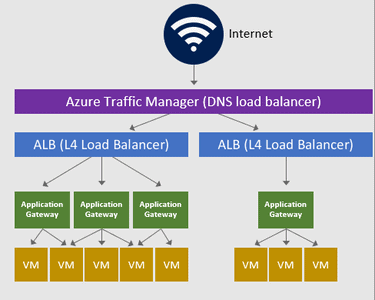
Microsoft Azure manages, control, divert, or balance Network Traffic with Azure Load balancer, Azure Front Door vs. Application Gateway.
Architecture:
What is an Azure Load balancer?
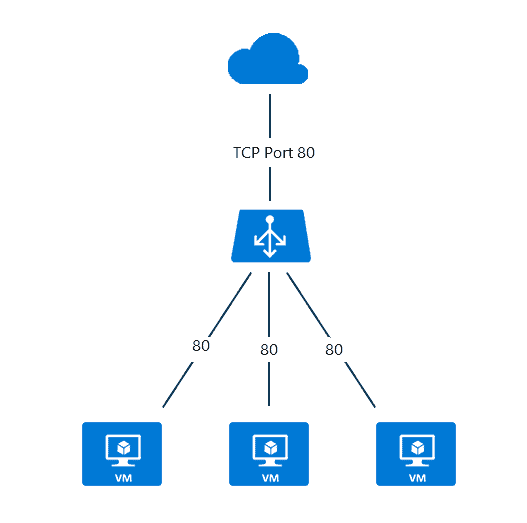
Azure Load balancer provides the distribution of Virtual Machine traffic to run your application smoothly in the production environment. All virtual machines connected to the backend of the Load balancer decide the traffic according to load on the per VM. Load balancer ensures the high availability of your application and its own fully managed service
An Azure load balancer is used to distribute traffic loads to backend virtual machines or virtual machine scale sets, by defining your own load balancing rules you can use a load balancer in a more flexible way.
Check Out: Microsoft AZ 104 Exam.
Feature of Azure Load Balancer
The followings are the most important features of Azure load balancer.
- Network Load balancer: Azure load balancing uses IP addresses, source port, destination IP, Destination port, and Networking Protocol of connection.
- Internal and public load balancer: Azure Load balancer supports Internal Load balancing where you can balance the traffic of an internal virtual network or traffic within a virtual network. Public load balancer used for balancing the internet traffic to virtual machines. it provides an outbound connection to virtual machines.
- Routing: Load balancer works on the Network load balancing technique so it supports the routing using source/ Destination (IP & Port), and protocol. it works on a general routing protocol to support the traffic.
- Works at Layer 4 OSI Model: it works on the Transport layer of the OSI model. it supports TCP and UDP connection process.
- Health probes as TCP/IP: health probe is a very useful feature of Azure load Balancer. whenever any Virtual machine gets stop or errored then the health probe generates the alert and stops sending traffic to a particular Virtual machine which saves the loss of data and time.
- Port Forwarding: Port forwarding supports the connection using IP addressing and Port of services. Azure load balancer support port forwarding so users can access applications with associated IP address and Ports.
Check Out: How to Create Virtual Machine on Azure.
What is Azure Front Door?
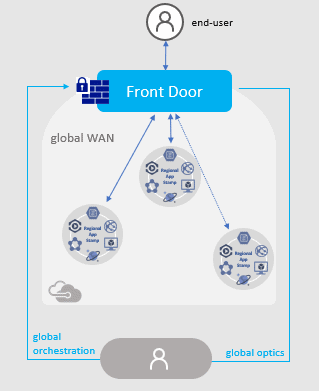
Microsoft Azure Front Door (AFD) is a service that offers a single global entry point for customers accessing web apps, APIs, content, and cloud services.
We can configure Azure front door service in two ways,
- Configure a backend pool for each website
- Create one backend pool and direct all website traffic to a single backend pool.
It offers services over Web applications, VM, APIs’, Cloud services, Data. Also, it provides a global infrastructure for building, managing, and provide security. It’s a kind of a global load balancer.
Also Check: Microsoft Azure Administrator Roles and Responsibilities.
Feature of Azure Front Door
- Microsoft Azure provides Azure front door in two ways, first, Azure front door which having normal functions, and another one, Azure front door standard/Premium (in preview) which has integration with DevOps, support analytics, and a high level of security.
- It supports a Modern Content delivery network with built-in security features.
- Syntactic HTTP/HTTPS requests in form of GET, HEAD
- Sticky Session Supported
- It can be implemented with a web application firewall (WAF).
- Azure DDOS protection support enables security and protection from cyber-attacks.
Also Read: Our previous blog post on Azure Availability Zones. Click here
Azure Front Door: Pros & Cons
Pros:
- Azure Front Door is a global service not tied to any specific Azure region.
- It provides support for the host, path, and query string redirection as well as part of URL redirection.
- Routes for your Front Door are not ordered and a specific route is selected based on the best match.
Cons:
- Azure Front Door doesn’t support static or dedicated frontend anycast IPs.
- Azure Front Door and Azure CDN can’t be configured together because both services utilize the same Azure edge sites when responding to requests.
- Currently, Azure Front Door defenders can only be used with Azure Cloud but there should be provision to use them with multiple cloud vendors.
What is Azure Application Gateway?
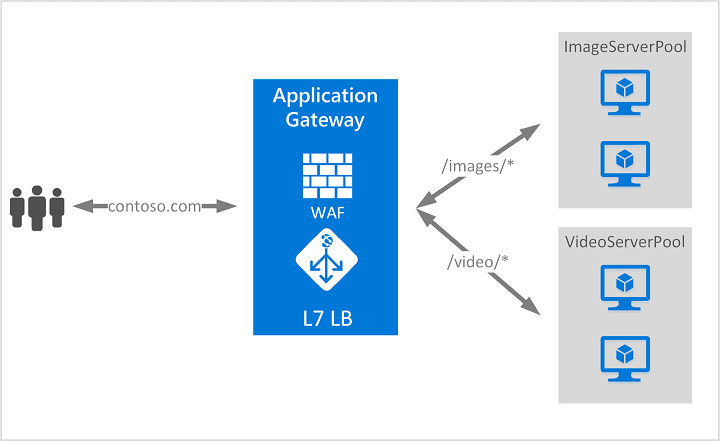
Azure Application Gateway is a web traffic management service provided by Microsoft for Azure cloud services. Azure Application Gateway provides an Azure load balancer on the transport level for applying Routing Rules for supporting load balancing and traffic management. It is a layer 7 load balancing solution that is specifically created for web applications, providing advanced application delivery features such as SSL termination, URL routing, session affinity, and web application firewall capabilities
It supports secure socket layer termination security which makes a more secure way of load balancing and also supports HTTP-based load balancing and creates sessions on the basis of cookies.
Also Read: Azure Proximity Placement Groups.
Features of Azure Application Gateway
- Web traffic load balancer: The application gateway enables the WebSocket and HTTPS protocols which enable full-duplex communication between client and server using TCP connection.
- Routing with URI path and Host headers: it allows you to set traffic between backend pools on the basis of URLs. it differentiates the traffic by URL and host headers names.
- Security: it supports a web application firewall that enables traffic filtering and protection with the Zone redundancy feature.
- Sticky Session Supported: it supports the traffic which is based on cookies. when you are using a web server then re-login to the server then the application gateway diverts the traffic to the same server as per the cookies for better connection and faster delivery of services.
Azure Application Gateway: Pros & Cons
Pros:
- HTTP, HTTPS, HTTP/2, and WebSocket support
- Traffic between backend pools can be set on the basis of URLs with Azure Application Gateway
- It supports the traffic which is based on cookies.
Cons:
- Application Gateway resource can not be renamed. A new resource with a different name has to be created every time.
- Email protocols support such as SMTP, IMAP, and POP3 is not available.
- The configuration is particular right now and needs to be more flexible.
Also Check Azure Cost Management.
What is the difference between Azure Front Door and Azure Application Gateway?
Application Gateway:
- Azure Application Gateway is a web traffic load balancer enabling users to manage traffic on their web applications
- They can make routing decisions based on additional attributes of an HTTP request, for example, URI path or host headers.
- Application Gateway can be used with Web Application Firewall (WAF) for a scalable and secure way to manage traffic to your web applications.
Azure Front Door:
- Azure Front Door is a global, scalable entry-point using the Microsoft global edge network to create fast, secure, and widely scalable web applications.
- With Front Door, you can transform your global consumer and enterprise applications into robust, high-performing personalized modern applications with content that reach a global audience through Azure
- It works at Layer 7 (HTTP/HTTPS layer)
Can you use Front Door and Application Gateway together?
Many a time it makes sense to run Front Door and Application Gateway at the same time. Front Door can be used as a global load balancer to interface with all application traffic entering the cloud. Azure Front Door directs the traffic from there to different regions, and then from there, the Application Gateway takes over to provide fine-tuned load balancing within each region.
But it is not necessary to use both services simultaneously even if we can. For a simple app that runs across multiple regions and doesn’t require complex routing based on low-level rules, Front Door is the most likely and feasible option.
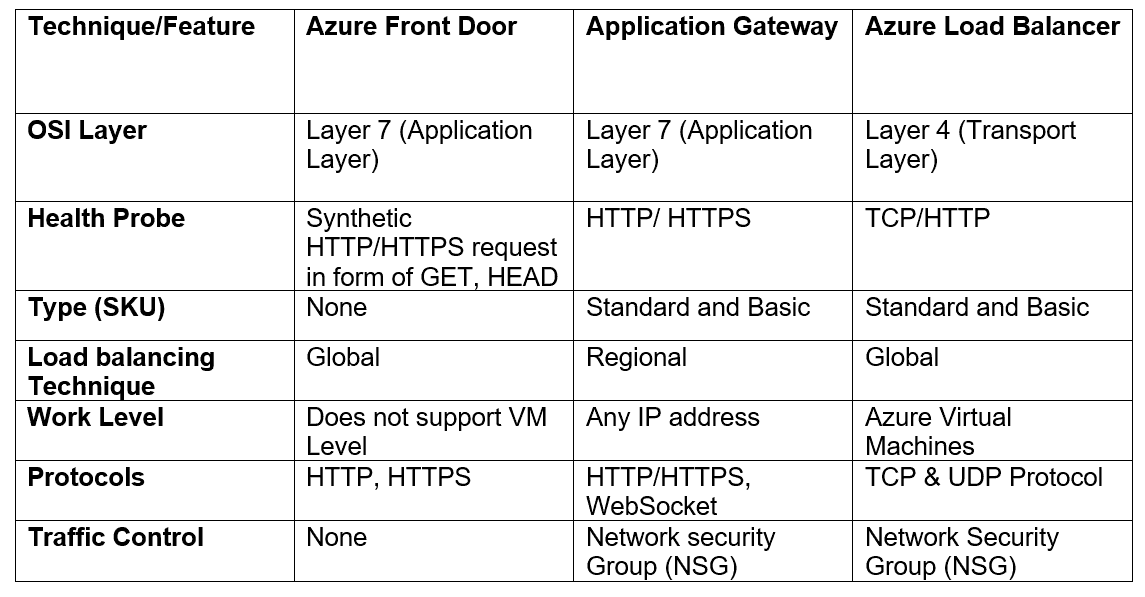
Comparison of Azure Front door Vs Application Gateway, and Azure Load balancer
The Following Table compares all the Available Features based on routing, protocols, and processing limits.
Check Out: What is Availability Set in Azure?
Frequently Asked Questions (FAQs)
Q1: What is the difference between Azure front door and Azure CDN?
Even though Azure Front Door and Azure CDN provide their own distinctive high accessibility capabilities, there can be situations where you might end up using both the features in your architecture. Azure Front Door can be used for delivering your sites, services, and APIs, whereas Azure CDN can be used to deliver static content like images, pdf, or videos which together as s result would provide the optimal solution to incorporate the best capabilities of both the options.
Q2: Is Azure Frontdoor a WAF?
Web Application Firewall(WAF) is natively integrated with Front Door and can inspect a request after it's decrypted.
Q3: What do you like most about Microsoft Azure Application Gateway?
Few features of Azure Application Gateway that make it likable are:
- Support for web application firewall that allows filtering the traffic and protection with the Zone redundancy feature.
- The Standard_v2 version provides support for autoscaling that can scale up/down depending upon the change in traffic load patterns.
- Application Gateway Ingress Controller (AGIC) allows users to use Application Gateway as the ingress for AKS clusters.
- Users can configure routing based on hostname or domain name for more than one web application on the same application gateway with the help of Microsoft Azure Application Gateway.
Q4: What do you like most about Azure Front Door?
Azure Front Door features that stand out are: Azure Front Door offers a modern content delivery network with built-in security feature support Sticky Session support Azure DDOS protection support in Azure Front Door enables security and protection from cyber-attacks. It accelerates and delivers apps and content globally at scale to users in whichever location they’re creating opportunities to compete, weather change, and quickly adapt to new demand and markets. Natively supports end-to-end IPv6 connectivity and the HTTP/2 protocol. The low entry fee and a simplified cost model reduce billing complexity by having fewer meters needed to plan for.
Q5: What's the difference between Azure Front Door and Application Gateway?
While both Front Door and Application Gateway are layer 7 (HTTP/HTTPS) load balancers, the main difference is that Front Door is a non-regional service and can load balance between different scale units/clusters/stamp units across regions whereas Application Gateway is a regional service and allows users to load balance between their VMs/containers, etc. that is within the scale unit.
Q6: What is difference between Azure CDN and Azure Front Door?
Azure CDN focuses on content caching and delivery, Azure Front Door offers more advanced traffic management capabilities, including routing, load balancing, and SSL termination, making it suitable for optimizing web application delivery and enhancing security
References/Related
- Exam AZ-305: Azure Solutions Architect Expert Certification
- ARM Template: Azure Resource Manager Template Tutorial
- Region, Availability Zone, Availability Sets and Fault Domain, Update Domain In Microsoft Azure
- Azure Networking: Brief Introduction of Azure Virtual Network
Next Task For You
Begin your journey toward Mastering Azure Cloud and landing high-paying jobs. Just click on the register now button on the below image to register for a Free Class on Mastering Azure Cloud: How to Build In-Demand Skills and Land High-Paying Jobs. This class will help you understand better, so you can choose the right career path and get a higher paying job.


![Microsoft Agentic AI Business Solutions Architect [AB-100] | K21 Academy](https://test.k21academy.com/wp-content/uploads/2025/11/Microsoft-Agentic-AI-Business-Solutions-Architect-AB-100-Exam-Overview1.png)



