





Are you looking for a way to migrate your on-premise database to the cloud and use the cloud benefits such as improved performance, a managed environment, and more transparency in maintenance costs?
AWS Database Migration Service (DMS) is a managed service that provides a quick and secure way to migrate your on-premise databases to the cloud. As a result of the migration to AWS, you can deliver up to 3x more features to the market, save on average 31% of your maintenance costs, and boost the productivity of your IT staff by 62%.
AWS DMS is a managed and automated service, however, it is not a fully-automated service. You will still need to set up a few things before starting the migration, which requires a comprehensive understanding of AWS Database Migration Service and its components. In this blog, I will explain AWS DMS, its benefits, and its components, and finally, we will see the steps for migrating an On-Premises Oracle Database to Amazon Aurora MySQL.
- What is AWS Database Migration Service?
- AWS DMS Benefits
- How does AWS DMS work?
- AWS DMS Components
- Use Cases
- Steps for Migrating an On-Prem Oracle Database to Amazon Aurora MySQL
- Limitations of AWS DMS
What is AWS Database Migration Service?
AWS Database Migration Service (DMS) is a managed and automated service that provides a quick and secure way to migrate databases from on-premise databases, DB instances, or databases running on EC2 instances to the cloud. It helps you modernize, migrate, and manage your environments in the AWS cloud. Amazon provides a wide spectrum of databases to work with such as Amazon RDS, Aurora, DynamoDB, ElasticCache, and Redshift.
Check out this blog to know more in detail about AWS Database Service – Amazon RDS, Aurora, DynamoDB, ElastiCache
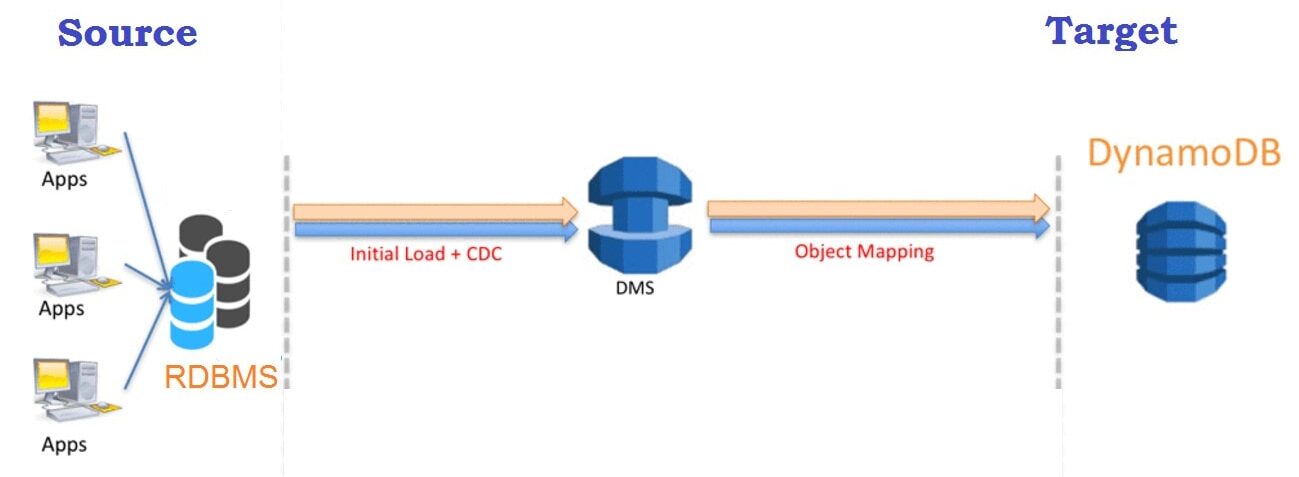
DMS can be used to migrate relational databases, data warehouses, NoSQL databases, and other types of databases into the cloud. AWS DMS supports homogeneous (i.e. Oracle to Oracle) and heterogeneous (i.e. Oracle to Amazon Aurora) database migration. During migration the source database remains operational, thereby minimizing the downtime. The entire migration process can be controlled from the AWS Management Console.
Learn With Us: Join our AWS Solution Architect Training and understand AWS basics in an easy way.
AWS DMS Benefits
AWS Database Migration Service has various benefits over traditional migration methods such as:
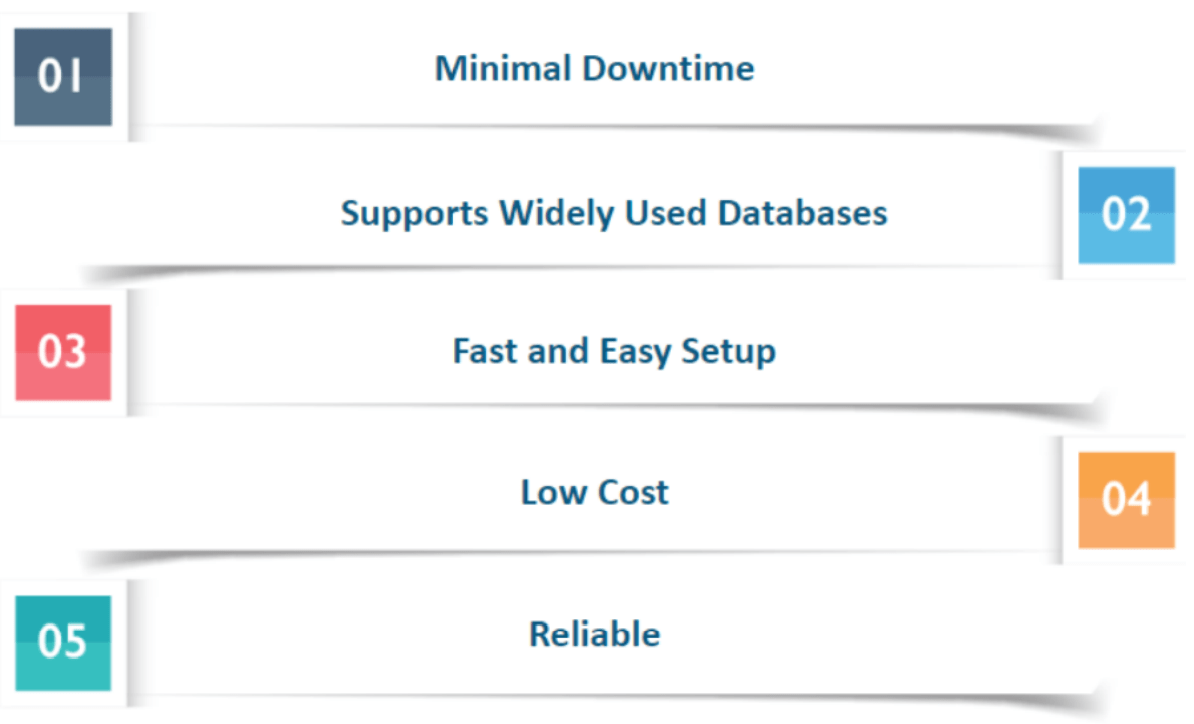
- Minimal downtime – DMS continuously replicates the changes to your source database during migration while keeping your source database operational. This allows you to switch over at any time without shutting down either database.
- Supports Widely Used Databases – AWS Database Migration Service can migrate your data to and from most of the widely used commercial and open-source databases.
- Fast & Easy Setup – A migration task can be set up within a few minutes in the AWS Management Console.
- Low cost – DMS is a free migration service for migration to Aurora, Redshift, DynamoDB, or DocumentDB. For other databases, you have to pay based on the amount of log storage and computational power needed to transfer.
- Reliability – DMS is a self-healing service and will automatically restart in case of an interruption occurs. DMS provides an option of setting up a Multi-AZ (availability zone) replication for disaster recovery.
Know More: About AWS Route 53.
How does AWS DMS work?
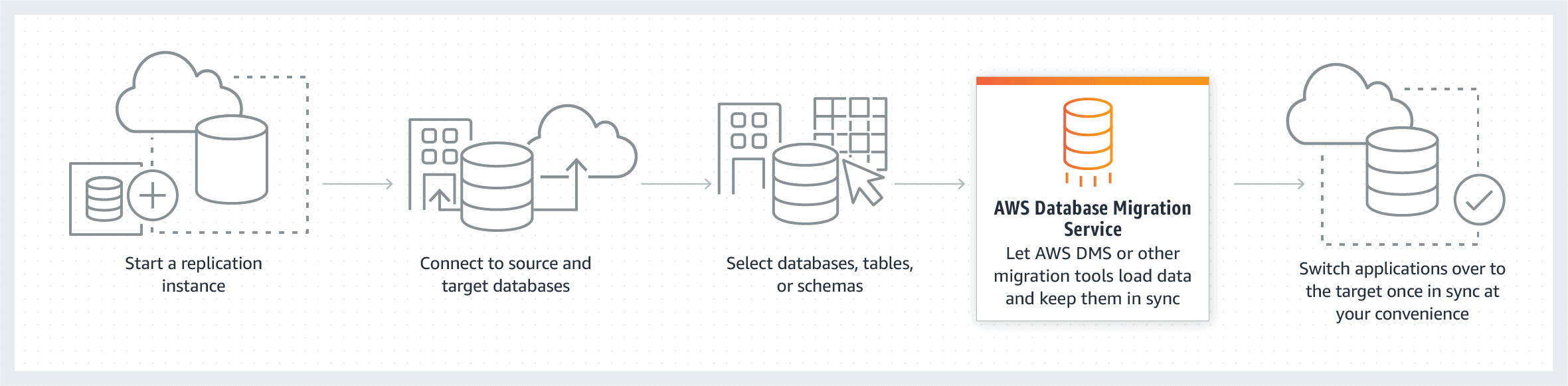
AWS Database Migration Service (DMS) is a managed and automated migration service that allows you to migrate your data from one database to another. The process starts by first connecting DMS to the endpoints; source, and target endpoints. The only requirement to use AWS DMS is that one of your endpoints must be on an AWS service.
AWS Database migration starts by first connecting to your source database, the service then reads the data, and formats the data according to the target database. It then loads the data into the target database. It goes through a full load migration where the source data is moved to the target. During full load, any changes made to the tables being loaded are cached on the replication server; these are the cached changes. Once the full load completes, AWS DMS immediately begins to apply the cached changes to the database to keep both the source and target database in sync with each other.
Components of AWS Database Migration Service
AWS DMS migration consists of three components that you should know about before starting with migration:
- Replication instance
- Source & Target Endpoints
- Replication tasks
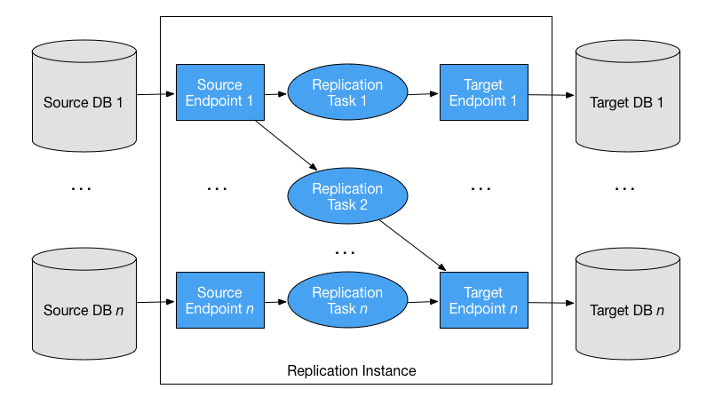
Replication Instance
A replication instance is simply a managed Amazon Elastic Compute Cloud (EC2) instance that is used to host one or more replication tasks. The above image shows a replication instance running several associated replication tasks.
Endpoints
DMS uses an endpoint to connect to your source and target databases. When you create an endpoint, you require the following information:
- Endpoint type
- Engine type
- Server name
- Port number
- Encryption protocols
- Credentials
You can create an endpoint using the AWS DMS console, where you test the endpoint connection that verifies whether the database exists at the given server name and port, and the supplied credentials can be used to connect to the database.
Replication Tasks
A replication task is used to move data from the source endpoint to the target endpoint, this is where you specify what tables and schemas are moved between your source and target databases and when. Creating a replication task is the last step you need before you start a migration.
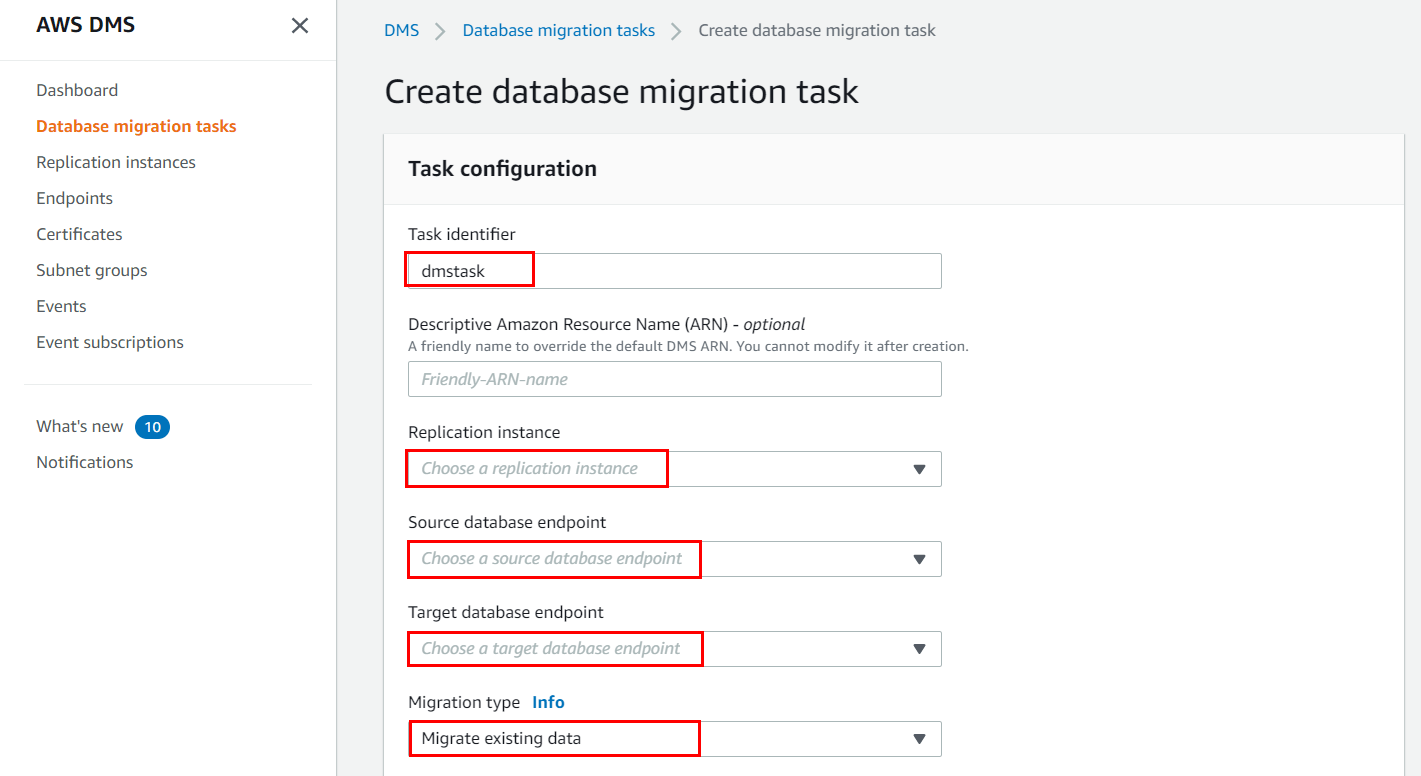
When you create a replication task, you need to specify which replication instance to use, your target and source endpoints, and your migration type option.
AWS Schema Conversion Tool
For a homogenous migration, DMS attempts to create a target schema. However, it is not always possible. In these cases, we use tools such as MySQL Workbench, Oracle SQL Developer, and pgAdmin III.
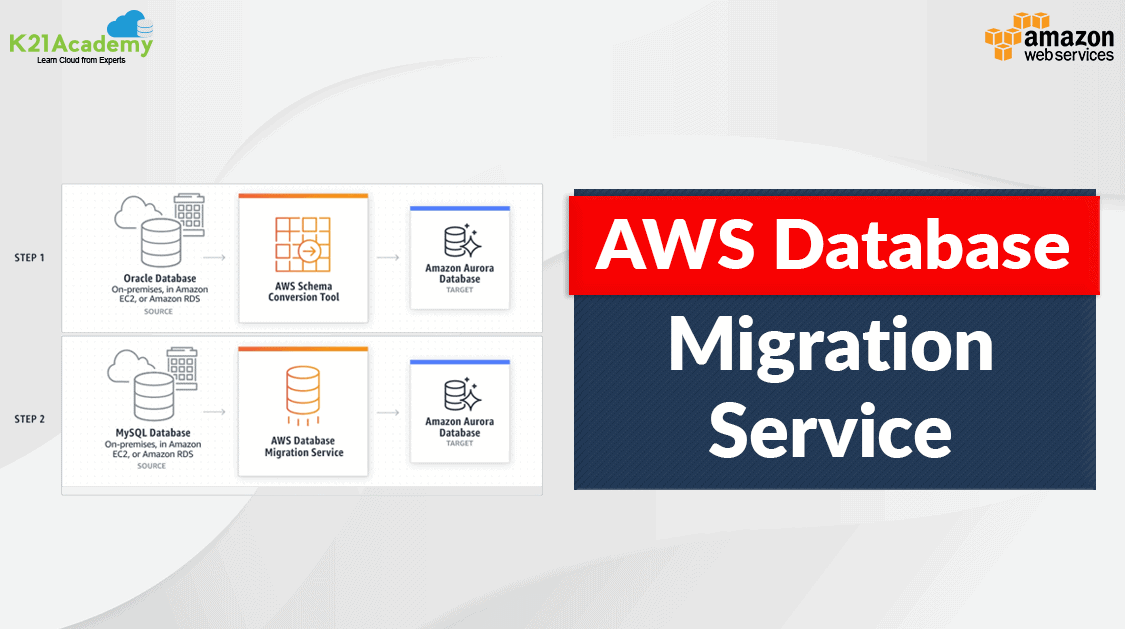
For heterogeneous migrations, AWS Database Migration Service cannot perform schema conversions. In these cases, you can use AWS Schema Conversion Tool (SCT). SCT automatically converts source schema to a compatible format for your target database. It can create a target schema and generate an entire schema, with tables, indexes, views, and so on.
Use Cases
DMS supports migration to Amazon RDS, Aurora, Redshift, DynamoDB, and DocumentDB. There are several use cases of AWS DMS, some of which are listed below:
1. Homogeneous Database Migration
Homogeneous Database Migration is when the source and target databases are the same or compatible with each other such as Oracle to Amazon RDS for Oracle, MySQL to Amazon Aurora, MySQL to Amazon RDS for MySQL, or Microsoft SQL Server to Amazon RDS for SQL Server. Since the schema structure and data types of the source and target database are compatible, it is a one-step process as there is no need for schema conversion.
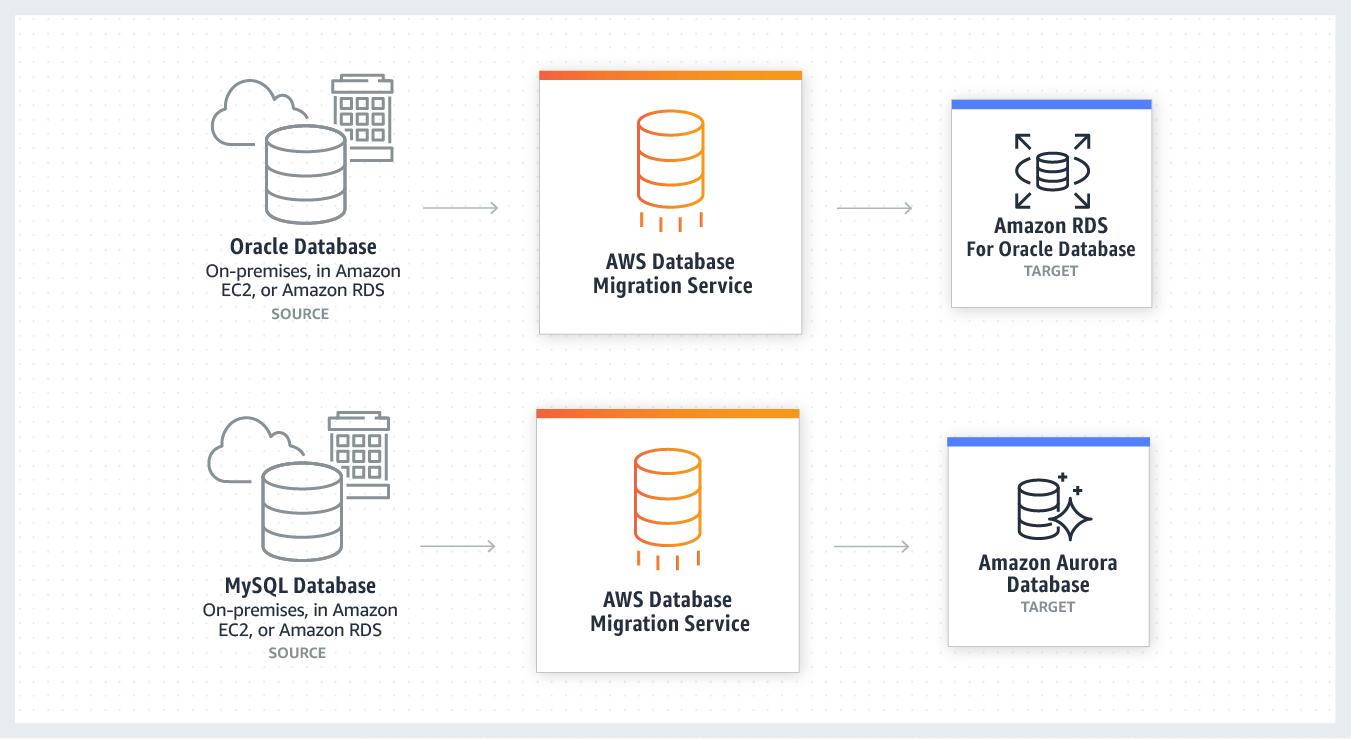
2. Heterogeneous Database Migration
Heterogeneous Database Migration is when the source and target database engines are different from each other such as Oracle to Amazon Aurora, Oracle to PostgreSQL, or Microsoft SQL Server to MySQL migrations. In this case, the schema structure and data types of source and target databases are different from each other, this requires a schema and code transformation before migration, which makes it a two-step process.
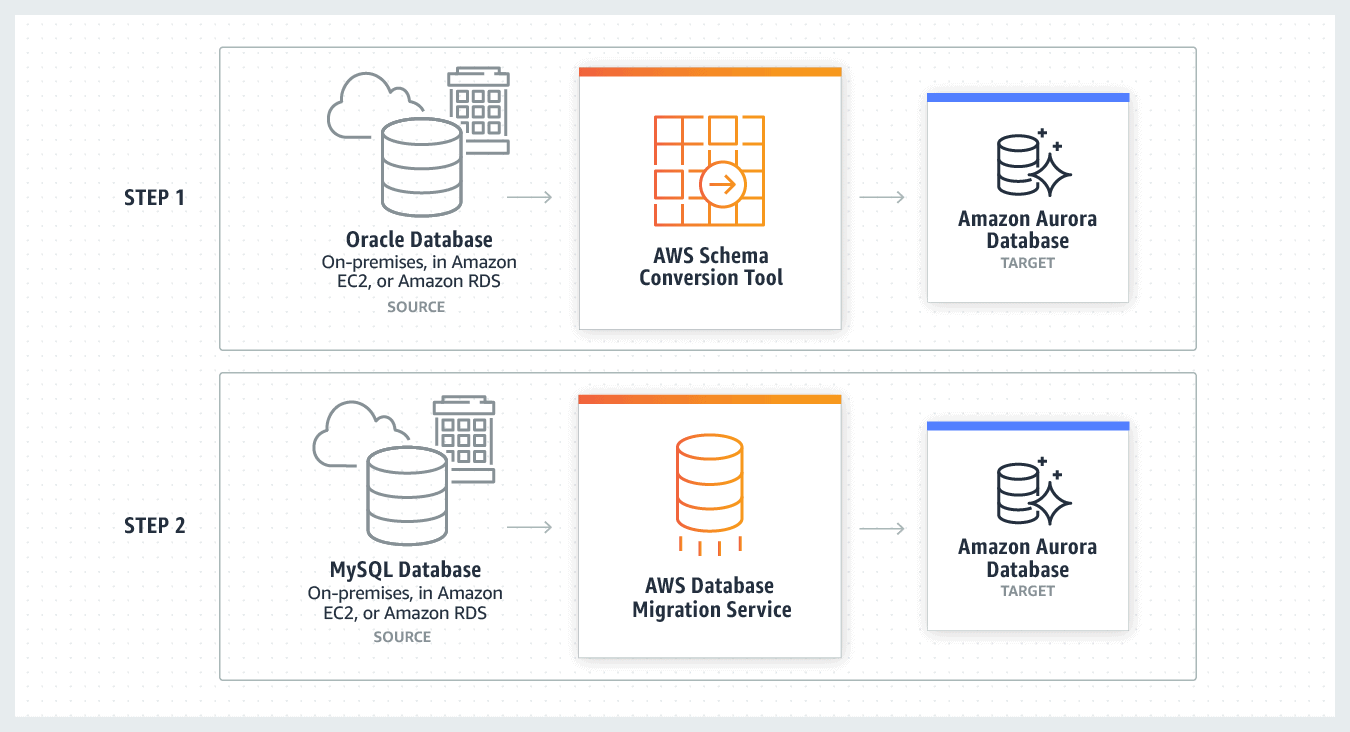
Migrating an On-Premises Oracle Database to Amazon Aurora MySQL
In this section, we will look at the step-by-step process for migrating an on-premises Oracle database (the source endpoint) to an Amazon Aurora with MySQL compatibility (the target endpoint) using AWS Database Migration Service (AWS DMS).
Before starting, you must have an AWS cloud account, if you don’t know how to create one, read our blog on How To Create AWS Free Tier Account.
Step 1: Configure Your Source Oracle Database
1. Run the following command to enable supplemental logging at the database level for AWS DMS
ALTER DATABASE ADD SUPPLEMENTAL LOG DATA;
2. If you are using an account with the minimal privileges required by AWS DMS, then you need to make sure it has the required privileges.
Step 2: Configure Your Target Aurora MySQL Database
If you want to create a temporary dms_user with the minimal privileges required for migration, then follow the steps in official AWS docs.
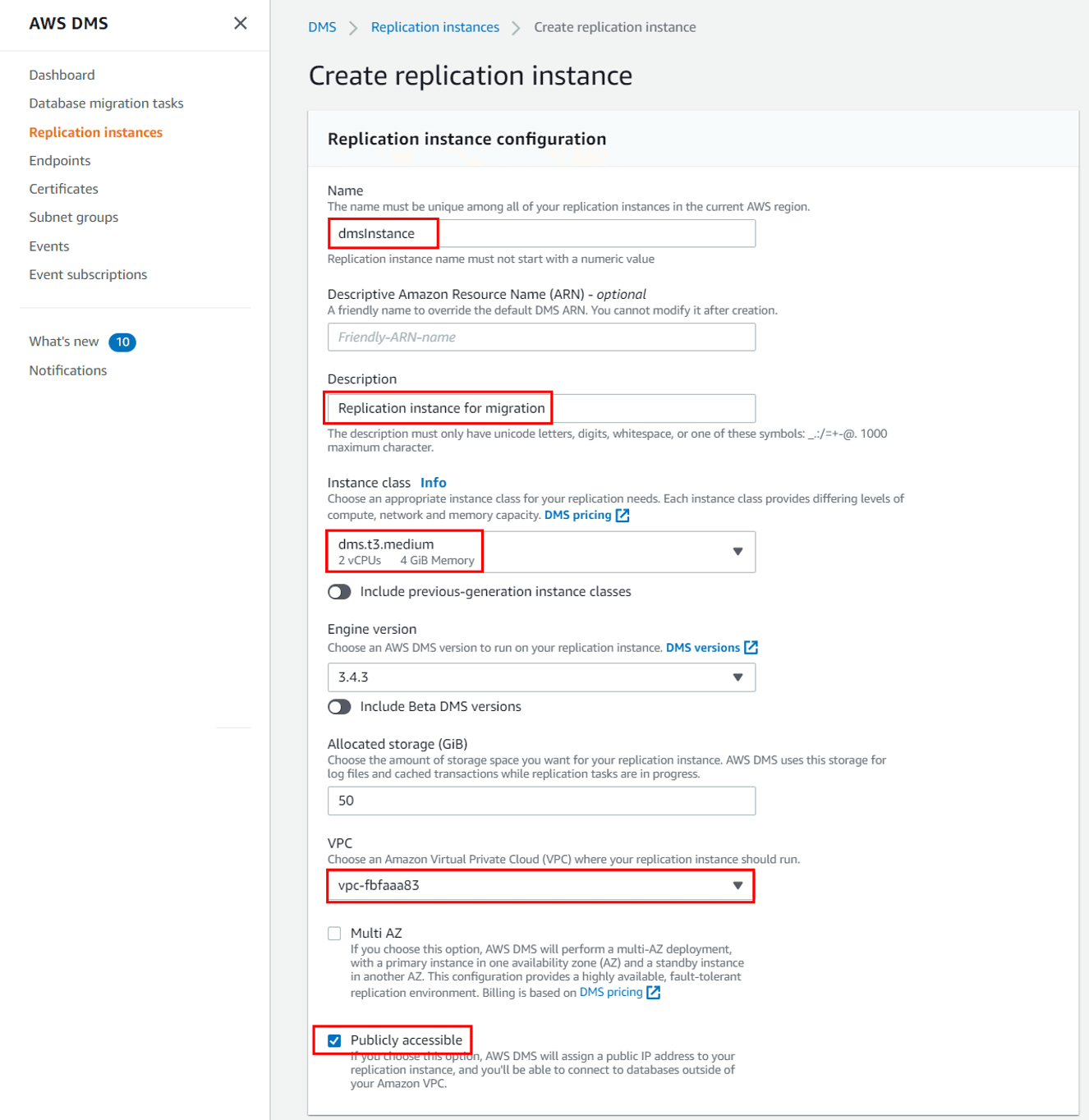
Step 3: Create a Replication Instance
1. Sign in to the AWS Management Console, and open the AWS DMS console and choose Replication instances.
2. Click on Create replication instance.
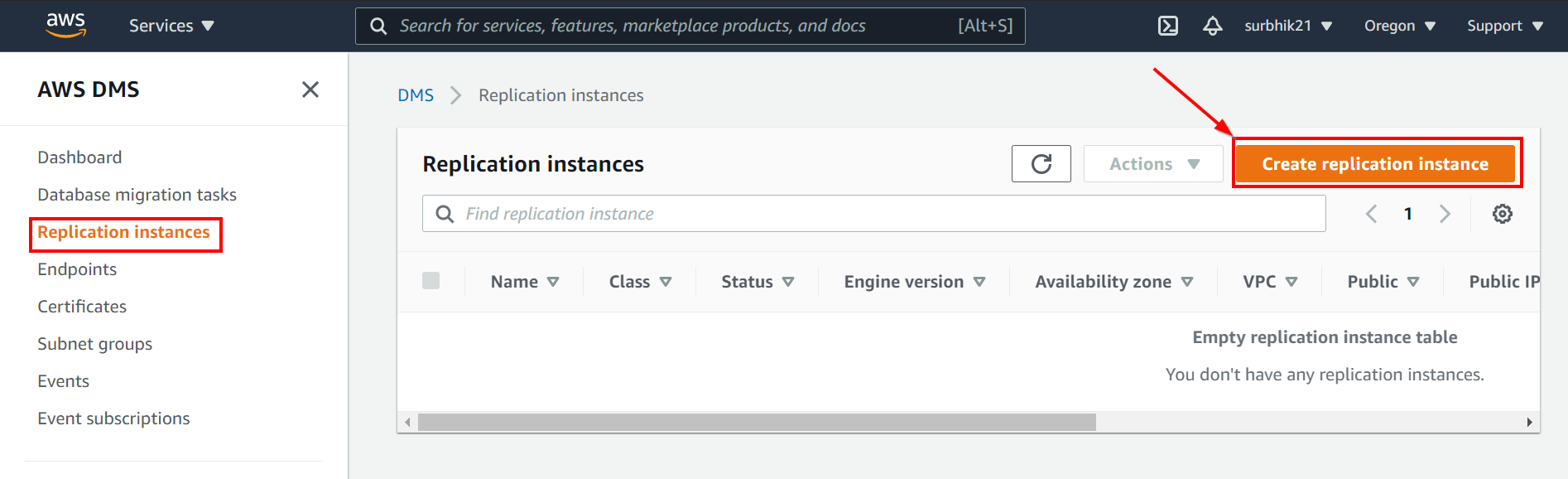
3. On the Create replication instance page, enter the required details. Once done, click Create.
Step 4: Create Oracle Source Endpoint
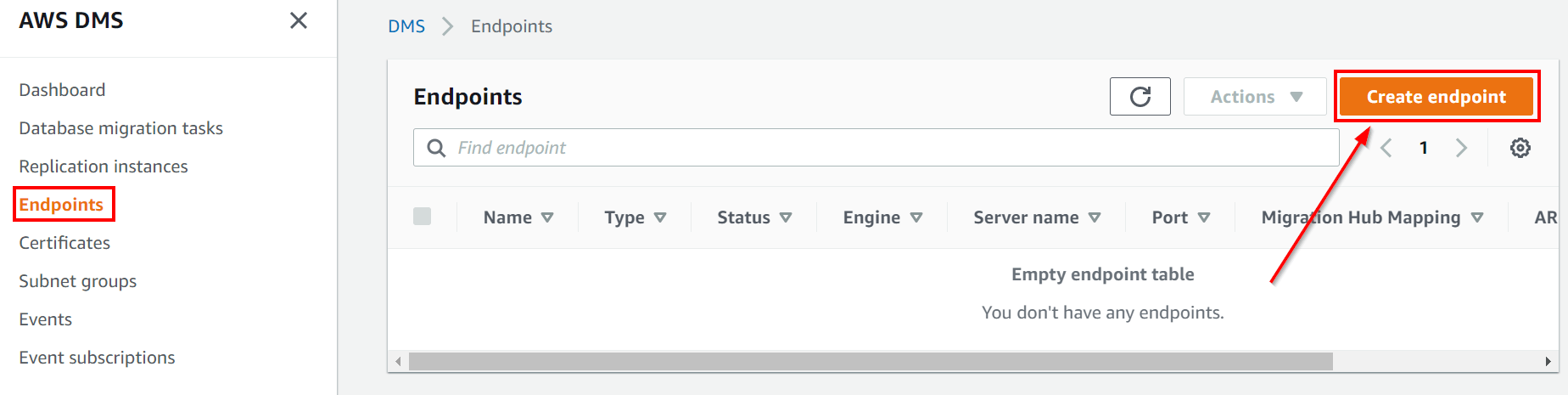
1. Go to the AWS DMS console, and choose Endpoints. Select Create Endpoint.
2. On the Create database endpoint page, enter the required details and create the source endpoint.
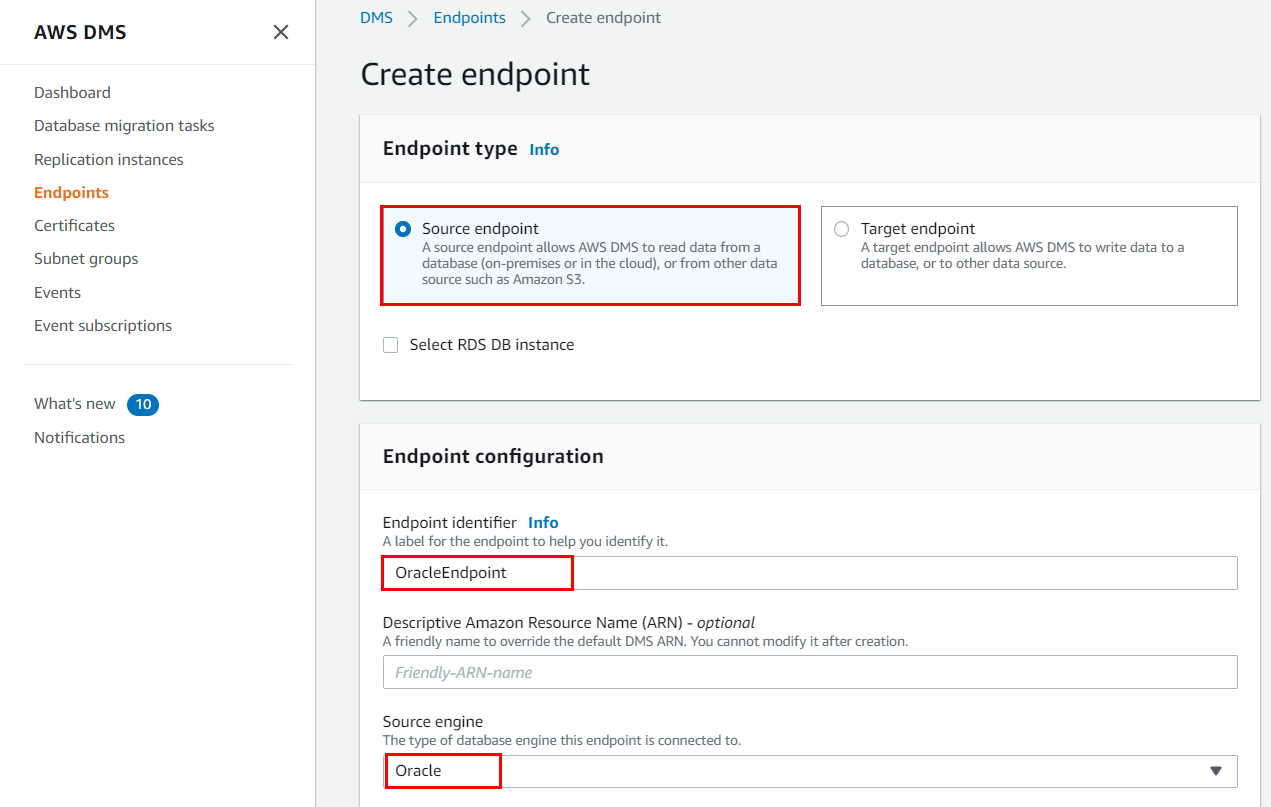
Step 5: Create Aurora MySQL Target Endpoint
Create a target endpoint in a similar way that you created the source endpoint. Select the Target endpoint on the create endpoint details page, select Aurora MySQL as your source engine, enter the database details for the Aurora database, and create the endpoint.
Step 6: Create a Migration Task
1. Go to the AWS DMS console, choose Database Migration Tasks, and click Create Task.
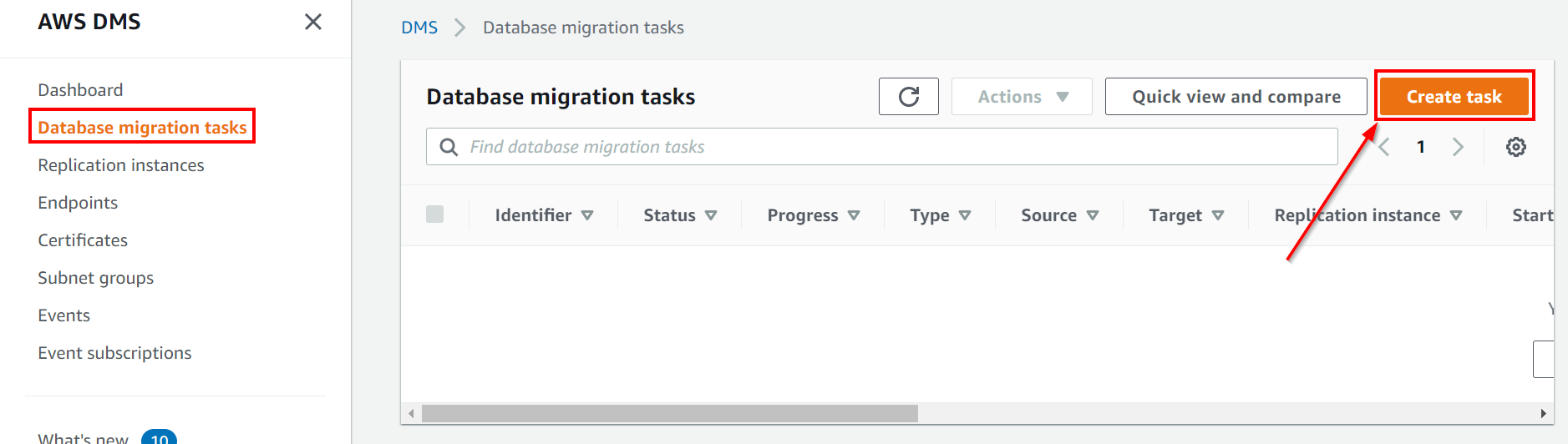
2. On the Create Task page, select the replication instance, source, and target endpoints that we created in previous steps and enter the other required details.
Limitations of AWS DMS
Issues with AWS DMS Schema Migration and Conversion:
Usually, AWS DMS doesn’t convert codes or schemas. As part of a homogenous migration, AWS DMS makes an effort to create a target schema at the destination while transferring data. As an example, using Oracle databases, this isn’t always achievable.
You might need to make use of outside resources to generate schema. AWS DMS cannot convert schemas in the case of heterogeneous migrations; the AWS Schema Conversion Tool (SCT) must be used instead. This enables you to change your source schema into a format appropriate for your intended use, albeit not all formats are supported. Manual conversions are required if the tool does not support your format. This is among the most crucial.
Required coding for incremental data capture
AWS’s Change Data Capture for Incremental Loads
Conclusion
I hope that by now you have a better understanding of AWS Database Migration Service, its benefits, components, and working. This should help you overcome the complex challenges of database migration to AWS.
Also, Check: Our previous blog post on AWS Compliance Services. Click here
Frequently Asked Questions (FAQs)
Let’s take a look at some of the frequently asked questions, asked by trainees in our AWS Solutions Architect Associate Certification training.
What is hot data and cold data?
Data that is frequently accessed on fast storage is called hot data and rarely accessed data stored on the slowest storage an organization has cold data.
What are the tools used for Migration to AWS?
The tools which are used during the migration are: 1. AWS Migration Hub 2. AWS Application Discovery Services 3. AWS Cloud Adoption Readiness Tool (CART) 4. AWS Migration Acceleration Program (MAP) 5. AWS Server Migration Service 6. AWS Marketplace 7. AWS Database Migration Service 8. Cloud Endure Migration 9. TSO Logic 10. VMware Cloud on AWS
How can a large amount of data be transferred from on-premises to AWS?
AWS Snowmobile is an exabyte-scale data transport solution that uses a secure semi 40-foot shipping container to transfer large amounts of data into and out of AWS. Using Snowmobile addresses common challenges with large-scale data transfers including high network costs, long transfer times, and security concerns.
Related/References
- AWS Database Service – Amazon RDS, Aurora, DynamoDB, ElastiCache
- Overview of Amazon Web Services & Concepts
- How To Create AWS Free Tier Account
- https://k21academy.com/amazon-web-services/aws-certified-solutions-architect-associate-saa-c03-exam/
- AWS Certified Solutions Architect: Roles & Responsibilities
- AWS Certified Solution Architect Associate SAA-C03Step By Step Activity Guides (Hands-On Labs)
- Amazon Kinesis Overview, Features And Benefits
Next Task For You
Begin your journey towards an AWS Cloud by joining our FREE Informative Class on Amazon Cloud Free Class by clicking on the below image.


![Microsoft Agentic AI Business Solutions Architect [AB-100] | K21 Academy](https://test.k21academy.com/wp-content/uploads/2025/11/Microsoft-Agentic-AI-Business-Solutions-Architect-AB-100-Exam-Overview1.png)



