



This post covers an Overview of Oracle Concurrent Manager, one of the most common tasks that Oracle Apps DBA‘s perform (apart from Patching, Cloning & Troubleshooting).
If you are new to Oracle AppsDBA or already working as Apps DBA but on version 11i or R12.1 then I highly recommend you first to go through Architecture, Installation, Start/Stop, File System, and Patching in Oracle AppsDBA R 12.2 for AppsDBAs here (FREE lessons from our Oracle Apps DBA Training)
Also check: Steps to download R12 software from Edelivery Oracle Site
Concurrent Manager Overview
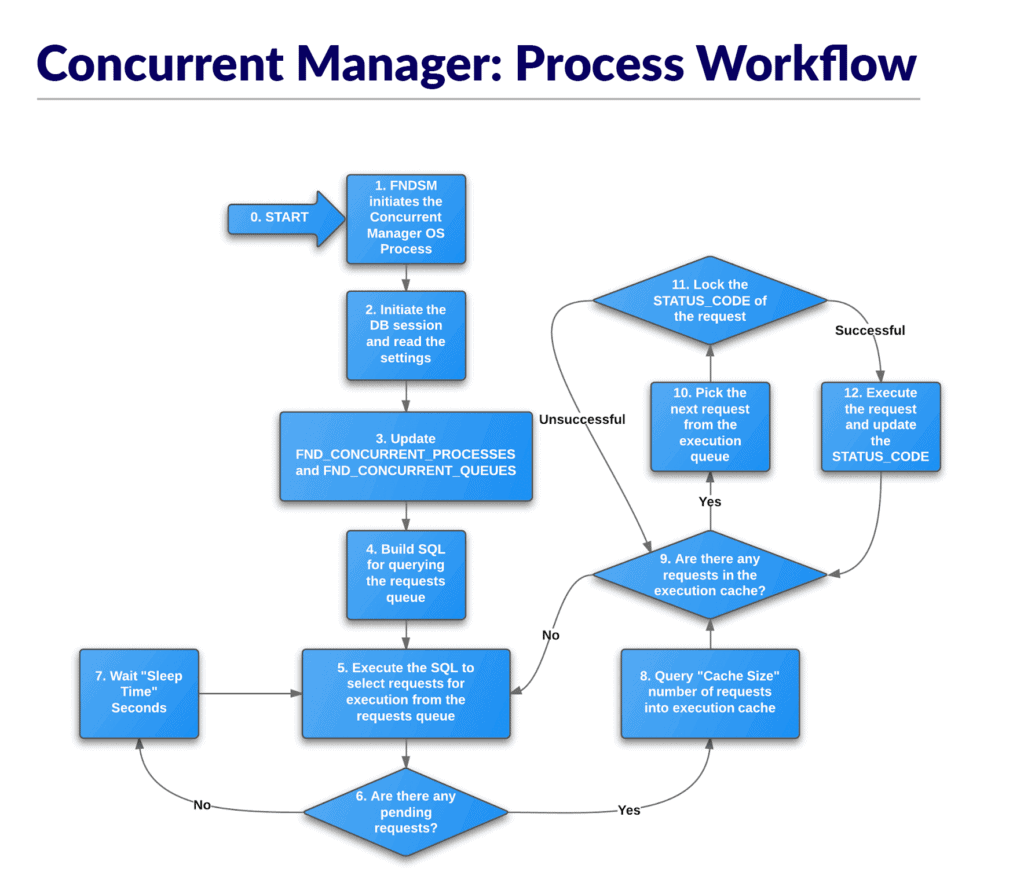
Oracle Concurrent Manager service is a batch processing tool that provides scheduling and queuing functionality for background jobs and is used by most of the Oracle Applications modules. It is a key service within Ebusiness Suite that runs the user requests in the background thus ensuring that the user can continue with other days to day tasks while the requested change/activity is carried out by the Concurrent Manager.
Also Read : all you need to know about Oracle Apps DBA (R12.2) Training.
Variables/Executables for CM
- $APPLCSF is the top-level directory in which the Concurrent Manager puts log and output files.
- $APPLLOG & $APPLOUT are the subdirectories in which the Concurrent Manager puts log and output files.
- $APPLTMP is the directory in which Oracle Applications temporary files are created.
- $APPLPTMP is the directory in which PL/SQL output files are created.
Note: The value must be exactly the same as “utl_file_dir” value in init.ora parameter file. - FNDLIBR ( executable ) The ICM (Internal Concurrent Manager) spawns FNDLIBR processes based on the concurrent manager definitions. The number of FNDLIBR processes at the operating system level will be equal to the total number of max requests for each Oracle concurrent manager defined plus one for the ICM.
FNDLIBR processes can be queried up at the operating system level by using
$ ps -ef | grep FNDLIBR
Output:
[applmgr@1705ecloud05 scripts]$ ps -ef | grep FNDLIBRapplmgr 5075 5069 0 04:54 ? 00:00:01 FNDLIBR
applmgr 12919 12169 0 06:33 pts/9 00:00:00 grep FNDLIBR
Remember there are also other manager processes for INVLIBR, MFGLIBR, etc.
Also check: Overview of ADOP
Start/Stop & Check Concurrent Managers (CM)
Prior to startup of CM service, you must run the environment file APPS<CONTEXT_NAME>.env
The default filename for the environment file in R12.2 is EBSapps.env and set the environment to Run Edition.
a) Start Concurrent Manager in R12
b) Stop Concurrent Manager in R12
c) To check the Status of Concurrent Manager
Output:
You are running adcmctl.sh version 120.19.12020000.7
Internal Concurrent Manager is Active.
adcmctl.sh: exiting with status 0
adcmctl.sh: check the logfile /u01/oracle/PRD122/fs1/inst/apps/PRD12111_1705ecloud05/logs/appl/admin/log/adcmctl.txt for more information …
Note: Script to start/stop Oracle concurrent manager, Similar to one in 11i. (This script, in turn, calls startmgr.sh )
Concurrent Manager Log file location in R12
Each concurrent request (run by Concurrent Manager) generates a log file for details regarding the request and an outfile for report details. There are 3 types of log files for concurrent processing:
A) Request Log File – documents the execution of a particular request ( l.req )
B) Manager Log File – documents the performance of a concurrent manager process. ( W.mgr )
C) Internal Manager Log File – documents the performance of the ICM.(std.mgr). This log file displays the parameters used with the’adcmctl’ command.
- Log files can be viewed as an operating system level of $product_TOP/$APPLLOG or $APPLCSF/$APPLLOG.
- $APPLLOG is always set and $APPLCSF is optional. Log files can also be viewed from within the applications from the View Concurrent Requests Form
$NE_BASE/inst/<CONTEXT_NAME>/logs/appl/conc/log
The out files contain the output generated from a concurrent processing report. Out files can be viewed at an operating system level of $product_TOP/$APPLOUT or $APPLCSF/$APPLOUT (if set). Out files can also be viewed from within the applications from the View Concurrent Requests form ( \ Nav Con Req).
$NE_BASE/inst/<CONTEXT_NAME>/logs/appl/conc/out
Concurrent Managers Tables in R12
- FND_CONCURRENT_PROCESSES FND_CONCURRENT_REQUESTS
- FND_CONCURRENT_QUEUES
- FND_CONCURRENT_PROGRAMS
FND_CONCURRENT_PROCESSES — Lists information about managers; Useful for determining UNIX and Oracle process is associated with managers; Identifies logfiles associated with managers.
FND_CONCURRENT_REQUESTS — Primary jobs submission table; Queried by the managers; Jobs are inserted into this table; Table can grow rather large thus affecting performance; Cleanup scripts available with the Applications.
FND_CONCURRENT_PROGRAMS –Stores information about concurrent programs. Each row includes a name and description of the concurrent program. Each row also includes the execution methods for the program (EXECUTION_METHOD_CODE), the argument method (ARGUMENT_METHOD_CODE), and whether the program is constrained (QUEUE_METHOD_CODE).
FAQs
Q1) What is concurrent manager?
Ans: A concurrent manager is itself a concurrent program that starts other concurrent programs running. When an application user submits a request to run a program, the request is entered into a database table that lists all of the requests. Concurrent managers read requests from the table and start programs running.
Q2) How do I start a concurrent manager?
Ans: The program that each user will run in EBS is called Concurrent Request, and Concurrent Manager is the program that manages these Concurrent Requests. To connect and access to Concurrent Manager in Oracle EBS, click on System administrator -> Concurrent -> Manager -> Administer tab.
Q3) What is actual and target in concurrent manager?
Ans: In the administer concurrent manager form, there are two columns target and actual. Target columns lists the number of processes that are running for each manager for a particular work shift. The actual column that is currently how many processes are running.
Q4) How do I increase concurrent manager processes in r12?
Ans: To allocate more processes to a manager, log in as a user with the System Administrator responsibility. Navigate to Concurrent -> Manager -> Define. Increase the number in the Processes column.
Related/Further Readings
-
- Oracle E-Business Suite Release 12.2.9 Readme (Doc ID 2495027.1)
- Oracle E-Business Suite 12.2.9 Now Available
- [Troubleshooting] Forms Issue: FRM-92050 failed to connect to server:forms/servlet
- Oracle E-Business Suite (EBS) 12.2.9 Now Available & Its Upgrade Steps
- [Solved] Java Forms opening issue in EBS (R12)
- How to Change Apps/Applsys & sysadmin Schema Passwords in Oracle EBS R12.2 : Step by Step
- [Video] Online Patching (ADOP) In Oracle EBS R12.2
- [Troubleshooting] Oracle Apps R12.2 Online Patching ADOP : Prepare Phase Issue
Next Task For You
We cover Oracle E-Business R12.2 Architecture & concepts in our Oracle Apps DBA For Beginners Training along with the Installation, Patching, Cloning, and Troubleshooting and also, Database upgrade to 19c and much more including the hands-on labs you must perform to upgrade your skills and get a good job with a high package.
Begin your journey towards becoming an Apps DBA by joining our FREE Masterclass on How To Learn Oracle Apps DBA (R12) & It’s New Features.


![Microsoft Agentic AI Business Solutions Architect [AB-100] | K21 Academy](https://test.k21academy.com/wp-content/uploads/2025/11/Microsoft-Agentic-AI-Business-Solutions-Architect-AB-100-Exam-Overview1.png)


