
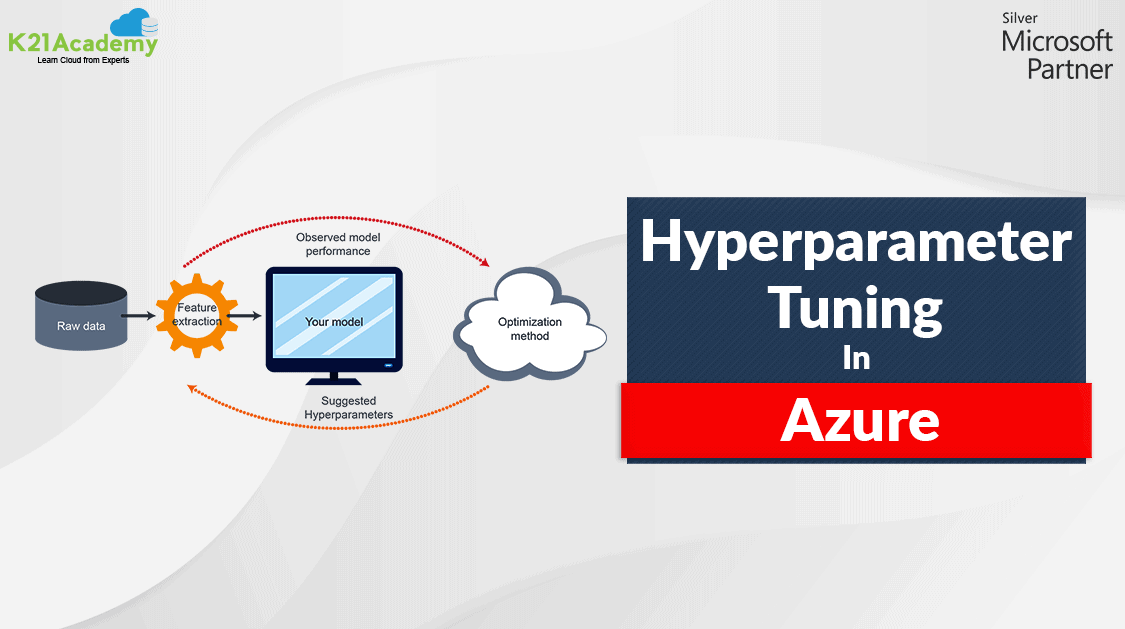





In machine learning, models are trained to predict unknown labels for new data based on correlations between known labels and features found in the training data. Depending on the algorithm used, you may need to specify hyperparameters to configure how the model is trained.
In this blog, we are going to cover the basics of hyperparameters, hyperparameter tuning, search space, and how to tune hyperparameters in Azure.
What Are Hyperparameters?
There are two types of parameters in machine learning:
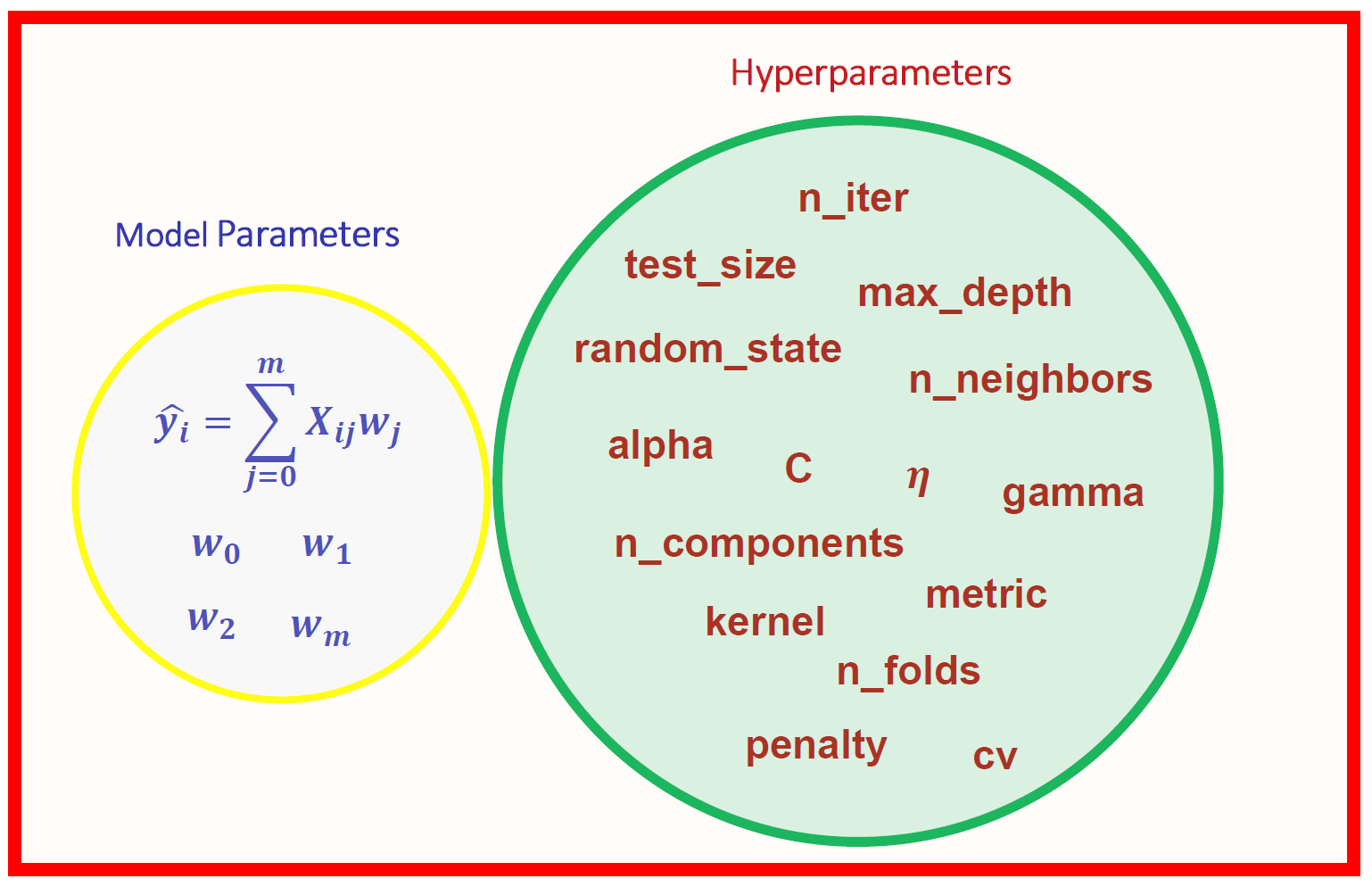
Model Parameters are parameters in the model that must be determined using the training data set. These are the fitted parameters. For Eg: eights and biases, or split points in the Decision Tree, and more.
Hyperparameters are adjustable parameters that control the model training process. Model performance depends heavily on hyperparameters.
Note: Do Checkout Our Blog Post On MLOps.
Selecting good hyperparameters has the following advantage:
- Efficient search across the space of possible hyperparameters
- Easy management of a large set of experiments for hyperparameter tuning.
Also read: Azure Machine Learning Service is a fully managed cloud service that is used to train, deploy, and manage machine learning models.
What Is Hyperparameter Tuning?
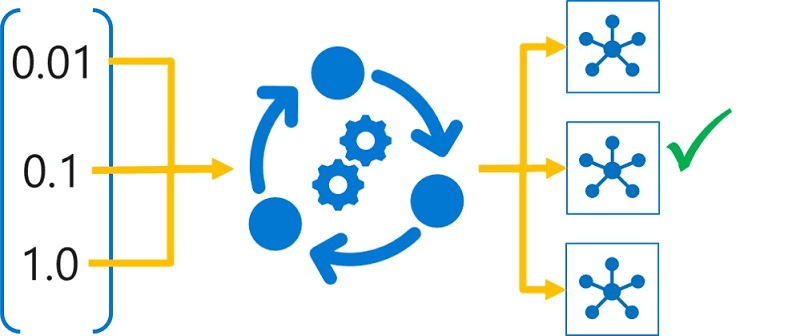
Hyperparameter tuning is the process of finding the configuration of hyperparameters that will result in the best performance. The process is computationally expensive and a lot of manual work has to be done. It is accomplished by training the multiple models, using the same algorithm and training data but different hyperparameter values. The resulting model from each training run is then evaluated to determine the performance metric for which you want to optimize (for example, accuracy), and the best-performing model is selected.
Read about: What is the difference between Data Science vs Data Analytics.
Search Space
The set of hyperparameter values tried during hyperparameter tuning is known as the search space. The definition of the range of possible values that can be chosen depends on the type of hyperparameter.
Hyperparameters can be discrete or continuous and have a distribution of values described by a parameter expression.
Note: Do Read Our Blog Post on Azure Machine Learning Model.
Discrete Hyperparameter: a search space for a discrete parameter using a choice from a list of explicit values, which can be defined as-
- an arbitrary list object (choice ([10,20,20]))
- a range object (choice (range (1,10))), and
- one or more comma-separated values (choice(20,60,100))
Also Visit: Our Blog Post To Know About DP- 100 FAQ
Continuous Hyperparameter: The Continuous hyperparameters are specified as a distribution over a continuous range of values. To define a search space for these kinds of value, any of the following distribution types can be used:
- uniform (low, high)
- loguniform (low, high)
- normal (mu, sigma)
- lognormal (mu, sigma)

Also Visit: Our Blog Post To Get An Overview Of DP-900 vs DP-100 DP-200
Hyperparameter Sampling
Hyperparameter sampling refers to specifying the parameter sampling method to use over the hyperparameter space. The following methods are supported by Azure Machine Learning:
- Random sampling
- Grid sampling
- Bayesian Sampling
Also Read our previous blog on Microsoft Azure Object Detection.
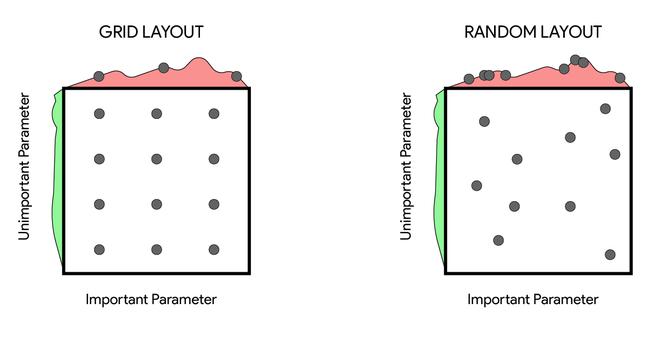
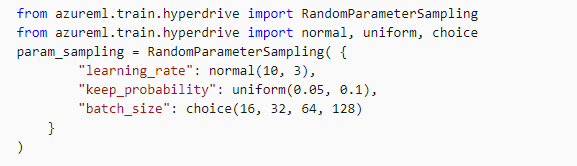
Random Sampling: Random Sampling supports both discrete and continuous hyperparameters and these values are randomly defined in the search space. It supports the early termination of low-performance runs.
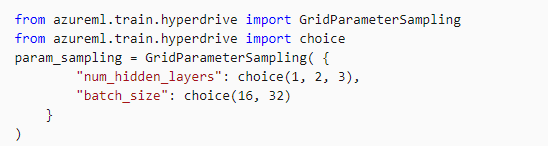
Grid Sampling: Grid Sampling supports only discrete hyperparameters and can be used only with Choice hyperparameters. It supports early termination of low-performance runs and is generally used when the user can budget to exhaustively search over the search space.
Check Out: Our blog post on Automated Machine Learning. Click here
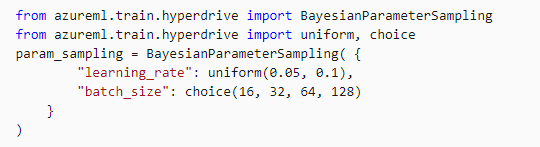
Bayesian Sampling: It supports choice, uniform, and quniform distributions over the search space and is based on the bayesian optimization algorithm.
Also Check: Our blog post on DP 100 questions. Click here
Early Termination Policy
Due to a sufficiently large hyperparameter search space, it could take many iterations (child runs) to try every possible combination. Traditionally, we have to set a maximum number of iterations, but this could still result in a large number of runs that may not result in a better model than a combination that has been already tried.
To prevent wasting time, there is a facility to set an early termination policy that abandons runs that are unlikely to produce a better result than previously completed runs.
Azure Machine Learning supports the following four early termination policies:
- Bandit Policy
- Median Stopping Policy
- Truncation Selection Policy
- No Termination Policy
Also read: Learn more about Azure Data Stores & Azure Data Sets
How To Tune Hyperparameters In Azure
Now that we have understood what are hyperparameters are and the terms related to it, let’s check how we can tune the hyperparameters in a machine learning model in Azure.
In Azure Machine Learning, you can tune hyperparameters by running a hyperdrive experiment.
These are the three steps that are to be followed once the Azure Environment is set i.e., the compute targets are created, the dataset is imported and the DP 100 User (Notebook) folder is cloned in the Jupyter.
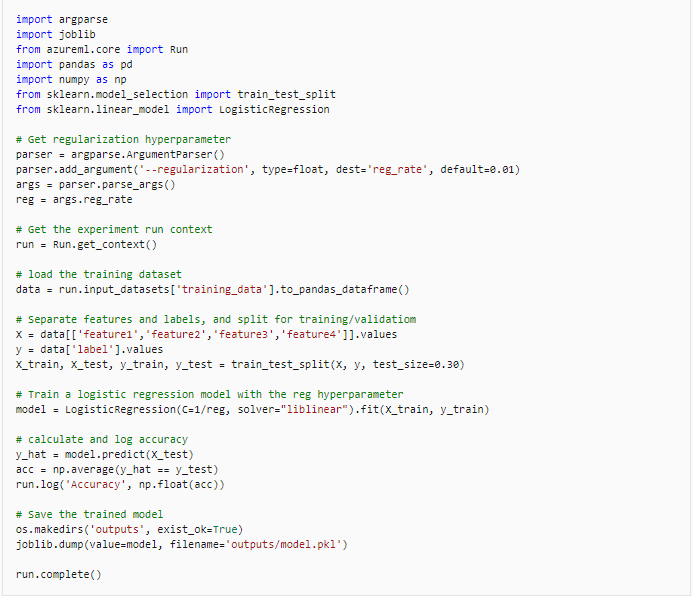
1.) The first step is to Create a training script for the experiment.
Also Check: Our previous blog post on Azure Load Balancer. Click here
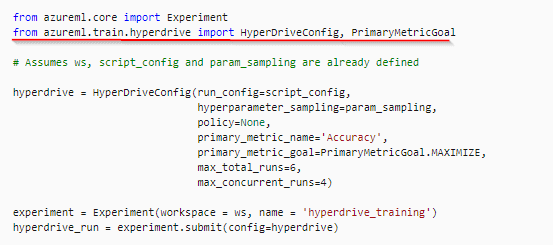
2.) After creating the script you can configure and run the experiment, but you must use a HyperDriveConfig object to configure the experiment run.
3.) After running the experiment, you can monitor the Hyperdrive Experiment in Azure Machine Learning studio, or by using the Jupyter Notebooks RunDetails widget.

Also Read: Our previous blog post on AWS Sagemaker. Click here
4.) You can also visualize the Training run in the Jupyter Notebooks.
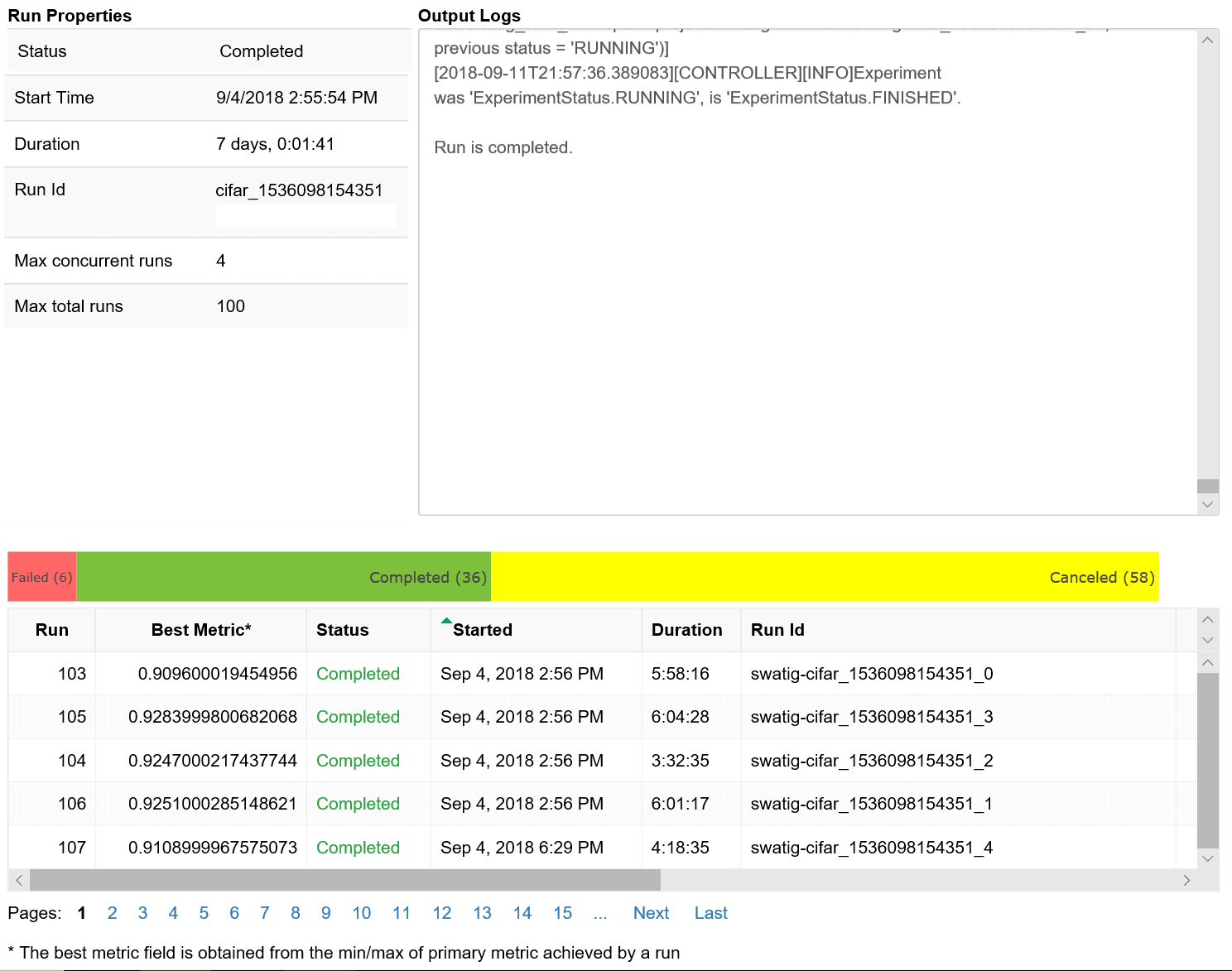
So this is how you can tune Hyperparameters in the Azure Portal or Jupyter notebook.
Read more: Basics of the Convolutional Neural Network (CNN) and how we train our CNN’s model on Azure ML service without knowing to code.
Hyperparameter tuning in machine learning
Hyperparameter tuning in Azure
Hyperparameter tuning in Azure Machine Learning automates the process of optimizing model parameters to improve performance. Azure ML provides tools like HyperDrive and AutoML, which use techniques such as grid search, random sampling, and Bayesian optimization to explore different hyperparameter combinations efficiently. Developers can define search spaces, evaluation metrics, and resource limits, ensuring the tuning process aligns with project requirements. With Azure’s scalability, hyperparameter tuning can be conducted across multiple compute nodes, reducing time and enabling precise adjustments for better model accuracy and reliability.
Hyperparameter tuning in Azure Example
Hyperparameter tuning in Azure can be done using Azure Machine Learning’s HyperDrive. For example, when training a classification model, you can define a search space for hyperparameters like learning rate, batch size, or tree depth. Use sampling methods like random sampling or grid sampling and specify the primary metric (e.g., accuracy). HyperDrive automatically runs multiple training iterations, evaluates models, and selects the best-performing configuration. This automated process saves time and optimizes model performance efficiently, making Azure an ideal platform for large-scale hyperparameter optimization tasks.
FAQs
How do you evaluate and visualize the results of a model in Azure ML Studio?
In Azure ML Studio, model evaluation involves analyzing metrics like accuracy, precision, and recall. Visualization tools, such as confusion matrices and ROC curves, provide insights into performance, aiding model optimization.
What steps are involved in building a prediction model in Azure ML Studio?
In Azure ML Studio, model evaluation involves analyzing metrics like accuracy, precision, and recall. Visualization tools, such as confusion matrices and ROC curves, provide insights into performance, aiding model optimization.
Why are businesses turning toward Azure Machine Learning for predictive analysis?
Businesses are turning to Azure Machine Learning for predictive analysis due to its scalability, integrated tools, and support for advanced AI capabilities, enabling faster, accurate insights for better decision-making and competitive advantage.
How does Azure Machine Learning Studio work?
Azure Machine Learning Studio simplifies building, training, and deploying machine learning models through a drag-and-drop interface, integrated tools, and automated workflows, enabling efficient end-to-end ML development and deployment.
How can you choose the right algorithm in Azure ML Studio?
To choose the right algorithm in Azure ML Studio, consider your data type and objective—classification, regression, or clustering. Use AutoML for recommendations or experiment manually to optimize performance and accuracy.
What are the benefits of integrating Machine Learning with Cloud Computing?
Integrating machine learning with cloud computing provides scalable resources, faster processing, and cost-efficiency. It enables seamless collaboration, simplifies deployment, and allows access to pre-built tools and AI services, enhancing innovation and productivity.
What is the difference between Azure Machine Learning Studio and Azure Machine Learning Service?
Azure Machine Learning Studio is a no-code, drag-and-drop interface for building and deploying ML models, ideal for beginners, while Azure Machine Learning Service offers advanced, code-based tools for professional developers and data scientists.
What unique features does Azure Machine Learning offer compared to AWS and GCP?
Azure Machine Learning stands out with its integrated MLOps capabilities, seamless integration with Microsoft tools like Power BI, and advanced AutoML for model development, making it user-friendly for enterprises and developers alike.
What considerations should be made when setting thresholds in a confusion matrix?
When setting thresholds in a confusion matrix, consider the balance between precision and recall, the cost of false positives versus false negatives, and the specific goals of your application or model.
Related/References:
- Join Our Generative AI Whatsapp Community
- Azure AI/ML Certifications: Everything You Need to Know
- Azure GenAI/ML : Step-by-Step Activity Guide (Hands-on Lab) & Project Work
- [DP-100] Microsoft Certified Azure Data Scientist Associate: Everything you must know
- Microsoft Certified Azure Data Scientist Associate | DP 100 | Step By Step Activity Guides (Hands-On Labs)
- [AI-900] Microsoft Certified Azure AI Fundamentals Course: Everything you must know
- Automated Machine Learning | Azure | Pros & Cons
- [AI-900] Azure Machine Learning Studio
- Azure Machine Learning Service Workflow for Beginners
Next Task: Enhance Your Azure AI/ML Skills


![Microsoft Agentic AI Business Solutions Architect [AB-100] | K21 Academy](https://test.k21academy.com/wp-content/uploads/2025/11/Microsoft-Agentic-AI-Business-Solutions-Architect-AB-100-Exam-Overview1.png)



