



Imagine managing hundreds or even thousands of cloud resources without touching the mouse or manually configuring servers. Sounds like magic, right? That’s exactly what Terraform brings to the table. In 2025, more than three out of four companies using cloud infrastructure are relying on Infrastructure as Code (IaC) to simplify deployments, reduce errors, and speed up workflows. Whether it’s spinning up 5 virtual machines or scaling to 5000 cloud instances, Terraform makes it predictable, efficient, and repeatable.
The future of Terraform looks even brighter. As more organisations embrace multi-cloud strategies and hybrid infrastructure, Terraform’s cloud-agnostic approach ensures it remains a critical tool for DevOps engineers and cloud architects. With the rise of automation, AI-assisted infrastructure management, and GitOps practices, Terraform is positioned to be the backbone of modern infrastructure management for years to come.
In this blog post, I am going to cover a brief introduction of Infrastructure as Code (IaC), Terraform, its lifecycle, and all the core concepts that every beginner should know. I have tried to cover all the topics in this beginner’s guide that will give you a quick start for using Terraform.
- Infrastructure as Code and IaC tools
- What Is Terraform?
- Terraform Lifecycle
- Terraform Core Concepts
- Terraform Installation
- Terraform Providers
- Terraform Configuration Files
- Getting Started Using Terraform
- Import Existing Infrastructure
What Is Infrastructure as Code (IaC)?
Think back to how IT infrastructure used to be managed just a few years ago. Teams would manually set up servers, configure networks, and manage databases using graphical dashboards or command-line tools. While this worked for smaller setups, as systems grew more complex and businesses began scaling globally, this manual process quickly became error-prone, slow, and nearly impossible to standardize. That’s where Infrastructure as Code (IaC) steps in.
Infrastructure as Code is the practice of managing and provisioning IT infrastructure using machine-readable configuration files instead of manually configuring hardware or using interactive configuration tools. In simpler terms, think of IaC as a way of writing code that describes what your servers, networks, and cloud resources should look like, and then letting a tool automatically build that exact setup for you.
For example, instead of manually clicking through AWS to create a virtual machine, you’d write a short configuration file that specifies details like “create an EC2 instance with 2 CPUs, 4 GB RAM, and Ubuntu installed.” Once you run that file, the IaC tool creates that instance for you. This removes human error, speeds up deployments, and ensures that the infrastructure is consistent every single time.
Another great analogy is baking. If you follow a recipe, you’ll always get the same cake. Infrastructure as Code is the recipe for your servers and cloud resources. As long as the “recipe” (your configuration file) is the same, the outcome will be predictable and identical no matter who runs it.
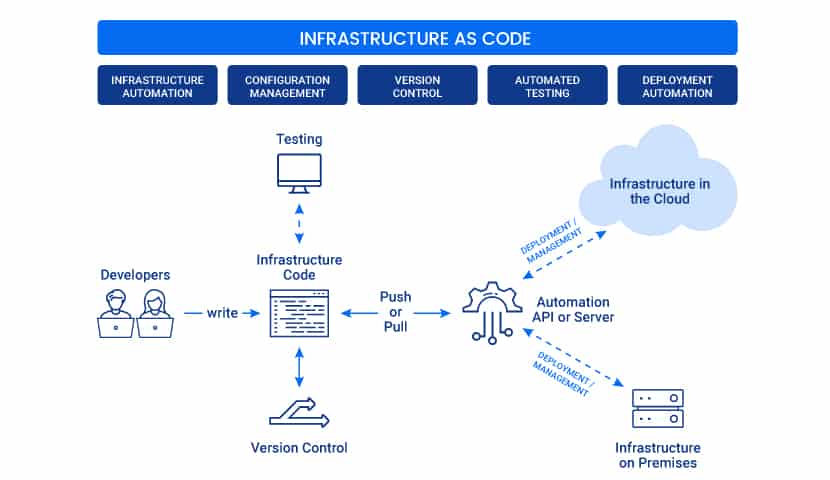
Popular IaC Tools:
1. Terraform is an open-source declarative tool that offers pre-written modules to build and manage an infrastructure.
2. Chef: A configuration management tool that uses cookbooks and recipes to deploy the desired environment. Best used for deploying and configuring applications using a pull-based approach.
3. Puppet: A Popular tool for configuration management that follows a Client-Server Model. Puppet needs agents to be deployed on the target machines before Puppet can start managing them.
4. Ansible: Ansible is used for building infrastructure as well as deploying and configuring applications on top of it. Best used for Ad hoc analysis.
5. Packer: A Unique tool that generates VM images (not running VMs) based on the steps you provide. Best used for Baking compute images.
6. Vagrant: Builds VMs using a workflow. Best used for creating pre-configured developer VMs within VirtualBox.
Read our blog to know why Terraform is preferred over other IaC tools, Terraform vs Ansible
What Is Terraform?
Terraform is one of the most popular Infrastructure-as-code (IaC) tools, used by DevOps teams to automate infrastructure tasks. It is used to automate the provisioning of your cloud resources. Terraform is an open-source, cloud-agnostic provisioning tool developed by HashiCorp and written in Go.

Benefits of using Terraform:
- Does orchestration, not just configuration management
- Supports multiple providers such as AWS, Azure, Oracle, GCP, and many more
- Provide immutable infrastructure where configuration changes smoothly
- Uses easy-to-understand language, HCL (HashiCorp configuration language)
- Easily portable to any other provider
Related Readings: What is Terraform?
Terraform Lifecycle
Terraform lifecycle consists of – init, plan, apply, and destroy.

1. Terraform init initializes the (local) Terraform environment. Usually executed only once per session.
2. Terraform plan compares the Terraform state with the as-is state in the cloud, builds and displays an execution plan. This does not change the deployment (read-only).
3. Terraform apply executes the plan. This potentially changes the deployment.
4. Terraform destroy deletes all resources that are governed by this specific Terraform environment.
Related Readings: Terraform Workflow: Terraform Plan & AWS Create VPC
Terraform Core Concepts
1. Variables: Terraform has input and output variables, it is a key-value pair. Input variables are used as parameters to input values at run time to customize our deployments. Output variables are return values of a terraform module that can be used by other configurations.
Related Readings: Terraform Variables: Types and Uses for Beginners
2. Provider: Terraform users provision their infrastructure on the major cloud providers such as AWS, Azure, OCI, and others. A provider is a plugin that interacts with the various APIs required to create, update, and delete various resources.
Related Readings: What are Terraform Providers?
3. Module: Any set of Terraform configuration files in a folder is a module. Every Terraform configuration has at least one module, known as its root module.
Related Readings: What are Terraform Modules and their purposes?
4. State: Terraform records information about what infrastructure is created in a Terraform state file. With the state file, Terraform can find the resources it created previously, supposed to manage and update them accordingly.
5. Resources: Cloud Providers provide various services in their offerings, which are referenced as Resources in Terraform. Terraform resources can be anything from compute instances, virtual networks to higher-level components such as DNS records. Each resource has its own attributes to define that resource.
Related Readings: Terraform Resources and Attributes
6. Data Source: The Data source performs a read-only operation. It allows data to be fetched or computed from resources/entities that are not defined or managed by Terraform or the current Terraform configuration.
Related Readings: What are Terraform Data Sources?
7. Plan: It is one of the stages in the Terraform lifecycle where it determines what needs to be created, updated, or destroyed to move from the real/current state of the infrastructure to the desired state.
8. Apply: It is one of the stages in the Terraform lifecycle where it applies the changes real/current state of the infrastructure to achieve the desired state.
Terraform Installation
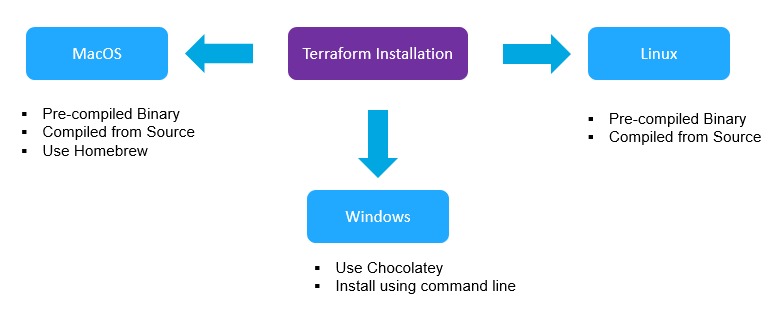
Before you start working, make sure you have Terraform installed on your machine; it can be installed on any OS, say Windows, macOS, Linux, or others. Terraform installation is an easy process and can be done in a few minutes.
Related Readings: How to Install Terraform?
We cover the step-by-step Terraform installation in all these ways in our Terraform training. Check out our blog for all the Hands-on Labs that we cover in our training HashiCorp Certified Terraform Associate-Step By Step Activity Guides.
Terraform Providers
A provider is responsible for understanding API interactions and exposing resources. It is an executable plug-in that contains code necessary to interact with the API of the service. Terraform configurations must declare which providers they require so that Terraform can install and use them.
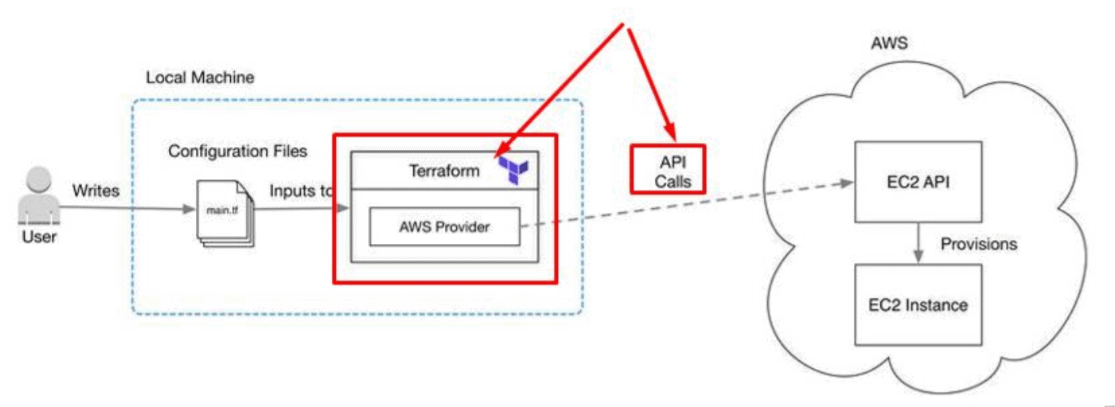
Terraform has over a hundred providers for different technologies, and each provider then gives terraform user access to its resources. So through AWS provider, for example, you have access to hundreds of AWS resources like EC2 instances, the AWS users, etc.
Read More: About Terraform Workflow.
Terraform Configuration Files
Configuration files are a set of files used to describe infrastructure in Terraform and have the file extensions .tf and .tf.json. Terraform uses a declarative model for defining infrastructure. Configuration files let you write a configuration that declares your desired state. Configuration files are made up of resources with settings and values representing the desired state of your infrastructure.
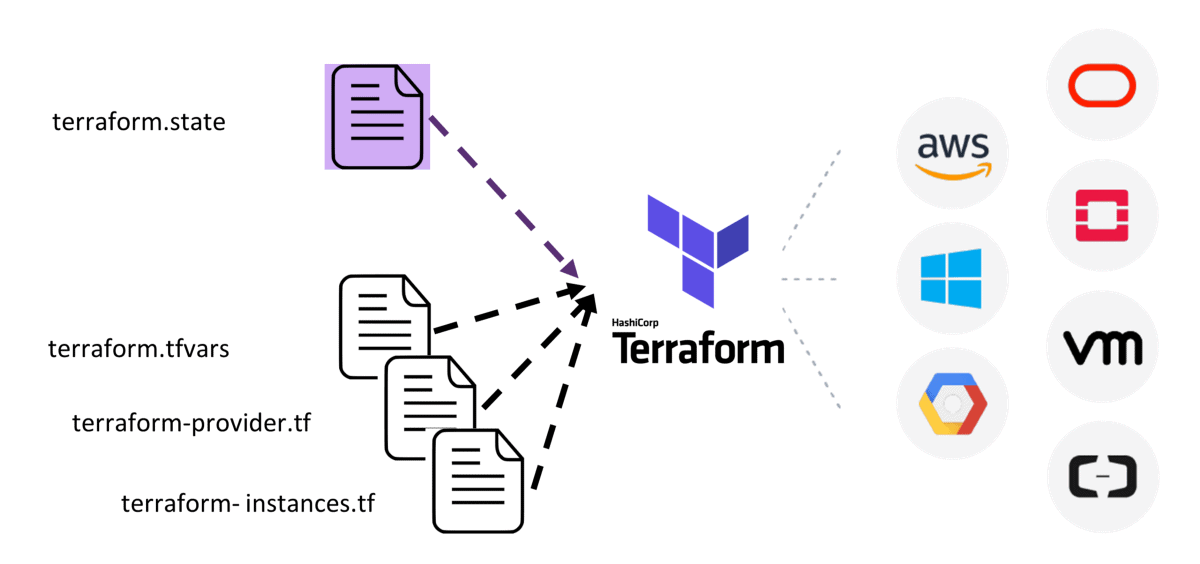
A Terraform configuration is made up of one or more files in a directory, provider binaries, plan files, and state files once Terraform has run the configuration.
1. Configuration file (*.tf files): Here we declare the provider and resources to be deployed along with the type of resource and all resources’ specific settings
2. Variable declaration file (variables.tf or variables.tf.json): Here we declare the input variables required to provision resources
3. Variable definition files (terraform.tfvars): Here, we assign values to the input variables
4. State file (terraform.tfstate): A state file is created once after Terraform is run. It stores state about our managed infrastructure.
Also Read: Our blog post on Terraform Create VM.
Getting started using Terraform
To get started building infrastructure resources using Terraform, there are few things that you should take care of. The general steps to deploy a resource(s) in the cloud are:
- Set up a Cloud Account on any cloud provider (AWS, Azure, OCI)
- Install Terraform
- Add a provider – AWS, Azure, OCI, GCP, or others
- Write configuration files
- Initialize Terraform Providers
- PLAN (DRY RUN) using terraform plan
- APPLY (Create a Resource) using terraform apply
- DESTROY (Delete a Resource) using terraform destroy
Related Readings: Terraform Interview Question.
Import Existing Infrastructure
Terraform is one of the great IaC tools with which you can deploy all your infrastructure resources. In addition to that, you can manage infrastructures from different cloud providers, such as AWS, Google Cloud, etc. But what if you have already created your infrastructure manually?
Terraform has a really nice feature for importing existing resources, which makes the migration of existing infrastructure into Terraform a lot easier.
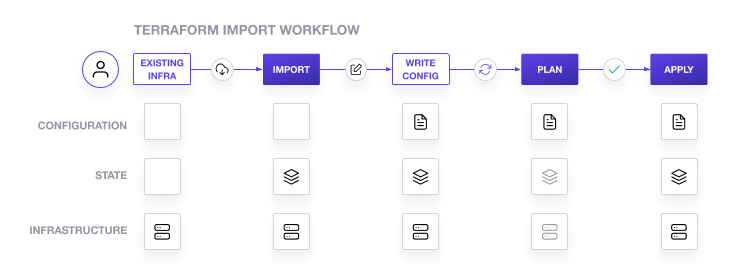
Currently, Terraform can only import resources into the state. It does not generate a configuration for them. Because of this, prior to running terraform import it is necessary to write manually a resource configuration block for the resource, to which the imported object will be mapped. For example:
resource "aws_instance" "import_example" {
  # ...instance configuration...
}
Now Terraform import can be run to attach an existing instance to this resource configuration:
$ terraform import aws_instance.import_example i-03efafa258104165f
This command locates the AWS instance with ID i-03efafa258104165f (which has been created outside Terraform) and attaches it to the name aws_instance.import_example in the Terraform state.
Check Out: Our blog post on Terraform Tips and Tricks.
Conclusion
Terraform is a powerful, cloud-agnostic Infrastructure as Code tool that simplifies provisioning, managing, and scaling infrastructure. By understanding its core concepts, configuration files, providers, modules, and state management, beginners can quickly become proficient. Start small, experiment with real cloud resources, and gradually move towards advanced practices like modules and remote state. With Terraform, you’re not just automating infrastructure—you’re building a foundation for scalable and reliable cloud operations.
I hope the above gives you an idea about how you can get started with Terraform. If you are interested in learning more, then I would suggest checking out our training Cloud Infrastructure Automation Certification: Terraform Associate Training, where we have covered all these topics in detail and much more along with Hands-on labs on each topic.
Frequently Asked Questions
Do I need prior programming or infrastructure experience to follow the guide?
No, prior programming or infrastructure experience is not necessary to follow the guide. It is designed to cater to beginners and assumes no prior knowledge of Terraform. The guide provides step-by-step explanations and examples to help newcomers understand and apply the concepts effectively.
Are there any prerequisites for using Terraform?
The guide may mention a few prerequisites, such as having a basic understanding of cloud computing concepts and having an account with a cloud provider (if you plan to provision resources in the cloud). Additionally, it may recommend installing Terraform and a text editor suitable for writing code.
Does the guide provide hands-on examples and exercises?
Yes, the Terraform Beginner's Guide typically includes hands-on examples and exercises throughout the content. These examples help solidify the concepts and allow readers to practice writing Terraform configurations, executing commands, and managing infrastructure resources.
How does Infrastructure as Code handle infrastructure updates and changes?
Infrastructure as Code tools typically handle updates and changes by comparing the desired state defined in the code with the current state of the infrastructure. When changes are made to the code, the tools generate an execution plan that outlines the modifications required to achieve the desired state. This plan can be reviewed and then applied to update or modify the infrastructure accordingly.
Can I use Infrastructure as Code for existing infrastructure?
Yes, Infrastructure as Code can be used for existing infrastructure. By defining the existing infrastructure in code, you can capture its current state and make modifications to it using code-based configuration files. This approach allows you to manage existing infrastructure in a consistent and automated manner.
Join FREE Class
🚀 Master Terraform & DevOps to get High-Paying Jobs! 🔥 Join our EXCLUSIVE Free class! 🚀
Get your hands dirty with lots of projects and labs based on Terraform and DevOps in our programme. Click on the image below to register for Our FREE Class Now!


![Microsoft Agentic AI Business Solutions Architect [AB-100] | K21 Academy](https://test.k21academy.com/wp-content/uploads/2025/11/Microsoft-Agentic-AI-Business-Solutions-Architect-AB-100-Exam-Overview1.png)


