



Oracle Security Zones is the preventive control measure, designed to stop you from making bad implementation choices that would weaken your security stance. OCI Security Zones enforce strict and best practices security rules that are locked and can’t be modified.
In this blog, I am going to cover a brief overview of OCI Security Zones and the recently announced service Maximum Security Zones (MSZ)
Security Zones
Security Zones ensures the resources in Oracle Cloud, that is Compute, Networking, Storage, Database, are secure and comply with Oracle Security principles. Oracle Security Zones automates security in a cloud compartment.
Read our blog to know more about OCI IAM
A security zone has the following characteristics:
- Associated with a single compartment that has the same name as the security zone
- Assigned a security zone recipe
When you create and update resources in a security zone, Oracle Cloud Infrastructure validates these operations against the list of policies defined in the security zone recipe. If any security zone policy is violated, then the operation is denied.
Read our blog to know more in detail Overview of Policy & How It Works In Oracle Cloud (OCI)
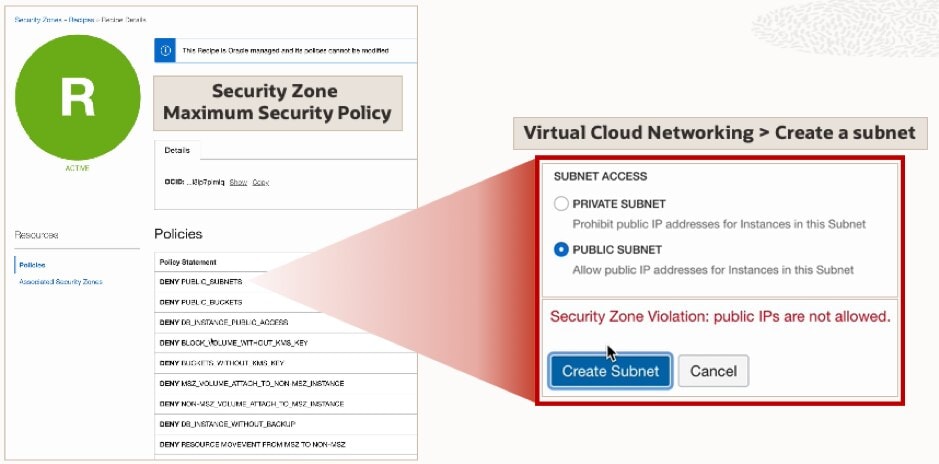
Let’s say a policy prohibit creating public subnet in a Virtual Cloud Network (VCN). If you try to create a public subnet in a security zone that has this policy, you will receive an error message as highlighted in the above image. Similarly, you can’t move an existing resource from a standard compartment to a security zone unless all policies are met.
Read our blog to know more about Networking In Oracle Cloud (OCI): VCN, Subnet, Gateways, Peering, Transit Routing
How To Create Security Zone in Console
Before creating an OCI Security Zone, you must have the required permissions to manage Security Zones in the entire tenancy.
Required IAM policy for creating a Security Zone
Allow group SecurityAdmins to manage security-zone in tenancy
Steps for creating a Security Zone
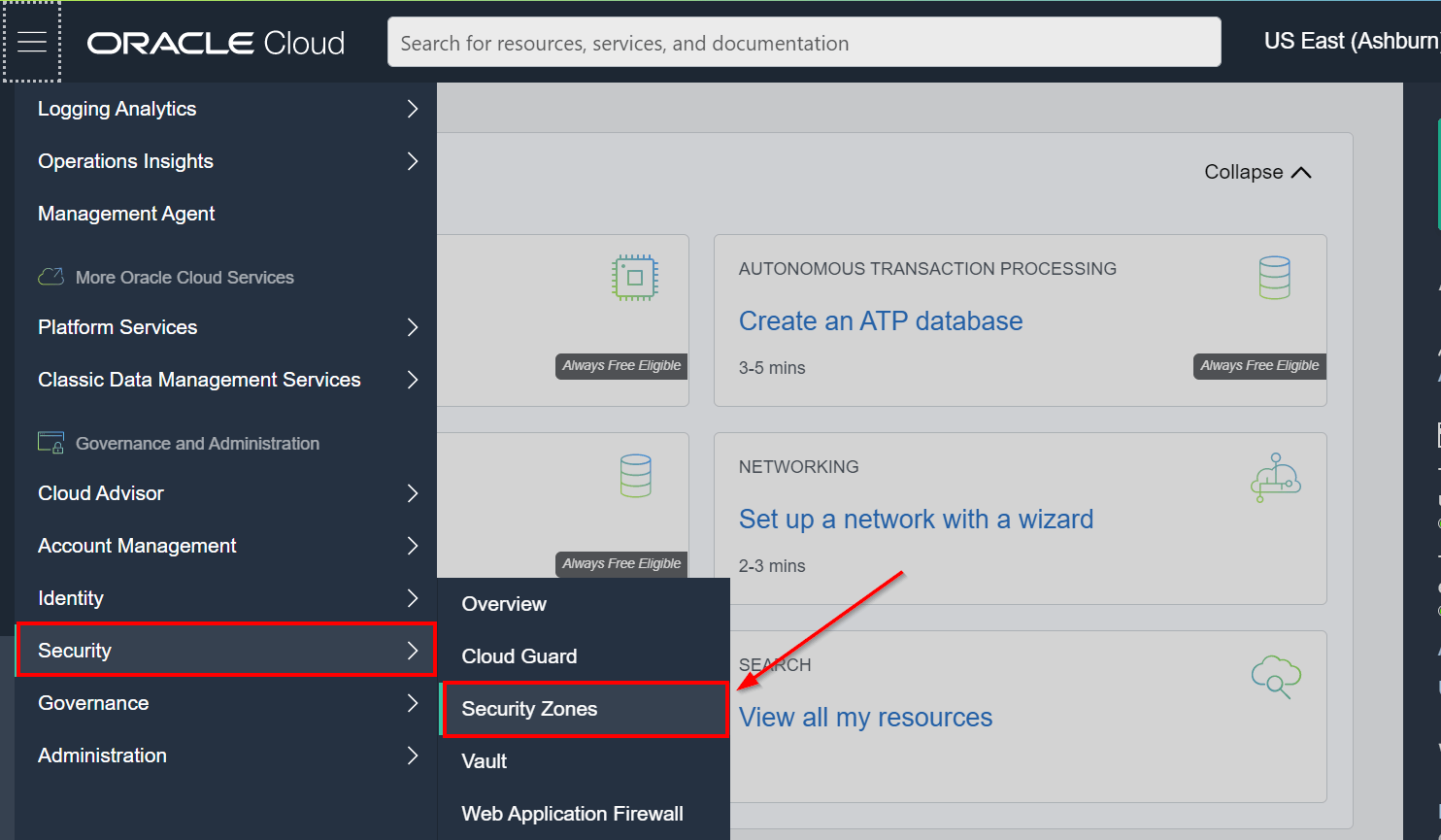
1. On the console, click on the Hamberger menu icon, under the Governance and Administration group, click on Security, and then click Security Zones
Check Out: Our blog post on Oracle Cloud Infrastructure Tagging. Click here
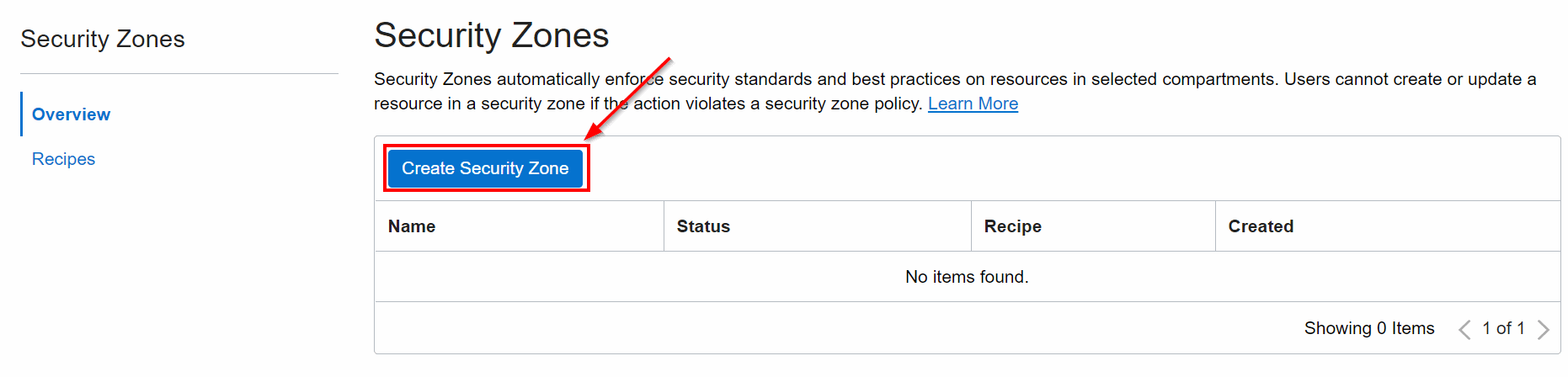
2. Click Create Security Zone
3. Enter a name and description for the security zone. To Create in Compartment, navigate to the compartment that you want to create the new compartment in.
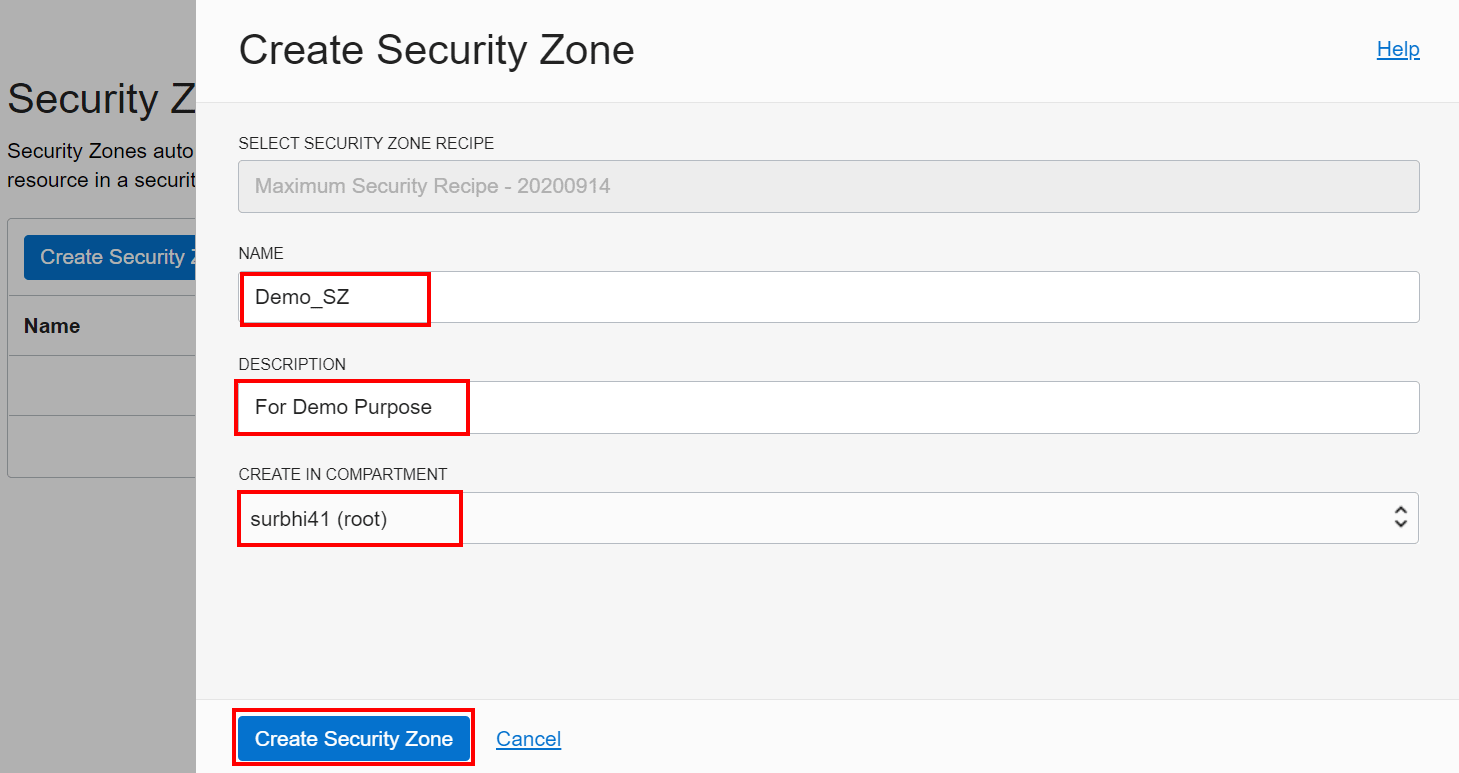
Resources can be created in the new Security Zone by selecting the compartment with the same name as the security zone while creating resources.
Also Check: Our blog post on Oracle Command Line Interface. Click here
Security Zone Recipes
You assign a recipe to Security Zone while creating a Security Zone in Console. A recipe is a collection of Security Zone policies. When you perform certain resource operations in a security zone, such as creating a compute instance or a subnet, Oracle Cloud Infrastructure automatically validates the policies within the recipe that is assigned to the security zone.
Your tenancy has a predefined recipe named Maximum Security Recipe, which includes all available security zone policies. Oracle manages this recipe and cannot be modified by the customer.
Read this to get the details of what free Oracle Cloud certifications are available for FREE & how you can book them.
How To View Policies in a Recipe
1. Again, click on the Hamberger menu icon, under the Governance and Administration group, click on Security, and then click Security Zones. Click on Recipes
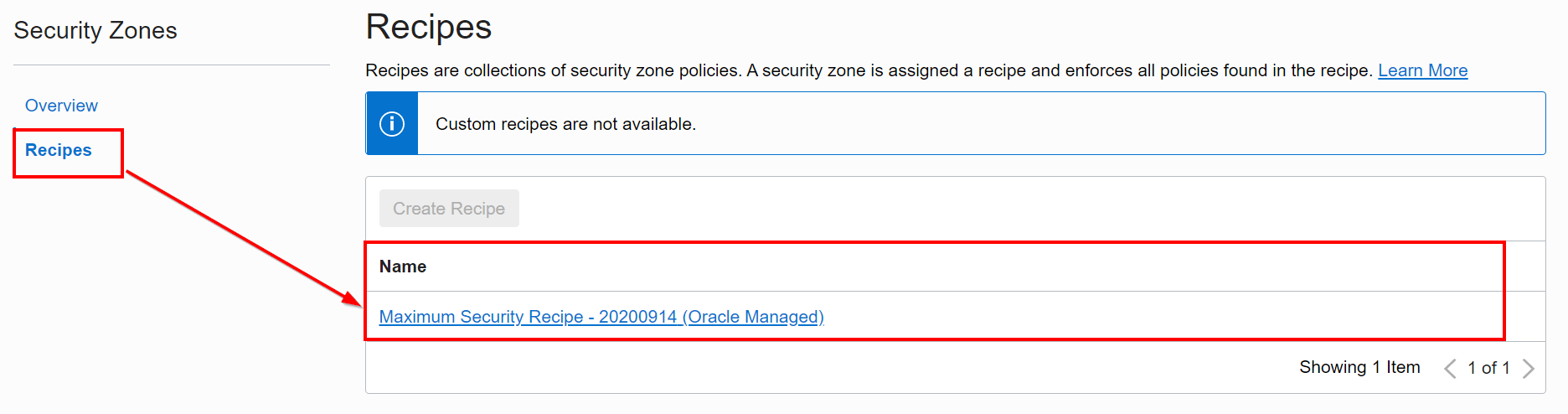
You can also check the security zones associated with a specific recipe by clicking on the recipe name and then clicking on Associated OCI Security Zones.
Also Check: Our blog post on OCI Virtual Cloud Network. Click here
Security Zone Policies
When you create and update resources in a security zone, such as creating a compute instance or a subnet, Oracle Cloud Infrastructure validates these operations against the policies associated with the security zone. If any policy is violated, then the operation is denied.
Security Policies have policies in place to maintain the following best security practices:
1. Restrict Resource Movement
Security Policies restrict moving certain resources from a security zone to a standard compartment, say a less secure compartment. An existing resource cannot be moved from a standard compartment to a security zone unless all security policies are met.
2. Restrict Resource Association
The components of a resource must also be located in a security zone. For example, the boot volume for a compute instance in a security zone must also be in a security zone.
3. Deny Public Access
All the resources in a security zone must not be accessible from the public internet. For example, you can’t create public subnets in a security zone, all subnets should be private within a VCN in a security zone, or you can’t add an internet gateway to a VCN in a security zone.
4. Require Encryption
Resources in a security zone must be encrypted using customer-managed keys ensuring data encryption while in transit or at rest. For example, Object Storage buckets in a security zone must use a customer-managed master encryption key in the Vault service. They can’t use the default encryption key managed by Oracle.
5. Ensure Data Durability
Automatic backups must be performed regularly for resources in a security zone. For example, Databases in a security zone must be configured to perform automatic backups.
6. Ensure Data Security
Data in a security zone is considered privileged and hence must not be copied to a standard compartment. For example, you can’t use a database backup in a security zone to create a database that isn’t in a security zone.
7. Use Only Configurations Approved by Oracle
Resources in a security zone must use only configurations and templates approved by Oracle. For example, all compute instances in a security zone must be created using an Oracle-provided image.
Maximum Security Zone (MSZ)
Oracle Maximum Security Zone ensures security policy enforcement of best practices automatically from day one so customers can prevent misconfiguration errors and deploy workloads securely. Maximum OCI Security Zones will release with a maximum security policy enabled.
Maximum Security Zones will come with a set of pre-defined and compulsory policies, called recipes (Maximum Security Recipe). This recipe will enforce the maximum level of security protection. This will be the most restrictive policy in nature and cannot be altered.
Policies that are enforced in Oracle Maximum Security Zones are:
- No public internet in or out
- All data encrypted with customer-managed HSM keys
- Only bastion access to hosts
- No databases without backups
- No instances without hardened images
Also Check: Our blog post on OCI Storage Gateway. Click here
A Simple Case Study for Maximum Security Zone
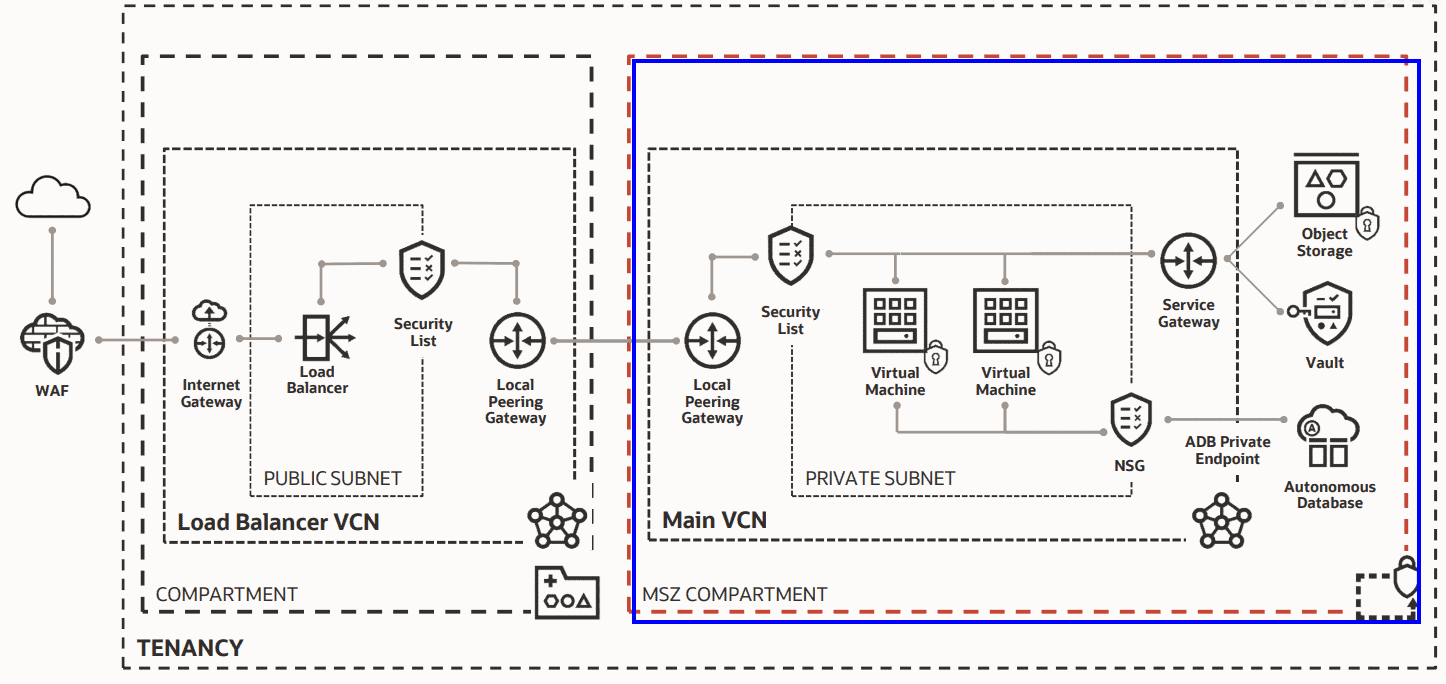
In this scenario, all the resources, Object Storage, VMs, Autonomous Database, Service Gateway, are deployed in a Maximum Security Zone. A local peering gateway is used to connect the resources from a Maximum Security Zone compartment to a standard, regular compartment where all the resources are public-facing and accessible from the public internet.
This scenario may have more resources than a regular scenario, more cost, and a lot more overhead of managing all these resources but it prevents misconfiguration errors and deploy workloads securely.
Conclusion
In this blog, I have discussed Security Zones, Security Zone Recipes, Security Zone Policies, and Maximum Security Zones. On a closing note, Security Zones are used when there is a requirement of pre-provisioned security posture with strict policies and you don’t want to perform any customization.
Related/References
- 1Z0-1072-20 | Oracle Cloud Infrastructure 2020 Architect Associate
- Overview Of Policy & How It Work In Oracle Cloud (OCI)
- IAM In OCI – User, Groups, Compartment, Policy, Tags
- Security In Oracle Cloud (OCI)
Begin Your Cloud Journey
Begin your journey towards becoming an Oracle Cloud Expert and earn a lot more in 2024 by joining our FREE CLASS. You will also know more about the Roles and Responsibilities, Job opportunities for OCI Architects, Admins in the market, and what to study Including Hands-On labs you must perform to get the Higher Paying jobs.
Click on the below image to Register for Our FREE Class on MASTERING ORACLE CLOUD FOR DBAs, APPs DBAs, ARCHITECTS & SYS ADMINS


![Microsoft Agentic AI Business Solutions Architect [AB-100] | K21 Academy](https://test.k21academy.com/wp-content/uploads/2025/11/Microsoft-Agentic-AI-Business-Solutions-Architect-AB-100-Exam-Overview1.png)


