





Azure Virtual Networks (VNets) form the backbone of your cloud infrastructure, enabling secure communication between Azure resources and hybrid environments. In this blog, we’ll see through the essentials of VNets, including VNet Peering, ExpressRoute, and VPN Gateway, to help you design a robust and scalable network architecture.
Check my previous blog on Azure Compute Options to get an overview of the important compute options in Azure.
In this blog, I’ve covered:
-
- Basics of Networking: Subnetting & CIDR
- Practical Applications of CIDR in Azure Networking
- What Is a Virtual Network?
- Why We Use Virtual Networks?
- Virtual Network Key Components
- Benefits of Virtual Network
- How Does it Work?
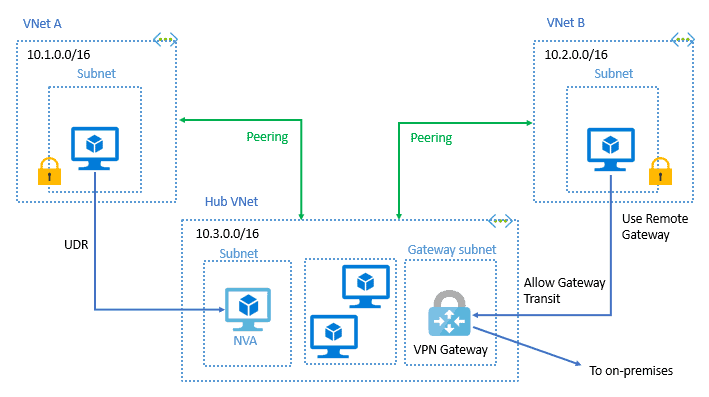
- VNet Peering
- ExpressRoute
- VPN Gateway
- Interconnection between Azure and Oracle Cloud
- Pricing of Virtual Networks
Basics of Networking: Subnetting & CIDR
Subnetting and CIDR: Key Concepts for Efficient Network Management
Understanding networking is a fundamental part of configuring complex environments on the internet. This has implications when trying to communicate between servers efficiently, developing secure network policies, and keeping your nodes organized.
Subnetting involves borrowing bits from the host portion of an IP address to create multiple sub-networks, known as subnets.
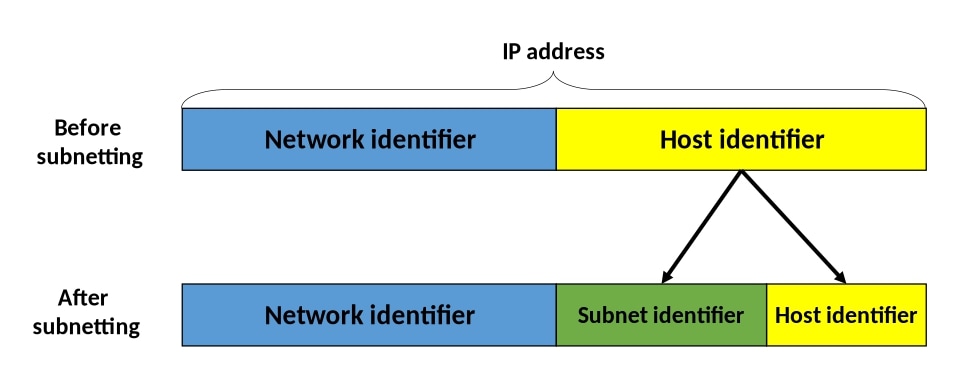
CIDR, or Classless Inter-Domain Routing, offers more flexibility by allowing the division of IP addresses at any point, which makes more efficient use of IP address space and eliminates the limitations of traditional class-based addressing.
By using subnetting, one single Class IP address can be used to have smaller sub-networks which provides better network management capabilities.
Related Readings: Understanding IP Addresses, Subnets, and CIDR Notation for Networking
Practical Applications of CIDR in Azure Networking
Classless Inter-Domain Routing (CIDR) is an essential concept in modern Azure networking that enables efficient use of IP address space, improved routing, and better scalability for your cloud infrastructure. Azure leverages CIDR in various ways, from creating virtual networks (VNets) to optimizing address allocation, managing hybrid environments, and facilitating seamless cloud connectivity. Here’s how CIDR is applied in Azure-specific scenarios:
1. Efficient IP Address Allocation in Azure Virtual Networks (VNets)
In Azure, CIDR plays a critical role in designing Virtual Networks (VNets). When creating a VNet, CIDR notation is used to allocate a range of private IP addresses that will be assigned to resources within that network. Azure supports both IPv4 and IPv6 address spaces, offering flexibility in how you design your network.
- Example:
When setting up a VNet in Azure, you can use CIDR notation to define the IP range, such as10.0.0.0/16. This allows you to divide your VNet into multiple subnets, like10.0.1.0/24for your web servers,10.0.2.0/24for your application servers, and so on. Each subnet can be dynamically resized based on the number of resources deployed. - Benefits:
- Optimized IP Usage: Efficiently allocate address space without wastage, ensuring your resources are scaled as needed.
- Flexible Network Design: Create custom subnets in Azure VNets tailored to your workload’s specific requirements.
2. Azure ExpressRoute and CIDR
Azure ExpressRoute provides a dedicated, private connection between on-premises networks and Azure. CIDR plays a vital role in ensuring efficient use of IP space while enabling seamless integration between on-premises and cloud networks.
- Example:
Suppose you have an on-premises network with a CIDR range of192.168.1.0/24and your Azure VNet uses10.0.0.0/16. By using ExpressRoute, you can configure a private peering connection between these two networks, ensuring that data flows securely and efficiently over the private link while avoiding public internet traffic. This integration allows for consistent IP routing using CIDR notation. - Benefits:
- Private, Secure Connections: CIDR ensures a predictable and scalable address space for ExpressRoute connections.
- Efficient Hybrid Cloud Architecture: ExpressRoute leverages CIDR to ensure seamless hybrid connectivity between on-premises and Azure.
3. Azure VPN Gateway and CIDR for Secure Site-to-Site Connections
Azure VPN Gateway is a key service for establishing secure, encrypted connections between your on-premises network and Azure VNets over the public internet. CIDR ensures that these connections are efficient and manageable.
- Example:
If you are setting up a Site-to-Site (S2S) VPN connection between your on-premises network172.16.0.0/24and your Azure VNet with10.1.0.0/16, CIDR notation helps define these address ranges in both networks. This ensures that only the necessary IP addresses from both networks are routed securely over the VPN tunnel. - Benefits:
- Secure Connectivity: CIDR ensures that only the specific IP ranges are accessible between your on-premises and Azure resources.
- Simplified Management: Use CIDR to efficiently manage address spaces and routes for VPN Gateway connections.
Related Readings: Azure Firewall: Overview and Concepts
What Is Azure Virtual Network?
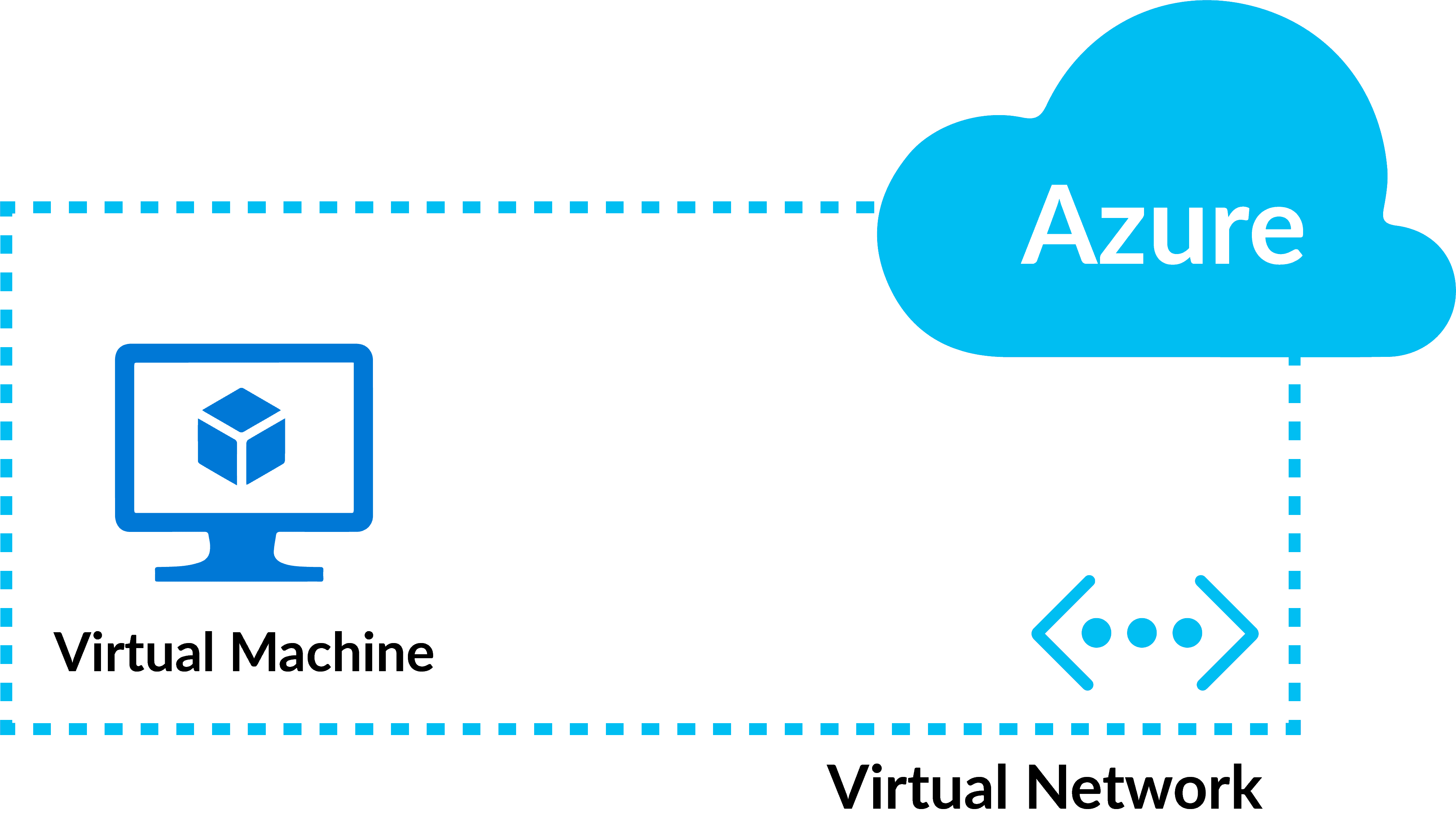
- Azure Virtual Network (VNet) is the fundamental building block for your private network in Azure.
- It enables many types of Azure resources, such as Azure Virtual Machines (VMs), to securely communicate with each other, the internet, and on-premises networks.
- It is similar to a traditional network that you’d operate in your own data center, but brings with it additional benefits of Azure’s infrastructure such as scale, availability, and isolation.
Related Readings: How to create and connect a Windows Virtual Machine in Azure
Use of Azure Virtual Network?
The main purpose of Virtual Networks is to act as a communication channel between resources launched in the cloud. Why Virtual? Because there are no actual routers or switches in the cloud.
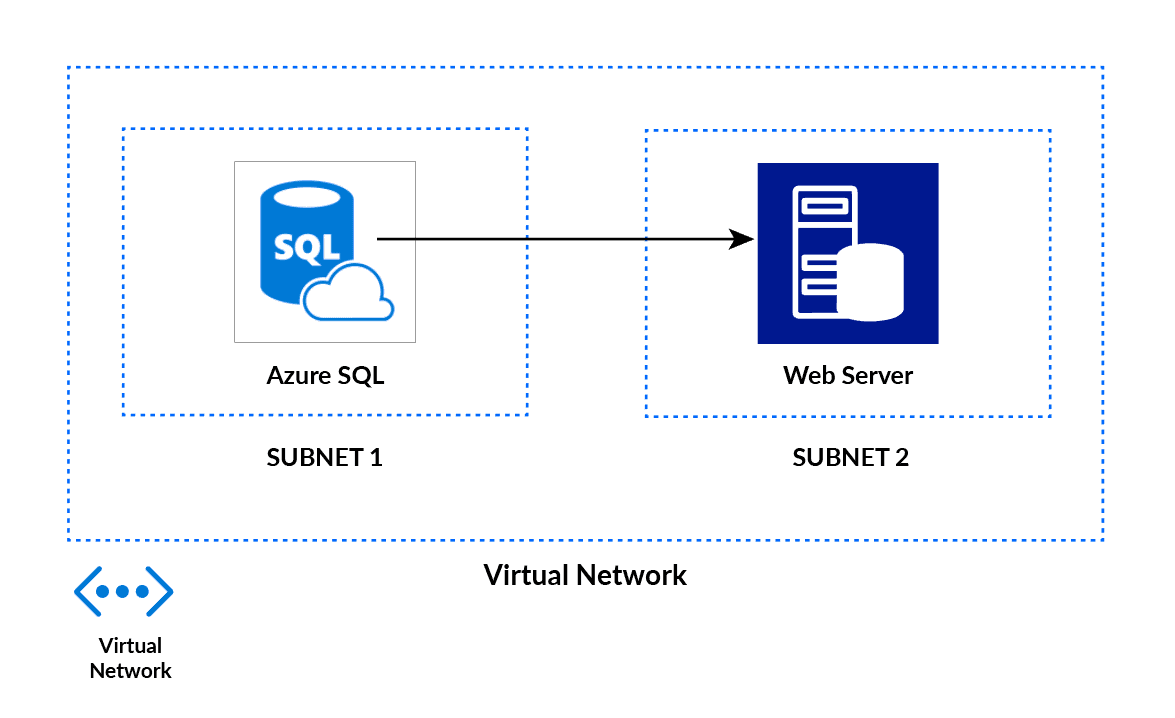
For example, if you launch a database server and a website server in the cloud, they would need a medium to interact. This medium of interaction is called a Virtual Network.
Virtual Network Key Components
Key components of Azure VNets include:
1. Subnets: Subnets enable segmenting a virtual network into one or more subnet networks and allocating a portion of the virtual network address space to each subnet. Azure resources are deployed to a specific subnet that is segmented using the VNet address space. A subnet can further be divided into:
- Private Subnet – A network in which there is no internet access.
- Public Subnet – A network in which there is internet access.
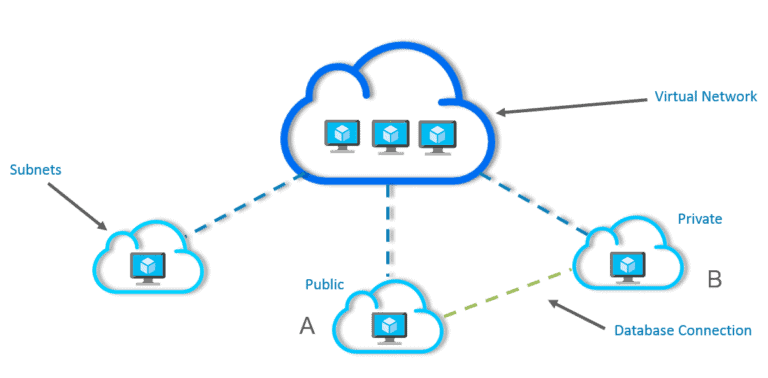
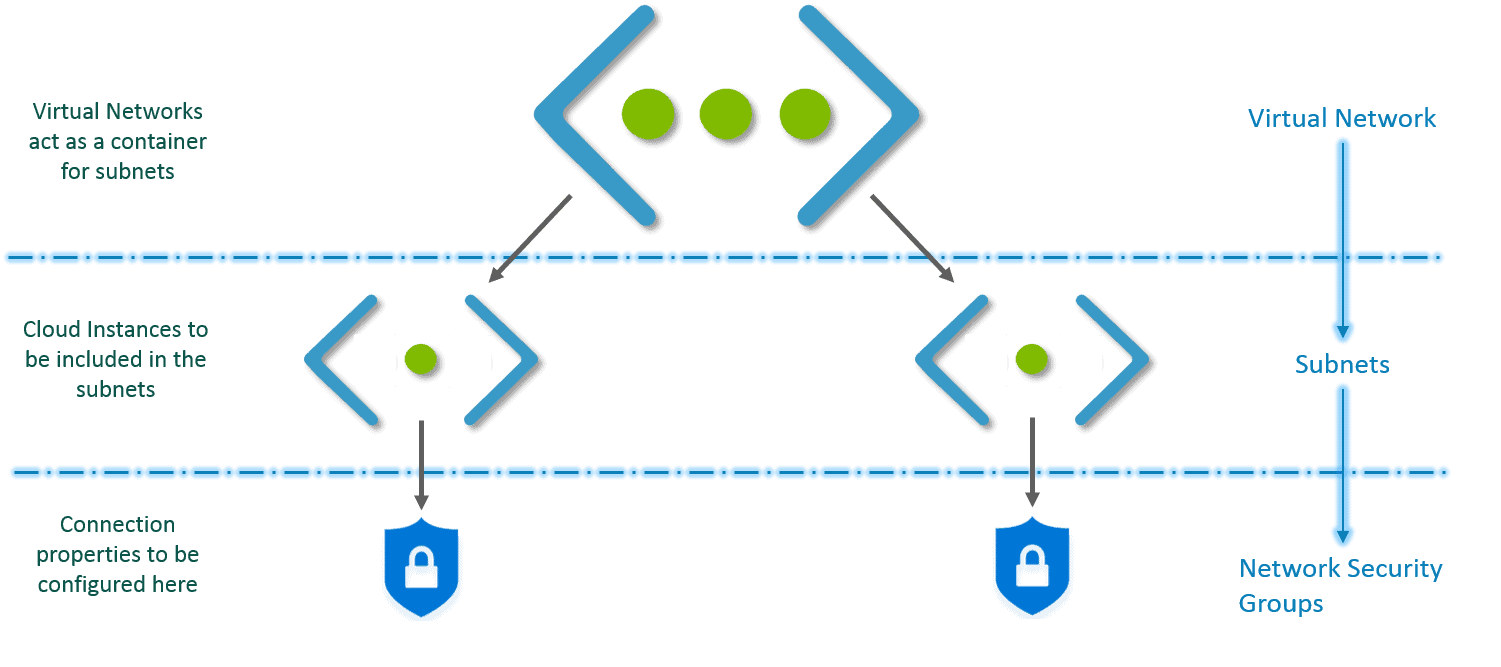
2. Network Security Groups (NSG): Use to permit or deny traffic (inbound or outbound), via rules, to a subnet or network interface.
Any Azure virtual network can be placed into a security group where different inbound and outbound rules can be configured to allow or deny certain types of traffic. For each rule, you can specify source and destination, port, and protocol.
Benefits of Azure Virtual Network
- Isolation: Virtual networks provide isolation and segmentation, which helps in reducing the attack surface and improves network security.
- Customization: Virtual networks are highly customizable, allowing you to configure IP address ranges, subnets, routing tables, and other network settings to meet your specific requirements.
- Connectivity: You can easily connect your virtual network to other virtual networks in Azure or to your on-premises network using VPN or ExpressRoute.
- Scalability: Virtual networks are highly scalable and can be easily expanded to accommodate growing workloads.
- Cost-effective: Using a virtual network in Azure can be more cost-effective than building and maintaining your own physical network infrastructure.
- Monitoring and logging: Azure provides a range of monitoring and logging tools that can help you identify and troubleshoot network issues.
- Integration with other Azure services: Virtual networks can be integrated with other Azure services, such as Azure Virtual Machines, Azure App Services, and Azure SQL Database, making it easier to deploy and manage your applications in the cloud.
How Does it Work?
- First, you create a virtual network.
- Then, in this virtual network, you create subnets.
- You associate each subnet with the respective Virtual Machines or Cloud Instances.
- Attach the relevant Network Security Group to each subnet.
- Configure the properties in the NSGs and you are set!
VNet Peering (Connection Between Azure VNets):
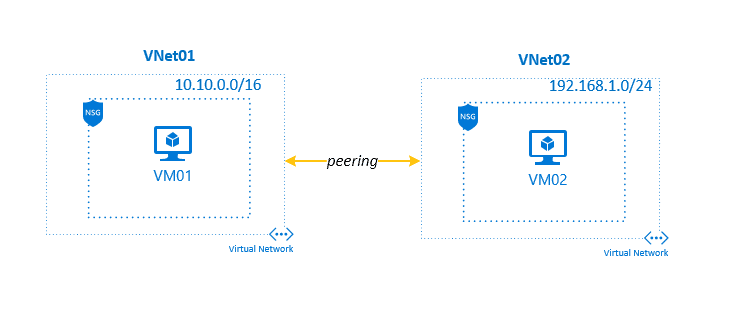
Virtual network peering enables you to seamlessly connect two or more Azure Virtual Networks in Azure. The virtual networks appear as one for connectivity purposes. The traffic between virtual machines in peered virtual networks uses the Microsoft backbone infrastructure. Like traffic between virtual machines in the same network, traffic is routed through Microsoft’s private network only.
VNet peering doesn’t use a VPN gateway and has different constraints. Additionally, VNet peering pricing is calculated differently than VNet-to-VNet VPN Gateway pricing.
Azure supports the following types of peering:
- Virtual network peering: Connect virtual networks within the same Azure region.
- Global virtual network peering: Connecting virtual networks across Azure regions.
 Related Readings: Azure VNet Peering
ExpressRoute (Connection Between On-prem to Azure):
ExpressRoute is an Azure networking service that privately connects (connections don’t go over the public Internet) an enterprise’s on-premises infrastructure to the Microsoft public cloud via a third-party connectivity provider. Because the connection is private, it offers lower latency and greater reliability than the public internet. Azure ExpressRoute connectivity providers include Comcast, AT&T and Equinix.
With ExpressRoute, you can establish connections to Microsoft cloud services, such as Microsoft Azure, Microsoft 365, and Dynamics 365.
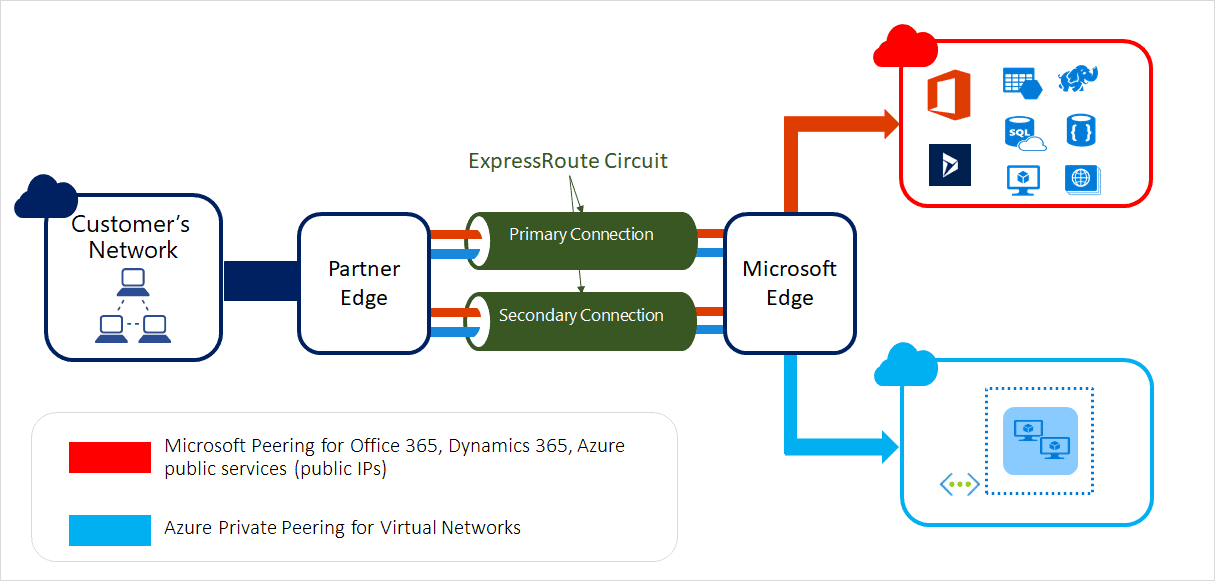
For information on how to connect your network to Microsoft using ExpressRoute, refer: ExpressRoute connectivity models.
VPN Gateway (For Encrypted Connections):
VPN Gateway helps you create encrypted cross-premises connections to your virtual network from on-premises locations, or create encrypted connections between VNets. It is composed of two or more VMs that are deployed to a specific subnet you create called the gateway subnet.
There are three different configurations available for VPN Gateway connections:
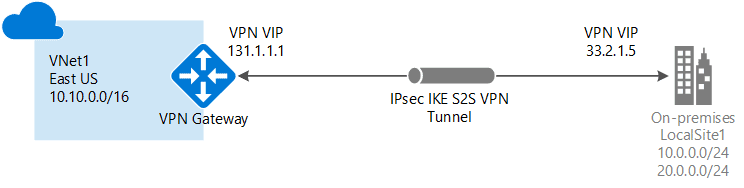
1. Site-to-Site (S2S): A Site-to-Site VPN gateway connection is used to connect your on-premises network to an Azure virtual network over a VPN (Virtual Private Network) tunnel. This type of connection requires a VPN device located on-premises that has an externally facing public IP address assigned to it.
Also, when you follow the Site-to-Site IPsec steps, you create and configure the local network gateways (a specific object that represents your on-premises location (the site) for routing purposes) manually. The local network gateway for each VNet treats the other VNet as a local site.
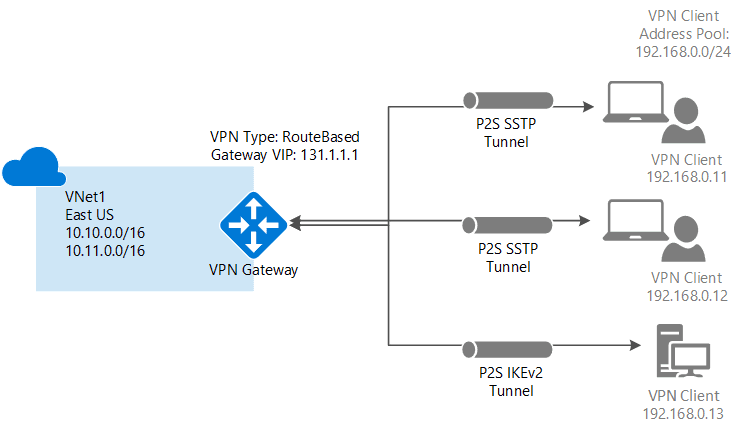
2. Point-to-Site (P2S): A Point-to-Site (P2S) VPN gateway connection lets you create a secure connection to your virtual network from an individual client computer. A P2S connection is established by starting it from the client computer. This solution is useful for telecommuters who want to connect to Azure VNets from a remote location, such as from home or a conference.
3. VNet-to-VNet: When you connect a virtual network to another virtual network with a VNet-to-VNet connection type (VNet2VNet), it’s similar to creating a Site-to-Site IPsec connection to an on-premises location. Both connection types use a VPN gateway to provide a secure tunnel with IPsec/IKE and function the same way when communicating. However, they differ in the way the local network gateway is configured.
When you create a VNet-to-VNet connection, the local network gateway address space is automatically created and populated.

Also Read: Our blog post on AZ 305 Exam: Learn how to prepare for this exam.
Comparison Between Azure VNet Peering, ExpressRoute, and VPN Gateway
| Feature | VNet Peering | ExpressRoute | VPN Gateway |
|---|---|---|---|
| Connection Type | Private, direct connection between VNets in Azure | Dedicated private connection between on-premises and Azure | Encrypted connection over the public internet |
| Usage | Connects multiple VNets within the same region or across regions | Secure, private connection for hybrid environments | Connects on-premises networks to Azure or VNet-to-VNet within Azure |
| Security | Uses Azure’s private backbone for secure communication | Fully private and dedicated connection, bypassing the public internet | Encrypted using IPSec/IKE over the internet |
| Latency | Low latency, as traffic flows over Azure’s internal backbone | Very low latency, high-speed dedicated connection | Higher latency compared to ExpressRoute due to public internet |
| Bandwidth | Limited by the size of the VNet and the region’s capacity | Up to 100 Gbps depending on the configuration | Limited to the internet bandwidth (e.g., 1 Gbps, 10 Gbps) |
| Cost | Pay for data transfer between VNets (intra-region or cross-region) | Higher cost due to dedicated connection and bandwidth | Lower cost, pay-per-usage based on data transfer and tunnel configuration |
| Scalability | Easily scalable by adding more VNets or regions | Scalable by increasing bandwidth (up to 100 Gbps) | Scalable by configuring multiple VPN tunnels and using higher bandwidth links |
| Use Cases | – Hub-and-spoke network designs – Connecting multiple VNets |
– Hybrid cloud architecture – Large-scale applications with high security |
– Connecting on-premises networks to Azure – Remote work and site-to-site connections |
| Setup Complexity | Simple setup through the Azure portal | More complex, involves physical connection and a third-party provider | Easy to set up via the Azure portal, though may require additional configuration for on-premises VPN devices |
| Redundancy | High availability with region-to-region peering and automatic failover | Built-in redundancy with multiple peering locations available | Redundant connections can be configured with active-passive or active-active setup |
| Integration with Azure Services | Fully integrated with Azure services like Load Balancer and Network Security Groups | Integrated with Microsoft services like Microsoft 365 and Azure private services | Integrates with Azure services but limited to internet-based services |
| IP Address Management | Allows seamless IP address communication between peered VNets | Offers a private IP address range for your entire infrastructure | Supports both private IP and public IP address configurations |
Interconnection between Azure and Oracle Cloud:
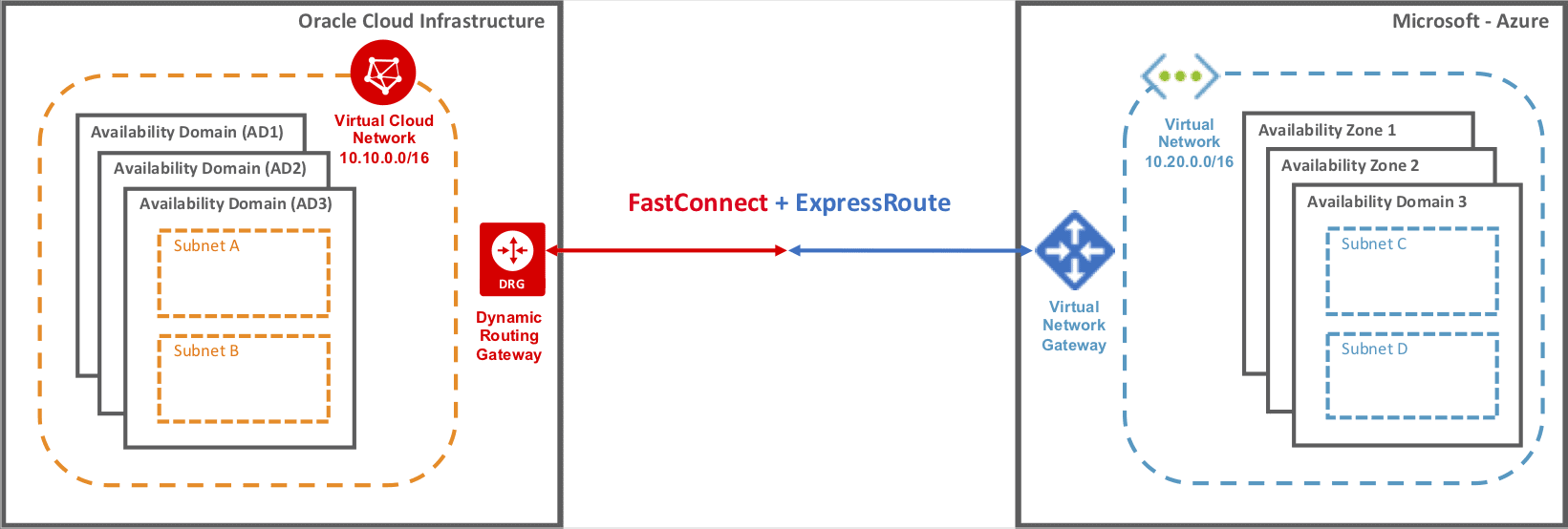
Microsoft and Oracle offer direct interconnection between Azure and Oracle Cloud Infrastructure (OCI) through ExpressRoute and FastConnect. Through the ExpressRoute and FastConnect interconnection, customers can experience low latency, high throughput, private direct connectivity between the two clouds.
Using this cross-cloud connectivity, you can partition a multi-tier application to run your database tier on Oracle Cloud Infrastructure (OCI), and the application and other tiers on Microsoft Azure. The experience is similar to running the entire solution stack in a single cloud.
Pricing of Virtual Networks
There is no charge for using Azure VNet, it is free of cost.
- Standard charges are applicable for resources, such as Virtual Machines (VMs) and other products.
- You are charged for the public IP address and reserved IP address inside your VNet.
- The incoming and outgoing data of VNet Peering is chargeable.
- Also, you can calculate the resources price using the Azure pricing calculator.
Summary
A virtual network is a network of IP addresses in a range connected together. It is an important aspect of consideration while designing solutions in the cloud. In order to secure each layer of application architecture inside a highly secured network, it is recommended to create different subnets for different tiers of an application and attach each subnet with a network security group with limited inbound and outbound security rules.
Frequently Asked Questions
Ans. The Azure Virtual Network service serves as the foundation for your private network in Azure. An instance of the service (a virtual network) allows numerous types of Azure services to securely connect with one another, the internet, and on-premises networks.
Ans. A subnet is a component of an IP network that allows for easier management and security. A virtual network, on the other hand, is an isolated network environment within a cloud provider's infrastructure in which resources such as virtual computers may safely connect. Subnets are virtual network components that define smaller address ranges to help organize and regulate network traffic.
Ans. Virtual network peering enables you to easily connect two or more virtual networks in Azure. To simplify communication, the virtual networks look as one. Peered virtual network traffic is routed through Microsoft's backbone infrastructure.
Ans. A VPN gateway in Azure is a virtual network gateway that establishes safe and encrypted connections between Azure virtual networks and on-premises networks, remote users, and other Azure virtual networks. It allows for secure communication over the public internet via protocols such as IPsec and SSL/TLS, extending on-premises networks to Azure or linking several Azure virtual networks together.
Ans. ExpressRoute is a dedicated private connection service that provides dependable, high-speed connectivity between on-premises networks and Azure services. By avoiding the public internet, it offers consistent performance, decreased latency, and increased security while accessing Azure services and enabling hybrid cloud connectivity.
Ans. It operates in layer 3. Q1) What are Azure Virtual Networks
Q2) What is the difference between a subnet and a virtual network?
Q3) What is VNet peering in Azure?
Q4) What is VPN gateway Azure?
Q5) What is an express route in Azure?
Q6) Is ExpressRoute layer 2 or 3?
Next Task For You
Begin your journey toward Mastering Azure Cloud and landing high-paying jobs. Just click on the register now button on the below image to register for a Free Class on Mastering Azure Cloud: How to Build In-Demand Skills and Land High-Paying Jobs. This class will help you understand better, so you can choose the right career path and get a higher paying job.


![Microsoft Agentic AI Business Solutions Architect [AB-100] | K21 Academy](https://test.k21academy.com/wp-content/uploads/2025/11/Microsoft-Agentic-AI-Business-Solutions-Architect-AB-100-Exam-Overview1.png)



