
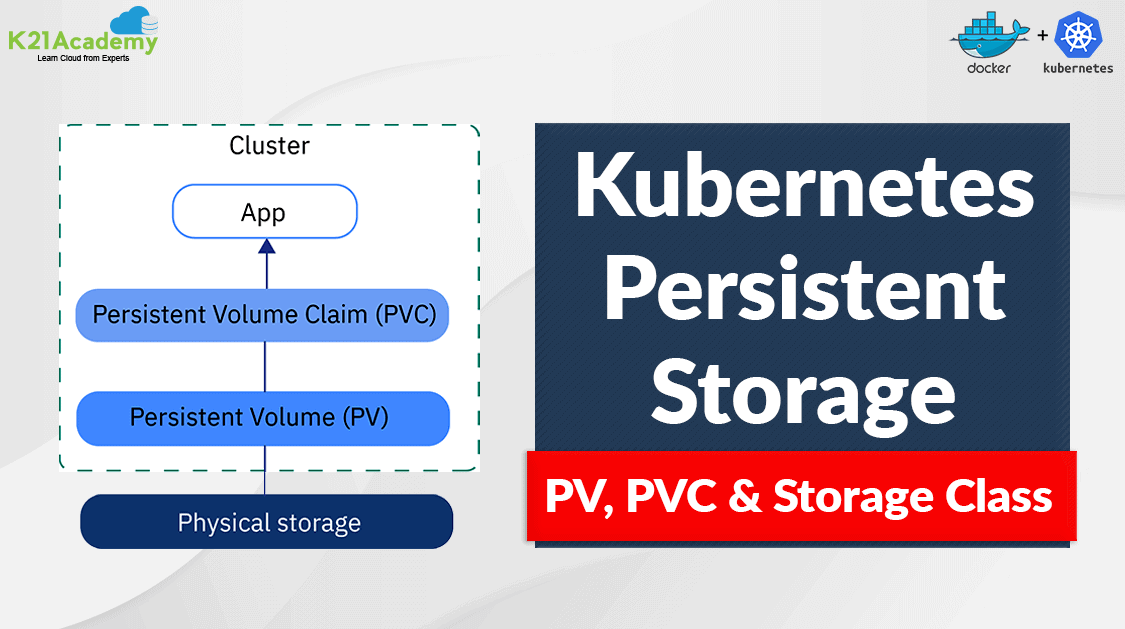





Kubernetes is a complete containerization orchestration, which provides the ability to run dynamically scaling, management of containerized applications. Persistent Storage in Kubernetes offers applications in K8s a handy way to request, and consume storage resources. In this blog, I’ll cover Kubernetes persistent storage concepts.
In this blog, I’ll take a broad look at:
- What is Kubernetes Volume
- Types of Volumes
- Kubernetes Persistency concepts
- Types of Persistent Volumes
- Persistent Storage – Phase
- Lifecycle of a volume and claim
What is Kubernetes Volume
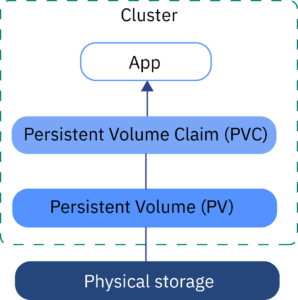
Difference between K8s Volume and Persistent Volume: Volume lifecycle is linked to a pod. It gets deleted when the pod gets deleted. While Persistent Volume has an independent lifecycle. It can exist beyond the lifetime of a pod.
Note: Check out our blog post on Docker Storage
Types of Volumes
Kubernetes supports various types of volumes.
Kubernetes hostPath
A Kubernetes hostPath volume mounts a file or directory from the host node’s filesystem into your Pod. This is not something that the majority Pods will need, but it offers a strong hatchway for a few applications.
configMap
A ConfigMap provides a way to inject configuration data into pods. The data stored during a ConfigMap are often referenced during a volume of type configMap then consumed by containerized applications running within a pod.
iSCSI
Also see: This blog covers the important part of Kubernetes which is Kubernetes Network Policy
Kubernetes Persistency concepts
There are three foremost concepts you should understand as you start working with Kubernetes persistent storage:
PersistentVolume (PV)
In Kubernetes Persistent Storage a PersistentVolume (PV) is a piece of storage within the cluster that has been provisioned by an administrator or dynamically provisioned using Storage Classes. PV is an abstraction for the physical storage device (such as NFS or iSCSI communication) that you have attached to the cluster. The main feature of a PV is that it has an independent life cycle which is managed by Kubernetes, and it continues to live when the pods accessing it gets deleted.
A typical YAML file of PV using hostPath PersistentVolume looks like this:
apiVersion: v1
kind: PersistentVolume
metadata:
  name: task-pv-volume
  labels:
    type: local
spec:
  storageClassName: manual
  capacity:
    storage: 10Gi
  accessModes:
    - ReadWriteOnce
  hostPath:
    path: "/mnt/data"
Also Read: Kubernetes Labels and Kubernetes Annotations are one of the main components which provide a way for adding additional metadata to our Kubernetes Objects.
PersistentVolumeClaim (PVC)
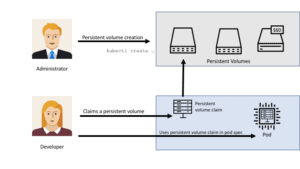
A PersistentVolumeClaim (PVC) is a request for storage by a user. The claim can include specific storage parameters required by the application. For example, an amount of storage, or a specific type of access (RWO – ReadWriteOnce, ROX – ReadOnlyMany, RWX – ReadWriteMany, etc.).
- ReadWriteOnce — the volume can be mounted as read-write by a single node
- ReadOnlyMany — the volume can be mounted read-only by many nodes
- ReadWriteMany — the volume can be mounted as read-write by many nodes
Kubernetes looks for a PV that meets the criteria defined in the user’s PVC, and if there is one, it matches the claim to PV then it binds the PV to that PVC.
Also Check: Our blog post on Kubernetes RBAC
A typical YAML file of PVC looks like this:
apiVersion: v1
kind: PersistentVolumeClaim
metadata:
  name: task-pv-claim
spec:
  storageClassName: manual
  accessModes:
    - ReadWriteOnce
  resources:
    requests:
      storage: 3Gi
You can attach the storage to a pod by adding a volume section in the pod config file:
apiVersion: v1
kind: Pod
metadata:
  name: task-pv-pod
spec:
  volumes:
    - name: task-pv-storage
      persistentVolumeClaim:
        claimName: task-pv-claim
  containers:
    - name: task-pv-container
      image: nginx
      ports:
        - containerPort: 80
          name: "http-server"
      volumeMounts:
        - mountPath: "/usr/share/nginx/html"
          name: task-pv-storage
Learn With Us: Join our Kubernetes training and understand Kubernetes basics in an easy way.
StorageClass
Storage Class allows the provision of Kubernetes persistent storage dynamically. With a storage class, administrators need not create a persistent volume separately before claiming it. Administrators can define several StorageClasses that give users multiple options for performance. For example, one can be on a fast SSD drive, it also supports Cloud Storage Services like AWS EBS, AzureDisk, GCEPersistentDisk, etc.
A typical YAML file of storage class using AWS EBS storage looks like this:
apiVersion: storage.k8s.io/v1
kind: StorageClass
metadata:
  name: standard
provisioner: kubernetes.io/aws-ebs
parameters:
  type: gp2
reclaimPolicy: Retain
allowVolumeExpansion: true
mountOptions:
  - debug
volumeBindingMode: Immediate
Also Read: Our blog post on Docker and Kubernetes. Click here
Types of Persistent Volumes
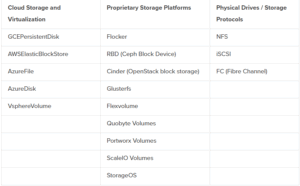
Using the Kubernetes Persistent Storage the PersistentVolume types are implemented as plugins. Kubernetes currently supports the following plugins:
Check Out: How to Use Configmap Kubernetes. Click here
Persistent Storage – Phase
- Available – A free resource that’s not yet sure to a claim
- Bound – The Volume is bound to a claim
- Released – The claim has been deleted, but the resource isn’t yet reclaimed by the cluster
- Failed – The volume has failed its automatic reclamation.
Note: Check out our blog post on Docker Container Lifecycle Management
Lifecycle of Volume and Claim
Persistent Volumes are the resources within the cluster. PVCs are requests for those resources and also act as claim checks to the resource. The interaction between PVs and PVCs follows the following lifecycle:
Provisioning
There are two ways PVs could be provisioned: statically or dynamically.
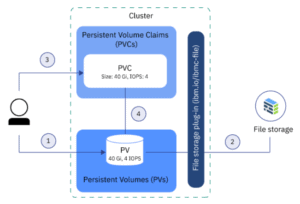
1. Static
In static provisioning of the Kubernetes persistent Storage, the administrator has to make existing storage devices available to a cluster. To make existing storage available to a cluster, the administrator has to manually create a persistent volume after that only user can claim the storage for the pod by creating PVCs.
Also Read: Our previous blog post on Kubernetes ingress
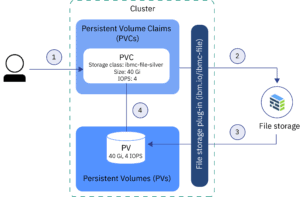
2. Dynamic
Dynamic provisioning is used when we want to give developers the liberty to provision storage when they need it. This provisioning is based on StorageClasses: the PVC must request a storage class and thus the administrator must have created and configured that storage class for dynamic provisioning to occur. In order to demand storage, you must create a PVC.
Binding
When a user creates a PVC with a specific amount of storage requested and with certain access modes. The control loop within the master watches a newly created PVCs finds an identical PV (if possible), and binds them together. If a PV was dynamically provisioned for a new PVC, the loop will always bind that PV to the PVC.
To know more about the Kubernetes architecture diagram. Click here
Reclaiming
When the user no longer needs a volume, they can delete the PVC. The reclaim policy for a PersistentVolume tells the cluster what to do with the volume after it has been released of its claim. Currently, volumes can either be Retained, Recycled, or Deleted.
Retain
The Retain reclaim policy allows the manual reclamation of the resource. Deleting the PVCs does not delete PV. it can still exists in the cluster and considered to be “released”. But it’s not yet available for an additional claim because the previous claimant’s data remains on the volume.
Delete
The volume plugins support the Delete reclaim policy. Deletion removes both the PV from the K8s cluster as well as the external storage asset like AWS EBS, GCE PD, Azure Disk, or Cinder volume.
To know more about Kubernetes deployment strategy. Click here
Recycle
Volume plugins that support the Recycle reclaim policy perform a basic scrub on the volume and make it available again for a fresh claim.
Note: The Recycle reclaim policy is outdated. Instead, the recommended approach is to use dynamic provisioning.
Frequently Asked Questions
What is a Persistent Volume (PV) in Kubernetes?
A Persistent Volume (PV) is a piece of storage in the cluster that has been provisioned by an administrator or dynamically through a Storage Class. PVs are cluster resources, independent of any particular pod, and can exist beyond the lifecycle of a pod.
What is a Persistent Volume Claim (PVC) in Kubernetes?
A Persistent Volume Claim (PVC) is a request for storage by a user. Similar to how pods consume node resources, PVCs consume PV resources. PVCs specify the size and access modes required by the application, and Kubernetes binds the PVC to an appropriate PV that meets the requirements.
What is a Storage Class in Kubernetes?
A Storage Class provides a way to describe the classes of storage a cluster administrator can offer. Different classes might map to quality-of-service levels, backup policies, or other attributes determined by the administrator. Storage Classes are used to dynamically provision Persistent Volumes.
How do PV and PVC work together?
A PVC is created by a user to request a certain amount of storage with specific access modes. Kubernetes finds a PV that satisfies the claim's request (size, access modes, etc.), and then binds the PVC to that PV. Once bound, the PV is dedicated to that PVC and cannot be bound to another.
Can a PVC be resized?
Yes, PVCs can be resized if the underlying storage provider supports it. To resize a PVC, you must update the PVC object with the new size. The process is non-disruptive, but you must ensure that the Storage Class and volume type support expansion.
Related/References
- Visit our YouTube channel on “Docker & Kubernetes”
- Kubernetes Architecture & Components Overview For Beginner
- Certified Kubernetes Administrator (CKA) Certification Exam
- Create AKS Cluster: A Complete Step-by-Step Guide
- Install Docker on Windows, Ubuntu and Mac: A Complete Step-by-Step Guide
- Docker Container Lifecycle Management: Create, Run, Pause, Stop And Delete
- Docker Compose Overview & Steps to Install Docker Compose
- CKA Certification Exam (Certified Kubernetes Administrator)
- Container (Docker) vs Virtual Machines (VM): What Is The Difference?
- How To Setup A Three Node Kubernetes Cluster For CKA: Step By Step
- Kubernetes Ingress Controller Examples with Best Option
Join FREE Masterclass of Kubernetes
Discover the Power of Kubernetes, Docker & DevOps – Join Our Free Masterclass. Unlock the secrets of Kubernetes, Docker, and DevOps in our exclusive, no-cost masterclass. Take the first step towards building highly sought-after skills and securing lucrative job opportunities. Click on the below image to Register Our FREE Masterclass Now!


![Microsoft Agentic AI Business Solutions Architect [AB-100] | K21 Academy](https://test.k21academy.com/wp-content/uploads/2025/11/Microsoft-Agentic-AI-Business-Solutions-Architect-AB-100-Exam-Overview1.png)



