





In this blog, you will see the overview of Azure storage account, Storage account types, Storage account services, how to create a storage account, and how to delete a storage account
In this blog, topics that are covered have important role in Azure storage accounts which are given below:
- What is an Azure storage account?
- Storage Account types
- Azure Storage Services
- Storage Of Virtual Images
- Performance Tiers In Storage Account
- Create a storage account
- Delete a storage account
- Faq’s
1. What is an Azure storage account?
Storage account in Azure is a method of creating a storage service for storing data in it. It contains all the Azure storage objects decided into a single resource group. It contains Blob, queue, tables, and files with disk images. It uniquely provides namespace and service access to functions of storage.
It is durable, highly available, and scalable. By using Azure storage account services, we don’t need to worry about space because it will be scaled upon our demand. The Azure storage account is a container that groups a set of Azure storage services together. Only data services from Azure storage can be included in a storage account.
2. Storage Account types
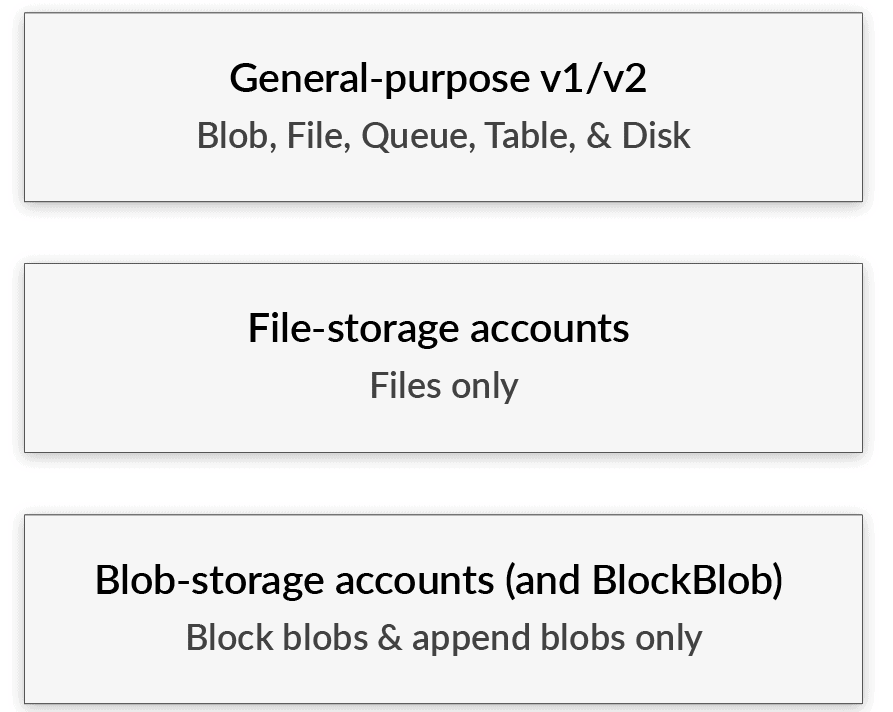
Storage type defines the methodology for storing data in Azure infrastructure. it gives the solution to the question of what type and how to store data in Azure.
There are two groups of storage accounts:
A) Accessible via REST API: Queue, table, Blob
B) Designed for Microsoft Azure Virtual machines: File storage, Disk storage
3. Azure Storage Services
The basis of a Microsoft Azure storage account is, of course, the storage type you need to choose. The type is defining how you store what and which options and features you can use. There are five storage types in Microsoft Azure and they can be divided into two groups by their design.
A) Azure Blob Storage
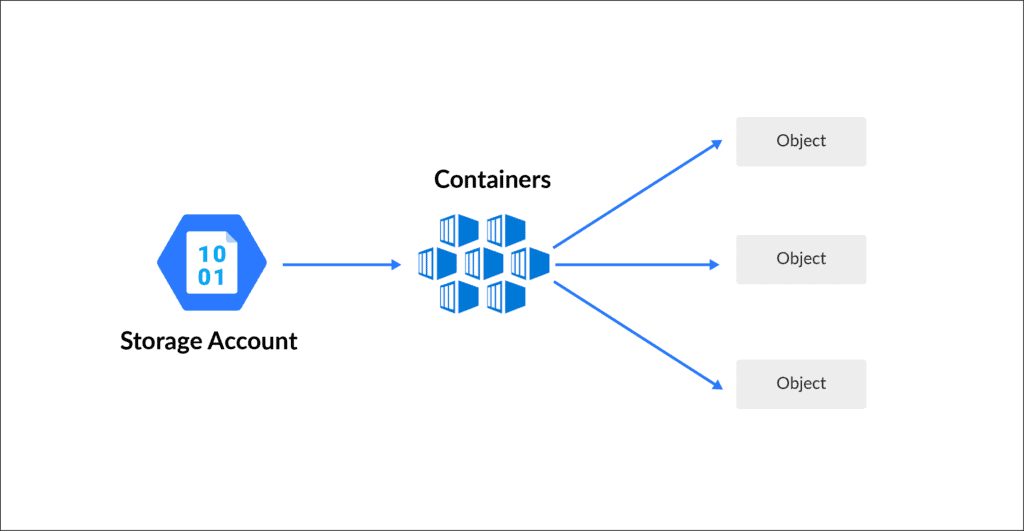
Azure Blob Storage is a Microsoft Azure cloud-based object storage solution. It is intended to store and manage unstructured data at scale, such as text or binary data such as photos, videos, documents, and other file formats.
- It is an object storage solution in Azure.
- It is used to store unstructured data.
- This is ideal when you have storage solutions for files, videos, log files, and images
- It has different tier levels:
-
- Hot storage tier: It is ideal for objects that are accessed frequently
- Cool storage tier: It is optimized for data that are infrequently accessed. This is a less expensive option than the hot storage tier
- Achieve storage tier: It is optimized for data that is rarely accessed. Mostly used for archiving or backup data. It is the least expensive service
B) Azure Table Storage
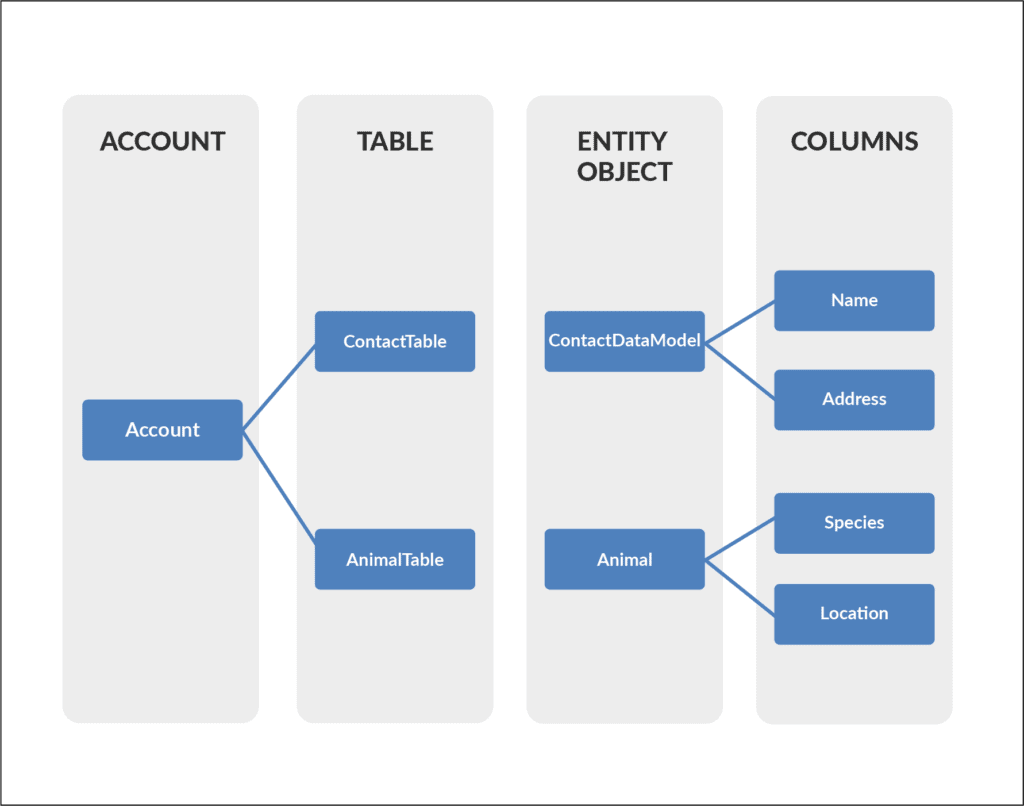
Microsoft Azure Table Storage was made to store structured NoSQL data. The storage is very scalable and, at the same time, very cheap to keep data in. However, it set off more expensive when you access files frequently.
- It is used for storing structured NoSQL data
- It is a key attribute store
- It is a cost-effective option for the storage of table-like data for applications
Instead of using SQL database to store data, you can use Azure table storage in a more cost-effective manner
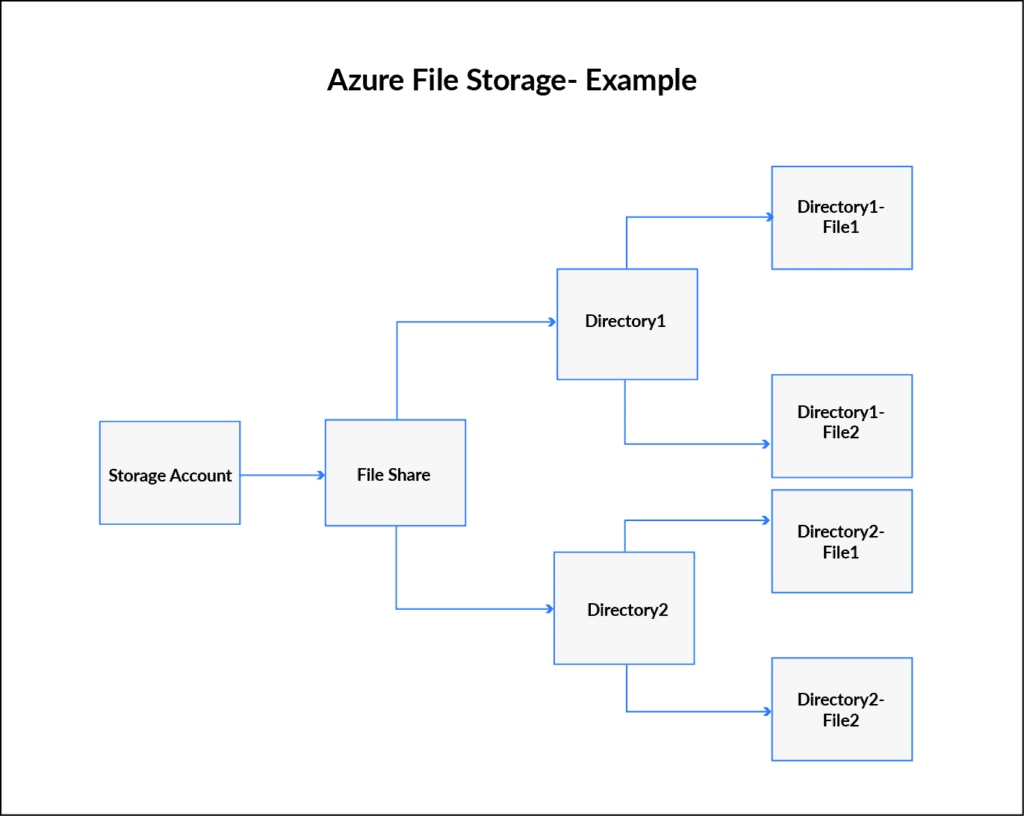
C) Azure File Storage
Microsoft Azure File storage is a type of Azure service that was designed to support the needs of the Azure VM environment. That storage is, in essence, a network share. You can store files there that can be accessed from different Virtual Machines. It is similar to Amazon EFS and is its direct competitor.
- It allows for the retrieval of files via the server message block protocol
- Using file storage, you can mount file shares on Windows, Linux, and Mac-based machines
- Here you don’t need to manage file servers
D) Azure Queue Storage
Queue Storage is a type of storage that is built to connect components of your application. It allows you to build flexible applications with decoupled and independent components that rely on asynchronous message queuing.
- This service used for the storage and retrieval of messages
- This service is good when you want to decouple components of an application
- A single message in the queue can be up to 64kb in size
- You can store millions of messages in the queue
4. Storage of virtual images
It is similar to OS Images, a VM Image is a collection of metadata and pointers to a set of VHDs (one VHD per disk) stored as page blobs in Azure Storage. This includes disk and files. Files are fully managed by using file share in the cloud
A) Unstructured data
This includes blob and data lake storage. Blobs are highly scalable. Data Lake is a Hadoop-distributed file system as a service. Unstructured data is different than structured data in that its structure is unpredictable. Documents, e-mails, blogs, digital images, videos, and satellite imagery all are examples of unstructured data. It also includes some data generated by machines or sensors.
B) Structured data
Cosmos DB, Azure SQL DB, and Tables all handle structured data. Tables are key-value auto-scaling no value store, Cosmos DB is a globally distributed database service and Azure SQL DB is a fully-managed database as a service that is built on SQL. Structured data is referred to data that has a defined length and format for big data. Numbers, dates, and groups of words all are examples of structured data
5. Performance Tiers In Storage Account
A) Standard
Standard storage is backed by magnetic hard drives like HDD and provides the lowest cost per GB. These are best for applications that required a bulk of data storage where data is accessed infrequently because read-write speeds are less as compared to premium.
B) Premium
Premium storage accounts are powered with SSD (Solid-state drives) and offer low latency performance. These are mostly used with high-end systems and high-intensity applications like databases. You can not switch from a standard storage account to a premium storage account, you must create a new storage account with premium or standard base on your requirement and then copy the data
6. Create a storage account
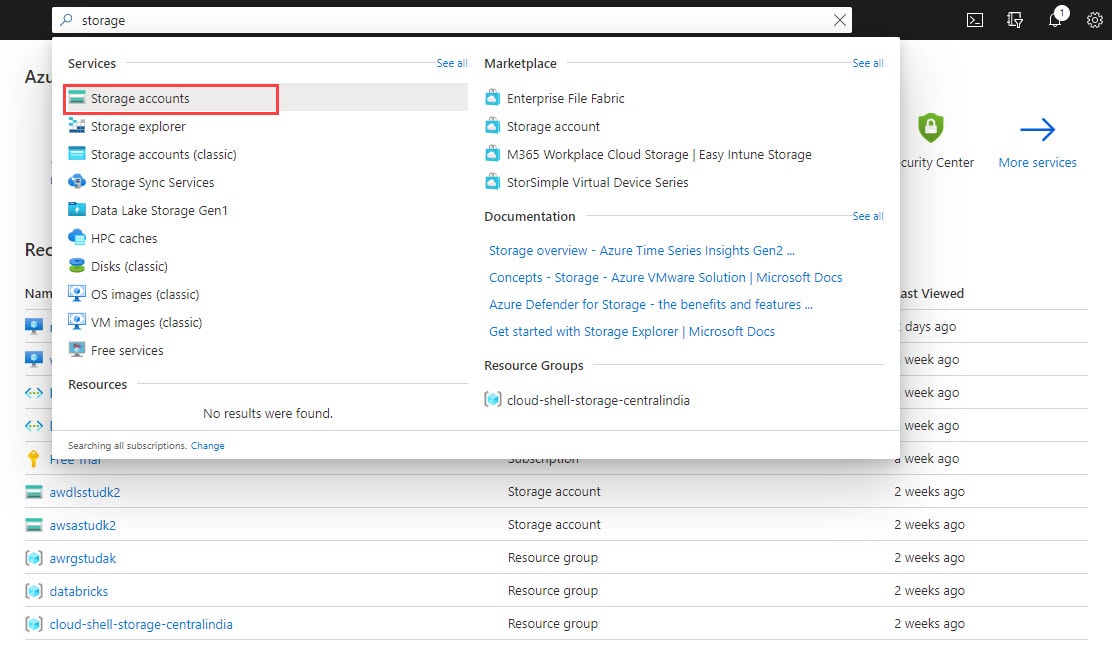
Step 1) In the Azure portal, search for and select Storage accounts. (Please make sure you have a subscription before doing all this. If you created a free account for the first time, you’ll already have a FREE TRIAL subscription for 1 month).
Note: If you don’t know how to get free Azure account then click on Azure Free Trial Account to know more
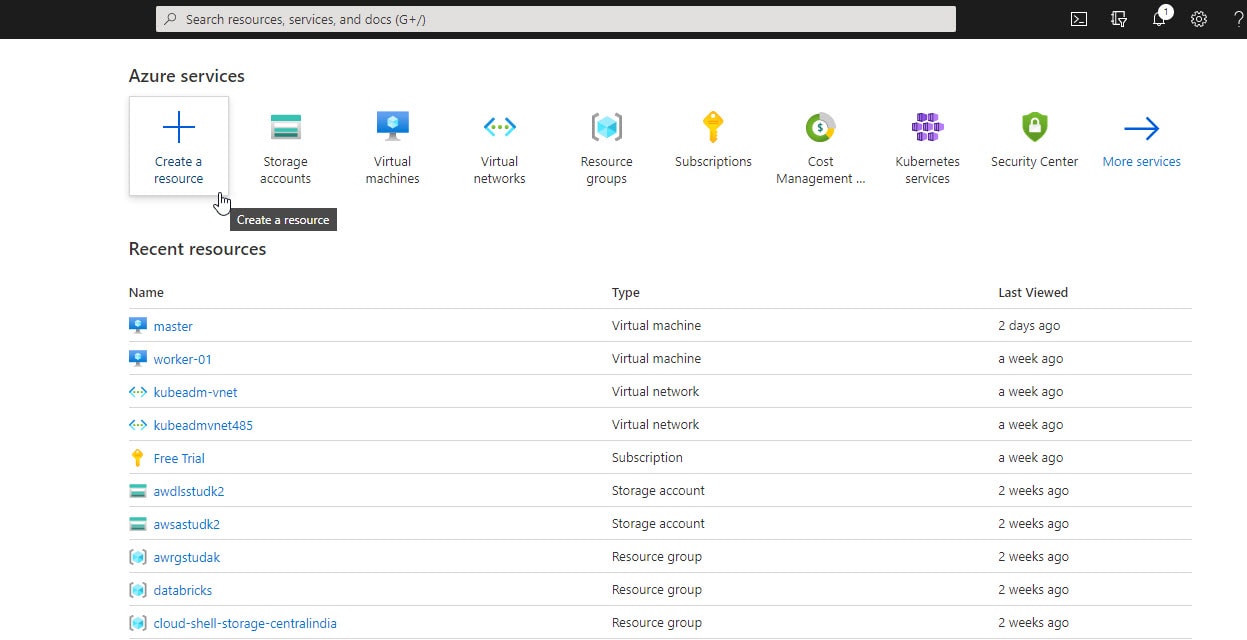
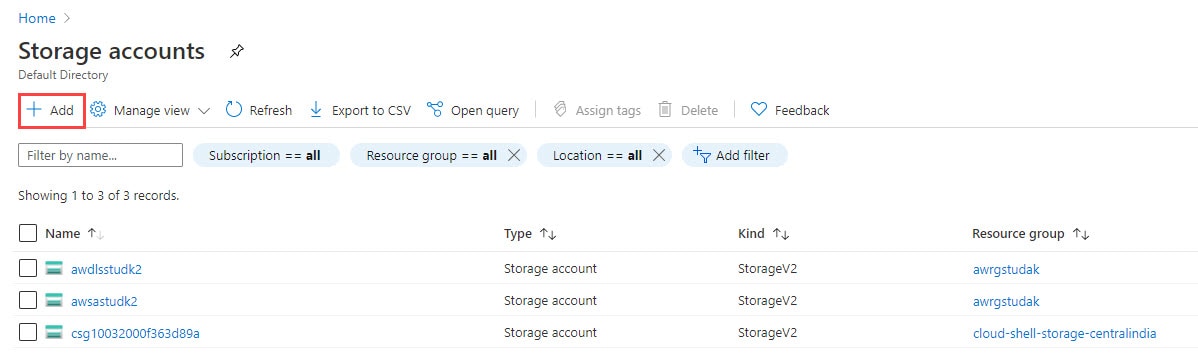
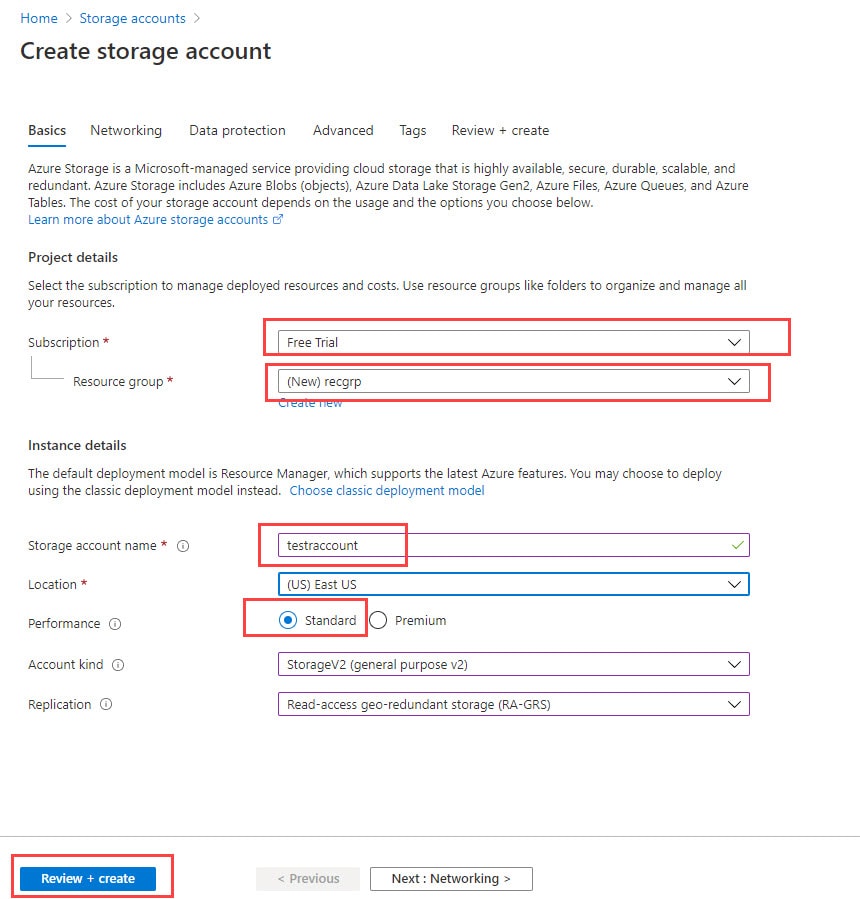
 Step 2) Now, click on Add. Then select your subscription and then select the resource group where you want to create this storage account. Enter the name and location of your storage account. Then, select account kind, replication, and Access Tier. Now, hit Review+Create.
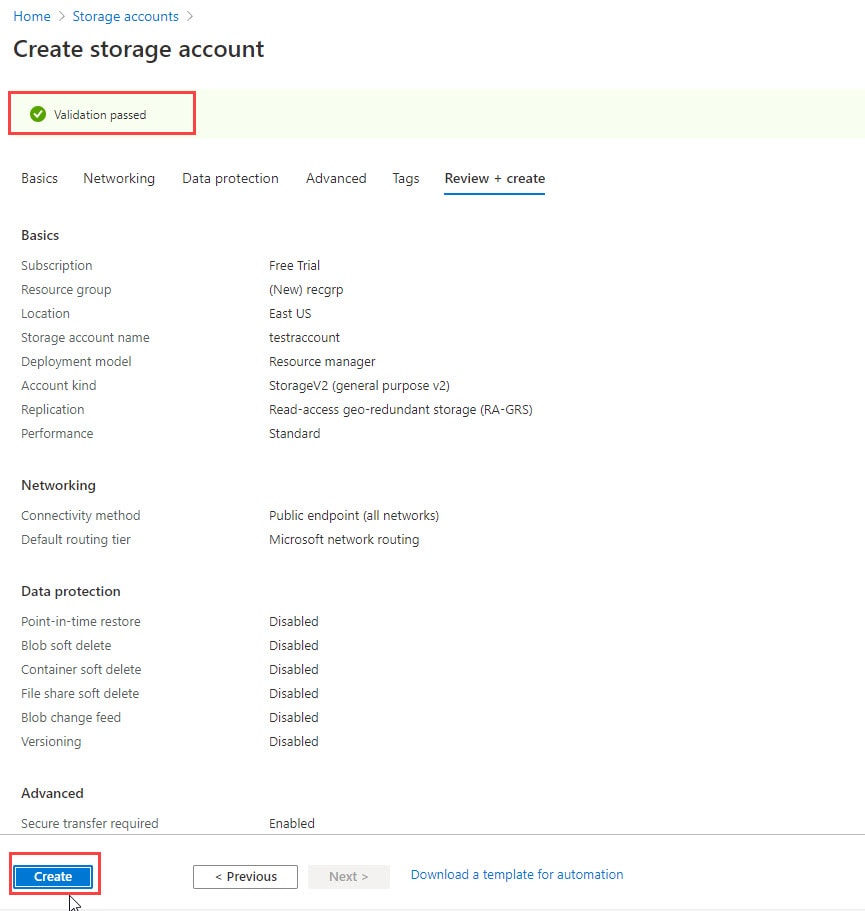
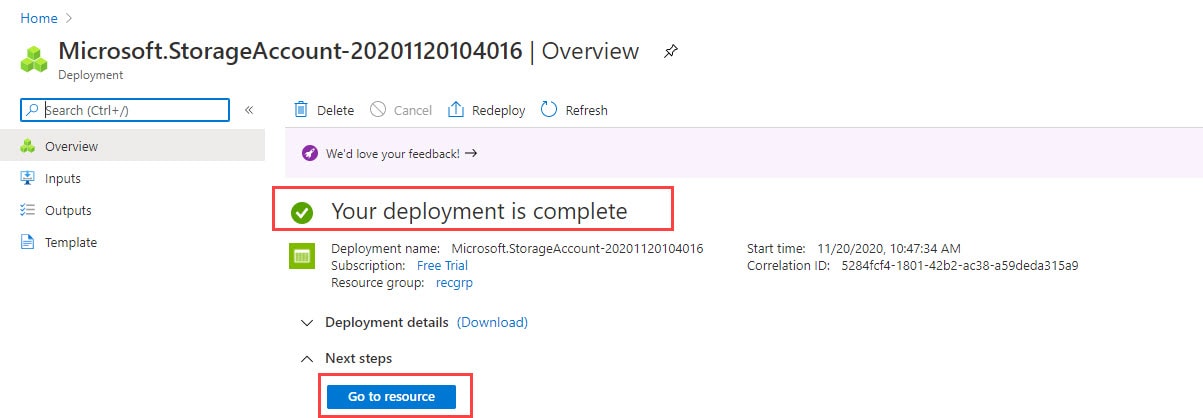
Step 3) Now, wait for the validation to be successful and then click on Create. Resource deployment will take place. Once done, you’ll receive a notification. Then click on Go to Resource to go to the newly created Storage Account.
7. Delete a storage account
Deletion of the Storage Account is much easier than creation, Follow the below steps to delete a storage account
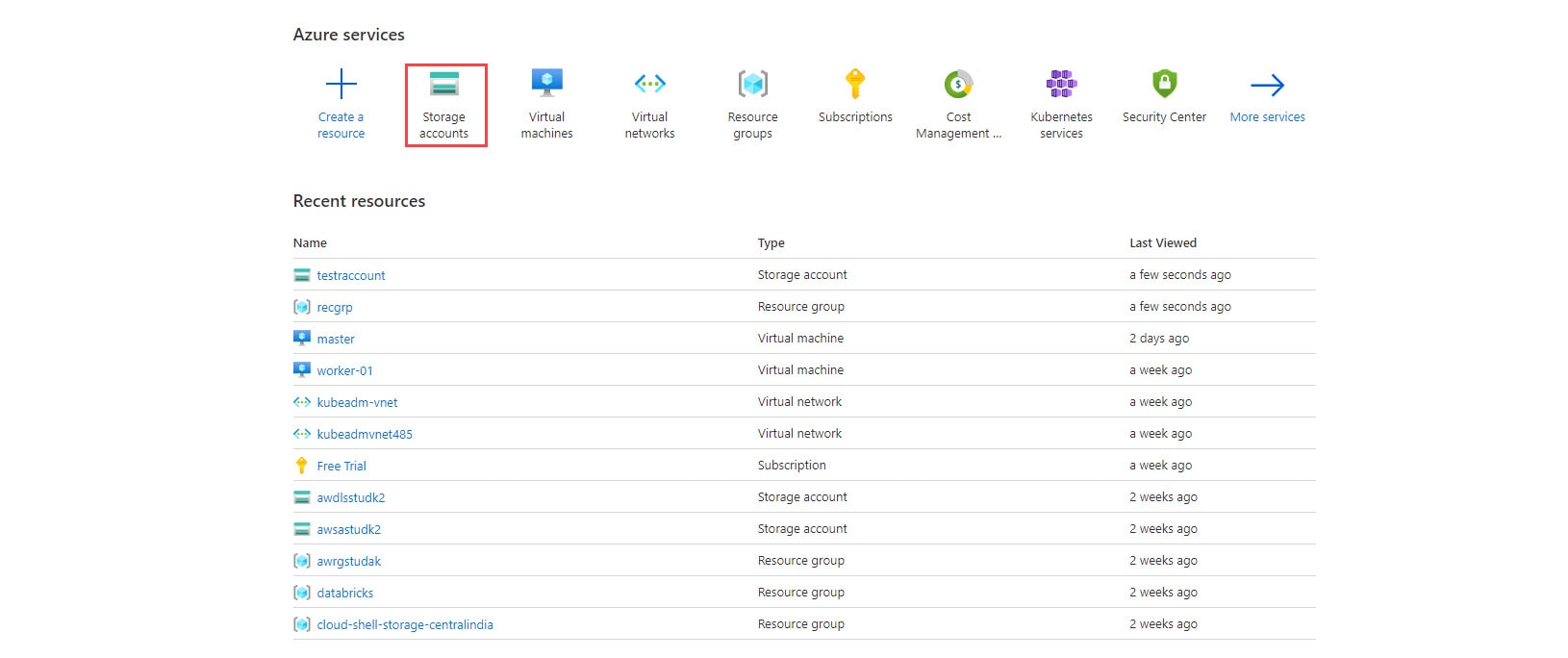
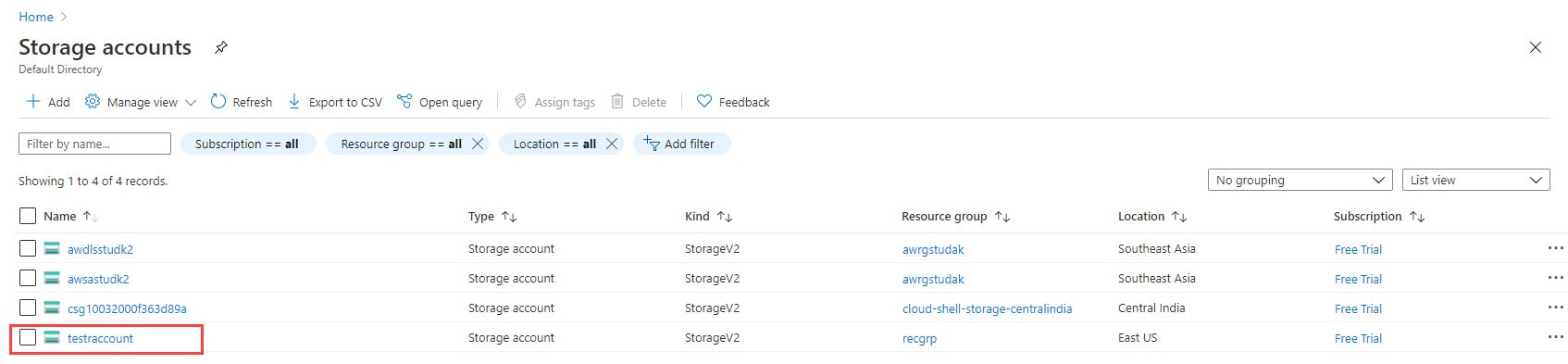
Step 1) Click on Storage Accounts or you can again search it if you are not able to find it.
Step 2) Now let’s choose the storage account which we want to delete, in this I am choosing test account
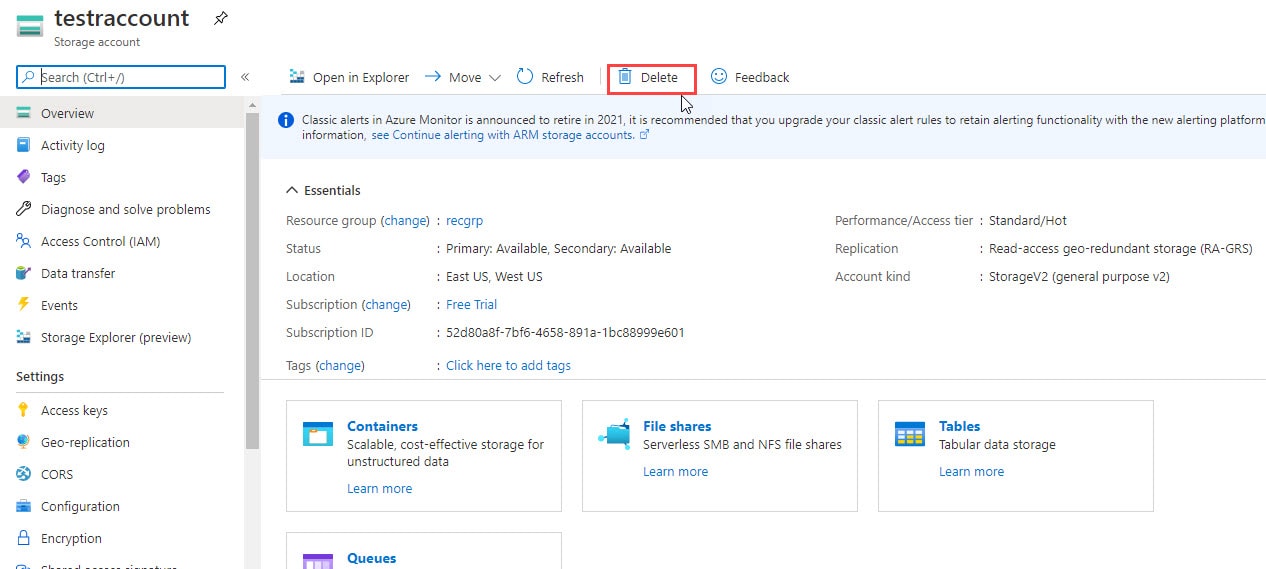
Step 3) Now you can see a new window appears with storage options, here click on the Delete option (Check below image for reference)
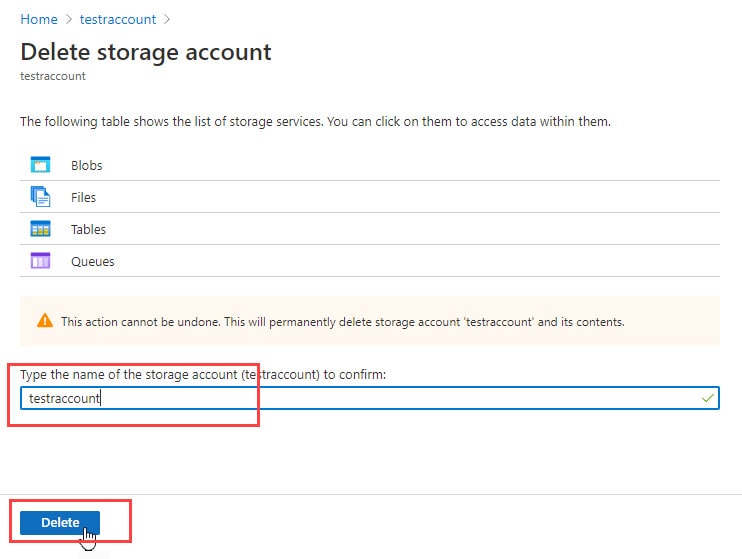
Step 4) To complete the deletion process we have to do confirmation and for that, you have to type the name of our storage account in the empty box and then click on the Delete button
 Step 5) Now it’s done in a few seconds you will see a notification under Notifications that your resource is successfully deleted storage account message
Faq’s
What is Microsoft Azure Storage Account and why is it important?
Microsoft Azure Storage Account is a Microsoft Azure cloud-based storage product. It enables users to store and handle massive volumes of unstructured data in the form of files, blobs, queues, tables, and disks.
It is significant because it provides a dependable, scalable, and secure method of storing and accessing data in the cloud. It also includes features like high availability, geo-replication, and disaster recovery to ensure that data is always available and secure. Azure Storage Account can be used for backup and recovery, archival storage, media and content storage, and IoT data processing.
What are the different types of Storage Accounts available in Azure?
Azure offers four types of storage accounts:
1. General-Purpose v2 (GPv2) Storage Accounts - The most frequent form of storage account in Azure. It supports blobs, files, queues, tables, and drives.
2. General-Purpose v1 (GPv1) Storage Accounts - This storage account type supports blobs, files, queues, and tables but not drives.
3. Blob Storage Accounts - This form of storage account is designed for storing massive amounts of unstructured data, such as photographs, videos, and documents.
4. Premium Storage Accounts - This type of storage account is intended for high-performance, low-latency workloads that require constant performance and minimal I/O latency. It supports both managed and uncontrolled disks.
Can you explain the differences between Azure Blob Storage, File Storage, Queue Storage, and Table Storage?
The following are the differences between Azure Blob Storage, File Storage, Queue Storage, and Table Storage:
1. Azure Blob Storage: This is a service for storing massive amounts of unstructured data, such as text or binary data. It's designed to store and access frequently visited or updated data. Blobs are often used to store files, photos, movies, and other sorts of data and may be accessed from anywhere in the world via HTTP or HTTPS.
2. Azure File Storage is a service for storing and accessing files that can be shared across numerous virtual machines (VMs). It has an SMB interface for accessing files, making it simple to integrate with current programs and workflows. It is generally used for scenarios such as file sharing across a group of VMs or storing application data that must be accessed by several instances of an application.
3. Azure Queue Storage is a service that allows you to store and process huge amounts of messages or small bits of data. It is designed for scenarios such as queuing work items or messages, and it can be used to create distributed systems that require reliable messaging. It is commonly utilized in scenarios such as processing messages from IoT devices or handling asynchronous workloads.
4. Azure Table Storage is a NoSQL key-value store that is built for storing structured data at scale. It is intended to be highly available and scalable, and it can manage huge amounts of data. It is commonly used for scenarios such as storing metadata about files or objects in Blob Storage or constructing scalable web applications.
How can I secure my data in Azure Storage Accounts?
Here are several methods for protecting your data in Azure Storage Accounts:
1. Enable encryption: To protect your data at rest, it provides encryption options such as client-side encryption, server-side encryption, and Azure Key Vault integration.
2. Use role-based access control (RBAC) to limit access to your storage account and regulate who can execute particular tasks, such as reading or writing data.
3. Set up a firewall and virtual networks: Use network security groups (NSGs) and virtual networks to control and isolate inbound and outbound traffic to your storage account.
4. Monitor access and activity: Use Azure Monitor to track and analyze access and activity records for your storage account, as well as set up warnings for questionable activities.
5. Backup your data on a regular basis to guarantee that you can restore it in the event of accidental deletion, corruption, or other data loss situations.
6. Follow best practices: Follow Azure Storage's best practices, such as installing secure transport protocols, employing strong authentication methods, and frequently updating your software and security settings.
How do I monitor and manage my Storage Account performance and usage?
You can use the following methods to monitor and manage the performance and utilization of your Azure Storage Account:
1. Monitor the utilization of your Storage Account: You may use Azure Storage Analytics to track the usage of your Storage Account. Storage Analytics analyzes metrics and logs data for your Storage Account, which can be used to diagnose problems and improve performance.
2. Configure notifications: You may set up alerts in your Storage Account to warn you when specific metrics, such as storage capacity or transactions, hit a certain level.
3. Use Azure Monitor to monitor and manage your Azure resources, including your Storage Account. Azure Monitor allows you to see performance metrics, create alerts, and analyze performance patterns.
4. Optimize performance: You can improve the performance of your Storage Account by choosing premium storage, optimizing your network connection, and employing caching.
5. Manage access: You may regulate access to your Storage Account by creating access policies, utilizing Azure Active Directory authentication, and setting up network rules.
How does data transfer and pricing work for Azure Storage Accounts?
Azure Storage Accounts allow you to store and access data in the cloud. Data transfer refers to the transportation of data between the Azure Storage Account and other services or resources within or outside of Azure.
The cost of data transfers for Azure Storage Accounts varies depending on the location of the data and the type of transmission. Data transfers within the same Azure region are generally free, however, data transfers between regions are charged. Furthermore, data transfers to and from the Internet are costly.
Azure Storage Account cost is determined by the amount of storage used and the number of actions performed on that data, such as reads, writes, and deletes. Pricing varies according to the type of storage you select, such as Blob storage, File storage, or Queue storage.
In summary, Azure Storage Account data transfer cost is determined by the location and type of transfer, whereas storage pricing is determined by the amount of storage used and the type of storage selected.
Related/References
- [AZ-104] Microsoft Azure Administrator Certification Exam: Everything You Need To Know
- Microsoft Azure AD Connect
- Virtual Networks In Microsoft Azure: VNet Peering, ExpressRoute, VPN Gateway
- Azure ExpressRoute Vs Azure VPN Gateway
- Microsoft Azure VNet Peering (Microsoft Official)
- [AZ-104] Roles And Responsibilities Of A Microsoft Azure Administrator
Next Task For You
Begin your journey toward Mastering Azure Cloud and landing high-paying jobs. Just click on the register now button on the below image to register for a Free Class on Mastering Azure Cloud: How to Build In-Demand Skills and Land High-Paying Jobs. This class will help you understand better, so you can choose the right career path and get a higher paying job.


![Microsoft Agentic AI Business Solutions Architect [AB-100] | K21 Academy](https://test.k21academy.com/wp-content/uploads/2025/11/Microsoft-Agentic-AI-Business-Solutions-Architect-AB-100-Exam-Overview1.png)



