


Imagine deploying your applications without the hassle of managing servers—AWS Fargate makes it possible! As a serverless compute engine for containers integrated with Amazon Elastic Container Service (ECS), AWS Fargate helps you focus on building and running your applications, not managing infrastructure.
Topics We’ll Cover:
In this post, we’ll explore how to deploy a containerized application with AWS Fargate. Before diving into deployment, let’s first understand what containers are and how AWS empowers container orchestration.
Overview of Containers

- Containers are an executable unit of software in which application code is packaged, along with its libraries and dependencies, in common ways so that it can be run anywhere, whether it be on the desktop, traditional IT, or the cloud.
- Containers are small, fast, and portable because unlike a virtual machine, containers do not need to include a guest OS in every instance and can, instead, simply leverage the features and resources of the host OS.
- Making software applications behave predictably on different computers is one of the biggest challenges for developers. The software may need to run in multiple environments: development, testing, staging, and production.
- To solve these challenges, more and more developers are using a technology called containers. Each container encapsulates an entire runtime environment. This includes the application itself, as well as the dependencies, libraries, frameworks, and configuration files that it needs to run.
To understand better about Containers and Container Lifecycle read our blog on Docker Containers.
What is AWS Fargate?
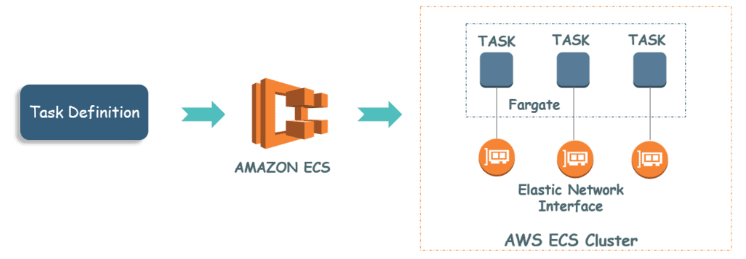
AWS Fargate is a compute engine for Amazon Elastic Container Service(ECS) that allows you to run containers without having to provision, configure & scale clusters of VMs that host container applications.
AWS Fargate eliminates the need for users to manage the EC2 instances on their own. In fact, users don’t need to use EC2 instances at all. Fargate itself will act as a compute engine. It lets you focus on elements like designing and constructing your application instead of managing the infrastructure that runs them. With the Fargate launch type, all you need to do is package your application in containers, specify the memory and CPU requirements, define IAM policies & launch your application.
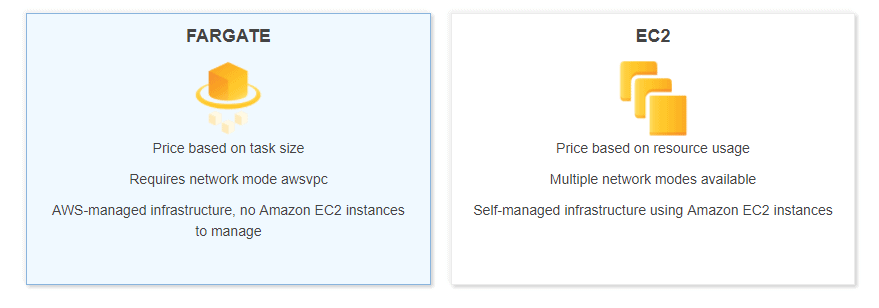
What is Amazon ECS?
Amazon Elastic Container Service (ECS) helps schedule and orchestrate containers across a fleet of servers. It involves installing an agent on each container host that takes instructions from the ECS control plane and relays them to the local Docker image on each one.
Read here: A good example of how the DevOps principles are used in practice is AWS CloudFormation.
Why AWS Fargate?
Containerization has transformed cloud architecture over the past few years, allowing businesses to build, deploy & manage applications at a faster rate. There are a plethora of container & container orchestration services that are available today. Most of them, however, still require you to configure and manage clusters of virtual machines for the containers to run. This is where AWS Fargate comes into the picture.
Fargate allocates the right amount of compute, eliminating the need to choose instances and scale cluster capacity. You only pay for the resources required to run your containers, so there is no over-provisioning and paying for additional servers.
Working on AWS Fargate
Before getting into the work, let’s understand some general terms that you will encounter several times when you are dealing with AWS Fargate.
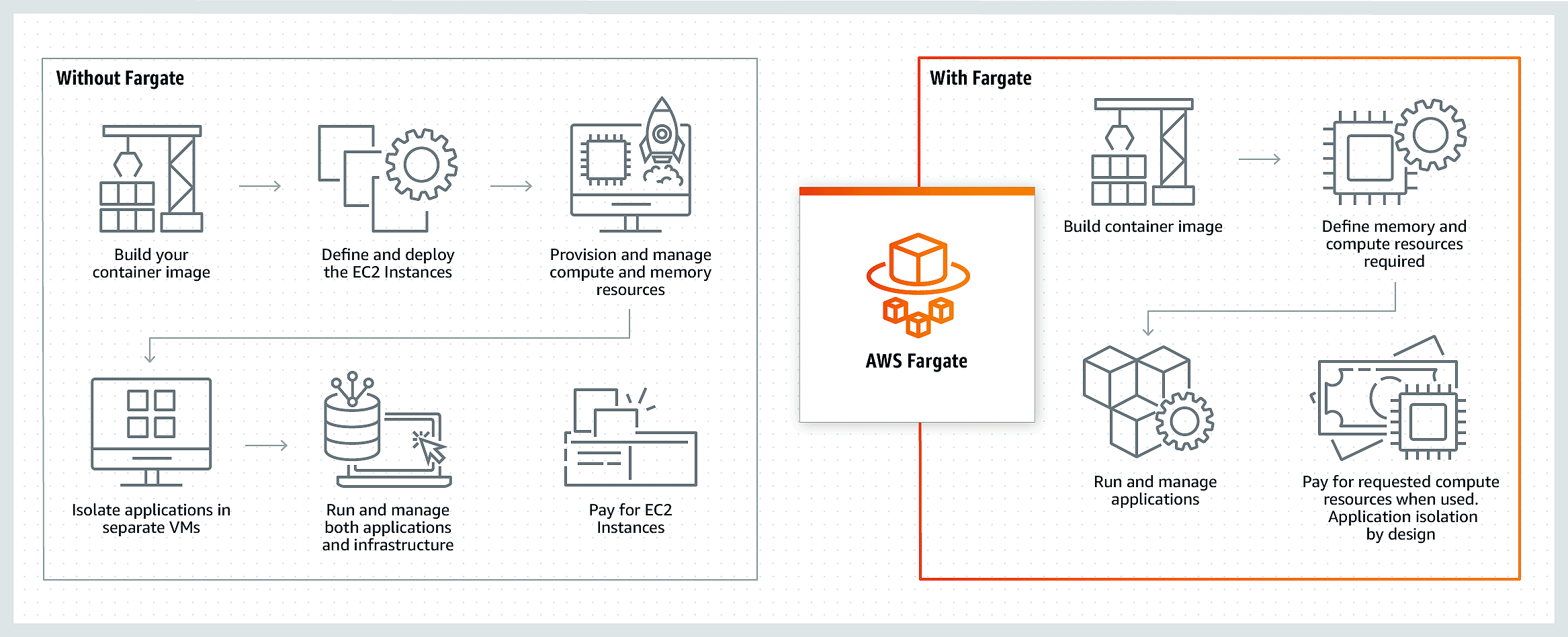
Task Definitions: The task definition is a text file, in JSON format, that describes one or more containers that form your application. You can think of it as a blueprint for your application.
Task: A task is the instantiation of a task definition within a cluster. You have the option to specify the number of tasks that will run on your cluster.
Clusters: Cluster is basically the logical grouping of resources that your application needs. If you use the Fargate launch type with tasks within clusters then Amazon ECS manages your cluster resources.
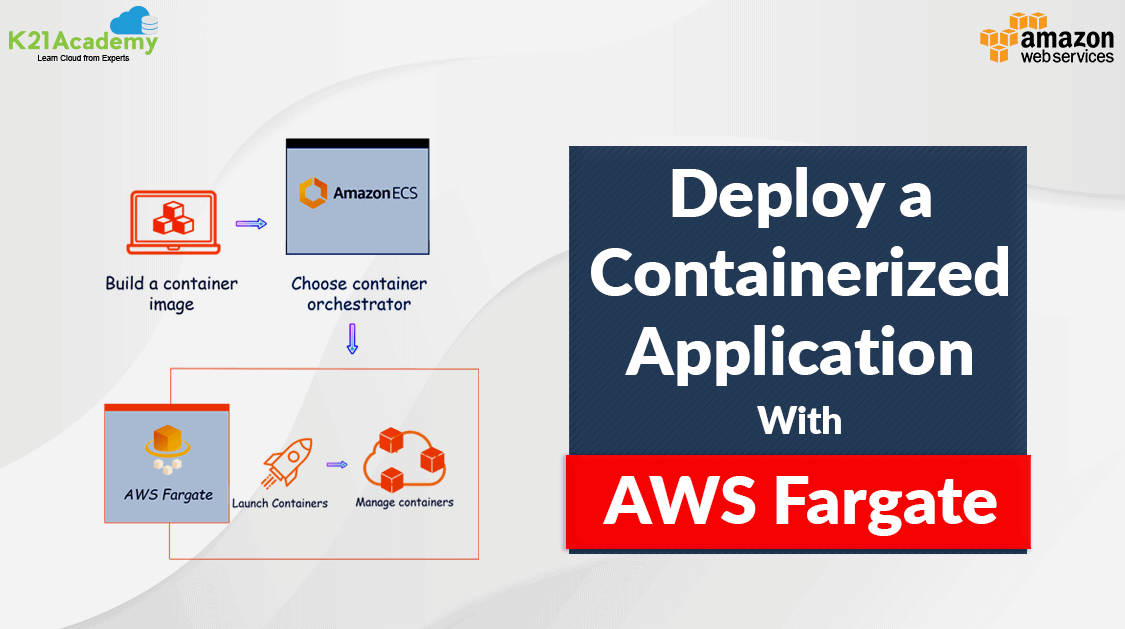
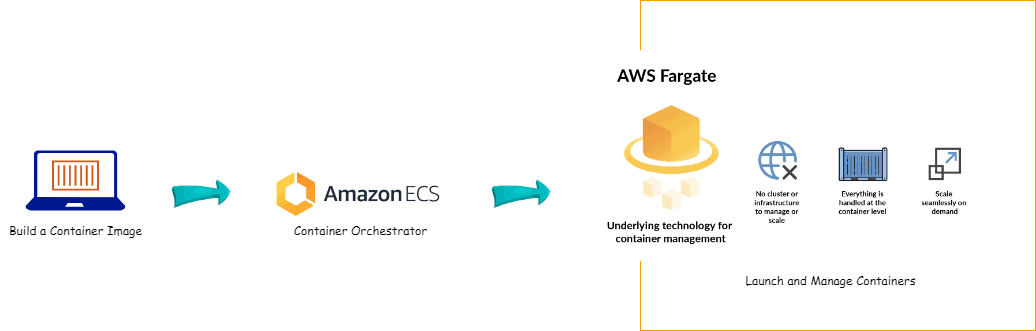
Now, we can move ahead to understand how to deploy the Containerized Application with Fargate. The diagram below gives you a rough idea of how to deploy it with AWS Fargate.
Demo: Fargate in Action
Make sure you have an active AWS account to perform this demo of deploying a containerized application with AWS Fargate.
Step 1: Introduction to AWS Fargate
- AWS Fargate is a serverless compute engine for containers, enabling you to run containers without managing underlying servers.
- The presenter explains how Fargate integrates with Amazon ECS (Elastic Container Service) to simplify container deployment.
Step 2: Accessing the AWS Management Console
- Log in to your AWS account by visiting the AWS Management Console.
- Use your credentials to access the dashboard.
Step 3: Navigating to the Elastic Container Service (ECS)
- In the AWS Management Console, locate the “Services” menu at the top.
- Search for and select “Elastic Container Service (ECS)”.

Step 4: Creating a New Cluster
- Inside the ECS service, click on the “Clusters” tab from the sidebar.
- Click the “Create Cluster” button.

- Provide a Cluster Name (e.g.,
Fargate-Cluster-1).

- Use default settings for all.
- Review your configuration, then click “Create” to finish.

Step 5: Defining a Task
- Return to the ECS dashboard and click “Task Definitions” in the left-hand menu.
- Click “Create New Task Definition”.
- Select the launch type as “Fargate” and proceed to the next step.
Configure Task Definition:
- Task Role: Choose an IAM role (or create a new one) to grant permissions for your containers.
- Task Size: Specify the task’s memory and CPU requirements (e.g., 0.5 vCPU and 1GB RAM).

Step 6: Configuring Container Details
- Click “Add Container” and provide the following details:
- Container Name: A unique name for your container (e.g.,
my-app-container). - Image URI: Specify the Docker image location (e.g., from Docker Hub or Amazon ECR).
- Memory Limit: Assign memory for the container (e.g., 512MB).
- Port Mapping: Add container ports (e.g.,
80:80for HTTP).
- Container Name: A unique name for your container (e.g.,
- (Optional) Add advanced configurations:
- Environment Variables: Define key-value pairs for your app.
- Log Configuration: Use AWS CloudWatch for log monitoring.
 Save the container definition and complete the task configuration.


Step 7: Setting Up New Task
- Navigate to the “Clusters” tab and select your newly created cluster.
- Click “Tasks” and then “Create Task”.


Step 8: Networking
- Assign a public IP (if the application needs internet access).
- Choose the correct subnets and security groups:
- Allow traffic on ports like
80(HTTP) or443(HTTPS).


- Allow traffic on ports like
Step 9: ECS Cluster and Application Verification
- Check Active Tasks
- Go to the Tasks tab.
- Filter by: Desired Status: Running, Launch Type: FARGATE.
- Verify CPU: 140, Memory: 308, Status: Running.

- Task Details
- Copy Public IP:
3.239.216.83

- Copy Public IP:
Verify Application
- Open Public IP
3.239.216.83in a browser. - Confirm the nginx welcome page is displayed.

Now, we have successfully created a running Containerized Application using AWS Fargate.
Conclusion
AWS Fargate is revolutionizing how we deploy containerized applications by making them serverless, scalable, and secure. By following the step-by-step guide in this case study, you can leverage its power to transform your deployment strategy. Ready to give it a go?
FAQs
What is the difference between AWS Fargate and EC2?
AWS Fargate eliminates the need to manage servers, unlike EC2, where you must provision and maintain instances manually.
Can AWS Fargate handle high traffic applications?
Yes, Fargate is designed to scale automatically, making it ideal for high-traffic applications.
How does Fargate pricing work?
Pricing is based on vCPU and memory usage, offering a pay-as-you-go model.
What are the security features in AWS Fargate?
Fargate provides workload isolation, integrated IAM roles, and VPC network configurations for enhanced security.
Is AWS Fargate suitable for small businesses?
Absolutely! Its pay-as-you-go model and minimal operational overhead make it perfect for businesses of any size.
Related/References
- Set Up a CI/CD Pipeline on AWS
- AWS Certified DevOps Engineer Professional DOP-C01
- Overview of Amazon Web Services & Concept
- AWS Management Console Walkthrough
Next Task For You
Begin your journey towards becoming an AWS Certified DevOps Engineer Professional by checking our FREE CLASS. Click on the below image to register for our FREE CLASS.


![Microsoft Agentic AI Business Solutions Architect [AB-100] | K21 Academy](https://test.k21academy.com/wp-content/uploads/2025/11/Microsoft-Agentic-AI-Business-Solutions-Architect-AB-100-Exam-Overview1.png)