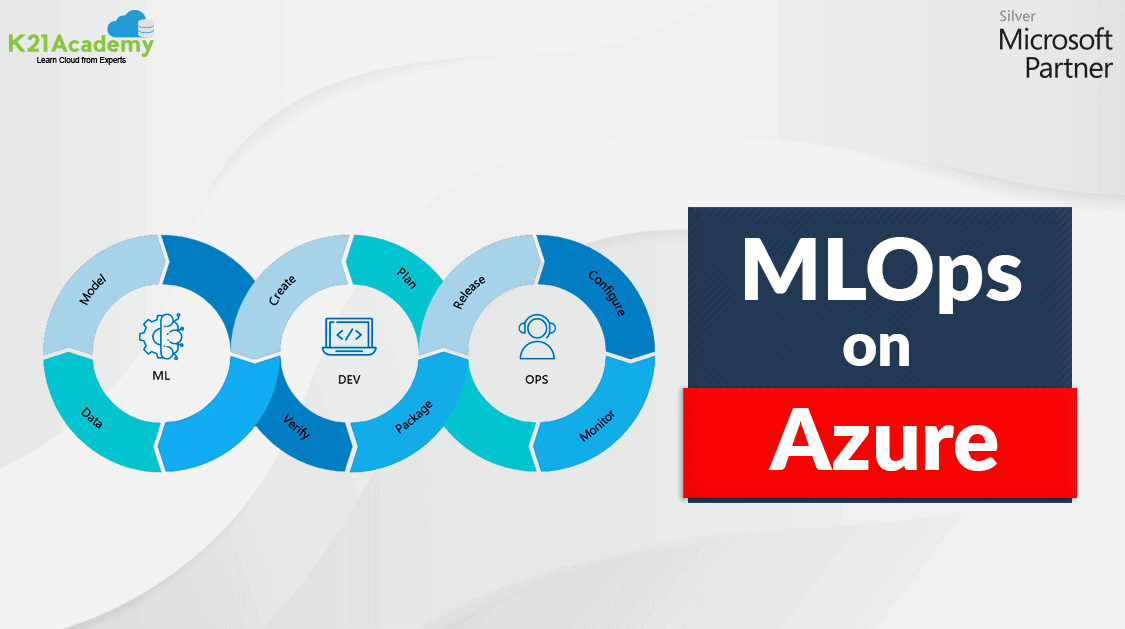





Azure MLOps or Machine Learning Operations is based on DevOps principles and practices that increase the efficiency of workflows and improve the quality and consistency of the machine learning solutions.
In this blog, we are going to learn more about MLOps, architecture describing how to implement continuous integration (CI), continuous delivery (CD), and retraining pipeline for an AI application using Azure Machine Learning and Azure DevOps, MLOps pipelines, and more.
In this blog, we will cover the following topics:
- What is MLOps Azure
- The Architecture Of MLOps Azure For Python Models Using Azure ML Service
- The End-to-End MLOps Workflow in Azure
- MLOps Pipeline
- Getting Started With MLOpsPython
- Conclusion
- FAQs
What is MLOps Azure
MLOps = ML + DEV + OPS
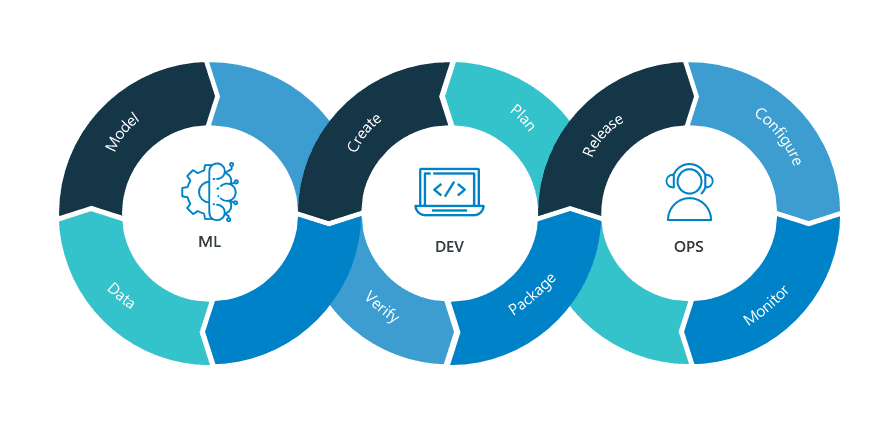
MLOps Azure is a Machine Learning engineering culture and practice that aims at unifying ML system development (Dev) and ML system operation (Ops). It applies DevOps principles and practices like continuous integration, delivery, and deployment to the machine learning process, with an aim for faster experimentation, development, and deployment of Azure machine learning models into production and quality assurance.
Also Read: Our Blog Post On Convolution Neural Network.
Here is a list of MLOps capabilities provided by Azure Machine Learning
- Create reproducible ML pipelines
- Create reusable software environments
- Register, package, and deploy models from anywhere
- Capture the governance data for the end-to-end ML lifecycle
- Notify and alert on events in the ML lifecycle
- Monitor ML applications for operational and ML-related issues
- Automate the end-to-end ML lifecycle with Azure Machine Learning and Azure Pipelines
Check out: Machine learning is a subset of Artificial Intelligence. It is the process of training a machine with specific data to make inferences. In this post, we are going to cover everything about Automated Machine Learning in Azure.
The Architecture Of MLOps Azure For Python Models Using Azure ML Service
This architecture describes how we can implement continuous integration (CI), continuous delivery (CD), and retraining pipelines for an AI application using Azure DevOps and Azure Machine Learning.
Also Read: What is the difference between Data Science vs Data Analytics.
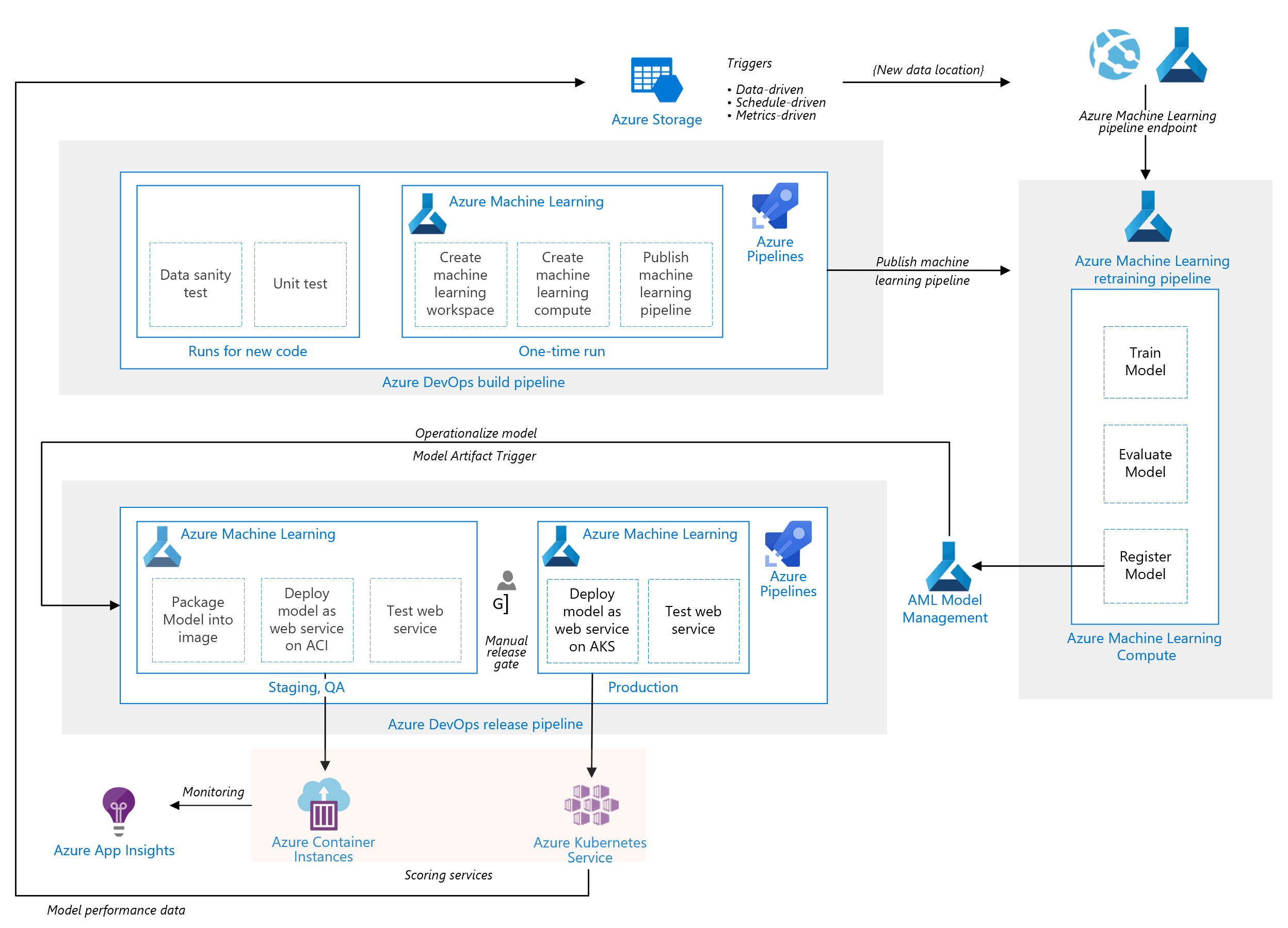
It has the following components:
1.) Azure Pipelines- The build and test system is based on Azure DevOps and used for the build and release pipelines. Azure Pipelines break these pipelines into logical steps called tasks.
2.) Azure Machine Learning- This architecture uses the Azure Machine Learning SDK for Python to create a workspace (space for an experiment), compute resources, and more.
3.) Azure Machine Learning Compute- It is a cluster of virtual machines where a training job is executed.
4.) Azure Machine Learning Pipelines- It provides reusable machine learning workflows. It is published or updated at the end of the build phase and is triggered on new data arrival.
5.) Azure Blob Storage- The Blob containers are used for storing the logs from the scoring service. In the above case, both the input data and model predictions are collected.
6.) Azure Container Registry- The scoring Python script is packaged as a Docker image and versioned in this registry.
7.) Azure Container Instances- As part of the release pipeline, QA and staging environment is mimicked by deploying the scoring web service image to Container Instances, which provides an easy and serverless way to run a container.
8.) Azure Kubernetes Service- It eases the process of deploying a managed Kubernetes cluster in Azure.
9.) Azure Application Insights- It is a monitoring service used for detecting performance anomalies.
Also read: Azure Data Stores & Azure Data Sets
The End-to-End MLOps Workflow in Azure
The image above provides a detailed representation of an end-to-end MLOps workflow, illustrating the collaboration between various roles and the integration of different pipelines within the Azure ecosystem.

Here’s a breakdown of the workflow:
- Data Engineer: Responsible for managing the data pipeline and handling changes to datasets. They ensure clean and structured data is available for machine learning processes.
- Data Scientist: Focuses on data preprocessing, model training, and producing a champion model ready for deployment. They iterate on improving the model’s performance before handing it off.
- Training Pipeline: Automated processes ensure that models are trained with the latest data and validated effectively. Results are logged into the Model Registry.
- QA Engineer: Conducts rigorous testing and validation of the model to ensure it meets business and technical requirements.
- Deploy Pipeline: Facilitates seamless model deployment to production environments while maintaining quality checks.
- MLOps Engineer: Oversees the entire lifecycle, ensuring automation, monitoring, and retraining workflows are in place for continuous improvements.
- Software Engineer: Integrates the ML API with applications, enabling users to leverage machine learning functionalities.
- Infrastructure Engineer: Ensures the application and models run smoothly on Kubernetes or other infrastructure platforms.
This diagram effectively showcases the interplay of these roles, emphasizing the importance of collaboration and automation in delivering reliable machine-learning solutions.
What challenges are involved in integrating Al and ML into company systems?
Integrating AI and ML into company systems poses challenges such as data quality issues, infrastructure scalability, high implementation costs, lack of skilled talent, and aligning solutions with business objectives.
What is the use case scenario for boosting profits from a marketing campaign using machine learning?
Machine learning boosts marketing campaign profits by predicting customer behavior, segmenting audiences, and personalizing offers. It optimizes ad spend, identifies high-value customers, and enhances targeting for maximum ROI.
MLOps Pipeline
The architecture shown in the above image is based on 3 pipelines:
1.) Build Pipeline- The CI pipeline gets triggered every time the code is checked in and publishes an updated Azure Machine Learning pipeline after building the code and running tests. It performs the following tasks:
- Code Quality
- Unit Test
- Data Test
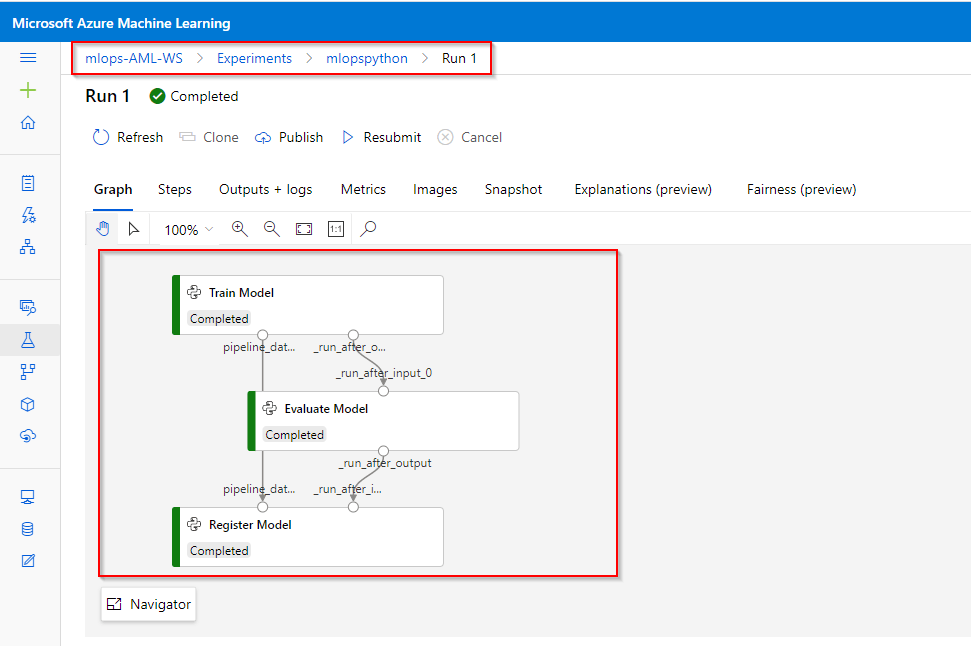
2.) Retraining Pipeline- It retrains the model on schedule or when there is new data available. It covers the following steps:
- Train Model
- Evaluate Model
- Register Model
3.) Release Pipeline- It operationalizes the scoring image and promotes it safely across either the QA environment or the Production environment.
In what ways can the implementation be customized to fit specific use cases and requirements?
Implementation can be customized by tailoring algorithms, fine-tuning models, optimizing workflows, integrating domain-specific data, and configuring tools or pipelines to meet unique business objectives and operational requirements.
What criteria are used to determine if a new machine learning model should be promoted to production?
A machine learning model is promoted to production if it meets criteria like high accuracy, low error rates, scalability, compliance with business goals, and robust performance on real-world validation data.
What is the significance of monitoring data drift, and how can it be automated?
Monitoring data drift ensures the model remains accurate as input data changes over time. Automation can be achieved using tools like Azure ML or custom pipelines to track and alert deviations.
How is data drift detected and managed in the proposed implementation?
Data drift is detected using statistical methods or monitoring tools to compare incoming data with training data. It is managed by retraining models, updating datasets, and implementing automated alerts for deviations.
How does model decay affect machine learning models, and what can be done to counteract it?
Model decay reduces a machine learning model’s accuracy over time due to data drift or changing patterns. To counteract it, regularly monitor performance, retrain with updated data, and implement automated pipelines.
How does MLflow assist in managing the lifecycle of machine learning models?
MLflow streamlines the machine learning model lifecycle by enabling tracking, versioning, and deployment. It provides a unified platform for experiment management, reproducibility, and seamless collaboration across teams.
Getting Started With MLOpsPython
Let’s look at the steps of how we can get MLOpsPython working with a sample ML project diabetes_regression. In this project, we will create a linear regression model to predict diabetes and has CI/CD DevOps practices enabled for model training and serve when these steps are completed.
Step 1: Sign In to the Microsoft Azure and DevOps portal. (You can use the same ID to log in for both the portals)
Note: If you do not have an Azure account then please create one before moving forward with the steps. You can Check out our blog to know more about how to create an Azure free trial account.
Step 2: In the DevOps portal, if you are a first-time user then create a New Organization and then click on New Project. Give Project Name and keep Visibility as Private
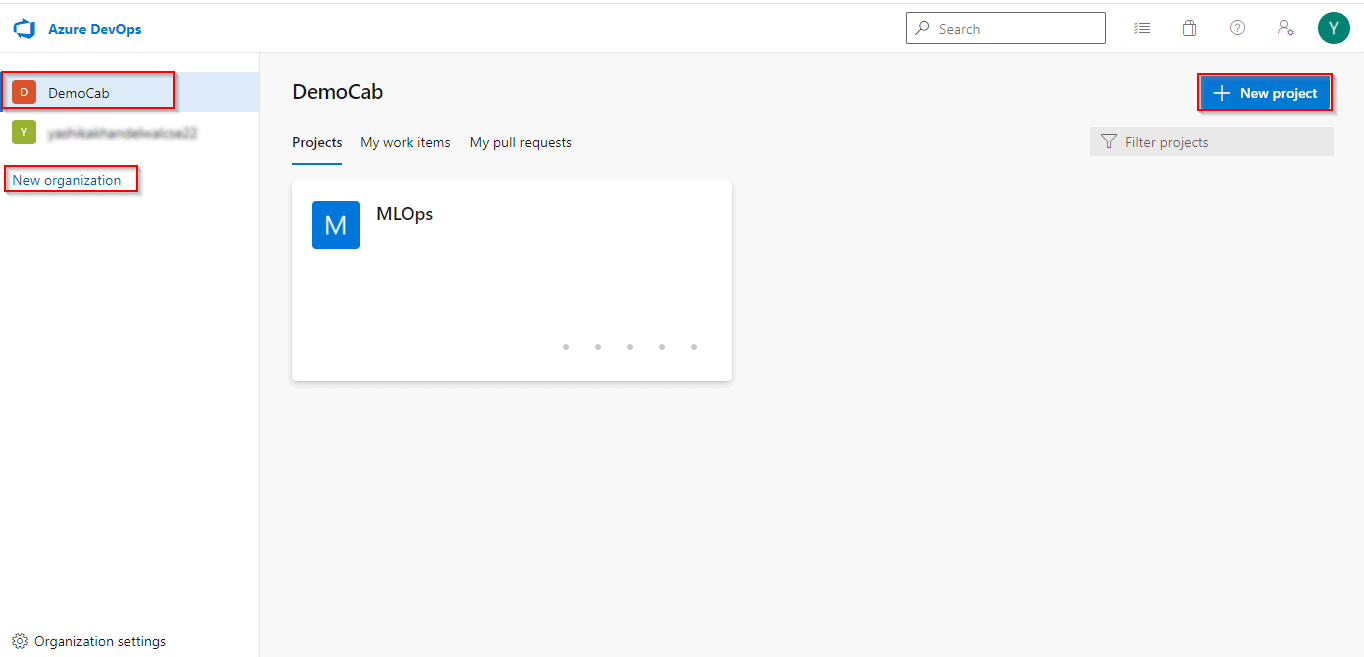
Step 3: A new project will be created. Now we require the code for the project for which we will use GitHub. You can get the code from the MLOpsPython document.
To add the code to our project, click on Project Settings, select GitHub Connections, and then connect to your GitHub account (It might ask you to sign-in to your GitHub account first).
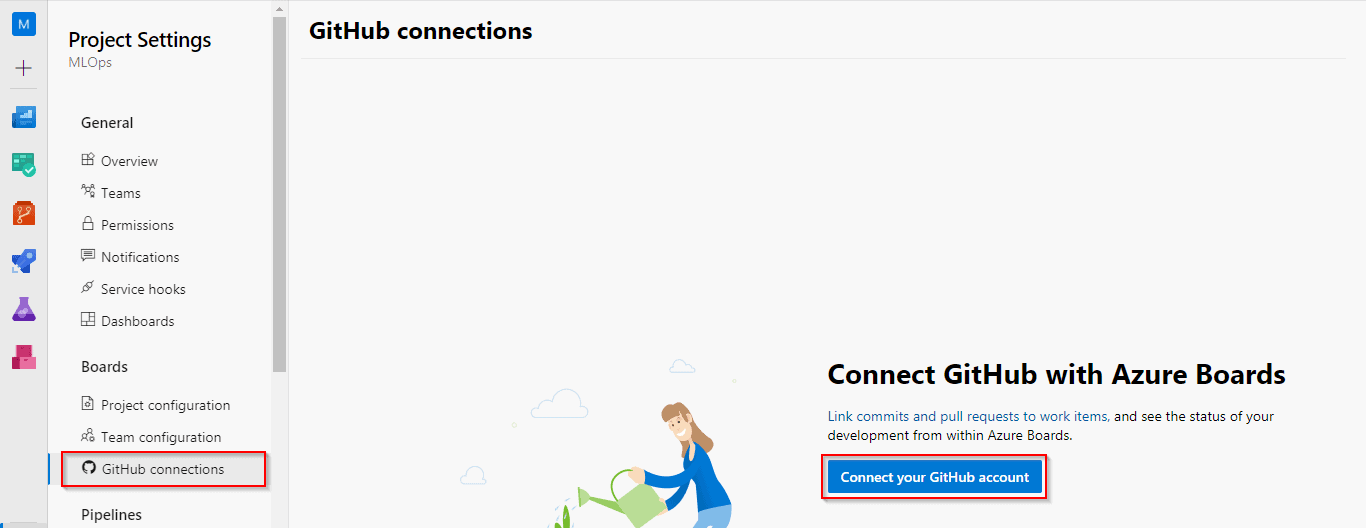
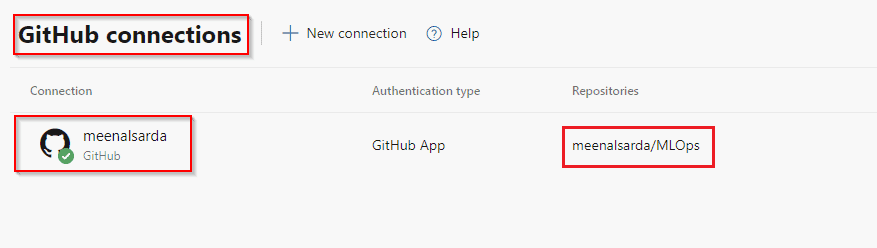
Step 4: After connecting to the GitHub account, select the repository where you have the code.
Read More: Microsoft Azure Object Detection
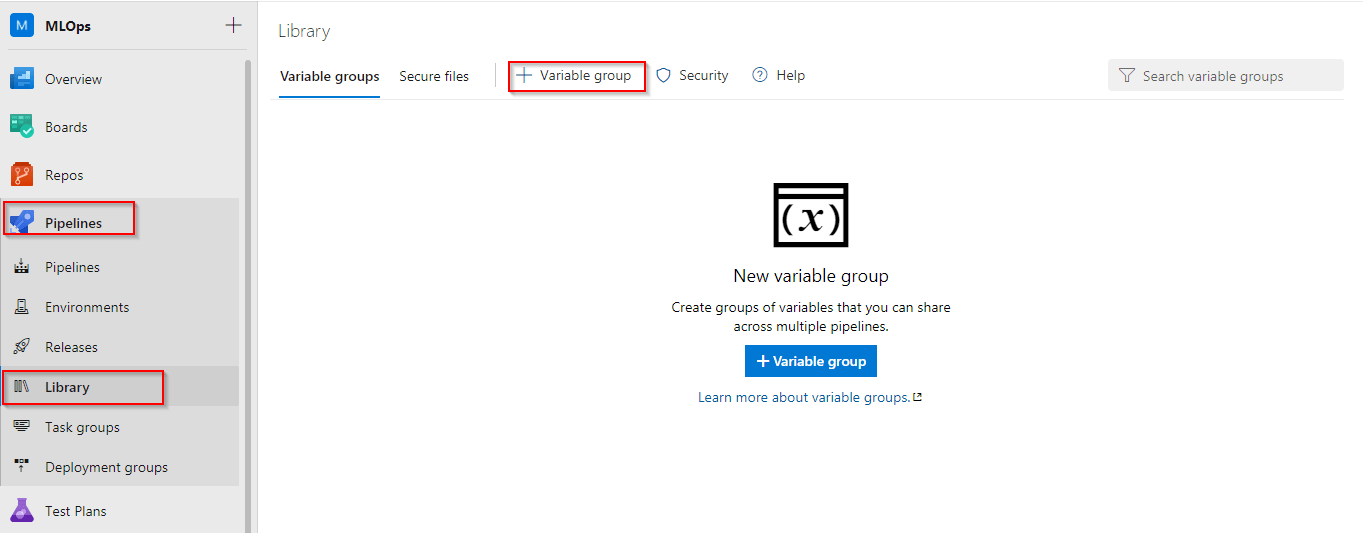
Step 5: Create a Variable Group for the pipeline. Select the Pipelines Option and click on Library to create a variable group.
Variable Groups are used to store values that are to be made available across multiple pipelines and can be controlled by the developer.
Note: You can give the same name for the variable group as mentioned in the document also.
Check Out: Azure Speech Translation.
Step 6: Now we have to add some variables in the variable group created in the previous step. So click on the Add button and add these variables.
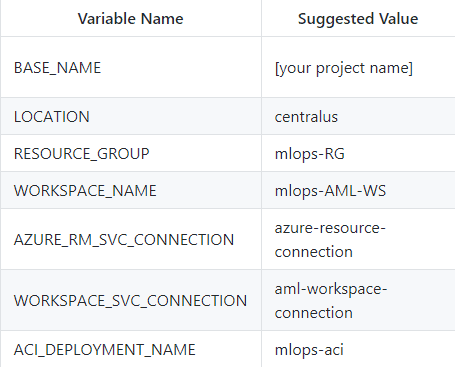
Step 7: No we have to create a service connection for Azure Resource Manager. So click on Project Settings and select Service Connections.
- Choose a Service Connection: Azure Resource Manager
- Authentication Method: Service Principal (automatic)
- Scope Level: Subscription (Your subscription will be populated in the box)
- Service connection name: Give the name that you specified in the AZURE_RM_SVC_CONNECTION variable and click on save.
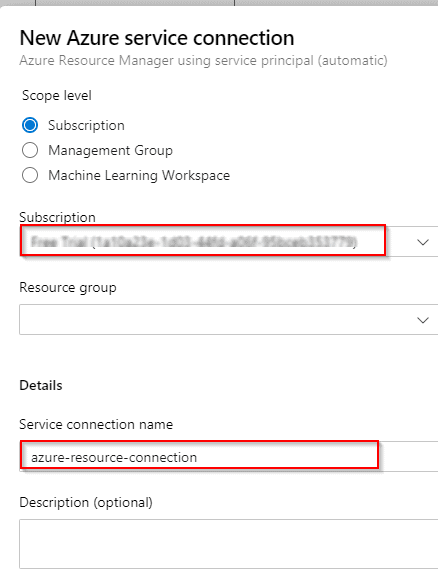
The Connection will be created and can be viewed in the Azure Portal under the Azure Active Directory Tab.
Step 8: Create Infrastructure as Code (IaC) Pipeline by clicking on Pipelines and selecting New Pipeline.
- It will ask for the code location, select GitHub.
- From Where to Configure- Existing Azure Pipelines YAML File
- Specify the path and click on Save
You can review the created pipeline and also rename it as IaC Pipeline for better understanding in the future. Once the pipeline is created click on Run.
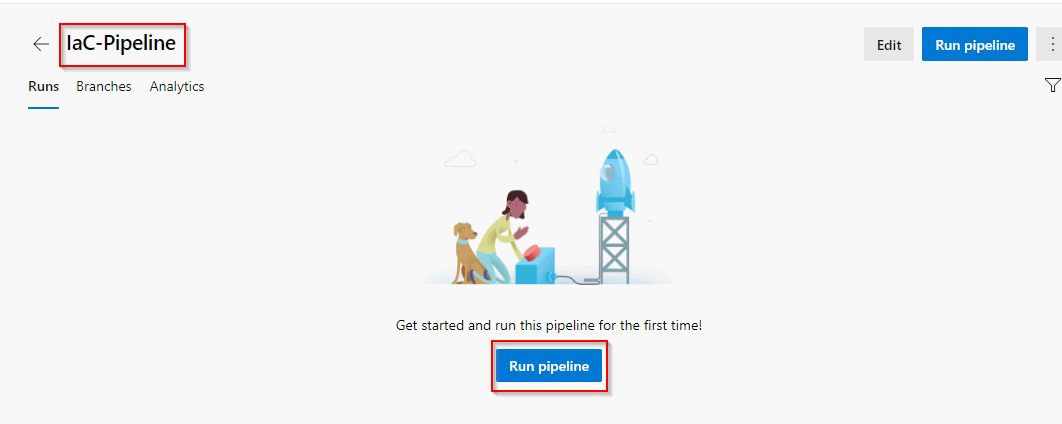
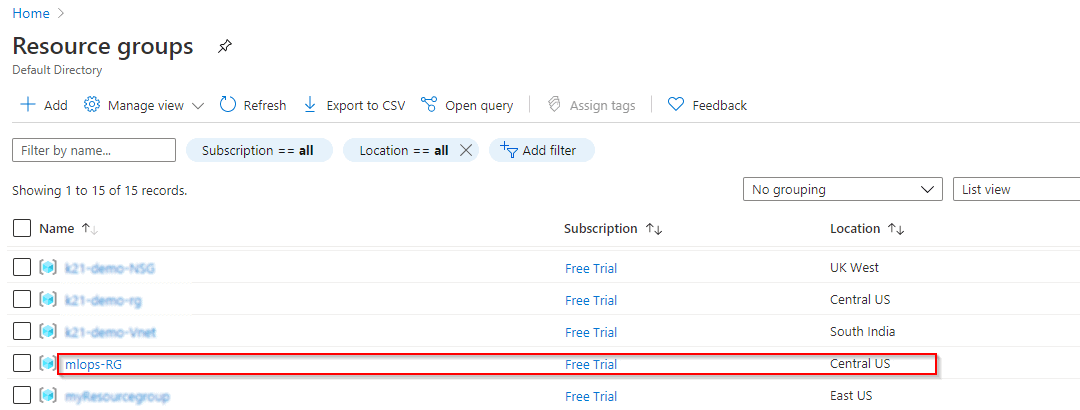
Step 9: After the pipeline starts running, you can see in the Azure Portal that a new resource group will be created with a machine learning service workspace.
Also Read: Our previous blog post on hyperparameter tuning. Click here
Step 10: Now the next step will be to connect Azure DevOps Service to Azure ML Workspace.
For this, we will create a new service connection with the scope of the Machine Learning Workspace.
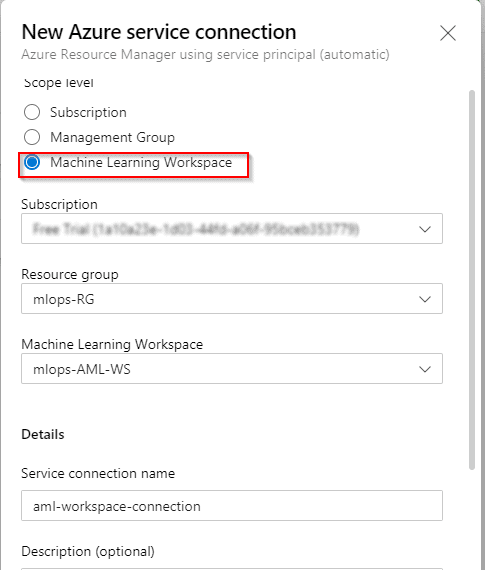
Step 11: After the connection is established, we will now create a Model, Train, and Register CI Pipeline and run that (It will take approximately 20 minutes to run this pipeline).
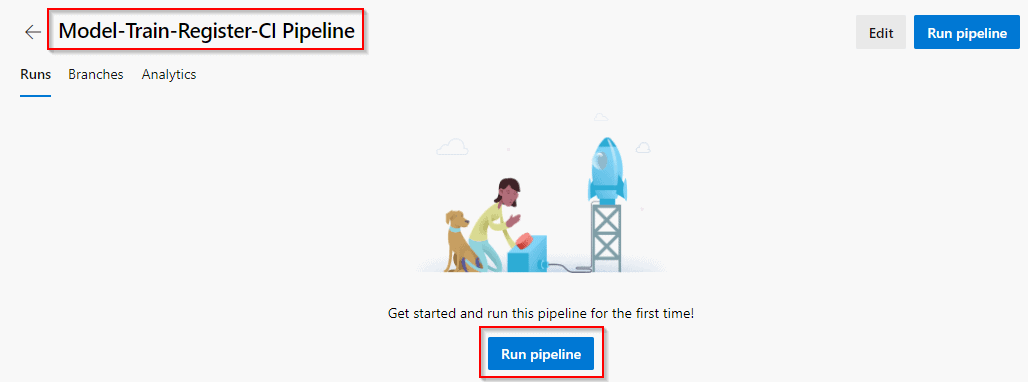
Step 12: After the pipeline run is completed you can view the workspace details in your azure portal in the model and pipeline section.
Also Read: Our blog post on AWS Sagemaker. Click here
Step 13: If you want to deploy the model, then create another pipeline and run the pipeline. There will be three deployment environments Deploy to ACI or AKS or Webapp.
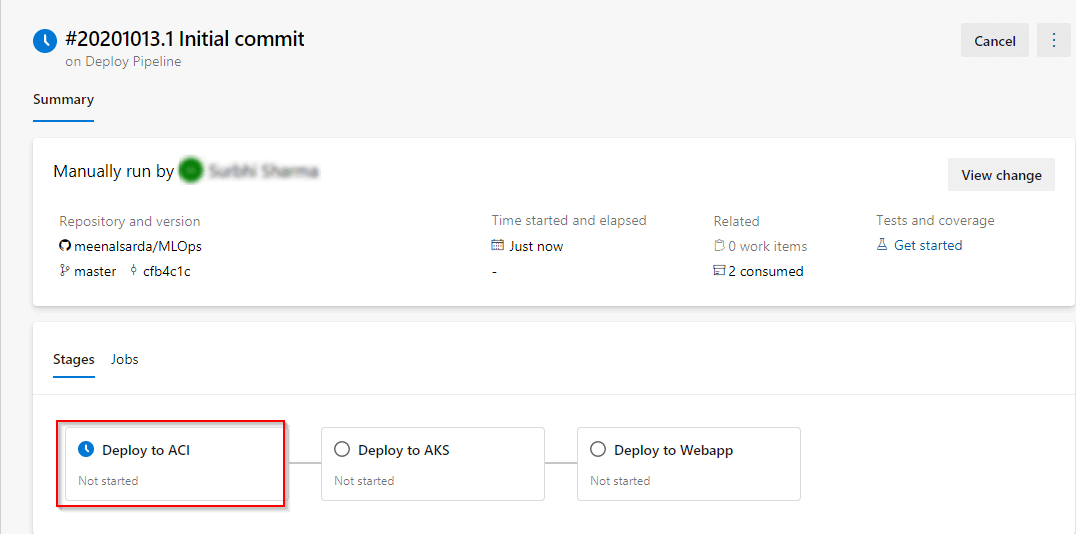
So this is how we can get MLOpsPython working with some sample projects.
Conclusion
Azure MLOps empowers organizations to unlock the true potential of machine learning by providing a platform that’s efficient, scalable, and secure. Whether you’re just starting with ML or scaling existing projects, Azure MLOps is a game-changer.
FAQs
What is Azure MLOps used for?
Azure MLOps is used to operationalise machine learning workflows, making them scalable, efficient, and collaborative.
How does Azure MLOps improve ML workflows?
By automating repetitive tasks, integrating with CI/CD pipelines, and providing robust monitoring tools.
What are the costs involved in Azure MLOps?
Costs depend on usage, including compute, storage, and additional services.
Can Azure MLOps handle multi-cloud setups?
Yes, Azure supports hybrid and multi-cloud environments, ensuring flexibility.
How secure is Azure MLOps for sensitive data?
With advanced encryption, role-based access control, and compliance with global standards, Azure MLOps ensures robust data security.
Related References
- Join Our Generative AI Whatsapp Community
- Azure AI/ML Certifications: Everything You Need to Know
- Azure GenAI/ML : Step-by-Step Activity Guide (Hands-on Lab) & Project Work
- The Role of AI and ML in Cloud Computing
- What is LangChain?
- GPT 4 vs GPT 3: Differences You Must Know in 2024
- Introduction to DataOps
- Understanding Generative Adversarial Network (GAN)
- What is Prompt Engineering?
- What Is NLP (Natural Language Processing)?
Next Task: Enhance Your Azure AI/ML Skills


![Microsoft Agentic AI Business Solutions Architect [AB-100] | K21 Academy](https://test.k21academy.com/wp-content/uploads/2025/11/Microsoft-Agentic-AI-Business-Solutions-Architect-AB-100-Exam-Overview1.png)