
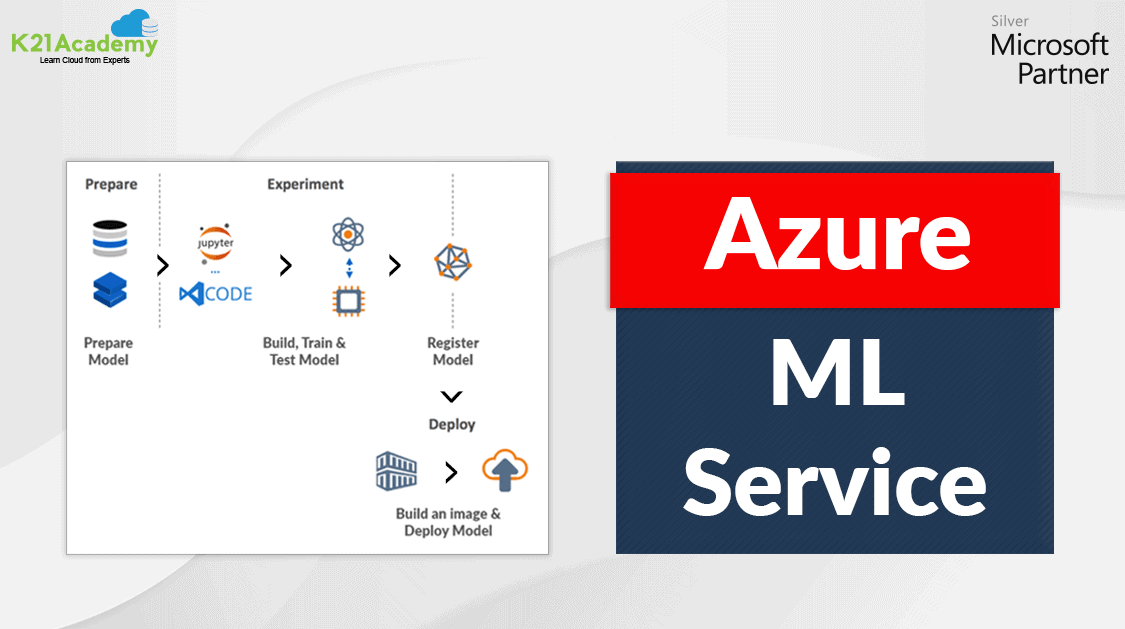





Azure Machine Learning Service is a fully managed cloud service that is used to train, deploy, and manage Azure machine learning models.
In this post, we are going to see what is Azure Machine Learning service and describe the end-to-end workflow for a machine learning service.
This post is beneficial for those who are new to machine learning or for all those who are preparing for Microsoft Azure Data Scientist Certification [DP-100].
Check out: Machine learning is a subset of Artificial Intelligence. It is the process of training a machine with specific data to make inferences. In this post, we are going to cover everything about Automated Machine Learning in Azure.
Microsoft Azure Machine Learning Service Overview
It is an enterprise-level service for building and deploying machine learning models. It allows us to create, test, manage, deploy, or monitor ML models in a scalable cloud-based environment. It supports numerous open-source packages available in Python such as TensorFlow, matplotlib, and sci-kit-learn.
There are some tools available that can be used to build, train, and deploy models.
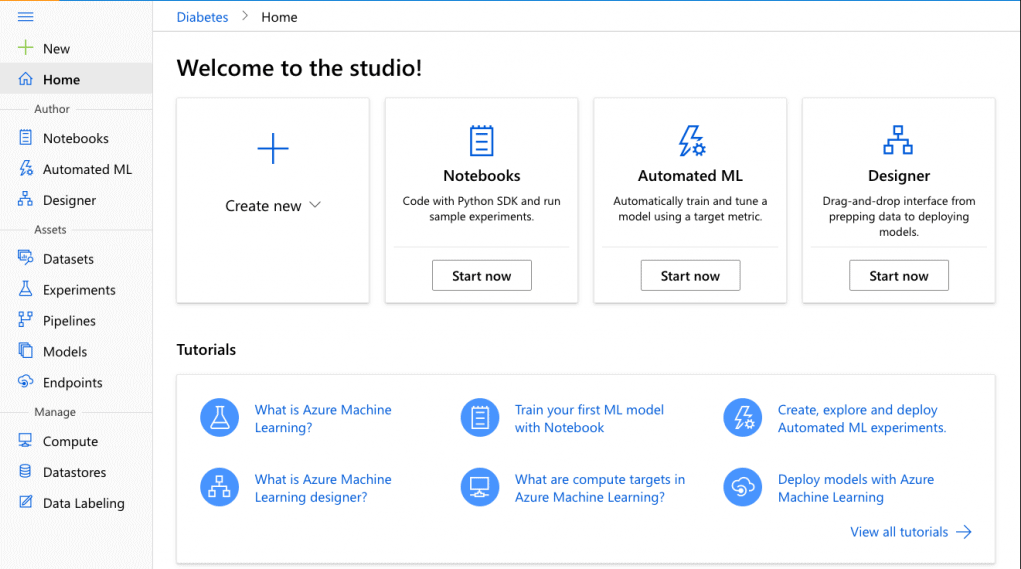
- Azure Machine Learning Studio: It is a workspace where you create, build, train the machine learning models. To know more about Azure Machine Learning studio you can read our blog post on Azure Machine Learning Studio.
- Azure Machine Learning for Visual Studio Code Extension: It is a free extension that allows managing resources, model training workflows, and deployments in Visual Studio Code
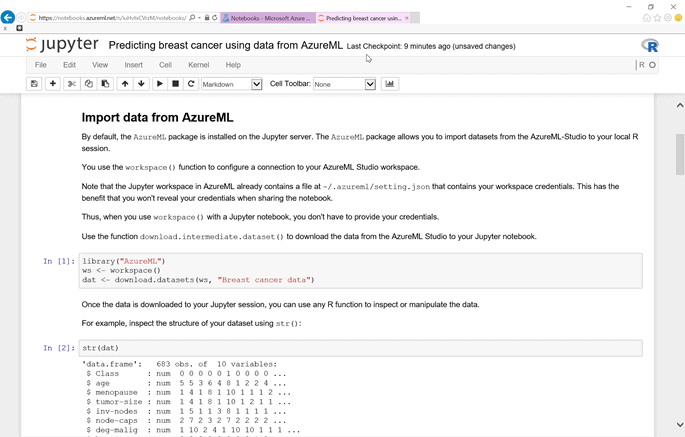
- Jupyter Notebooks: It is an open-source web application that allows us to create and share documents that contain live code, visualizations narrative texts, and equations.
Also Check: Our Blog Post To Know About Most Important DP- 100 FAQ
- Model Registry: It is a component machine learning service where the model is stored once trained. A model registry is responsible for keeping records of the models that are being built and trained. The models can be identified by their versions and names. Every time a new model is registered with the name which has already been used before, the registry stores it as a new version. The version number is increased and the name of the model remains the same. Additional metadata tags can be added during the registration of the model which helps in easy searching.
Note: Do Read Our Blog On MLOps.
- Image Registry: It holds a record of images created by the models. It adds additional metadata tags while creating an image that is kept by an image registry. These tags can be used as a query to find the image.
Also read: Learn more about Azure Data Stores & Azure Data Sets
Features Of Azure Machine Learning Service
- It has the potential to auto-train and auto-tunes a model.
- The model can be trained on a local machine and then deployed on the cloud.
- It offers computing services like Azure Databricks, Azure Machine Learning Compute, etc.
- It manages the scripts and the run history of models, making it easy to compare model versions.
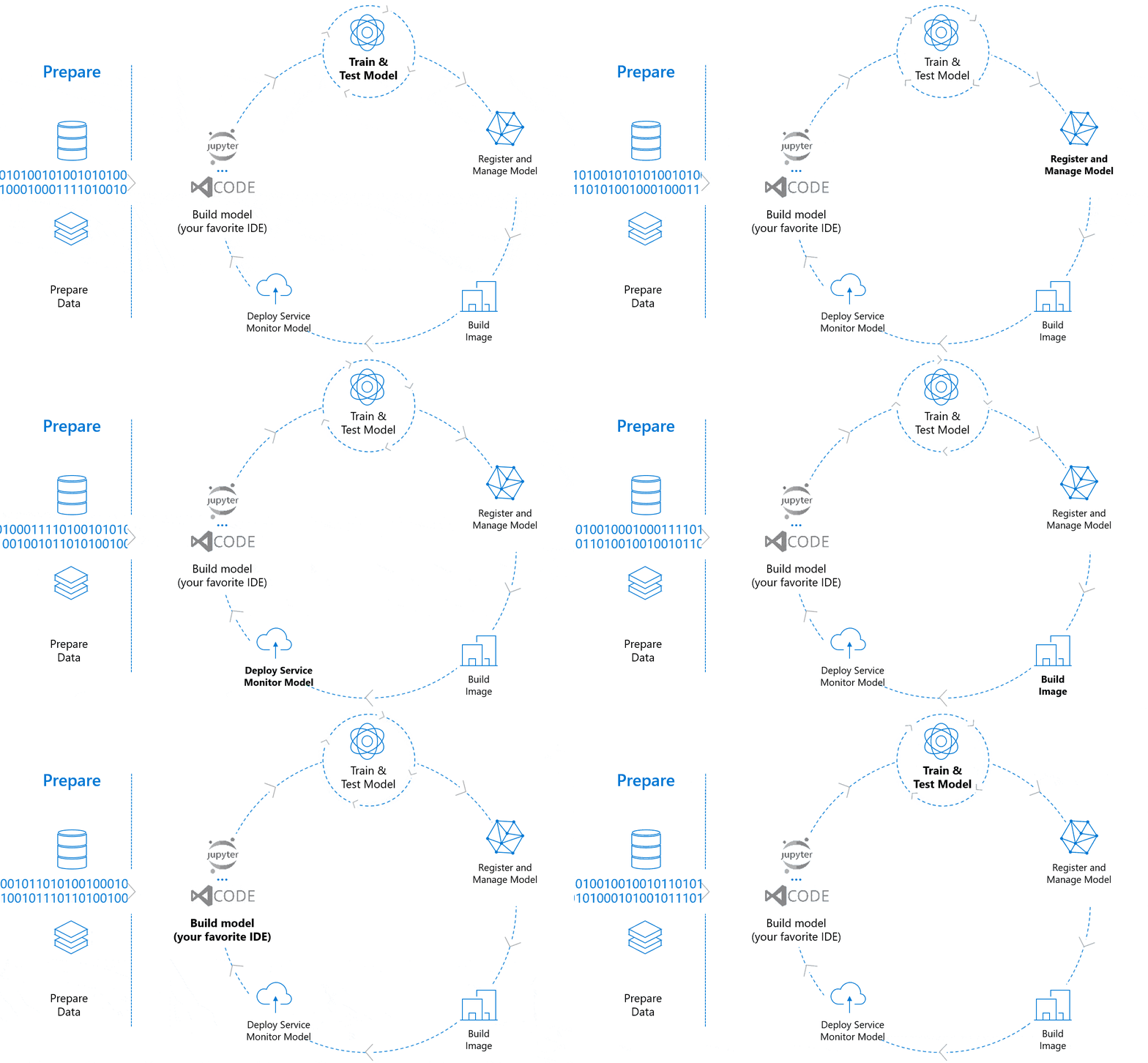
Workflow Of Azure Machine Learning Service
Azure machine learning service workflow is a three-step process that includes:
- Prepare Data
- Experiment (Build, Train & Test the model)
- Deployment
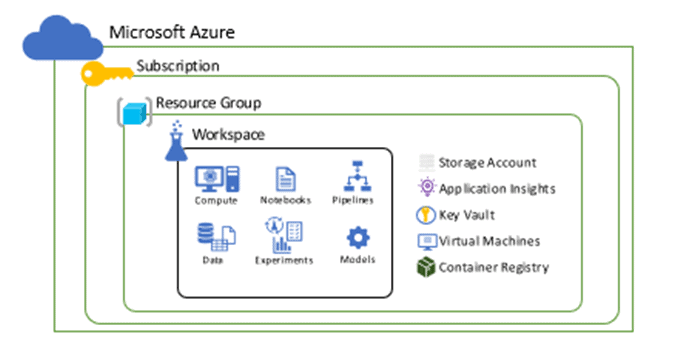
Before we start with collecting and processing our data we need a Workspace where we can perform all the operations. A Workspace represents the highest level of centralized resource of machine learning service. It holds the list of all computes targets used for the training developed model. It stores the log of training execution, metrics, outputs, and snapshots. This data assists in choosing the best training model for the project. The model is registered through the workspace.
To Know More About Microsoft Azure Object Detection Click Here.
1.) Prepare Data
This is the first step in creating a machine learning model which includes collecting and processing the data from datastore and datasets.
Datastore: They are used to store connection information to Azure storage services which can be referred to by name and are attached to the workspace.
Some examples of supported Azure storage services that can be registered as datastores are:
- Azure Data Lake
- Azure SQL Database
- Databricks File System
- Azure Blob Container
Also Visit Our Blog Post To Get An Overview Of the Convolution Neural Network.
Datasets: A Dataset is a reference to data in the datastore or behind public web URLs and also creates a copy of its metadata. There are two types of datasets supported by Azure namely the File dataset and Tabular dataset.
2.) Experiment
After the data is registered and stored in the dataset, the next step is to build, train, and test the model.
Model: It is a piece of code that takes input and produces the output for the given inputs. While developing a machine learning model, it requires selecting an algorithm, availing data, and tuning of hyperparameters. Training includes an iterative process that provides a trained model inheriting what it learned from the training process. The model is obtained by executing in Azure Machine Learning.
Compute Targets: It is a machine or a set of machines that are used to run the training scripts or host service deployments. A local machine or a remote compute resource can also be used as a compute target. The compute resources used for compute targets are attached to the workspace.
Do Check: What is the difference between Data Science and Data Analytics?
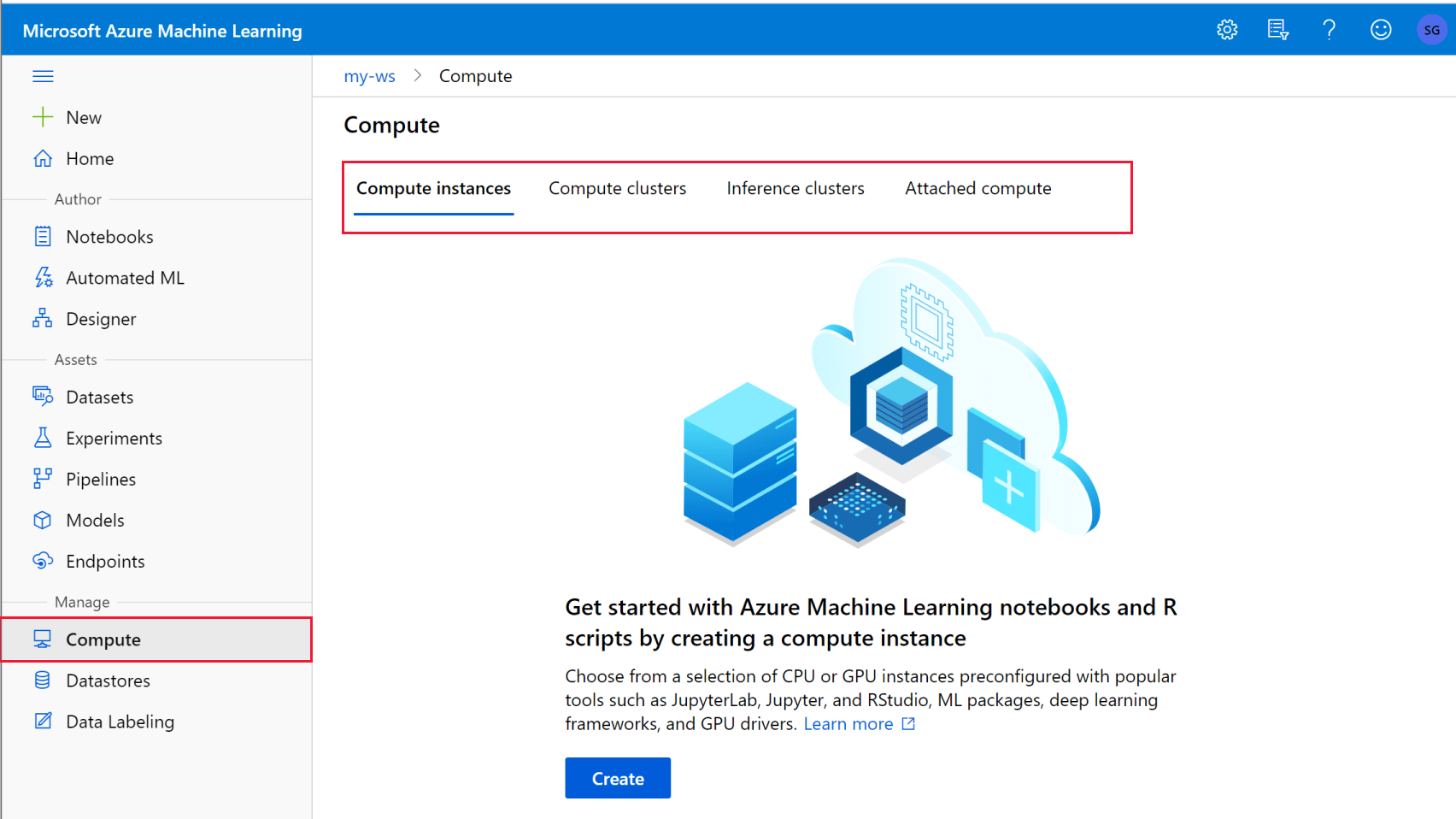
There are 4 types of Compute Targets:
- Local Computer: It is a computing context where the experiment submission code runs.
- Compute Cluster: It is a virtual cluster managed by Azure Machine Learning.
- Inference Cluster: It is a container-based deployment target.
- Attached Compute: It includes Azure Databricks, Azure Data Analytics, etc.
Do Read: Our Blog Post On Hyperparameter Tuning.
3.) Deployment
Once the model is trained and tested, it is stored in the model registry and then deployed in web service or IoT modules.
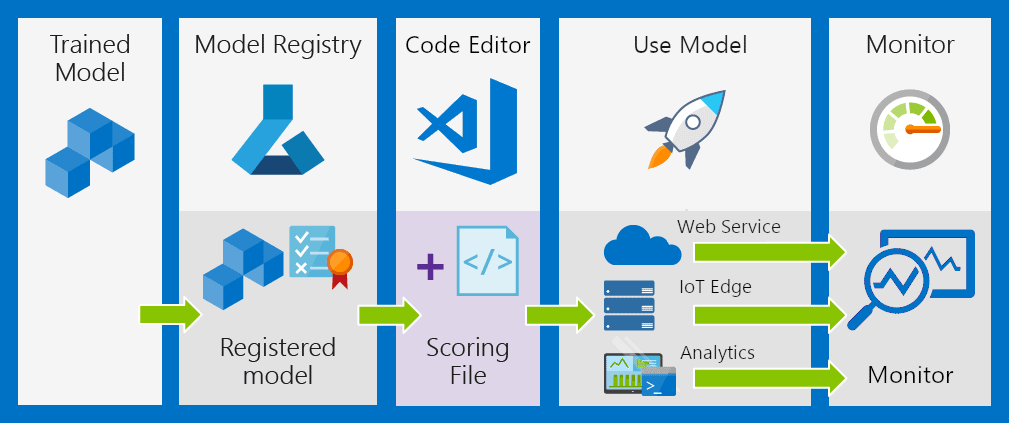
Image: It provides an environment to deploy the model independently. It consists of all the components required by the model. An image contains a model, application, or script and the dependencies required by the model or script. The images are stored in the image registry.
There are two types of images:
- FPGA image – used while deploying a field-programmable gate array in Azure ML. FPGA is a semiconductor device widely used in electronic circuits.
- Docker image – used to deploy computer targets such as Azure Kubernetes Service or Azure Container Instances. To know about docker images you can read our blog post on Docker Image: A Complete Guide For Beginners.
Deployment: The registered model is deployed as a service endpoint. It instantiates the image into a web service that is further hosted over the cloud or into an IoT module for using it in an integrated device deployment.
This is the entire workflow of an Azure Machine Learning Service.
Also, Check Our blog post on DP 100 questions. Click here
Azure Machine Learning Studio
Azure Machine Learning Studio is a powerful, cloud-based platform designed for building, training, and deploying machine learning models with ease. It offers a user-friendly interface and supports both code-first and no-code approaches, making it accessible for beginners and professionals. The platform integrates seamlessly with popular tools like Python, R, and Azure services, enabling efficient data preprocessing, experimentation, and model management. With features like automated ML, pipelines, and compute management, it accelerates development workflows, empowering users to create scalable AI solutions tailored to business needs.
Azure Machine Learning Workshop
Azure Machine Learning Workshop is a hands-on learning experience designed to help professionals and enthusiasts master the essential tools and techniques of Azure’s AI/ML platform. Participants explore the end-to-end machine learning lifecycle, including data preparation, model training, deployment, and monitoring, all within Azure’s integrated ecosystem. The workshop emphasizes practical application through labs and real-world scenarios, making it ideal for beginners and experienced users alike. By attending, learners gain valuable skills to leverage Azure ML for building scalable, efficient, and impactful AI solutions.
Azure Machine Learning Designer
Azure Machine Learning Designer is a powerful visual tool within Azure Machine Learning that simplifies the process of building, testing, and deploying machine learning models. It features a drag-and-drop interface, allowing users to create and connect modules for data preprocessing, feature engineering, and model training without writing code. Ideal for both beginners and professionals, it supports seamless integration with Azure services for scalable deployment. This tool accelerates experimentation and collaboration, making it a valuable asset for developing and operationalizing AI solutions efficiently.
Frequently Asked Questions (FAQs)
Q: How does Azure Machine Learning Service handle data preparation?
A: Azure Machine Learning Service provides a range of tools and features for data preparation. It allows you to import data from various sources, perform data cleaning and transformation, handle missing values, and split data into training and testing sets.
Q: How does Azure Machine Learning Service support collaboration?
A: Azure Machine Learning Service provides collaborative features, allowing multiple users to work together on machine learning projects. It supports version control, experiment tracking, and shared project workspaces for efficient collaboration.
Q: Does Azure Machine Learning Service integrate with other Azure services?
A: Yes, Azure Machine Learning Service integrates seamlessly with other Azure services. It can utilize Azure Data Lake Storage for data storage, Azure Databricks for big data processing, Azure DevOps for CI/CD pipelines, and Azure Kubernetes Service (AKS) for container orchestration.
Q: How can I evaluate the performance of a trained model in Azure Machine Learning Service?
A: Azure Machine Learning Service offers various evaluation techniques to assess the performance of a trained model. It provides metrics such as accuracy, precision, recall, and F1-score. Cross-validation and hyperparameter tuning can also be performed to optimize the model.
Q: Is Azure ML free?
A: Azure Machine Learning offers a free tier that includes access to one workspace per Microsoft account, allowing users to upload up to 10 GB of datasets and operationalize models as staging APIs.
Q: What are alternatives to Azure ML?
A: Alternatives to Azure ML include Amazon SageMaker, Google Cloud Vertex AI, IBM Watson Studio, Databricks, and H2O.ai. These platforms offer robust machine learning tools for data preparation, model training, deployment, and monitoring across diverse industries and use cases.
Q: How can fairness be ensured in machine learning models deployed on Azure?
A: Ensuring fairness in Azure-deployed machine learning models involves using tools like Fairlearn to detect and mitigate bias, implementing diverse training datasets, conducting bias audits, and adhering to responsible AI principles throughout development, testing, and deployment stages.
Q: How is Azure ML different from Databricks?
A: Azure ML specializes in building, training, and deploying machine learning models with automation and integrated tools. Databricks focuses on collaborative data engineering, analytics, and machine learning, excelling in big data processing and integration with Spark for advanced workflows.
Q: How can one set up an Azure Machine Learning workspace?
A: To set up an Azure Machine Learning workspace, sign into the Azure portal, search for Machine Learning, and create a new workspace. Provide details like subscription, resource group, workspace name, region, and storage.
Q: How does Azure Automated Machine Learning (AutoML) work?
A: Azure Automated Machine Learning (AutoML) simplifies model building by automating data preprocessing, algorithm selection, and hyperparameter tuning. It iteratively trains models, ranks them based on performance metrics, and deploys the best model, enabling faster, efficient machine learning development.
Azure Data Scientist Associate Certification [DP-100]
If you are a data science enthusiast or studying machine learning then you should plan on taking the Microsoft Azure Data Scientist Associate [DP-100] Certification and must read our blog posts on [DP-100] Microsoft Certified Azure Data Scientist Associate: Everything you must know and know about the hands-on required by going through Microsoft Certified Azure Data Scientist Associate | DP 100 | Step By Step Activity Guides (Hands-On Labs).
Related/References:
- Join Our Generative AI Whatsapp Community
- Azure AI/ML Certifications: Everything You Need to Know
- Azure GenAI/ML : Step-by-Step Activity Guide (Hands-on Lab) & Project Work
- [DP-100] Microsoft Certified Azure Data Scientist Associate: Everything you must know
- Exam DP-100: Designing and Implementing a Data Science Solution on Azure
- AI-900: Azure AI Fundamentals: Everything You Need To Know
- Microsoft Azure AI Fundamentals [AI-900]: Step By Step Activity Guides (Hands-On Labs)
- DP 100 Exam | Microsoft Certified Azure Data Scientist Associate
- [DP-100] Designing and Implementing a Data Science Solution on Azure
Next Task: Enhance Your Azure AI/ML Skills


![Microsoft Agentic AI Business Solutions Architect [AB-100] | K21 Academy](https://test.k21academy.com/wp-content/uploads/2025/11/Microsoft-Agentic-AI-Business-Solutions-Architect-AB-100-Exam-Overview1.png)



