



In this blog, I have covered various options for running Azure Compute workloads in detail, which includes Virtual Machines, Azure Container Instances, Azure Kubernetes Service (AKS), App Service, and Serverless Computing
Topics I’ll cover:
- Azure Virtual machines
- Azure Containers Instances
- Azure Kubernetes Service
- Azure App Service
- Serverless computing (Functions)
Azure Virtual Machine
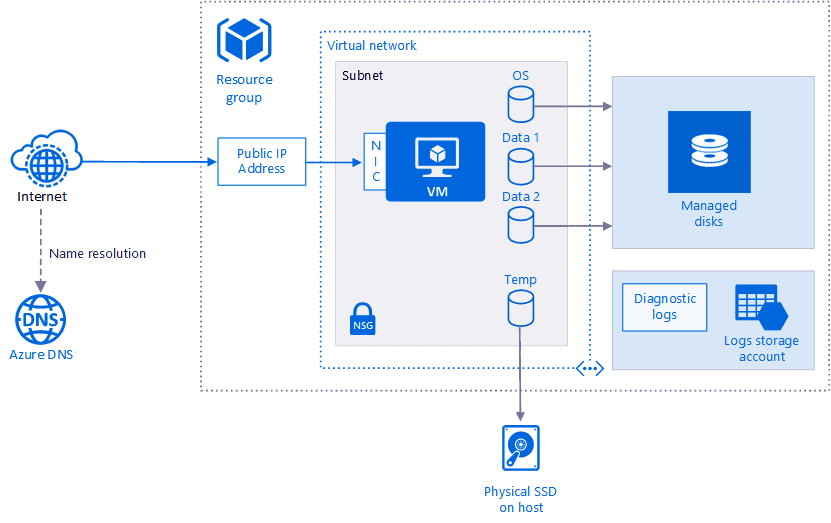
The virtual machine is an initial IaaS stage in Azure compute options. This is the most common compute service which is used on all cloud platform widely. Azure Virtual Machines provide scalable computing resources in the cloud, allowing you to run applications and workloads without the need to invest in physical hardware.
Key Features:
-
Customizable Configurations: Choose from a variety of sizes and configurations to meet specific workload requirements.
-
Multiple Operating Systems: Support for Windows, Linux, and other operating systems.
-
Integrated Networking: Assign Network Interface Cards (NICs) with public and private IP addresses.
-
Persistent Storage: Attach multiple Virtual Hard Disks (VHDs) for data storage.
-
Monitoring and Security: Utilize Azure Monitor and Network Security Groups (NSGs) for performance tracking and traffic control.
Benefits:
-
Flexibility: Run any application or workload with full control over the operating system and software stack.
-
Scalability: Easily scale up or down based on demand.
-
Cost Management: Pay only for the resources you use, optimizing operational costs.
Related Readings: Virtual Networks In Microsoft Azure
Azure Container Instances
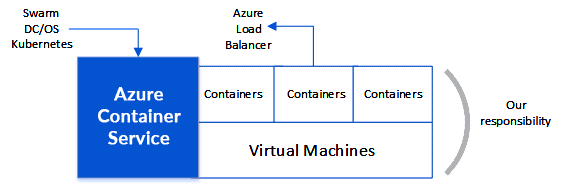
Containers are used for deploying Microservices applications in an easy way. It’s difficult to talk about microservices without talking about containers. Azure Container Instances offer a fast and straightforward way to run containers in the cloud without managing virtual machines or orchestrators.
Key Features:
-
Serverless Containers: Deploy containers without provisioning or managing infrastructure.
-
On-Demand Scaling: Automatically scale container instances based on workload requirements.
-
Integration with Azure Services: Seamlessly connect with Azure Virtual Networks and other services.
Benefits:
-
Rapid Deployment: Start applications in seconds with minimal setup.
-
Cost Efficiency: Pay per second for compute resources, reducing costs for short-lived applications.
-
Simplified Management: Focus on application logic without managing underlying infrastructure.
Check out: Our previous blog post on What Are Containers?
Azure Kubernetes Service (AKS)
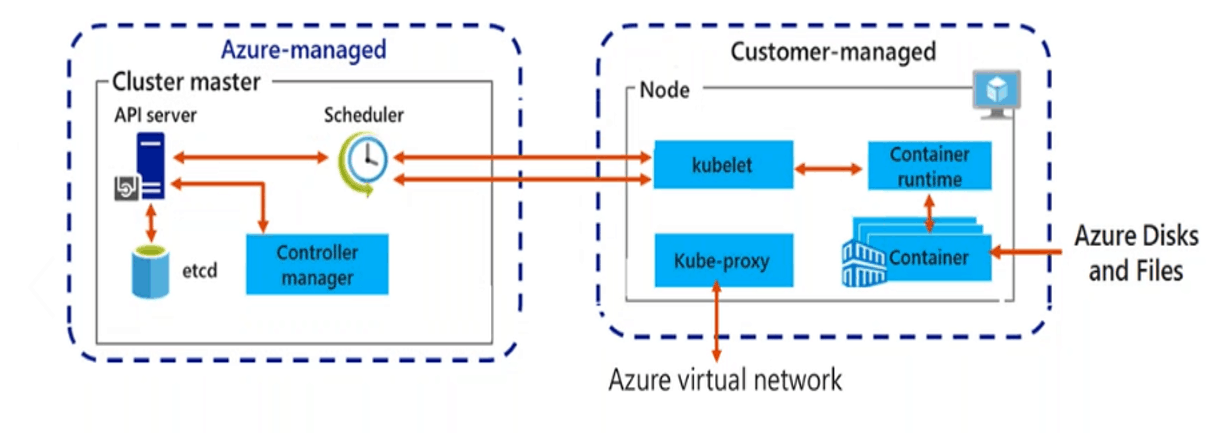
Azure Kubernetes Service (AKS) is a managed Kubernetes service in which the master node is managed by Azure and end-users manages worker nodes. Users can use AKS to deploy, scale, and manage Docker containers and container-based applications across a cluster of container hosts. As a managed Kubernetes service AKS is free – you only pay for the worker nodes within your clusters, not for the masters. You can create an AKS cluster in the Azure portal, with the Azure CLI, or template-driven deployment options such as Resource Manager templates and Terraform.
Key Features:
-
Managed Control Plane: Azure handles the Kubernetes master nodes, reducing operational overhead.
-
Integrated Developer Tools: Support for Azure DevOps, Helm, and other CI/CD tools.
-
Scalability and Availability: Automatically scale applications and ensure high availability across regions.
Benefits:
-
Simplified Operations: Focus on application development while Azure manages the Kubernetes infrastructure.
-
Enhanced Security: Built-in security features, including Azure Active Directory integration and role-based access control.
-
Cost-Effective: Pay only for the worker nodes; the managed control plane is free.
Read more: All you need to know on the CKA Certification Exam
Azure App Service
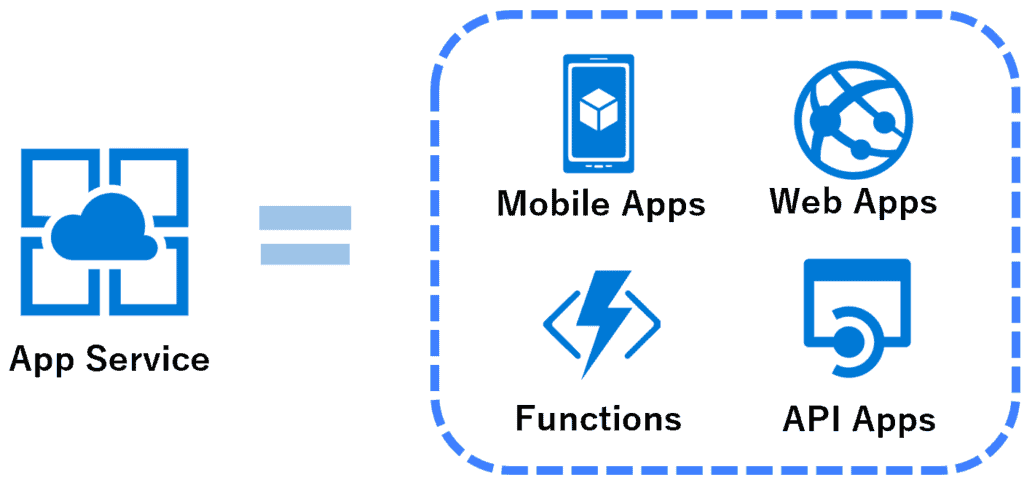
In terms of SaaS, Azure App Service Plays an important role in Azure compute options. Using Azure app service you can run your application on the cloud. It is not only used to host apps it can also host REST API’s mobile backends. You can also develop the applications in a language like .NET, NET Core, JAVA, Ruby, Python, etc. In-app service you can use features like load balancing auto-scaling, etc.
Your apps in the app service run in an App Service plan. An App Service plan defines compute resource for your web app if you have excess capacity in your plan you can run multiple apps on a single app service plan
Key Features:
-
Multiple Framework Support: Develop applications using .NET, Java, Python, Node.js, and more.
-
Integrated Developer Tools: Built-in support for Git, GitHub, Azure DevOps, and FTP for continuous integration and deployment.
-
Scaling and Load Balancing: Automatic scaling and load balancing to handle varying traffic loads.
Benefits:
-
Rapid Deployment: Quickly deploy applications with minimal configuration.
-
High Availability: Achieve 99.95% SLA uptime with automatic failover.
-
Security and Compliance: Built-in security features, including SSL certificates and compliance with industry standards.
Benefits Of Azure App Service
- Use multiple language and frameworks
- You can easily set up CI (Continuous Integration) and CD (Continuous Deployment)
- You can Scale up or down as per your need
- You can use application template for azure marketplace
Also Read: Our blog post on Azure Notification Hub.
Azure Serverless Computing
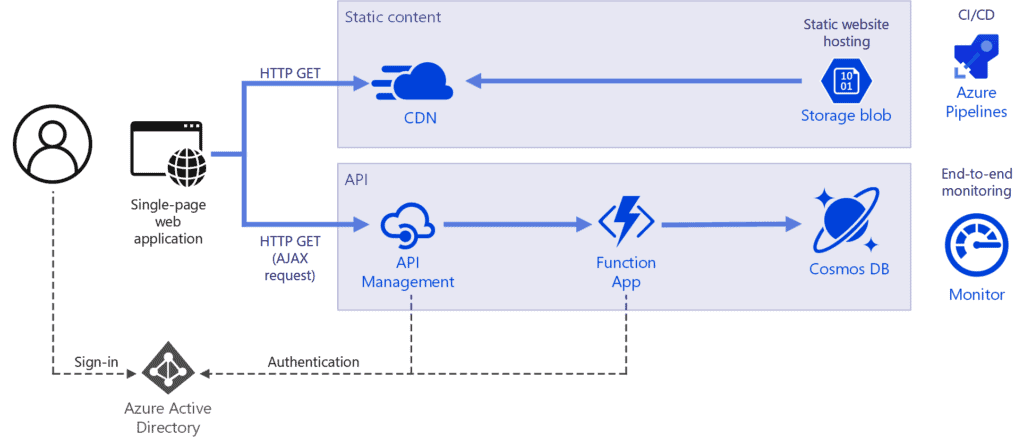
What if you spending all your time in building and deploying the app and none of your time managed in your servers, Serverless computing lets you do just that because the infrastructure that you need to run and scale apps is managed for you by a third party like cloud AWS and GCP. So you only focus on creating and deploying apps.
Serverless computing doesn’t mean there is no server, Of course, there is a server but you don’t have to worry about that in serverless computing, infrastructure is managed for you. Serverless computing is an abstraction of servers, OS, and infrastructure. It is driven by reaction to events in triggers in near real-time. Service Bus, Event Grid, Azure Function, Logic Apps are a part of serverless computing.
References/Related
- Exam AZ-300 – Microsoft Azure Architect Technologies Certification Exam
- Azure Kubernetes Service (AKS) & Azure Container Instances (ACI) For Beginners
- Microsoft Azure Architect Design Step By Step Activity Guides (Hands-On Labs)
- Case Study: Deploy A Container Instance In Azure Using The Azure Portal
- Tips To Prepare Exam AZ-304: Microsoft Azure Architect Design
- [AZ-304] Microsoft Azure Architect Design (beta): Everything You Need To Know
- Microsoft Azure Solution Architect AZ-303/AZ-304: Everything You Need To Know
- Virtual Networks In Microsoft Azure: VNet Peering, ExpressRoute, VPN Gateway
- Exam AZ-305: Azure Solutions Architect Expert Certification
Next Task For You
Begin your journey towards becoming a Microsoft Azure Solutions Architect Expert. Just click on the register now button below to register for a Free Class on Microsoft Azure Solutions Architect Expert Certification [AZ-305], which will help you to understand better, so you can choose the right path and clear the certification exam.


![Microsoft Agentic AI Business Solutions Architect [AB-100] | K21 Academy](https://test.k21academy.com/wp-content/uploads/2025/11/Microsoft-Agentic-AI-Business-Solutions-Architect-AB-100-Exam-Overview1.png)


