
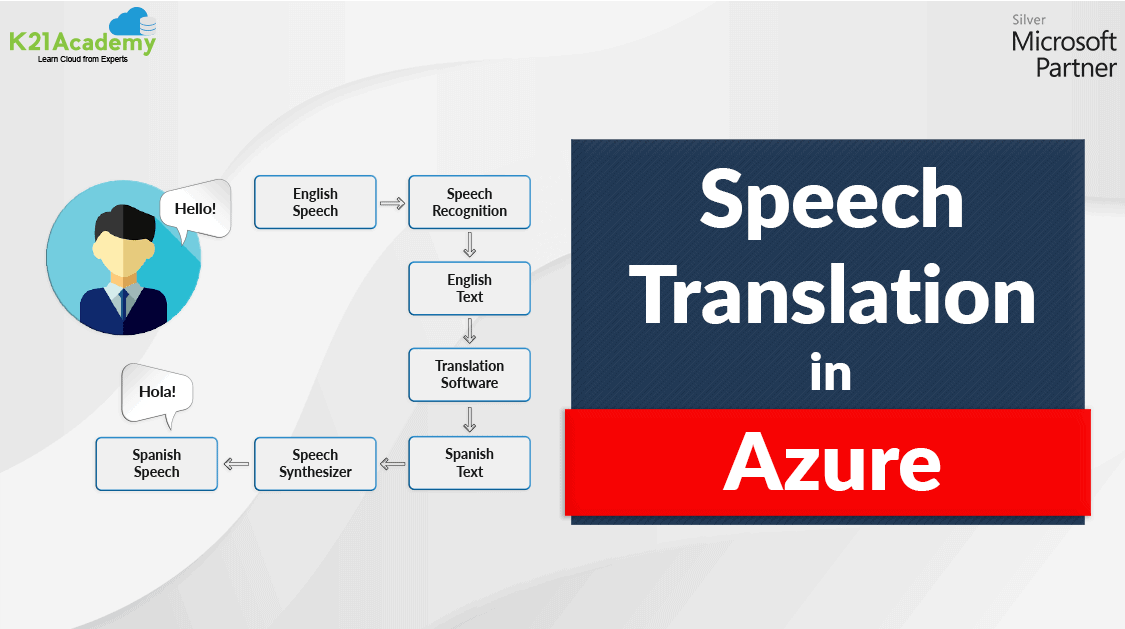





The Machines which can act, behave, and make decisions like humans are termed as Artificially Intelligent Machine. Machine Learning is a subset of Artificial Intelligence. We use various machine learning algorithms to make Artificially Intelligent machines that we use in our day to day life like Amazon Alexa, Youtube Recommendations, Google Translator, Face Unlock System in mobile phones.
In this post, we will cover everything you must know about the Speech Translation System in Artificial Intelligence.
Overview Of Speech Translation
Speech Translation is the process of converting the spoken conversational words from one language to another. It will help to build communication between people who speak different languages.
Speech Translator is been widely used in many industries like medical facilities, schools, police, hotels, retail stores, and factories. One of the very common examples of Speech translation is Google speech-to-speech.
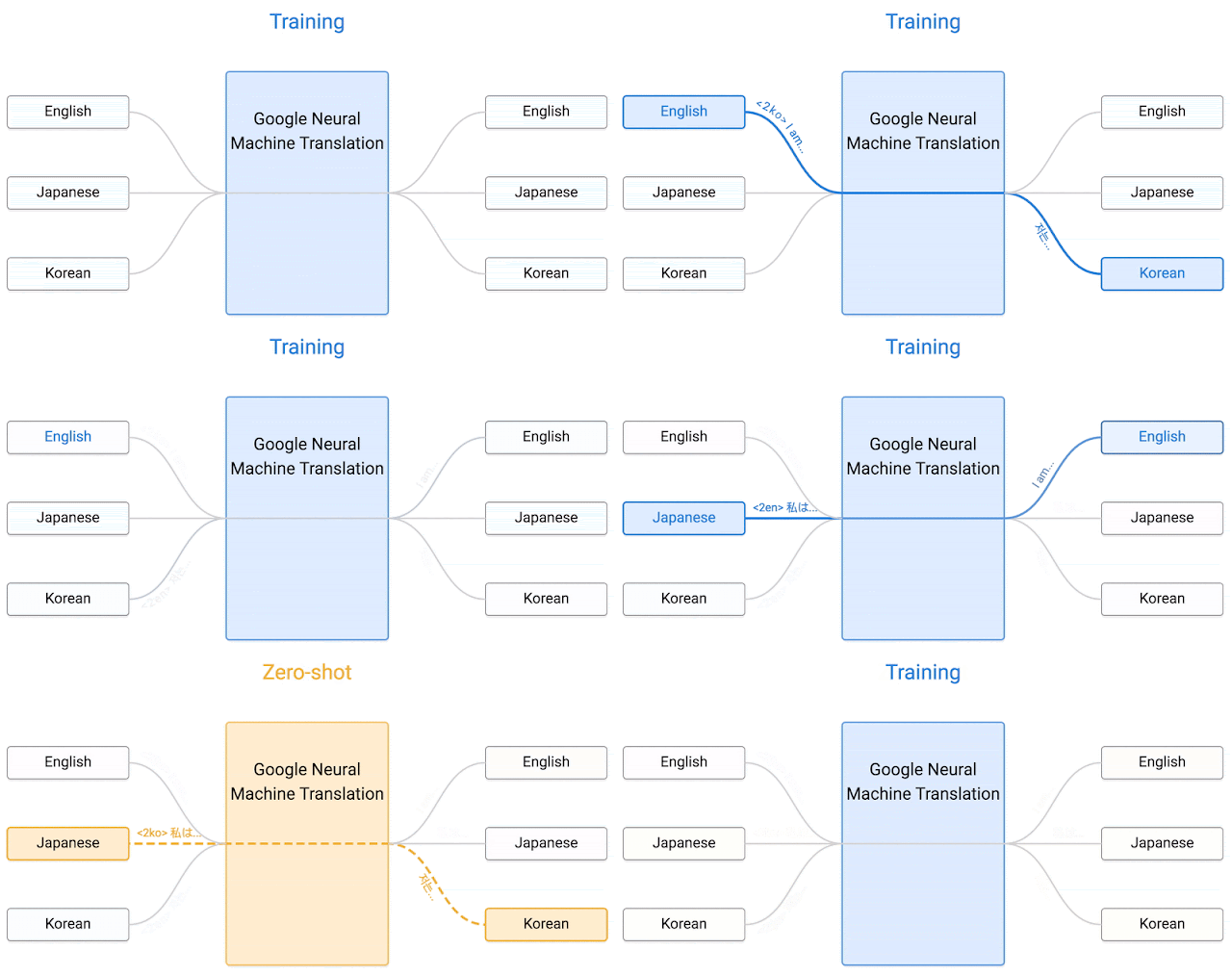
Check out: Overview of Azure Machine Learning Service
How Speech Translation Works
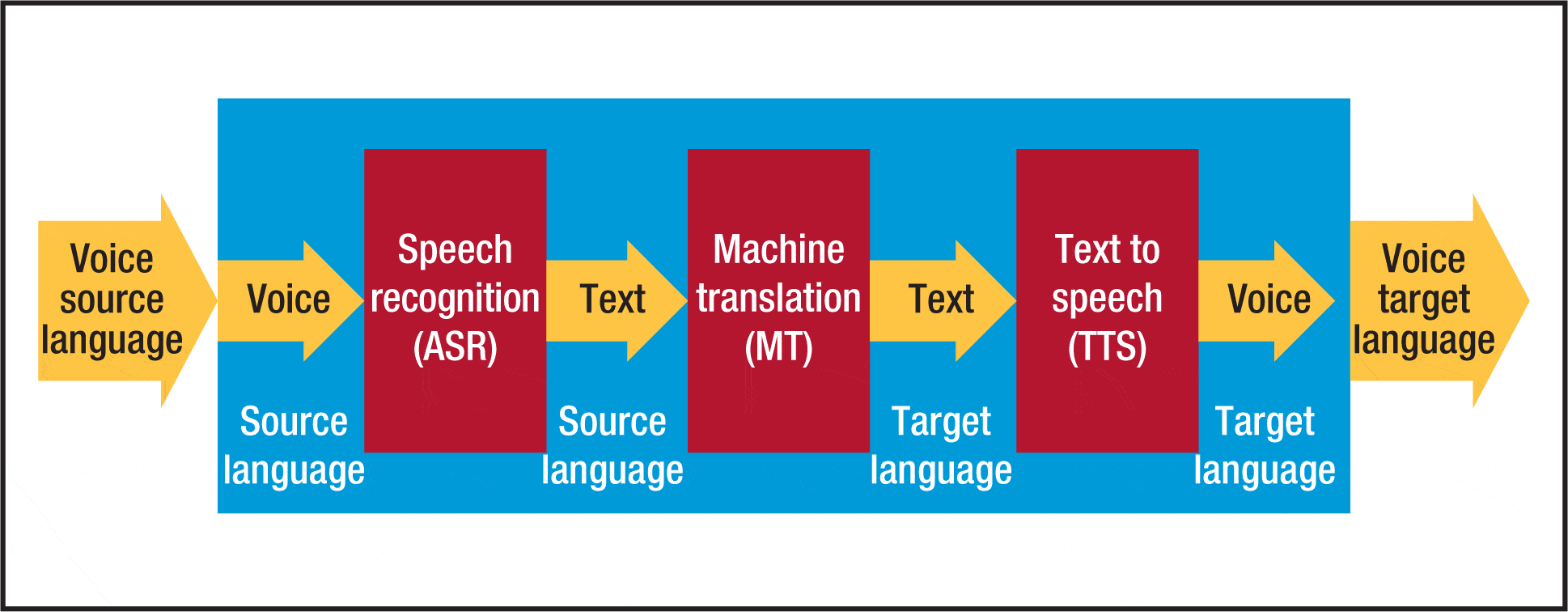
Speech translation requires the integration of three software technologies.
Note : Do Read Our Blog on Automated Machine Learning.
1) Automatic Speech Recognition: It will help in converting the spoken words & phrases into the text in the same language.
2) Machine Translation: It will help in converting the text into a second language. It will replace each word in the text with the appropriate word in the second language.
3) Speech Synthesis: It will estimate the pronunciation of the text generated by machine translation and generate the speech in the second and desired language.
Note: To see a demo how actually speech to speech translation works click here.
Speech Service In Azure
The speech service of Azure includes the following Application programming interface (APIs).
- Speech to Text: Transforming generated speech into Text form.
- Text to Speech: Transforming text into the desired language speech.
- Speech Translation: Translate speech from one language to speak in another language.
Note: Azure Supports translation of speech into 60 different languages.
Note: Speech Translation is covered in the Microsoft Azure AI Fundamentals Certification program (AI-900). Check out our blog to know more about this certification.
Steps To Create An Speech-To-Speech Translation Model
1) Data Collection: Collecting data (speech) from various sources for training the Model.
2) Speech Recognition: This phase is the most complicated and expensive part of the model creation. It will translate the spoken phrases into text in the same language.
3) Translation: Translating the text generated in the previous step into the text in the desired language.
4) Synthesis: Analysing the target text and pronunciation for the resulting output.
5) System Integration: Integrating all these steps to create an optimized model for speech translation.
6) Performance: Check the performance of the created model by testing them on some sample speech data.
Also check: All you need know about DP 100 Exam
Speech to Speech Translation AI
Speech-to-Speech Translation AI enables real-time communication across language barriers by directly translating spoken words into another language. It leverages advanced models like automatic speech recognition (ASR), machine translation (MT), and text-to-speech (TTS) synthesis, seamlessly converting speech input into meaningful output. This technology has applications in global business, education, healthcare, and tourism, fostering cross-cultural collaboration. Tools like Microsoft Translator, Google Translate, and AWS Transcribe are leading in this field, offering scalable solutions for accessibility and convenience. As AI evolves, speech-to-speech translation continues to improve in accuracy, making it a vital tool in our increasingly interconnected world.
Meta Speech to Speech Translation
Meta’s Speech-to-Speech Translation leverages advanced AI to enable seamless real-time communication across languages by directly converting spoken words from one language to another. Unlike traditional systems that rely on intermediate text translation, Meta’s approach reduces latency and improves accuracy. This technology is particularly useful in breaking language barriers in global business meetings, virtual classrooms, and cross-cultural collaborations. Its potential applications extend to accessibility, offering enhanced tools for individuals with disabilities, and bridging gaps in multilingual settings. By combining cutting-edge neural networks and audio processing techniques, Meta’s innovation represents a significant leap in real-time communication technology.
How to use Meta AI Translation ?
Meta AI Translation can be used to translate text or speech across various languages using cutting-edge machine learning models. Developers can access it via APIs provided by Meta, integrating translation capabilities into their applications. Start by signing up for Meta’s developer platform, obtaining API keys, and exploring the documentation for setup instructions. Use supported programming languages like Python or JavaScript to call the API with source text and desired target languages. Meta AI Translation supports real-time, high-accuracy translations, making it ideal for applications like multilingual chatbots, globalized content, and accessibility tools. It offers scalability for both personal and enterprise use cases.
FAQs
How do direct speech to speech translation models differ from traditional models?
Direct speech-to-speech translation models bypass intermediate text conversion, translating audio directly into target speech. This approach reduces latency, preserves speaker characteristics, and improves performance in real-time multilingual communication.
How can speech to speech translation tools be used for real-time communication?
Speech-to-speech translation tools enable real-time communication by instantly converting spoken language into another, bridging linguistic barriers for global collaboration, customer support, and multilingual accessibility in diverse settings.
Why is real-time translation important in breaking language barriers?
Real-time translation is vital for breaking language barriers as it enables seamless communication, fosters global collaboration, and enhances accessibility in education, business, and travel by bridging linguistic gaps instantly.
What is the role of decoders in speech to speech translation systems?
Decoders in speech-to-speech translation systems convert intermediate representations, such as translated text or encoded features, into synthesized speech, ensuring accurate and natural output in the target language.
How does Microsoft Translator support speech translation?
Microsoft Translator supports speech translation by converting spoken language into text, translating it into the desired language, and providing real-time audio output. It uses advanced AI models for accuracy and efficiency.
How can speech to speech translation tools aid accessibility for those with impairments?
Speech-to-speech translation tools enhance accessibility for individuals with impairments by enabling real-time language interpretation, supporting clearer communication, and breaking language barriers for those with hearing or speech difficulties.
How can speech to speech translation tools be user-friendly?
Speech-to-speech translation tools can be user-friendly by offering intuitive interfaces, real-time translation accuracy, multi-language support, and seamless integration with devices, ensuring effortless communication across diverse audiences.
What are the top speech to speech translation tools available?
Top speech-to-speech translation tools include Microsoft Translator, Google Translate, and iTranslate. These tools offer real-time multilingual communication, support diverse languages, and enhance accessibility for global users.
Related/References:
- Join Our Generative AI Whatsapp Community
- Azure AI/ML Certifications: Everything You Need to Know
- Azure GenAI/ML : Step-by-Step Activity Guide (Hands-on Lab) & Project Work
- [DP-100] Microsoft Certified Azure Data Scientist Associate: Everything you must know
- [AI-900] Microsoft Certified Azure AI Fundamentals Course: Everything you must know
- Object Detection & Tracking in Azure Machine Learning
- Automated Machine Learning | Azure | Pros & Cons
- Microsoft Certified Azure Data Scientist Associate | DP 100 | Step By Step Activity Guides (Hands-On Labs)
- Azure Free Account: Steps to Register for Free Trial Account
- DP 100 Exam | Microsoft Certified Azure Data Scientist Associate
- [DP-100] Designing and Implementing a Data Science Solution on Azure
- Microsoft Azure Data Scientist DP-100 FAQ
- Datastores And Datasets In Azure
- Overview of Hyperparameter Tuning In Azure
Next Task: Enhance Your Azure AI/ML Skills


![Microsoft Agentic AI Business Solutions Architect [AB-100] | K21 Academy](https://test.k21academy.com/wp-content/uploads/2025/11/Microsoft-Agentic-AI-Business-Solutions-Architect-AB-100-Exam-Overview1.png)



